

Microsoft is preparing Microsoft 365 Roadmap ID 564608 for July 2026 general availability, bringing MCP-based agent widgets to Microsoft 365 Copilot Chat in GCC, GCC High, and DoD across desktop and web. Government-cloud admins should treat this as an app-governance change now: review approved Copilot agents in the Microsoft 365 Admin Center, identify who owns each agent and tool connection, and decide which widget-enabled experiences are allowed to reach users before the feature appears broadly.
The roadmap entry, created on May 27, 2026 and last updated on July 8, 2026, says MCP-based agents in Microsoft 365 Copilot Chat will be able to surface “rich, interactive UI widgets” directly within chat. Microsoft’s public roadmap description frames the change as a developer enhancement: developers can deliver more engaging and structured agent interactions, users will see widgets when they interact with agents that implement them, and admins will continue to manage those agents through the Microsoft 365 Admin Center. For public-sector IT, that last point is the control hook.
This is not just a visual update. If approved agents can present interactive surfaces inside Copilot Chat, then administrators need to evaluate those surfaces as part of the agent experience, not as decoration around a text answer. The immediate question is practical: which agents are approved, which ones may implement widgets, who owns their behavior, and what review gates apply before users are asked to act inside Copilot?
The important shift in Roadmap ID 564608 is not that Copilot Chat can show prettier cards. Microsoft 365 Copilot already presents structured responses in different contexts. The new feature matters because the roadmap says interactive UI widgets will appear when users interact with MCP-based agents that implement them. That moves the Copilot Chat experience closer to a place where an agent can present a structured work surface, not merely return a paragraph.
A text-only assistant can tell a grants officer which documents appear to be missing, tell a procurement analyst that a vendor record needs review, or tell an incident handler that a ticket may need escalation. A widget-bearing agent could, depending on what the agent is designed and approved to do, present information in a more structured format or guide the user through a narrower task. That possibility is useful, but it also raises the bar for review.
The governance issue is straightforward. Once a user is looking at an interactive surface inside Copilot Chat, the user may treat it as part of the approved workflow. That makes the design, labels, data shown, hidden fields, action wording, and confirmation steps part of the operational control environment. A confusing widget can create risk even if the underlying agent is approved.
Microsoft’s roadmap wording does not, by itself, prove that every commercial Copilot extensibility capability is arriving in every government tenant. It says this specific feature is planned for GCC, GCC High, and DoD on desktop and web, in Microsoft 365 Copilot Chat, with general availability targeted for July 2026. Administrators should keep the scope that narrow until Microsoft publishes tenant-specific details or the feature appears in their own admin surfaces.
That does not mean every government tenant will experience the feature in the same way on the same day. The roadmap status is still “in development,” with July 2026 listed for general availability. Roadmap entries are planning signals, not proof that the feature is enabled in every tenant at the start of the month. Admins should watch Microsoft 365 Message Center communications, the Microsoft 365 Admin Center, and tenant-specific release behavior before treating the capability as live.
That table is intentionally narrow. The roadmap says the feature targets those cloud instances, platforms, and the general availability ring; it does not say that every agent-building option, every SDK feature, every connector, or every commercial capability automatically applies to all three government clouds.
The practical reading is this: if an agency has Microsoft 365 Copilot Chat and approved agents in scope, Microsoft is preparing support for richer UI experiences when those agents implement them. Existing agents should not be assumed to change automatically. Users will see widgets when interacting with agents that implement widgets.
It is reasonable to analyze this as part of Microsoft’s broader move toward agent-based work in Microsoft 365, but administrators should separate analysis from confirmed roadmap detail. The confirmed roadmap item is about MCP-based agent widgets in Copilot Chat for GCC, GCC High, and DoD. Claims about exact developer requirements, supported authentication methods, OpenAI Apps SDK support, fallback behavior, capability detection, or remote hosting details should be validated against current Microsoft documentation before being written into agency policy.
For government tenants, that caution matters. Desktop and web support are in scope for Roadmap 564608, but government environments can carry different app availability, identity, network, data-source, and policy assumptions. A widget-enabled agent should therefore be tested in the exact tenant, cloud, platform, browser or desktop client, and user role where it will be used.
The admin lesson is not “block it because it is new.” The lesson is “treat the widget as part of the agent.” If the agent is approved for a narrow purpose, the widget should reinforce that purpose. If the agent can access sensitive information, the widget should make clear what information is being shown and what the user is being asked to do. If the widget suggests an action, the owner should define whether that action is advisory, preparatory, or authoritative.
A text response has a familiar risk profile. It can be wrong, misleading, incomplete, or overconfident. An interactive widget adds another layer: it can present fields, buttons, choices, records, status indicators, links, or next-step prompts. The roadmap does not need to spell out every possible design for the governance point to be clear. If a user can interact with it, the organization should review it.
That changes the admin conversation. Traditional Microsoft 365 governance asks: who can install this app, who can access this connector, what data can it read, and what policy applies? Agent governance adds: what is this agent for, what tools does it use, what user decisions does it influence, and how does it present its output? Widget-enabled agents add still more concrete questions: what does the widget show, what does it hide, what can the user click, and what happens next?
A widget can be technically approved and still be operationally confusing. For example, a widget that summarizes a case file and offers a “prepare response” action might be useful. But if it does not clearly distinguish generated draft language from agency-approved language, it may invite misuse. A procurement widget that previews a vendor record may save time. But if it omits fields the legacy process required users to inspect, it may change the review process without anyone formally approving that change.
In AI governance, interface design is policy. The way a widget names an action, orders options, displays confidence, or labels generated content can shape user behavior. Government admins should therefore require mission-process review, not only technical approval.
An approval control can establish that an agent is allowed in the tenant. It cannot prove that every widget interaction is clear to every user, that the widget matches the organization’s records-management process, or that a sensitive operation has the right human confirmation step. Those questions belong to a layered governance model.
Security teams should review identity, access, data flow, tool use, publisher trust, and least privilege. Records and compliance teams should review retention implications, decision provenance, and whether users are being encouraged to bypass systems of record. Mission owners should review whether the widget matches the actual policy and workflow used by the program office. Help desk or operations teams should know where user reports go when a widget behaves unexpectedly.
This is where agencies should avoid vague ownership. “IT owns Copilot” is not enough. “The grants management office owns the grants eligibility agent; the security team owns access review; records management owns retention guidance; the Copilot admin team owns tenant availability; and the help desk owns first-line incident intake” is closer to the level of detail needed.
Central management matters, but local accountability matters more. If a program office builds or requests an agent that surfaces a rich UI inside Copilot Chat, someone must own the behavior of that interface. Someone must decide what counts as a sensitive operation. Someone must test the widget with real users who understand the work, not only with developers who understand the implementation.
Widget-enabled agents can give developers a better way to express that structure inside Copilot Chat. An agent can still answer in natural language, while the widget carries the parts of the interaction that should be constrained or easier to inspect: options, visible state, validation cues, progress, or a compact view of records returned from an approved source.
But a better surface also reduces the excuse for poor design. A team should not use Copilot Chat to recreate an entire line-of-business application inside a small agent interaction. The better early uses will likely be narrow: a benefits agent that shows required documents, a help-desk agent that displays ticket status and next steps, a compliance agent that presents a short checklist, a project agent that renders a compact risk register, or a training agent that shows role-specific next actions.
The weak uses will be obvious. Anything that requires dense data entry, long multi-screen review, complex exception handling, or high-consequence approval may not belong fully inside a Copilot widget. Copilot can initiate, summarize, and guide those workflows. It should not become a shadow system of record because a team found the widget surface convenient.
Developers should document the user experience as carefully as they document the technical integration. At minimum, they should describe what the widget displays, which data sources feed it, which actions are available, what happens after each action, what audit or record trail is expected, and when the user must leave Copilot for the authoritative system.
The adoption benefit is clear. Asking a user to trust a generated paragraph is hard in regulated work. Showing a structured result, with fields, actions, and state, can make the agent feel more useful and easier to inspect. It may reduce the sense that AI is a black box.
The risk is that users may over-trust a polished widget. A clean interface can imply authority. If Copilot presents a well-designed card with a recommended action, some users will treat it as more official than a plain text answer. In government work, where process discipline matters, that can be a problem if the widget is summarizing uncertain output, relying on incomplete context, or presenting a next step that still requires human judgment.
Training should therefore avoid jargon. Agencies and contractors should not announce this as “MCP widget support.” The better message is: some approved Copilot agents may show interactive work surfaces inside Copilot Chat; use them as guided aids, verify outputs, and treat final actions with the same care you would in the underlying system.
The best user experience will make those boundaries visible without a long training deck. It will label draft content as draft, identify source systems or source categories where appropriate, show what action is being taken, and require clear confirmation for sensitive steps. The worst experience will hide uncertainty behind a polished card.
The roadmap status is still “in development,” even with July 2026 listed for general availability. That matters. Administrators should not assume the feature is live everywhere at once. They should check tenant messages, validate the Microsoft 365 Admin Center experience, and test behavior in GCC, GCC High, or DoD as applicable.
The other important point is that the feature appears to support agents that implement widgets, not automatic conversion of all existing agents. Users will experience widgets when interacting with agents that implement them. That means the first wave of impact depends on what Microsoft, partners, and internal developers actually publish or enable in a given tenant.
That is normal for an extensibility feature. The host capability arrives, agents and tools adapt, and then the governance questions become concrete. The mistake would be waiting until after users discover the first widget-enabled agent to decide who reviews it.
July 2026 — Microsoft lists general availability for the feature across GCC, GCC High, and DoD on desktop and web.
July 8, 2026 — Microsoft last updated the roadmap entry, with the feature still marked as in development.
The Microsoft 365 Admin Center remains the control point Microsoft names in the roadmap entry. That gives IT a familiar place to begin. But the organization also needs a human process around it: who reviews an agent’s purpose, who reviews its UI, who validates access, who signs off on mission impact, and who handles user reports when a widget behaves unexpectedly.
This is also the right moment to revisit agent sprawl. Microsoft’s agent strategy allows for both centrally supplied and organization-built agents. That can be powerful, but it can also create overlapping assistants that answer similar questions with different tools and different interface patterns. Government tenants should avoid letting every program office create its own Copilot front end without a shared review standard.
The better pattern is a catalog with owners, approved use cases, lifecycle status, and support paths. If an agent is important enough to present an interactive UI to government users, it is important enough to have a name, owner, review date, support contact, and retirement plan.
Agencies should also watch how vendors describe support. A vendor saying it supports MCP-based widgets in Microsoft 365 Copilot Chat is not the same as saying the feature is available, approved, and tested in GCC High or DoD. Procurement and security teams should ask for the exact cloud environment, user surface, admin controls, data flows, and support boundaries.
For internal developers, the standard should be simple: no widget without an owner, no owner without a documented process, no process without a pilot, and no pilot without a rollback plan. That may sound conservative, but it is the difference between controlled adoption and accidental workflow redesign.
The forward-looking opportunity is still real. If Microsoft delivers this cleanly, Copilot Chat can become a more useful place for government employees to start structured work without leaving the Microsoft 365 environment. A user could ask a question, invoke an approved agent, inspect a focused interface, and take a guided next step with appropriate human confirmation.
But the value will not come from the widget itself. It will come from disciplined implementation: narrow use cases, clear labels, known owners, tested controls, and users who understand when Copilot is helping them work and when the system of record still governs the outcome.
Roadmap ID 564608 is best read as an early warning to prepare that discipline now. The feature may appear as a richer interface in Copilot Chat, but for GCC, GCC High, and DoD administrators, the real work is governance: decide which agents deserve an interactive surface, prove that the surface matches the mission process, and make sure every user knows the widget is a tool, not the authority.
The roadmap entry, created on May 27, 2026 and last updated on July 8, 2026, says MCP-based agents in Microsoft 365 Copilot Chat will be able to surface “rich, interactive UI widgets” directly within chat. Microsoft’s public roadmap description frames the change as a developer enhancement: developers can deliver more engaging and structured agent interactions, users will see widgets when they interact with agents that implement them, and admins will continue to manage those agents through the Microsoft 365 Admin Center. For public-sector IT, that last point is the control hook.
This is not just a visual update. If approved agents can present interactive surfaces inside Copilot Chat, then administrators need to evaluate those surfaces as part of the agent experience, not as decoration around a text answer. The immediate question is practical: which agents are approved, which ones may implement widgets, who owns their behavior, and what review gates apply before users are asked to act inside Copilot?
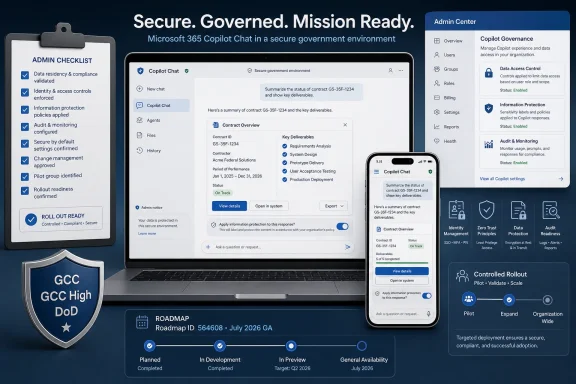 Microsoft Is Turning Copilot Chat Into More Than a Prompt Box
The important shift in Roadmap ID 564608 is not that Copilot Chat can show prettier cards. Microsoft 365 Copilot already presents structured responses in different contexts. The new feature matters because the roadmap says interactive UI widgets will appear when users interact with MCP-based agents that implement them. That moves the Copilot Chat experience closer to a place where an agent can present a structured work surface, not merely return a paragraph.A text-only assistant can tell a grants officer which documents appear to be missing, tell a procurement analyst that a vendor record needs review, or tell an incident handler that a ticket may need escalation. A widget-bearing agent could, depending on what the agent is designed and approved to do, present information in a more structured format or guide the user through a narrower task. That possibility is useful, but it also raises the bar for review.
The governance issue is straightforward. Once a user is looking at an interactive surface inside Copilot Chat, the user may treat it as part of the approved workflow. That makes the design, labels, data shown, hidden fields, action wording, and confirmation steps part of the operational control environment. A confusing widget can create risk even if the underlying agent is approved.
Microsoft’s roadmap wording does not, by itself, prove that every commercial Copilot extensibility capability is arriving in every government tenant. It says this specific feature is planned for GCC, GCC High, and DoD on desktop and web, in Microsoft 365 Copilot Chat, with general availability targeted for July 2026. Administrators should keep the scope that narrow until Microsoft publishes tenant-specific details or the feature appears in their own admin surfaces.
Government Cloud Support Is the Real Headline
The roadmap entry is explicitly for GCC, GCC High, and DoD, not merely for Microsoft’s commercial cloud. That is why this item deserves more attention than a typical Copilot interface change. Government-cloud availability means Microsoft is preparing this rich agent interaction surface for tenants where change control, identity boundaries, records obligations, and compliance review matter more than novelty.That does not mean every government tenant will experience the feature in the same way on the same day. The roadmap status is still “in development,” with July 2026 listed for general availability. Roadmap entries are planning signals, not proof that the feature is enabled in every tenant at the start of the month. Admins should watch Microsoft 365 Message Center communications, the Microsoft 365 Admin Center, and tenant-specific release behavior before treating the capability as live.
| Cloud instance | Roadmap inclusion | Product surface | Platforms | Release ring | Admin management |
|---|---|---|---|---|---|
| GCC | Included in Roadmap ID 564608 | Microsoft 365 Copilot Chat | Desktop, Web | General Availability | Microsoft 365 Admin Center |
| GCC High | Included in Roadmap ID 564608 | Microsoft 365 Copilot Chat | Desktop, Web | General Availability | Microsoft 365 Admin Center |
| DoD | Included in Roadmap ID 564608 | Microsoft 365 Copilot Chat | Desktop, Web | General Availability | Microsoft 365 Admin Center |
The practical reading is this: if an agency has Microsoft 365 Copilot Chat and approved agents in scope, Microsoft is preparing support for richer UI experiences when those agents implement them. Existing agents should not be assumed to change automatically. Users will see widgets when interacting with agents that implement widgets.
MCP Is the Agent Integration Context, but the Roadmap Scope Is Specific
Model Context Protocol has become part of the broader agent-integration conversation across the AI ecosystem, including Microsoft’s Copilot extensibility story. In the context of Roadmap ID 564608, the key fact is narrower: Microsoft says MCP-based agents in Microsoft 365 Copilot Chat will be able to surface rich, interactive UI widgets.It is reasonable to analyze this as part of Microsoft’s broader move toward agent-based work in Microsoft 365, but administrators should separate analysis from confirmed roadmap detail. The confirmed roadmap item is about MCP-based agent widgets in Copilot Chat for GCC, GCC High, and DoD. Claims about exact developer requirements, supported authentication methods, OpenAI Apps SDK support, fallback behavior, capability detection, or remote hosting details should be validated against current Microsoft documentation before being written into agency policy.
For government tenants, that caution matters. Desktop and web support are in scope for Roadmap 564608, but government environments can carry different app availability, identity, network, data-source, and policy assumptions. A widget-enabled agent should therefore be tested in the exact tenant, cloud, platform, browser or desktop client, and user role where it will be used.
The admin lesson is not “block it because it is new.” The lesson is “treat the widget as part of the agent.” If the agent is approved for a narrow purpose, the widget should reinforce that purpose. If the agent can access sensitive information, the widget should make clear what information is being shown and what the user is being asked to do. If the widget suggests an action, the owner should define whether that action is advisory, preparatory, or authoritative.
The Widget Is the New Review Surface
The most important security and compliance question is not whether a widget looks polished. It is what the user believes the widget is allowed to do.A text response has a familiar risk profile. It can be wrong, misleading, incomplete, or overconfident. An interactive widget adds another layer: it can present fields, buttons, choices, records, status indicators, links, or next-step prompts. The roadmap does not need to spell out every possible design for the governance point to be clear. If a user can interact with it, the organization should review it.
That changes the admin conversation. Traditional Microsoft 365 governance asks: who can install this app, who can access this connector, what data can it read, and what policy applies? Agent governance adds: what is this agent for, what tools does it use, what user decisions does it influence, and how does it present its output? Widget-enabled agents add still more concrete questions: what does the widget show, what does it hide, what can the user click, and what happens next?
A widget can be technically approved and still be operationally confusing. For example, a widget that summarizes a case file and offers a “prepare response” action might be useful. But if it does not clearly distinguish generated draft language from agency-approved language, it may invite misuse. A procurement widget that previews a vendor record may save time. But if it omits fields the legacy process required users to inspect, it may change the review process without anyone formally approving that change.
In AI governance, interface design is policy. The way a widget names an action, orders options, displays confidence, or labels generated content can shape user behavior. Government admins should therefore require mission-process review, not only technical approval.
Admin Center Control Is Necessary, but Not Sufficient
Microsoft says admins will continue to manage these agents through the Microsoft 365 Admin Center. That is reassuring because it gives organizations a named control surface. It is also only the beginning of the review process.An approval control can establish that an agent is allowed in the tenant. It cannot prove that every widget interaction is clear to every user, that the widget matches the organization’s records-management process, or that a sensitive operation has the right human confirmation step. Those questions belong to a layered governance model.
Security teams should review identity, access, data flow, tool use, publisher trust, and least privilege. Records and compliance teams should review retention implications, decision provenance, and whether users are being encouraged to bypass systems of record. Mission owners should review whether the widget matches the actual policy and workflow used by the program office. Help desk or operations teams should know where user reports go when a widget behaves unexpectedly.
This is where agencies should avoid vague ownership. “IT owns Copilot” is not enough. “The grants management office owns the grants eligibility agent; the security team owns access review; records management owns retention guidance; the Copilot admin team owns tenant availability; and the help desk owns first-line incident intake” is closer to the level of detail needed.
Central management matters, but local accountability matters more. If a program office builds or requests an agent that surfaces a rich UI inside Copilot Chat, someone must own the behavior of that interface. Someone must decide what counts as a sensitive operation. Someone must test the widget with real users who understand the work, not only with developers who understand the implementation.
Developers Get a Better Surface, and Less Room for Sloppy Design
For developers, Roadmap 564608 reduces one obvious limitation of Copilot agents in government clouds: the chat-only bottleneck. Text is a poor interface for many business processes. Forms, tables, status trackers, previews, and guided choices exist because users often need structure, not just language.Widget-enabled agents can give developers a better way to express that structure inside Copilot Chat. An agent can still answer in natural language, while the widget carries the parts of the interaction that should be constrained or easier to inspect: options, visible state, validation cues, progress, or a compact view of records returned from an approved source.
But a better surface also reduces the excuse for poor design. A team should not use Copilot Chat to recreate an entire line-of-business application inside a small agent interaction. The better early uses will likely be narrow: a benefits agent that shows required documents, a help-desk agent that displays ticket status and next steps, a compliance agent that presents a short checklist, a project agent that renders a compact risk register, or a training agent that shows role-specific next actions.
The weak uses will be obvious. Anything that requires dense data entry, long multi-screen review, complex exception handling, or high-consequence approval may not belong fully inside a Copilot widget. Copilot can initiate, summarize, and guide those workflows. It should not become a shadow system of record because a team found the widget surface convenient.
Developers should document the user experience as carefully as they document the technical integration. At minimum, they should describe what the widget displays, which data sources feed it, which actions are available, what happens after each action, what audit or record trail is expected, and when the user must leave Copilot for the authoritative system.
Users Will Notice the Interface Before They Understand the Architecture
Most users will not know or care that a widget is associated with an MCP-based agent. They will know that Copilot Chat suddenly feels more capable. That is both the adoption opportunity and the risk.The adoption benefit is clear. Asking a user to trust a generated paragraph is hard in regulated work. Showing a structured result, with fields, actions, and state, can make the agent feel more useful and easier to inspect. It may reduce the sense that AI is a black box.
The risk is that users may over-trust a polished widget. A clean interface can imply authority. If Copilot presents a well-designed card with a recommended action, some users will treat it as more official than a plain text answer. In government work, where process discipline matters, that can be a problem if the widget is summarizing uncertain output, relying on incomplete context, or presenting a next step that still requires human judgment.
Training should therefore avoid jargon. Agencies and contractors should not announce this as “MCP widget support.” The better message is: some approved Copilot agents may show interactive work surfaces inside Copilot Chat; use them as guided aids, verify outputs, and treat final actions with the same care you would in the underlying system.
The best user experience will make those boundaries visible without a long training deck. It will label draft content as draft, identify source systems or source categories where appropriate, show what action is being taken, and require clear confirmation for sensitive steps. The worst experience will hide uncertainty behind a polished card.
The Government Rollout Should Be Treated as a Controlled Readiness Exercise
Roadmap 564608 lands in a familiar tension for public-sector Microsoft 365 tenants: agencies want modern capability, but they need change control. Interactive agent widgets are useful only if they arrive with clear ownership, tested workflows, and predictable admin controls.The roadmap status is still “in development,” even with July 2026 listed for general availability. That matters. Administrators should not assume the feature is live everywhere at once. They should check tenant messages, validate the Microsoft 365 Admin Center experience, and test behavior in GCC, GCC High, or DoD as applicable.
The other important point is that the feature appears to support agents that implement widgets, not automatic conversion of all existing agents. Users will experience widgets when interacting with agents that implement them. That means the first wave of impact depends on what Microsoft, partners, and internal developers actually publish or enable in a given tenant.
That is normal for an extensibility feature. The host capability arrives, agents and tools adapt, and then the governance questions become concrete. The mistake would be waiting until after users discover the first widget-enabled agent to decide who reviews it.
Timeline
May 27, 2026 — Microsoft created Roadmap ID 564608 for Microsoft Copilot in Microsoft 365, covering MCP agents with interactive UI widgets in government clouds.July 2026 — Microsoft lists general availability for the feature across GCC, GCC High, and DoD on desktop and web.
July 8, 2026 — Microsoft last updated the roadmap entry, with the feature still marked as in development.
The Right First Move Is Inventory, Not Excitement
For admins, the practical response should be deliberately boring. Before anyone promotes richer Copilot agents, government tenants should inventory which agents are approved, who owns them, what tools they use, and whether any of them are expected to present interactive widgets.The Microsoft 365 Admin Center remains the control point Microsoft names in the roadmap entry. That gives IT a familiar place to begin. But the organization also needs a human process around it: who reviews an agent’s purpose, who reviews its UI, who validates access, who signs off on mission impact, and who handles user reports when a widget behaves unexpectedly.
Action checklist for admins
- In the Microsoft 365 Admin Center, review approved Copilot agents and pending agent requests for GCC, GCC High, or DoD tenants where applicable.
- For each approved agent, record the business owner, technical owner, support contact, intended users, and approved purpose.
- Identify which agents use tools or MCP-based capabilities, and ask whether they are expected to present interactive widgets in Copilot Chat.
- Require a short widget review before rollout: data shown, actions offered, confirmation steps, source systems, and any records or audit implications.
- Gate rollout on three approvals: tenant admin approval, security or compliance review, and mission-owner signoff.
- Pilot with a limited group on desktop and web before broad availability; include users who understand the real workflow, not only IT testers.
- Update user guidance to say that interactive Copilot surfaces are approved work aids, not automatic authorities.
This is also the right moment to revisit agent sprawl. Microsoft’s agent strategy allows for both centrally supplied and organization-built agents. That can be powerful, but it can also create overlapping assistants that answer similar questions with different tools and different interface patterns. Government tenants should avoid letting every program office create its own Copilot front end without a shared review standard.
The better pattern is a catalog with owners, approved use cases, lifecycle status, and support paths. If an agent is important enough to present an interactive UI to government users, it is important enough to have a name, owner, review date, support contact, and retirement plan.
What to Watch Next
The next useful signals will come from tenant-level Microsoft 365 Message Center posts, Microsoft 365 Admin Center changes, and any updated Microsoft documentation that explains how widget-enabled MCP-based agents are managed in government clouds. Admins should look for practical details: whether there are new policy controls, how widget-capable agents are identified, what approval workflows look like, and whether any government-cloud limitations apply.Agencies should also watch how vendors describe support. A vendor saying it supports MCP-based widgets in Microsoft 365 Copilot Chat is not the same as saying the feature is available, approved, and tested in GCC High or DoD. Procurement and security teams should ask for the exact cloud environment, user surface, admin controls, data flows, and support boundaries.
For internal developers, the standard should be simple: no widget without an owner, no owner without a documented process, no process without a pilot, and no pilot without a rollback plan. That may sound conservative, but it is the difference between controlled adoption and accidental workflow redesign.
The forward-looking opportunity is still real. If Microsoft delivers this cleanly, Copilot Chat can become a more useful place for government employees to start structured work without leaving the Microsoft 365 environment. A user could ask a question, invoke an approved agent, inspect a focused interface, and take a guided next step with appropriate human confirmation.
But the value will not come from the widget itself. It will come from disciplined implementation: narrow use cases, clear labels, known owners, tested controls, and users who understand when Copilot is helping them work and when the system of record still governs the outcome.
Roadmap ID 564608 is best read as an early warning to prepare that discipline now. The feature may appear as a richer interface in Copilot Chat, but for GCC, GCC High, and DoD administrators, the real work is governance: decide which agents deserve an interactive surface, prove that the surface matches the mission process, and make sure every user knows the widget is a tool, not the authority.
References
- Primary source: Microsoft 365 Roadmap
Published: 2026-07-08T23:11:07.7961302Z
Microsoft 365 Roadmap | Microsoft 365
The Microsoft 365 Roadmap lists updates that are currently planned for applicable subscribers. Check here for more information on the status of new features and updates.www.microsoft.com
- Official source: learn.microsoft.com
Agents for Microsoft 365 Copilot Chat | Microsoft Learn
Guidelines on use of agents in Microsoft 365 Copilot Chat.learn.microsoft.com - Official source: developer.microsoft.com
Microsoft 365 Copilot | Extend and Customize Copilot
Extend, enrich, and customize Microsoft Microsoft 365 Copilot. Explore Copilot extensibility options such as agents, API plugins, and Copilot connectors to expand AI-powered productivity, skills, and creativity.developer.microsoft.com - Official source: support.microsoft.com
Use model choice in the Researcher agent | Microsoft Support
Use model choice in the Researcher agentsupport.microsoft.com - Official source: devblogs.microsoft.com
Build declarative agents for Microsoft 365 Copilot with MCP - Microsoft 365 Developer Blog
With introduction of MCP support, it’s now much easier for developers to integrate their business workflows, SaaS, and LoB systems into Copilot via declarative agent.devblogs.microsoft.com - Related coverage: windowscentral.com
Claude AI now plugs into Outlook, Teams, and OneDrive | Windows Central
Microsoft's AI diversification continues as it pulls away from overreliance on OpenAI.www.windowscentral.com
- Official source: cdn-dynmedia-1.microsoft.com