

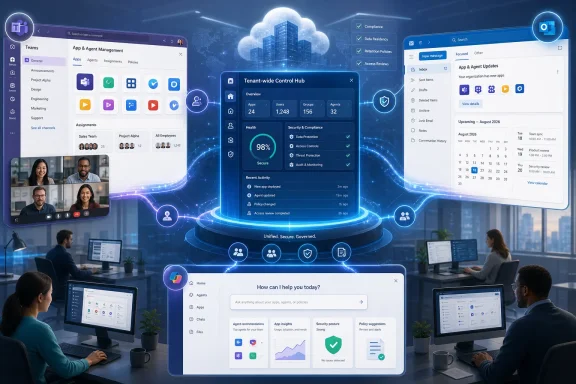
Microsoft is preparing to eliminate one of the more confusing divisions in Microsoft 365 administration: the split between installing apps and agents through the Microsoft 365 admin center and installing them through the Teams admin center. Under Microsoft 365 Roadmap item 567883, an installation change made in either portal will be enforced across supported experiences in Teams, Outlook, and Microsoft 365 Copilot, rather than affecting only the products historically associated with that portal. The change is scheduled for worldwide general availability in August 2026, and although it may look like a modest administrative refinement, it represents a significant step toward treating Microsoft 365 apps and AI agents as tenant-wide resources instead of isolated extensions attached to individual clients.
Microsoft 365 application management developed around products that once had relatively independent extension models. Exchange and Outlook administrators deployed add-ins through Office-oriented controls, while Teams administrators handled bots, tabs, messaging extensions, meeting apps, and other collaborative components through the Teams admin center.
That arrangement reflected the architecture of an earlier Microsoft 365. Outlook was primarily an email client, Teams was a communications hub, and Office applications had their own add-in ecosystem. Each workload could therefore justify a dedicated deployment and policy path.
This cross-host model offered developers a larger addressable audience, but it complicated administration. An app that appeared to users as one product could still have different deployment states across Microsoft’s management portals.
An agent might be discovered in Microsoft 365 Copilot, invoked during work in Teams, and connected to data or services also used from Outlook. Managing that agent separately on each surface becomes difficult to explain, difficult to audit, and easy to misconfigure.
The new roadmap item extends that logic beyond Teams. The important unit of administration is increasingly the tenant-level app or agent, while Teams, Outlook, and Microsoft 365 Copilot become delivery surfaces for that centrally governed object.
Roadmap item 567883 says those installation changes will be unified. An administrator should be able to apply the change once in either supported admin center and have it enforced consistently across Teams, Outlook, and Microsoft 365 Copilot.
Similarly, an installation initiated from the Microsoft 365 admin center should not leave the same app absent from Teams. The administrative command follows the app across its supported Microsoft 365 hosts.
This matters because administrators generally think in terms of organizational intent:
An app may be allowed in the tenant without being proactively installed for every eligible user. Conversely, an attempted installation still depends on surrounding controls, including app availability, user assignment, publisher configuration, consent requirements, licensing, and service-specific prerequisites.
Unified installation therefore should not be interpreted as a single switch that overrides every other Microsoft 365 policy. It is better understood as synchronization of an administrative deployment decision across supported hosts.
A change could be correct in one admin center while incomplete in the other. The resulting discrepancy might remain unnoticed until users compared experiences or a support ticket exposed it.
If the group membership, rollout schedule, or deployment decision later changed, both configurations had to remain aligned. Missing one update could produce a tenant in which users saw the app in Teams but not Outlook, or encountered an agent in Copilot that was not installed in their primary collaboration environment.
Configuration drift was especially likely when:
Support personnel then had to determine whether the difference came from installation, availability, user assignment, propagation delay, consent, licensing, client caching, or a product-specific limitation. Two management planes expanded the number of states that had to be inspected.
The new model will not eliminate every troubleshooting variable, but it should remove a particularly artificial one: the portal from which the installation was initiated.
Unified management reverses that relationship. The portal becomes an interface for expressing tenant intent, while the underlying service distributes the decision to supported hosts.
Microsoft has also increasingly blended app and agent terminology in Teams administration. This reflects the fact that many Copilot extensions use or inherit elements of the Microsoft 365 and Teams app platform.
A typical workflow involves:
Those agents may have dedicated settings rather than following ordinary app installation behavior. Administrators should therefore avoid assuming that every capability labeled an “agent” will appear in the unified installation workflow.
The distinction will become increasingly important as Microsoft combines conventional apps, Copilot extensions, built-in assistants, custom agents, and autonomous services under a broader agent-management strategy.
Historically, an integrated app deployment from this portal covered Microsoft 365 and Outlook scenarios but did not automatically produce an equivalent installation in Teams. The August 2026 update is designed to remove that scope difference for supported apps and agents.
For administrators, this should mean that choosing the Microsoft 365 admin center no longer produces a narrower deployment simply because the app also happens to support Teams. The same should be true in reverse when a Teams specialist performs the installation.
Unified installation will simplify one layer of this environment, but it will not collapse all agent controls into a single page. Administrators may still need to evaluate:
This reduces the disjointed experience in which the organization appears to recommend a tool in one application while leaving users to discover or install it manually in another.
Unified deployment can reinforce organizational guidance by presenting the same approved capability in Teams, Outlook, and Microsoft 365 Copilot. That consistency may be particularly useful for agents, whose value often depends on users learning when and where to invoke them.
Unified installation therefore means consistent assignment, not necessarily feature parity. Administrators should document what users can expect on each surface to prevent a synchronized deployment from creating unrealistic assumptions.
Desktop application refresh cycles, service caches, identity changes, group processing, and client sign-in state can all affect visibility. Help desks should continue to record the time of an administrative change before treating every temporary mismatch as a policy failure.
A common installation state reduces the need for those groups to perform parallel deployment work. It also creates an opportunity to simplify internal operating procedures.
A sensible responsibility model might assign:
With unified management, a single approved change should be easier to execute and audit. The deployment record can describe one intended assignment across supported Microsoft 365 hosts rather than treating Teams and Outlook as unrelated projects.
However, centralization is not automatically equivalent to stronger security. If an overly broad installation is configured, unified enforcement can spread that mistake more efficiently across the suite.
Small businesses may nevertheless experience an outsized benefit because they often lack separate specialists for each admin center.
Unified installation makes the system behave more like a small-business administrator would reasonably expect: install an app for the intended users, and let Microsoft apply that decision wherever the app is supported.
Even a small tenant may store sensitive financial records, customer correspondence, employee information, and intellectual property in Microsoft 365. Administrators should still examine permissions, external connections, data-processing terms, and the publisher’s security posture before deployment.
Unified installation increases the importance of reviewing the complete capability set before assignment. An app installed across three surfaces may gain more visibility and adoption than one confined to a single client.
The same advantage applies to urgent containment after a publisher compromise, permission concern, or internal policy violation. A single installation change can reduce the chance that an app remains assigned on a less visible surface.
Organizations should apply least-privilege administrative roles, require appropriate change approval, and use pilot groups before broad deployment. The convenience of one-action enforcement makes procedural safeguards more—not less—important.
Government, sovereign, and specialized cloud environments are not included in the roadmap entry as currently described.
The assessment should identify:
Documentation should replace phrases such as “install in Teams” with more precise language. It may need to distinguish between installing a multi-host package, enabling a Teams-specific capability, and assigning a built-in agent.
The pilot should verify:
That model could make the Microsoft 365 ecosystem more attractive to software vendors, but only if deployment and governance remain understandable.
Unified installation is an administrative expression of that strategy. It suggests that Microsoft wants host boundaries to matter less when an organization deploys an extension.
For vendors, this can expand reach. For Microsoft, it reinforces Copilot as a front end for business processes that previously required users to navigate menus, websites, or dedicated applications.
Unified installation removes one seam, but the broader management experience remains fragmented. Competitors can still differentiate through simpler policy models, clearer audit trails, or more predictable cross-product administration.
Administrators should also watch for updated documentation explaining the relationship among installation, availability, assignment, and agent-level access.
Detailed Message Center guidance will be more operationally important than the high-level roadmap description. It should explain rollout phases, opt-out options if any, audit behavior, supported app types, and expected propagation.
Audit records should identify:
The long-term test will be whether administrators can manage an app or agent as one tenant object while still seeing the host-specific permissions and behaviors that matter. Too much separation creates duplication; too much abstraction hides important differences.
The August update is therefore best viewed as an enabling step rather than a finished destination. It removes a legacy deployment boundary at the same time Microsoft is preparing for a much larger population of AI-driven extensions.
Microsoft’s unified app and agent installation model addresses a genuine weakness in the current Microsoft 365 management experience: one organizational decision should not produce different results merely because it was submitted through the Teams admin center instead of the Microsoft 365 admin center. If the August 2026 rollout delivers reliable synchronization, transparent migration, strong auditing, and clear separation between installation and other governance controls, administrators will gain a simpler and more defensible way to deploy extensions across Teams, Outlook, and Microsoft 365 Copilot. The larger significance is architectural: Microsoft is steadily replacing workload-specific administration with tenant-wide management of apps and agents, preparing Microsoft 365 for a future in which users invoke the same business capabilities from whichever collaborative, messaging, or AI surface happens to be in front of them.
 Background
Microsoft 365 application management developed around products that once had relatively independent extension models. Exchange and Outlook administrators deployed add-ins through Office-oriented controls, while Teams administrators handled bots, tabs, messaging extensions, meeting apps, and other collaborative components through the Teams admin center.That arrangement reflected the architecture of an earlier Microsoft 365. Outlook was primarily an email client, Teams was a communications hub, and Office applications had their own add-in ecosystem. Each workload could therefore justify a dedicated deployment and policy path.
The Microsoft 365 app model expanded beyond Teams
The boundaries began to blur as Microsoft expanded the Teams app platform into Outlook and the Microsoft 365 application experience. A single app package could expose different capabilities depending on its host, such as a Teams tab, an Outlook action, or a Microsoft 365 Copilot agent.This cross-host model offered developers a larger addressable audience, but it complicated administration. An app that appeared to users as one product could still have different deployment states across Microsoft’s management portals.
Copilot agents increased the urgency
Microsoft 365 Copilot turned this administrative inconsistency into a more pressing governance problem. Agents can add specialized instructions, organizational knowledge, search sources, connectors, APIs, and actions to Copilot, giving them a potentially broader operational role than conventional productivity add-ins.An agent might be discovered in Microsoft 365 Copilot, invoked during work in Teams, and connected to data or services also used from Outlook. Managing that agent separately on each surface becomes difficult to explain, difficult to audit, and easy to misconfigure.
App-centric management laid the groundwork
Microsoft has already been moving Teams customers from older app permission policies toward app-centric management. Instead of beginning with a broad policy and asking which apps a population may use, administrators can start with an individual app or agent and assign availability or installation to users and groups.The new roadmap item extends that logic beyond Teams. The important unit of administration is increasingly the tenant-level app or agent, while Teams, Outlook, and Microsoft 365 Copilot become delivery surfaces for that centrally governed object.
What Microsoft Is Changing
Before this update, an installation action in the Microsoft 365 admin center applied to Outlook and Microsoft 365 experiences, while an installation action in the Teams admin center applied to Teams. Administrators responsible for organization-wide deployment consequently had to repeat or coordinate changes between portals.Roadmap item 567883 says those installation changes will be unified. An administrator should be able to apply the change once in either supported admin center and have it enforced consistently across Teams, Outlook, and Microsoft 365 Copilot.
One installation state across supported hosts
The practical objective is to establish a common installation state. If an administrator installs an eligible app or agent for a department from the Teams admin center, that assignment should no longer stop at the Teams client merely because Teams was the portal used.Similarly, an installation initiated from the Microsoft 365 admin center should not leave the same app absent from Teams. The administrative command follows the app across its supported Microsoft 365 hosts.
This matters because administrators generally think in terms of organizational intent:
- The finance department should receive the approved expense-management app.
- The support organization should receive the service-management agent.
- A pilot group should receive an AI assistant before broad deployment.
- An obsolete or unapproved installation should no longer be assigned.
Installation is not the same as availability
The roadmap language specifically concerns app and agent installation. That distinction must not be overlooked.An app may be allowed in the tenant without being proactively installed for every eligible user. Conversely, an attempted installation still depends on surrounding controls, including app availability, user assignment, publisher configuration, consent requirements, licensing, and service-specific prerequisites.
Unified installation therefore should not be interpreted as a single switch that overrides every other Microsoft 365 policy. It is better understood as synchronization of an administrative deployment decision across supported hosts.
How the Previous Split Created Administrative Friction
The old model placed a coordination burden on organizations with separate Microsoft 365, messaging, collaboration, and AI administration teams. Even when the same personnel managed both portals, they had to remember that seemingly equivalent installation actions had different scopes.A change could be correct in one admin center while incomplete in the other. The resulting discrepancy might remain unnoticed until users compared experiences or a support ticket exposed it.
Duplicate work encouraged configuration drift
Consider an organization deploying a project-management app that supports Teams, Outlook, and Microsoft 365 Copilot. The administrator could install it for a project office through the Teams admin center, then repeat the assignment in the Microsoft 365 admin center for Outlook and Microsoft 365.If the group membership, rollout schedule, or deployment decision later changed, both configurations had to remain aligned. Missing one update could produce a tenant in which users saw the app in Teams but not Outlook, or encountered an agent in Copilot that was not installed in their primary collaboration environment.
Configuration drift was especially likely when:
- Different teams controlled the two portals.
- Changes were made during an incident or urgent rollout.
- Group names or assignments evolved over time.
- An app’s capabilities expanded into additional Microsoft 365 hosts.
- Documentation described the app as one product without explaining separate deployment paths.
Troubleshooting started in the wrong place
Inconsistent installation also made support more difficult. A user might report that a colleague could access an app in Outlook but not Teams, despite apparently having the same license and role.Support personnel then had to determine whether the difference came from installation, availability, user assignment, propagation delay, consent, licensing, client caching, or a product-specific limitation. Two management planes expanded the number of states that had to be inspected.
The new model will not eliminate every troubleshooting variable, but it should remove a particularly artificial one: the portal from which the installation was initiated.
Administrative intent was not portable
The deeper problem was that an administrator’s intent did not travel with the app. Installing a multi-host app from a particular portal effectively tied the action to that portal’s traditional workload boundary.Unified management reverses that relationship. The portal becomes an interface for expressing tenant intent, while the underlying service distributes the decision to supported hosts.
The Role of the Teams Admin Center
The Teams admin center remains a major control point because Teams hosts a large ecosystem of Microsoft, third-party, and custom applications. It provides app inventory, organization-wide controls, user and group assignments, installation management, compliance information, and details about individual apps and agents.Microsoft has also increasingly blended app and agent terminology in Teams administration. This reflects the fact that many Copilot extensions use or inherit elements of the Microsoft 365 and Teams app platform.
App-centric access and installation
Under app-centric management, administrators can open an app’s details and determine who may access it and for whom it should be installed. This is more direct than maintaining multiple broad permission and setup policies whose combined effect may not be obvious.A typical workflow involves:
- Reviewing the app or agent and its publisher.
- Confirming that the organization permits it.
- Assigning availability to the appropriate users or groups.
- Selecting the users or groups for proactive installation.
- Granting required permissions or consent where applicable.
- Monitoring deployment, adoption, and support results.
Built-in agents remain a special category
Not every AI feature behaves like an installable app. Microsoft has introduced built-in Teams agents that are embedded directly into core experiences and do not require installation from an app store.Those agents may have dedicated settings rather than following ordinary app installation behavior. Administrators should therefore avoid assuming that every capability labeled an “agent” will appear in the unified installation workflow.
The distinction will become increasingly important as Microsoft combines conventional apps, Copilot extensions, built-in assistants, custom agents, and autonomous services under a broader agent-management strategy.
The Role of the Microsoft 365 Admin Center
The Microsoft 365 admin center provides integrated app deployment and a growing set of agent-management capabilities. It is often the more natural starting point for administrators responsible for Outlook, Office extensions, Copilot access, and tenant-wide Microsoft 365 services.Historically, an integrated app deployment from this portal covered Microsoft 365 and Outlook scenarios but did not automatically produce an equivalent installation in Teams. The August 2026 update is designed to remove that scope difference for supported apps and agents.
Integrated apps become genuinely cross-suite
The term “integrated app” implies that an extension belongs to the suite rather than a single workload. Unified installation brings the administrative behavior closer to that promise.For administrators, this should mean that choosing the Microsoft 365 admin center no longer produces a narrower deployment simply because the app also happens to support Teams. The same should be true in reverse when a Teams specialist performs the installation.
Agent administration is broader than installation
The Microsoft 365 admin center now handles several dimensions of agent governance, including inventory, access, assignments, approval, lifecycle management, and tenant-level settings. Some organizations may also manage agent creation and capacity through Microsoft Copilot Studio and the Power Platform admin center.Unified installation will simplify one layer of this environment, but it will not collapse all agent controls into a single page. Administrators may still need to evaluate:
- Whether users can access agents at all.
- Whether a specific agent is approved and available.
- Which users or groups can use it.
- Whether it requires separate licensing or consumption capacity.
- What organizational information it can retrieve.
- Which external services receive data.
- Whether its actions can modify records or trigger workflows.
- How the agent was created, published, shared, and maintained.
What Users Should Experience
For end users, the most visible benefit should be consistency. A user assigned an approved multi-host app or agent should encounter it across the Microsoft 365 experiences that the product supports, subject to licensing, client support, and propagation.This reduces the disjointed experience in which the organization appears to recommend a tool in one application while leaving users to discover or install it manually in another.
More predictable discovery
Proactive installation is partly a discovery mechanism. Users are far more likely to adopt a tool when it is placed in the environment where they already work than when they must locate it in a store.Unified deployment can reinforce organizational guidance by presenting the same approved capability in Teams, Outlook, and Microsoft 365 Copilot. That consistency may be particularly useful for agents, whose value often depends on users learning when and where to invoke them.
Installation does not guarantee identical behavior
The app may still behave differently on each host. Teams might expose a conversational bot, collaborative tab, meeting extension, or channel capability, while Outlook could provide a mail-oriented action and Copilot could expose an agent.Unified installation therefore means consistent assignment, not necessarily feature parity. Administrators should document what users can expect on each surface to prevent a synchronized deployment from creating unrealistic assumptions.
Propagation will still matter
Microsoft’s app-management documentation warns that availability and assignment changes can take time to reach users. A unified back end does not guarantee instantaneous updates in every client.Desktop application refresh cycles, service caches, identity changes, group processing, and client sign-in state can all affect visibility. Help desks should continue to record the time of an administrative change before treating every temporary mismatch as a policy failure.
Enterprise Administration and Governance Impact
Large enterprises stand to gain the most from unified installation because their administrative responsibilities are often divided among specialized teams. Teams administrators, Exchange administrators, Microsoft 365 service owners, security teams, application governance boards, and Copilot program leaders may all influence the lifecycle of the same app.A common installation state reduces the need for those groups to perform parallel deployment work. It also creates an opportunity to simplify internal operating procedures.
Clearer ownership models
Organizations should use the change to decide who owns the final installation decision. The fact that either admin center can apply a cross-suite change does not mean every administrator should make it independently.A sensible responsibility model might assign:
- The application governance board to approve publishers and business purposes.
- Security and privacy teams to assess permissions and data handling.
- Service owners to validate host-specific behavior.
- A designated deployment team to assign installation.
- Support teams to monitor adoption and incidents.
- Application owners to review the deployment at scheduled intervals.
Reduced change-management overhead
Enterprises commonly require change records, testing evidence, implementation plans, and rollback procedures for software deployment. Repeating the same logical action across two portals created unnecessary operational steps.With unified management, a single approved change should be easier to execute and audit. The deployment record can describe one intended assignment across supported Microsoft 365 hosts rather than treating Teams and Outlook as unrelated projects.
Better alignment with zero-trust principles
Zero trust emphasizes explicit authorization, least privilege, continuous verification, and the assumption that no resource should be trusted merely because it resides inside the tenant. Unified app deployment can support that philosophy by making assignments more consistent and reducing accidental gaps.However, centralization is not automatically equivalent to stronger security. If an overly broad installation is configured, unified enforcement can spread that mistake more efficiently across the suite.
Consumer and Small-Business Impact
The roadmap item is primarily an administrative change, so individual consumers are unlikely to interact with it directly. Its more relevant audience is commercial Microsoft 365 tenants using managed Teams, Outlook, and Copilot experiences.Small businesses may nevertheless experience an outsized benefit because they often lack separate specialists for each admin center.
One administrator, fewer hidden scopes
In a small organization, the person administering Microsoft 365 may also manage devices, identities, security, billing, email, collaboration, and user support. Requiring that person to understand a historical portal boundary adds complexity without adding business value.Unified installation makes the system behave more like a small-business administrator would reasonably expect: install an app for the intended users, and let Microsoft apply that decision wherever the app is supported.
Simplification does not remove review obligations
Small organizations may be tempted to treat easier deployment as permission to approve apps more quickly. That would be a mistake, particularly for AI agents and third-party integrations.Even a small tenant may store sensitive financial records, customer correspondence, employee information, and intellectual property in Microsoft 365. Administrators should still examine permissions, external connections, data-processing terms, and the publisher’s security posture before deployment.
Security, Compliance, and Data Governance
Apps and agents can operate at very different privilege levels. Some merely display information, while others can read messages, query files, connect to business systems, generate content, or perform actions on a user’s behalf.Unified installation increases the importance of reviewing the complete capability set before assignment. An app installed across three surfaces may gain more visibility and adoption than one confined to a single client.
Installation is only one control layer
A secure deployment generally requires several independent checks:- Publisher trust: Administrators should confirm who built and maintains the app.
- Permission scope: The requested access should match the documented business purpose.
- Data handling: Administrators should determine where data is processed and retained.
- User assignment: Access should be limited to people with a legitimate requirement.
- Licensing and capacity: The organization should understand both fixed and consumption-based costs.
- Lifecycle ownership: Someone should be responsible for updates, incidents, and eventual removal.
- Host behavior: Teams, Outlook, and Copilot capabilities should each be tested.
- Auditability: Security teams should know which logs capture installation and use.
Consistency can improve incident response
If a problematic app must be removed, a unified state should make remediation more reliable. Administrators should not have to remember to reverse separate installations for Teams and the rest of Microsoft 365.The same advantage applies to urgent containment after a publisher compromise, permission concern, or internal policy violation. A single installation change can reduce the chance that an app remains assigned on a less visible surface.
Broader deployment increases blast radius
The opposite is also true. A mistaken assignment can now affect every supported host from either portal.Organizations should apply least-privilege administrative roles, require appropriate change approval, and use pilot groups before broad deployment. The convenience of one-action enforcement makes procedural safeguards more—not less—important.
Operational Preparation for August 2026
Microsoft lists the feature as in development, with worldwide general availability planned for August 2026 in standard multi-tenant cloud environments. Roadmap dates are targets rather than contractual delivery commitments, so administrators should watch tenant communications for the actual rollout schedule and any prerequisites.Government, sovereign, and specialized cloud environments are not included in the roadmap entry as currently described.
Inventory existing differences
Before rollout, administrators should compare installation and availability states between the Teams admin center and Microsoft 365 admin center. Existing inconsistencies may reveal old deployments, abandoned pilots, or deliberate product-specific decisions.The assessment should identify:
- Apps and agents represented in both portals.
- Users and groups assigned in each management plane.
- Differences between availability and proactive installation.
- Apps with separate consent or publisher configuration requirements.
- Deployments intentionally limited to one host.
- Owners who can confirm the desired future state.
- Unsupported or legacy extensions that may not participate in unification.
Review automation and documentation
Organizations that use scripts, internal runbooks, or service-management workflows should determine whether those processes assume portal-specific scope. An automation designed to install an app only in Teams could behave differently after the underlying management model changes.Documentation should replace phrases such as “install in Teams” with more precise language. It may need to distinguish between installing a multi-host package, enabling a Teams-specific capability, and assigning a built-in agent.
Establish a pilot population
A controlled pilot should include users who actively work in Teams, Outlook, and Microsoft 365 Copilot. Testing only in Teams would miss the central purpose of the change.The pilot should verify:
- Whether the assignment appears on each supported surface.
- Whether removal is also reflected consistently.
- How long changes take to propagate.
- Whether group-based assignments behave as expected.
- Whether licensing affects individual hosts differently.
- Whether users receive confusing duplicate prompts or notifications.
- Whether existing installations are preserved during migration.
- Which audit records capture the administrative action.
Competitive and Platform Implications
Unified app administration strengthens Microsoft’s argument that Teams, Outlook, and Microsoft 365 Copilot are components of one extensible work platform. Developers can build a package that reaches users across communications, email, productivity, and AI interfaces, while administrators manage its deployment as a common resource.That model could make the Microsoft 365 ecosystem more attractive to software vendors, but only if deployment and governance remain understandable.
Microsoft is turning clients into surfaces
Microsoft increasingly treats Teams, Outlook, and the Microsoft 365 Copilot app as surfaces over a shared identity, data, application, and agent layer. The user may change clients during the day, but the organizational apps, policies, and context should follow.Unified installation is an administrative expression of that strategy. It suggests that Microsoft wants host boundaries to matter less when an organization deploys an extension.
Copilot becomes a distribution channel
The inclusion of Microsoft 365 Copilot is strategically important. Copilot is not merely another place to display an app; it can become the conversational entry point through which users invoke organizational tools and agents.For vendors, this can expand reach. For Microsoft, it reinforces Copilot as a front end for business processes that previously required users to navigate menus, websites, or dedicated applications.
Rivals still have an opening
Centralization can become a competitive advantage only if Microsoft controls complexity. Enterprises already navigate the Microsoft 365 admin center, Teams admin center, Microsoft Entra, Microsoft Intune, Microsoft Purview, Microsoft Defender, Power Platform, and other portals.Unified installation removes one seam, but the broader management experience remains fragmented. Competitors can still differentiate through simpler policy models, clearer audit trails, or more predictable cross-product administration.
Strengths and Opportunities
The update offers more than a reduction in clicks. If implemented reliably, it can improve deployment consistency, supportability, and governance across the Microsoft 365 environment.- Administrators can express installation intent once. The selected portal should no longer determine whether the deployment reaches Teams or the other supported Microsoft 365 hosts.
- Users should receive a more consistent experience. Approved apps and agents can follow them across Teams, Outlook, and Microsoft 365 Copilot instead of appearing arbitrarily in only one client.
- Help desks gain a simpler troubleshooting model. Support teams can focus on assignment, availability, licensing, consent, and propagation rather than checking two unrelated installation scopes.
- Enterprises can streamline change records. A cross-suite deployment can be treated as one coordinated change instead of duplicated implementation work.
- Security teams can respond more coherently. Removing an installation through either portal should reduce the risk of leaving the same app assigned elsewhere.
- Developers gain a clearer deployment story. Multi-host apps become easier for customers to roll out as unified Microsoft 365 solutions.
- Copilot adoption may become more structured. Organizations can proactively place approved agents in the environments where users work, rather than relying on unmanaged discovery.
- Small organizations face a lower administrative burden. Generalist administrators will have fewer product-specific deployment rules to remember.
Risks and Concerns
Centralized behavior also creates new failure modes. Administrators should not assume that simplification eliminates the need for careful testing and role design.- A mistaken change may spread farther. An administrator expecting a Teams-only installation could unintentionally affect Outlook and Microsoft 365 Copilot.
- Existing conflicts may be difficult to reconcile. Tenants with different assignments in each portal will need clarity about how Microsoft chooses or merges the effective state.
- Terminology may remain confusing. Availability, installation, pinning, agent access, app consent, and licensing are separate controls even when they appear adjacent in the interface.
- Not every app will support every host. Unified management cannot create an Outlook or Copilot capability that the publisher did not build.
- Built-in agents may follow different rules. Administrators will still need dedicated controls for AI features embedded directly into Microsoft products.
- Propagation may produce temporary discrepancies. A synchronized back end does not mean all desktop and web clients will update at the same moment.
- Administrative roles could overlap. Teams and Microsoft 365 administrators may both gain practical influence over the same cross-suite installation state.
- Automated processes may carry outdated assumptions. Scripts and runbooks that depend on portal-specific scope must be reviewed before the rollout.
- Broader agent visibility can increase data exposure. Easier deployment may accelerate adoption before privacy, compliance, and external-service risks are fully assessed.
What to Watch Next
The most important unanswered question is how Microsoft will handle tenants that already have contradictory installation assignments. A predictable reconciliation model will determine whether the rollout feels seamless or produces a wave of unexpected changes.Administrators should also watch for updated documentation explaining the relationship among installation, availability, assignment, and agent-level access.
Migration behavior
Microsoft needs to clarify whether one portal’s existing state takes precedence, whether assignments are combined, or whether administrators will receive a migration experience for resolving conflicts. The safest outcome would preserve access while clearly flagging inconsistencies for review, but that approach could also perpetuate overly broad legacy assignments.Detailed Message Center guidance will be more operationally important than the high-level roadmap description. It should explain rollout phases, opt-out options if any, audit behavior, supported app types, and expected propagation.
Role and audit changes
A unified control plane raises questions about administrative permissions. If a Teams administrator changes an installation that affects Outlook and Copilot, organizations will need to understand whether that action falls cleanly within existing role expectations.Audit records should identify:
- Which administrator initiated the change.
- Which portal was used.
- Which app or agent was affected.
- Which users or groups were targeted.
- Which supported hosts received the installation state.
- Whether the action succeeded or partially failed.
- When the state became effective.
Expansion beyond installation
Roadmap item 567883 focuses on installation, but Microsoft’s direction points toward broader unification. Availability controls are already moving toward a shared model, and future updates could further align inventory, approval, compliance review, deployment, removal, reporting, and lifecycle management.The long-term test will be whether administrators can manage an app or agent as one tenant object while still seeing the host-specific permissions and behaviors that matter. Too much separation creates duplication; too much abstraction hides important differences.
Agent 365 and the larger control plane
Microsoft’s evolving agent-management strategy may eventually place unified installation within a wider control plane for discovering, securing, assigning, observing, and retiring agents. Such a system would need to govern agents built by Microsoft, internal makers, third-party publishers, Copilot Studio developers, and other platforms.The August update is therefore best viewed as an enabling step rather than a finished destination. It removes a legacy deployment boundary at the same time Microsoft is preparing for a much larger population of AI-driven extensions.
Microsoft’s unified app and agent installation model addresses a genuine weakness in the current Microsoft 365 management experience: one organizational decision should not produce different results merely because it was submitted through the Teams admin center instead of the Microsoft 365 admin center. If the August 2026 rollout delivers reliable synchronization, transparent migration, strong auditing, and clear separation between installation and other governance controls, administrators will gain a simpler and more defensible way to deploy extensions across Teams, Outlook, and Microsoft 365 Copilot. The larger significance is architectural: Microsoft is steadily replacing workload-specific administration with tenant-wide management of apps and agents, preparing Microsoft 365 for a future in which users invoke the same business capabilities from whichever collaborative, messaging, or AI surface happens to be in front of them.
References
- Primary source: Microsoft 365 Roadmap
Published: 2026-07-20T22:37:15.9046041Z
Microsoft 365 Roadmap | Microsoft 365
The Microsoft 365 Roadmap lists updates that are currently planned for applicable subscribers. Check here for more information on the status of new features and updates.www.microsoft.com
- Official source: learn.microsoft.com
Manage agents in the Microsoft 365 admin center - Microsoft 365 admin | Microsoft Learn
Manage agents in the Microsoft 365 admin center. Learn how to enable, assign, block, or remove agents to optimize your organization's agentic experience.learn.microsoft.com
