

Microsoft is once again edging toward a Windows 11 change that could matter far more than a new wallpaper, a refreshed icon, or another AI-facing feature. The immediate trigger is a fresh hint from senior Microsoft engineer Scott Hanselman that the company is actively looking at the long-criticized Microsoft account requirement during setup, a move that would directly affect how millions of people first experience a new PC. If Microsoft follows through, it would mark a meaningful shift in the balance between convenience, cloud integration, and user control. It would also land at a sensitive moment, with Windows 10 support having ended on October 14, 2025, pushing more users toward Windows 11 whether they are enthusiastic about the platform or not.
For years, the Windows setup experience has reflected Microsoft’s broader strategic pivot: the company wants users tied into a Microsoft account so the operating system can sync settings, personalize services, surface OneDrive, and make Windows feel like part of a larger ecosystem rather than a standalone desktop product. That approach makes business sense from Microsoft’s perspective, but it has never sat comfortably with every customer. Many buyers still think of a PC as something they own outright, not a subscription portal that asks for credentials before the first desktop appears. Microsoft’s own support documentation still recommends signing in with a Microsoft account for better integration, security, and sync across devices.
The tension has been building for years. Microsoft has steadily tightened Windows 11 setup, removed common bypasses, and made the online-account-first model more prominent. Reporting in 2025 noted that Microsoft eliminated a popular workaround that allowed some users to sidestep the Microsoft account step during installation, arguing that the change improved the security and user experience of Windows 11. That move made the company’s direction look clear: fewer escape hatches, more identity linkage, and deeper cloud dependence.
But the latest signal points in a different direction. Hanselman’s response on X — “I hate that. Working on it” — is notable not just because of his position, but because it suggests the conversation is alive inside Microsoft rather than settled. That matters. Microsoft can technically reverse or soften setup requirements far more easily than people sometimes assume; the real question is whether leadership wants to trade ecosystem lock-in for goodwill, flexibility, and the goodwill of power users, IT admins, and privacy-conscious buyers.
The timing is also important. Windows 10 has reached end of support, and Microsoft is aggressively steering people toward Windows 11 as the secure, modern alternative. The company’s own support pages say Windows 10 no longer receives technical assistance, feature updates, or security updates after October 14, 2025. That creates an incentive to make Windows 11 feel less coercive and more welcoming, especially for people who are already being nudged to upgrade.
At the same time, Microsoft has been trying to soften some of the more obviously promotional parts of Windows 11. Its recent Windows Insider posts describe quieter widget defaults, more control over when widgets appear, and improved personalization for feeds. In other words, Microsoft is clearly aware that Windows works best when it feels helpful, not pushy. The possible account change fits that broader effort, even if the company has not promised it publicly.
This is why the subject generates such strong reactions. For mainstream consumers, a Microsoft account can be useful, especially if they want OneDrive, password recovery, device sync, Microsoft Store access, or Family Safety. But for enthusiasts, developers, enterprise admins, schools, and privacy-minded users, mandatory sign-in can feel like friction where none should exist. They do not object to the option; they object to the default becoming the gatekeeper.
The requirement also creates an awkward mismatch between consumer expectations and enterprise realities. Corporate IT often needs local, staged, offline, or domain-centered provisioning workflows. A setup flow that assumes every new PC should begin life as an internet-connected identity node can slow deployment and complicate imaging. That does not mean Microsoft cannot support modern identity systems, only that one size does not fit all.
At the same time, Microsoft has not stopped expanding the ecosystem hooks that define its modern desktop strategy. Widgets, feeds, Copilot-related surfaces, account-dependent features, and Microsoft 365 integration still occupy a central place in the company’s roadmap. The result is a somewhat mixed message: soften the edges, but keep the structure intact. That is not necessarily contradictory, but it does show Microsoft is still balancing product polish against platform ambition.
This is why Hanselman’s comment matters. When a senior Microsoft figure says a disliked behavior is being worked on, it usually reflects something real in the pipeline, even if details are not finalized. It does not guarantee a shipping feature, but it does suggest the issue has climbed high enough to matter. In a large company, that is often the first meaningful step.
A company can be pushy when it is asking users to adopt a new feature; it is much less wise to be pushy when users are being forced to migrate for security reasons. If Microsoft wants Windows 11 to become the obvious destination for Windows 10 refugees, the setup process cannot feel like a punishment. Removing or relaxing the Microsoft account requirement would help reduce that friction.
That is why setup policy is not a trivial UX detail. It is the first line of defense against user resistance. A smoother install path may convert skeptics who otherwise would have delayed upgrading or worked around the system entirely. A more coercive path, by contrast, can reinforce the idea that Windows is becoming less open just as people are being asked to recommit to it.
There is also a privacy dimension. A local account does not make a device magically private, but it does reduce the amount of identity entanglement at setup. For users who are skeptical of cloud logins, data collection, and automatic service attachment, the ability to complete setup offline feels like a meaningful expression of control. Control, in consumer computing, is often less about raw technical capability and more about whether the user feels they are steering the experience.
The consumer upside extends to secondary markets too. Refurbishers, small shops, educators, and households repurposing older hardware all value a cleaner setup process. If Microsoft makes the OS feel more open, it may also encourage more reuse of Windows PCs rather than more frustration at the moment of installation. That is not just a user-experience win; it is a lifecycle win.
If Microsoft relaxes the consumer setup requirement, enterprise administrators may benefit indirectly as well. Even when organizations do not use local accounts in the long term, they often rely on offline or semi-offline provisioning steps, testing rigs, factory imaging, and recovery workflows. The less opinionated Windows setup becomes, the easier it is to adapt to different deployment models.
Microsoft has spent years telling organizations that Windows 11 is its secure, modern, managed platform. That message lands better when the company appears to trust customers and IT departments to choose the right account model for themselves. Reversing the setup pressure would not weaken enterprise management; it could actually underline that Windows is flexible enough to serve different deployment philosophies.
The company also gets product telemetry and service continuity benefits. When devices are tied to accounts, Microsoft can more easily deliver continuity across PCs, tablets, and phones, and users get a more unified experience across devices. That makes the OS feel more modern, but it also makes the company more central to the device relationship.
That is the heart of the policy debate. The company wants to make the account path the easiest and most rewarding path. Users want the account path to remain one option among several. Those are not irreconcilable positions, but they do require Microsoft to accept that some customers will intentionally choose less-connected workflows.
The setup-account issue sits right at the intersection of that messaging. If Windows is about trust, then the first boot should not feel adversarial. If Windows is about user control, then people should be able to choose how connected they want the operating system to be. Those principles are easy to say and harder to implement, but they are exactly the standards Microsoft has set for itself.
In branding terms, this is about whether Windows feels like a product or a platform tax collector. That may sound harsh, but it reflects how many users experience the current setup flow: you are not simply installing software, you are entering a relationship. Microsoft has the chance to make that relationship feel voluntary again.
This matters because perception affects platform evaluation even among users who never leave Windows. Power users, IT professionals, and reviewers often shape broader opinion. If the dominant desktop OS begins to feel more closed than its alternatives in basic workflows, that influences how people describe the entire ecosystem. A local-account option would help Microsoft avoid that comparison.
A smarter Windows onboarding experience could also help Microsoft differentiate itself from the “everything must be connected” pattern that many consumers increasingly dislike. A PC that starts simply, then invites deeper services later, is often more persuasive than one that demands commitment at the door. That is not just a philosophical point; it is a conversion strategy.
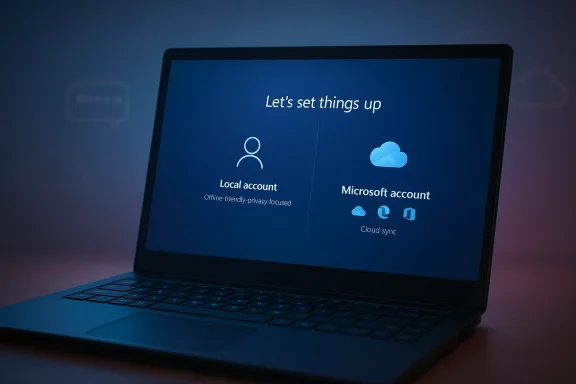
Microsoft will also have to balance any relaxation against its ongoing push to make Windows 11 feel like the center of its consumer ecosystem. That means the best outcome may be a more explicit choice architecture: local account for those who want it, Microsoft account for those who value sync and recovery. If Microsoft can frame the decision as empowerment rather than compromise, it may win back some trust without sacrificing too much strategic leverage.
Source: Daily Express https://www.express.co.uk/life-styl...ulls-update-could-change-windows-forever/amp/
 Overview
For years, the Windows setup experience has reflected Microsoft’s broader strategic pivot: the company wants users tied into a Microsoft account so the operating system can sync settings, personalize services, surface OneDrive, and make Windows feel like part of a larger ecosystem rather than a standalone desktop product. That approach makes business sense from Microsoft’s perspective, but it has never sat comfortably with every customer. Many buyers still think of a PC as something they own outright, not a subscription portal that asks for credentials before the first desktop appears. Microsoft’s own support documentation still recommends signing in with a Microsoft account for better integration, security, and sync across devices.The tension has been building for years. Microsoft has steadily tightened Windows 11 setup, removed common bypasses, and made the online-account-first model more prominent. Reporting in 2025 noted that Microsoft eliminated a popular workaround that allowed some users to sidestep the Microsoft account step during installation, arguing that the change improved the security and user experience of Windows 11. That move made the company’s direction look clear: fewer escape hatches, more identity linkage, and deeper cloud dependence.
But the latest signal points in a different direction. Hanselman’s response on X — “I hate that. Working on it” — is notable not just because of his position, but because it suggests the conversation is alive inside Microsoft rather than settled. That matters. Microsoft can technically reverse or soften setup requirements far more easily than people sometimes assume; the real question is whether leadership wants to trade ecosystem lock-in for goodwill, flexibility, and the goodwill of power users, IT admins, and privacy-conscious buyers.
The timing is also important. Windows 10 has reached end of support, and Microsoft is aggressively steering people toward Windows 11 as the secure, modern alternative. The company’s own support pages say Windows 10 no longer receives technical assistance, feature updates, or security updates after October 14, 2025. That creates an incentive to make Windows 11 feel less coercive and more welcoming, especially for people who are already being nudged to upgrade.
At the same time, Microsoft has been trying to soften some of the more obviously promotional parts of Windows 11. Its recent Windows Insider posts describe quieter widget defaults, more control over when widgets appear, and improved personalization for feeds. In other words, Microsoft is clearly aware that Windows works best when it feels helpful, not pushy. The possible account change fits that broader effort, even if the company has not promised it publicly.
Why the Microsoft Account Requirement Became Such a Flashpoint
The Microsoft account requirement is not merely a setup nuisance; it is a symbol of how Windows has changed. In earlier eras, Windows was mostly an endpoint operating system. You installed it, created a local user, and the machine was yours to shape. Today, Microsoft wants the first boot to become the beginning of a connected services relationship, with identity, cloud storage, sync, recovery, and monetization all baked into the flow. That is a strategic choice, but for many users it feels like a loss of autonomy.This is why the subject generates such strong reactions. For mainstream consumers, a Microsoft account can be useful, especially if they want OneDrive, password recovery, device sync, Microsoft Store access, or Family Safety. But for enthusiasts, developers, enterprise admins, schools, and privacy-minded users, mandatory sign-in can feel like friction where none should exist. They do not object to the option; they object to the default becoming the gatekeeper.
The Strategic Tradeoff
Microsoft’s logic is understandable. A linked account helps unify services, improves device recovery, and gives the company a cleaner path for telemetry-driven product improvements. It also creates a more seamless experience for people who use Microsoft 365, Edge, Xbox, and OneDrive. But every convenience feature carries a trust cost when it becomes a requirement instead of a choice. That distinction matters more than Microsoft sometimes seems to appreciate.The requirement also creates an awkward mismatch between consumer expectations and enterprise realities. Corporate IT often needs local, staged, offline, or domain-centered provisioning workflows. A setup flow that assumes every new PC should begin life as an internet-connected identity node can slow deployment and complicate imaging. That does not mean Microsoft cannot support modern identity systems, only that one size does not fit all.
- It makes a personal computer feel less personal.
- It improves Microsoft’s ecosystem attachment.
- It can simplify recovery and sync for casual users.
- It creates friction for offline setups and lab environments.
- It frustrates buyers who want a clean local-first install.
What Microsoft Has Already Been Doing in Windows 11
The possible account reversal should not be seen in isolation. Microsoft has already been experimenting with a more restrained Windows 11 personality in some places, even while pushing harder in others. Recent Insider builds mention quieter widget defaults, more granular control over how widgets appear, and feed personalization that is supposed to be less overwhelming. That suggests the company recognizes a basic truth: if Windows feels noisy, users will fight it.At the same time, Microsoft has not stopped expanding the ecosystem hooks that define its modern desktop strategy. Widgets, feeds, Copilot-related surfaces, account-dependent features, and Microsoft 365 integration still occupy a central place in the company’s roadmap. The result is a somewhat mixed message: soften the edges, but keep the structure intact. That is not necessarily contradictory, but it does show Microsoft is still balancing product polish against platform ambition.
Insiders as a Pressure Valve
The Windows Insider program remains one of Microsoft’s most useful pressure valves. It lets the company test features, observe feedback, and adjust before changes hit the broad Windows 11 audience. In practice, that means Microsoft can float a less intrusive setup experience, watch how users respond, and then decide whether to expand it. The same mechanism has been used for UI changes, widgets redesigns, and taskbar behavior.This is why Hanselman’s comment matters. When a senior Microsoft figure says a disliked behavior is being worked on, it usually reflects something real in the pipeline, even if details are not finalized. It does not guarantee a shipping feature, but it does suggest the issue has climbed high enough to matter. In a large company, that is often the first meaningful step.
- Microsoft has already softened some Windows 11 surfaces.
- The company still heavily favors cloud-linked experiences.
- Insider builds act as a feedback testbed.
- The setup flow remains the most politically sensitive part.
- A change here would signal a larger philosophy shift.
Why the Windows 10 Deadline Changed the Conversation
Windows 10’s end of support on October 14, 2025 altered the emotional and practical stakes of this debate. Once a product reaches end of support, users are less likely to tolerate extra friction when transitioning to the next generation. Microsoft’s own guidance now tells consumers to move to Windows 11, use ESU where available, or buy a newer device. That makes the onboarding experience on Windows 11 more important than ever.A company can be pushy when it is asking users to adopt a new feature; it is much less wise to be pushy when users are being forced to migrate for security reasons. If Microsoft wants Windows 11 to become the obvious destination for Windows 10 refugees, the setup process cannot feel like a punishment. Removing or relaxing the Microsoft account requirement would help reduce that friction.
The Upgrade Funnel Problem
Microsoft is in a funnel-management business whether it likes the phrase or not. Windows 10 users are being nudged into Windows 11, Windows 11 users are nudged into Microsoft accounts, and Microsoft account users are nudged toward cloud services. Each step may look small, but the cumulative effect can be decisive. If one step in the funnel is annoying enough, it can poison the entire journey.That is why setup policy is not a trivial UX detail. It is the first line of defense against user resistance. A smoother install path may convert skeptics who otherwise would have delayed upgrading or worked around the system entirely. A more coercive path, by contrast, can reinforce the idea that Windows is becoming less open just as people are being asked to recommit to it.
- Windows 10’s end of support raised the importance of Windows 11 onboarding.
- Users dislike being forced to choose cloud identity at first boot.
- The migration moment is when goodwill matters most.
- Friction at setup can shape long-term platform sentiment.
- Microsoft has a rare opportunity to make a migration feel respectful.
Consumer Impact: Convenience, Privacy, and Ownership
For ordinary home users, the most obvious benefit of dropping the requirement would be choice. People who want cloud sync and automatic sign-in could still use a Microsoft account. People who do not want that relationship could create a local account and move on. That sounds simple, but simplicity is the point: good platform design usually means removing unnecessary decisions from the moment when the user just wants the machine to start.There is also a privacy dimension. A local account does not make a device magically private, but it does reduce the amount of identity entanglement at setup. For users who are skeptical of cloud logins, data collection, and automatic service attachment, the ability to complete setup offline feels like a meaningful expression of control. Control, in consumer computing, is often less about raw technical capability and more about whether the user feels they are steering the experience.
Why This Matters Beyond Enthusiasts
This issue is often discussed by power users, but it is not only for them. Parents setting up a child’s PC, retirees migrating from an old machine, and buyers unboxing a laptop for a very specific offline use case can all benefit from a local-first option. A forced account step can create support friction that has nothing to do with sophistication and everything to do with convenience.The consumer upside extends to secondary markets too. Refurbishers, small shops, educators, and households repurposing older hardware all value a cleaner setup process. If Microsoft makes the OS feel more open, it may also encourage more reuse of Windows PCs rather than more frustration at the moment of installation. That is not just a user-experience win; it is a lifecycle win.
- More genuine ownership at first boot.
- Less setup friction for casual buyers.
- Better support for offline and low-connectivity installs.
- A cleaner path for family and shared devices.
- Reduced resentment toward the Windows onboarding flow.
Enterprise Impact: Imaging, Compliance, and Device Staging
In business environments, the Microsoft account question is not really about personal preference. It is about deployment efficiency, security policy, and the ability to stage devices in a controlled way. Enterprises already use identity systems such as Microsoft Entra and other management frameworks, so they do not need Windows to force a consumer-style cloud account during initial setup. They need flexibility.If Microsoft relaxes the consumer setup requirement, enterprise administrators may benefit indirectly as well. Even when organizations do not use local accounts in the long term, they often rely on offline or semi-offline provisioning steps, testing rigs, factory imaging, and recovery workflows. The less opinionated Windows setup becomes, the easier it is to adapt to different deployment models.
The IT Admin Perspective
Admins generally dislike unnecessary setup dependencies because they create variability. A machine that must authenticate to a consumer service before it can be imaged, handed over, or joined to a domain adds one more point of failure. In fleet scenarios, that can translate into minutes multiplied by hundreds or thousands of devices. At scale, minutes become money.Microsoft has spent years telling organizations that Windows 11 is its secure, modern, managed platform. That message lands better when the company appears to trust customers and IT departments to choose the right account model for themselves. Reversing the setup pressure would not weaken enterprise management; it could actually underline that Windows is flexible enough to serve different deployment philosophies.
- Cleaner imaging and staging workflows.
- Fewer account-related roadblocks in labs.
- Better compatibility with offline provisioning.
- Less dependence on consumer-style login choices.
- More alignment with real enterprise identity practice.
The Business Logic Behind Microsoft’s Push
Microsoft’s preference for a mandatory account is not hard to decode. A signed-in user is easier to connect to Microsoft 365, OneDrive, Edge sync, Store purchases, Xbox services, and backup/recovery features. Each connection deepens the value of the ecosystem and raises switching costs. From a pure platform strategy perspective, the account requirement is efficient.The company also gets product telemetry and service continuity benefits. When devices are tied to accounts, Microsoft can more easily deliver continuity across PCs, tablets, and phones, and users get a more unified experience across devices. That makes the OS feel more modern, but it also makes the company more central to the device relationship.
Security Versus Convenience
Microsoft often frames account sign-in as a security enhancement, and there is some truth to that. An online account supports recovery workflows, multifactor authentication, and cross-device synchronization. But security arguments can become overbroad when they are used to justify blanket requirements for every user in every scenario. Security should be available by default, not mandated in a way that removes legitimate use cases.That is the heart of the policy debate. The company wants to make the account path the easiest and most rewarding path. Users want the account path to remain one option among several. Those are not irreconcilable positions, but they do require Microsoft to accept that some customers will intentionally choose less-connected workflows.
- Accounts help Microsoft deepen service engagement.
- They improve recovery and sync for many users.
- They also raise switching costs.
- Security benefits do not automatically justify forced adoption.
- Product strategy and user autonomy are in tension here.
How This Fits Microsoft’s Recent Windows Messaging
The company’s Windows messaging in 2025 and 2026 has been increasingly about trust, restraint, and quality, even as it continues to expand AI and cloud integration. Microsoft’s Windows Insider and Windows Experience posts have emphasized polish, consent, and user transparency. That is not accidental branding. It is Microsoft trying to defend Windows as a trusted platform in a market where users are increasingly sensitive to intrusive defaults.The setup-account issue sits right at the intersection of that messaging. If Windows is about trust, then the first boot should not feel adversarial. If Windows is about user control, then people should be able to choose how connected they want the operating system to be. Those principles are easy to say and harder to implement, but they are exactly the standards Microsoft has set for itself.
The Windows Brand Problem
Windows still has an enormous installed base and remains the default desktop OS for most of the world’s PCs, but that does not mean goodwill should be taken for granted. Every generation of Windows has carried some amount of complaint, but Windows 11 has drawn unusually sharp criticism for UI decisions, forced content surfaces, and account dependency. A softer setup flow would not solve everything, yet it would remove one of the clearest symbolic irritants.In branding terms, this is about whether Windows feels like a product or a platform tax collector. That may sound harsh, but it reflects how many users experience the current setup flow: you are not simply installing software, you are entering a relationship. Microsoft has the chance to make that relationship feel voluntary again.
- Trust is becoming a central Windows product theme.
- Setup is the first and most visible trust test.
- AI and cloud features can coexist with local choice.
- Brand perception is shaped by small friction points.
- Windows 11 needs wins that feel user-centric, not just strategic.
The Competitive Angle: Apple, Linux, and the Windows Difference
If Microsoft loosens the account requirement, it will narrow one of the rhetorical advantages held by Linux and, to a lesser extent, Apple among control-oriented users. Linux has long been associated with local ownership and administrator freedom, while macOS typically lets users establish local accounts during setup without the same sense of being forced into a cloud identity flow. Windows does not need to copy either platform wholesale, but it does need to avoid looking more restrictive than both.This matters because perception affects platform evaluation even among users who never leave Windows. Power users, IT professionals, and reviewers often shape broader opinion. If the dominant desktop OS begins to feel more closed than its alternatives in basic workflows, that influences how people describe the entire ecosystem. A local-account option would help Microsoft avoid that comparison.
Market Signaling
There is also a subtle market signal here. When Microsoft relaxes a control surface, it often signals that the company has decided user experience or compatibility is more important than maximal ecosystem capture. That would be a meaningful signal at a time when the market is already watching Windows 11 adoption, Windows 10 migration, and the role of AI features in the operating system. Signals matter in platform markets.A smarter Windows onboarding experience could also help Microsoft differentiate itself from the “everything must be connected” pattern that many consumers increasingly dislike. A PC that starts simply, then invites deeper services later, is often more persuasive than one that demands commitment at the door. That is not just a philosophical point; it is a conversion strategy.
- Windows can compete on choice, not just features.
- Linux and macOS already look less coercive here.
- Reviewer sentiment often shapes platform reputation.
- A softer setup flow would improve Microsoft’s positioning.
- Delay the upsell until after trust is established.
Strengths and Opportunities
Microsoft has a real opportunity to turn a long-standing irritant into a goodwill moment, especially now that many users are being pushed off Windows 10 and into Windows 11. A better setup experience would not just please enthusiasts; it could make Windows feel more respectful to ordinary buyers who simply want to use the hardware they paid for. It would also align with Microsoft’s recent messaging around trust, transparency, and quieter defaults.- Restores a sense of ownership at first boot.
- Reduces setup friction for new PC buyers.
- Improves compatibility with offline and low-connectivity environments.
- Helps Microsoft present Windows 11 as less pushy and more mature.
- Could improve sentiment among IT admins and refurbishers.
- Fits Microsoft’s broader trust and quality messaging.
- Makes the Windows 10-to-Windows 11 migration feel less forced.
Risks and Concerns
Any shift away from mandatory Microsoft accounts will create internal tension because it weakens a key part of Microsoft’s ecosystem strategy. The company may worry that fewer linked accounts could reduce engagement with OneDrive, Edge sync, Microsoft 365, and other services that benefit from a unified identity layer. There is also the possibility that users will misread the change as Microsoft retreating from security or cloud integration when the real goal is simply more choice.- Lower initial uptake of some Microsoft services.
- Potential confusion if the change is not explained clearly.
- Risk of fragmenting the setup experience across editions.
- Internal resistance from teams that benefit from account linkage.
- Possible claims that Microsoft is backtracking on security.
- Need to preserve easy opt-in for consumers who want sync.
- No guarantee that Microsoft will actually ship the change.
What to Watch Next
The key question now is not whether Microsoft has heard the complaint — clearly it has — but whether that internal discomfort turns into an actual product decision. If the change comes, the most important details will be how broad it is, whether it applies to Windows 11 Home as well as Pro, and whether Microsoft offers a clean local-account path without hidden catch-alls. The company’s recent Insider cadence suggests the setup experience is still being refined, which means this story is very much alive.Microsoft will also have to balance any relaxation against its ongoing push to make Windows 11 feel like the center of its consumer ecosystem. That means the best outcome may be a more explicit choice architecture: local account for those who want it, Microsoft account for those who value sync and recovery. If Microsoft can frame the decision as empowerment rather than compromise, it may win back some trust without sacrificing too much strategic leverage.
Watch List
- Whether Microsoft confirms a local-account option in a future Insider build.
- Whether the change reaches Windows 11 Home or only Pro/Enterprise paths.
- Whether Microsoft softens other first-run prompts alongside account setup.
- Whether the company frames the move as a trust improvement.
- Whether Windows 10 holdouts see the change as a reason to upgrade.
Source: Daily Express https://www.express.co.uk/life-styl...ulls-update-could-change-windows-forever/amp/
