

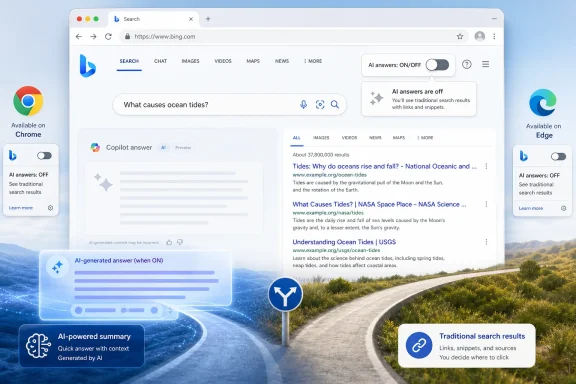
Microsoft’s Bing team in early June 2026 introduced a preview browser extension for Chrome and Edge that lets users toggle Copilot-style AI answers off in Bing Search with one click. The move is small in engineering terms but large in product symbolism: Microsoft is admitting that AI in search works best when it is a choice, not a mandate. That concession arrives just as Google is pushing Search deeper into AI Mode, creating an opening for Bing to pitch itself less as the smarter search engine and more as the one that still remembers who is in charge.
For the past three years, Microsoft has treated Copilot as both product and atmosphere. It has been a button, a sidebar, a chat box, a Windows feature, a Microsoft 365 upsell, a Bing differentiator, and, depending on the week, the future of work itself. The result has often been less a coherent user experience than a scavenger hunt for where Microsoft decided to put the AI this time.
That is what makes the new Bing extension interesting. It is not another splashy Copilot demo, not another claim about agentic productivity, and not another attempt to make search feel like a chatbot wearing a blue-link costume. It is a switch that says, in effect: perhaps you came here to search the web, not to negotiate with a generated paragraph.
Jordi Ribas, Microsoft’s president and head of search, framed the preview extension as a simple way to toggle “AI chat-like features” on or off. He also acknowledged the sentence that every AI product team should probably have printed above the sprint board: not everyone wants AI for everything all the time.
That does not mean Microsoft has suddenly become skeptical of AI. Bing remains one of the company’s most important showcases for Copilot, and Microsoft has every incentive to keep pushing users toward conversational search. But the company appears to have learned that control itself can be a feature, especially when the rival across the aisle is making search feel less optional by the month.
A real opt-out would live where ordinary users expect it: inside Bing, tied to their account or browser session, visible on the search results page, and persistent across devices. An extension is better than nothing, but it also shifts the burden onto the user. If you want less AI in Bing, you must first know the extension exists, install it, trust it, and keep it enabled.
There is another wrinkle. Reports around the launch note that the extension also helps set Bing as the browser’s default search engine, and in Chrome it can open Bing on every new tab. That turns the kill switch into something more complicated than a privacy-respecting courtesy. It is also a distribution tactic.
This is classic Microsoft: concede the user’s complaint while still advancing the platform. You can turn off the Copilot-style answers, but the path to doing so may also deepen Bing’s grip on the browser. For some users, that trade-off will be acceptable. For others, it will look like Microsoft discovered consent and then immediately packaged it with default-search acquisition.
Still, the signal is real. Microsoft is experimenting with a product posture that says AI should not be welded permanently onto every query. That is a sharper message than any benchmark chart, because search is not just a technical market. It is a habit market.
That is a profound change because Google Search is not merely another consumer app. It is the front door to the web for billions of people and the economic plumbing for publishers, merchants, creators, restaurants, repair shops, forums, and niche communities. When Google changes the shape of a results page, entire industries feel the blast radius.
AI-generated answers intensify that tension. A conventional search result sends users outward, however imperfectly. An AI answer keeps them on the search page longer, condensing information into a synthesized response that may or may not earn a click for the sources it used. For users, that can feel faster. For the web, it can feel like the platform is eating the meal before anyone else gets to the table.
Microsoft sees the opening. Bing has long been the underdog with decent technology and poor user inertia. It can rarely out-Google Google at being Google, but it may be able to define a different axis of competition: the search engine that lets you decide how much AI you want in the experience.
That is a clever reversal. Microsoft was one of the first major search players to make generative AI a central part of consumer search with the “new Bing” in 2023. Now it can present itself as the adult in the room because it is willing to add an off-ramp.
The issue is not whether search should use AI. It already does, and it has for years. The issue is whether a generated answer should become the dominant surface for queries where users may prefer source diversity, chronology, nuance, or simply the ability to skim competing pages themselves.
AI answers are especially irritating when they appear for searches that do not need synthesis. If a user wants a support thread, a changelog, a driver download, a forum post, a government form, a product page, or a troubleshooting discussion, a chatty summary can feel like furniture blocking the doorway. The machine may be trying to help, but it is also slowing down the user’s original intent.
This is where Microsoft’s language about “in the moment” choice is important. A user might want Copilot for a broad comparison, a trip plan, a recipe substitution, or a multi-step explanation. The same user might want plain results five minutes later when looking for a download link or a specific error code. Search is not one activity. It is a hundred different micro-intentions wearing the same input box.
A good search product should respond to that complexity. A bad one decides that because AI is useful sometimes, it must be visible always.
AI search scrambles that bargain. The search engine can now summarize the destination, extract the useful bits, and display an answer before the user visits the source. In some cases, the publisher may still get cited. In others, it may be buried below a generated box that answers just enough to end the journey.
This matters acutely for sites like WindowsForum.com. Forums thrive on long-tail problems, weird edge cases, exact error messages, driver quirks, registry oddities, and the practical knowledge that accumulates when real users collide with real machines. That material is perfect fodder for AI systems because it is specific, conversational, and often absent from polished vendor documentation.
But the value of a forum is not only the final answer. It is the thread: the false starts, corrections, hardware details, timestamps, build numbers, and human skepticism that let a reader decide whether advice applies to their own problem. A generated answer can flatten that context into something smoother and less trustworthy.
An AI-off search mode may therefore become more than a user preference. It could become a way for technically minded users to preserve the investigative nature of search. Sometimes the answer is not the answer. Sometimes the answer is the trail.
Windows 11 has already seen Copilot shift forms multiple times, from integrated experience to app-like presence to taskbar-adjacent experiments. Edge has its own Copilot surfaces, sidebar history, settings toggles, and AI features that seem to migrate from optional novelty to expected furniture. Office users have seen Copilot buttons and prompts appear in places that make sense for some workflows and feel intrusive in others.
That is why the Bing extension should not be overpraised. It is a welcome concession, not a revolution. Microsoft still has a strong commercial reason to normalize AI assistance across its ecosystem, especially where it can connect consumer search behavior to enterprise productivity ambitions.
But it does suggest that the company understands a product truth it has often ignored: opt-outs build trust even among people who never use them. A visible off switch changes the emotional contract. It tells the user that the feature is there to serve them, not the other way around.
That matters in Windows because the operating system is not just an app users can casually abandon. It is the environment where work happens, games run, files live, peripherals connect, and administrators enforce policy. If Microsoft wants Copilot to become part of that environment, it must make the boundaries clearer, not fuzzier.
Good software has modes. It lets the user move from automation to manual control, from summary to source, from assistant to interface. Bad software mistakes engagement with usefulness and assumes that if a feature is strategically important to the vendor, it must also be continuously visible to the user.
Search especially requires humility. The same query can mean different things depending on the person asking it. “Windows 11 24H2 printer problem” might be a novice asking for a friendly explainer, a sysadmin looking for a known issue, a journalist checking chronology, or a forum member hunting for the exact thread where someone found a workaround. A single AI box cannot satisfy all of those intents equally well.
There is also the matter of trust. AI answers can be useful, but they are often most useful when the stakes are low or the user already knows enough to verify them. In troubleshooting, security, medicine, law, finance, and software deployment, the user frequently needs primary sources, dates, version numbers, reproducible steps, and dissenting reports. A generated answer can help frame the problem, but it should not become a fog machine between the user and the evidence.
Microsoft’s toggle, primitive as it is, recognizes that disappearance can be a feature. The most mature AI products will not be the ones that shout the loudest. They will be the ones that know when to get out of the way.
If Microsoft is serious, the feature should graduate into Bing proper. It should work without an extension. It should sync across signed-in sessions. It should be available on mobile. It should be easy to find, easy to understand, and honest about what it disables. It should also separate “turn off AI answers” from “make Bing my default,” because bundling consent with distribution muddies the message.
Enterprise admins will want even more. They will want policy controls, documentation, telemetry clarity, and predictable behavior across managed browsers. In regulated environments, AI-generated search responses are not just a taste issue. They can raise concerns about data handling, source reliability, retention, and user exposure to unverified guidance.
Microsoft knows this world well. It sells to it every day. If the company can turn AI search control into a managed, documented, policy-friendly feature, it can make Bing more attractive not only to consumers annoyed by AI summaries but to organizations that need search behavior to be auditable and boring.
That is the real strategic opportunity. Google can still dominate consumer search by inertia, quality, defaults, and advertising scale. But Microsoft can win credibility in the corners where control matters more than spectacle.
DuckDuckGo’s post-I/O install surge suggests that at least some users are actively seeking AI-optional search experiences. That does not mean DuckDuckGo is about to topple Google, or that the public has turned against AI in search. It does mean that a visible segment of users is irritated enough to change habits, which is one of the hardest things to make people do online.
Microsoft’s challenge is that it has credibility problems of its own. Windows users have seen enough nags, prompts, default resets, Edge nudges, Microsoft account pressure, and Copilot placements to be skeptical when the company talks about choice. A Bing AI-off extension is useful, but it arrives from a company with a long history of making the preferred path very obvious and the alternative path very narrow.
Still, markets are comparative. Microsoft does not have to become a digital civil liberties foundation to benefit from Google’s overreach. It only has to be meaningfully less coercive at the right moment.
That is why this small extension deserves attention. It is not because the tool itself is technically remarkable. It is because Microsoft may have found a wedge issue in search: not better AI, but better agency.
 Microsoft Finds a Better Sales Pitch Than More Copilot
For the past three years, Microsoft has treated Copilot as both product and atmosphere. It has been a button, a sidebar, a chat box, a Windows feature, a Microsoft 365 upsell, a Bing differentiator, and, depending on the week, the future of work itself. The result has often been less a coherent user experience than a scavenger hunt for where Microsoft decided to put the AI this time.That is what makes the new Bing extension interesting. It is not another splashy Copilot demo, not another claim about agentic productivity, and not another attempt to make search feel like a chatbot wearing a blue-link costume. It is a switch that says, in effect: perhaps you came here to search the web, not to negotiate with a generated paragraph.
Jordi Ribas, Microsoft’s president and head of search, framed the preview extension as a simple way to toggle “AI chat-like features” on or off. He also acknowledged the sentence that every AI product team should probably have printed above the sprint board: not everyone wants AI for everything all the time.
That does not mean Microsoft has suddenly become skeptical of AI. Bing remains one of the company’s most important showcases for Copilot, and Microsoft has every incentive to keep pushing users toward conversational search. But the company appears to have learned that control itself can be a feature, especially when the rival across the aisle is making search feel less optional by the month.
The Extension Is a Toggle, but the Default Is Still the Business Model
The important caveat is that this is not a native Bing setting calmly waiting inside the search preferences menu. It is, at least for now, a preview extension available through the Chrome Web Store and Microsoft Edge add-ons store. That distinction matters because browser extensions are power-user territory compared with first-party settings.A real opt-out would live where ordinary users expect it: inside Bing, tied to their account or browser session, visible on the search results page, and persistent across devices. An extension is better than nothing, but it also shifts the burden onto the user. If you want less AI in Bing, you must first know the extension exists, install it, trust it, and keep it enabled.
There is another wrinkle. Reports around the launch note that the extension also helps set Bing as the browser’s default search engine, and in Chrome it can open Bing on every new tab. That turns the kill switch into something more complicated than a privacy-respecting courtesy. It is also a distribution tactic.
This is classic Microsoft: concede the user’s complaint while still advancing the platform. You can turn off the Copilot-style answers, but the path to doing so may also deepen Bing’s grip on the browser. For some users, that trade-off will be acceptable. For others, it will look like Microsoft discovered consent and then immediately packaged it with default-search acquisition.
Still, the signal is real. Microsoft is experimenting with a product posture that says AI should not be welded permanently onto every query. That is a sharper message than any benchmark chart, because search is not just a technical market. It is a habit market.
Google’s AI Search Push Gives Bing a Rare Opening
The timing is not subtle. Google used I/O 2026 to push Search further into an AI-first model, with AI Mode and AI Overviews becoming more central to the company’s pitch for how people will ask questions, compare information, shop, plan, and browse. Google’s language around a “reimagined” search box made clear that the old search results page is no longer the sacred object it once was.That is a profound change because Google Search is not merely another consumer app. It is the front door to the web for billions of people and the economic plumbing for publishers, merchants, creators, restaurants, repair shops, forums, and niche communities. When Google changes the shape of a results page, entire industries feel the blast radius.
AI-generated answers intensify that tension. A conventional search result sends users outward, however imperfectly. An AI answer keeps them on the search page longer, condensing information into a synthesized response that may or may not earn a click for the sources it used. For users, that can feel faster. For the web, it can feel like the platform is eating the meal before anyone else gets to the table.
Microsoft sees the opening. Bing has long been the underdog with decent technology and poor user inertia. It can rarely out-Google Google at being Google, but it may be able to define a different axis of competition: the search engine that lets you decide how much AI you want in the experience.
That is a clever reversal. Microsoft was one of the first major search players to make generative AI a central part of consumer search with the “new Bing” in 2023. Now it can present itself as the adult in the room because it is willing to add an off-ramp.
The Backlash Is Not Anti-AI So Much as Anti-Compulsion
It is tempting to read every complaint about AI search as nostalgia for ten blue links. That is too easy. Users have always accepted automation when it solves a problem cleanly: spell correction, maps answers, snippets, shopping filters, flight data, translation, weather, calculator cards, and knowledge panels all changed search long before generative AI arrived.The issue is not whether search should use AI. It already does, and it has for years. The issue is whether a generated answer should become the dominant surface for queries where users may prefer source diversity, chronology, nuance, or simply the ability to skim competing pages themselves.
AI answers are especially irritating when they appear for searches that do not need synthesis. If a user wants a support thread, a changelog, a driver download, a forum post, a government form, a product page, or a troubleshooting discussion, a chatty summary can feel like furniture blocking the doorway. The machine may be trying to help, but it is also slowing down the user’s original intent.
This is where Microsoft’s language about “in the moment” choice is important. A user might want Copilot for a broad comparison, a trip plan, a recipe substitution, or a multi-step explanation. The same user might want plain results five minutes later when looking for a download link or a specific error code. Search is not one activity. It is a hundred different micro-intentions wearing the same input box.
A good search product should respond to that complexity. A bad one decides that because AI is useful sometimes, it must be visible always.
Publishers See an Off Switch as More Than a Preference
For publishers, Microsoft’s toggle is not merely a comfort feature. It is a hint that search companies understand the political and economic tension around AI answers, even if they rarely say it bluntly. The web’s bargain has always been unstable, but it was at least legible: publishers allowed crawlers, search engines indexed pages, users found links, and some fraction of those users clicked through.AI search scrambles that bargain. The search engine can now summarize the destination, extract the useful bits, and display an answer before the user visits the source. In some cases, the publisher may still get cited. In others, it may be buried below a generated box that answers just enough to end the journey.
This matters acutely for sites like WindowsForum.com. Forums thrive on long-tail problems, weird edge cases, exact error messages, driver quirks, registry oddities, and the practical knowledge that accumulates when real users collide with real machines. That material is perfect fodder for AI systems because it is specific, conversational, and often absent from polished vendor documentation.
But the value of a forum is not only the final answer. It is the thread: the false starts, corrections, hardware details, timestamps, build numbers, and human skepticism that let a reader decide whether advice applies to their own problem. A generated answer can flatten that context into something smoother and less trustworthy.
An AI-off search mode may therefore become more than a user preference. It could become a way for technically minded users to preserve the investigative nature of search. Sometimes the answer is not the answer. Sometimes the answer is the trail.
Microsoft’s Own Windows Strategy Makes the Toggle More Complicated
There is an irony here that Windows users will not miss. Microsoft is offering a Bing-side control for Copilot-style answers while continuing to weave Copilot deeper into Windows, Edge, and Microsoft 365. The company has spent years learning that users resent feeling herded into AI features, yet its broader platform strategy still depends on making Copilot feel ambient and unavoidable.Windows 11 has already seen Copilot shift forms multiple times, from integrated experience to app-like presence to taskbar-adjacent experiments. Edge has its own Copilot surfaces, sidebar history, settings toggles, and AI features that seem to migrate from optional novelty to expected furniture. Office users have seen Copilot buttons and prompts appear in places that make sense for some workflows and feel intrusive in others.
That is why the Bing extension should not be overpraised. It is a welcome concession, not a revolution. Microsoft still has a strong commercial reason to normalize AI assistance across its ecosystem, especially where it can connect consumer search behavior to enterprise productivity ambitions.
But it does suggest that the company understands a product truth it has often ignored: opt-outs build trust even among people who never use them. A visible off switch changes the emotional contract. It tells the user that the feature is there to serve them, not the other way around.
That matters in Windows because the operating system is not just an app users can casually abandon. It is the environment where work happens, games run, files live, peripherals connect, and administrators enforce policy. If Microsoft wants Copilot to become part of that environment, it must make the boundaries clearer, not fuzzier.
The Best AI Feature May Be Knowing When to Disappear
The phrase “kill switch” is dramatic, but it captures something users have struggled to articulate. People do not necessarily hate Copilot. They hate the feeling that every surface has been recruited into a corporate AI rollout without their consent.Good software has modes. It lets the user move from automation to manual control, from summary to source, from assistant to interface. Bad software mistakes engagement with usefulness and assumes that if a feature is strategically important to the vendor, it must also be continuously visible to the user.
Search especially requires humility. The same query can mean different things depending on the person asking it. “Windows 11 24H2 printer problem” might be a novice asking for a friendly explainer, a sysadmin looking for a known issue, a journalist checking chronology, or a forum member hunting for the exact thread where someone found a workaround. A single AI box cannot satisfy all of those intents equally well.
There is also the matter of trust. AI answers can be useful, but they are often most useful when the stakes are low or the user already knows enough to verify them. In troubleshooting, security, medicine, law, finance, and software deployment, the user frequently needs primary sources, dates, version numbers, reproducible steps, and dissenting reports. A generated answer can help frame the problem, but it should not become a fog machine between the user and the evidence.
Microsoft’s toggle, primitive as it is, recognizes that disappearance can be a feature. The most mature AI products will not be the ones that shout the loudest. They will be the ones that know when to get out of the way.
The Browser Extension Is Also a Test of User Leverage
The next question is whether Microsoft treats this preview as a genuine design direction or as a pressure valve. Tech companies often ship controls after backlash, let the news cycle cool, and then quietly leave the control obscure, incomplete, or limited to a subset of users. The difference between a principle and a patch is where the toggle goes next.If Microsoft is serious, the feature should graduate into Bing proper. It should work without an extension. It should sync across signed-in sessions. It should be available on mobile. It should be easy to find, easy to understand, and honest about what it disables. It should also separate “turn off AI answers” from “make Bing my default,” because bundling consent with distribution muddies the message.
Enterprise admins will want even more. They will want policy controls, documentation, telemetry clarity, and predictable behavior across managed browsers. In regulated environments, AI-generated search responses are not just a taste issue. They can raise concerns about data handling, source reliability, retention, and user exposure to unverified guidance.
Microsoft knows this world well. It sells to it every day. If the company can turn AI search control into a managed, documented, policy-friendly feature, it can make Bing more attractive not only to consumers annoyed by AI summaries but to organizations that need search behavior to be auditable and boring.
That is the real strategic opportunity. Google can still dominate consumer search by inertia, quality, defaults, and advertising scale. But Microsoft can win credibility in the corners where control matters more than spectacle.
Search Is Becoming a Settings War
The broader market is moving toward a strange new phase. Search engines used to compete on relevance, speed, index size, advertising load, privacy posture, and browser defaults. Now they are competing on how much AI they inject and how gracefully they let users refuse it.DuckDuckGo’s post-I/O install surge suggests that at least some users are actively seeking AI-optional search experiences. That does not mean DuckDuckGo is about to topple Google, or that the public has turned against AI in search. It does mean that a visible segment of users is irritated enough to change habits, which is one of the hardest things to make people do online.
Microsoft’s challenge is that it has credibility problems of its own. Windows users have seen enough nags, prompts, default resets, Edge nudges, Microsoft account pressure, and Copilot placements to be skeptical when the company talks about choice. A Bing AI-off extension is useful, but it arrives from a company with a long history of making the preferred path very obvious and the alternative path very narrow.
Still, markets are comparative. Microsoft does not have to become a digital civil liberties foundation to benefit from Google’s overreach. It only has to be meaningfully less coercive at the right moment.
That is why this small extension deserves attention. It is not because the tool itself is technically remarkable. It is because Microsoft may have found a wedge issue in search: not better AI, but better agency.
The Small Switch That Says the Quiet Part Out Loud
The concrete lesson from Bing’s preview extension is that AI search has moved from novelty to negotiation. Users are no longer simply trying the future; they are bargaining with it. Microsoft’s switch is the first draft of that bargain, and its limitations show how much remains unsettled.- Microsoft has introduced a preview extension for Chrome and Edge that lets users suppress Copilot-style AI answers in Bing Search with a one-click toggle.
- The control is useful but incomplete because it lives in a browser extension rather than as a universal Bing setting across desktop, mobile, and signed-in sessions.
- The extension’s reported default-search behavior makes the feature both a user-control concession and a Bing distribution play.
- Google’s aggressive AI Search push gives Microsoft a rare chance to compete on user choice rather than pure search scale.
- Publishers, forums, and technical communities have a direct stake in whether search engines preserve click-through paths to source material.
- The real test is whether Microsoft turns this preview into a transparent, persistent, admin-friendly control or leaves it as a temporary escape hatch.
References
- Primary source: Windows Central
Published: Thu, 11 Jun 2026 11:15:28 GMT
Loading…
www.windowscentral.com - Related coverage: pcworld.com

Copilot uses your Microsoft activity data to personalize its responses
Fortunately, you can disable this setting and opt out—for now. www.pcworld.com
- Related coverage: windowslatest.com

Microsoft confirms Windows 11's Edge browser is getting an AI-driven redesign to look more like Copilot and Bing
Microsoft confirms Edge redesign with Copilot-style UI, bringing rounded design, and unified UI across Bing and other Microsoft AI surfaces. www.windowslatest.com
- Related coverage: ppc.land

You can't turn off AI search? Here's what actually works on 10 engines
What actually works when trying to disable AI on 10 search engines: Google, Bing, DuckDuckGo, Brave, Ecosia, Qwant, Startpage, Kagi, Perplexity, and Yahoo.ppc.land
- Related coverage: techdemis.com

Microsoft Edge Removes Copilot Toggle for Some Users, Making AI Feature Permanent
A Microsoft Edge update is stripping some users of the ability to disable Copilot in the browser's address bar, with no full rollout confirmed yet. www.techdemis.com
- Related coverage: allthings.how
Loading…
allthings.how
- Official source: learn.microsoft.com
Loading…
learn.microsoft.com - Related coverage: techspot.com
Microsoft is baking even more Copilot functionality into the Edge browser | TechSpot
The newly announced changes focus on expanding Copilot's ability to make web browsing more seamless for users. Microsoft has recently indicated it is scaling back broader Copilot...www.techspot.com - Related coverage: windowsforum.com
Loading…
windowsforum.com - Related coverage: pureinfotech.com

How to turn off Copilot AI responses on Bing search results - Pureinfotech
To disable Copilot responses on Bing search, from the main menu, turn off "Copilot response on result page" and "Scroll to open Copilot." pureinfotech.com
- Related coverage: seroundtable.com

Microsoft Bing Gives Searchers A Way To Disable AI Copilot Answers
Microsoft Bing announced a new way to disable the Copilot, Microsoft AI, responses from showing up in the Bing search results. There is a new browser extension available for Chrome and Edge that you can install to toggle off showing AI responses, or you can just add -ai to the end of your query.www.seroundtable.com
- Official source: blogs.microsoft.com
</rdf:Alt> </dc:title> <dc:description> <rdf:Alt> <rdf:li xml:lang="x-default"/> </rdf:Alt> </dc:description> <dc:creator> <rdf:Seq> <rdf:li>Natasha
</rdf:Alt> </dc:description> <dc:creator> <rdf:Seq> <rdf:li>Natasha Crampton (CELA)blogs.microsoft.com
- Official source: download.microsoft.com
- Related coverage: techxplore.com
Loading…
techxplore.com - Related coverage: topaz.ils.unc.edu
Loading…
topaz.ils.unc.edu - Related coverage: androidcentral.com
Loading…
www.androidcentral.com - Related coverage: techcrunch.com

DuckDuckGo installs are up 30% as users reject being ‘force-fed’ Google’s AI Search | TechCrunch
Google overhauled Search at I/O 2026, replacing blue links with AI agents. The backlash has been swift. DuckDuckGo app installs spiked 30% as users seek a way out. techcrunch.com
- Related coverage: blog.google
Loading…
blog.google - Related coverage: megamobilecontent.com
Loading…
www.megamobilecontent.com - Related coverage: smartpostly.com
Loading…
www.smartpostly.com - Related coverage: 9to5mac.com

DuckDuckGo keeps surging on iPhone after Google’s AI search overhaul - 9to5Mac
DuckDuckGo is riding a fresh wave of user interest after Google’s AI-heavy search demo at Google I/O. Here’s the latest. 9to5mac.com
- Related coverage: briefs.co

DuckDuckGo Installs Up 30% After Google's AI Search Push
DuckDuckGo US app installs jumped 30.5% week-over-week and iOS hit 69.9% after Google rolled out its AI-driven search overhaul. www.briefs.co
- Related coverage: webpronews.com
Loading…
www.webpronews.com - Related coverage: thefreethoughtproject.com
Loading…
thefreethoughtproject.com