

The University of Maryland, Baltimore is telling faculty, staff, and students in 2026 that Microsoft Copilot Chat can now be personalized through Chat settings, where users can adjust memory and custom instructions so Copilot answers in ways that better fit their roles and work habits. That is a small campus IT announcement with much larger implications. Microsoft’s workplace AI is moving from a generic prompt box toward a persistent assistant that learns how an organization’s people write, decide, and repeat their daily routines. The question for Windows and Microsoft 365 shops is no longer whether users will try Copilot, but how much institutional context they should allow it to keep.
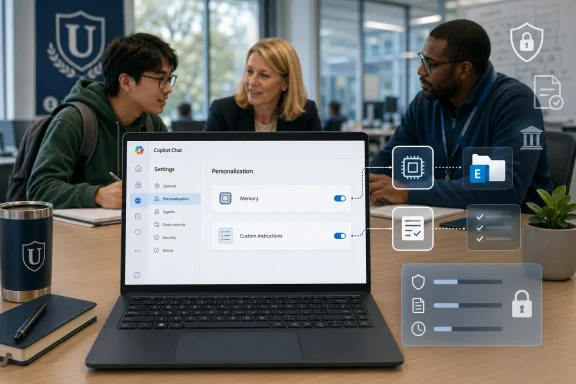
UMB’s announcement is not flashy. It does not promise an autonomous agent that books travel, rewrites a spreadsheet, or runs a department. It simply tells users to open Copilot Chat, click the three-dot menu near the prompt area, choose Settings, and visit the Personalization tab.
That modest workflow is exactly why it matters. The most durable enterprise software changes rarely arrive as theatrical product launches; they arrive as settings that make yesterday’s friction disappear. If Copilot remembers that a communications employee writes for a mixed technical audience, the user stops typing that instruction every afternoon.
This is Microsoft’s practical path into daily work. Rather than asking every employee to become a prompt engineer, Copilot personalization turns repeated prompting into a profile. The assistant becomes less like a search box and more like a colleague who remembers house style, preferred formats, accessibility needs, and recurring tasks.
That sounds harmless because, in many cases, it is useful. A user who always wants plain language, short paragraphs, or checklist-style output should not have to restate those preferences forever. Memory reduces the tax that makes many AI tools feel impressive in demos but tedious in actual work.
But memory also changes the bargain. A stateless chatbot forgets too much; a personalized assistant may remember more than users realize. In Microsoft 365 environments, that distinction matters because Copilot is not floating outside the enterprise stack. It sits beside identity, Exchange, SharePoint, Teams, OneDrive, compliance tooling, and the policies administrators already use to govern work data.
Microsoft’s documentation says Copilot personalization and memory are still in preview and subject to change. It also says memory is available to Copilot Chat users with or without a Microsoft 365 Copilot license, which makes this more than a premium-user novelty. If organizations leave enhanced personalization on by default, this behavior can become part of the baseline Copilot experience.
This is not merely cosmetic. Office users have spent decades encoding organizational preference into templates, style guides, email signatures, boilerplate, macros, and SharePoint pages. Custom instructions are the AI-era version of that impulse: make the default output closer to acceptable so the human spends less time cleaning it up.
The power is obvious for universities, hospitals, local governments, and enterprises where audience complexity is the rule rather than the exception. A help desk technician may want Copilot to assume a Windows 11 user with limited admin rights. A faculty member may want explanations suitable for first-year students. A sysadmin may want PowerShell examples, caveats, and security implications up front.
The risk is that instructions become invisible policy. A user can tell Copilot to simplify, summarize, or prioritize certain kinds of answers, and that can improve productivity. It can also flatten nuance if users stop checking whether the assistant’s preferred style is appropriate for a specific situation.
That default matters. In many organizations, especially higher education, IT departments are balancing productivity pressure from leadership with privacy concerns from faculty, researchers, staff, unions, students, and compliance officers. A default-on personalization system asks admins to decide whether the benefits of more relevant answers outweigh the governance burden of another class of retained AI context.
Microsoft stores memories, including saved memories, inferred details from chat history, and custom instructions, in the user’s Exchange mailbox in a hidden folder. That is a very Microsoft answer: not a mysterious AI vault, but mailbox-backed data tied into the existing compliance architecture. It is also a reminder that “AI memory” is not magic. It is data, and data has lifecycle, discovery, deletion, and oversight consequences.
The wrinkles are important. Microsoft says saved memories remain until the user deletes them in Settings > Personalization, and deleting a chat does not necessarily delete saved memories generated from that chat. Retention policies and retention labels configured in Purview do not apply to Copilot memory in the same way they may apply to other content. That is the sort of detail that will send careful compliance teams back to their governance diagrams.
The broader pattern is familiar. Microsoft lands a feature in the productivity suite, institutions translate it into local guidance, and users discover that the feature is most useful when adapted to their context. The personalization tab is not a destination; it is the start of a thousand local conventions.
Higher education makes the stakes especially visible. Universities have highly varied user populations, from administrative staff and faculty researchers to students, clinicians, contractors, and guests. They also have unusual norms around academic freedom, records retention, student privacy, and decentralized IT. A feature that seems straightforward inside a corporate department can become more ambiguous on a campus.
That does not mean universities should avoid Copilot personalization. It means they should treat it like a deployable capability, not a cute user preference. The right question is not “Can users turn on memory?” It is “What kinds of work should be helped by memory, what kinds should remain temporary, and how will people know the difference?”
That is the point. The long-term value of workplace AI is not just model quality, because models improve and commoditize. The moat is context: your documents, your org chart, your calendar, your language, your preferences, your workflows, and your accumulated instructions. Personalization is the interface where Microsoft turns that context into user loyalty.
This also explains why Copilot Chat matters even without the full Microsoft 365 Copilot license. Chat is the entry point. It acclimates users to asking, refining, and delegating. Once personalization makes those interactions feel less generic, the upsell to deeper Office integration, agents, and workflow automation becomes easier to justify.
For WindowsForum readers, the lesson is that Copilot is no longer just a sidebar or a key on a new keyboard. It is becoming a persistence layer across Microsoft’s work environment. The Windows client, the browser, the Microsoft 365 app, and the cloud tenant are converging around the same idea: AI that remembers enough to feel useful.
The consent problem is practical rather than philosophical. A user may knowingly save a preference such as “write in a concise style.” But Copilot may also infer useful details from chat history, and users may not always understand which details are being retained, applied, or later surfaced in responses. Even when the system is working as designed, its convenience can outrun user comprehension.
There is also the familiar problem of mixed contexts. A staff member may use Copilot for a public announcement in the morning, a sensitive personnel draft at noon, and a personal productivity plan in the afternoon. If personalization improves all three interactions, the user may stop separating them mentally. That is where training has to move beyond “click here” instructions.
Organizations should be plain with users: do not put secrets into memory; review what Copilot has saved; use temporary or non-personalized modes when the work demands it; and understand that deleting a chat is not the same thing as deleting every retained memory. None of that makes Copilot unusable. It makes it a normal enterprise system.
That is especially valuable in Windows and Microsoft 365 support environments. A technician can instruct Copilot to include Windows version assumptions, avoid recommending registry edits unless necessary, flag admin-rights requirements, and separate user-safe steps from escalation steps. A manager can ask for brief status summaries that distinguish confirmed facts from likely causes.
The trap is over-personalization. If a user loads Copilot with too many preferences, the assistant may become less flexible. It may produce the same shape of answer whether the task calls for nuance, brevity, caution, or exploration. The goal is not to create an AI mini-me; it is to remove repetitive setup while preserving judgment.
That is why UMB’s example works. “Use plain language for faculty and staff with mixed technical experience” is a good standing instruction because it improves many communications without dictating every sentence. Good personalization sets a floor, not a cage.
A good policy does not need to be long. It should explain what memory does, what custom instructions do, when to use them, when not to use them, and how to review or clear them. It should also explain whether the organization has enabled or disabled enhanced personalization and whether local rules differ for students, staff, faculty, contractors, or regulated departments.
The harder work is deciding the defaults. Leaving enhanced personalization on may be reasonable in many tenants, especially if users receive clear guidance. Turning it off may be appropriate in more sensitive environments, at least until preview behavior stabilizes and administrators are comfortable with the compliance model.
What organizations should avoid is the worst middle ground: enabling the feature silently, waiting for power users to discover it, then issuing policy after habits have formed. Copilot memory is not just another preference pane. It is where user behavior becomes retained context.
Generative AI adoption is often discussed at the level of strategy decks and vendor keynotes. But in the workplace, adoption happens when a staff member gets a better first draft, when a student receives a clearer explanation, when an administrator stops rewriting the same prompt, and when a department decides the output is finally close enough to use.
That is why small institutional guides matter. They translate vendor capability into local trust. A Microsoft blog can announce memory; a university IT office can tell its own users what it means for their day.
The next phase will be less about whether Copilot can answer and more about whether it can answer as the organization expects. Personalization is the bridge between raw capability and local usefulness. It is also where the debates over privacy, compliance, accuracy, and autonomy become unavoidable.
The best early deployments will pair enablement with restraint. Give users examples. Encourage them to save durable preferences rather than confidential details. Remind them to inspect memory. Teach them that custom instructions improve tone and structure but do not verify facts.
For WindowsForum’s IT pro audience, the operational message is equally clear. If your tenant has Copilot Chat, personalization is not an edge feature. It is a governance surface, a training topic, and a productivity lever.
Source: The University of Maryland, Baltimore Personalize Your Microsoft Copilot Chat Experience - The Elm
 Microsoft’s Quietest Copilot Feature May Be Its Stickiest
UMB’s announcement is not flashy. It does not promise an autonomous agent that books travel, rewrites a spreadsheet, or runs a department. It simply tells users to open Copilot Chat, click the three-dot menu near the prompt area, choose Settings, and visit the Personalization tab.That modest workflow is exactly why it matters. The most durable enterprise software changes rarely arrive as theatrical product launches; they arrive as settings that make yesterday’s friction disappear. If Copilot remembers that a communications employee writes for a mixed technical audience, the user stops typing that instruction every afternoon.
This is Microsoft’s practical path into daily work. Rather than asking every employee to become a prompt engineer, Copilot personalization turns repeated prompting into a profile. The assistant becomes less like a search box and more like a colleague who remembers house style, preferred formats, accessibility needs, and recurring tasks.
Memory Turns Prompting Into Workplace Infrastructure
The Memory setting is the heart of this shift. When enabled, Copilot can retain information a user chooses to share over time, such as preferences, recurring responsibilities, or goals. In UMB’s example, a staff member who regularly writes campus announcements might tell Copilot that their audience includes faculty and staff with mixed technical experience.That sounds harmless because, in many cases, it is useful. A user who always wants plain language, short paragraphs, or checklist-style output should not have to restate those preferences forever. Memory reduces the tax that makes many AI tools feel impressive in demos but tedious in actual work.
But memory also changes the bargain. A stateless chatbot forgets too much; a personalized assistant may remember more than users realize. In Microsoft 365 environments, that distinction matters because Copilot is not floating outside the enterprise stack. It sits beside identity, Exchange, SharePoint, Teams, OneDrive, compliance tooling, and the policies administrators already use to govern work data.
Microsoft’s documentation says Copilot personalization and memory are still in preview and subject to change. It also says memory is available to Copilot Chat users with or without a Microsoft 365 Copilot license, which makes this more than a premium-user novelty. If organizations leave enhanced personalization on by default, this behavior can become part of the baseline Copilot experience.
Custom Instructions Are the New Office Template
If memory is the assistant’s recollection, custom instructions are its standing orders. Users can tell Copilot how to respond: tone, format, reading level, accessibility considerations, and other preferences that shape output before the first prompt is written. In the UMB scenario, the same staff member might ask for plain language, short paragraphs, and bullet points.This is not merely cosmetic. Office users have spent decades encoding organizational preference into templates, style guides, email signatures, boilerplate, macros, and SharePoint pages. Custom instructions are the AI-era version of that impulse: make the default output closer to acceptable so the human spends less time cleaning it up.
The power is obvious for universities, hospitals, local governments, and enterprises where audience complexity is the rule rather than the exception. A help desk technician may want Copilot to assume a Windows 11 user with limited admin rights. A faculty member may want explanations suitable for first-year students. A sysadmin may want PowerShell examples, caveats, and security implications up front.
The risk is that instructions become invisible policy. A user can tell Copilot to simplify, summarize, or prioritize certain kinds of answers, and that can improve productivity. It can also flatten nuance if users stop checking whether the assistant’s preferred style is appropriate for a specific situation.
The Admin Story Is More Complicated Than the User Story
For end users, the pitch is simple: go to Settings, open Personalization, and make Copilot work more like you. For administrators, the pitch is messier. Microsoft says enhanced personalization is the tenant-level control that allows Copilot memory to be used, and that it is on by default unless an admin turns it off.That default matters. In many organizations, especially higher education, IT departments are balancing productivity pressure from leadership with privacy concerns from faculty, researchers, staff, unions, students, and compliance officers. A default-on personalization system asks admins to decide whether the benefits of more relevant answers outweigh the governance burden of another class of retained AI context.
Microsoft stores memories, including saved memories, inferred details from chat history, and custom instructions, in the user’s Exchange mailbox in a hidden folder. That is a very Microsoft answer: not a mysterious AI vault, but mailbox-backed data tied into the existing compliance architecture. It is also a reminder that “AI memory” is not magic. It is data, and data has lifecycle, discovery, deletion, and oversight consequences.
The wrinkles are important. Microsoft says saved memories remain until the user deletes them in Settings > Personalization, and deleting a chat does not necessarily delete saved memories generated from that chat. Retention policies and retention labels configured in Purview do not apply to Copilot memory in the same way they may apply to other content. That is the sort of detail that will send careful compliance teams back to their governance diagrams.
The Campus Use Case Is a Preview of the Enterprise Rollout
UMB’s announcement is aimed at faculty, staff, and students, but the example could have been written for almost any large Microsoft 365 tenant. A staff member producing campus announcements is not so different from an HR generalist drafting benefits updates, a department analyst summarizing meeting notes, or a service desk lead writing outage notifications.The broader pattern is familiar. Microsoft lands a feature in the productivity suite, institutions translate it into local guidance, and users discover that the feature is most useful when adapted to their context. The personalization tab is not a destination; it is the start of a thousand local conventions.
Higher education makes the stakes especially visible. Universities have highly varied user populations, from administrative staff and faculty researchers to students, clinicians, contractors, and guests. They also have unusual norms around academic freedom, records retention, student privacy, and decentralized IT. A feature that seems straightforward inside a corporate department can become more ambiguous on a campus.
That does not mean universities should avoid Copilot personalization. It means they should treat it like a deployable capability, not a cute user preference. The right question is not “Can users turn on memory?” It is “What kinds of work should be helped by memory, what kinds should remain temporary, and how will people know the difference?”
Microsoft Is Training Users to Expect Persistent AI
Personalization also has a strategic function for Microsoft. Copilot competes not only with other AI assistants, but with the user’s own habits. If a user gets roughly the same answer from every chatbot, switching costs are low. If Copilot gradually adapts to the user’s role, writing style, files, meetings, and workplace identity, switching becomes harder.That is the point. The long-term value of workplace AI is not just model quality, because models improve and commoditize. The moat is context: your documents, your org chart, your calendar, your language, your preferences, your workflows, and your accumulated instructions. Personalization is the interface where Microsoft turns that context into user loyalty.
This also explains why Copilot Chat matters even without the full Microsoft 365 Copilot license. Chat is the entry point. It acclimates users to asking, refining, and delegating. Once personalization makes those interactions feel less generic, the upsell to deeper Office integration, agents, and workflow automation becomes easier to justify.
For WindowsForum readers, the lesson is that Copilot is no longer just a sidebar or a key on a new keyboard. It is becoming a persistence layer across Microsoft’s work environment. The Windows client, the browser, the Microsoft 365 app, and the cloud tenant are converging around the same idea: AI that remembers enough to feel useful.
The Privacy Trade-Off Is Not a Footnote
Microsoft emphasizes user control: users can view, manage, disable, or clear memory. That is necessary, but it is not the same as full institutional clarity. Most users do not think in terms of hidden Exchange folders, eDiscovery, inferred memories, or tenant-level enhanced personalization controls.The consent problem is practical rather than philosophical. A user may knowingly save a preference such as “write in a concise style.” But Copilot may also infer useful details from chat history, and users may not always understand which details are being retained, applied, or later surfaced in responses. Even when the system is working as designed, its convenience can outrun user comprehension.
There is also the familiar problem of mixed contexts. A staff member may use Copilot for a public announcement in the morning, a sensitive personnel draft at noon, and a personal productivity plan in the afternoon. If personalization improves all three interactions, the user may stop separating them mentally. That is where training has to move beyond “click here” instructions.
Organizations should be plain with users: do not put secrets into memory; review what Copilot has saved; use temporary or non-personalized modes when the work demands it; and understand that deleting a chat is not the same thing as deleting every retained memory. None of that makes Copilot unusable. It makes it a normal enterprise system.
The Best Personalization Will Be Boring on Purpose
The smartest use of Copilot personalization is not to make the assistant sound clever. It is to make routine outputs less wrong. Tell it your audience. Tell it the default format. Tell it whether you prefer step-by-step instructions, executive summaries, or accessibility-first language. Tell it what assumptions it should not make.That is especially valuable in Windows and Microsoft 365 support environments. A technician can instruct Copilot to include Windows version assumptions, avoid recommending registry edits unless necessary, flag admin-rights requirements, and separate user-safe steps from escalation steps. A manager can ask for brief status summaries that distinguish confirmed facts from likely causes.
The trap is over-personalization. If a user loads Copilot with too many preferences, the assistant may become less flexible. It may produce the same shape of answer whether the task calls for nuance, brevity, caution, or exploration. The goal is not to create an AI mini-me; it is to remove repetitive setup while preserving judgment.
That is why UMB’s example works. “Use plain language for faculty and staff with mixed technical experience” is a good standing instruction because it improves many communications without dictating every sentence. Good personalization sets a floor, not a cage.
IT Departments Need a Policy Before Users Build One by Accident
Users will personalize Copilot whether IT writes guidance or not. That is the nature of productivity software: people adapt tools first and ask governance questions later. The personalization tab simply makes that adaptation more persistent.A good policy does not need to be long. It should explain what memory does, what custom instructions do, when to use them, when not to use them, and how to review or clear them. It should also explain whether the organization has enabled or disabled enhanced personalization and whether local rules differ for students, staff, faculty, contractors, or regulated departments.
The harder work is deciding the defaults. Leaving enhanced personalization on may be reasonable in many tenants, especially if users receive clear guidance. Turning it off may be appropriate in more sensitive environments, at least until preview behavior stabilizes and administrators are comfortable with the compliance model.
What organizations should avoid is the worst middle ground: enabling the feature silently, waiting for power users to discover it, then issuing policy after habits have formed. Copilot memory is not just another preference pane. It is where user behavior becomes retained context.
UMB’s Announcement Shows Where Copilot Adoption Really Happens
The most revealing part of UMB’s post is its ordinariness. It does not frame personalization as an AI revolution. It frames it as a way to save time, reduce repetitive prompting, and get more useful results. That is exactly how enterprise AI will become normal.Generative AI adoption is often discussed at the level of strategy decks and vendor keynotes. But in the workplace, adoption happens when a staff member gets a better first draft, when a student receives a clearer explanation, when an administrator stops rewriting the same prompt, and when a department decides the output is finally close enough to use.
That is why small institutional guides matter. They translate vendor capability into local trust. A Microsoft blog can announce memory; a university IT office can tell its own users what it means for their day.
The next phase will be less about whether Copilot can answer and more about whether it can answer as the organization expects. Personalization is the bridge between raw capability and local usefulness. It is also where the debates over privacy, compliance, accuracy, and autonomy become unavoidable.
The Practical Wins Are Real, but So Are the New Habits
The immediate benefits of Copilot personalization are concrete enough that many users should try it. The feature is most compelling for people who repeatedly create the same kind of output for the same kind of audience. It is less compelling for users whose work is highly sensitive, irregular, or context-dependent.The best early deployments will pair enablement with restraint. Give users examples. Encourage them to save durable preferences rather than confidential details. Remind them to inspect memory. Teach them that custom instructions improve tone and structure but do not verify facts.
For WindowsForum’s IT pro audience, the operational message is equally clear. If your tenant has Copilot Chat, personalization is not an edge feature. It is a governance surface, a training topic, and a productivity lever.
The Settings Pane Is Where Microsoft’s AI Strategy Becomes Personal
UMB’s guide is a useful snapshot of where Microsoft 365 Copilot is heading, and the concrete lessons are refreshingly practical.- Users can access Copilot Chat personalization from the prompt screen by opening the three-dot menu, choosing Settings, and selecting the Personalization tab.
- Memory can help Copilot retain preferences, recurring tasks, and goals so future responses require less repetitive prompting.
- Custom instructions can steer tone, format, reading level, and accessibility choices across future chats.
- Users should review and clear saved memories when their role, projects, or privacy needs change.
- Administrators should decide whether enhanced personalization belongs on by default and should explain that decision before users form their own habits.
- Organizations should treat Copilot personalization as part of AI governance, not merely as a convenience setting.
Source: The University of Maryland, Baltimore Personalize Your Microsoft Copilot Chat Experience - The Elm
