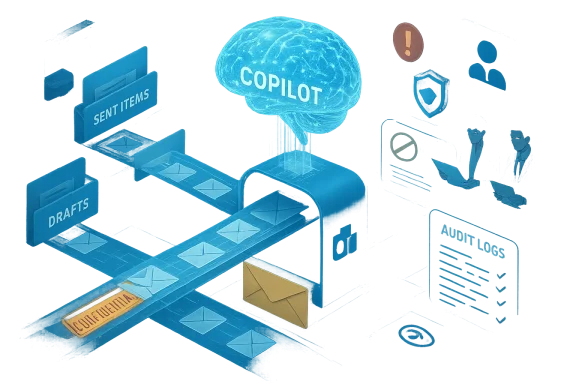
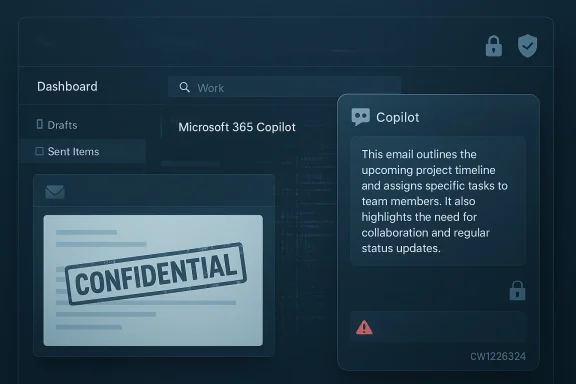
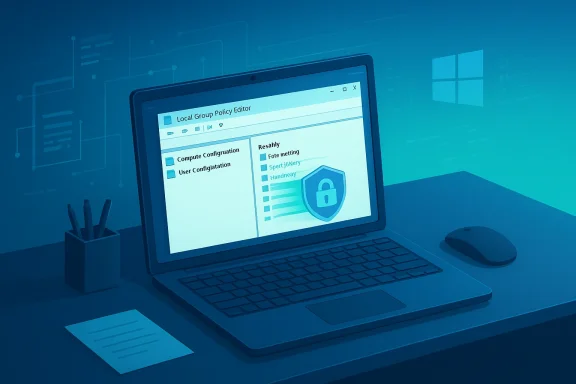
Microsoft’s flagship workplace assistant, Microsoft 365 Copilot Chat, briefly read and summarized email messages that organizations had explicitly labeled Confidential, a logic error the company logged internally as service advisory CW1226324 and that has forced a re‑examination of how embedded generative AI interacts with long‑standing enterprise data controls.
Microsoft 365 Copilot is sold as an AI productivity layer embedded across Outlook, Word, Excel, Teams and other Microsoft 365 surfaces. Its value proposition is simple: let the assistant search, summarize and synthesize content from an employee’s documents, chats and emails so workers get concise answers and drafts without manual search. But that convenience depends on strict adherence to enterprise governance — sensitivity labels, Microsoft Purview controls and Data Loss Prevention (DLP) policies — systems designed to exclude protected data from automated processing and sharing.
In late January 2026 Microsoft detected anomalous behavior: Copilot Chat’s “Work” experience was returning summaries derived from messages in users’ Sent Items and Drafts folders even when those messages carried confidentiality labels and DLP policies that should have excluded them from Copilot processing. The company attributes the root cause to a code/configuration issue thatse specific folders to be “picked up” by Copilot despite protections. The issue was first logged by Microsoft on 21 January 2026 and tracked internally as CW1226324.
In addition to news outlets, community threads and incident compilations in our repository show how Microsoft’s advisory was discussed across tenant administrators and security forums; those internal threads document the timeline, tracking number and the initial mitigation steps taken by admins who observed similar behavior in their tenants. This community evidence reinforces the public reporting and gives practitioners a granular sense of what to audit.
But Microsoft has not publicly released:
Regulatory bodies are responding. The European Parliament’s IT services and other public institutions have recently restricted built‑in AI features on corporate devices while governments and large enterprises reassess the legal and operational implications of routing corporate communications through cloud AI services. Those policy moves reflect institutional risk aversion to uncertain retention, downstream usage and cross‑boundary processing.
For technology leaders, the lesson is clear: embed generative AI with caution, instrument it for auditability from day one, and assume that any automated indexing behavior — however convenient — must be demonstrably governed. The productivity promise of Copilot remains compelling, but the trust that underpins enterprise adoption will be earned only through rigorous engineering, accountable vendor behaviour and disciplined governance.
Source: digit.fyi Microsoft Error Sees Confidential Emails Exposed to AI Tool Copilot
 Background / Overview
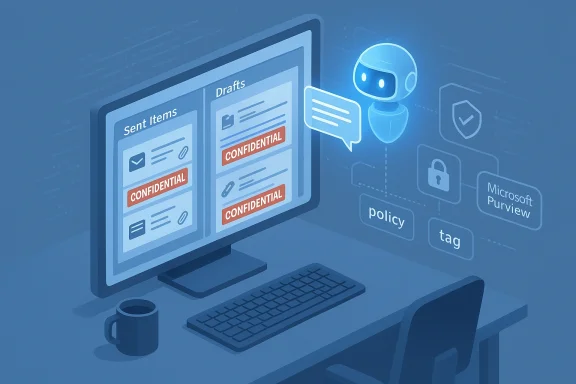
Microsoft 365 Copilot is sold as an AI productivity layer embedded across Outlook, Word, Excel, Teams and other Microsoft 365 surfaces. Its value proposition is simple: let the assistant search, summarize and synthesize content from an employee’s documents, chats and emails so workers get concise answers and drafts without manual search. But that convenience depends on strict adherence to enterprise governance — sensitivity labels, Microsoft Purview controls and Data Loss Prevention (DLP) policies — systems designed to exclude protected data from automated processing and sharing.In late January 2026 Microsoft detected anomalous behavior: Copilot Chat’s “Work” experience was returning summaries derived from messages in users’ Sent Items and Drafts folders even when those messages carried confidentiality labels and DLP policies that should have excluded them from Copilot processing. The company attributes the root cause to a code/configuration issue thatse specific folders to be “picked up” by Copilot despite protections. The issue was first logged by Microsoft on 21 January 2026 and tracked internally as CW1226324.
What exactly happened
The observable behavior
- Copilot Chat’s Work tab returned content and summaries that referenced messages stored in a user’s Drafts and Sent Items folders.
- Those messages were sometimes stamped with sensitivity labels (for example, “Confidential”) and were subject to DLP rules that, by design, should prevent automated ingestion or sharing with AI services.
- In practice, Copilot processed and synthesized the content of those messages, producing summaries that were visible in the Copilot Chat session.
Scope and timing
Microsoft’s advisory and subsequent reporting indicate the anomaly was limitin Sent Items and Drafts — inboxes appeared unaffected — but the practical impact is substantial because Sent and Draft folders often contain final or in‑progress communications, including attachments and confidential content. The bug was detected on 21 January 2026 and Microsoft began rolling out a server‑side remediation in early February 2026; public reporting escalated in mid‑February.Microsoft’s public position
Microsoft said it identified and addressed the issue and asserted that the behavior “did not provide anyone access to information they weren’t already authorised to see,” adding that its access controls and data protection policies “remained intact” even while acknowledging the observed behavior did not match the intended Copilot experience. The company also said a configuration update has been deployed worldwide for enterprise customers and that it has been contacting subsets of affected tenants to validate remediation.Technical anatomy: why a folder‑scoped bug matters
Sensitivity labels, DLP and retrieval pipelines
Sensitivity labels (Microsoft Purview) and DLP policies operate as enforcement points that prevent certain content from being processed, shared, forwarded or indexed by automated systems. Copilot’s value comes from its ability to retrieve and aggregate content from an organization’s graph — emails, documents and chats — and feed that content to an LLM to produce synthesized results. If any link in the retrieval pipeline incorrectly flags items as eligible, the LLM will happily ingest and summarize them. In this incident a code path apparently treated items in Sent and Draft folders differently from other folders, allowing those items into the Copilot processing workflow despite labels and DLP rules.Access controls vs. processing behavior
There’s an important distinction between authorization to read (who may open the message in Outlook) and authorized processing by an AI pipeline. Microsoft’s statement that the bug “did not provide anyone access to information they weren’t already authorised to see” hinges on this: users who could already read those messages in Outlook (for example, the author or recipients) likely could still read them. But Copilot’s automated processing of labeled material — and the appearance of summaries in chat — violates the expectation that automated tools would not index or synthesize protected content. In short: the access control model may have remained intact, while the automated processing policy did not.Why drafts are uniquely sensitive
Drafts often contain unredacted notes, quotes, legal language, or attachments that never made it into the final record. Sent Items contains final outbound communications and attachments. A bug that indexes these two places expands the risk surface dramatically because confidential material never intended for general consumption can be summarized and surfaced inside an AI chat window. That’s why many organizations place special label restrictions on these folders. The failure to honor those restrictions is therefore not merely an implementation bug — it is a governance gap with business, legal and regulatory consequences.Cross‑checks and what the public record shows
Multiple independent reporting outlets — including BleepingComputer, TechCrunch, Tom’s Guide and PCWorld — corroborate the same central facts: the issue was tracked as CW1226324, it affected the Copilot Chat “Work” experience, it allowed emails in Sent Items and Drafts with confidential labels to be incorrectly processed, and Microsoft began deploying a fix in early February. These outlets independently reviewed Microsoft’s advisory and a service health notice, and BleepingComputer published a captured service alert that triggered the reporting.In addition to news outlets, community threads and incident compilations in our repository show how Microsoft’s advisory was discussed across tenant administrators and security forums; those internal threads document the timeline, tracking number and the initial mitigation steps taken by admins who observed similar behavior in their tenants. This community evidence reinforces the public reporting and gives practitioners a granular sense of what to audit.
Immediate impact: what organizations should assume right now
- Assume possible processing. Until a tenant‑level forensic export is provided, compliance teams should assume that some labeled Drafts and Sent Items may have been processed and act accordingly. Microsoft’s public statements do not quantify how many tenants or messages were affected.
- Audit Copilot logs. Administrators should collect Copilot interaction logs, retrieval traces, and tenant audit logs for the window from 21 January 2026 through the early‑February remediation window. These artifacts are the only reliable way to demonstrate which items — if any — were processed and by which Copilot sessions. Our community threads and operational guidance repeatedly call for tenant‑level artifacts; Microsoft’s public remediation note suggests the company is contacting subsets of affected tenants, but a universal forensic export is not yet public.
- Notify affected stakeholders. If your organization hosts regulated data (health, financial, legal, government), legal and compliance teams should evaluate obligations under breach notification laws or contractual commitments. Even if Microsoft’s advisory frames the issue as a bug rather than an exfiltration, regulators and auditors will want to know how controls failed.
- Preserve evidence. Freeze retention and audit settings: ensure logs are retained, do not delete potential evidence, and document the times and scope of remediation actions. For many teams, the hardest part will be bridging the gap between Microsoft’s staged remediation and tenant‑level verification; plan for forensic timelines accordingly.
How Microsoft fixed it — and what remains opaque
Microsoft says the issue was caused by a code issue in the Copilot processing flow that allowed Sent Items and Drafts to be included despite labels, and that a configuration update has been deployed globally for enterprise customers. The company also says it has contacted affected tenants to validate remediation and is continuing to monitor the situation.But Microsoft has not publicly released:
- A tenant‑level map of which customers were affected.
- A complete forensic report showing exactly which messages were processed, summaries generated, or whether any Copilot interactions were logged and retained outside tenant boundaries.
- Assurance about retention/usage of those summaries by backend LLM systems, or whether any of the content was used to update model state. (Microsoft statements emphasize that access controls remained intact, but they do not explicitly state retention or model‑training status.)
A technical and governance checklist for IT and security teams
Below is a practical, prioritized checklist administrators can implement immediately.- Short term (within 24–72 hours)
- 1.) Export and secure all Copilot admin logs and workspace audit trails covering 21 January 2026 through the present. Preserve timestamps and retrieval traces.
- 2.) Verify that the configuration update Microsoft described has reached your tenant. Check the Microsoft 365 Service Health advisory CW1226324 in the admin center and request confirmation screenshots or change‑control evidence from Microsoft support if needed.
- 3.) Temporarily disable Copilot Chat’s Work tab (or set Copilot to opt‑in) for high‑risk users and groups handling regulated data until you complete a forensic review.
- 4.) Inform legal and compliance teams and prepare regulator nif your legal counsel advises that an incident report is required.
- Mid term (within 2–4 weeks)
- Conduct a tenant‑level forensic analysis to identify whether labeled Drafts or Sent Items appear in Copilot retrieval traces.
- Seek Microsoft’s assistance to extract service diagnostics correlated to your tenant, and demand a written attestation of the remediation state.
- Verify DLP policy configuration and test label enforcement specifically for Sent and Drafts folders using controlled test messages.
- Longer term (30–90 days)
- Review contractual protections and service‑level commitments with Microsoft, including obligations to provide forensic artifacts in future incidents.
- Reassess Copilot enablement policy across the enterprise (who can use it, what data the feature can index).
- Build internal AI governance playbooks that include vendor incident response expectations and audit milestones.
Governance lessons: product design, vendor transparency, and risk appetite
This incident illuminates several broader governance challenges:- Product complexity multiplies failure modes. Embedding a cloud LLM in email and document workflows creates new trust boundaries. Systems that previously required explicit data sharing are now feeding content into an automated retrieval layer; that layer must honor existing policy primitives without exception. The Sent/Draft folder distinction shows how a single unchecked code path can break a cornerstone assumption.
- Vendors must provide forensic exports. When enterprise controls fail, affected customers require tenant‑level evidence to meet regulatory and contractual obligations. A fix without a comprehensive forensic artifact leaves many compliance teams exposed. Our community threads and practitioner posts emphasize the same demand repeatedly: a full post‑incident report and tenant artifacts are non‑negotiable for regulated organizations.
- Feature rollout cadence should match governance maturity. Organizations adopting Copilot at scale must align vendor feature‑release velocity with internal governance readiness. When features ship rapidly and are enabled by default, teams risk exposure before policies and auditing catch up. Several security analysts quoted in coverage called for making such features private‑by‑default and opt‑in for regulated users.
The bigger picture: prior incidents and industry context
This is not the first time Copilot’s integrations have generated security headlines. In 2025, a critical information‑disclosure flaw dubbed EchoLeak (CVE‑2025‑32711) was disclosed and patched; that vulnerability illustrated how prompt injection or retrieval pipeline issues can enable sensitive data exfiltration without user interaction. Together with the current CW1226324 advisory, these incidents form a pattern: powerful retrieval+LLM combinations need far more rigorous design and testing than traditional server logic.Regulatory bodies are responding. The European Parliament’s IT services and other public institutions have recently restricted built‑in AI features on corporate devices while governments and large enterprises reassess the legal and operational implications of routing corporate communications through cloud AI services. Those policy moves reflect institutional risk aversion to uncertain retention, downstream usage and cross‑boundary processing.
What vendors and platform teams need to do differently
- Build policy‑first retrieval pipelines. The retrieval layer must apply label and DLP policies before any content reaches an LLM pipeline. This includes explicit folder‑scoped checks and conservative default behaviours for Drafts and Sent Items.
- Offer auditable, tenant‑level retrieval traces and artifact exports on demand. Customers should be able to demand selective forensic evidence tied to incidents. Documentation must exist to show precisely what Copilot saw and when.
- Adopt opt‑in rollout defaults for wide‑reaching AI features that can touch sensitive data. For customers with regulated workloads, features that index corporate communications should be opt‑in and tightly scoped by default.
- Increase transparency around retention and model usage. Customers need clear, contractual guarantees about whether processed content will be retained, logged, or used for model training or telemetry. Ambiguity here undermines trust.
Practical takeaways for business leaders
- Treat the incident as a governance wake‑up call: embedding LLMs across knowledge work multiplies scale and risk.
- Prioritize people and process: update incident response playbooks to include AI retrieval traces, vendor artifact requests, and legal notification timelines.
- Ask vendors for certainties: written attestations, forensic exports, retention policies and change‑control evidence must be contractual prerequisites for enterprise AI services.
- Rebalance convenience and containment: Copilot’s productivity gains are real, but organizations should limit scope — for example, enabling Copilot only for business units with a documented risk acceptance posture and control program.
Conclusion
The CW1226324 advisory is a sharp reminder that the combination of cloud‑scale retrieval and large language models creates new, sometimes unexpected, failure modes. Microsoft’s quick identification and staged remediation of the code/configuration error are necessary first steps, but they are not sufficient on their own. Organizations must demand tenant‑level artifacts, stronger vendor transparency, and stricter defaults for features that touch regulated data stores like Drafts and Sent Items.For technology leaders, the lesson is clear: embed generative AI with caution, instrument it for auditability from day one, and assume that any automated indexing behavior — however convenient — must be demonstrably governed. The productivity promise of Copilot remains compelling, but the trust that underpins enterprise adoption will be earned only through rigorous engineering, accountable vendor behaviour and disciplined governance.
Source: digit.fyi Microsoft Error Sees Confidential Emails Exposed to AI Tool Copilot