

Microsoft’s Copilot story in 2026 is no longer just about writing drafts or summarizing meetings. It now reaches into the everyday friction points that slow work down: reviewing action items, cleaning up documents, wrangling spreadsheets, organizing project material, and automating repetitive office chores. Those smaller gains matter because productivity losses usually come from accumulated micro-tasks, not one giant problem, and Microsoft is clearly positioning Copilot as the layer that smooths them away. The result is a more ambitious productivity pitch — one that is increasingly about reducing context switching, not just generating text.
For years, workplace AI has been marketed in the broadest possible terms: draft this email, summarize that report, brainstorm a presentation, and maybe answer a few questions along the way. That framing was useful when generative AI was still novel, but it undersold the real opportunity. The most valuable productivity tools are often the ones that shave seconds or minutes off tasks people repeat all day, every day. Microsoft’s current Copilot approach reflects that shift, because it is built less around spectacle and more around removing friction from the ordinary workday.
The article that prompted this discussion makes the same case from a user-facing angle. It argues that the biggest productivity drain rarely comes from one dramatic bottleneck, but from a thousand tiny interruptions: checking notes, cleaning up drafts, fixing spreadsheet formulas, moving information between apps, or creating a status update from scattered material. Copilot’s value, in that framing, is not that it does something magical, but that it handles the dull, repetitive work that slows momentum. That is a subtle but important distinction, because small wins compound in a way that flashy features often do not.
Microsoft has been steadily building toward this moment across Windows, Teams, and Microsoft 365. Earlier Copilot capabilities focused heavily on content generation and meeting assistance, while newer experiences increasingly emphasize reuse, editing, automation, and project continuity. In other words, Microsoft is moving Copilot from a chat companion to a work-layer tool that can live inside the apps people already use. That makes it easier to adopt, but it also raises the bar for reliability, security, and trust.
There is also a competitive angle. The productivity market is crowded with point tools that solve one thing well, but Microsoft’s advantage is distribution: Word, Excel, Teams, Outlook, and the broader Microsoft 365 stack already sit at the center of many offices. If Copilot can become the default way people interact with those apps, it could reduce the appeal of separate AI tools and keep more workflows inside Microsoft’s ecosystem. That is why these features matter beyond the headline value of “AI at work.” They are part of a broader battle over where work starts, where it lives, and where it gets finished.
The important shift here is from passive record-keeping to active recall. Instead of forcing users to scrub through a transcript or replay a recording, Copilot helps them jump straight to what they need. That saves time, but it also reduces cognitive drag, which is a more underrated productivity problem. People do their best work when they can re-enter a project quickly, and AI recaps make that easier. Less rummaging, more doing is a fair shorthand for the value proposition.
That distinction is important because many AI tools are good at producing first drafts, but far fewer are genuinely helpful in the messy middle stages of editing. Copilot’s strength is that it lives inside the document itself, where the real work happens. Instead of copying text into a separate chatbot and back again, users can improve the content where it already sits. That lowers friction and keeps momentum intact.
The article also notes that Microsoft has pushed this further by updating Copilot in Excel so it can edit a workbook through chat. That is a bigger deal than it may sound like, because it turns spreadsheet work from a mechanical exercise into a conversation about intent. You describe the change you want, and Copilot handles more of the mechanics. For everyday users, that is the difference between being stuck and being productive.
This is where Copilot starts to feel less like a helper and more like a project environment. Pages and Notebooks give the AI more context to work with, which can improve the quality of the output. They also make it easier for teams to keep a shared understanding of where a project stands. That matters because one of the hidden costs of collaboration is not doing the work — it is finding the latest version of the work.
That is a big step because it lowers the technical skill required to automate work. In older automation systems, users had to think in terms of connectors, triggers, and configuration logic. Microsoft is now trying to make the same outcome accessible through simple instructions. If that works well, it could unlock a class of useful automations that most office workers would actually deploy because they do not require a specialist to set them up.
That matters because productivity is rarely destroyed by one giant task. It is usually eroded by interruptions, context shifts, and small jobs that are too annoying to automate manually. Copilot’s biggest advantage is that it sits inside familiar tools, so users do not have to invent a new workflow just to benefit from AI. That makes adoption easier, and it makes the gains feel more immediate.
There is also a subtle cultural shift underway. People who once viewed AI as a separate destination are now more likely to see it as part of the apps they already use. That lowers the barrier to use, but it also raises expectations. Once users get used to faster recaps and smarter edits, they will expect the tools to be accurate, secure, and reliably embedded in their work. That is a high bar, but it is the right one.
If Microsoft keeps tightening the integration and improving reliability, Copilot could become a default layer for everyday work rather than a feature people remember to try occasionally. That would be a bigger win than any single headline capability, because it would turn AI into a habit instead of a novelty. And in productivity software, habits are where the real lock-in happens.
Source: TechRadar 5 things you didn't know AI could do to help boost your productivity
 Background
For years, workplace AI has been marketed in the broadest possible terms: draft this email, summarize that report, brainstorm a presentation, and maybe answer a few questions along the way. That framing was useful when generative AI was still novel, but it undersold the real opportunity. The most valuable productivity tools are often the ones that shave seconds or minutes off tasks people repeat all day, every day. Microsoft’s current Copilot approach reflects that shift, because it is built less around spectacle and more around removing friction from the ordinary workday.The article that prompted this discussion makes the same case from a user-facing angle. It argues that the biggest productivity drain rarely comes from one dramatic bottleneck, but from a thousand tiny interruptions: checking notes, cleaning up drafts, fixing spreadsheet formulas, moving information between apps, or creating a status update from scattered material. Copilot’s value, in that framing, is not that it does something magical, but that it handles the dull, repetitive work that slows momentum. That is a subtle but important distinction, because small wins compound in a way that flashy features often do not.
Microsoft has been steadily building toward this moment across Windows, Teams, and Microsoft 365. Earlier Copilot capabilities focused heavily on content generation and meeting assistance, while newer experiences increasingly emphasize reuse, editing, automation, and project continuity. In other words, Microsoft is moving Copilot from a chat companion to a work-layer tool that can live inside the apps people already use. That makes it easier to adopt, but it also raises the bar for reliability, security, and trust.
There is also a competitive angle. The productivity market is crowded with point tools that solve one thing well, but Microsoft’s advantage is distribution: Word, Excel, Teams, Outlook, and the broader Microsoft 365 stack already sit at the center of many offices. If Copilot can become the default way people interact with those apps, it could reduce the appeal of separate AI tools and keep more workflows inside Microsoft’s ecosystem. That is why these features matter beyond the headline value of “AI at work.” They are part of a broader battle over where work starts, where it lives, and where it gets finished.
Meeting summaries: turning calls into usable work
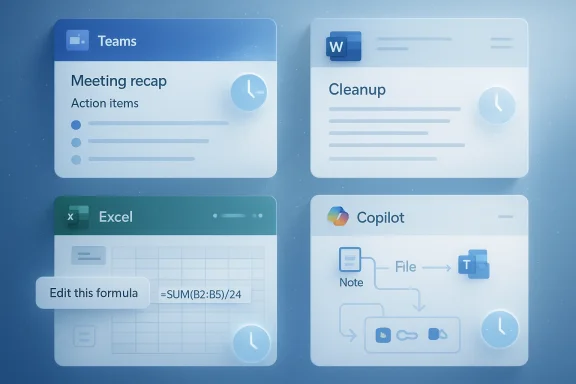
AI meeting summaries are no longer novel, but they are still one of the most practical examples of workplace automation. Microsoft Teams can now do more than transcribe a discussion; Copilot can pull out action points, unanswered questions, and the parts of the conversation that still need follow-up. That matters because the meeting itself is only half the burden. The real productivity cost is often everything that happens afterward: checking notes, confirming decisions, and re-surfacing context for people who missed the call.The important shift here is from passive record-keeping to active recall. Instead of forcing users to scrub through a transcript or replay a recording, Copilot helps them jump straight to what they need. That saves time, but it also reduces cognitive drag, which is a more underrated productivity problem. People do their best work when they can re-enter a project quickly, and AI recaps make that easier. Less rummaging, more doing is a fair shorthand for the value proposition.
Why this matters for teams
This feature is especially useful in fast-moving environments where calendars are packed and meetings are frequent. It can help teams keep pace without turning every recap into a manual admin task. For managers, it also creates a cleaner handoff between discussion and execution, which is where many projects traditionally leak time.- Action points are easier to capture.
- Follow-up questions are easier to surface.
- Absent teammates can catch up faster.
- Decisions are less likely to get buried.
- Weekly meeting load feels less chaotic.
Smarter document editing: fixing the draft, not just creating one
A lot of workplace writing is not about starting from zero. It is about taking a draft that is too long, too flat, too awkward, or simply too rough for other people to read comfortably. Microsoft Copilot inside Word and other Office apps is valuable because it helps with exactly that kind of cleanup. It can rewrite sections, shorten text, adjust tone, and reshape language without forcing users to start over.That distinction is important because many AI tools are good at producing first drafts, but far fewer are genuinely helpful in the messy middle stages of editing. Copilot’s strength is that it lives inside the document itself, where the real work happens. Instead of copying text into a separate chatbot and back again, users can improve the content where it already sits. That lowers friction and keeps momentum intact.
The real editing win
The biggest productivity gain is not that AI can write for you. It is that AI can make mediocre drafts good enough much faster. That changes the amount of energy people spend on polishing wording, trimming repetition, and tuning tone for an audience. In many workplaces, that is the difference between a draft that lingers and a document that gets sent.- Rewrite a paragraph to sound more concise.
- Shorten a long section without losing meaning.
- Adjust tone for executives, customers, or peers.
- Tighten repetitive wording.
- Turn rough notes into a readable structure.
Plain-English spreadsheets: making Excel feel less hostile
Excel has always been essential and slightly intimidating in equal measure. It is a powerful tool until it asks for a formula you do not remember, a chart configuration you have not used in months, or a table that needs translating into something a non-analyst can understand. Copilot addresses that pain point by letting users ask for help in plain English instead of hunting through menus or memorizing syntax.The article also notes that Microsoft has pushed this further by updating Copilot in Excel so it can edit a workbook through chat. That is a bigger deal than it may sound like, because it turns spreadsheet work from a mechanical exercise into a conversation about intent. You describe the change you want, and Copilot handles more of the mechanics. For everyday users, that is the difference between being stuck and being productive.
Why this is more than convenience
The real value is not merely speed. It is lowering the barrier between a question and an answer. Budgets, sales trackers, forecasts, and reporting tables often eat time in little chunks, and those little chunks add up. If AI can remove even part of the friction, the net effect can be substantial across a week or month.- Ask for a formula fix without remembering the syntax.
- Summarize what a data table is showing.
- Ask for a chart adjustment in conversational language.
- Make workbook edits without switching tools.
- Reduce reliance on external tutorials for routine tasks.
Shared project workspaces: fewer loose ends, better context
One of the smartest things Microsoft has done with Copilot is stop treating every response as disposable chat. Copilot Pages lets users turn answers into shared, editable pages, while Copilot Notebooks creates a workspace where chats, files, notes, links, and other project material can live together. That is a meaningful change, because real projects rarely exist in one tidy document. They are usually spread across messages, drafts, spreadsheets, and side notes.This is where Copilot starts to feel less like a helper and more like a project environment. Pages and Notebooks give the AI more context to work with, which can improve the quality of the output. They also make it easier for teams to keep a shared understanding of where a project stands. That matters because one of the hidden costs of collaboration is not doing the work — it is finding the latest version of the work.
Context is the productivity multiplier
Better context means better AI output, but it also means fewer manual handoffs. If teammates can work from the same notebook or shared page, they are less likely to duplicate effort or lose track of decisions. That is particularly valuable in cross-functional projects where information tends to scatter across different tools and teams.- Chats can be preserved as working material.
- Notes and links can be grouped with the project.
- Drafts can evolve in a shared place.
- Team members can align on the same source material.
- Real-time collaboration becomes less fragmented.
Task automation: turning repetitive chores into flows
The most underrated productivity killer in office work is repetition. People spend a shocking amount of time moving information between apps, sending routine reminders, checking status, or assembling standard reports. Microsoft’s Workflows tool inside Microsoft 365 Copilot is aimed directly at those chores, letting users describe a process in natural language and convert it into an automated flow across Microsoft 365 apps such as Outlook and Teams.That is a big step because it lowers the technical skill required to automate work. In older automation systems, users had to think in terms of connectors, triggers, and configuration logic. Microsoft is now trying to make the same outcome accessible through simple instructions. If that works well, it could unlock a class of useful automations that most office workers would actually deploy because they do not require a specialist to set them up.
Small automations, big payoff
The point here is not to replace complex business process tools. It is to remove the annoying little steps that pile up each day. That can be a daily unread-email digest, a routine approval process, or a recurring reminder that updates the right people at the right time. Those are not headline-grabbing automations, but they save real time.- Schedule recurring status checks.
- Pull task or calendar data into a workflow.
- Trigger actions based on events.
- Collect input through Teams.
- Reduce manual follow-up on routine approvals.
Why these features matter more than the usual AI demos
A lot of AI marketing still focuses on the dramatic use cases: writing from scratch, generating slides, or summarizing long documents in seconds. Those are useful, but they are also easy to overstate because they show off what AI can produce rather than how it fits into the day. Microsoft’s more interesting Copilot story in 2026 is that it is learning to help with the less glamorous work that actually eats time.That matters because productivity is rarely destroyed by one giant task. It is usually eroded by interruptions, context shifts, and small jobs that are too annoying to automate manually. Copilot’s biggest advantage is that it sits inside familiar tools, so users do not have to invent a new workflow just to benefit from AI. That makes adoption easier, and it makes the gains feel more immediate.
Consumer and enterprise value are not identical
For consumers and individual professionals, the appeal is speed and convenience. Meeting recaps, document edits, and spreadsheet help make daily work feel lighter and less fragmented. For enterprises, the stakes are broader: consistency, governance, standardization, and the ability to scale productivity improvements across teams.There is also a subtle cultural shift underway. People who once viewed AI as a separate destination are now more likely to see it as part of the apps they already use. That lowers the barrier to use, but it also raises expectations. Once users get used to faster recaps and smarter edits, they will expect the tools to be accurate, secure, and reliably embedded in their work. That is a high bar, but it is the right one.
Strengths and Opportunities
Microsoft’s Copilot approach is strongest when it solves boring but frequent problems. That is exactly what these five features do, and it is why they matter more than a generic “AI can help with productivity” claim. The opportunity for Microsoft is to keep turning hidden friction into visible time savings, while making those gains feel native to the apps people already trust.- Meeting summaries reduce the admin burden after calls.
- Document editing makes rough drafts easier to finish.
- Excel chat editing lowers the skill barrier for spreadsheet work.
- Shared Pages and Notebooks improve project continuity.
- Workflows can automate repetitive office chores.
- Built-in integration reduces app switching and context loss.
- Natural-language control makes advanced tools easier to adopt.
Risks and Concerns
The promise of AI productivity tools is real, but so are the risks. The biggest one is overtrust: users may assume a summary is complete, a rewrite is final, or a spreadsheet change is correct when the model has actually missed something subtle. That is why these tools should be treated as accelerators, not replacements for human review.- Summaries can omit nuance.
- Rewrites can flatten meaning.
- Spreadsheet changes can introduce errors.
- Automation can create new failure points.
- Shared workspaces can increase clutter if poorly managed.
- Feature discovery remains a challenge for many users.
- Enterprises still need governance and approval controls.
Looking Ahead
The next phase of Copilot will likely be judged less by how impressive it looks in demos and more by how often it saves people from small moments of friction. That means Microsoft’s focus on meeting recaps, document cleanup, spreadsheet editing, shared workspaces, and workflow automation is probably the right one. These are the kinds of features that can quietly change the rhythm of a workday.If Microsoft keeps tightening the integration and improving reliability, Copilot could become a default layer for everyday work rather than a feature people remember to try occasionally. That would be a bigger win than any single headline capability, because it would turn AI into a habit instead of a novelty. And in productivity software, habits are where the real lock-in happens.
- Better recap accuracy would increase trust in Teams.
- More flexible editing controls would improve Word adoption.
- Stronger workbook automation would make Excel feel more approachable.
- Cleaner project workspaces would reduce version confusion.
- Easier workflow creation would help users automate more often.
Source: TechRadar 5 things you didn't know AI could do to help boost your productivity
Last edited:
