

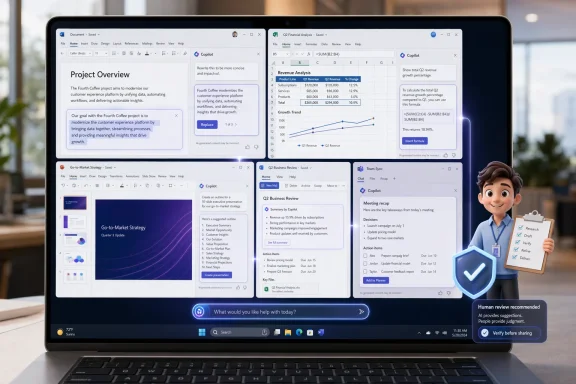
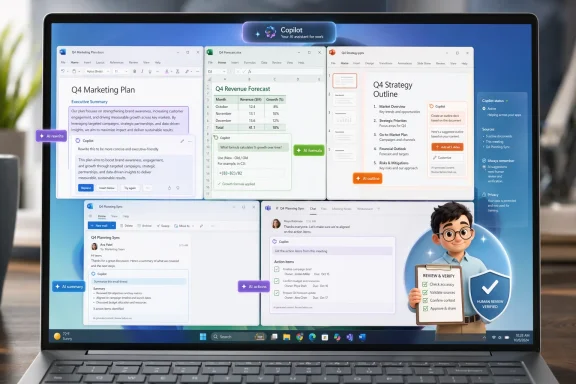
Microsoft’s latest Copilot push in Office is no longer just about drafting emails or summarizing meetings; it is about turning the suite into an AI-driven work layer that can help users move from prompt to finished output with less friction. PCWorld’s review captures the moment well: Copilot can feel like an eager intern—useful, fast, and often directionally right—but still very much in need of supervision, especially when the task shifts from simple drafting to judgment-heavy office work. That tension defines Microsoft’s current strategy: make Copilot deeply useful enough to change habits, while still keeping human review in the loop. ft has spent the last two years trying to reframe Copilot from a chatbot bolted onto productivity software into a core layer inside Windows and Microsoft 365. The company’s goal is not subtle: if users can rely on AI inside Word, Excel, PowerPoint, Outlook, and Teams, then Copilot stops being a novelty and starts becoming infrastructure. That is a much bigger bet than a one-off AI feature launch, because infrastructure changes workflows, procurement decisions, and user expectations.
What makes the PCWor is that it reflects a broader evolution in Microsoft’s product thinking. Copilot is no longer being sold only as a generator of text or slides; it is increasingly presented as an assistant that understands context, can act across apps, and can reduce repetitive work. In the forum’s recent coverage, that shift has been described as Microsoft moving from “ask and answer” toward “delegate and verify,” which is exactly the line between a helper and a coworker.
That transition matters because office sofabout more than just features. Word, Excel, and PowerPoint became dominant not because they were flashy, but because they lived where work happened and became muscle memory for millions of people. Copilot’s success will likely depend on the same principle: usefulness embedded in familiar places is far more powerful than brilliance trapped in a separate app.
At the same time, Microsoft’s AI push has created real user fatiporting notes that Microsoft has had to scale back some Copilot visibility in Windows, while also dealing with backlash over forced installs and overly broad AI integration. That context matters, because it shows the company is balancing two competing instincts: put AI everywhere and stop annoying the user.
The result is a product story that is less about spectacle than about workflow discipegh idea to polished result faster, Microsoft has a compelling case. If it merely adds another layer of branding, prompts, and uncertainty, the platform risks becoming more visible than valuable.
Microsoft’s Copilot effort began with a classic platform ambition: use generative AI to make the existing productihout forcing users to change software. That was always the promise of Microsoft 365 Copilot, which was pitched as context-aware assistance rooted in the user’s files, mail, meetings, and documents. The logic was simple enough: if the AI lives where the work already is, then it can help without requiring an extra mental hop.
Over time, Microsoft expanded Copilot from a single idea into an umbrella brand covering consumer chat, Microsoft 365, Windows, browser features, and ekflows. That broadening gave the company reach, but it also introduced confusion. Users had to figure out which Copilot they were seeing, which features were available under which license, and which features were merely previews versus production-ready tools.
That confusion is one reason PCWorld-style hands-on testing has become so useful. Marketing language tends to collapse every new feature into “AI productivity,” but actual us that matter. A tool that produces a decent first draft is not the same thing as a tool that can reliably handle the next three steps without drifting, hallucinating, or making a subtle but consequential mistake.
The latest wave of Copilot features shows Microsoft leaning harder into agentic workflows. Forum coverage has described Copilot Cowork, Agent Mode, Work IQ, and other newer additions as part oftep execution rather than single-turn chat. That is important because the value proposition changes when the software is no longer just suggesting what to do; it is actually doing parts of it.
This is also where the Office story gets more interesting than the Windows story. In Office, AI can be measured against concrete tasks: write the memo, fix the spreadsheet, generate the deck, summarize the thread, and. The closer Copilot gets to those everyday tasks, the more Microsoft can argue that AI is not an add-on, but a working layer.
That distinction is critical. A standalone chatbot must persuade users to visit it. A Copilot feature inside Excel only has to be good enough to use once, after which convenience can take over. That is why Microsoft is so eager to hide friction inside the worg users to bounce between separate tools.
That is a fair description of most useful AI in 2026. The best systems are not perfect oracles; they are accelerators. They get users moving faster, reduce blank-page anxiety, and handle first passes that would otherwise take a lot of human effort. But as soon as the job becomes more consequential than dll has to validate the result.
PCWorld’s language also reflects a deeper market truth: AI tools are increasingly judged not by their demos, but by how well they survive contact with actual work. A beautifully generated slide deck matters less if it still needs substantial cleanup. A meeting summary matters less if it leaves out the one decision that reallyhy Microsoft’s current Copilot pitch is more modest than some of its earlier hype. The company is not claiming the assistant removes the need for expertise; it is claiming the assistant reduces the mechanical load around expertise. In office work, that is often enough to create real value.
I the task demands judgment, policy awareness, or domain-specific nuance. That is where an “eager intern” can become a liability if the user assumes too much and verifies too little. In other words, the metaphor is useful precisely because it captures both promise and limitation.
That matters because most office writing is not about invention from scratch. It is about refining mediocre drafts until they become readable, aligned, and fit for purpose. Copilot’s value is not that it writes like a novelist; it is that it can help rescue a rough draft from the swamp of half-finished ideas and turn it into something usable faster.
Copilot’s ability to rewrite, tighten, and reframe content in context is therefore more significant than another generic “write me something” prompt. It lowers o move from messy thought to communicable output. That is a meaningful productivity gain, even if it is not the kind that makes for dramatic demo clips.
For many users, Excel is not difficult because the t is difficult because the interface assumes you remember syntax, structure, and logic you may not have used in months. If Copilot can bridge that gap, it makes Excel less intimidating for casual users and faster for people who already know what they want but not always how to express it in formula form.
This is especially valuable for budgets, trackers, forecasts, and recurring reporting. Those tasks involve lots of small adjustments, and small adjustments are exactly where time gets leaked. If Copilot saves even a few mny spreadsheet tasks, the cumulative gain can be substantial.
That is not a failure so much as a reflection of what presentation work actually is. A deck is not just information; it is hierarchy, pacing, brand consistency, and visual narrative. Copilot can accelerate the assembly of still has to care about whether the typography, images, and emphasis actually support the message.
The opportunity here is less about replacing designers and more about raising the floor for everyone else. Not every business user needs a perfect pitch deck. Many need a competent one, quickly. Copilot’s best presentation value is in getting them there sooner.
The reason is sie context, but they also generate administrative drag. Someone has to remember decisions, extract action items, and turn conversation into task-ready language. If Copilot can do that with decent accuracy, it cuts down on one of the most persistent forms of office friction.
The catch is that summaries can be dangerously persuasive. A polished recap may look authoritative even when it oened disagreement. That is why users still need to validate the result, especially when the meeting involved commitments, deadlines, or ambiguous decisions.
This approach gives Copilot more context, but it also gives teams a better place to work. If the AI can keep the project’s thinking, source material, place, then it becomes part of the project history rather than a throwaway interface. That makes the experience feel more durable and less like a temporary chat session.
This is especially useful in cross-functional work, where people often come to the same problem from different angles. Having a single working area does not solve collaboration by itself, but it does make cgmented. That is a meaningful improvement in organizations where information is typically scattered across chats, docs, and inboxes.
The value here is not glamorous. It is the removal of tiny chores: recurring reminders, approval nudges, daily digests, status checks, and routine cross-app handoffs. Those tasks are annoying enough to matter, yet simple enough that many users never automitional workflow tools feel too technical.
This is a classic Microsoft move: make the hard thing look simpler without fully hiding the complexity underneath. That can be risky, because users may overestimate what the automation can safely do. But it can also be transformative if the implementation is carefuurns repeated tasks into simple flows.
The enterprise case is very different. Companies care about consistency, governance, permissions, auditing, and whether the tool is e without creating support problems. In that environment, Copilot is not just a helper; it is a managed capability that can affect data handling, policy compliance, and training overhead.
The strategic implication is that Microsoft has to satisfy both groups without collapsing the product into one size fits none. Too much consumer-style enthusiasm alienates IT teams. Too much enterprise caution makes the product feel cold and slow. The balancing act is one of the defining challenges of Microsoft’s Copilot era.
The opportunity is especially large in boring productivity. That is where Copilot can quietly save time without demanding a new workflow. If Microsoft keeps reducing friction in writing, spreadsheets, moordination, it can create a defensible business case that feels practical rather than speculative.
There is also a growing concern about product clutter. Recent reporting shows Microsoft bder how aggressively it places Copilot inside Windows and adjacent apps, which suggests the company knows that AI visibility can cross the line into annoyance. If users feel AI is being pushed at them rather than helping them, goodwill drops quickly.
Finally, there is a branding risk. Copilot now means too many things to too many people, and that can make the product feel powerful but blurry. If Microsoft cannocoherent, the brand may remain widely visible without becoming widely loved.
It also means Microsoft has to keep tightening the relationship between usefulness and restraint. The company has already shown that too much Copilot visibility can backfire, so the winning version of the product may be the one that feels most naturally embedded rather than most aggressively branded. In other words, the less Copilot behaves like a marketing campaign, the more successful it may become.
Source: PCWorld I put Microsoft's new Copilot tools to work in Office. It performed like an eager intern
What makes the PCWor is that it reflects a broader evolution in Microsoft’s product thinking. Copilot is no longer being sold only as a generator of text or slides; it is increasingly presented as an assistant that understands context, can act across apps, and can reduce repetitive work. In the forum’s recent coverage, that shift has been described as Microsoft moving from “ask and answer” toward “delegate and verify,” which is exactly the line between a helper and a coworker.
That transition matters because office sofabout more than just features. Word, Excel, and PowerPoint became dominant not because they were flashy, but because they lived where work happened and became muscle memory for millions of people. Copilot’s success will likely depend on the same principle: usefulness embedded in familiar places is far more powerful than brilliance trapped in a separate app.
At the same time, Microsoft’s AI push has created real user fatiporting notes that Microsoft has had to scale back some Copilot visibility in Windows, while also dealing with backlash over forced installs and overly broad AI integration. That context matters, because it shows the company is balancing two competing instincts: put AI everywhere and stop annoying the user.
The result is a product story that is less about spectacle than about workflow discipegh idea to polished result faster, Microsoft has a compelling case. If it merely adds another layer of branding, prompts, and uncertainty, the platform risks becoming more visible than valuable.
 Background
Microsoft’s Copilot effort began with a classic platform ambition: use generative AI to make the existing productihout forcing users to change software. That was always the promise of Microsoft 365 Copilot, which was pitched as context-aware assistance rooted in the user’s files, mail, meetings, and documents. The logic was simple enough: if the AI lives where the work already is, then it can help without requiring an extra mental hop.Over time, Microsoft expanded Copilot from a single idea into an umbrella brand covering consumer chat, Microsoft 365, Windows, browser features, and ekflows. That broadening gave the company reach, but it also introduced confusion. Users had to figure out which Copilot they were seeing, which features were available under which license, and which features were merely previews versus production-ready tools.
That confusion is one reason PCWorld-style hands-on testing has become so useful. Marketing language tends to collapse every new feature into “AI productivity,” but actual us that matter. A tool that produces a decent first draft is not the same thing as a tool that can reliably handle the next three steps without drifting, hallucinating, or making a subtle but consequential mistake.
The latest wave of Copilot features shows Microsoft leaning harder into agentic workflows. Forum coverage has described Copilot Cowork, Agent Mode, Work IQ, and other newer additions as part oftep execution rather than single-turn chat. That is important because the value proposition changes when the software is no longer just suggesting what to do; it is actually doing parts of it.
This is also where the Office story gets more interesting than the Windows story. In Office, AI can be measured against concrete tasks: write the memo, fix the spreadsheet, generate the deck, summarize the thread, and. The closer Copilot gets to those everyday tasks, the more Microsoft can argue that AI is not an add-on, but a working layer.
Why Office is the real battleground
Office apps are where Microsoft has the deepest historical moat and the clearest opportunity to convert AI enthusiasm into paid habit. People already trust Word for drafting, Excel for analysis, Powon, and Outlook for communication. That means Copilot does not need to invent a new behavior; it needs to improve the old one.That distinction is critical. A standalone chatbot must persuade users to visit it. A Copilot feature inside Excel only has to be good enough to use once, after which convenience can take over. That is why Microsoft is so eager to hide friction inside the worg users to bounce between separate tools.
What PCWorld’s review is really saying
The “eager intern” analogy is flattering and cautionary at the same time. It suggests Copilot is quick, energetic, and willing to help with a wide range of tasks. It also implies a need for oversight, because interns can be productive while context, and the consequences of a wrong assumption.That is a fair description of most useful AI in 2026. The best systems are not perfect oracles; they are accelerators. They get users moving faster, reduce blank-page anxiety, and handle first passes that would otherwise take a lot of human effort. But as soon as the job becomes more consequential than dll has to validate the result.
PCWorld’s language also reflects a deeper market truth: AI tools are increasingly judged not by their demos, but by how well they survive contact with actual work. A beautifully generated slide deck matters less if it still needs substantial cleanup. A meeting summary matters less if it leaves out the one decision that reallyhy Microsoft’s current Copilot pitch is more modest than some of its earlier hype. The company is not claiming the assistant removes the need for expertise; it is claiming the assistant reduces the mechanical load around expertise. In office work, that is often enough to create real value.
Where the intern metaphor fits best
The anenarios where the task is routine but still cognitively demanding. Copilot can outline a memo, summarize a thread, rephrase a paragraph, or draft a starting point for a deck. Those jobs are tedious enough to benefit from automation, but important enough that a human should still review the result.I the task demands judgment, policy awareness, or domain-specific nuance. That is where an “eager intern” can become a liability if the user assumes too much and verifies too little. In other words, the metaphor is useful precisely because it captures both promise and limitation.
Writing and editing: Copilot’s strongest suit
If there is one area where Copilot conly helpful, it is writing assistance. Microsoft has consistently pushed features that rewrite, shorten, summarize, and adjust tone directly inside Word and related apps, and that kind of in-place editing is where the friction reduction becomes obvious. Users do not have to copy text into a separate chatbthey can work where the draft already lives.That matters because most office writing is not about invention from scratch. It is about refining mediocre drafts until they become readable, aligned, and fit for purpose. Copilot’s value is not that it writes like a novelist; it is that it can help rescue a rough draft from the swamp of half-finished ideas and turn it into something usable faster.
Why editing is more valuable than generation
Pure generation gets attention bediting gets value because it is practical. A lot of professional work starts as notes, fragments, or too-long paragraphs, and the time sink is usually not the idea itself but the polishing.Copilot’s ability to rewrite, tighten, and reframe content in context is therefore more significant than another generic “write me something” prompt. It lowers o move from messy thought to communicable output. That is a meaningful productivity gain, even if it is not the kind that makes for dramatic demo clips.
- It reduces blank-page hesitation.
- It improves draft quality before human review.
- It helps users tune tone for different audiences.
- Itom rough notes to a usable document.
- It keeps the editing process inside the document instead of outside it.
Excel and data work: where Copilot gets more ambitious
Excel is the test case that separates a clever assistant from a genuinely useful productivity partner. Microsoft has pushed Copilot further here by letting users ask lish and, in newer iterations, edit workbooks through chat rather than by navigating menus and formulas manually. That is a much bigger deal than it sounds like because it lowers the cognitive barrier to spreadsheet work.For many users, Excel is not difficult because the t is difficult because the interface assumes you remember syntax, structure, and logic you may not have used in months. If Copilot can bridge that gap, it makes Excel less intimidating for casual users and faster for people who already know what they want but not always how to express it in formula form.
Plain English as a productivity breakthrough
The real breakthrough is not that AI can calculate. Excel already did that. The breakthrough is conversational cformula fix, a chart change, or a data explanation without having to hunt for the exact command. That turns a mechanical workflow into an intent-driven one.This is especially valuable for budgets, trackers, forecasts, and recurring reporting. Those tasks involve lots of small adjustments, and small adjustments are exactly where time gets leaked. If Copilot saves even a few mny spreadsheet tasks, the cumulative gain can be substantial.
- Ask for formula help in natural language.
- Summarize the meaning of a table or chart.
- Adjust a workbook without switching tools.
- Reduce reliance on external tutorials for routine fixes.
- Make spreadsheet work more approachable for non-specialists.
PowerPoint and prfast first drafts, human finish
PowerPoint is another area where Copilot can be surprisingly good at the first 80 percent and less convincing at the final 20 percent. Forum coverage of presentation workflows suggests that Copilot can create structurally sound slide decks quickly, but human design judgmen “acceptable” into “presentable.”That is not a failure so much as a reflection of what presentation work actually is. A deck is not just information; it is hierarchy, pacing, brand consistency, and visual narrative. Copilot can accelerate the assembly of still has to care about whether the typography, images, and emphasis actually support the message.
Why this matters for everyday office users
Many users do not need PowerPoint to become an art studio. They need it to stop being a time sink. If Copilot can produce a clean starting point, users can spend their energy on judgment and message rather than on layout and boilerplate. That alone can shprep time off routine presentations.The opportunity here is less about replacing designers and more about raising the floor for everyone else. Not every business user needs a perfect pitch deck. Many need a competent one, quickly. Copilot’s best presentation value is in getting them there sooner.
- It speeds up slide structure and outlinuces time spent on blank slides.
- It gives users a credible starting point to refine.
- It is most useful for internal and operational decks.
- It still depends on human judgment for polish and brand alignment.
Outlook, summaries, and the meeting problem
Meeting summaries and follow-up drafting are among Copilot’s most important everyday use cases becausel pain point: nobody wants to be the person who manually reconstructs what happened in a meeting. Microsoft’s broader Copilot strategy has leaned hard into this kind of low-drama value, which is often more useful than the flashier writing demos.The reason is sie context, but they also generate administrative drag. Someone has to remember decisions, extract action items, and turn conversation into task-ready language. If Copilot can do that with decent accuracy, it cuts down on one of the most persistent forms of office friction.
summaries
Summaries are not glamorous, but they are foundational. They reduce dependence on the one person who took better notes, and they create a repeatable baseline for follow-up. That improves continuity, especially in large organizations where meetings are constant and memory is often fragmented.The catch is that summaries can be dangerously persuasive. A polished recap may look authoritative even when it oened disagreement. That is why users still need to validate the result, especially when the meeting involved commitments, deadlines, or ambiguous decisions.
- Good summaries reduce administrative overhead.
- Follow-up drafts save time after meetings.
- Action-item extraction improves continuity.
- Users must st completeness.
- The feature is most useful when meetings are frequent and messy.
Shared workspaces, notebooks, and project continuity
One of Microsoft’s smartest Copilot moves has been to stop treating AI as disposable chat. The company has increasingly emphasized shared workspaces such as Copilot Pages and Copilot Noteboes, notes, and links can live together. That is a subtle but powerful shift, because real projects are rarely confined to one clean document.This approach gives Copilot more context, but it also gives teams a better place to work. If the AI can keep the project’s thinking, source material, place, then it becomes part of the project history rather than a throwaway interface. That makes the experience feel more durable and less like a temporary chat session.
Why context beats raw intelligence
Context is the multiplier here. The more Copiloject, the less likely it is to produce generic output that sounds plausible but misses the point. Shared workspaces can also reduce duplicated effort by helping teams see the same sources and decisions.This is especially useful in cross-functional work, where people often come to the same problem from different angles. Having a single working area does not solve collaboration by itself, but it does make cgmented. That is a meaningful improvement in organizations where information is typically scattered across chats, docs, and inboxes.
- Shared pages preserve working context.
- Notebooks keep notes and files together.
- Teams can reduce duplicate effort.
- The AI output improves when the project context improves.
- Collaboration becomes les and forwarding chains.
Workflow automation: the underrated Copilot story
Microsoft’s automation story may be the most underappreciated part of the Copilot transition. Instead of only generating content, Copilot is increasingly being used to create simple workflows across Outlook, Teams, and other Microsofsignificant because much of office work is still eaten up by repetitive coordination, not deep thinking.The value here is not glamorous. It is the removal of tiny chores: recurring reminders, approval nudges, daily digests, status checks, and routine cross-app handoffs. Those tasks are annoying enough to matter, yet simple enough that many users never automitional workflow tools feel too technical.
Why low-friction automation is powerful
By letting users describe a process in natural language, Microsoft lowers the skill barrier to automation. That is important because it means more office workers canwithout becoming workflow engineers. If the feature works reliably, it could unlock a lot of value that previously stayed locked behind complexity.This is a classic Microsoft move: make the hard thing look simpler without fully hiding the complexity underneath. That can be risky, because users may overestimate what the automation can safely do. But it can also be transformative if the implementation is carefuurns repeated tasks into simple flows.
- It reduces manual follow-up and status chasing.
- It lowers the barrier to useful automations.
- It saves small amounts of time that add up quickly.
- It works best in teams already living inside Microsoft 365.
Enterprise vs. consumer impact
The consumer case for Copilot isnce, speed, and reducing annoyance. For an individual user, the tool is valuable if it saves time, lowers effort, and makes documents or spreadsheets easier to finish. The bar is relatively personal: does it help me get my work done faster today?The enterprise case is very different. Companies care about consistency, governance, permissions, auditing, and whether the tool is e without creating support problems. In that environment, Copilot is not just a helper; it is a managed capability that can affect data handling, policy compliance, and training overhead.
Different buyers, different expectations
Consumers tolerate a certain amount of roughls immediate. Enterprises do not. A feature that occasionally misfires can become a support burden if it is rolled out across hundreds or thousands of seats. That is why Microsoft’s enterprise messaging around Copilot increasingly emphasizes controls, permissits.The strategic implication is that Microsoft has to satisfy both groups without collapsing the product into one size fits none. Too much consumer-style enthusiasm alienates IT teams. Too much enterprise caution makes the product feel cold and slow. The balancing act is one of the defining challenges of Microsoft’s Copilot era.
- and convenience.
- Enterprises want governance and predictability.
- Individuals judge Copilot by usefulness.
- IT teams judge it by controllability.
- Microsoft must avoid confusing the two audiences.
Strengths and Opportunities
Microsoft’s strongest position is that Copilot sits inside the work apps people already use every day. That tribution advantage that standalone AI tools have to fight to earn. The more Microsoft improves the quality of those embedded experiences, the more likely it is to convert curiosity into habit.The opportunity is especially large in boring productivity. That is where Copilot can quietly save time without demanding a new workflow. If Microsoft keeps reducing friction in writing, spreadsheets, moordination, it can create a defensible business case that feels practical rather than speculative.
- Deep integration into Word, Excel, PowerPoint, Outlook, and Teams.
- Strong fit for repetitive, everyday office tasks.
- Natural-language interaction lowers the learning curve.
- Shared workspaces improve continuity across pron remove a large amount of low-value coordination.
- Enterprise governance can make deployment more realistic at scale.
- The brand is already familiar, which lowers adoption friction.
Risks and Concerns
Copilot’s biggeste more polished the output looks, the easier it is for users to assume it is correct, complete, or safe to use without verification. That is a serious issue in office settings where one wrong detail in a summary, spreadsheet, or draft can create downstream problems.There is also a growing concern about product clutter. Recent reporting shows Microsoft bder how aggressively it places Copilot inside Windows and adjacent apps, which suggests the company knows that AI visibility can cross the line into annoyance. If users feel AI is being pushed at them rather than helping them, goodwill drops quickly.
The operational downside
Enterprises must also worry about governance ot becomes more agentic, the question shifts from what it can answer to what it can do on a user’s behalf. That raises the stakes around approvals, auditing, and access boundaries, especially in regulated industries or large organizations with strict policy requirements.Finally, there is a branding risk. Copilot now means too many things to too many people, and that can make the product feel powerful but blurry. If Microsoft cannocoherent, the brand may remain widely visible without becoming widely loved.
- Users may overtrust AI-generated output.
- AI prompts can become intrusive if overused.
- Enterprises need stronger governance than consumers.
- Brand confusion can weaken product clarity.
- Automation can create failure points if poorly designed.
- may make adoption uneven.
- Privacy and policy concerns can slow deployment.
Looking Ahead
The next test for Microsoft is not whether Copilot can impress in a demo. It is whether it can keep saving users time in small, ordinary, repeatable ways. That means meeting recaps, editable drafts, formula help, workflow automation, and project continuity will matter more than any single viral feature.It also means Microsoft has to keep tightening the relationship between usefulness and restraint. The company has already shown that too much Copilot visibility can backfire, so the winning version of the product may be the one that feels most naturally embedded rather than most aggressively branded. In other words, the less Copilot behaves like a marketing campaign, the more successful it may become.
What to watch next
- Wider adoption of agentic features in Microsoft 365.
- Whether workbook editing through chat becomes reliable enough for daily use.
- How Microsoft balances automation with human approval checkpoints.
- More clarity on licensing, pricing, and feature tiers.
- Whether Copilot becomes a habit rather than an experiment.
- Continued adjustments to Copilot’s visibility in Windows and Office.
- Enterprise governance tools that make large-scale deployment easier.
Source: PCWorld I put Microsoft's new Copilot tools to work in Office. It performed like an eager intern
Attachments
Last edited:
