

Microsoft Copilot is Microsoft’s AI assistant family for consumers, Windows users, developers, and Microsoft 365 customers, and as of Friday, June 12, 2026, it remains central to the company’s software-and-services strategy across web, Office apps, Teams, Edge, Windows, and business workflows. That dry sentence is the important one: Copilot is no longer a feature Microsoft is experimenting with at the edge of its product line. It is the interface layer Microsoft wants users to meet before they meet the application underneath. The bet is that work, search, coding, and personal computing will become less about opening the right tool and more about asking the right assistant.
The most useful way to understand Copilot in 2026 is not as a chatbot, though chat remains the most obvious surface. Copilot is Microsoft’s attempt to turn AI into a universal front door for its software estate: Microsoft 365, Windows, Edge, Teams, Outlook, GitHub, Dynamics, Power Platform, and the broader Azure stack.
That is why the branding can feel both powerful and maddening. Microsoft Copilot can mean a free consumer assistant on the web, a work chat experience inside Microsoft 365, a paid add-on for Office apps, an enterprise agent platform, a coding assistant, or a Windows-side helper depending on where the user happens to be standing. The ambiguity is not accidental. Microsoft has taken a familiar enterprise playbook and applied it to AI: make the brand broad enough that almost every customer already has “Copilot” before procurement asks what Copilot costs.
The Friday product-in-focus framing gets the broad point right. Copilot is a software and service product, not a one-time launch. It changes because Microsoft changes the models behind it, the products around it, and the licensing path beneath it. A laptop can be reviewed when it ships; Copilot has to be watched like a platform.
That makes it strategically more important than any single AI demo. Microsoft is not merely selling access to a large language model. It is selling AI that sits next to the documents, emails, meetings, source code, customer records, search results, and corporate identity systems that already define daily computing for millions of users.
That pitch remains intact, but the licensing story has become more layered. Microsoft now distinguishes between Copilot Chat included with eligible Microsoft 365 subscriptions, paid Microsoft 365 Copilot experiences that unlock deeper work-data grounding and app integration, and metered or pay-as-you-go agent usage for organizations that want to extend Copilot into custom workflows. The result is familiar to anyone who has managed Microsoft licensing: the entry point is simple, and the cost model becomes more complicated as soon as the product becomes useful.
This is not necessarily cynical. AI inference costs real money, enterprise grounding is not free, and organizations want different levels of data access, compliance, and customization. But it does mean IT departments need to treat Copilot less like an optional app and more like a new cloud service category.
The practical question is no longer “Do we have Copilot?” Many organizations already do, at least in some form. The better question is: which Copilot are users actually touching, what data can it reach, what agents are enabled, and how are costs measured when experimentation turns into habit?
That shift matters because AI tools tend to expand quietly. A pilot begins with a small group of enthusiastic knowledge workers, then spreads through Teams, Outlook, Edge, and the Microsoft 365 Copilot app. By the time finance notices the bill or compliance notices the workflow, the assistant may already have become part of how employees expect to work.
That is the funnel. The prize is work grounding.
A generic AI assistant can summarize public information and draft plausible text. A work-grounded assistant can reason over meetings, email, files, chats, calendars, SharePoint content, and business data the user is allowed to access. That is where the productivity pitch becomes more credible, and also where the security conversation becomes more serious.
Microsoft’s advantage is distribution. It does not need to convince every employee to adopt a new destination. It can put Copilot where employees already live: in the app launcher, in Teams, in Outlook, in Edge, in Windows, and in the browser tab that used to be a search box.
The risk is that users collapse very different modes of AI into one mental bucket. A consumer Copilot session, a protected work chat, an app-embedded Copilot response, and a custom agent using tenant data are not the same thing. They may share a brand, but they do not share identical data boundaries, licensing terms, administrative controls, or audit implications.
For WindowsForum readers running home machines, small businesses, or enterprise fleets, that distinction is not academic. The same Copilot logo can appear in contexts with very different consequences. The responsible posture is to ask what identity is signed in, what data source is being used, and whether the output is grounded in the user’s files, the public web, or a model’s general training.
That is why Copilot’s presence in Microsoft 365 is more important than any single benchmark. Word, Excel, PowerPoint, Outlook, and Teams are not glamorous, but they are deeply embedded. If Copilot can shave minutes from email triage, meeting follow-up, proposal drafting, spreadsheet exploration, or deck assembly, it does not need to feel magical every time. It needs to be convenient enough that users keep trying it.
The same logic applies to Windows. Microsoft has spent decades training users to think of the operating system as the place where files, settings, apps, search, notifications, and workflows converge. Copilot gives the company a way to reframe the operating system around intent rather than navigation.
The challenge is that familiarity cuts both ways. Users tolerate mediocre features inside familiar products, but they also resent when familiar products become noisier. AI assistants can feel helpful when summoned and intrusive when pushed. Microsoft’s job is to make Copilot feel like an accelerator rather than a layer of synthetic enthusiasm spread over every ribbon, sidebar, and search result.
That balance has not always been perfect. Microsoft’s recent history is full of aggressive prompts, defaults, account nudges, Edge promotions, and cloud upsells. Copilot will be judged not only by its intelligence, but by whether Microsoft can resist turning it into yet another surface for coercive product choreography.
In that sense, Copilot is less a robot colleague than a compression engine. It compresses meetings into notes, documents into summaries, threads into decisions, and blank pages into rough drafts. The value comes not from eliminating expertise, but from reducing the tax around expertise.
That distinction matters. The best Copilot deployments will not treat AI output as finished work. They will treat it as a starting point that shortens the distance between intention and review. A lawyer, analyst, engineer, marketer, or support manager still has to know what good looks like. Copilot can accelerate the path to a draft, but it cannot own the judgment that makes the draft trustworthy.
The danger is that organizations buy the productivity story and forget the review cost. A bad summary can be worse than no summary if it causes a team to miss a caveat. A plausible spreadsheet explanation can mislead a manager who does not understand the underlying data. A confident meeting recap can turn ambiguity into false consensus.
That is where governance becomes part of productivity. The companies that get value from Copilot will be the ones that pair access with training, permissions hygiene, data lifecycle discipline, and clear expectations about when AI output must be checked. The companies that simply switch it on and hope for magic may discover that automation can scale confusion as easily as efficiency.
Microsoft’s current Copilot language increasingly emphasizes agents, Copilot Studio, Microsoft 365 extensibility, Graph grounding, and business process automation. This is where Copilot begins to overlap with Power Platform, Dynamics, Azure AI, and GitHub. The assistant becomes not merely a place to ask for help, but a control plane for getting work done.
For IT pros, this is where the architecture becomes interesting and dangerous. Agents need permissions. They need connectors. They need access to data. They need monitoring, lifecycle management, and cost controls. A badly scoped agent can become a tireless intern with too much access and too little judgment.
Microsoft knows this, which is why its enterprise materials increasingly emphasize admin controls, agent management, responsible AI, and data protection. But no vendor document can solve the oldest problem in enterprise computing: most organizations do not fully understand their own permissions.
If a company has years of overshared SharePoint sites, stale Teams workspaces, poorly labeled documents, and inherited access groups, Copilot does not create that mess. It reveals it. An AI assistant that can find and summarize anything a user is allowed to see makes sloppy access control much more visible.
That may turn out to be one of Copilot’s most useful side effects. It gives security and compliance teams a new reason to clean up Microsoft 365 estates that should have been cleaned up years ago. But it also means Copilot readiness is not just a licensing checklist. It is a data governance exam.
That is useful, but it is also generic. Consumers have access to multiple capable AI assistants, and many of them are only a browser tab away. Microsoft’s differentiation is not that Copilot can answer a dinner-planning prompt. It is that Copilot can be woven into the everyday Microsoft account, browser, Office, and Windows experience.
The problem is that consumers are more sensitive to clutter than enterprises are. A business may tolerate an AI sidebar because it comes with compliance controls and productivity promises. A home user may see the same surface as one more icon competing for attention.
Microsoft has to prove that Copilot belongs in Windows without making Windows feel like a billboard for AI. That means tighter, more local, more contextual assistance over time: help with settings, files, troubleshooting, accessibility, device management, and personal workflows. The most valuable Windows Copilot is not the one that chats about the internet. It is the one that understands the machine in front of the user, while respecting boundaries the user can understand.
That is the hard part. The more useful the assistant becomes, the more context it needs. The more context it uses, the more trust it must earn. Windows is personal in a way that a web chatbot is not, and Microsoft cannot assume that enterprise trust automatically transfers to the desktop.
The broader Copilot strategy borrows from that success. Put AI where the work happens. Make it context-aware. Let the user stay in flow. Improve from autocomplete to chat, from chat to multi-step assistance, and from assistance to agentic workflows.
For developers, the agentic turn is especially significant. Microsoft’s Build-era messaging has leaned heavily into native development tools, GitHub Copilot experiences, model context, cloud agents, and AI-assisted application building. The company wants developers not only to use Copilot, but to build for a Copilot-shaped world.
That means Copilot is both product and platform. It is a subscription Microsoft sells, an interface users touch, and a distribution channel for agents and extensions. If Microsoft succeeds, developers will not merely build apps that happen to include AI. They will build tools meant to be invoked by assistants, grounded in enterprise context, and governed through Microsoft identity and admin systems.
This is where the comparison to earlier platform shifts becomes apt. Microsoft once used Windows APIs, Office file formats, Active Directory, Exchange, SharePoint, and Azure services to anchor developers and enterprises. Copilot is the new layer Microsoft wants others to integrate with, extend, and depend on.
Microsoft’s opportunity is enormous because the installed base is enormous. Even modest attach rates across Microsoft 365 commercial seats can produce meaningful revenue. Add agents, Copilot Studio, Azure AI consumption, GitHub Copilot, Dynamics integrations, and partner services, and the product family becomes a cloud growth engine rather than a single SKU.
But AI economics are not the same as classic software economics. Each prompt, file analysis, image generation, and agentic workflow consumes compute. Microsoft can optimize models, route workloads, use its infrastructure scale, and price accordingly, but the marginal cost profile still matters. The company is trying to sell recurring intelligence, and recurring intelligence is more expensive to deliver than a static Office feature.
That tension explains why Copilot pricing and packaging keep evolving. Microsoft needs broad adoption, but it also needs customers to understand that deeper grounding, priority access, agent usage, and enterprise workflows are paid value. If the company gives away too much, it trains users not to pay. If it charges too aggressively, it slows adoption and invites competitors into the gap.
For customers, the practical response is measurement. Copilot should not be evaluated solely by enthusiasm surveys or vendor case studies. Organizations need to look at time saved, output quality, support burden, compliance impact, license utilization, agent consumption, and whether the people receiving licenses actually use them after the novelty fades.
But privacy language is not the same as trust. Trust is built when users understand what is happening. Which data was used? Was the response grounded in company files or public web results? Can the user inspect sources? Did the assistant respect permissions? Was the answer generated, retrieved, inferred, or guessed?
Copilot’s success depends on making those distinctions visible enough without turning every answer into a compliance seminar. Enterprise users need confidence, not just reassurance. Administrators need controls, not just branding. Security teams need logs and policies. Legal teams need clarity about retention, processing, and exposure. End users need to know when to slow down.
The deeper Microsoft embeds Copilot, the more important this becomes. A standalone chatbot can be ignored. An assistant inside Outlook, Teams, Word, Excel, and Windows becomes part of the cognitive furniture of work. Errors, hallucinations, permission surprises, and ambiguous grounding are not edge cases when the assistant is always nearby.
That is why the best version of Copilot is not merely more fluent. It is more accountable. It should show its work where possible, degrade gracefully when it lacks context, and make uncertainty legible. The industry’s first phase rewarded confident demos. The next phase will reward systems that know when confidence is dangerous.
That is why competitors can build impressive assistants and still struggle to dislodge Microsoft inside the enterprise. A CIO does not buy an assistant in isolation. The assistant has to fit into authentication, data loss prevention, retention policies, device management, eDiscovery, audit trails, vendor risk reviews, and budget cycles.
Microsoft can say, with some credibility, that Copilot extends the environment customers already bought. That does not make it automatically superior. It does make it easier to approve, easier to pilot, and easier to scale than a tool that requires a new trust relationship.
This is also why Copilot is strategically defensive. If AI becomes the new front end for work, Microsoft cannot allow another company to own that front end across Office files, Teams meetings, Outlook inboxes, and Windows PCs. Copilot is a growth product, but it is also a moat repair project.
The company has seen this movie before. Browsers, mobile platforms, search engines, and app stores all threatened to mediate Microsoft’s relationship with users. Copilot is Microsoft’s attempt to ensure that the AI assistant layer does not become another place where someone else stands between Microsoft and its customers.
That sprawl is not fatal, but it creates adoption friction. Users do not want to parse SKU theology before asking for help. Administrators do not want five different Copilot control surfaces. Executives do not want a product family so broad that every department claims success and no one can calculate return.
Microsoft has been here before with Teams, Viva, Defender, Purview, Power Platform, and Azure branding. The company often wins through breadth, then spends years making the portfolio understandable. Copilot may follow the same path: first ubiquity, then rationalization.
The risk is that AI assistants depend more heavily on user trust than traditional enterprise software. Confusing names and overlapping experiences are annoying in a portal. They are worse when users are trying to understand what data an assistant can see or why one Copilot can do something another Copilot cannot.
Microsoft’s challenge for the next year is not merely to add features. It is to make Copilot feel coherent. A universal assistant should not require a field guide.
That is a subtle but important change. In the old software cycle, major releases created the rhythm. Windows versions, Office versions, service packs, and hardware launches gave users discrete moments to evaluate change. Copilot belongs to the cloud cadence, where products are continuously adjusted, renamed, expanded, and repriced.
For journalists and IT pros, that makes Copilot harder to cover and harder to manage. There may be no single day when Copilot “ships” in the old sense. Instead, Microsoft adds a feature to Teams, changes a Copilot Chat entitlement, previews an agent capability, updates a consumer app, announces a developer integration, and tweaks admin guidance. The story is cumulative.
The Friday focus also reminds us that AI has become a services business. The value is not in owning a box with AI inside it. The value is in subscribing to a relationship between models, data, apps, and workflow. Microsoft is better positioned than most companies to sell that relationship because so much of the working world already pays Microsoft rent.
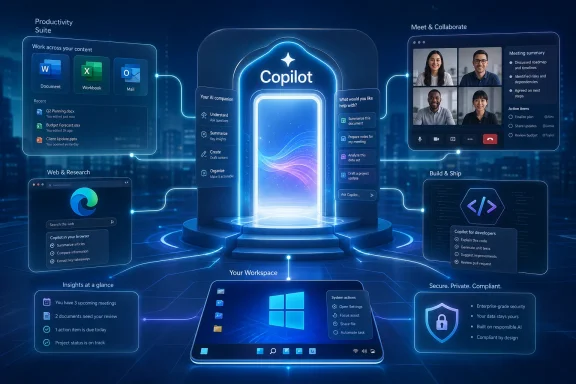 Microsoft Has Turned Copilot Into the Front Door
The most useful way to understand Copilot in 2026 is not as a chatbot, though chat remains the most obvious surface. Copilot is Microsoft’s attempt to turn AI into a universal front door for its software estate: Microsoft 365, Windows, Edge, Teams, Outlook, GitHub, Dynamics, Power Platform, and the broader Azure stack.That is why the branding can feel both powerful and maddening. Microsoft Copilot can mean a free consumer assistant on the web, a work chat experience inside Microsoft 365, a paid add-on for Office apps, an enterprise agent platform, a coding assistant, or a Windows-side helper depending on where the user happens to be standing. The ambiguity is not accidental. Microsoft has taken a familiar enterprise playbook and applied it to AI: make the brand broad enough that almost every customer already has “Copilot” before procurement asks what Copilot costs.
The Friday product-in-focus framing gets the broad point right. Copilot is a software and service product, not a one-time launch. It changes because Microsoft changes the models behind it, the products around it, and the licensing path beneath it. A laptop can be reviewed when it ships; Copilot has to be watched like a platform.
That makes it strategically more important than any single AI demo. Microsoft is not merely selling access to a large language model. It is selling AI that sits next to the documents, emails, meetings, source code, customer records, search results, and corporate identity systems that already define daily computing for millions of users.
The Assistant Is Becoming a Licensing Strategy
The original enterprise pitch for Microsoft 365 Copilot was straightforward: pay for an AI layer that works inside the Office apps employees already use. Word can draft and rewrite. Excel can help analyze. PowerPoint can generate decks. Outlook can summarize threads. Teams can recap meetings and surface action items.That pitch remains intact, but the licensing story has become more layered. Microsoft now distinguishes between Copilot Chat included with eligible Microsoft 365 subscriptions, paid Microsoft 365 Copilot experiences that unlock deeper work-data grounding and app integration, and metered or pay-as-you-go agent usage for organizations that want to extend Copilot into custom workflows. The result is familiar to anyone who has managed Microsoft licensing: the entry point is simple, and the cost model becomes more complicated as soon as the product becomes useful.
This is not necessarily cynical. AI inference costs real money, enterprise grounding is not free, and organizations want different levels of data access, compliance, and customization. But it does mean IT departments need to treat Copilot less like an optional app and more like a new cloud service category.
The practical question is no longer “Do we have Copilot?” Many organizations already do, at least in some form. The better question is: which Copilot are users actually touching, what data can it reach, what agents are enabled, and how are costs measured when experimentation turns into habit?
That shift matters because AI tools tend to expand quietly. A pilot begins with a small group of enthusiastic knowledge workers, then spreads through Teams, Outlook, Edge, and the Microsoft 365 Copilot app. By the time finance notices the bill or compliance notices the workflow, the assistant may already have become part of how employees expect to work.
Free Chat Is the Funnel, Work Data Is the Prize
Microsoft’s most consequential Copilot move has been to normalize AI chat as something included rather than something exotic. Copilot Chat gives business users a relatively low-friction way to ask web-grounded questions, generate content, use files, create images, and interact with Microsoft-managed AI under enterprise protections when signed in with an organizational account.That is the funnel. The prize is work grounding.
A generic AI assistant can summarize public information and draft plausible text. A work-grounded assistant can reason over meetings, email, files, chats, calendars, SharePoint content, and business data the user is allowed to access. That is where the productivity pitch becomes more credible, and also where the security conversation becomes more serious.
Microsoft’s advantage is distribution. It does not need to convince every employee to adopt a new destination. It can put Copilot where employees already live: in the app launcher, in Teams, in Outlook, in Edge, in Windows, and in the browser tab that used to be a search box.
The risk is that users collapse very different modes of AI into one mental bucket. A consumer Copilot session, a protected work chat, an app-embedded Copilot response, and a custom agent using tenant data are not the same thing. They may share a brand, but they do not share identical data boundaries, licensing terms, administrative controls, or audit implications.
For WindowsForum readers running home machines, small businesses, or enterprise fleets, that distinction is not academic. The same Copilot logo can appear in contexts with very different consequences. The responsible posture is to ask what identity is signed in, what data source is being used, and whether the output is grounded in the user’s files, the public web, or a model’s general training.
Microsoft Is Selling Familiarity, Not Just Intelligence
The AI market often talks as if the best model wins. Microsoft behaves as if the best distribution wins, provided the model is good enough and improving quickly enough. Copilot’s strongest commercial argument is not that it always produces the smartest answer. It is that it appears inside the software where work already happens.That is why Copilot’s presence in Microsoft 365 is more important than any single benchmark. Word, Excel, PowerPoint, Outlook, and Teams are not glamorous, but they are deeply embedded. If Copilot can shave minutes from email triage, meeting follow-up, proposal drafting, spreadsheet exploration, or deck assembly, it does not need to feel magical every time. It needs to be convenient enough that users keep trying it.
The same logic applies to Windows. Microsoft has spent decades training users to think of the operating system as the place where files, settings, apps, search, notifications, and workflows converge. Copilot gives the company a way to reframe the operating system around intent rather than navigation.
The challenge is that familiarity cuts both ways. Users tolerate mediocre features inside familiar products, but they also resent when familiar products become noisier. AI assistants can feel helpful when summoned and intrusive when pushed. Microsoft’s job is to make Copilot feel like an accelerator rather than a layer of synthetic enthusiasm spread over every ribbon, sidebar, and search result.
That balance has not always been perfect. Microsoft’s recent history is full of aggressive prompts, defaults, account nudges, Edge promotions, and cloud upsells. Copilot will be judged not only by its intelligence, but by whether Microsoft can resist turning it into yet another surface for coercive product choreography.
The Enterprise Case Is Strongest Where Work Is Already Messy
Copilot’s most convincing use cases are not glamorous. They are the places where knowledge work is already inefficient: catching up on meetings, summarizing sprawling threads, drafting first versions, extracting action items, finding documents, comparing policies, and turning semi-structured information into something usable.In that sense, Copilot is less a robot colleague than a compression engine. It compresses meetings into notes, documents into summaries, threads into decisions, and blank pages into rough drafts. The value comes not from eliminating expertise, but from reducing the tax around expertise.
That distinction matters. The best Copilot deployments will not treat AI output as finished work. They will treat it as a starting point that shortens the distance between intention and review. A lawyer, analyst, engineer, marketer, or support manager still has to know what good looks like. Copilot can accelerate the path to a draft, but it cannot own the judgment that makes the draft trustworthy.
The danger is that organizations buy the productivity story and forget the review cost. A bad summary can be worse than no summary if it causes a team to miss a caveat. A plausible spreadsheet explanation can mislead a manager who does not understand the underlying data. A confident meeting recap can turn ambiguity into false consensus.
That is where governance becomes part of productivity. The companies that get value from Copilot will be the ones that pair access with training, permissions hygiene, data lifecycle discipline, and clear expectations about when AI output must be checked. The companies that simply switch it on and hope for magic may discover that automation can scale confusion as easily as efficiency.
Agents Move Copilot From Assistant to Actor
The most important evolution in Microsoft’s AI strategy is the move from chat to agents. A chat assistant answers. An agent can be instructed to perform a task, consult tools, use organizational knowledge, and potentially act across systems. That is a much bigger claim.Microsoft’s current Copilot language increasingly emphasizes agents, Copilot Studio, Microsoft 365 extensibility, Graph grounding, and business process automation. This is where Copilot begins to overlap with Power Platform, Dynamics, Azure AI, and GitHub. The assistant becomes not merely a place to ask for help, but a control plane for getting work done.
For IT pros, this is where the architecture becomes interesting and dangerous. Agents need permissions. They need connectors. They need access to data. They need monitoring, lifecycle management, and cost controls. A badly scoped agent can become a tireless intern with too much access and too little judgment.
Microsoft knows this, which is why its enterprise materials increasingly emphasize admin controls, agent management, responsible AI, and data protection. But no vendor document can solve the oldest problem in enterprise computing: most organizations do not fully understand their own permissions.
If a company has years of overshared SharePoint sites, stale Teams workspaces, poorly labeled documents, and inherited access groups, Copilot does not create that mess. It reveals it. An AI assistant that can find and summarize anything a user is allowed to see makes sloppy access control much more visible.
That may turn out to be one of Copilot’s most useful side effects. It gives security and compliance teams a new reason to clean up Microsoft 365 estates that should have been cleaned up years ago. But it also means Copilot readiness is not just a licensing checklist. It is a data governance exam.
Windows Users Get the Most Confusing Version of the Pitch
For ordinary Windows users, Copilot can be harder to pin down than it should be. There is Copilot on the web, Copilot in Edge, Copilot in Windows-adjacent experiences, Copilot in Microsoft 365 consumer subscriptions, and Copilot branding across an expanding set of AI-powered features. Microsoft’s consumer pitch is help with writing, planning, summarizing, searching, creating images, and getting answers.That is useful, but it is also generic. Consumers have access to multiple capable AI assistants, and many of them are only a browser tab away. Microsoft’s differentiation is not that Copilot can answer a dinner-planning prompt. It is that Copilot can be woven into the everyday Microsoft account, browser, Office, and Windows experience.
The problem is that consumers are more sensitive to clutter than enterprises are. A business may tolerate an AI sidebar because it comes with compliance controls and productivity promises. A home user may see the same surface as one more icon competing for attention.
Microsoft has to prove that Copilot belongs in Windows without making Windows feel like a billboard for AI. That means tighter, more local, more contextual assistance over time: help with settings, files, troubleshooting, accessibility, device management, and personal workflows. The most valuable Windows Copilot is not the one that chats about the internet. It is the one that understands the machine in front of the user, while respecting boundaries the user can understand.
That is the hard part. The more useful the assistant becomes, the more context it needs. The more context it uses, the more trust it must earn. Windows is personal in a way that a web chatbot is not, and Microsoft cannot assume that enterprise trust automatically transfers to the desktop.
Developers Are Seeing the Clearest Version of the Future
GitHub Copilot has always been the cleaner story. Developers write code, Copilot suggests code, and the benefit is visible in the editor. There are plenty of hard questions around correctness, licensing, security, dependency quality, and overreliance, but the workflow is obvious.The broader Copilot strategy borrows from that success. Put AI where the work happens. Make it context-aware. Let the user stay in flow. Improve from autocomplete to chat, from chat to multi-step assistance, and from assistance to agentic workflows.
For developers, the agentic turn is especially significant. Microsoft’s Build-era messaging has leaned heavily into native development tools, GitHub Copilot experiences, model context, cloud agents, and AI-assisted application building. The company wants developers not only to use Copilot, but to build for a Copilot-shaped world.
That means Copilot is both product and platform. It is a subscription Microsoft sells, an interface users touch, and a distribution channel for agents and extensions. If Microsoft succeeds, developers will not merely build apps that happen to include AI. They will build tools meant to be invoked by assistants, grounded in enterprise context, and governed through Microsoft identity and admin systems.
This is where the comparison to earlier platform shifts becomes apt. Microsoft once used Windows APIs, Office file formats, Active Directory, Exchange, SharePoint, and Azure services to anchor developers and enterprises. Copilot is the new layer Microsoft wants others to integrate with, extend, and depend on.
The Stock Price Is Less Interesting Than the Margin Question
The source article notes Microsoft shares trading at $481.07 on Nasdaq on June 11, 2026. That number is a snapshot, not a thesis. The more interesting financial question is whether Copilot becomes a high-margin software expansion or a costly AI feature that customers expect to be bundled.Microsoft’s opportunity is enormous because the installed base is enormous. Even modest attach rates across Microsoft 365 commercial seats can produce meaningful revenue. Add agents, Copilot Studio, Azure AI consumption, GitHub Copilot, Dynamics integrations, and partner services, and the product family becomes a cloud growth engine rather than a single SKU.
But AI economics are not the same as classic software economics. Each prompt, file analysis, image generation, and agentic workflow consumes compute. Microsoft can optimize models, route workloads, use its infrastructure scale, and price accordingly, but the marginal cost profile still matters. The company is trying to sell recurring intelligence, and recurring intelligence is more expensive to deliver than a static Office feature.
That tension explains why Copilot pricing and packaging keep evolving. Microsoft needs broad adoption, but it also needs customers to understand that deeper grounding, priority access, agent usage, and enterprise workflows are paid value. If the company gives away too much, it trains users not to pay. If it charges too aggressively, it slows adoption and invites competitors into the gap.
For customers, the practical response is measurement. Copilot should not be evaluated solely by enthusiasm surveys or vendor case studies. Organizations need to look at time saved, output quality, support burden, compliance impact, license utilization, agent consumption, and whether the people receiving licenses actually use them after the novelty fades.
The Privacy Story Is Better Than the Trust Story
Microsoft has a stronger privacy and compliance story than many AI rivals because it can tie Copilot to Microsoft 365 identity, tenant boundaries, enterprise data protection, admin controls, and existing contractual commitments. That matters. Businesses do not want employees pasting sensitive data into random web tools, and Microsoft has positioned Copilot as the safer, managed alternative.But privacy language is not the same as trust. Trust is built when users understand what is happening. Which data was used? Was the response grounded in company files or public web results? Can the user inspect sources? Did the assistant respect permissions? Was the answer generated, retrieved, inferred, or guessed?
Copilot’s success depends on making those distinctions visible enough without turning every answer into a compliance seminar. Enterprise users need confidence, not just reassurance. Administrators need controls, not just branding. Security teams need logs and policies. Legal teams need clarity about retention, processing, and exposure. End users need to know when to slow down.
The deeper Microsoft embeds Copilot, the more important this becomes. A standalone chatbot can be ignored. An assistant inside Outlook, Teams, Word, Excel, and Windows becomes part of the cognitive furniture of work. Errors, hallucinations, permission surprises, and ambiguous grounding are not edge cases when the assistant is always nearby.
That is why the best version of Copilot is not merely more fluent. It is more accountable. It should show its work where possible, degrade gracefully when it lacks context, and make uncertainty legible. The industry’s first phase rewarded confident demos. The next phase will reward systems that know when confidence is dangerous.
Microsoft’s Real Advantage Is the Boring Plumbing
The flashiest AI stories are about models. Microsoft’s advantage is the boring plumbing: identity, documents, permissions, compliance, deployment channels, admin centers, endpoint management, and procurement relationships. Copilot rides on all of it.That is why competitors can build impressive assistants and still struggle to dislodge Microsoft inside the enterprise. A CIO does not buy an assistant in isolation. The assistant has to fit into authentication, data loss prevention, retention policies, device management, eDiscovery, audit trails, vendor risk reviews, and budget cycles.
Microsoft can say, with some credibility, that Copilot extends the environment customers already bought. That does not make it automatically superior. It does make it easier to approve, easier to pilot, and easier to scale than a tool that requires a new trust relationship.
This is also why Copilot is strategically defensive. If AI becomes the new front end for work, Microsoft cannot allow another company to own that front end across Office files, Teams meetings, Outlook inboxes, and Windows PCs. Copilot is a growth product, but it is also a moat repair project.
The company has seen this movie before. Browsers, mobile platforms, search engines, and app stores all threatened to mediate Microsoft’s relationship with users. Copilot is Microsoft’s attempt to ensure that the AI assistant layer does not become another place where someone else stands between Microsoft and its customers.
The Weakness Is Product Sprawl
The same breadth that gives Copilot its power also creates confusion. Microsoft has Copilot-branded products for consumers, workers, developers, security teams, sales teams, service teams, finance teams, and low-code builders. Some are assistants. Some are agents. Some are app features. Some are paid add-ons. Some are included. Some are metered. Some depend on Microsoft 365 subscriptions. Some belong more naturally to Azure or GitHub.That sprawl is not fatal, but it creates adoption friction. Users do not want to parse SKU theology before asking for help. Administrators do not want five different Copilot control surfaces. Executives do not want a product family so broad that every department claims success and no one can calculate return.
Microsoft has been here before with Teams, Viva, Defender, Purview, Power Platform, and Azure branding. The company often wins through breadth, then spends years making the portfolio understandable. Copilot may follow the same path: first ubiquity, then rationalization.
The risk is that AI assistants depend more heavily on user trust than traditional enterprise software. Confusing names and overlapping experiences are annoying in a portal. They are worse when users are trying to understand what data an assistant can see or why one Copilot can do something another Copilot cannot.
Microsoft’s challenge for the next year is not merely to add features. It is to make Copilot feel coherent. A universal assistant should not require a field guide.
The Friday Snapshot Says More Than It Intends
The ad hoc Friday focus article is thin, but it captures something real: Copilot has become a standing Microsoft product, not an occasional announcement. It is now the kind of thing that can be featured on a quiet news day because it is always in motion.That is a subtle but important change. In the old software cycle, major releases created the rhythm. Windows versions, Office versions, service packs, and hardware launches gave users discrete moments to evaluate change. Copilot belongs to the cloud cadence, where products are continuously adjusted, renamed, expanded, and repriced.
For journalists and IT pros, that makes Copilot harder to cover and harder to manage. There may be no single day when Copilot “ships” in the old sense. Instead, Microsoft adds a feature to Teams, changes a Copilot Chat entitlement, previews an agent capability, updates a consumer app, announces a developer integration, and tweaks admin guidance. The story is cumulative.
The Friday focus also reminds us that AI has become a services business. The value is not in owning a box with AI inside it. The value is in subscribing to a relationship between models, data, apps, and workflow. Microsoft is better positioned than most companies to sell that relationship because so much of the working world already pays Microsoft rent.
The Copilot Bet Comes Down to Six Concrete Tests
The next phase of Copilot will not be judged by keynote language. It will be judged by whether the product becomes useful enough, governed enough, and understandable enough to survive daily contact with real users.- Copilot is now a product family rather than a single assistant, and users should assume that capabilities, data access, and licensing vary by context.
- Microsoft 365 Copilot’s strongest business case remains work-data grounding inside familiar apps such as Word, Excel, Outlook, PowerPoint, and Teams.
- Copilot Chat lowers the adoption barrier, but organizations still need to decide when paid licenses or metered agents make financial and operational sense.
- Agentic features raise the stakes because they move Copilot from answering questions toward performing tasks across tools and data sources.
- Security teams should treat Copilot readiness as a permissions, data governance, and auditability project, not merely an AI enablement project.
- Microsoft’s greatest advantage is distribution through existing software, but its greatest product risk is confusing users with too many Copilot-branded experiences.
References
- Primary source: AD HOC NEWS
Published: 2026-06-12T12:00:07.467968
Microsoft Copilot: A Friday focus on Microsofts AI assistant
Microsoft Copilot remains one of Microsoft's most visible software offerings, blending AI chat, work tools, and web-connected assistance. On Friday, it stands out as a software and service product built for both consumers and businesses.www.ad-hoc-news.de - Related coverage: windowscentral.com
Build 2026 only makes sense if you remember Build 2025: a look back at the groundwork of the "age of AI agents" | Windows Central
Microsoft’s latest announcements build directly on the architecture it introduced a year ago.www.windowscentral.com - Related coverage: techradar.com
From Quantum to Containers - 4 big things you might have missed at Microsoft Build 2026 | TechRadar
We round up some of the other major news from Microsoft Build 2026www.techradar.com - Related coverage: tomsguide.com
Vibe coding is coming to Windows — how Microsoft Copilot turns anyone into a creator | Tom's Guide
Vibe coding is going mainstream and Microsoft is in a unique position to capitalize with Copilot integrating itself across the Windows platform.www.tomsguide.com - Official source: blogs.microsoft.com
Announcing Copilot leadership update - The Official Microsoft Blog
Satya Nadella, Chairman and CEO, and Mustafa Suleyman, Executive Vice President and CEO of Microsoft AI, shared the below communications with Microsoft employees this morning. SATYA NADELLA MESSAGE I want to share two org changes we’re making to our Copilot org and superintelligence effort. It’s...blogs.microsoft.com - Official source: microsoft.com
Microsoft 365 Copilot Plans and Pricing—AI for Business | Microsoft 365
Explore AI subscription plans for Microsoft 365 Copilot—AI designed to enhance productivity. Discover Copilot pricing options tailored to your business needs.www.microsoft.com
- Official source: news.microsoft.com
Microsoft Build 2026
 news.microsoft.com
- Official source: support.microsoft.com
Copilot in Microsoft 365 Personal, Family, and Premium | Microsoft Support
Copilot is now in Microsoft 365 Personal and Family subscription plans. Get the details about what you'll see in your AI-powered productivity suite.support.microsoft.com - Official source: learn.microsoft.com
Decide which Copilot is right for you | Microsoft Learn
Microsoft has several Copilot AI virtual assistants, including Microsoft 365 Copilot Chat, Microsoft 365 Copilot, Microsoft Copilot, Microsoft Security Copilot, GitHub Copilot, and Copilot Studio. Decide which Copilot is right for you and your organization. Which Copilot is right for me?learn.microsoft.com - Official source: developer.microsoft.com
Microsoft Build 2026 recap: vision, launches, and top sessions - Microsoft for Developers
Catch up on Microsoft Build 2026 with the vision lead-off, top developer announcements, and must-watch sessions across the Microsoft developer ecosystem.developer.microsoft.com - Related coverage: atonementlicensing.com
Microsoft 365 Copilot Pricing 2026: True Cost Decoded
Microsoft 365 Copilot lists at $30 per user per month. Realised cost lands at $66 to $87 after the E3 or E5 prerequisite. Get the 2026 pricing math.atonementlicensing.com
- Official source: info.microsoft.com
