

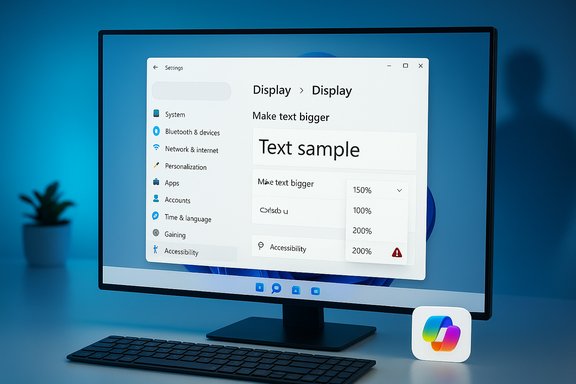
Microsoft’s latest social-media push for a voice‑controlled Windows — a short clip showing tech creator Judner Aura (UrAvgConsumer) asking Copilot to “make the text bigger” — has become a high‑visibility case study in how not to demo an AI assistant: instead of taking action or reliably guiding the user, the on‑screen Copilot points to the wrong path and recommends a scale the PC already had selected, forcing manual intervention and drawing swift criticism from the tech community.
Background / Overview
Microsoft has pushed Copilot from a sidebar tool into the fabric of Windows 11 with three headline capabilities: Copilot Voice (the opt‑in wake phrase “Hey, Copilot”), Copilot Vision (permissioned screen awareness and OCR), and Copilot Actions (experimental agentic automations that can perform multi‑step tasks under explicit permission). These features are being rolled out in stages — starting in Insider builds and the Copilot app — and the company emphasizes opt‑in controls, visible UI cues, and a hybrid local/cloud model for processing. The recent social clip Microsoft posted — designed to demonstrate the productivity promise of hands‑free Windows control — instead exposed several practical gaps users and admins have been warning about: mistaken guidance, poor contextual reasoning, and a demo that favors showing rather than doing. Independent coverage and community responses picked up the thread immediately, with outlets noting the assistant’s sluggish, step‑by‑step guidance and users asking why the assistant didn’t simply change the setting itself.What the clip actually showed
- The clip opens with the creator summoning Copilot by saying, “Hey, Copilot,” and asking to make text on the screen larger.
- Copilot guides the user to the Display settings rather than the Accessibility section — a valid path, but not the most direct for font or text scaling aimed at assistive needs.
- When asked what scale to choose, Copilot recommends 150% — the same value the PC is already using. The creator detects the mismatch and manually sets the display scale to 200%, ending the task by hand.
- The assistant’s route selection (Display vs. Accessibility) missed a better option.
- The assistant failed to read the current setting or verify state before proposing a change.
- The assistant did not act on behalf of the user even though the UI & agentic plumbing (Copilot Actions) is explicitly designed to carry out multi‑step tasks when permitted.
Why the ad misfired: a technical and UX diagnosis
1) State blindness: not checking the current setting
A core expectation of a helpful assistant is that it inspects the current state before suggesting actions. In the clip, Copilot proposes a value it could have verified visually or by reading the Settings window before recommending it — a cheap but critical check that was missed. That’s not just a cosmetic bug; it’s a sign the agent’s observation pipeline — combining Copilot Vision, UI parsing, and settings interrogation — didn’t complete a pre‑action validation. Independent documentation shows that Vision can extract text and identify UI elements but requires explicit session permission and may be conservative in what it examines; early previews also run Actions in a sandboxed Agent Workspace where every step is visible and interruption is allowed. That containment is great for safety, but it can also lead to conservative behavior when the assistant is unsure.2) Teaching versus doing: design tradeoffs in agentic systems
Microsoft’s current Copilot Actions iterate on a visible, step‑by‑step model where agents show progress and request explicit permissions before taking sensitive steps. That design deliberately favors transparency and user control over silent automation — a prudent approach for early rollouts, particularly in enterprise contexts — but it makes the assistant feel less “helpful” for power users who expect the agent to perform simple tasks on their behalf. The demo reflects this tension: Copilot walks the user through menus rather than executing the change automatically. For many users this will feel like a time sink rather than a time saver.3) Demo scripting and production choices amplified the problem
A staged promotional video is a production exercise, not a live test. Microsoft and its creative partners had every chance to re‑shoot or correct the interaction before posting. The decision to publish a clip that includes a basic misstep raises two possibilities: either the company intentionally left the error in to show authenticity (which backfired), or the demo pipeline failed to include verification steps. The result was a high‑visibility example of the assistant’s current brittleness, magnified by the platform’s reach. Coverage across outlets and social replies made that clear within hours of release.The broader technical context: what Copilot can and cannot do today
Copilot Voice: the wake‑word and local spotting
Microsoft built a small, on‑device wake‑word spotter for “Hey, Copilot” so the phrase can be detected without streaming all audio to the cloud; once the wake word is detected, heavier speech processing typically occurs in the cloud unless the machine is a Copilot+ PC capable of more local inference. The feature is opt‑in, off by default, and limited to unlocked devices. That architecture helps privacy and battery life in principle, but it also introduces latency and cloud dependence for the substantive part of the interaction.Copilot Vision: permissioned screen understanding
Copilot Vision can be granted access to windows or regions of the screen and it can run OCR, identify UI elements, and extract useful structures (tables, lists, forms). Vision is session‑bound and permissioned, which mitigates persistent surveillance concerns — but it also adds friction: the user must explicitly grant access to the appropriate window or region before the agent can analyze it. That friction explains why a short ad can omit critical steps and make the experience seem smoother than real life.Copilot Actions: agentic automations in a sandbox
Copilot Actions are the most consequential piece: short agent scripts that can execute clicks, type, navigate menus, and operate across local and web apps when authorized. Actions run inside a visible Agent Workspace and are designed to request least‑privilege access for sensitive steps. That sandboxing choice is a safety win, but it also means early agent behavior can be conservative, requiring explicit approval and user confirmation that slows task completion. The feature is intentionally experimental and off by default while Microsoft tunes guardrails.Strengths Microsoft has built into this model
- Privacy-first opt‑in model: Wake‑word detection runs locally and sessions require explicit permission; Vision and Actions are session‑bound and visible, which reduces the chance of stealthy ingestion.
- Safety via transparency: Agents show step‑by‑step progress in a visible workspace and require explicit elevation for sensitive tasks — a model that reduces silent, unreviewed automation.
- Accessibility potential: Voice and screen awareness genuinely expand access for users with mobility or vision impairments — when the system is accurate, it can be transformational.
- Platform integration: Copilot is integrated into Taskbar, File Explorer, and system settings, making it discoverable and broadly useful once reliability improves.
Risks, fragmentation, and governance concerns
Fragmentation by hardware and the Copilot+ tier
Microsoft is gating the richest on‑device experiences to a Copilot+ hardware tier (NPUs rated around 40+ TOPS), which will produce a two‑tier experience: low‑latency, privacy‑friendly local inference on new hardware vs. cloud‑backed behavior on older machines. That fragmentation will amplify perception differences and could accelerate hardware churn or buyer confusion.Cloud dependency, retention, and auditability
Although wake‑word spotting is local, substantive reasoning typically goes to the cloud — meaning organizations and users need clear answers about where transcripts, screen captures, or action logs live, how long they are retained, and whether they are used for model training. Microsoft’s public documentation describes session behavior, but independent verification and enterprise audit tooling remain necessary.Agentic attack surfaces
Agents that click, type, and fill forms open new security windows: phishing or malicious prompts could trick an over‑privileged agent into taking unsafe steps. Microsoft’s current model of visible step logs and least‑privilege approvals reduces this risk but does not remove it. Enterprises must treat Copilot Actions as a high‑risk automation capability until mature audit trails, SIEM integration, and connector whitelists exist.User trust and demo risk
High‑profile demos that fail publicly can set back adoption and amplify skepticism from power users and privacy‑conscious audiences. Even minor errors in polished promotional material are treated by many users as representative of the product’s baseline reliability. The recent clip is a textbook example: a small error, amplified by Microsoft’s reach, led to rapid viral reaction and intensified scrutiny.How Microsoft could fix this (practical recommendations)
UX and engineering fixes (short to medium term)
- Make state checks mandatory for setting changes: before recommending or attempting a change, Copilot should read and confirm the current value and then propose a delta (e.g., “Your scale is 150%; increase to 175% or 200%?”).
- Add a concise mode for power users: a preference that lets Copilot act with fewer confirmations on non‑sensitive tasks, reducing friction for experienced users.
- Improve path heuristics: teach the agent to prefer Accessibility options for text/vision needs and reserve Display paths for hardware/resolution problems.
- Harden demos and marketing workflows: establish a production checklist that prevents public content with obvious errors or that simulates perfect behavior when the product doesn’t.
Enterprise and admin controls (policy & rollout)
- Start with pilot groups and monitor action logs in SIEM. Treat agentic Actions as a separate risk class and enforce approvals and audit trails.
- Limit Copilot Vision and Actions on sensitive endpoints with MDM/Group Policy until auditability and retention policies are validated.
- Demand vendor transparency on NPU claims and independent benchmarks before committing to Copilot+ hardware purchases.
What’s verifiable — and what still needs independent confirmation
- Verifiable, documented facts:
- “Hey, Copilot” is an opt‑in feature that uses a local wake‑word spotter and is available in the Copilot app; full speech processing typically runs in the cloud.
- Copilot Vision and Copilot Actions are real, permissioned features Microsoft is previewing in Insider and Copilot Labs channels; Actions run in a visible Agent Workspace.
- Claims that should be treated cautiously until independently audited:
- Any company‑sourced metrics about adoption, engagement increases, or claims that voice doubles usage should be treated as internal telemetry until third‑party audits confirm them.
- NPU TOPS numbers and related performance claims vary by vendor measurement methodologies; buyers should require independent benchmarks for real‑world tasks.
A plain‑language verdict for everyday users and power users
- For casual users and those with accessibility needs, Copilot’s voice and vision features are a meaningful usability advance when used conservatively: opt‑in, grant session permissions deliberately, and try low‑risk tasks first. The UI affordances (floating mic, chimes, visible permission prompts) are designed to build trust when used as intended.
- For power users and IT teams, the current Copilot Actions model is promising but immature. The assistant’s conservative, transparent mode is safe but not yet competitive with scripts, PowerShell, or macros for reliable automation. Power users will want:
- a faster “do it for me” flow for trivial tasks,
- clear ways to revoke action permissions,
- and enterprise‑grade logging for compliance.
Conclusion
Microsoft’s vision of an “AI PC” — one that listens, sees, and acts — is both technically plausible and strategically rational. The Copilot architecture (wake‑word spotting, permissioned Vision, sandboxed Actions) shows that Microsoft is prioritizing user control and safety. But the recent promo video that portrays a fumbling Copilot reveals the product’s present limitations: state blindness, conservative agent behavior — and a mismatch between marketing and real‑world experience. Fixing those gaps is straightforward in principle: verify the system reads state before proposing changes, give advanced users an option to let the assistant act, and harden the production pipeline so public demos don’t undercut confidence. Until those usability and reliability upgrades land at scale, Copilot will remain a valuable but sometimes frustrating companion — most useful for accessibility and low‑risk tasks, less so as a time‑saving automation tool for power users. The feature set is promising; the rollout must now earn trust through consistent, verifiable behavior rather than polished promises.Source: XDA Microsoft showed off the future of a voice-controlled Windows, and it's not great
