

Mustafa Suleyman’s quip about being “mindblown” that people call modern AI “underwhelming” landed in the middle of a much larger and nastier conversation: Microsoft is aggressively folding Copilot and generative AI into the fabric of Windows 11, and a broad cross-section of users — from longtime power users to enterprise admins and privacy advocates — are not applauding. The debate now centers on two linked questions: are the technical building blocks mature enough for an “agentic OS,” and has Microsoft thought through the privacy, control, and UX consequences of making AI omnipresent across the desktop? The short answer: the technology is impressive in places, but Microsoft’s rollout strategy, defaults, and messaging are creating the perception that AI is more of a nuisance or risk than a productivity multiplier.
Over the past year Microsoft has transitioned from positioning Copilot as “an assistant app” to treating AI as a platform primitive — an OS-level capability that can act on behalf of users. That effort includes a constellation of features and platform changes:
1) Technical brittleness and advertising mismatch
Marketing clips show smooth, context-aware workflows. Independent reviewers and community tests repeatedly find different outcomes: misidentified objects in videos or images, assistance that suggests actions already taken, and agentic sequences that fail to complete reliably. When an assistant is promised to do a task but instead produces noise or incorrect guidance, trust collapses fast. This is not purely hype; real capability differences (model grounding, UI-state awareness, latency) create practical failures. 2) Perceived and real loss of control — AI everywhere, by default
The second complaint is less technical: users feel Microsoft is forcing AI into surfaces where they never asked for it. Copilot icons and prompts appear in the taskbar, File Explorer, Notepad, Settings, and even the Photos app. Even when features are opt‑in, the ubiquity of Copilot branding, preinstalled services, and in‑product nudges create the impression that AI will be persistent and invasive. That feeling is compounded when sensitive features (like Recall or File Explorer connectors) are discussed publicly, even if they’re off by default.
The fix is straightforward, if politically hard: slow the consumer‑facing rollout, deliver measurable reliability and safety guarantees, and treat user control as a feature equal to the models themselves. Do that, and the agentic dream — a Windows that helps rather than hassles — becomes plausible. Ignore it, and “AI everywhere” will remain a marketing slogan that many users experience as bloatware and a privacy risk, not the productivity leap Microsoft intends.
Source: Windows Latest As Windows 11 turns into an AI OS, Microsoft Copilot boss does not understand how AI is underwhelming
 Background / Overview
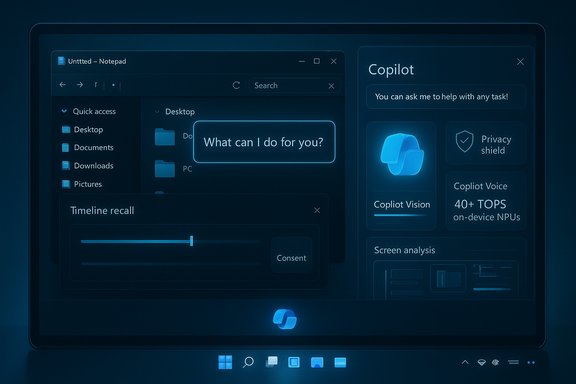
Over the past year Microsoft has transitioned from positioning Copilot as “an assistant app” to treating AI as a platform primitive — an OS-level capability that can act on behalf of users. That effort includes a constellation of features and platform changes:- Copilot Voice (wake-word “Hey, Copilot”) and Copilot Vision, enabling on-screen, multimodal interaction.
- Copilot Actions and the “Ask Copilot” taskbar entry, which let agentic features automate multi-step workflows and act on local apps and files.
- Experimental agentic features / Agent Workspace, where agents run in separate accounts and sessions, with Microsoft explicitly warning that these agents “may hallucinate and produce unexpected outputs.”
- Copilot+ PCs, a hardware tier requiring high-performance NPUs (Microsoft’s public guidance sets the bar at 40+ TOPS) for lower-latency, on-device models.
What’s shipping (and what it promises)
Copilot Voice and Vision: hands-free and screen-aware help
Microsoft has shipped a wake-word experience — “Hey, Copilot” — that’s opt-in and relies on an on-device wake-word spotter; when the wake word is detected, Copilot starts a cloud-backed conversation. The user can end sessions with voice or UI controls. For many users this restores a Cortana-style hands-free design but with modern LLM backends. Copilot Vision allows the assistant to analyze the visible screen, point at UI elements, and provide contextual guidance. In concept it’s powerful: troubleshooting an unfamiliar app or extracting data from a slide should be much faster when the assistant can “see” what you see. In practice, early hands‑on reporting has flagged slow responses, brittle recognition, and mismatch between ad-style demos and everyday inputs. Voice and vision features work, but their UX is uneven.Copilot Actions, Agent Workspace, and Ask Copilot
The real ambition is agentic computing: agents that take multi-step actions (fill forms, reorganize files, compile reports) autonomously. Microsoft exposed an experimental toggle — Experimental agentic features — that enables Agent Workspace, provisioned agent accounts, and file access limited to a set of “known folders” unless explicitly granted. Those safeguards are meaningful, but Microsoft’s own docs warn agents can hallucinate and be targeted by new attack classes like cross‑prompt injection (XPIA). That admission is unusual and important: Microsoft is explicitly acknowledging functional and security limitations as it tests agentic scenarios in the wild.Copilot+ PCs and local AI acceleration
Microsoft’s Copilot+ brand bundles software with hardware expectations — notably NPUs capable of 40+ TOPS. That hardware enables lower latency for on-device inference, local privacy options, and features like live translation, Cocreate image creation, and Recall (a local searchable timeline) on qualifying systems. Copilot+ machines promise better on-device responsiveness, but they also create a two-tier Windows experience where older or standard hardware gets a degraded AI experience by design.The UX gap: where AI becomes a problem, not a solution
There are two separate but related reasons many users call AI in Windows “underwhelming,” and they’re both solvable — but not without deliberate changes.1) Technical brittleness and advertising mismatch
Marketing clips show smooth, context-aware workflows. Independent reviewers and community tests repeatedly find different outcomes: misidentified objects in videos or images, assistance that suggests actions already taken, and agentic sequences that fail to complete reliably. When an assistant is promised to do a task but instead produces noise or incorrect guidance, trust collapses fast. This is not purely hype; real capability differences (model grounding, UI-state awareness, latency) create practical failures. 2) Perceived and real loss of control — AI everywhere, by default
The second complaint is less technical: users feel Microsoft is forcing AI into surfaces where they never asked for it. Copilot icons and prompts appear in the taskbar, File Explorer, Notepad, Settings, and even the Photos app. Even when features are opt‑in, the ubiquity of Copilot branding, preinstalled services, and in‑product nudges create the impression that AI will be persistent and invasive. That feeling is compounded when sensitive features (like Recall or File Explorer connectors) are discussed publicly, even if they’re off by default.
Privacy, security, and governance: real risks with agentic features
Microsoft’s public documentation for Experimental agentic features is unusually candid. The company warns agents can hallucinate, points out the novel attack vector of cross‑prompt injection, and lays out a defense-in-depth strategy: agent accounts, sandboxed workspaces, tamper-evident audit logs, and admin-gated enablement. That’s the right direction, but warnings in documentation do not instantly translate to safe, user‑friendly products at scale. Concrete examples of the problem space:- Recall and timeline capture: the idea of a local, searchable timeline was compelling — until Signal, Brave, and privacy tools started blocking Recall and Microsoft paused parts of the rollout after backlash. Even though Microsoft emphasized local processing and opt‑in controls, the optics and potential for accidental capture of sensitive data drove pushback. Brave and others implemented code to block Recall in certain contexts. That reaction illustrates how quickly privacy narratives can harden and how difficult it is to recover user trust once a feature smells risky.
- File Explorer integrations: previews show agents like Claude or Manus being able to request access to folders and act on local files (summarize documents, build a website from a folder). While Microsoft frames this as “File Explorer connectors” inside a security model, critics worry about accidental exposure, enterprise compliance, and how users will audit agent behavior. The devil is in the UI: will prompts be clear? Will permission revocation be simple and obvious? Early previews show promise — but also an appetite for misconfiguration and misunderstanding.
- Hallucinations and XPIA: Microsoft’s docs explicitly name hallucination as a functional limitation and XPIA as a threat. That matters: agents that interpret UI elements or parse documents act like users in many ways but lack human judgment, which enables new attack patterns (e.g., cleverly crafted UI content that instructs an agent to exfiltrate data). Microsoft’s guidance promises audit logs and scoped permissions, but real-world defenses require robust logging, mandatory human approvals for sensitive plans, and enterprise-grade policy controls.
Feature bloat: examples that irritate rather than help
Microsoft has added AI to almost every app surface. A few emblematic cases:- Notepad with Copilot suggestions — a lightweight text editor now offers GPT-powered rephrasing and expansion that defeats Notepad’s original simplicity and delights marketers while alienating users who wanted a minimal scratch pad. The perception: AI for AI’s sake.
- File Explorer AI Actions — right‑click to blur background on images or let an agent summarize documents; useful in narrow cases but a vector for permission creep and performance drag.
- Bing Wallpaper and Photos edge-cases — clicking the desktop opening the browser or showing visual search results can feel jarring and unnecessary. It’s low-hanging UX friction that feeds the narrative of AI being shoved into places where it doesn’t belong.
Why Suleyman’s “mindblown” post escalated matters
When a senior executive publicly contrasts the novelty of modern AI with playing Snake on a Nokia, it signals a deep conviction that the technical leap is self-evident. For product teams and investors that’s motivating; for many users, it reads as tone-deaf. The timing — coming soon after an “agentic OS” framing and visible demo gaffes — made the message land poorly. Multiple outlets reconstructed Suleyman’s social post and reported the reaction; however, accounts caution against literal verbatim quoting of ephemeral posts and recommend treating exact wording with care. That caution matters: executives can and should celebrate progress, but dismissing legitimate, operational grievances as mere cynicism widens the trust gap between maker and user.Strategic analysis: what Microsoft is doing well — and where it’s exposed
Strengths
- Platform-scale ambition is coherent. Microsoft’s investment in MCP (Model Context Protocol), agent workspaces, and Copilot+ hardware shows a thought-through stack: connectors, secure execution, and on-device acceleration. If executed well, this could deliver useful agentic workflows that enterprises adopt.
- Realistic security posture in documentation. The company is unusually candid about hallucinations, novel attack surfaces, and the need for auditability. That transparency is a strength when followed by concrete, measurable controls.
- Meaningful on-device features for Copilot+ hardware. NPUs at the 40+ TOPS class enable sensible low-latency scenarios that improve both utility and privacy for on-device tasks.
Weaknesses and risks
- Perception of forced integration — Microsoft’s aggressive surface placements and Copilot branding have created a backlash that advertising and product messaging haven’t resolved. Users don’t hate AI per se; they hate losing control and seeing the OS change in ways that feel mandatory.
- Real-world reliability gaps — vision and action features still fail to meet the expectations set by ads. These measurable inconsistencies are the fastest way to erode trust.
- Privacy optics and ecosystem friction — even local, opt-in features like Recall inspired blocking by privacy-focused browsers. Once the narrative of surveillance or accidental capture spreads, fixing it is a reputational and engineering task.
- Fragmented user experience across hardware — Copilot+ creates a hardware-dependent quality cliff where only NPU-equipped PCs get the best experience. That’s fine as a premium tier, but it hardens perceptions of bloat for standard users whose devices perform worse or show more prompts.
Practical, prioritized recommendations (for Microsoft)
- Make defaults conservative and prompts explicit
- Keep agentic features off by default and make any enablement a clear, audited, reversible admin decision. Present a simple, readable risk summary (not legalese) at the point of opt‑in.
- Focus on measurable reliability before expansion
- Invest in state‑awareness tests, grounding heuristics, and end‑to‑end QA that reproduce the messy real world (compressed video frames, messy slides, ambiguous UIs). Reduce high‑visibility demo/marketing until those common failure modes are resolved.
- Harden permissions and make revocation trivial
- Single-click revocation, readable audit trails, and explicit "plan approvals" for multi-step agent workflows. Enterprises must be able to set policy templates that forbids agents from certain folders or operations.
- Add human-in-the-loop for sensitive tasks
- Require an explicit user approval step for any action that touches system configuration, credentials, or file transfers outside the user’s explicit intent.
- Rebrand and simplify messaging
- Stop using “Copilot” as an all-purpose marketing term across surfaces. Use descriptive, context-specific names and avoid “agentic OS” phrasing in consumer-facing messaging.
- Prioritize lightweight experiences for non‑Copilot+ hardware
- Ensure that non‑NPU machines still get helpful, quick, and local forms of assistance — but without the intrusive prompts and mandatory visual chrome.
- Work with third‑party privacy apps and browser vendors
- Rather than forcing a defensive posture where browsers block features, create partnership APIs and clear boundaries so other devs can opt into or out of discovery in a principled way.
What users and admins should do now
- Treat experimental agentic features as preview: enable them only on test machines. Back up critical data before experimenting.
- For enterprise deployments, block agentic enablement with policy until audit and governance controls meet compliance requirements. Use conditional access and endpoint controls to restrict agent access to known safe folders.
- If you value minimalism: review Copilot settings, disable wake-word listening, and be cautious about granting connectors or File Explorer access to third-party AI apps.
Conclusion
The tension playing out around Copilot and Windows 11 is not a simple debate about technological capability; it’s a negotiation over control, trust, and product stewardship. Microsoft is right to invest in platform primitives — connective tissue like MCP and agent workspaces matter for the long-term evolution of software. The mistake is pacing and posture: rolling many experiments into the mainline OS while messaging triumphal inevitability and leaving defaults, UX, and governance partly resolved produces the exact backlash the company now faces.The fix is straightforward, if politically hard: slow the consumer‑facing rollout, deliver measurable reliability and safety guarantees, and treat user control as a feature equal to the models themselves. Do that, and the agentic dream — a Windows that helps rather than hassles — becomes plausible. Ignore it, and “AI everywhere” will remain a marketing slogan that many users experience as bloatware and a privacy risk, not the productivity leap Microsoft intends.
Source: Windows Latest As Windows 11 turns into an AI OS, Microsoft Copilot boss does not understand how AI is underwhelming
