

Microsoft’s latest permissionsush to make Windows an “agentic” operating system — with Copilot surfacing everywhere and autonomous agents that can act on users’ behalf — has catalyzed a furious mix of technical criticism, security warnings, and viral mockery that together answer the question on many minds: yes, Microsoft has gone much further into AI-first Windows than most users expected, and that choice is creating real friction across performance, privacy, security, and trust.
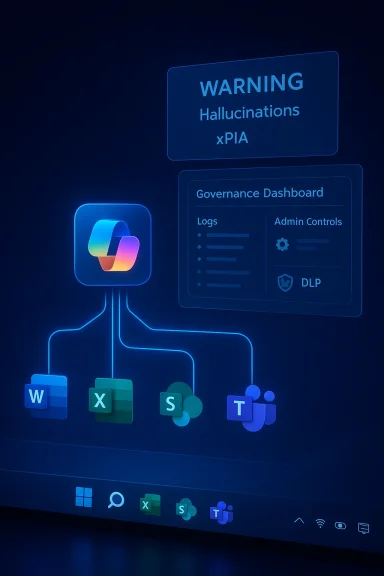
Microsoft’s Copilot branding began as a set of productivity helpers and has been elevated to a platform-level strategy: Copilot Voice, Copilot Vision, Copilot Actions, Copilot Studio for building agents, and a Copilot+ hardware tier that signals Microsoft wants on-device AI acceleration to be a first-class capability. The company has publicly detailed plans to let organizations build autonomous agents in Copilot Studio and to publish agent templates for Dynamics 365 and Microsoft 365. These moves are explicit, deliberate, and recent. That platform-level change is not abstract marketing. Microsoft has started baking Copilot functionality directly into core Windows surfaces — taskbar, search and settings, File Explorer, and even OS-level agent workspaces — and is offering enterprise controls for governance. At the same time, the company has warned openly that agentic behaviors introduce new classes of risk: hallucinations, unpredictable outputs, and the potential for cross‑prompt injection (XPIA) attacks that could let malicious content in documents or UI elements coerce an agent into actions like data exfiltration or malware installation. Microsoft’s support pages and product blogs describe these limitations and advise conservative, admin‑driven rollouts.
Community forums, long‑time Windows engineers, and user advocates have framed this backlash as more than trolling: it’s a cohering signal that corporate messaging, design choices, and engineering tradeoffs are out of sync with a substantial segment of the installed base. Veteran voices have urged Microsoft to pause the feature treadmill and prioritize stability — invoking an “XP SP2 moment” — while others recommend conservative admin policies and staged pilots for Copilot surfaces.
Source: YouTube
 Background: how Copilot became Windows’ center of gravity
Microsoft’s Copilot branding began as a set of productivity helpers and has been elevated to a platform-level strategy: Copilot Voice, Copilot Vision, Copilot Actions, Copilot Studio for building agents, and a Copilot+ hardware tier that signals Microsoft wants on-device AI acceleration to be a first-class capability. The company has publicly detailed plans to let organizations build autonomous agents in Copilot Studio and to publish agent templates for Dynamics 365 and Microsoft 365. These moves are explicit, deliberate, and recent. That platform-level change is not abstract marketing. Microsoft has started baking Copilot functionality directly into core Windows surfaces — taskbar, search and settings, File Explorer, and even OS-level agent workspaces — and is offering enterprise controls for governance. At the same time, the company has warned openly that agentic behaviors introduce new classes of risk: hallucinations, unpredictable outputs, and the potential for cross‑prompt injection (XPIA) attacks that could let malicious content in documents or UI elements coerce an agent into actions like data exfiltration or malware installation. Microsoft’s support pages and product blogs describe these limitations and advise conservative, admin‑driven rollouts. What’s happening now: the Microslop moment
A short, highly shareable video clip and a string of user complaints crystallized into a meme: “Microslop.” The label captures a set of user grievances — intrusive UI placements, flaky Copilot outputs, perceived defaults that are hard to opt out of, and the sense that Microsoft is prioritizing AI PR over day‑to‑day polish. The meme migrated from jokes to a browser extension that literally replaces “Microsoft” with “Microslop” on pages, underscoring how visceral and public the pushback has become.Community forums, long‑time Windows engineers, and user advocates have framed this backlash as more than trolling: it’s a cohering signal that corporate messaging, design choices, and engineering tradeoffs are out of sync with a substantial segment of the installed base. Veteran voices have urged Microsoft to pause the feature treadmill and prioritize stability — invoking an “XP SP2 moment” — while others recommend conservative admin policies and staged pilots for Copilot surfaces.
Technical reality: performance, resource use, and inconsistent reporting
One of the single most tangible complaints is resource usage and perceived bloat. Public tests and user reports present a messy picture:- Some early coverage and Microsoft-friendly writeups argued that newer Copilot builds moved toward a native WinUI/XAML shell that should reduce memory footprint relative to earlier PWA wrappers. Those assessments reported a dramatic memory reduction in certain builds — down into the tens of megabytes in short, controlled tests.
- Other tests and repeated user reports show the opposite: the “native” Copilot still embeds an Edge-based WebView2 and, on many machines and in many sessions, consumes hundreds of megabytes and occasionally spikes into gigabytes, leading to sluggishness or crashes on systems with limited RAM. Forum threads and technician writeups document sustained 500–1,500 MB peaks across different Windows 11 releases.
Agentic AI: power, promise, and concrete risks
Agentic AI — systems that can plan and act across multiple apps and services without continuous human supervision — sits at the center of Microsoft’s vision for an AI-native Windows. Copilot Actions and Copilot Studio are designed to let agents chain steps, react to triggers, and work with enterprise data sources. The promise is clear: automate repetitive workflows, extract knowledge from documents at scale, and give workers a virtual “assistant” that can perform real tasks. Microsoft’s published demonstrations and partners (e.g., Dynamics 365 templates, enterprise case studies) illustrate measurable productivity wins when agent design and governance are done carefully. But the operational and security hazards are also concrete:- Hallucinations remain a fundamental model limitation. An agent that acts on a hallucination multiplies the damage: it can misconfigure systems, delete or move files, or send incorrect data to external services. Microsoft has explicitly acknowledged this risk in product guidance.
- Cross‑prompt injection (XPIA). When agents ingest user-supplied documents, web previews, or UI-rendered content, carefully crafted adversarial text or embedded instructions could override an agent’s plan. Unlike a chat answer, an agent’s misinterpreted instruction can lead to real-world side effects (downloads, file moves, or credential leaks). Microsoft describes XPIA as a novel threat introduced when AI gets the ability to execute.
- Supply‑chain and connector risks. Copilot Studio agents rely on connectors to systems like SharePoint, Salesforce, or ServiceNow. Weak connectors, misconfigured permissions, or lax identity controls expand the attack surface and can turn automation into an exfiltration channel. Microsoft emphasizes admin controls, activity logs, and capability scoping to mitigate these exposures.
Governance, admin controls, and Microsoft’s public posture
Microsoft has not ignored these issues. The company has deployed several governance primitives:- Agent Workspace and Experimental Agentic Features: isolated agent accounts and scoped known-folder access, off by default and requiring administrative enablement to protect user profiles and system areas.
- Model Context Protocol (MCP) and the Copilot Control System: a standardized way for agents to discover and interact with app capabilities while enabling central enforcement of authentication and logging.
- Copilot Studio admin controls: lifecycle governance, access control, automatic security scans, and enterprise data protections including customer-managed keys and DLP integrations for agents operating across business data.
How valid are the common criticisms of “bloat” and “forced AI”?
There are several distinct claims that often mix under the “bloat” label; they deserve separate treatment:- Claim: Windows 11 is being packed with Copilot features users cannot disable. Reality: Many Copilot features are opt‑in or administratively controllable in enterprise contexts, but defaults and discoverability matter. When a feature is visible in core shell surfaces (taskbar, settings search) and opt‑outs are opaque, users perceive coercion even when controls exist. Microsoft has tightened admin controls, but perception lag and rollout inconsistencies continue to drive frustration.
- Claim: Copilot consumes too much RAM and CPU. Reality: Measurements vary by build and workload. Independent tests and community telemetry show both slim and heavy behaviors; the correct technical posture is to treat resource usage claims as conditional and version‑dependent. Aggressive monitoring and pre‑deployment testing on representative fleets are sensible mitigations.
- Claim: Agentic features are unsafe by design. Reality: Agentic features do add novel threat vectors (XPIA, hallucination‑driven actions). Microsoft acknowledges the hazards and provides containment features, but the real debate is about defaults, auditability, and enterprise scoping. Until the guardrails are mature, cautious, admin‑led adoption is the prudent path.
Practical guidance for users, power users, and IT administrators
For everyday Windows users and IT teams navigating this transition, the following measured steps reduce risk and friction:- Treat Copres as opt‑in experiments. Evaluate in small pilot groups before broad enablement.
- Harden defaults at the enterprise level: disable experimental features like Recall and Agentic Workspace until validated, and use Intune/Group Policy to enforce opt‑outs where necessary.
- Monitor device telemetry and battery/CPU/RAM metrics when Copilot is enabled on representative hardware; measure p50/p95 latencies and failure modes.
- Require human confirmation and audit logs for any agentic action that changes system state, financial entries, or customer data. Maintain an agent runbook and incident playbook.
- Validate connectors and use least-privilege identities for agent access; prefer customer‑managed keys and DLP protections where available.
Strengths of Microsoft’s approach — and where it’s right
Microsoft’s strategy does contain defensible strengths that explain why the company is investing so heavily:- Platform integration creates single‑pane experiences that can reduce context switching and genuinely speed workflows when agents are designed conservatively and scoped correctly. Copilot Studio’s low‑code tooling and connectors can deliver measurable business ROI in targeted scenarios.
- Investment in on‑device acceleration (Copilot+ guidance and AI Foundry runtimes) acknowledges that latency and privacy needs will push some inference to endpoints, which is a technically sensible long‑term direction.
- Microsoft’s unusually candid public warnings about hallucinations and XPIA show awareness of the threat model and a willingness to bake in mitigations rather than papering over them. That candor is rare and important.
Risks and unanswered questions
Even acknowledging strengths, several unresolved risks merit emphasis:- Default behavior and discoverability: If opt‑outs are hard to find or restore after updates, perception of coercion will harden into procurement pain.
- Real-world robustness: Agents must handle ambiguous, malformed, or adversarial inputs while avoiding destructive side effects; current models still hallucinate, and human oversight is not always present.
- Independent verification: Claims around on‑device performance targets (e.g., “40+ TOPS”), resource usage, and privacy guarantees need independent benchmarking to be credible. Community calls for transparency and third‑party NPU/battery/privacy tests are reasonable.
- Regulatory and enterprise optics: Widespread, poorly governed deployment risks procurement freezes, increased scrutiny, or contractual resistance from customers unwilling to accept new agentic threat models.
Conclusion: has Microsoft gone too far?
“Too far” depends on the audience and the metric.- For strategic product planners and large enterprise customers pursuing automation, Microsoft’s direction is bold but plausibly correct — the integration of agents into the OS could unlock real productivity gains if governance and engineering catch up.
- For everyday users, admins managing mixed fleets, and power users who prize predictability, Microsoft’s timing and defaults feel too aggressive. The backlash and the “Microslop” meme are symptoms of a credibility gap that Microsoft must close with concrete transparency, conservative defaults, independent benchmarking, and a clear commitment to fixing foundational reliability before adding more visible AI surfaces.
Source: YouTube
