

Microsoft’s Copilot app has acquired a more specific identity in the Microsoft Store, changing from the generic “Copilot” label to “Microsoft Copilot on Windows.” The rename does not appear to deliver a new feature, alter licensing, or transform the app overnight, but it is more consequential than a routine metadata edit. By explicitly attaching Copilot to Windows, Microsoft is drawing a clearer boundary around the assistant it wants PC users to recognize, while separating that experience from Microsoft 365 Copilot, the web service, mobile apps, Edge integrations, security products, developer tools, and the expanding collection of AI features built directly into Windows 11.
Microsoft has spent the past three years turning Copilot from a Bing-based chatbot into an umbrella brand spanning much of its software portfolio. That expansion gave Microsoft a recognizable AI identity, but it also created a naming problem: many different products became “Copilot,” even when they served different audiences, used different data, required different subscriptions, or operated under different security policies.
The renamed Store listing suggests Microsoft understands that the brand now needs qualifiers. “Microsoft Copilot on Windows” tells users where the app runs and implies that it offers capabilities tailored to the PC, rather than functioning only as another window onto the general Copilot website.
That model did not remain fixed. Microsoft subsequently moved toward a separately serviced Copilot app distributed through the Microsoft Store, giving the company more freedom to update the interface and AI features without waiting for a full Windows cumulative update.
The transition mattered technically and strategically. A Store-delivered application can evolve on its own schedule, while Windows can provide controlled integration points such as keyboard shortcuts, file access, settings support, screen sharing, notifications, and taskbar placement.
Microsoft’s challenge has therefore shifted. The company no longer needs only to make the Copilot name visible; it needs to make each Copilot experience understandable.
There is no clear indication that the rename itself unlocks new models, subscriptions, permissions, or system controls. Users who already have the app installed should not expect the words in the Store to produce an immediate change in how their PC behaves.
That distinction is important. The Windows client is not necessarily an entirely separate AI service with a different conversational brain; it is a platform-specific presentation of Microsoft Copilot with access to selected PC capabilities.
As a result, the new name should be interpreted cautiously. It establishes a clearer public identity, but it is not proof that a substantial Windows AI release has begun rolling out alongside it.
The qualifier also leaves room for Microsoft to build Windows-specific functions without implying that every capability will appear on the web, macOS, Android, or iOS at the same time.
That separation can benefit both Microsoft and users. Microsoft can update the app rapidly, while users and administrators can more easily identify it as a distinct software package with its own version, permissions, deployment status, and support lifecycle.
The wording is therefore carefully balanced. It says that Copilot belongs on Windows and has a special relationship with the platform, but it stops short of describing the assistant as Windows itself.
If those capabilities continue to mature, the Windows app could become a genuine orchestration layer between the user and the PC. If development stalls, the more explicit name could instead highlight the gap between Microsoft’s platform language and the app’s actual level of integration.
This tension is not unique to AI. Microsoft previously shifted Office products toward Microsoft 365 branding, renamed individual services, and reorganized enterprise plans as cloud subscriptions became more important than boxed software.
The Copilot name allowed the company to reposition conversational AI as a general-purpose assistant. It could help with writing, research, images, planning, coding, and eventually PC tasks without always presenting itself as a Bing feature.
The early implementation, however, had limited authority over the PC. It could guide or initiate certain actions, but it was not a universal system administrator capable of independently changing everything a user requested.
That limitation encouraged Microsoft to rethink the architecture. Moving Copilot into an app reduced the risk of tying the operating system’s servicing model to an AI interface that needed frequent experimentation.
The distinction affects licensing, identity, compliance, grounding, and administrative control. A clearer “Microsoft Copilot on Windows” label may help prevent users from assuming that installing the free Windows app automatically provides every Microsoft 365 Copilot capability.
Those capabilities make the Windows qualifier increasingly defensible. They also introduce more complicated questions about permissions, reliability, security, and user control.
Vision can help explain an interface, analyze displayed material, or guide a user through a task. Its value is especially apparent when the user cannot easily describe the problem in text, such as locating an unfamiliar command in a complex application.
Microsoft has also experimented with visual guidance that can indicate where a user should click. This changes Copilot from a general adviser into something closer to an interactive tutor, although the user still needs to verify instructions before acting.
The distinction between Copilot file search and Windows’ own semantic search is worth preserving. Windows can use indexing and on-device AI capabilities to improve local search on supported hardware, while the Copilot app offers a conversational interface that may process or reason over selected content through Microsoft’s AI services.
Users should not assume that every “AI search” feature has the same privacy model. Where processing occurs, what is uploaded, how long information is retained, and which account governs the interaction can vary by feature.
The safest implementation is not one that silently changes dozens of options. It is one that explains the proposed action, presents the correct setting, and leaves the final decision visible to the user.
This approach blurs the line between an AI assistant, a browser, and a research workspace. It may reduce context switching, but it also increases the importance of clearly communicating when browsing information, saved tabs, passwords, form data, and conversation context are being synchronized.
A user does not necessarily need a Copilot+ PC to run the Copilot app. Conversely, buying a Copilot+ PC does not mean every premium Copilot service or Microsoft 365 AI entitlement is included.
The core advantage is that certain tasks can run locally with lower latency and, depending on the feature, without sending the workload to a cloud service. That can improve responsiveness, preserve battery life compared with heavier CPU or GPU processing, and support offline scenarios.
Windows-specific features may use local APIs or hardware, but the presence of the app alone does not transform an older PC into a Copilot+ PC. Microsoft must keep this distinction prominent or risk replacing one branding problem with another.
The answer may be that Microsoft is separating the technology from the assistant. Not every AI-powered writing, editing, search, or image tool needs to advertise Copilot as though the user were leaving the current app to consult a separate personality.
A more disciplined strategy would reserve the Copilot name for the dedicated assistant while describing embedded functions by what they do. “Rewrite,” “remove background,” “generate image,” “summarize,” and “visual search” are often more useful labels than a generic Copilot icon.
AI may follow the same path. Users care less about whether a feature uses a large language model than whether it works reliably, protects their data, produces accurate results, and saves time.
This would give Microsoft a cleaner hierarchy: Copilot is the assistant, while AI is a capability throughout Windows.
The greater benefit will come only if Microsoft pairs clearer naming with clearer explanations of accounts, subscriptions, data handling, and hardware requirements.
The Store label also reduces the chance that similarly named third-party tools will be mistaken for Microsoft’s official client. Publisher identity remains important, however, and users should still verify that an application comes from Microsoft before installing it.
Microsoft should clearly identify when a request uses cloud processing, when local content is being shared, and whether a feature takes advantage of an NPU. The company’s naming can establish a platform identity, but it cannot substitute for understandable privacy controls.
The same capabilities could also reduce informal technical support burdens. Instead of asking a family member where Microsoft moved a setting, a user could describe the desired result and receive guidance tailored to the screen in front of them.
Accuracy remains essential. Incorrect instructions delivered confidently can be more frustrating than a traditional help page, especially when system configuration or data is at stake.
A changed display name does not necessarily mean the underlying package identifier or deployment method has changed. Administrators should therefore avoid treating the new Store label as evidence of a new application until they verify inventory and management data.
However, IT teams should still test their rules. Microsoft has revised the architecture and packaging of Copilot clients before, and a future migration could affect detection logic even if the visible change begins as a simple rename.
Windows must make that context obvious at the moment of use. Employees should not have to infer whether a prompt is grounded in public web information, personal files, or protected organizational content based only on a small profile icon.
Organizations should monitor more than Windows release notes. They may need to track Copilot app versions, Microsoft 365 roadmap items, Store package changes, cloud-service announcements, and region-specific availability.
Windows gives Microsoft a unique distribution advantage, but that advantage can become a liability if users perceive Copilot as unavoidable, confusing, or more promotional than useful.
The company also has a broad hardware partnership network. Rather than limiting its AI strategy to first-party Surface devices, Microsoft can encourage PC manufacturers to ship Copilot-capable experiences across a wide range of price points and processor architectures.
Competitors may win users through better model quality, simpler pricing, stronger privacy assurances, preferred creative tools, or deeper expertise in a specific domain. Microsoft’s integration advantage matters only when the integration is reliable and genuinely useful.
That positioning raises the stakes. If the app feels nearly identical to the web version, users may ask why it needs special status. Microsoft must continuously justify the Windows identity through features that respect the operating system, its security model, and the user’s existing workflow.
Understanding those layers helps explain why a Store rename can matter even when the model has not changed.
This orchestration role may become more important than the visual chat window. As AI models become interchangeable or frequently upgraded, the durable value lies in how safely and predictably the application connects those models to the PC.
Microsoft’s Windows AI strategy uses both. Copilot can rely on online services for broad reasoning and generation, while Copilot+ PC components can support local search, image processing, language tasks, and other hardware-accelerated experiences.
The ideal implementation chooses the right location for each workload and tells the user what is happening. A platform-specific name may prepare Microsoft to explain that hybrid model more clearly.
A single broad approval for permanent access would be easier to implement but harder to trust. Session-based sharing, previews before changes, narrow file permissions, and explicit action confirmation provide a stronger foundation for a Windows assistant.
Several developments will determine whether the rename proves significant.
The crucial question is not whether Copilot can click a button. It is whether Windows can expose structured, auditable actions that are safer than having an AI imitate mouse and keyboard input.
A clearer app name helps with platform identity, but account identity is equally important.
Any such integration should remain transparent. “On Windows” should not become a vague phrase that obscures whether a task occurred on the PC or in Microsoft’s cloud.
The product will struggle in regulated environments if policies arrive after features. Administrative control must be part of the design, not a cleanup task following consumer deployment.
Microsoft’s success will be measured by whether a user can search for the product, install it, understand it, manage it, and obtain support without encountering five competing names.
The rename will fade quickly if the assistant remains a destination users open only for occasional web questions. It will matter if Copilot becomes a dependable, controlled interface for working with the PC.
The change to “Microsoft Copilot on Windows” is small enough to arrive without fanfare, yet specific enough to expose Microsoft’s evolving AI strategy. The company appears to be concentrating the Copilot brand around a dedicated assistant while allowing individual Windows features to use AI with less promotional clutter. No immediate functionality should be inferred from the Store rename alone, but it creates a clearer promise: this is supposed to be the Copilot designed for a Windows PC, not merely Copilot displayed inside another window. Microsoft now has to fulfill that promise with meaningful platform integration, unambiguous account and privacy controls, manageable enterprise policies, and enough restraint to ensure that the assistant serves Windows users rather than making Windows feel like a vehicle for advertising the assistant.
 Background
Microsoft has spent the past three years turning Copilot from a Bing-based chatbot into an umbrella brand spanning much of its software portfolio. That expansion gave Microsoft a recognizable AI identity, but it also created a naming problem: many different products became “Copilot,” even when they served different audiences, used different data, required different subscriptions, or operated under different security policies.The renamed Store listing suggests Microsoft understands that the brand now needs qualifiers. “Microsoft Copilot on Windows” tells users where the app runs and implies that it offers capabilities tailored to the PC, rather than functioning only as another window onto the general Copilot website.
From Windows sidebar to Store-delivered app
The original Copilot in Windows arrived in 2023 as an operating-system experience presented through a sidebar. Microsoft promoted it as an assistant that could answer web questions and help with a limited selection of Windows settings, placing it prominently beside the desktop rather than treating it as a conventional application.That model did not remain fixed. Microsoft subsequently moved toward a separately serviced Copilot app distributed through the Microsoft Store, giving the company more freedom to update the interface and AI features without waiting for a full Windows cumulative update.
The transition mattered technically and strategically. A Store-delivered application can evolve on its own schedule, while Windows can provide controlled integration points such as keyboard shortcuts, file access, settings support, screen sharing, notifications, and taskbar placement.
A brand stretched across too many products
By 2025, “Copilot” could refer to a free consumer assistant, a Microsoft 365 subscription feature, a Windows app, an Edge experience, GitHub Copilot, Security Copilot, Copilot Studio, or any of several role-specific enterprise offerings. Even technically experienced users could struggle to determine which Copilot they had, what data it could access, and whether a feature required payment.Microsoft’s challenge has therefore shifted. The company no longer needs only to make the Copilot name visible; it needs to make each Copilot experience understandable.
What Actually Changed in the Microsoft Store
The visible Store name has changed from the broad “Copilot” designation to “Microsoft Copilot on Windows.” Based on the available listing information, the adjustment appears to be a branding and discoverability change rather than a major application release.There is no clear indication that the rename itself unlocks new models, subscriptions, permissions, or system controls. Users who already have the app installed should not expect the words in the Store to produce an immediate change in how their PC behaves.
The application remains the familiar Copilot client
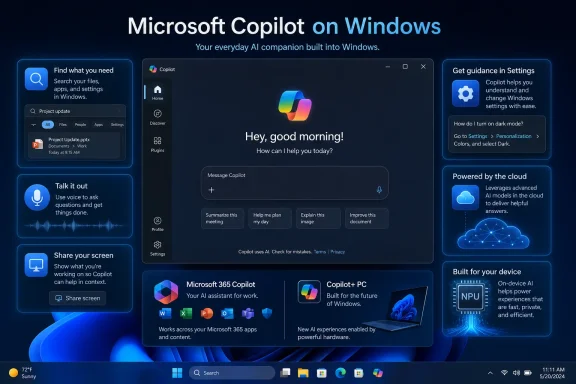
Microsoft describes Copilot on Windows as providing the general capabilities available through its web service, supplemented by Windows-oriented features. Those additions can include keyboard invocation, voice activation, file search, screenshot handling, Copilot Vision, web content displayed beside a conversation, and assistance with finding relevant Windows settings.That distinction is important. The Windows client is not necessarily an entirely separate AI service with a different conversational brain; it is a platform-specific presentation of Microsoft Copilot with access to selected PC capabilities.
Store metadata can change before the product does
Microsoft frequently updates Store-delivered applications in stages. A listing name, description, icon, screenshot set, package, and feature rollout do not always change simultaneously, and availability may differ by account, region, device, or Windows Insider channel.As a result, the new name should be interpreted cautiously. It establishes a clearer public identity, but it is not proof that a substantial Windows AI release has begun rolling out alongside it.
What users should expect immediately
For most users, the practical consequences are modest:- The app may appear under its new name in Store search results, the Store library, or installation dialogs.
- Existing pins and shortcuts may retain older labels temporarily because caches and staged updates do not refresh everywhere at once.
- The app’s core features should continue to depend on account type, region, Microsoft-controlled rollouts, and local Windows configuration.
- No new payment requirement is implied merely by the listing rename.
- No additional access to personal files or the desktop should be assumed without a corresponding feature update and permission flow.
Why “On Windows” Matters
The words “on Windows” position the app as the Windows edition of a broader service rather than as the singular, universal definition of Copilot. That is a subtle but useful shift because Microsoft now needs to explain differences within the Copilot family, not merely promote the family name.The qualifier also leaves room for Microsoft to build Windows-specific functions without implying that every capability will appear on the web, macOS, Android, or iOS at the same time.
Platform identity without full operating-system ownership
Calling the app “Microsoft Copilot on Windows” does not necessarily mean Copilot is becoming an inseparable component of the operating system. In fact, the Store delivery model preserves a degree of separation between Windows itself and the cloud-connected assistant.That separation can benefit both Microsoft and users. Microsoft can update the app rapidly, while users and administrators can more easily identify it as a distinct software package with its own version, permissions, deployment status, and support lifecycle.
The wording is therefore carefully balanced. It says that Copilot belongs on Windows and has a special relationship with the platform, but it stops short of describing the assistant as Windows itself.
A clearer promise of PC-specific capabilities
The renamed product will ultimately be judged by whether “on Windows” delivers more than a convenient desktop wrapper. Features such as Vision, local file discovery, Windows Settings guidance, keyboard shortcuts, and contextual interaction with open applications give the name substance.If those capabilities continue to mature, the Windows app could become a genuine orchestration layer between the user and the PC. If development stalls, the more explicit name could instead highlight the gap between Microsoft’s platform language and the app’s actual level of integration.
Microsoft’s Long Copilot Naming Journey
The current rename is easier to understand when viewed as part of Microsoft’s repeated attempts to organize its AI portfolio. The company has alternated between consolidating experiences under one powerful brand and adding qualifiers when that consolidation creates confusion.This tension is not unique to AI. Microsoft previously shifted Office products toward Microsoft 365 branding, renamed individual services, and reorganized enterprise plans as cloud subscriptions became more important than boxed software.
The Bing Chat era
Microsoft’s modern consumer AI assistant emerged publicly through Bing and Edge. That origin gave the product immediate distribution, but it also tied the assistant to a search-engine identity that was narrower than Microsoft’s ambitions.The Copilot name allowed the company to reposition conversational AI as a general-purpose assistant. It could help with writing, research, images, planning, coding, and eventually PC tasks without always presenting itself as a Bing feature.
The arrival of Copilot in Windows
When Copilot entered Windows 11, Microsoft emphasized the idea of a persistent assistant available from the taskbar. The presentation suggested a future in which natural-language interaction would sit alongside familiar desktop controls.The early implementation, however, had limited authority over the PC. It could guide or initiate certain actions, but it was not a universal system administrator capable of independently changing everything a user requested.
That limitation encouraged Microsoft to rethink the architecture. Moving Copilot into an app reduced the risk of tying the operating system’s servicing model to an AI interface that needed frequent experimentation.
The Microsoft 365 complication
Microsoft 365 Copilot added another layer of ambiguity because it serves a different purpose and can operate under different commercial and data-protection arrangements. A consumer asking Copilot to plan a vacation is not necessarily using the same product context as an employee asking Microsoft 365 Copilot to summarize internal documents, email, meetings, and organizational data.The distinction affects licensing, identity, compliance, grounding, and administrative control. A clearer “Microsoft Copilot on Windows” label may help prevent users from assuming that installing the free Windows app automatically provides every Microsoft 365 Copilot capability.
The Windows App Is Becoming More Than a Chat Box
The most significant context for the rename is the app’s gradual movement beyond basic prompt-and-response conversations. Microsoft has been testing ways for Copilot to perceive what is happening on the PC, find information, present web content, guide settings changes, and assist inside active workflows.Those capabilities make the Windows qualifier increasingly defensible. They also introduce more complicated questions about permissions, reliability, security, and user control.
Copilot Vision
Copilot Vision allows users to share an application or browser window so the assistant can interpret visible content and discuss it in real time. Microsoft has presented the feature as an opt-in experience, meaning the user deliberately selects what Copilot can see rather than granting unrestricted observation of the desktop.Vision can help explain an interface, analyze displayed material, or guide a user through a task. Its value is especially apparent when the user cannot easily describe the problem in text, such as locating an unfamiliar command in a complex application.
Microsoft has also experimented with visual guidance that can indicate where a user should click. This changes Copilot from a general adviser into something closer to an interactive tutor, although the user still needs to verify instructions before acting.
File search and document understanding
The Windows app can search for supported files with the user’s permission and answer questions about their contents. This addresses a familiar PC problem: users often remember what a document discussed but not its exact filename or folder.The distinction between Copilot file search and Windows’ own semantic search is worth preserving. Windows can use indexing and on-device AI capabilities to improve local search on supported hardware, while the Copilot app offers a conversational interface that may process or reason over selected content through Microsoft’s AI services.
Users should not assume that every “AI search” feature has the same privacy model. Where processing occurs, what is uploaded, how long information is retained, and which account governs the interaction can vary by feature.
Settings support
Copilot on Windows can interpret requests such as making the screen easier to read or reducing distractions and then guide users toward relevant settings. This is useful because Windows Settings contains a large number of controls whose official names may not match the language ordinary users employ.The safest implementation is not one that silently changes dozens of options. It is one that explains the proposed action, presents the correct setting, and leaves the final decision visible to the user.
In-app web content
Microsoft has also developed an experience in which links open beside the Copilot conversation. With permission, the assistant can use the context of pages opened within that session to answer follow-up questions, compare information, or help draft content.This approach blurs the line between an AI assistant, a browser, and a research workspace. It may reduce context switching, but it also increases the importance of clearly communicating when browsing information, saved tabs, passwords, form data, and conversation context are being synchronized.
Copilot Is Not the Same as Copilot+ PC
The new name may improve one area of confusion while leaving another intact. Microsoft Copilot on Windows is an application, whereas a Copilot+ PC is a hardware and Windows platform category.A user does not necessarily need a Copilot+ PC to run the Copilot app. Conversely, buying a Copilot+ PC does not mean every premium Copilot service or Microsoft 365 AI entitlement is included.
What defines a Copilot+ PC
Copilot+ PCs are designed around hardware capable of accelerating local AI workloads, particularly through a neural processing unit. Windows uses that hardware for supported on-device features such as enhanced search, image processing, language models, and other machine-learning experiences.The core advantage is that certain tasks can run locally with lower latency and, depending on the feature, without sending the workload to a cloud service. That can improve responsiveness, preserve battery life compared with heavier CPU or GPU processing, and support offline scenarios.
What the Copilot app depends on
The Copilot app remains primarily a service-connected assistant. Many of its most capable conversational and generative functions depend on Microsoft’s cloud infrastructure, account services, feature availability, and an internet connection.Windows-specific features may use local APIs or hardware, but the presence of the app alone does not transform an older PC into a Copilot+ PC. Microsoft must keep this distinction prominent or risk replacing one branding problem with another.
A useful mental model
Windows users can separate the terms as follows:- Microsoft Copilot on Windows is the assistant application installed on the PC.
- Copilot+ PC describes a class of Windows hardware built for accelerated on-device AI.
- Microsoft 365 Copilot describes productivity capabilities connected to Microsoft 365 accounts, applications, and organizational data.
- Other Copilot products, such as GitHub Copilot or Security Copilot, serve specialized professional workloads.
A Branding Retreat and an AI Expansion Can Happen Together
Microsoft has recently reduced or softened conspicuous Copilot labels in parts of Windows while continuing to invest in the underlying AI features. At first glance, that seems inconsistent: why remove Copilot branding in one place and make it more specific in another?The answer may be that Microsoft is separating the technology from the assistant. Not every AI-powered writing, editing, search, or image tool needs to advertise Copilot as though the user were leaving the current app to consult a separate personality.
Fewer unnecessary entry points
Placing a Copilot button inside every Windows application can create visual clutter and user fatigue. It may also imply that Microsoft values brand impressions more than coherent interface design.A more disciplined strategy would reserve the Copilot name for the dedicated assistant while describing embedded functions by what they do. “Rewrite,” “remove background,” “generate image,” “summarize,” and “visual search” are often more useful labels than a generic Copilot icon.
AI becomes an ordinary capability
Mature technologies tend to recede into the interface. Applications do not label every cloud-synchronized field as “cloud powered,” and Windows does not advertise every security check as a separate branded assistant.AI may follow the same path. Users care less about whether a feature uses a large language model than whether it works reliably, protects their data, produces accurate results, and saves time.
The dedicated app becomes the branded destination
Under that model, “Microsoft Copilot on Windows” becomes the place for open-ended assistance, conversation, cross-application guidance, research, and eventually agent-like tasks. Individual Windows apps can retain focused AI tools without presenting themselves as miniature Copilot clients.This would give Microsoft a cleaner hierarchy: Copilot is the assistant, while AI is a capability throughout Windows.
Consumer Impact
For home users, the rename should make Store discovery somewhat easier. Someone searching for the Windows version can identify it more confidently, while users comparing mobile or web access can see that Microsoft regards the PC client as a distinct edition.The greater benefit will come only if Microsoft pairs clearer naming with clearer explanations of accounts, subscriptions, data handling, and hardware requirements.
Installation and discovery
Windows 11 PCs may already include or promote the Copilot app, and the Store remains the delivery mechanism for app updates. Users who remove it should be able to distinguish reinstalling the Windows client from opening Copilot in a browser or accessing an AI feature inside Microsoft 365.The Store label also reduces the chance that similarly named third-party tools will be mistaken for Microsoft’s official client. Publisher identity remains important, however, and users should still verify that an application comes from Microsoft before installing it.
Expectations around local control
The phrase “on Windows” could lead some users to believe the assistant operates entirely on the device. That would be an incorrect assumption for many Copilot functions.Microsoft should clearly identify when a request uses cloud processing, when local content is being shared, and whether a feature takes advantage of an NPU. The company’s naming can establish a platform identity, but it cannot substitute for understandable privacy controls.
Accessibility and support potential
A context-aware Windows assistant could be particularly valuable for users who find conventional menus difficult to navigate. Natural-language settings guidance, visual explanations, voice interaction, and step-by-step coaching can lower barriers without redesigning every legacy interface.The same capabilities could also reduce informal technical support burdens. Instead of asking a family member where Microsoft moved a setting, a user could describe the desired result and receive guidance tailored to the screen in front of them.
Accuracy remains essential. Incorrect instructions delivered confidently can be more frustrating than a traditional help page, especially when system configuration or data is at stake.
Enterprise and IT Administration Impact
Enterprise administrators are likely to view the rename through a different lens. They care less about Store marketing and more about package identity, update behavior, account boundaries, policy control, telemetry, data protection, and whether the application appears unexpectedly on managed devices.A changed display name does not necessarily mean the underlying package identifier or deployment method has changed. Administrators should therefore avoid treating the new Store label as evidence of a new application until they verify inventory and management data.
Package identity matters more than display name
Software management systems commonly rely on package identifiers, executable details, detection rules, certificates, and version numbers rather than the consumer-facing title. If Microsoft changes only Store metadata, existing deployment and removal policies may continue working.However, IT teams should still test their rules. Microsoft has revised the architecture and packaging of Copilot clients before, and a future migration could affect detection logic even if the visible change begins as a simple rename.
Personal and organizational accounts
A major source of enterprise confusion is the difference between consumer Copilot and Microsoft 365 Copilot operating with organizational identity. The account used can influence available data, compliance protections, connectors, licensing, and administrative oversight.Windows must make that context obvious at the moment of use. Employees should not have to infer whether a prompt is grounded in public web information, personal files, or protected organizational content based only on a small profile icon.
Update cadence and change management
Store delivery allows Microsoft to improve Copilot quickly, but rapid updates can complicate enterprise validation. New features involving screen context, files, browsing sessions, or actions may require security review before widespread deployment.Organizations should monitor more than Windows release notes. They may need to track Copilot app versions, Microsoft 365 roadmap items, Store package changes, cloud-service announcements, and region-specific availability.
Competitive Implications
Microsoft is not alone in trying to give an AI assistant deeper access to the desktop. Apple, Google, browser vendors, PC manufacturers, and independent AI companies are all exploring ways to connect models with personal files, applications, screens, and operating-system actions.Windows gives Microsoft a unique distribution advantage, but that advantage can become a liability if users perceive Copilot as unavoidable, confusing, or more promotional than useful.
Microsoft’s home-field advantage
Microsoft controls Windows APIs, the Store, taskbar integration, account infrastructure, Edge, Microsoft 365, and a large enterprise management ecosystem. It can therefore connect Copilot to workflows that a third-party assistant may struggle to reach consistently.The company also has a broad hardware partnership network. Rather than limiting its AI strategy to first-party Surface devices, Microsoft can encourage PC manufacturers to ship Copilot-capable experiences across a wide range of price points and processor architectures.
Third-party assistants can still compete
Windows remains an application platform, and users can access competing assistants through browsers, desktop clients, extensions, and developer tools. A Copilot rename does not guarantee loyalty.Competitors may win users through better model quality, simpler pricing, stronger privacy assurances, preferred creative tools, or deeper expertise in a specific domain. Microsoft’s integration advantage matters only when the integration is reliable and genuinely useful.
Branding precision as a competitive tool
“Microsoft Copilot on Windows” can help Microsoft defend the idea that its assistant is the natural AI companion for the PC. The phrasing resembles a platform edition rather than a generic chatbot installation.That positioning raises the stakes. If the app feels nearly identical to the web version, users may ask why it needs special status. Microsoft must continuously justify the Windows identity through features that respect the operating system, its security model, and the user’s existing workflow.
The Technical Boundary Between App, Cloud, and Windows
One reason Copilot branding has been difficult is that the product crosses several architectural layers. The visible app is only one component; responses may depend on cloud models, search services, account systems, Windows APIs, local indexes, application context, and user-granted permissions.Understanding those layers helps explain why a Store rename can matter even when the model has not changed.
The app as an orchestration surface
The Windows client can act as a front end that brings multiple capabilities into one interface. It handles conversation, invokes platform features, presents permission prompts, displays web content, and maintains the user’s workflow.This orchestration role may become more important than the visual chat window. As AI models become interchangeable or frequently upgraded, the durable value lies in how safely and predictably the application connects those models to the PC.
Cloud intelligence versus local intelligence
Cloud models generally offer greater computational scale and can be updated rapidly. Local models can provide lower latency, offline operation, and stronger data minimization for suitable tasks.Microsoft’s Windows AI strategy uses both. Copilot can rely on online services for broad reasoning and generation, while Copilot+ PC components can support local search, image processing, language tasks, and other hardware-accelerated experiences.
The ideal implementation chooses the right location for each workload and tells the user what is happening. A platform-specific name may prepare Microsoft to explain that hybrid model more clearly.
Permissions are the real product boundary
As Copilot gains the ability to inspect files, view windows, open pages, or propose actions, permission design becomes more important than branding. Users need controls that are specific, reversible, visible, and understandable.A single broad approval for permanent access would be easier to implement but harder to trust. Session-based sharing, previews before changes, narrow file permissions, and explicit action confirmation provide a stronger foundation for a Windows assistant.
Strengths and Opportunities
The rename gives Microsoft an opportunity to impose order on a portfolio that has often appeared crowded and inconsistent. Its value will depend on whether the company follows through with product design, documentation, and transparent controls.- Clearer Store discovery can help users find the official Windows client and distinguish it from other Copilot products.
- A platform-specific name gives Microsoft room to add Windows-only features without promising identical behavior on every device.
- Store delivery supports faster updates than tying every Copilot improvement to a major Windows release.
- Vision, file search, settings guidance, and voice interaction could make complex PC tasks more accessible.
- A dedicated Copilot identity may allow Microsoft to remove redundant branding from Notepad, Photos, Snipping Tool, and other focused applications.
- The Windows app could become a consistent, permission-based interface for cloud and on-device AI capabilities.
- Enterprises may eventually gain a more manageable product boundary if Microsoft aligns the name with stable packages, policies, and account controls.
Risks and Concerns
A better name cannot solve the deeper issues surrounding AI integration. Microsoft still needs to earn trust through reliability, restraint, performance, security, and clear communication.- The new name may imply deeper operating-system integration than the app currently provides.
- Users may confuse Copilot on Windows with Copilot+ PC hardware or assume that all processing occurs locally.
- Rapid Store updates can introduce features faster than enterprises can assess them.
- Screen, file, and browsing context create privacy risks if permission prompts are vague or account boundaries are unclear.
- An assistant that confidently misidentifies a setting or document can increase rather than reduce support problems.
- Preinstallation and taskbar promotion may feel coercive if removal and default controls are not respected.
- The growing number of Copilot editions may remain confusing even after the Windows app receives a qualifier.
- Resource consumption could become a concern if the client duplicates browser components or keeps background services active unnecessarily.
What to Watch Next
The renamed Store listing is best treated as an indicator rather than a launch event. It suggests how Microsoft wants the app to be understood, but the next rounds of Windows Insider updates will reveal whether the company is building a substantially more capable PC assistant around that identity.Several developments will determine whether the rename proves significant.
1. More direct Windows actions
Settings guidance is useful, but users will expect the assistant to complete safe tasks rather than merely explain them. Microsoft will need a controlled action framework with previews, confirmations, rollback options, and strict limits around sensitive changes.The crucial question is not whether Copilot can click a button. It is whether Windows can expose structured, auditable actions that are safer than having an AI imitate mouse and keyboard input.
2. Better separation of account contexts
Microsoft should make personal, work, and school contexts unmistakable. Users need to know which identity is active, which data sources are available, and which protections apply before they submit a prompt or share a document.A clearer app name helps with platform identity, but account identity is equally important.
3. Deeper use of local AI
Copilot+ PCs give Microsoft a growing base of hardware capable of running on-device models. Future Copilot updates may use that capacity for private preprocessing, faster intent recognition, local content retrieval, or offline assistance.Any such integration should remain transparent. “On Windows” should not become a vague phrase that obscures whether a task occurred on the PC or in Microsoft’s cloud.
4. Enterprise policy documentation
IT administrators will watch for stable controls governing installation, taskbar presence, consumer account access, file permissions, Vision, browsing context, wake-word activation, and agent-like actions.The product will struggle in regulated environments if policies arrive after features. Administrative control must be part of the design, not a cleanup task following consumer deployment.
5. Consistent naming across Windows
The Store, Start menu, taskbar, Settings, support documents, privacy dashboards, update notes, and enterprise management portals should all use compatible terminology. A rename that appears only in one storefront would add another layer of inconsistency.Microsoft’s success will be measured by whether a user can search for the product, install it, understand it, manage it, and obtain support without encountering five competing names.
6. Evidence of measurable usefulness
Ultimately, Microsoft must show that Copilot on Windows saves time. Useful measures could include fewer steps to locate settings, faster retrieval of files, successful task completion, better accessibility outcomes, and reduced need to switch between apps.The rename will fade quickly if the assistant remains a destination users open only for occasional web questions. It will matter if Copilot becomes a dependable, controlled interface for working with the PC.
The change to “Microsoft Copilot on Windows” is small enough to arrive without fanfare, yet specific enough to expose Microsoft’s evolving AI strategy. The company appears to be concentrating the Copilot brand around a dedicated assistant while allowing individual Windows features to use AI with less promotional clutter. No immediate functionality should be inferred from the Store rename alone, but it creates a clearer promise: this is supposed to be the Copilot designed for a Windows PC, not merely Copilot displayed inside another window. Microsoft now has to fulfill that promise with meaningful platform integration, unambiguous account and privacy controls, manageable enterprise policies, and enough restraint to ensure that the assistant serves Windows users rather than making Windows feel like a vehicle for advertising the assistant.
References
- Primary source: thewincentral.com
Published: 2026-07-21T13:43:12+00:00
Microsoft Copilot on Windows Appears as New Microsoft Store Name - WinCentral
Microsoft has renamed the Copilot app listing in the Microsoft Store to Microsoft Copilot on Windows. - Read in Microsoft News on WinCentral thewincentral.com
- Official source: support.microsoft.com
Getting started with Copilot on Windows | Microsoft Support
Discover how Microsoft Copilot, your everyday AI companion, can help you achieve anything you can imagine.support.microsoft.com - Official source: blogs.windows.com
- Related coverage: windowscentral.com
Microsoft scales back Copilot plans on Windows 11 | Windows Central
Originally announced in 2024, Microsoft's plan to integrate Copilot across various areas of the Windows 11 shell has been shelved as the company reevaluates its AI approach in the OS.www.windowscentral.com - Related coverage: pcgamer.com
In a truly galaxy-brained rebrand, Microsoft Office is now the 'Microsoft 365 Copilot app,' but Copilot is also still the name of the AI assistant | PC Gamer
Copilot is the app for launching the other apps, but it's also a chatbot inside the apps. Any questions?www.pcgamer.com - Related coverage: techradar.com
Microsoft Office has been rebranded to Microsoft 365 Copilot, or has it? | TechRadar
There's some serious confusion around a potential rebrand from Microsoftwww.techradar.com