

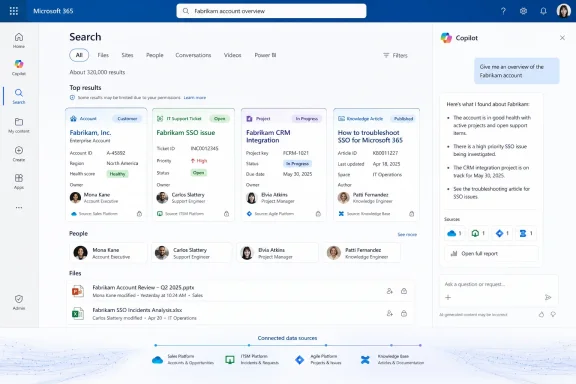
Microsoft is preparing a meaningful refinement to how external business data appears in Microsoft Search: rich entity representation for connectors in search results. The feature, tracked as Microsoft 365 Roadmap ID 502533, is currently marked In development and is scheduled for general availability in September 2026 for Microsoft Copilot users on the web in worldwide standard multi-tenant environments.
On the surface, the roadmap description is brief. Underneath it, however, the change points to an important next step for organizations that use Microsoft 365 Copilot connectors to bring data from systems such as ServiceNow, Salesforce, Jira, Confluence, Box, internal knowledge bases, and custom line-of-business applications into Microsoft 365. Instead of presenting connector content as relatively generic external search entries, Microsoft appears set to make those results more recognizably tied to the people, tickets, accounts, projects, products, policies, and other business entities behind the data.
That may sound like a visual polish feature. In practice, it has the potential to affect search usability, data discoverability, connector design, metadata quality, governance expectations, and the perceived usefulness of Microsoft Copilot extensibility across the enterprise.
The roadmap item is categorized under Copilot Extensibility and Search UX, a pairing that matters. Microsoft is not positioning rich entity representation as a standalone Copilot chatbot capability or as a new connector platform. It is a search experience improvement aimed at the point where users encounter data.
The key elements currently published for the feature are straightforward:
Still, the direction is clear: Microsoft wants connected external content to look more native, more intelligible, and more contextually useful in Search results.
A typical connector can expose content from systems that employees already rely on every day, including:
That is where rich entity representation can make a difference.
A search result that merely displays a title and source can force the user to open several items before understanding what each one represents. A richer entity-oriented result could potentially show a more meaningful identity for the underlying record: perhaps a customer account, service ticket, project, employee profile, product, or support case.
Microsoft has not published the final visual design or an exhaustive list of supported entity types for Roadmap ID 502533. That distinction is important. Organizations should not assume that every custom connector will automatically receive specialized cards, images, fields, badges, or relationship views. However, the roadmap wording strongly suggests that Microsoft Search will become better at presenting connector-backed records as recognizable business objects rather than undifferentiated external documents.
Modern work often requires a different question: Which customer, ticket, person, product, project, or transaction is relevant to this task?
That difference is subtle but substantial.
A document is an artifact. An entity is a meaningful thing in the business. A customer account may have many associated notes, cases, sales opportunities, contracts, and contacts. A support incident may link to alerts, affected services, owners, changes, and knowledge articles. A project can contain tasks, risks, files, milestones, and stakeholders.
When Search recognizes and conveys that context, users can make better decisions before opening a result. The value is not merely more visual information. It is faster interpretation.
Similarly, a seller searching for an account might benefit if the result is clearly identified as an account record, associated with its relevant owner or stage, rather than appearing as a string of similarly named external items.
This may involve improvements such as:
That interoperability is useful only if people can quickly understand the source and significance of each result.
Richer entity treatment can reduce the cognitive cost of mixed search. It can make it easier to tell whether a result is:
There are two broad connector approaches that shape how data can surface.
This model is especially relevant to rich search representation because indexed items can carry structured properties alongside their content. A custom connector might define fields such as:
A connector that sends only a vague title and a block of unstructured text may have less to offer a richer search interface than a connector that exposes a clean, thoughtfully designed entity model.
This approach suits data that changes frequently, must remain in its original system, or is subject to restrictions that make broad indexing undesirable. It can provide Microsoft Copilot with timely information without maintaining a duplicated searchable store of that content.
The roadmap item does not explicitly state whether its rich entity representation will apply equally to synced and federated connector experiences. Organizations should avoid assuming feature parity until Microsoft documents the supported scenarios.
That said, the broader product strategy is evident: Microsoft is building an extensibility model in which enterprise data can participate in Search and Copilot whether it is indexed in advance or retrieved dynamically.
Rich entity representation depends on rich entity data.
A connector cannot communicate meaningful context if the source system has incomplete ownership fields, inconsistent statuses, duplicate account names, meaningless titles, or poorly maintained categories. Search can improve the presentation, but it cannot fully repair weak source data.
Organizations should therefore review common connector naming patterns. Titles such as
Better alternatives might include:
A good schema should identify:
These issues do not disappear when content is connected to Microsoft 365. In fact, richer display can make them more visible.
Before deploying or expanding connectors, organizations should consider:
If a search result exposes a customer name, case title, project status, owner, or priority, that metadata itself may be sensitive. Even a user who cannot open the full record should not be shown information they are not entitled to see.
For synced connector content, external items are associated with access control lists that determine who can view them in Microsoft experiences. Administrators and developers should regard that access-control layer as a core implementation requirement, not an administrative afterthought.
Organizations should test at least the following scenarios before broad connector deployment:
Users should be able to find business knowledge where they work without constantly remembering which application owns the information. That is one of the clearest promises of Microsoft 365 Copilot extensibility.
That is valuable for support teams, sales organizations, HR departments, legal teams, project offices, operations staff, and anyone who works across multiple systems of record.
A connector that simply dumps text into an index may still be functional, but a connector that represents business entities cleanly can become genuinely useful in daily work.
Richer connector results reinforce the idea that Microsoft Search and Microsoft 365 Copilot are complementary. Copilot can summarize and synthesize, while Search can provide the structured, inspectable path back to authoritative data.
That means several important questions remain open:
Enterprise search works best when it gives people enough context to choose the right result quickly. It becomes less effective when it tries to reproduce an entire application record in a result card.
Microsoft will need to balance visual richness with clarity. Connector publishers and administrators will face the same discipline when deciding which fields deserve prominence.
If connector results become visually richer without a consistent organizational vocabulary, users may still struggle to interpret what they see. This is especially likely in large enterprises with multiple acquisitions, regional systems, or long-established departmental tools.
Organizations should continue to focus on content freshness, titles, metadata completeness, access controls, and source quality. Rich representation is best understood as an enhancement to discoverability, not a replacement for search relevance engineering.
For each one, document:
Look for:
Avoid simply mapping every available source field. The objective is not data exhaustiveness; it is search clarity.
Do not rely solely on administrator accounts. Highly privileged test accounts can conceal permission errors that ordinary employees will encounter.
Communicate that the organization is preparing for a Microsoft Search improvement, not committing to a specific visual design before it is documented and available.
Microsoft is trying to make the Microsoft 365 environment a place where organizational knowledge can be discovered and used regardless of where it originated. That strategy includes:
For Windows and Microsoft 365 users, that matters because the productivity stack is increasingly defined by context. Employees do not want to memorize which site, portal, or dashboard holds a particular answer. They want to find it from a familiar workspace, understand what it is quickly, and move directly into the system where action is taken.
Rich connector entities in Search results move Microsoft closer to that goal.
If Microsoft delivers the capability effectively, connected records from third-party and custom business systems should become easier to identify alongside Microsoft 365 content. That could make Microsoft Search more useful for everyday operational work, while giving Microsoft 365 Copilot connectors a more polished and credible role in the broader productivity experience.
The feature’s success will depend on more than its visual design. It will rely on clean connector schemas, meaningful metadata, accurate permissions, strong governance, and source data that reflects how the organization actually works. For IT teams, the September 2026 target is best viewed as an opportunity to improve those fundamentals now—so that richer search results surface genuinely richer business context when the capability reaches general availability.
On the surface, the roadmap description is brief. Underneath it, however, the change points to an important next step for organizations that use Microsoft 365 Copilot connectors to bring data from systems such as ServiceNow, Salesforce, Jira, Confluence, Box, internal knowledge bases, and custom line-of-business applications into Microsoft 365. Instead of presenting connector content as relatively generic external search entries, Microsoft appears set to make those results more recognizably tied to the people, tickets, accounts, projects, products, policies, and other business entities behind the data.
That may sound like a visual polish feature. In practice, it has the potential to affect search usability, data discoverability, connector design, metadata quality, governance expectations, and the perceived usefulness of Microsoft Copilot extensibility across the enterprise.
 Overview: What Microsoft Is Announcing
The roadmap item is categorized under Copilot Extensibility and Search UX, a pairing that matters. Microsoft is not positioning rich entity representation as a standalone Copilot chatbot capability or as a new connector platform. It is a search experience improvement aimed at the point where users encounter data.The key elements currently published for the feature are straightforward:
- Roadmap ID: 502533
- Feature area: Microsoft Copilot extensibility and Microsoft Search user experience
- Status: In development
- Product: Microsoft Copilot for Microsoft 365
- Platform: Web
- Release ring: General Availability
- Cloud availability: Worldwide standard multi-tenant environments
- Target availability: September 2026
Still, the direction is clear: Microsoft wants connected external content to look more native, more intelligible, and more contextually useful in Search results.
Background: Why Connector Search Results Need More Context
Microsoft 365 Copilot connectors are designed to extend Microsoft 365 beyond content stored directly in Exchange, SharePoint, OneDrive, Teams, and other first-party services. They give organizations a way to surface external enterprise knowledge inside Microsoft Search and Copilot experiences.A typical connector can expose content from systems that employees already rely on every day, including:
- Customer relationship management platforms
- IT service-management systems
- Engineering and issue-tracking tools
- Wiki and knowledge-management repositories
- Enterprise resource planning systems
- Document repositories outside Microsoft 365
- HR, legal, compliance, and policy databases
- Proprietary in-house applications
That is where rich entity representation can make a difference.
A search result that merely displays a title and source can force the user to open several items before understanding what each one represents. A richer entity-oriented result could potentially show a more meaningful identity for the underlying record: perhaps a customer account, service ticket, project, employee profile, product, or support case.
Microsoft has not published the final visual design or an exhaustive list of supported entity types for Roadmap ID 502533. That distinction is important. Organizations should not assume that every custom connector will automatically receive specialized cards, images, fields, badges, or relationship views. However, the roadmap wording strongly suggests that Microsoft Search will become better at presenting connector-backed records as recognizable business objects rather than undifferentiated external documents.
From Documents to Entities
For decades, enterprise search has largely been document-centric. The central question has been: Which files, pages, messages, and records contain these keywords?Modern work often requires a different question: Which customer, ticket, person, product, project, or transaction is relevant to this task?
That difference is subtle but substantial.
A document is an artifact. An entity is a meaningful thing in the business. A customer account may have many associated notes, cases, sales opportunities, contracts, and contacts. A support incident may link to alerts, affected services, owners, changes, and knowledge articles. A project can contain tasks, risks, files, milestones, and stakeholders.
When Search recognizes and conveys that context, users can make better decisions before opening a result. The value is not merely more visual information. It is faster interpretation.
The Limits of Generic Search Listings
Generic listings have several recurring weaknesses in enterprise environments:- Similar titles can conceal very different records.
- Searchers may not know the source system’s naming conventions.
- A record’s business importance may be buried in metadata.
- Users cannot easily distinguish current items from historical ones.
- Essential fields, such as status, owner, priority, or account name, may require another click.
- Search results may feel disconnected from the workflow application where the data originated.
Similarly, a seller searching for an account might benefit if the result is clearly identified as an account record, associated with its relevant owner or stage, rather than appearing as a string of similarly named external items.
What Rich Entity Representation May Change
Microsoft’s concise roadmap language leaves implementation details open. The safest interpretation is that connector-powered results will be able to present a more structured, visually meaningful view of the entity represented by an external item.This may involve improvements such as:
- More prominent entity names and types
- Source-specific or entity-specific visual treatments
- Better use of connector schema properties
- More useful metadata placement
- Recognizable labels, icons, or attributes
- Clearer relationships between external content and the business context it represents
- Improved scanning of mixed Microsoft 365 and third-party results
A Better Mixed-Results Experience
Microsoft Search increasingly needs to blend information from multiple locations. In a single result set, users may encounter SharePoint documents, OneDrive files, Power BI assets, Teams content, and connector-backed records from third-party services.That interoperability is useful only if people can quickly understand the source and significance of each result.
Richer entity treatment can reduce the cognitive cost of mixed search. It can make it easier to tell whether a result is:
- A live support ticket rather than a PDF attachment
- A customer record rather than a presentation mentioning the customer
- A project workspace rather than a task update
- A current policy object rather than an archived policy document
- A product record rather than a sales collateral file
- A person or organizational contact rather than a document authored by that person
The Connector Foundation Behind the Feature
Microsoft 365 Copilot connectors are the modern evolution of what many administrators and developers previously knew as Microsoft Graph connectors. Their role is to bridge external data sources into Microsoft 365 experiences.There are two broad connector approaches that shape how data can surface.
Synced Connectors
A synced connector brings external content into Microsoft Graph for indexing. The connector defines a schema, ingests items, assigns access control information, and makes those items discoverable through supported Microsoft 365 experiences.This model is especially relevant to rich search representation because indexed items can carry structured properties alongside their content. A custom connector might define fields such as:
- Title
- Description
- Owner
- Status
- Priority
- Customer
- Department
- Project
- Category
- Date created
- Date modified
- URL
- Tags
- External identifier
A connector that sends only a vague title and a block of unstructured text may have less to offer a richer search interface than a connector that exposes a clean, thoughtfully designed entity model.
Federated Connectors
Microsoft also supports federated connectors, which use the Model Context Protocol, or MCP, to retrieve information from external systems in real time rather than first ingesting the source content into Microsoft Graph.This approach suits data that changes frequently, must remain in its original system, or is subject to restrictions that make broad indexing undesirable. It can provide Microsoft Copilot with timely information without maintaining a duplicated searchable store of that content.
The roadmap item does not explicitly state whether its rich entity representation will apply equally to synced and federated connector experiences. Organizations should avoid assuming feature parity until Microsoft documents the supported scenarios.
That said, the broader product strategy is evident: Microsoft is building an extensibility model in which enterprise data can participate in Search and Copilot whether it is indexed in advance or retrieved dynamically.
Why Metadata Quality Will Become a Competitive Advantage
The most important practical consequence of this roadmap item may not be in Microsoft’s user interface. It may be in the data work organizations need to do beforehand.Rich entity representation depends on rich entity data.
A connector cannot communicate meaningful context if the source system has incomplete ownership fields, inconsistent statuses, duplicate account names, meaningless titles, or poorly maintained categories. Search can improve the presentation, but it cannot fully repair weak source data.
Titles Still Matter
Even in an entity-centric experience, a clear title remains essential. Microsoft’s own guidance around connector search experiences emphasizes the importance of meaningful item titles for discoverability and scanning.Organizations should therefore review common connector naming patterns. Titles such as
Case 0001482, Record 92, or Project Update may be technically valid but weak as search results.Better alternatives might include:
Northwind Traders — Open Escalation: Invoice ProcessingINC-10482 — VPN Authentication Failure — High PriorityApollo Migration — Risk RegisterContoso HR Policy — Remote Work EligibilityFabrikam Account — Renewal Opportunity
Schema Design Is User-Experience Design
For connector developers, schema design should no longer be treated as a purely technical setup task. It is now part of Microsoft Search UX design.A good schema should identify:
- The entity’s primary name or title.
- The properties that help users distinguish similar items.
- The fields that communicate actionability, urgency, or lifecycle state.
- The metadata that should be searchable.
- The metadata that should be refinable or filterable where supported.
- The fields that are appropriate to show to users with access.
- The access-control rules that ensure every visible record is safe to expose.
Data Normalization Matters
Businesses often have inconsistent data across systems. One team uses “In Progress,” another uses “Active,” and a third uses “Work in Flight.” Customer names may differ between CRM, support, and finance platforms. Employee records may have stale department assignments.These issues do not disappear when content is connected to Microsoft 365. In fact, richer display can make them more visible.
Before deploying or expanding connectors, organizations should consider:
- Standardizing key status values
- Removing duplicate or obsolete records
- Establishing canonical entity names
- Mapping source-system fields consistently
- Defining which data is authoritative
- Validating deep links back to the source application
- Reviewing how inactive records should appear in search
Security and Compliance: Better Visibility Raises the Stakes
Connector-based search is only as secure as its permission model. This has always been true, but richer representation increases the importance of getting it right.If a search result exposes a customer name, case title, project status, owner, or priority, that metadata itself may be sensitive. Even a user who cannot open the full record should not be shown information they are not entitled to see.
For synced connector content, external items are associated with access control lists that determine who can view them in Microsoft experiences. Administrators and developers should regard that access-control layer as a core implementation requirement, not an administrative afterthought.
The Principle of Least Surprise
Users expect Microsoft Search to respect the same permissions they encounter in the original application. If they can see a service ticket in Microsoft Search but receive an access-denied page after opening it, confidence drops quickly. If they see a sensitive title that should have remained hidden, the issue is more serious.Organizations should test at least the following scenarios before broad connector deployment:
- Users who should see all records
- Users who should see only records assigned to their group
- Users who should see a record but not its restricted attachments
- Former employees or users with recently removed access
- Guest accounts where applicable
- Privileged records such as HR, legal, security, and executive content
- Source-system permission changes that must be reflected promptly
Governance Needs to Catch Up
Microsoft 365 administrators should establish a governance model for connectors that covers more than technical deployment. It should include:- Named business owners for each data source
- A data classification review
- Change management for connector schemas
- Periodic validation of permissions
- Monitoring for indexing or synchronization failures
- Retention and lifecycle considerations
- User communication about what data is searchable
- An escalation process for inaccurate or sensitive results
Strengths of Microsoft’s Direction
The planned feature has several notable strengths, even with public detail still limited.It Makes External Data Feel Less External
One of the long-standing challenges in workplace search is the uneven experience between first-party Microsoft content and information stored in external services. If connector results receive richer entity treatment, Microsoft can reduce that gap.Users should be able to find business knowledge where they work without constantly remembering which application owns the information. That is one of the clearest promises of Microsoft 365 Copilot extensibility.
It Encourages Search-First Workflows
When search results contain more immediate context, employees can make decisions faster. Search becomes a navigation and triage layer, not merely a list of links.That is valuable for support teams, sales organizations, HR departments, legal teams, project offices, operations staff, and anyone who works across multiple systems of record.
It Rewards High-Quality Integrations
The feature may encourage developers and vendors to invest in better connector schemas, metadata mapping, security models, and result relevance. That is a healthy pressure for the ecosystem.A connector that simply dumps text into an index may still be functional, but a connector that represents business entities cleanly can become genuinely useful in daily work.
It Complements Copilot Rather Than Replacing Search
There is a tendency to frame AI chat as the successor to search. In enterprise workflows, that is too simplistic. Search remains essential when users need to inspect records, compare sources, verify details, navigate to systems of record, or control exactly what they open.Richer connector results reinforce the idea that Microsoft Search and Microsoft 365 Copilot are complementary. Copilot can summarize and synthesize, while Search can provide the structured, inspectable path back to authoritative data.
Risks and Open Questions
The feature is promising, but organizations should remain realistic about its limitations.The Roadmap Description Is Not a Technical Specification
Microsoft has not publicly described the final entity taxonomy, visual layout, administrative controls, licensing requirements, customization limits, or developer changes associated with Roadmap ID 502533.That means several important questions remain open:
- Which connector types will receive rich entity representation?
- Will the capability apply to prebuilt and custom connectors equally?
- Which metadata fields will drive the presentation?
- Can administrators configure result templates or entity mappings?
- Will the feature appear in every Microsoft Search endpoint on the web?
- How will the interface behave for sparse or unstructured connector schemas?
- Will organizations be able to disable or limit the richer view?
- Will rollout begin uniformly worldwide or in phases?
More Information Can Also Mean More Noise
A richer result is not automatically a better result. Too many labels, badges, images, statuses, and metadata fields can overwhelm the scanning experience.Enterprise search works best when it gives people enough context to choose the right result quickly. It becomes less effective when it tries to reproduce an entire application record in a result card.
Microsoft will need to balance visual richness with clarity. Connector publishers and administrators will face the same discipline when deciding which fields deserve prominence.
Inconsistent Entity Models Could Confuse Users
Different source systems model the same business concept differently. A “case” in one tool may be an “incident” in another. A “customer” may be an “account,” “organization,” “client,” or “tenant” depending on the system.If connector results become visually richer without a consistent organizational vocabulary, users may still struggle to interpret what they see. This is especially likely in large enterprises with multiple acquisitions, regional systems, or long-established departmental tools.
Search Relevance Remains the Foundation
Presentation improves comprehension, but it does not solve ranking. An elegant entity card is of little value if it appears below outdated, irrelevant, or lower-priority records.Organizations should continue to focus on content freshness, titles, metadata completeness, access controls, and source quality. Rich representation is best understood as an enhancement to discoverability, not a replacement for search relevance engineering.
What IT Administrators Should Do Before September
Because the feature is still in development, there is no need for immediate production changes. There is, however, a useful preparation window for organizations that already use Microsoft 365 Copilot connectors or are planning to deploy them.1. Inventory Existing Connectors
Start by identifying every connector enabled in the tenant, including Microsoft-provided, partner-provided, and custom-built integrations.For each one, document:
- Data source and business owner
- Connector type
- Main entity types represented
- Search visibility
- Permission model
- Metadata schema
- Synchronization frequency, if applicable
- Known issues with result quality
2. Review Search Result Quality as a User
Administrators should not evaluate connectors only through configuration screens. Perform common user searches and inspect the actual result sets.Look for:
- Ambiguous titles
- Duplicate items
- Missing metadata
- Stale records
- Broken links
- Weak source identification
- Inconsistent naming
- Results that expose more context than intended
- Results that lack enough context to be useful
3. Improve the Metadata That Matters
Prioritize fields that help users make a quick relevance decision. Depending on the source, this could mean status, owner, priority, account name, project name, product family, date, or business unit.Avoid simply mapping every available source field. The objective is not data exhaustiveness; it is search clarity.
4. Test Permissions With Realistic Personas
Validate access behavior using representative employee roles, including frontline staff, managers, executives, contractors, and users with restricted access.Do not rely solely on administrator accounts. Highly privileged test accounts can conceal permission errors that ordinary employees will encounter.
5. Set Expectations Internally
The September 2026 general availability target is useful for planning, but it is not a promise of immediate tenant-wide availability on the first day of the month. Microsoft 365 features can roll out gradually, and the eventual interface may differ from early expectations.Communicate that the organization is preparing for a Microsoft Search improvement, not committing to a specific visual design before it is documented and available.
The Bigger Picture for Microsoft 365 Copilot Extensibility
Rich entity representation for connectors is a relatively focused roadmap item, but it reflects a broader Microsoft strategy.Microsoft is trying to make the Microsoft 365 environment a place where organizational knowledge can be discovered and used regardless of where it originated. That strategy includes:
- Microsoft 365 Copilot connectors for external data
- Search experiences that blend first-party and connected content
- Agent development and deployment
- Copilot APIs and extensibility tooling
- Real-time integrations through Model Context Protocol
- Permission-aware access to enterprise knowledge
- Semantic retrieval across business information
For Windows and Microsoft 365 users, that matters because the productivity stack is increasingly defined by context. Employees do not want to memorize which site, portal, or dashboard holds a particular answer. They want to find it from a familiar workspace, understand what it is quickly, and move directly into the system where action is taken.
Rich connector entities in Search results move Microsoft closer to that goal.
Conclusion
Microsoft’s planned rich entity representation for connectors in Search results may appear modest beside larger Copilot announcements, but it addresses a practical weakness in enterprise information discovery. External data is only valuable when people can recognize, trust, and act on it without navigating through layers of ambiguous search results.If Microsoft delivers the capability effectively, connected records from third-party and custom business systems should become easier to identify alongside Microsoft 365 content. That could make Microsoft Search more useful for everyday operational work, while giving Microsoft 365 Copilot connectors a more polished and credible role in the broader productivity experience.
The feature’s success will depend on more than its visual design. It will rely on clean connector schemas, meaningful metadata, accurate permissions, strong governance, and source data that reflects how the organization actually works. For IT teams, the September 2026 target is best viewed as an opportunity to improve those fundamentals now—so that richer search results surface genuinely richer business context when the capability reaches general availability.