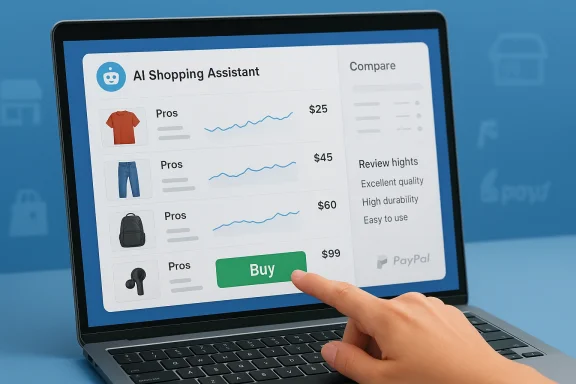
Microsoft’s Copilot is quietly reshaping the way we shop online and in stores, folding price comparison, review summarization, and even in-chat checkout into a single conversational assistant designed to reduce decision friction and — Microsoft hopes — make buying decisively less agonizing.
Microsoft has been layering AI into its products for years, but the shift from utility to transaction is recent and deliberate. What began as experimental shopping helpers in Microsoft Edge — price trackers, coupon finders, and cashback nudges — has been consolidated into Copilot, the company’s cross‑platform AI assistant. The evolution is both technical and strategic: Copilot is being positioned not just as a research tool but as a transactional surface that can discover products, compare options, notify you of price drops, and complete purchases without sending you to a retailer’s checkout page.
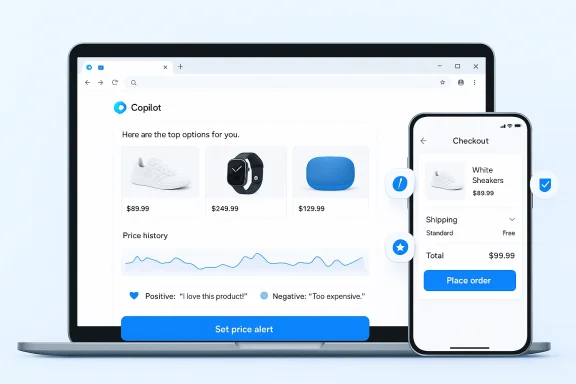
This change represents a realignment of decades-old commerce flows. Historically, shoppers clicked through search results and merchant sites, compared products manually, and completed purchases on retailer checkouts. Today, Copilot aims to compress those steps into a conversational flow: ask, shortlist, compare, wait for a price alert, and pay — all from within the assistant or the Edge browser sidebar.
At the same time, this convenience is not free: it carries accuracy challenges, privacy tradeoffs, and new commerce‑era risks. The most effective use of Copilot will be informed skepticism — rely on the assistant to do the heavy lifting, but verify the facts that matter most before you buy. As Copilot matures and merchants and regulators weigh in, the assistant’s potential to change how we shop is real — but so is the need for careful oversight and responsible use.
If you plan to try Copilot for your next purchase, give it a clear brief, use price tracking for non‑urgent items, and always double‑check the final checkout details before you hit pay. The assistant can take you to the finish line faster — but you should still read the scoreboard.
Source: Microsoft Shop Smarter with an AI Shopping Assistant | Microsoft Copilot
 Background
Microsoft has been layering AI into its products for years, but the shift from utility to transaction is recent and deliberate. What began as experimental shopping helpers in Microsoft Edge — price trackers, coupon finders, and cashback nudges — has been consolidated into Copilot, the company’s cross‑platform AI assistant. The evolution is both technical and strategic: Copilot is being positioned not just as a research tool but as a transactional surface that can discover products, compare options, notify you of price drops, and complete purchases without sending you to a retailer’s checkout page.This change represents a realignment of decades-old commerce flows. Historically, shoppers clicked through search results and merchant sites, compared products manually, and completed purchases on retailer checkouts. Today, Copilot aims to compress those steps into a conversational flow: ask, shortlist, compare, wait for a price alert, and pay — all from within the assistant or the Edge browser sidebar.
How Copilot’s shopping assistant works
Narrowing an ocean of choices into a useful shortlist
Choice overload is real: dozens of models, thousands of reviews, and specs that read like spreadsheets. Copilot’s shopping mode accepts constraints — budget, must-have features, usage scenarios — and returns a focused list of candidates. The assistant applies a combination of web‑wide signals, on‑page product metadata, and trained reasoning to surface items that match the brief.- You provide a concise shopping brief (budget, priorities, deal breakers).
- Copilot filters and ranks options, highlighting why each product made the cut.
- The output is a practical shortlist (typically 3–5 items) rather than a long list of near-equivalents.
Side‑by‑side comparisons in plain English
Where traditional comparison charts either oversimplify or drown you in specs, Copilot attempts to explain meaningful tradeoffs. Instead of listing identical processor names and RAM speeds, Copilot focuses on the user-relevant differences: battery life, noise levels, durability under heavy use, or whether a model struggles with a common task (e.g., blending frozen fruit).- The assistant will identify who each product is best for and who should avoid it.
- It can call out hidden costs or unnecessary premium features you’re unlikely to use.
- The conversation model makes it easy to ask follow‑ups like “Which of these is quieter?” or “Any long-term reliability concerns?”
Turning thousands of reviews into digestible takeaways
A 4.7-star product with 6,000 reviews is a mess of signal and noise. Copilot summarizes patterns across reviews: what consistently delights people, what commonly breaks, and whether complaints cluster around a particular firmware update, manufacturing run, or misuse scenario.- Summaries focus on recurring themes, not single anecdotal complaints.
- The assistant flags persistent quality issues that appear after months of ownership.
- It can answer questions like “Are people complaining about battery life after six months?” without you reading hundreds of reviews.
Price tracking, history, and “wait or buy” guidance
Price volatility is a major source of shopping anxiety. Copilot’s shopping features, as integrated into Microsoft Edge, include price comparison, price history graphs, and price‑drop alerts. If you’re not in a hurry, Copilot can monitor price movements for a product and notify you when the item reaches a target price.- Set an alert, and Copilot watches the web for you.
- Price history helps you set a realistic target instead of guessing.
- Built-in cashback signals and deal hints may surface extra savings.
In‑store help: the assistant in your pocket
Copilot’s mobility makes it useful when you’re physically standing in a store aisle. Point your phone at two models, ask Copilot for a real‑time comparison, and get guidance on whether the store’s sticker price is competitive. It’s a handheld expert for last‑minute decision points.In‑chat checkout: paying without leaving the conversation
Perhaps the most consequential development is Copilot Checkout — a merchant integration that lets users complete purchases directly inside Copilot without being redirected to the retailer’s website. Microsoft has announced partnerships with major payment platforms and commerce providers to enable in-chat payment flows.- Copilot Checkout is meant to reduce friction by keeping the user in the assistant experience.
- Trusted partners listed for early rollouts include major payment processors and commerce platforms.
- Merchants remain the merchant of record, but the checkout experience is embedded inside Copilot.
The technology under the hood
Models, orchestration, and product signals
Copilot uses a stack of models for understanding queries, extracting meaningful product features, and reasoning across multiple data points. The system blends:- Large language models for conversational reasoning and summary generation.
- Web scraping and structured data extraction for price and spec collection.
- Signal aggregation (ratings, review sentiment, return rates where available) for reliability indicators.
- Edge‑specific features that access browsing context when users opt in to richer capabilities.
Edge integration and permissioned context
Copilot’s shopping features are deeply integrated into Microsoft Edge’s sidebar and Copilot Mode. When allowed by the user, Copilot can reason across open tabs and local context to provide more targeted assistance — for example, comparing items that are currently open in different tabs or recognizing which product page you’re viewing and checking for better prices elsewhere. These behaviors are opt‑in and tied to Edge’s privacy settings.Data sources and limitations
Copilot’s product and price signals come from a mix of public merchant listings, structured markup, partner feeds, and advertising inventory. That diversity can be a strength — broader visibility — but it also creates potential discrepancies in reported price and availability. Microsoft’s own documentation cautions that Copilot may occasionally make mistakes about product details, price, and stock status, and encourages users to verify critical facts on the merchant’s site.Practical playbook: how to get the best results from Copilot shopping
The assistant shines when given clear direction. Here’s a short, repeatable workflow that turns Copilot AI assistance into predictable outcomes.- Start with a compact shopping brief:
- Budget range, top 2–3 priorities, and a realistic use case.
- Example: “Wireless headphones, $80–$150, comfortable with glasses, good mic for calls, balanced sound.”
- Ask for a 3–5 item shortlist with reasons:
- Request a recommended pick and a backup for each typical tradeoff.
- Request a side‑by‑side comparison:
- Include pros, cons, and one‑line guidance on who should buy or skip each model.
- Sanity‑check with follow‑ups:
- “What do reviews say about durability?” or “Any firmware-related complaints?”
- If not urgent, set a price alert:
- Use Copilot/Edge price tracking to watch for a target price.
- Before checkout, verify:
- Confirm dimensions, warranty, compatibility, and the merchant’s return policy on the merchant site.
Ready‑to‑use prompts
- “Recommend five wireless mice between $30 and $70 for productivity and long sessions. Explain why each made the list.”
- “Compare [Product A] vs [Product B]. Which is better for photo editing and why?”
- “Set a reasonable target price for [product]. How often does it go on sale and when?”
Strengths: where Copilot shopping genuinely helps
- Time efficiency: Copilot collapses hours of browsing and review reading into minutes of focused conversation.
- Contextual recommendations: When you give a realistic use case, Copilot tailors choices to how you’ll use the product, not just headline specs.
- Integrated price intelligence: Price history and tracking reduce guesswork and the fear of buying before a drop.
- In-chat checkout convenience: Embedded payment flows remove friction and make impulse purchases simpler — for good and ill.
- Cross-device continuity: Copilot’s availability on web, mobile, and Edge allows a consistent experience across contexts, including in-store comparisons.
- Personalization potential: With Copilot Studio and personalized shopping agents, merchants can craft tailored discovery experiences that should feel more helpful than generic product lists.
Risks and caveats: what users should watch out for
Accuracy and stale or incorrect data
Product pages and merchant feeds can be out of date. Copilot aggregates signals from many sources, and price, availability, or even technical specs can be inconsistent across feeds.- Do not rely on Copilot for last‑minute stock confirmation or price guarantees.
- Always verify the final price and shipping details on the merchant’s checkout page, especially for limited‑time promotions.
Over‑compression of nuance by summarizers
AI summarization is powerful but blunt. Distilling thousands of reviews into a few bullet points risks losing context and nuance.- Summaries can amplify a frequent but non‑critical complaint into a perceived systemic defect.
- Conversely, they can understate rare but safety‑critical issues.
Privacy and permission creep
Copilot’s more helpful features often depend on access to context: open tabs, browsing history, or permissioned contacts. Greater convenience typically requires tradeoffs in data exposure.- Review permissions carefully before enabling features that read your inbox, tabs, or browsing history.
- Understand what data is stored and how long it’s retained in the service’s settings.
Security and regulatory exposure
Embedding more commerce into an AI assistant raises security and consumer‑protection questions. Copilot Checkout and agentic commerce form a new locus for fraud, disputes, and regulatory scrutiny.- Who is responsible when a Copilot‑initiated order fails or mischarges? Microsoft’s early framing keeps the merchant as the merchant of record, but practical dispute resolution flows are untested at scale.
- Expect regulators and industry groups to press for clearer disclosures and consumer protections as in‑chat checkout adoption grows.
Business model opacity and merchant incentives
When an assistant surfaces deals, it’s reasonable to ask: who benefits? Cashback signals, affiliate relationships, and advertising inventory can bias which offers are promoted.- Transparency about sponsored results and ranking signals is crucial but not guaranteed.
- Users should be skeptical of an assistant’s “recommended” pick if they’re not told whether merchants compensated the platform.
Systemic vulnerabilities and accidental disclosures
AI systems have had operational bugs that can expose or summarize private data. Recent incidents across AI services underscore the reality that complex integrations introduce new attack surfaces.- Maintain caution about exposing confidential or sensitive personal data via conversational prompts.
- For high‑sensitivity purchases or work‑related procurement, prefer direct vendor channels.
What to watch next
Merchant adoption and rollout speed
Wide merchant participation will determine Copilot’s usefulness as a discovery engine. If major retailers and platforms embrace Copilot Checkout and native product feeds, the assistant can become a genuine one‑stop shopping surface. Early partnerships with large payment and e‑commerce platforms are an important first step, but merchant activation and standards for product data will be the longer test.Competition and consumer choice
Other major players are racing to embed commerce into conversational AI and search: expect competing in‑chat checkouts, instant‑buy features, and deeper commerce integrations from rival platforms. Competition could drive better features and pricing, but it may also fragment the user experience and force consumers to choose which assistant controls their commerce interactions.Regulation, disclosures, and trust frameworks
As agentic commerce grows, regulators are likely to demand stronger disclosures, transparent ranking, and clearer dispute-resolution channels. Users should expect evolving policy requirements about sponsored results, algorithmic transparency, and consumer protections for in-chat purchases.Technical transparency and auditability
Independent scrutiny of how Copilot aggregates price and review signals will be essential. Demand for reproducible reasoning — why a particular product was recommended — will drive calls for explainability features that make the assistant’s decision path auditable.Practical recommendations for shoppers
- Use Copilot as a decision partner, not an unquestioned authority. Let it narrow options and surface risks, but verify final specs and return terms on the merchant site.
- Be explicit with your brief. The more precise you are about budget and priorities, the better Copilot’s shortlist will be.
- Keep sensitive data out of chats. Don’t paste account numbers, passwords, or confidential purchase details into an assistant.
- For high‑value purchases, corroborate Copilot’s findings with at least one additional trusted source.
- Review permission settings in Edge and the Copilot app. Limit cross‑tab and inbox access unless you need the extra convenience.
- Use price tracking for non-urgent buys, but set realistic target prices based on historical data rather than wishful thinking.
Conclusion
Microsoft’s Copilot shopping assistant is a pragmatic step toward a future where AI reduces the drudgery of discovery and replaces tedious comparison shopping with conversational decision-making. The integration of price history, review summarization, and in‑chat checkout points to a streamlined experience that could save consumers time and, in some cases, money.At the same time, this convenience is not free: it carries accuracy challenges, privacy tradeoffs, and new commerce‑era risks. The most effective use of Copilot will be informed skepticism — rely on the assistant to do the heavy lifting, but verify the facts that matter most before you buy. As Copilot matures and merchants and regulators weigh in, the assistant’s potential to change how we shop is real — but so is the need for careful oversight and responsible use.
If you plan to try Copilot for your next purchase, give it a clear brief, use price tracking for non‑urgent items, and always double‑check the final checkout details before you hit pay. The assistant can take you to the finish line faster — but you should still read the scoreboard.
Source: Microsoft Shop Smarter with an AI Shopping Assistant | Microsoft Copilot