

Microsoft Is Moving the Agent Story Out of the Demo Room
For the last two years, the enterprise AI pitch has been dominated by the spectacular: summarize this meeting, draft that email, turn this spreadsheet into a chart, ask a chatbot to find a policy buried in SharePoint. Copilot Studio’s April update lands in a different register. The emphasis is not on a single dazzling prompt, but on the plumbing required when thousands of prompts become business processes.
That shift matters because organizations do not fail at automation only when the model gives a bad answer. They fail when no one knows who owns the automation, what data it can touch, how much it costs to run, whether it can be audited, and what happens when it hands work to another system. Microsoft’s update is an answer to that less glamorous but far more consequential problem.
Copilot Studio is increasingly becoming the place where Microsoft wants enterprises to design agents, bind them to workflows, let them act inside Microsoft 365 Copilot, and then govern them through a broader management layer. The message is clear: the agent era will not be won by the vendor with the cleverest chatbot alone. It will be won by the vendor that can make a bot’s authority, cost, permissions, and behavior legible to IT.
This is classic Microsoft platform strategy. Give business users low-code tools to build quickly, give administrators enough policy surface to tolerate that speed, and give partners a marketplace where their own integrations become reasons to stay inside the ecosystem. Copilot Studio is not merely absorbing AI features; it is being positioned as the agentic successor to a decade of Power Platform thinking.
Governance Is No Longer the Fine Print
The most important part of the April update is not the most glamorous one. Microsoft says Copilot Studio now surfaces agent status directly in the authoring experience, including security and protection posture indicators that can expose authentication gaps or policy effects. In practical terms, that means the maker is supposed to see more of the operational risk before the agent escapes into production.
That may sound like UI housekeeping, but it addresses a real enterprise problem. Low-code platforms often produce a shadow estate of automations that are business-critical, poorly documented, and owned by people who have changed roles twice since building them. AI agents raise the stakes because they can reason over context, invoke tools, and produce outputs that look authoritative even when the underlying chain is messy.
Microsoft’s answer is to put more governance feedback into the build experience rather than only in a separate admin portal. That is the right instinct. If security posture is only visible to central IT, every deployment becomes a ticket queue. If it is visible to makers, some problems can be caught before administrators have to intervene.
The new generally available Analytics Viewer role follows the same pattern. It gives stakeholders read-only access to an agent’s analytics without granting rights to modify, configure, or publish the agent. That sounds almost mundane until you map it to how real organizations work: business owners want performance data, operations teams want trend lines, compliance teams want visibility, and platform owners do not want all of them to have change privileges.
Separation of duties is one of those enterprise concepts that sounds bureaucratic until it saves you from a bad day. A chatbot that answers HR questions, routes sales leads, or reviews contracts is not just a convenience layer; it is part of an operational workflow. Letting analysts inspect outcomes without touching production settings is exactly the kind of boring control that makes broader adoption possible.
Agent 365 Reveals the Shape of Microsoft’s Control Plane
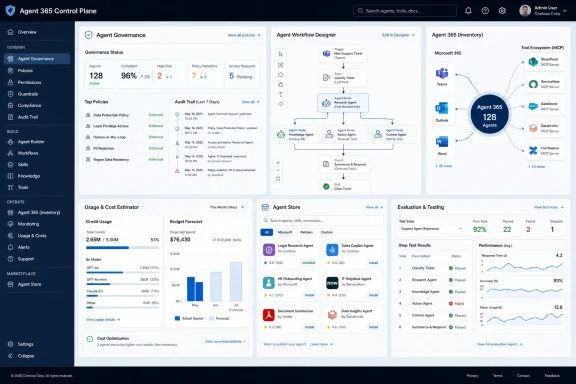
Microsoft’s announcement that Agent 365 is generally available is the clearest sign that the company knows Copilot Studio cannot be governed in isolation. The stated ambition is a centralized control plane for agents across an environment, including inventory, permissions, behavior, and activity. For Copilot Studio customers, that means agents built in the studio can sit alongside Microsoft 365 agents and partner agents under shared oversight.
This is the most Microsoft part of the update. The company has spent decades turning messy end-user computing into managed estate: Group Policy, Active Directory, Intune, Defender, Purview, Entra, Power Platform admin controls, and now agent governance. Every time computing decentralizes, Microsoft tries to sell the re-centralization layer.
There is a strong case for that approach. If agents are going to act across email, files, CRM systems, ticketing platforms, and line-of-business apps, administrators need more than a list of bots built in one tool. They need to know what agents exist, what identities they use, what permissions they inherit, what data they can access, and how their activity can be investigated after the fact.
The risk is that “control plane” becomes another dashboard that promises unity while the actual operational truth remains scattered. Enterprise IT already lives with too many portals that each claim to be the central view of something. Agent 365 will earn trust only if it becomes an operationally useful inventory and policy layer, not just a marketing label for agent sprawl.
Still, Microsoft has an advantage here because it owns so many of the work surfaces where enterprise agents are likely to appear. Copilot Chat, Teams, Outlook, SharePoint, Dynamics 365, Power Platform, and the Microsoft Graph are not peripheral systems for many organizations; they are the daily habitat of office work. If agent governance is going to be attached to identity, permissions, data boundaries, and user activity, Microsoft starts with unusually deep roots.
The Usage Estimator Is Microsoft Admitting Cost Anxiety Is Real
The expanded agent usage estimator now includes Dynamics 365 agents such as Sales Qualification Agent and Customer Service Agent, allowing organizations to model Copilot credit consumption across more scenarios. This is another update that looks small until you talk to anyone responsible for AI budgets. Consumption-based AI pricing can turn a pilot into a procurement migraine.
The enterprise AI adoption curve is already littered with proofs of concept that were exciting in a conference room and alarming in a spreadsheet. Agents make that worse because their value often depends on repeated, embedded use rather than occasional manual prompting. An agent that qualifies leads, drafts service responses, or reviews contracts may execute dozens of model-backed steps per business event.
Microsoft’s credit model gives it a way to meter usage across capabilities, but it also introduces a planning problem for customers. If business units can build and deploy agents rapidly, finance and IT need a forward view of likely consumption. An estimator is not a guarantee, but it is a necessary concession to operational reality.
The inclusion of Dynamics 365 scenarios is especially telling. Microsoft is not treating agents as a standalone Copilot Studio toy; it is threading them through the applications that already carry business process data. That makes cost forecasting harder and more important. A sales or customer service agent is not merely answering a question; it may become part of the revenue or support pipeline.
There is a useful honesty in Microsoft’s framing here. “Avoid unexpected cost surprises” is the kind of phrase vendors use when they know customers have been surprised before. The more agentic the system becomes, the more AI spending resembles cloud spending: elastic, powerful, and occasionally horrifying when no one has tagged, forecast, or constrained it properly.
Workflows Are Where Microsoft Tries to Civilize Agents
The workflow updates are the conceptual heart of the release. Microsoft describes Copilot Studio workflows as deterministic, step-by-step automation processes, and the April update makes it possible to embed agents directly inside those workflows through agent nodes. The significance is that Microsoft is not asking customers to choose between rigid automation and open-ended AI reasoning. It is trying to blend them.
That blend is probably the right model for enterprise AI. Pure chatbot interfaces are too ambiguous for many business processes, while traditional workflows are too brittle for messy real-world inputs. A contract review process, a customer-service escalation, or an onboarding request often needs both structure and interpretation. The trick is deciding where the machine gets discretion and where it must stay inside the lane markings.
Agent nodes are Microsoft’s answer: let a workflow delegate a specific reasoning, decision, or generation task to an agent at a defined step. That preserves the surrounding process while introducing flexibility at the points where rules alone struggle. It also makes the automation easier to inspect than a single giant agent asked to “handle the contract review.”
The Unifi example in Microsoft’s post illustrates why this model is attractive. The aviation ground handling company reportedly used Copilot Studio and Power Platform to automate legal contract review by breaking the process into coordinated steps that extract, classify, and validate key terms. Microsoft says the system reduced contract processing from days to minutes and performed comparably to more expensive legal-industry products.
That case study should be read with the usual vendor-story caution, but the architecture is credible. Enterprises are unlikely to trust one monolithic agent with an entire legal or compliance process. They are more likely to trust a workflow where one component extracts clauses, another classifies risk, another validates required terms, and a human remains in the loop where judgment or approval is required.
Determinism Is the New Enterprise AI Buzzword for a Reason
Microsoft’s repeated invocation of deterministic workflows is not accidental. In 2023 and 2024, the most common enterprise AI concern was accuracy. By 2026, the sharper question is repeatability: can the organization understand what the system will do, when it will do it, and how it will behave under policy constraints?
A workflow gives administrators and process owners a skeleton they can reason about. Even if an agent performs a generative step inside that workflow, the overall structure can define inputs, outputs, review gates, retries, escalation paths, and audit points. That is how AI moves from “assistant” to infrastructure.
The April update also adds direct configuration of AI actions within flows and the ability to test individual steps using sample inputs. Step-level testing is more important than it sounds. Anyone who has debugged a multi-step automation knows that failures often hide in the transitions: the field that is missing, the classification that is slightly off, the output that the next connector cannot parse.
By giving makers a way to validate behavior earlier, Microsoft is trying to shorten the distance between experimentation and operational confidence. The challenge is that AI test coverage is not like conventional unit testing. A step can pass with sample inputs and still fail against the long tail of actual user language, document variation, or ambiguous business context.
That is why the evaluation features later in the announcement matter. Generating test cases from analytics, simulating multi-turn interactions, and running evaluations through APIs and connectors are not side dishes. They are the beginnings of an AI operations discipline for low-code environments. The agent that cannot be tested repeatedly will eventually become the agent that no one wants to own.
MCP Support Pulls Copilot Studio Into the Wider Tool Ecosystem
Microsoft says workflows can now connect to a broader ecosystem of tools, including model context protocol server-enabled tools in preview. The inclusion of MCP is strategically significant because it acknowledges a reality Microsoft cannot avoid: agents will need to use tools outside any single vendor’s native connector library.
MCP has become one of the more visible attempts to standardize how AI systems discover and call external tools and data sources. In Copilot Studio, preview support for MCP server-enabled tools could make it easier for organizations to plug workflows into internal systems, developer tools, databases, or SaaS platforms without waiting for a first-party connector to mature. That fits the direction of agentic AI: less “chat over documents,” more “reason, decide, and act through tools.”
But tool expansion is also where risk concentrates. Every new tool an agent can call is a new path to data exposure, unintended action, or privilege confusion. The history of enterprise integration is full of systems that were safe in isolation and dangerous in combination. Agents increase that danger because they can select tools dynamically based on context.
Microsoft’s governance framing is therefore not optional garnish. The company says these workflow connections operate within Microsoft security, permission, and compliance boundaries, and it has introduced a centralized, admin-controlled environment for Workflows Agent to apply data loss prevention policies more consistently. If that works as promised, it gives administrators a place to enforce policy before workflow experimentation turns into uncontrolled cross-system action.
The phrase “compliant by design” should always make IT professionals squint. Compliance is not achieved by architecture diagrams alone; it depends on configuration, monitoring, process ownership, and human discipline. Still, centralizing DLP enforcement for workflow agents is a more credible foundation than trusting every maker to remember which connector can touch which data class.
Apps in Agents Are Microsoft’s Bid to Collapse the Last Mile
Support for apps in agents is now generally available, and this may be the update users notice most directly. Agents built in Copilot Studio can surface rich, interactive app experiences inside Copilot Chat, allowing users to review data, update records, approve requests, or create assets without leaving the conversation. That is Microsoft’s attempt to close the gap between “the AI told me something” and “the work is done.”
This is the part of the agent vision that has always been more persuasive than the chatbot demo. A conversational interface is useful for asking, summarizing, and drafting, but business work usually ends in an action. A record must be updated. A form must be approved. A design must be edited. A ticket must be routed. If the user has to leave the chat, find the right app, re-enter context, and perform the action manually, the assistant becomes a well-spoken clipboard.
By embedding app experiences inside Copilot Chat, Microsoft is trying to make the conversation itself an operating surface. That is a natural extension of the Microsoft 365 Copilot strategy, which has always depended on meeting users where their work already happens. It is also a direct challenge to standalone AI tools that can answer questions but cannot safely transact inside enterprise systems.
The partner list in Microsoft’s announcement includes Adobe Express, Box, Figma, Monday.com, and Wix, alongside Microsoft apps such as Power Apps and Dynamics 365. The point is not that every WindowsForum reader is suddenly going to approve a Wix asset inside Copilot Chat. The point is that Microsoft wants the Agent Store to look less like a bot catalog and more like an enterprise action marketplace.
That marketplace model will appeal to business teams because it promises speed. It will worry administrators because every embedded app experience is also a permissions and lifecycle question. Who approved the integration? What data is passed into the app? What actions can be taken from chat? How are changes logged? Can an app experience be disabled without breaking a workflow that a department now depends on?
The Agent Store Is a Marketplace, but Also a Control Problem
Microsoft’s Agent Store strategy is easy to understand. Enterprises want ready-made capabilities, partners want distribution, and Microsoft wants Copilot Chat to become the front door for business software. If agents can be installed, extended, and governed through a familiar Microsoft surface, the company gains leverage over both users and vendors.
But marketplaces have a predictable lifecycle. They begin as convenience, become distribution channels, and eventually become governance challenges. Every new listing carries questions about trust, support, data handling, tenant configuration, licensing, and long-term maintenance. In the AI era, those questions become sharper because the integration may participate in reasoning and action, not just display static UI.
For Windows admins and Microsoft 365 administrators, the practical concern is not whether the Agent Store has recognizable partner logos. It is whether the administrative model can keep up with business demand. If a marketing team adopts an Adobe Express agent experience, a project team adopts Monday.com, and a legal team wires contract review into a workflow, IT needs a coherent way to see, restrict, audit, and retire those experiences.
That is where Agent 365 and Copilot Studio governance have to meet the Agent Store. Microsoft cannot simply say that partner integrations are enterprise-grade; it must make their permissions and behavior manageable with the same seriousness as apps, devices, and identities. Otherwise, the store risks becoming the next generation of OAuth consent sprawl.
The upside is equally clear. If Microsoft gets this right, Copilot Chat becomes less of a conversational assistant and more of a controlled workbench for business action. The user does not need to know which system owns the record, which workflow routes the approval, or which app renders the form. The agent becomes the interface, while policy decides the boundaries.
Work IQ Shows Microsoft Chasing Organizational Memory
The Work IQ API, now in public preview according to Microsoft’s update, is presented as a way to bring Copilot’s intelligence layer into custom agents and workflows. Microsoft describes that layer as grounded in organizational context, memory, and signals. In plain English, the company wants agents to understand not just the text of a request, but the surrounding business reality.
That is where enterprise AI becomes both more useful and more sensitive. A generic model can draft an email. A work-aware agent can know the customer account, the project status, the responsible team, the recent documents, the relevant meetings, and the organizational relationships that shape the answer. The productivity gain comes from context; so does the governance burden.
Microsoft is trying to make that context available without forcing developers and makers to assemble raw data pipelines for every agent. That is a sensible platform move. The Microsoft Graph already gives the company a powerful map of organizational activity, and Copilot’s enterprise pitch has long depended on grounding responses in tenant data under existing permissions.
The danger is that “organizational memory” can become a euphemism for systems that know enough to be creepy, wrong in context, or hard to challenge. Memory and signals require careful boundaries. Users need to know why an agent made a recommendation, administrators need to know what sources it could access, and compliance teams need retention and audit stories that survive legal scrutiny.
Work IQ’s public preview status is therefore important. This is not merely another connector; it is a deeper attempt to expose Microsoft’s work-context layer to custom agent builders. If it matures, it could make Copilot Studio agents substantially more useful. If it is opaque, it could become another black box that enterprises hesitate to operationalize.
Agent-to-Agent Communication Raises the Ceiling and the Risk
Agent-to-agent communication in Work IQ is one of the more futuristic-sounding features in the April update, but it follows logically from the workflow direction. Microsoft says agents can collaborate as peers and delegate tasks using shared organizational context. That is the kind of capability that makes multi-agent architectures feel less like research demos and more like business systems.
The use cases are easy to imagine. A sales agent might ask a pricing agent for discount guidance, which consults a policy agent and returns an approved range. A service agent might delegate warranty verification to another agent before drafting a customer response. A procurement workflow might coordinate supplier risk, budget approval, and contract review across specialized agents.
Specialization is appealing because no single agent should do everything. Smaller, role-aware agents can be easier to test, govern, and improve. They can also map more naturally to business domains, where the accounting process, legal process, and support process each have different rules and owners.
But agent-to-agent communication also introduces failure modes that enterprises have not fully learned to manage. Errors can propagate through delegation chains. One agent’s misunderstood context can become another agent’s confident premise. Audit trails must capture not only the final output but the inter-agent path that produced it. Authorization must ensure that an agent cannot indirectly obtain information or trigger actions through another agent that it could not access directly.
This is why Microsoft’s governance and evaluation updates are inseparable from the multi-agent story. A2A communication without visibility would be a nightmare. A2A communication with inventory, policy, testing, analytics, and lifecycle controls could become a powerful architecture for complex business automation. The difference is not theoretical; it is operational.
GPT-5.5 Reasoning Is the Shiny Part, but Not the Whole Product
Microsoft says GPT-5.5 Thinking is available in Copilot Studio early release cycle environments as GPT-5.5 Reasoning and is also rolling out across Microsoft 365 Copilot in Copilot Chat, Word, Excel, and PowerPoint. That is the headline that will attract attention from model watchers. It should not be mistaken for the whole story.
Model upgrades matter. Better reasoning can improve planning, analysis, classification, and multi-step output generation. In workflows where an agent must interpret messy requests, compare documents, or generate structured content, a stronger model can materially improve outcomes. For users, the difference may show up as fewer nonsensical responses and better handling of complex tasks.
But the April Copilot Studio update is not primarily about model intelligence. It is about model operationalization. The best reasoning model in the world does not solve authorization, monitoring, budget forecasting, workflow testing, app integration, or lifecycle governance. Microsoft’s release implicitly acknowledges that enterprise AI maturity is now bottlenecked less by raw model capability than by trustable deployment patterns.
There is also a naming lesson here. “Thinking,” “Reasoning,” “Work IQ,” “agentic,” and “multi-agent” are all part of the current AI vocabulary fog. Microsoft will need to translate these terms into admin-visible controls and user-visible reliability. IT professionals do not deploy adjectives; they deploy systems.
Still, giving Copilot Studio customers access to more advanced reasoning models in early release environments is a useful signal. It lets organizations test higher-capability models before broad deployment, observe cost and behavior differences, and decide where stronger reasoning justifies its likely higher consumption. The model race continues, but Microsoft’s enterprise bet is that the winning model is the one wrapped in the most usable governance.
Evaluation Features Are the Quiet Beginning of AgentOps
The April update’s evaluation improvements deserve more attention than they will probably receive. Microsoft says teams can generate test cases from analytics, simulate multi-turn interactions, automate evaluations through APIs and connectors, and define custom metrics tied to outcomes such as resolution rates or conversions. This is the vocabulary of operational quality, not demo quality.
Traditional software teams have spent decades building habits around testing, monitoring, deployment gates, rollback plans, and incident response. Agent builders are only beginning to develop equivalent practices. A low-code maker can build an agent quickly, but someone still has to answer whether it works, when it fails, and whether it is improving business outcomes.
Generating test cases from real conversation analytics is a practical step because it grounds evaluation in actual usage rather than synthetic happy paths. Multi-turn simulation matters because many agent failures appear only after context accumulates. API-driven evaluations matter because quality checks need to become part of repeatable release processes, not occasional manual spot checks.
Custom metrics may be the most business-relevant piece. Usage statistics tell you whether people are trying the agent; they do not tell you whether the agent is resolving issues, qualifying leads, preventing escalations, or improving cycle time. Outcome-based measurement is how enterprises decide whether an agent deserves to graduate from pilot to production.
The hard part will be metric design. If organizations choose shallow targets, agents will optimize for shallow success. If they choose meaningful metrics, they will need reliable data, clear ownership, and agreement on what counts as a good outcome. Microsoft can provide the tooling, but customers still have to do the organizational work.
Windows Shops Should Read This as a Platform Shift, Not a Feature Drop
For WindowsForum readers, the relevance of this announcement is not limited to Copilot Studio specialists. Microsoft is sketching the next layer of enterprise computing on top of the systems many Windows and Microsoft 365 administrators already manage. Agents will not remain a novelty in a side portal; they will appear in chat, Office apps, Dynamics records, Power Platform workflows, and partner app experiences.
That means the administrative surface of Windows-centric environments is widening again. Identity teams will care about permissions and delegated access. Security teams will care about DLP, audit trails, and tool invocation. Endpoint and productivity administrators will care about how Copilot Chat becomes an action surface. Developers and power users will care about how agents can be composed, tested, and connected.
The pattern resembles earlier platform transitions. Macros, SharePoint workflows, Power Automate flows, Teams apps, OAuth grants, and low-code apps all began as productivity accelerants and eventually became governance estates. Agents are following the same path, only faster and with more ambiguity because their behavior is partly generated at runtime.
Organizations that already have mature Power Platform governance will have an advantage. They understand environment strategy, DLP policies, maker enablement, solution lifecycle management, and the tension between central control and business agility. Copilot Studio appears to be extending that operating model into the agent era.
Organizations that treated Copilot as a chat add-on may be surprised by how quickly the conversation turns into workflow architecture. The April update is a warning shot: the next wave of Microsoft AI adoption will not be managed by prompt tips alone. It will require inventory, roles, policies, evaluations, cost models, and a clear view of where agents are allowed to act.
The April Release Draws a Governance Map for the Agent Sprawl Era
The practical take from Microsoft’s update is that Copilot Studio is becoming a managed automation platform with AI at its center, not a chatbot customization tool. The features still need real-world proving, and preview capabilities should be treated as such. But the direction is now obvious enough for IT teams to plan around it.
- Copilot Studio now emphasizes operational visibility, including agent status in the authoring experience and a generally available Analytics Viewer role for read-only performance access.
- Agent 365 is positioned as the broader governance plane for agents across Microsoft, Copilot Studio, and partner ecosystems.
- Workflows are gaining agent nodes, AI actions, step testing, MCP-enabled tool support in preview, and centralized controls intended to make automation more powerful without abandoning policy.
- Apps in agents are generally available, allowing Copilot Studio agents to surface interactive app experiences inside Copilot Chat for actions such as approvals, record updates, and asset creation.
- Work IQ, agent-to-agent communication, evaluation automation, custom metrics, and GPT-5.5 Reasoning point toward a future where agent quality is managed continuously rather than judged by occasional demos.
Microsoft’s April 2026 Copilot Studio update is best understood as a governance release disguised as a feature roundup. The company is betting that enterprises will not scale AI agents because they are magical; they will scale them when administrators can see them, budget them, test them, restrict them, and plug them into real work without losing the plot. If Microsoft can make that control plane credible, Copilot Studio may become one of the more important pieces of the company’s AI stack—not because it writes the cleverest answer, but because it decides when an answer is allowed to become an action.