

Microsoft Coreutils for Windows should be treated as a controlled platform change, not a developer convenience install: inventory and test CMD and PowerShell automation before
Microsoft announced Coreutils for Windows as generally available on June 2, 2026, although the project repository still identifies the implementation as preview. Microsoft’s documentation describes a Windows-focused Rust build combining uutils/coreutils, findutils, and GNU-compatible
The June 16 servicing release reinforced that reality. Microsoft added
The conflict list should immediately concern anyone maintaining
In CMD, command discovery is heavily shaped by executable lookup and
Start the audit before broad deployment:
PowerShell pipelines are object-oriented; classic Unix-style command pipelines generally operate on byte or text streams. A command sequence can look valid while passing different data than its author expects. The danger rises when scripts process archives, generated files, encoded output, machine-readable records, or names containing spaces and non-ASCII characters.
For administrators, the practical test is simple: do not merely confirm that a command returns output. Compare the whole contract before and after the package is present:
For PowerShell in particular, avoid pipelines that rely on a short alias and then hand the result to a Unix-style consumer. Use explicit cmdlets when building a PowerShell object pipeline; use explicit native commands and controlled input/output when building a stream pipeline. Mixing the two can work, but it should be tested as an intentional compatibility boundary, not discovered during a deployment.
Build a pilot ring with the user groups most likely to benefit and most able to report regressions: developers, release engineers, automation owners, and Windows terminal power users. Install through the supported command:
Then run the previously identified script corpus against known inputs. Include unattended installation and removal in the pilot because Microsoft’s June 16 release specifically addressed silent WinGet installation and uninstall behavior. If the organization uses custom PowerShell profiles, test those too; the servicing release also fixed profile-related issues, but profile complexity is often local rather than universal.
Establish rollback before deployment. The most direct conflict response is the new manager command:
Use it selectively after an identified collision rather than as a blanket reaction. Disabling every conflicting utility erases the portability benefit that justified the package, while leaving every conflict enabled assumes that local scripts are already safe. The appropriate state depends on the workload.
A conservative policy can divide systems into three groups:
Record the package as an approved software component, including its installation route, ownership, update policy, and rollback path. Confirm which team is responsible for deciding when package updates move from pilot to broad deployment. If your organization uses application allowlisting, endpoint controls, or software inventory, make sure the Coreutils executables are accounted for rather than silently appearing as unfamiliar native tools.
The same applies to telemetry and privacy review. The supplied Microsoft documentation establishes the package’s purpose and installation method, but it does not by itself answer an enterprise’s telemetry, logging, or operational-monitoring questions. Do not infer those answers from the package name; assess the package and the surrounding management workflow under normal internal policy.
Administrators should also avoid the false comfort of “Microsoft-maintained” meaning “drop-in GNU compatibility everywhere.” The package is based on Rust uutils/coreutils and is explicitly Windows-focused. That is valuable, but it makes behavioral testing more important, not less, wherever a script has accumulated platform-specific assumptions.
For broader context on the native command-line shift, WindowsForum has previously covered Microsoft’s Coreutils package and its June servicing update. The operational lesson from both developments is that Windows command-line parity is becoming infrastructure, not merely a convenience layer for users who miss Linux utilities.
Does
No. It can remove a conflicting utility, but it does not repair scripts that depend on different encoding, pipeline, quoting, globbing, exit-code, or file-behavior assumptions.
Should scripts use short names such as
Only when the intended shell behavior is explicit and tested. Production automation is safer when it names the intended cmdlet or executable rather than depending on aliases or resolution order.
Coreutils for Windows makes native Windows command lines more hospitable to Unix-oriented tooling, but that benefit arrives with a new compatibility boundary. The next milestone for most IT teams is not installing the package everywhere; it is completing the inventory that makes a controlled deployment possible.
winget install Microsoft.Coreutils reaches shared developer images or enterprise baselines. The risk is not that Windows gains ls, cat, or grep; it is that a familiar command name can begin resolving to a different command, with different pipeline, text, error-handling, or file-behavior assumptions.Microsoft announced Coreutils for Windows as generally available on June 2, 2026, although the project repository still identifies the implementation as preview. Microsoft’s documentation describes a Windows-focused Rust build combining uutils/coreutils, findutils, and GNU-compatible
grep; that combination makes it a more consequential package than a single utility or an optional terminal theme.The June 16 servicing release reinforced that reality. Microsoft added
coreutils-manager disable <utility> for command conflicts and fixed silent WinGet installation, uninstall, and PowerShell-profile problems. That is useful remediation, but it is not a substitute for knowing which scripts and interactive workflows depend on current resolution behavior.
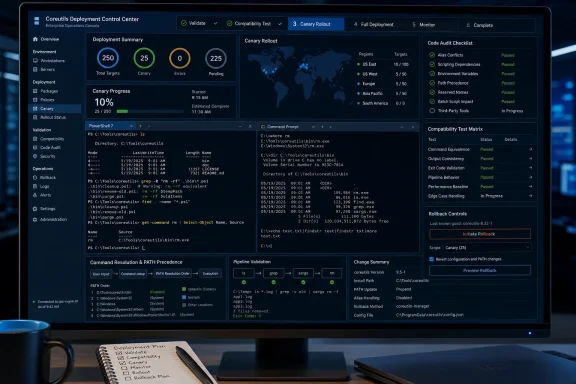 The first task is to find every command that can be shadowed
The conflict list should immediately concern anyone maintaining .cmd, .bat, .ps1, build scripts, deployment wrappers, or endpoint-management snippets. Microsoft identifies collisions involving cat, cp, date, echo, ls, mkdir, mv, pwd, rm, sort, and tee.In CMD, command discovery is heavily shaped by executable lookup and
PATH ordering. In PowerShell, the calculation is more complicated: aliases, functions, cmdlets, scripts, and native executables can all compete. A script that says ls may be intentionally using the PowerShell alias for Get-ChildItem; another may be expecting a native executable after a developer changes profiles or PATH.Start the audit before broad deployment:
- Search repositories, logon scripts, image-build code, configuration-management content, and scheduled-task actions for the conflicting names, plus
findandxargs. Search for both bare command invocations and explicitly suffixed executable names such asfind.exe. - Separate PowerShell from CMD rather than treating “shell scripts” as one category. A
.ps1file can be affected by aliases and functions even when the Coreutils executable directory is available throughPATH; a.cmdfile may instead be sensitive to executable precedence and command-line syntax. - On representative endpoints, record what resolves today. In PowerShell, use
Get-Commandfor each command under review. In CMD, usewherefor executable candidates. Capture the result from a standard user session as well as an elevated administrative session if both are supported paths. - Flag scripts that pipe data into
find,xargs,sort,tee, orgrep, and scripts whose success depends on exact output. These are the places where an apparently harmless name collision becomes an automation failure. - Write the intended command explicitly where practical. In PowerShell, use the full cmdlet name when the script means a cmdlet. Where a native program is required, invoke the intended executable deliberately rather than relying on a short, ambiguous name.
PowerShell pipelines are the sharpest edge
Microsoft explicitly warns that PowerShell aliases can break binary-stream compatibility in pipelines, specifically calling out utilities such asxargs and find. That warning deserves more attention than the usual debate over whether ls should mean a PowerShell alias or a Unix executable.PowerShell pipelines are object-oriented; classic Unix-style command pipelines generally operate on byte or text streams. A command sequence can look valid while passing different data than its author expects. The danger rises when scripts process archives, generated files, encoded output, machine-readable records, or names containing spaces and non-ASCII characters.
For administrators, the practical test is simple: do not merely confirm that a command returns output. Compare the whole contract before and after the package is present:
- Confirm whether the command receives objects, formatted text, or a byte stream.
- Confirm line endings and text encoding in generated files.
- Confirm glob expansion, quoting, and paths containing spaces or special characters.
- Confirm exit codes on both success and expected failure paths.
- Confirm whether file attributes, timestamps, permissions, or overwrite behavior are part of the script’s expected result.
$LASTEXITCODE, branches on an error level, or parses standard output, a changed executable can alter behavior without producing an obvious terminal error.For PowerShell in particular, avoid pipelines that rely on a short alias and then hand the result to a Unix-style consumer. Use explicit cmdlets when building a PowerShell object pipeline; use explicit native commands and controlled input/output when building a stream pipeline. Mixing the two can work, but it should be tested as an intentional compatibility boundary, not discovered during a deployment.
A canary rollout is more useful than a blanket install
The right rollout model is a canary, not an organization-wide WinGet command pushed to every workstation. Coreutils for Windows may be appropriate for developer workstations, build agents, or teams moving scripts between Windows, Linux, macOS, containers, and WSL. It does not follow that every help desk endpoint or production automation host needs it.Build a pilot ring with the user groups most likely to benefit and most able to report regressions: developers, release engineers, automation owners, and Windows terminal power users. Install through the supported command:
winget install Microsoft.CoreutilsThen run the previously identified script corpus against known inputs. Include unattended installation and removal in the pilot because Microsoft’s June 16 release specifically addressed silent WinGet installation and uninstall behavior. If the organization uses custom PowerShell profiles, test those too; the servicing release also fixed profile-related issues, but profile complexity is often local rather than universal.
Establish rollback before deployment. The most direct conflict response is the new manager command:
coreutils-manager disable <utility>Use it selectively after an identified collision rather than as a blanket reaction. Disabling every conflicting utility erases the portability benefit that justified the package, while leaving every conflict enabled assumes that local scripts are already safe. The appropriate state depends on the workload.
A conservative policy can divide systems into three groups:
- Developer systems may receive the package through managed WinGet deployment after canary validation, with documented shell guidance.
- Build and automation systems should receive it only when a named pipeline has tests proving the expected command resolution and output behavior.
- General-purpose and privileged administration systems should remain unchanged unless there is a defined business or operational use case.
Treat Coreutils as part of the software supply chain
Because Coreutils for Windows is Microsoft-maintained and offered through WinGet, it has a clearer enterprise story than downloading a collection of separate ports from unknown sources. But managed provenance does not eliminate change control.Record the package as an approved software component, including its installation route, ownership, update policy, and rollback path. Confirm which team is responsible for deciding when package updates move from pilot to broad deployment. If your organization uses application allowlisting, endpoint controls, or software inventory, make sure the Coreutils executables are accounted for rather than silently appearing as unfamiliar native tools.
The same applies to telemetry and privacy review. The supplied Microsoft documentation establishes the package’s purpose and installation method, but it does not by itself answer an enterprise’s telemetry, logging, or operational-monitoring questions. Do not infer those answers from the package name; assess the package and the surrounding management workflow under normal internal policy.
Administrators should also avoid the false comfort of “Microsoft-maintained” meaning “drop-in GNU compatibility everywhere.” The package is based on Rust uutils/coreutils and is explicitly Windows-focused. That is valuable, but it makes behavioral testing more important, not less, wherever a script has accumulated platform-specific assumptions.
For broader context on the native command-line shift, WindowsForum has previously covered Microsoft’s Coreutils package and its June servicing update. The operational lesson from both developments is that Windows command-line parity is becoming infrastructure, not merely a convenience layer for users who miss Linux utilities.
Frequently Asked Questions
Should administrators block Coreutils for Windows?
Not categorically. Block uncontrolled installation where necessary, but allow a managed pilot for teams that need cross-platform command-line compatibility and can validate their scripts.Does coreutils-manager disable solve every compatibility problem?
No. It can remove a conflicting utility, but it does not repair scripts that depend on different encoding, pipeline, quoting, globbing, exit-code, or file-behavior assumptions.Is PowerShell affected even if an executable is present on PATH?
Yes. PowerShell command resolution includes aliases, functions, cmdlets, scripts, and native executables. APATH change alone does not explain every result; test with Get-Command.Should scripts use short names such as ls and rm?
Only when the intended shell behavior is explicit and tested. Production automation is safer when it names the intended cmdlet or executable rather than depending on aliases or resolution order.Coreutils for Windows makes native Windows command lines more hospitable to Unix-oriented tooling, but that benefit arrives with a new compatibility boundary. The next milestone for most IT teams is not installing the package everywhere; it is completing the inventory that makes a controlled deployment possible.
References
- Primary source: learn.microsoft.com
Coreutils for Windows overview | Microsoft Learn
A set of UNIX-style core utilities for Windows that lets developers run the same commands and scripts they already use on Linux, macOS, and WSL.learn.microsoft.com - Independent coverage: newreleases.io
microsoft/coreutils v2026.6.16 on GitHub
New release microsoft/coreutils version v2026.6.16 Servicing Release 2026.6.16 on GitHub. newreleases.io
- Independent coverage: github.com
GitHub - microsoft/coreutils: Coreutils for Windows: Installer & Packaging · GitHub
Coreutils for Windows: Installer & Packaging. Contribute to microsoft/coreutils development by creating an account on GitHub. github.com
- Independent coverage: blogs.windows.com
Build 2026: Furthering Windows as the trusted platform for development
Build is one of our favorite moments each year - a chance to connect with the global developer community and share what we’ve been building. Over the past year, we have connected with many developers pushing the boundaries of what’s possible onblogs.windows.com - Independent coverage: developer.microsoft.com
Microsoft Build 2026 recap: vision, launches, and top sessions - Microsoft for Developers
Catch up on Microsoft Build 2026 with the vision lead-off, top developer announcements, and must-watch sessions across the Microsoft developer ecosystem.developer.microsoft.com - Independent coverage: sourceforge.net
Coreutils for Windows - Browse Files at SourceForge.net
Coreutils for Windows files. Full list of files for Coreutils for Windows, Coreutils for Windows: Installer & Packaging sourceforge.net
