

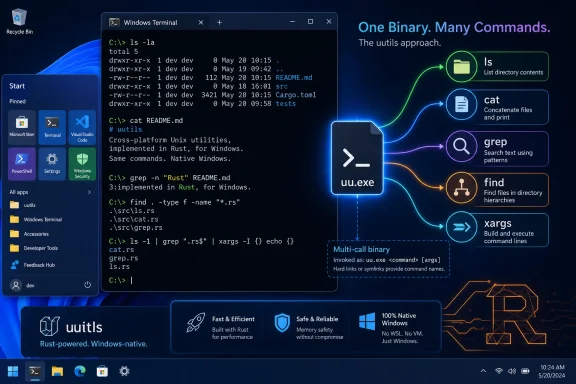
Microsoft’s new Coreutils for Windows, released around Build 2026 and based on the Rust uutils project, brings familiar Unix-style commands such as
The funny thing about Coreutils for Windows is that it feels both new and extremely old. Microsoft is not inventing the idea of Unix commands on Windows. It is putting an official label on a desire that has followed Windows NT since the beginning: let people who know one command-line world get useful work done in another.
That desire was never just about typing
Microsoft’s pitch is deliberately mundane. Coreutils for Windows is a Microsoft-maintained package of Unix-style tools that run natively on Windows, built from Rust-based uutils components and bundled as a single multi-call binary. That last detail matters because this is not a Linux distribution hiding in the corner. It is Windows absorbing a layer of Unix vocabulary into its own command-line surface.
The move also lands at a moment when Windows is trying to look less like a legacy desktop OS with developer features bolted on and more like a serious workstation for cloud-era work. WSL, Windows Terminal, winget, Dev Drive, native
That difference showed up in syntax, but syntax was only the surface. A Unix user expected
Unix won a disproportionate share of developer mindshare because its command line became the common language of servers, open-source software, academic computing, and later cloud infrastructure. Windows remained dominant on desktops, but the software industry increasingly wrote its instructions as if the reader had a POSIX-like shell nearby. The README became a quiet instrument of cultural pressure.
That is why Unix tools on Windows never went away. They were not a niche convenience for people who disliked Microsoft. They were the connective tissue between Windows machines and a software ecosystem that increasingly assumed Unix semantics at the edges. Every port, toolkit, subsystem, and compatibility layer has been a different answer to the same practical question: how much Unix does Windows need to speak?
That is why native ports have always been tempting. Compile a useful pile of tools as Win32 console applications, teach them about Windows paths, and suddenly a large part of the Unix command-line experience appears to exist. For many users, that is enough. If the job is searching text, renaming files, counting lines, or scripting a repeatable maintenance task, there is no need to pretend the whole OS is Unix.
But the illusion breaks when commands stop being isolated executables and start relying on the deeper Unix contract. The Unix command line is not simply a bag of programs. It is a culture of process inheritance, file descriptors, signals, exit codes, pseudo-terminals, quoting rules, globbing behavior, and permissions that have accumulated over decades.
The hardest mismatch has always been
MKS was not trying to erase Windows. That was its appeal. It treated Windows as the operating system in charge while giving users a Unix-flavored toolbox: KornShell-style scripting,
That distinction is important because it foreshadows Microsoft’s current Coreutils move more than Cygwin or WSL do. MKS was valuable precisely because it did not require a full alternate universe. It let administrators and developers stay in Windows while borrowing the command language they needed.
The commercial context also mattered. Enterprises were full of heterogeneous systems long before “hybrid cloud” became a conference phrase. Big companies had Unix servers, Windows desktops, proprietary applications, and build processes that could not be rewritten every time a platform boundary got in the way. A toolkit that reduced friction was not ideological; it was operationally useful.
That kind of project is heroic in the most exhausting sense. Every familiar Unix behavior eventually has to land on a Windows behavior with different assumptions. File permissions do not line up cleanly. Symbolic links have history and privilege complications. Signals, terminals, process groups, device files, and pathname conventions all hide edge cases that only appear after someone tries to run real software.
Compatibility layers also suffer from a cruel asymmetry. Users remember the one script that fails, not the hundred commands that work. The more complete the promise, the more painful each semantic mismatch becomes. “Mostly Unix-like” is useful, but it can also be a trap when software expects the missing part.
UWIN’s place in the story is not that it conquered Windows. It did not. Its importance is that it showed the scale of the problem. Bringing Unix commands to Windows is easy if the commands are treated as convenient tools. Bringing Unix behavior to Windows is hard because behavior lives below the command name.
That model made Cygwin immensely useful. It was not a way to run arbitrary Linux binaries, and it was not a magic spell that made native Windows programs understand every Unix convention. But for source-level portability, it gave developers a workable environment: rebuild the software, link against the compatibility layer, and get a substantial POSIX world on a Windows machine.
The cost was complexity. Cygwin had to emulate enough Unix behavior to satisfy real programs while living inside Windows constraints. The deeper the tool went, the more the compatibility layer mattered. A simple
Again,
Git for Windows may be the most successful stealth example. Millions of Windows developers installed Git and received a bundle of Unix-like tools and shell conventions as part of the experience. Many did not know or care about MSYS2, compatibility layers, or the history behind the pieces. They just learned that Git Bash made certain instructions work.
That invisibility is revealing. The Unix-on-Windows story is often told as a battle between operating systems, but the actual user demand is more prosaic. Developers want the path of least resistance between a command they found in documentation and a result they need on screen. If the machinery is hidden, all the better.
This is also where Windows accumulated a patchwork command-line personality.
That shift was both a retreat and a breakthrough. It admitted that translating Linux semantics forever was a losing battle for many workloads. At the same time, by making Linux feel officially integrated into Windows rather than bolted on by enthusiasts, Microsoft turned what once looked like ideological surrender into developer strategy.
WSL is especially compelling when the desired thing is not just a command name but a Linux environment. Package managers, shells, compilers, daemons, language runtimes, and filesystem assumptions all behave more predictably when they are actually running in Linux. If the goal is to reproduce a production server or container workflow, WSL is the right kind of compromise.
But WSL also makes the boundary more explicit. Files may live on different sides of the Windows/Linux divide. Performance characteristics can depend on where those files sit. Integration is good, but not invisible. For a quick native Windows pipeline, launching a Linux environment can feel like using a freight elevator to move a coffee mug.
The package brings everyday Unix-style utilities into native Windows space. Microsoft’s documentation describes a set of commands exposed under familiar names, built from Rust uutils implementations, with coreutils joined by findutils and a GNU-compatible grep. It is installable through winget or from the project’s releases, and it is meant to reduce friction when moving among Windows, Linux, macOS, WSL, and containers.
The choice of uutils is also telling. Microsoft is not shipping GNU coreutils directly. It is building on a Rust reimplementation designed for cross-platform use. That gives Microsoft a codebase already oriented toward portability, while avoiding some of the licensing and integration constraints that would come with other approaches.
The multi-call binary design is an old Unix trick in modern packaging clothes. One executable can present itself as many utilities depending on how it is invoked. That matters for distribution and maintenance, but the user-facing goal is simple: type the standard command name and get the expected tool.
PowerShell adds its own wrinkle. It already uses aliases such as
There is also a philosophical mismatch between PowerShell and Unix pipelines. Unix tools generally pass text streams. PowerShell passes objects, then renders text when necessary. Administrators who have invested in PowerShell are not wrong to see Unix text utilities as a step backward for some Windows management tasks. But developers who live in cross-platform build scripts are not wrong to want
The correct answer is not to crown one shell culture the winner. The correct answer is to recognize that Windows is now a multi-lingual command-line environment. Coreutils gives it another dialect, and this one happens to be the dialect most cloud and open-source documentation assumes.
That framing fits the broader industry moment. Rust has become the respectable answer when vendors want to talk about safer systems programming without abandoning performance. uutils benefits from that halo, even though command-line compatibility is a brutal test of edge cases rather than marketing language.
The Rust choice does not magically make every utility identical to GNU behavior. Reimplementations live and die by compatibility details, and some Unix users are famously unforgiving about flags, output formatting, locale behavior, and obscure options. A command can be “compatible enough” for casual use while still breaking a carefully aged script from 2007.
For Windows users, though, perfection may not be the standard. The more relevant question is whether common commands behave consistently enough to reduce daily friction. If Coreutils handles the mainstream cases well, it will earn a place in developer setup guides even if purists continue to find differences.
That has benefits. A sysadmin can use PowerShell for structured Windows management, WSL for Linux-native workflows, Git Bash for a familiar Git-centered shell, and now Coreutils for native text processing. Windows Terminal gives these worlds a common frame. Winget makes some of them easier to install. The result is not elegant in the Unix sense, but it is pragmatic.
It also reflects Microsoft’s business reality. Azure, GitHub, Visual Studio Code, containers, and developer services matter more to Microsoft’s platform strategy than defending the purity of
Coreutils for Windows is therefore less about nostalgia than retention. It removes one more reason for a developer to say, “I’ll just use a Mac or Linux box.” Not every reason, and not the biggest reason, but one of the small irritants that accumulates over years.
A standardized Coreutils package could simplify onboarding and automation in shops where Windows endpoints coexist with Linux servers, CI runners, containers, and macOS developer machines. Internal documentation can use fewer platform branches. Training can assume more common ground. Scripts that only need ordinary text utilities may no longer need WSL as a dependency.
Security teams will still ask the usual questions. What is the update cadence? How are upstream uutils changes reviewed? How do these tools interact with application control policies? Could command-name collisions create confusion in incident response or administrative scripts? The answers are manageable, but the questions are real.
The most likely enterprise outcome is selective adoption. Developer workstations will get it first. Build agents may follow where native Windows jobs need Unix-style tooling. Locked-down production servers will move more cautiously, especially if existing PowerShell automation already does the job.
That line is the whole story. Native ports are simple and fast but shallow. POSIX compatibility layers are deeper but more complex. Full Linux environments are more faithful but introduce a boundary. Microsoft’s new package chooses native convenience, and that is the right choice for the problem it is actually solving.
It is also the reason nobody should confuse Coreutils for Windows with a full Unix personality for Windows. If a workflow depends on Linux kernel behavior, WSL remains the answer. If a workflow depends on Windows administration, PowerShell remains the better-native instrument. If a workflow depends on everyday command-line text processing, Coreutils now has a plausible official role.
That layered reality may offend people who prefer clean conceptual models. But modern development is already layered: local machines, containers, remote runners, cloud shells, package managers, virtual filesystems, and language-specific toolchains. Windows is merely making the layering explicit.
Still, the full-circle narrative should not be pushed too far. MKS existed in a world where Unix and Windows were often rival corporate territories. Cygwin flourished when open-source developers needed a bridge onto Windows. WSL arrived when Linux had become central to cloud development. Coreutils for Windows arrives after Microsoft has already accepted that Windows must coexist with Linux rather than defeat it.
That makes this move less dramatic but more durable. It does not need to win an argument about operating systems. It only needs to save time. If
The fine print is that compatibility is a moving target. GNU behavior, uutils behavior, Windows filesystem behavior, PowerShell aliasing, and user expectations will not always align. Microsoft will have to decide which incompatibilities are bugs, which are Windows realities, and which are upstream matters. That maintenance burden is the price of making a familiar command feel official.
The practical consequences are narrow but real:
ls, cat, grep, find, and xargs to native Windows without requiring WSL, Cygwin, or a separate POSIX compatibility layer. The practical story is small; the historical story is not. Windows has spent three decades alternately resisting, imitating, hosting, and now packaging the Unix command line. The result is less a surrender to Linux than an admission that developer muscle memory has become infrastructure.
 Microsoft Has Rediscovered the Oldest Windows Developer Complaint
The funny thing about Coreutils for Windows is that it feels both new and extremely old. Microsoft is not inventing the idea of Unix commands on Windows. It is putting an official label on a desire that has followed Windows NT since the beginning: let people who know one command-line world get useful work done in another.That desire was never just about typing
ls instead of dir. It was about moving habits, scripts, build steps, documentation, and mental models between systems without constantly translating them. A developer who spends the morning in a Linux container, the afternoon in PowerShell, and the evening reading a README written by someone on macOS does not want a philosophical debate about operating-system purity. They want the command in the example to work.Microsoft’s pitch is deliberately mundane. Coreutils for Windows is a Microsoft-maintained package of Unix-style tools that run natively on Windows, built from Rust-based uutils components and bundled as a single multi-call binary. That last detail matters because this is not a Linux distribution hiding in the corner. It is Windows absorbing a layer of Unix vocabulary into its own command-line surface.
The move also lands at a moment when Windows is trying to look less like a legacy desktop OS with developer features bolted on and more like a serious workstation for cloud-era work. WSL, Windows Terminal, winget, Dev Drive, native
curl and tar, sudo for Windows, and now Coreutils all point in the same direction. Microsoft knows the modern developer does not live entirely inside Windows, but it wants Windows to be the place where those other worlds remain reachable.The Border Was Cultural Before It Was Technical
For much of personal-computing history, Unix and Windows users did not merely use different commands. They inhabited different assumptions. Unix taught generations of users that small tools should read from standard input, write to standard output, and compose through pipes. DOS and Windows taught a different set of habits around drive letters, extensions, executable suffixes, GUI applications, registry-backed configuration, and APIs that cared little for POSIX expectations.That difference showed up in syntax, but syntax was only the surface. A Unix user expected
grep error *.log | sort | uniq -c to be a normal way of asking a machine a question. A Windows user might reach for Explorer, Event Viewer, findstr, batch files, or later PowerShell objects. Neither worldview was inherently foolish, but they optimized for different eras and different kinds of work.Unix won a disproportionate share of developer mindshare because its command line became the common language of servers, open-source software, academic computing, and later cloud infrastructure. Windows remained dominant on desktops, but the software industry increasingly wrote its instructions as if the reader had a POSIX-like shell nearby. The README became a quiet instrument of cultural pressure.
That is why Unix tools on Windows never went away. They were not a niche convenience for people who disliked Microsoft. They were the connective tissue between Windows machines and a software ecosystem that increasingly assumed Unix semantics at the edges. Every port, toolkit, subsystem, and compatibility layer has been a different answer to the same practical question: how much Unix does Windows need to speak?
The Easy Commands Were Never the Hard Part
At first glance, the problem looks laughably simple.cat opens a file and writes bytes. mkdir creates a directory. cp, mv, and rm map closely enough to ordinary file operations. Even pipes are not foreign to Windows; command chaining and redirected streams have existed in Microsoft’s world for a long time.That is why native ports have always been tempting. Compile a useful pile of tools as Win32 console applications, teach them about Windows paths, and suddenly a large part of the Unix command-line experience appears to exist. For many users, that is enough. If the job is searching text, renaming files, counting lines, or scripting a repeatable maintenance task, there is no need to pretend the whole OS is Unix.
But the illusion breaks when commands stop being isolated executables and start relying on the deeper Unix contract. The Unix command line is not simply a bag of programs. It is a culture of process inheritance, file descriptors, signals, exit codes, pseudo-terminals, quoting rules, globbing behavior, and permissions that have accumulated over decades.
The hardest mismatch has always been
fork(). Unix lets a process clone itself, handing the child a copy of the parent’s memory, open descriptors, environment, and execution state. Windows has CreateProcess(), a perfectly reasonable and powerful model, but not the same model. If all you need to do is launch a fresh program, the difference is manageable. If you are implementing a shell, a build system, or software that assumes fork-and-exec as a primitive of the universe, the difference becomes architectural.MKS Sold Interoperability Before Interoperability Became a Strategy
Long before Microsoft could plausibly market Linux-adjacent developer ergonomics as a Windows feature, commercial vendors were selling Unix familiarity to Windows shops. The MKS Toolkit, from Mortice Kern Systems, became one of the best-known answers for organizations that wanted shells, scripting tools, text utilities, and development workflows that felt portable between Unix and Windows.MKS was not trying to erase Windows. That was its appeal. It treated Windows as the operating system in charge while giving users a Unix-flavored toolbox: KornShell-style scripting,
vi, grep, awk, make, and many of the other staples needed to move procedures and habits between environments.That distinction is important because it foreshadows Microsoft’s current Coreutils move more than Cygwin or WSL do. MKS was valuable precisely because it did not require a full alternate universe. It let administrators and developers stay in Windows while borrowing the command language they needed.
The commercial context also mattered. Enterprises were full of heterogeneous systems long before “hybrid cloud” became a conference phrase. Big companies had Unix servers, Windows desktops, proprietary applications, and build processes that could not be rewritten every time a platform boundary got in the way. A toolkit that reduced friction was not ideological; it was operationally useful.
UWIN Tried to Give Windows a Unix Soul
AT&T’s UWIN was more ambitious. Associated with David Korn of KornShell fame, it aimed to provide a serious Unix environment on top of Windows NT and Windows 95, including libraries, headers, commands, and enough standards-facing behavior to make Unix software feel at home. Where MKS gave Windows users a practical toolbox, UWIN tried to make Windows wear a Unix personality more convincingly.That kind of project is heroic in the most exhausting sense. Every familiar Unix behavior eventually has to land on a Windows behavior with different assumptions. File permissions do not line up cleanly. Symbolic links have history and privilege complications. Signals, terminals, process groups, device files, and pathname conventions all hide edge cases that only appear after someone tries to run real software.
Compatibility layers also suffer from a cruel asymmetry. Users remember the one script that fails, not the hundred commands that work. The more complete the promise, the more painful each semantic mismatch becomes. “Mostly Unix-like” is useful, but it can also be a trap when software expects the missing part.
UWIN’s place in the story is not that it conquered Windows. It did not. Its importance is that it showed the scale of the problem. Bringing Unix commands to Windows is easy if the commands are treated as convenient tools. Bringing Unix behavior to Windows is hard because behavior lives below the command name.
Cygwin Built the Most Durable Compromise
Cygwin became the classic answer because it drew the line differently. Instead of merely providing native Windows binaries with Unix-like names, Cygwin supplied a POSIX compatibility DLL. Programs built for Cygwin could call into that layer, which translated Unix expectations into Windows operations.That model made Cygwin immensely useful. It was not a way to run arbitrary Linux binaries, and it was not a magic spell that made native Windows programs understand every Unix convention. But for source-level portability, it gave developers a workable environment: rebuild the software, link against the compatibility layer, and get a substantial POSIX world on a Windows machine.
The cost was complexity. Cygwin had to emulate enough Unix behavior to satisfy real programs while living inside Windows constraints. The deeper the tool went, the more the compatibility layer mattered. A simple
grep invocation might look no different from any other port. A process-heavy shell script could reveal just how much work the layer was doing.Again,
fork() was the emblematic problem. On Unix, it is a primitive. On Windows, it has to be approximated with significant machinery. Cygwin’s longevity is a testament to how well that machinery served users, but also to how stubborn the mismatch remained.MinGW, MSYS, and Git for Windows Made Unix Tools Invisible
Not every Windows user who benefited from Unix tools thought they were adopting a Unix environment. MinGW and MSYS, and later MSYS2, brought a lighter-weight GNU-ish toolchain culture to Windows developers who wanted to build native Windows software. The goal was not always to live inside POSIX. Often it was to get enough shell, make, compiler, and text-processing behavior to make cross-platform development tolerable.Git for Windows may be the most successful stealth example. Millions of Windows developers installed Git and received a bundle of Unix-like tools and shell conventions as part of the experience. Many did not know or care about MSYS2, compatibility layers, or the history behind the pieces. They just learned that Git Bash made certain instructions work.
That invisibility is revealing. The Unix-on-Windows story is often told as a battle between operating systems, but the actual user demand is more prosaic. Developers want the path of least resistance between a command they found in documentation and a result they need on screen. If the machinery is hidden, all the better.
This is also where Windows accumulated a patchwork command-line personality.
cmd.exe persisted. PowerShell introduced object pipelines and a more structured administrative model. Git Bash brought Unix conventions. WSL brought actual Linux userlands. Windows Terminal made the whole arrangement visually coherent, if not semantically unified.WSL Stopped Translating and Brought the Guest Inside
The Windows Subsystem for Linux changed the emotional temperature of the debate. Instead of asking how much Unix could be simulated on Windows, WSL asked whether Windows could host a Linux userland directly enough that developers would stop fighting the boundary. WSL 1 translated Linux system calls. WSL 2 moved to a real Linux kernel inside a managed lightweight virtual machine.That shift was both a retreat and a breakthrough. It admitted that translating Linux semantics forever was a losing battle for many workloads. At the same time, by making Linux feel officially integrated into Windows rather than bolted on by enthusiasts, Microsoft turned what once looked like ideological surrender into developer strategy.
WSL is especially compelling when the desired thing is not just a command name but a Linux environment. Package managers, shells, compilers, daemons, language runtimes, and filesystem assumptions all behave more predictably when they are actually running in Linux. If the goal is to reproduce a production server or container workflow, WSL is the right kind of compromise.
But WSL also makes the boundary more explicit. Files may live on different sides of the Windows/Linux divide. Performance characteristics can depend on where those files sit. Integration is good, but not invisible. For a quick native Windows pipeline, launching a Linux environment can feel like using a freight elevator to move a coffee mug.
Coreutils for Windows Is a Smaller Move With Bigger Symbolism
That is why Coreutils for Windows matters despite seeming modest. It does not replace WSL. It does not replace PowerShell. It does not make Windows POSIX-compliant, and it does not promise that a complicated Unix shell script will behave exactly as it does on Linux. Its usefulness comes from accepting a narrower target.The package brings everyday Unix-style utilities into native Windows space. Microsoft’s documentation describes a set of commands exposed under familiar names, built from Rust uutils implementations, with coreutils joined by findutils and a GNU-compatible grep. It is installable through winget or from the project’s releases, and it is meant to reduce friction when moving among Windows, Linux, macOS, WSL, and containers.
The choice of uutils is also telling. Microsoft is not shipping GNU coreutils directly. It is building on a Rust reimplementation designed for cross-platform use. That gives Microsoft a codebase already oriented toward portability, while avoiding some of the licensing and integration constraints that would come with other approaches.
The multi-call binary design is an old Unix trick in modern packaging clothes. One executable can present itself as many utilities depending on how it is invoked. That matters for distribution and maintenance, but the user-facing goal is simple: type the standard command name and get the expected tool.
The Command Name Is Only Half the Contract
The obvious risk is that users will assume command-name compatibility means script compatibility. It does not. Native Windows tools live in the Windows process model, filesystem model, and shell environment. That means path syntax, quoting, wildcard expansion, line endings, case sensitivity, executable lookup, and shell aliases can still produce surprises.PowerShell adds its own wrinkle. It already uses aliases such as
ls, cp, and mv, but those aliases point to PowerShell commands with PowerShell semantics. A user who wants the Coreutils executable may need to call the .exe explicitly or adjust PATH and shell behavior. That is not a fatal flaw, but it is exactly the sort of seam that shows why Unix commands on Windows have always been more than names.There is also a philosophical mismatch between PowerShell and Unix pipelines. Unix tools generally pass text streams. PowerShell passes objects, then renders text when necessary. Administrators who have invested in PowerShell are not wrong to see Unix text utilities as a step backward for some Windows management tasks. But developers who live in cross-platform build scripts are not wrong to want
grep, cut, sort, uniq, and xargs without ceremony.The correct answer is not to crown one shell culture the winner. The correct answer is to recognize that Windows is now a multi-lingual command-line environment. Coreutils gives it another dialect, and this one happens to be the dialect most cloud and open-source documentation assumes.
The Rust Rewrite Gives Microsoft a Politically Useful Middle Path
The use of Rust-based uutils also changes the politics of the move. If Microsoft had shipped a Windows-branded GNU toolchain, the story would have been easier to caricature as “GNU comes to Windows.” Instead, the company can frame Coreutils for Windows as a modern, memory-safe, cross-platform implementation of familiar behavior.That framing fits the broader industry moment. Rust has become the respectable answer when vendors want to talk about safer systems programming without abandoning performance. uutils benefits from that halo, even though command-line compatibility is a brutal test of edge cases rather than marketing language.
The Rust choice does not magically make every utility identical to GNU behavior. Reimplementations live and die by compatibility details, and some Unix users are famously unforgiving about flags, output formatting, locale behavior, and obscure options. A command can be “compatible enough” for casual use while still breaking a carefully aged script from 2007.
For Windows users, though, perfection may not be the standard. The more relevant question is whether common commands behave consistently enough to reduce daily friction. If Coreutils handles the mainstream cases well, it will earn a place in developer setup guides even if purists continue to find differences.
Windows Is Becoming a Workbench, Not a Cathedral
The deeper Windows story is that Microsoft has stopped trying to make one command-line vision rule them all. The old cathedral model of the operating system — one shell, one philosophy, one blessed way to automate — no longer matches how software work happens. Windows is increasingly a workbench where incompatible but useful tools sit side by side.That has benefits. A sysadmin can use PowerShell for structured Windows management, WSL for Linux-native workflows, Git Bash for a familiar Git-centered shell, and now Coreutils for native text processing. Windows Terminal gives these worlds a common frame. Winget makes some of them easier to install. The result is not elegant in the Unix sense, but it is pragmatic.
It also reflects Microsoft’s business reality. Azure, GitHub, Visual Studio Code, containers, and developer services matter more to Microsoft’s platform strategy than defending the purity of
cmd.exe. The company wins if developers can use Windows without feeling cut off from the tooling assumptions of the wider software industry.Coreutils for Windows is therefore less about nostalgia than retention. It removes one more reason for a developer to say, “I’ll just use a Mac or Linux box.” Not every reason, and not the biggest reason, but one of the small irritants that accumulates over years.
Enterprise IT Will Care About Predictability More Than Romance
For enterprise administrators, the appeal is not that Windows can now cosplay as Unix. It is that a Microsoft-maintained package is easier to approve, document, and standardize than a grab bag of unofficial ports. That matters in managed environments where every binary has a provenance question attached to it.A standardized Coreutils package could simplify onboarding and automation in shops where Windows endpoints coexist with Linux servers, CI runners, containers, and macOS developer machines. Internal documentation can use fewer platform branches. Training can assume more common ground. Scripts that only need ordinary text utilities may no longer need WSL as a dependency.
Security teams will still ask the usual questions. What is the update cadence? How are upstream uutils changes reviewed? How do these tools interact with application control policies? Could command-name collisions create confusion in incident response or administrative scripts? The answers are manageable, but the questions are real.
The most likely enterprise outcome is selective adoption. Developer workstations will get it first. Build agents may follow where native Windows jobs need Unix-style tooling. Locked-down production servers will move more cautiously, especially if existing PowerShell automation already does the job.
The Old Divide Has Turned Into a Layering Problem
The Hackaday history is useful because it prevents us from treating Coreutils for Windows as a sudden conversion. The industry has been here again and again. MKS, UWIN, Cygwin, MinGW, MSYS, Git for Windows, Services for UNIX, Interix, and WSL each drew a line between convenience and compatibility.That line is the whole story. Native ports are simple and fast but shallow. POSIX compatibility layers are deeper but more complex. Full Linux environments are more faithful but introduce a boundary. Microsoft’s new package chooses native convenience, and that is the right choice for the problem it is actually solving.
It is also the reason nobody should confuse Coreutils for Windows with a full Unix personality for Windows. If a workflow depends on Linux kernel behavior, WSL remains the answer. If a workflow depends on Windows administration, PowerShell remains the better-native instrument. If a workflow depends on everyday command-line text processing, Coreutils now has a plausible official role.
That layered reality may offend people who prefer clean conceptual models. But modern development is already layered: local machines, containers, remote runners, cloud shells, package managers, virtual filesystems, and language-specific toolchains. Windows is merely making the layering explicit.
The Full-Circle Moment Comes With Fine Print
The irony is hard to miss. Decades after commercial Unix toolkits made Windows more tolerable for Unix users, Microsoft is shipping an official version of the same basic idea. The names have changed. The implementation language has changed. The cultural stakes have changed. The underlying demand has not.Still, the full-circle narrative should not be pushed too far. MKS existed in a world where Unix and Windows were often rival corporate territories. Cygwin flourished when open-source developers needed a bridge onto Windows. WSL arrived when Linux had become central to cloud development. Coreutils for Windows arrives after Microsoft has already accepted that Windows must coexist with Linux rather than defeat it.
That makes this move less dramatic but more durable. It does not need to win an argument about operating systems. It only needs to save time. If
grep works where a developer expects it, if xargs makes a build step portable enough, if sha256sum avoids yet another platform-specific instruction, the feature has justified itself.The fine print is that compatibility is a moving target. GNU behavior, uutils behavior, Windows filesystem behavior, PowerShell aliasing, and user expectations will not always align. Microsoft will have to decide which incompatibilities are bugs, which are Windows realities, and which are upstream matters. That maintenance burden is the price of making a familiar command feel official.
The Native Toolbox Finally Gets Its Badge
The most concrete reading of Coreutils for Windows is also the most useful one: it gives Windows users an officially maintained native toolbox for common Unix-style commands without asking them to enter Linux first. That is not glamorous, but command lines rarely become valuable because they are glamorous. They become valuable because they make repeated work boring.The practical consequences are narrow but real:
- Developers can install a Microsoft-maintained package and use many familiar Unix-style utilities directly in Windows terminals.
- WSL remains the better answer for workloads that require a real Linux userland, Linux packages, or kernel-level behavior.
- PowerShell remains the stronger native option for structured Windows administration, especially where object pipelines and Windows management APIs matter.
- Command-name collisions and shell behavior will still require care, particularly in PowerShell and in older scripts that assume Windows-native utilities.
- The biggest benefit is reduced translation friction across Windows, Linux, macOS, containers, and documentation written for Unix-like environments.
References
- Primary source: Hackaday
Published: Tue, 16 Jun 2026 14:00:00 GMT
A Brief History Of Unix Commands On Windows: CoreUtils (Again) | Hackaday
If you use Windows today and type ls, cat, grep, or awk in a terminal, there is a good chance something useful will happen. That was not always true. For most of the history of personal computing, …hackaday.com
- Official source: learn.microsoft.com
Coreutils for Windows overview | Microsoft Learn
A set of UNIX-style core utilities for Windows that lets developers run the same commands and scripts they already use on Linux, macOS, and WSL.learn.microsoft.com - Official source: github.com
GitHub - microsoft/coreutils: Coreutils for Windows: Installer & Packaging · GitHub
Coreutils for Windows: Installer & Packaging. Contribute to microsoft/coreutils development by creating an account on GitHub. github.com
- Related coverage: scivision.dev
- Related coverage: windowsreport.com
Microsoft Announces Coreutils for Windows and Built-In WSL Containers
Microsoft is bringing Linux-style Coreutils and native WSL containers to Windows to simplify developer workflows. windowsreport.com
- Related coverage: pureinfotech.com
Microsoft brings native Linux command tools to Windows 11 with Coreutils - Pureinfotech
Microsoft releases Coreutils for Windows 11, adding native Linux commands like ls, cp, and rm for developers working across platforms. pureinfotech.com
- Related coverage: gigazine.net
Microsoft has released 'Coreutils for Windows,' which enables the use of UNIX-like commands such as grep on Windows. - GIGAZINE
Microsoft has released Coreutils for Windows , a set of UNIX-style command-line utilities. Installing Coreutils for Windows allows you to use commands such as grep in Command Prompt (CMD) and PowerShell. Coreutils for Windows overview | Microsoft Learn...gigazine.net - Related coverage: uutils.github.io

Installation - uutils Documentation
uutils.github.io
- Related coverage: windowscentral.com
I break down 4 new Windows 11 tools from Build 2026 that genuinely stood out and show where the OS is heading | Windows Central
Microsoft unveiled a lot of AI projects at Build 2026, but these four Windows 11 tools caught my attention the most.www.windowscentral.com
