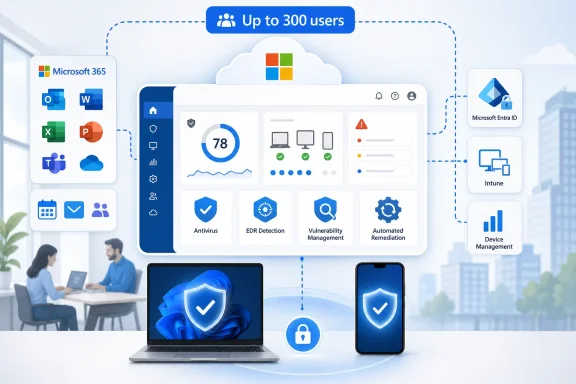
Microsoft Is Selling Security Gravity, Not Just Security Features
The pitch behind Defender and Purview for Business Premium is not subtle: small businesses already live in Microsoft 365, so Microsoft wants more of their risk management to live there too. Email, Teams, SharePoint, OneDrive, Entra ID, Intune, endpoints, audit logs, retention policies, and data-loss controls are not separate islands in a modern Microsoft tenant. They are increasingly one administrative terrain.
That terrain is exactly where SMBs have been weakest. A 40-person accounting firm can be targeted by phishing, token theft, ransomware, malicious OAuth apps, and accidental data exposure just as surely as a Fortune 500 company. The difference is that the smaller firm probably does not have a security operations center, a compliance department, or three engineers who can spend a quarter tuning five separate consoles.
Microsoft’s argument is that the tooling should come to where those customers already are. Defender expands the defensive perimeter across identity, endpoint, mail, collaboration, and cloud apps. Purview tries to answer the messier question of what happens once data starts moving through Microsoft 365, browsers, AI tools, file shares, and employee workflows.
That is a sensible product strategy, and it is also an aggressive platform strategy. Microsoft is not merely offering SMBs a cheaper path to enterprise-grade controls. It is asking them to accept Microsoft 365 as the place where security decisions, compliance evidence, user behavior, and data governance all converge.
The SMB Threat Model Has Outgrown “Good Enough” IT
For years, small-business security was built around a forgiving fiction: if an organization had decent antivirus, multifactor authentication, a backup product, and maybe a spam filter, it was doing enough. That was never completely true, but it was at least understandable. Budgets were small, technical staff were scarce, and attackers were assumed to be more interested in larger prey.
That assumption no longer survives contact with the modern threat economy. Business email compromise does not need a large target; it needs a payable invoice, a distracted employee, and a compromised mailbox. Ransomware crews and access brokers do not need a famous brand; they need exposed credentials, unmanaged devices, or weak conditional access. AI-driven tooling does not have to be magical to be dangerous; it only has to make phishing, impersonation, translation, reconnaissance, and message variation cheaper.
The rise of SaaS has widened the problem. A small company can now run payroll, CRM, file storage, marketing automation, sales operations, finance, and customer support through browser-based services managed by a handful of people. Every integration, guest account, unmanaged device, stale permission, and unsanctioned app becomes part of the attack surface.
This is where Microsoft’s timing is important. Defender and Purview are not arriving because SMBs suddenly became enterprise-like in headcount. They are arriving because SMB infrastructure became enterprise-like in complexity while remaining SMB-like in staffing.
Business Premium Was Already the Floor, Not the Ceiling
Microsoft 365 Business Premium has become the default “serious small business” bundle because it includes more than Office apps and cloud mail. It brings together productivity, device management, identity controls, Defender for Business, Intune, and baseline security features that are materially better than the old Business Standard-plus-antivirus stack.
But Business Premium has always sat in an awkward middle. It gives smaller organizations a credible foundation, yet many of the more advanced capabilities historically lived in the E5 world or in separate security and compliance SKUs. That left IT providers and customers playing licensing Tetris: one add-on for email security, another for endpoint depth, another for identity risk, another for data loss prevention, another for eDiscovery, another for audit, and so on.
The new suites try to reduce that fragmentation. The Defender Suite for Business Premium adds or expands capabilities around Microsoft Defender for Office 365, Defender for Endpoint, Defender for Identity, Defender for Cloud Apps, and Entra-related controls. The Purview Suite brings the compliance and information-protection side closer to the SMB market, including data loss prevention, information governance, insider-risk-style controls, audit and eDiscovery capabilities, and sensitivity-driven protection.
The important point is that these are not replacements for Business Premium. They are Microsoft’s attempt to turn Business Premium into a launchpad. The base suite gives SMBs a manageable Microsoft 365 security posture; the add-ons are for organizations that have outgrown baseline protection but are not ready, willing, or eligible to move wholesale into enterprise licensing.
Defender Is the Easier Sell Because the Enemy Is Outside the Door
Defender has the cleaner story. It is the suite that maps most directly to the threats small businesses already understand: malicious email, compromised endpoints, stolen identities, suspicious sign-ins, risky cloud apps, and attackers moving laterally after the first breach.
That matters because security purchases in SMBs are often event-driven. A phishing incident, a ransomware scare, a cyber insurance questionnaire, a client security requirement, or a failed audit can move money faster than a carefully argued architecture review. Defender speaks to those triggers in familiar language.
The strongest case for Defender is not any single component. It is correlation. A malicious attachment in email, a risky sign-in, an endpoint alert, and a suspicious cloud-app session are more useful when they can be understood as one incident rather than four unrelated warnings in four portals. Microsoft has spent years trying to make the Defender brand represent this shared fabric, even if the underlying products still carry the scars of separate histories.
For smaller IT teams, that correlation can be more valuable than raw feature count. The choice is rarely between Microsoft and a perfectly staffed best-of-breed security program. It is often between Microsoft and a patchwork of tools that nobody has time to tune. In that world, integration is not a convenience feature. It is the difference between having telemetry and having an operational signal.
Purview Is the Harder Sell Because the Enemy May Be Normal Work
Purview asks SMBs to think differently. Its concern is not only malware, phishing, or hostile infrastructure. It is the ordinary movement of sensitive information through a business: a spreadsheet shared externally, a customer file uploaded to an AI chatbot, a contract copied into a personal account, a Teams conversation retained too long or not long enough, a departing employee downloading a trove of documents before resigning.
That makes Purview more abstract and, in many organizations, more politically sensitive. Endpoint protection can be framed as stopping bad guys. Data governance asks uncomfortable questions about how employees actually work. Who can share what? Which files deserve labels? What should be retained? What must be deleted? Which behaviors are risky enough to trigger review?
Small businesses often postpone those questions because they sound like enterprise bureaucracy. But the underlying risks are not enterprise-only. A medical clinic, architecture firm, law office, manufacturer, nonprofit, or managed services provider may handle regulated, contractual, financial, or commercially sensitive data every day. The fact that the company has 75 employees instead of 7,500 does not make the data less consequential.
Purview’s SMB relevance grows further in the AI era. Generative AI tools make data movement easier to overlook because the user’s intent may feel harmless: summarize this contract, rewrite this email, analyze this spreadsheet, extract themes from these support tickets. The risk is that sensitive business data can leave approved boundaries through convenience rather than malice. Purview is Microsoft’s answer to that quiet exfiltration problem.
The AI Angle Turns Data Loss Prevention From Nuisance Into Necessity
For years, data loss prevention had a reputation as the security feature everyone bought, few tuned well, and many users learned to hate. DLP policies could be noisy, brittle, and disconnected from how people actually did their jobs. In smaller businesses, the administrative burden was often enough to keep serious DLP work on the “later” list forever.
AI changes the calculus. It creates new destinations for sensitive data, new user habits, and new ambiguity around what counts as disclosure. Employees may not think of pasting customer records into a public AI tool as a leak in the same way they would think of emailing the records to a personal Gmail account. Yet from the organization’s point of view, the risk may be similar or worse.
This is where Microsoft has a credible structural advantage. If the sensitive data already lives in Microsoft 365, and if identities, devices, sessions, labels, and sharing policies are also in Microsoft’s orbit, then controls can be applied closer to the point of use. A policy that understands a sensitivity label, a user identity, a device compliance state, and an application context is more useful than a generic blocklist bolted onto the network edge.
But that advantage depends on implementation discipline. A poorly planned Purview deployment can become shelfware with a compliance logo. A rushed DLP rollout can frustrate users and teach them to route around controls. The technology is only as good as the classification model, exception process, and business buy-in behind it.
The Partner Channel Is the Real Deployment Engine
The BizTech framing around CDW is not incidental. Microsoft may design the suites, but many SMBs will encounter them through resellers, managed service providers, consultants, and licensing partners. That is how much of the SMB Microsoft ecosystem works, especially when the product touches security configuration rather than simple seat assignment.
This creates a practical divide. On paper, the add-ons make advanced controls more accessible. In practice, accessibility depends on whether a customer has someone capable of assessing the tenant, mapping features to risks, enabling policies safely, and maintaining the environment after the initial sale. Buying the suite is not the same thing as improving security posture.
That is particularly true for Defender. Turning on more detections is easy; building an alert triage process is harder. Small businesses need to know who receives alerts, who investigates them, what constitutes an incident, how devices are isolated, how users are reset, how mail is purged, and how evidence is preserved. Otherwise the organization has upgraded its license more than its security program.
Purview is even more dependent on services. Classification, retention, DLP, audit, eDiscovery, and insider-risk controls require conversations with leadership, legal, HR, finance, and operations. SMBs may not have those departments in formal form, but the responsibilities still exist. A partner that treats Purview as a toggle rather than a governance project will create disappointment.
Consolidation Reduces Sprawl, But It Also Raises the Stakes
The most persuasive argument for Microsoft’s approach is sprawl reduction. SMB security stacks often accrete over time: one tool for endpoint protection, one for email filtering, one for password management, one for mobile device management, one for SaaS backup, one for compliance archiving, one for phishing simulation, one for cloud-app discovery. Each may be defensible on its own; together they can become administratively incoherent.
Consolidation can lower that burden. Fewer consoles, fewer agents, fewer policy engines, fewer identity mappings, fewer renewal cycles, and fewer integration gaps are real benefits. For a lean IT team, the operational simplicity may matter more than whether a specialized vendor wins a feature-by-feature comparison in a lab.
The counterargument is dependence. The more an organization relies on Microsoft for productivity, identity, endpoint security, email security, compliance, DLP, audit, and AI governance, the more Microsoft becomes not just a vendor but the operating environment of the business. That can make sense, but it should be a conscious decision rather than the accidental result of bundled pricing.
There is also the risk of monoculture. If a configuration mistake, licensing misunderstanding, service issue, or compromised administrator account affects the Microsoft tenant, it can affect nearly everything. A consolidated platform needs stronger administrative hygiene, not less. Privileged access, break-glass accounts, conditional access, logging, backup strategy, and independent recovery planning become more important as the center of gravity moves into one cloud.
Licensing Is Still the Tax on Understanding
Microsoft’s security value proposition has often been slowed by Microsoft’s own licensing complexity. The new SMB add-ons simplify some decisions, but they do not eliminate the underlying problem. Customers still need to understand what Business Premium includes, what Defender Suite adds, what Purview Suite adds, what the combined suite includes, how seat minimums or regional availability may apply, and how these offerings compare with older E5 Security or E5 Compliance add-ons.
This matters because licensing confusion is not just a procurement annoyance. It can lead to false assumptions about protection. An administrator may believe a tenant has a capability because a similarly named Defender or Purview product appears in documentation, only to discover the needed feature requires a different plan. Microsoft’s branding is powerful, but it is not always clarifying.
For SMBs, the best licensing test is not “Which bundle sounds most complete?” It is “Which concrete risks are we trying to reduce in the next 90 days?” If the answer is phishing, endpoint compromise, identity attacks, and cloud-app visibility, Defender deserves the first look. If the answer is sensitive-data movement, retention, audit, eDiscovery, and AI leakage, Purview becomes harder to ignore.
Many organizations will eventually need both, but sequencing matters. A business with unmanaged devices and weak MFA should not start by designing an elaborate retention taxonomy. A business handling regulated data with decent endpoint controls may find that Purview closes the more urgent gap. The suite architecture is Microsoft’s, but the roadmap should belong to the customer.
Security Value Will Come From Configuration, Not SKU Names
The danger in any bundled security release is the illusion of arrival. A company buys a higher-end suite, assigns licenses, and assumes it has crossed a maturity threshold. Attackers do not care what appears on the invoice. They care whether MFA is enforced, devices are managed, alerts are reviewed, risky apps are blocked, and sensitive files are governed.
That is why the first phase of adoption should look less like a product rollout and more like a tenant reckoning. Which users have administrative roles? Which devices are unmanaged? Which mailboxes have forwarding rules? Which OAuth apps have broad permissions? Which SharePoint sites allow external sharing? Which data types are most sensitive? Which logs are retained long enough to investigate an incident?
Defender and Purview can help answer those questions, but they do not answer them automatically. The organizations that benefit most will be the ones that treat the suites as instruments for continuous posture management. The ones that benefit least will be the ones that buy them as insurance theater.
The same applies to AI governance. Blocking every public AI service may be unrealistic, and allowing everything may be reckless. The useful middle is policy grounded in data sensitivity, identity, device state, approved tools, and user education. Microsoft’s tooling can support that middle ground, but only if the business has decided what responsible use actually means.
The SMB Security Market Is Being Pulled Upmarket
Microsoft’s move also says something broader about the security market. Enterprise controls are drifting downward because the old separation between enterprise and SMB risk is collapsing. Attack tooling scales. Cloud misconfiguration scales. Credential theft scales. Compliance pressure scales through supply chains, customer contracts, insurers, and regulators.
That does not mean every small business needs a miniature enterprise security program. It means the baseline for competent IT is rising. Ten years ago, a small company could plausibly argue that advanced identity protection, endpoint detection, SaaS governance, and DLP were beyond its category. In 2026, that argument is less persuasive, especially for firms handling client data, financial transactions, health records, intellectual property, or privileged access to other customers’ systems.
Microsoft is well positioned to benefit from that shift because it already owns the productivity estate where much of the risk lives. Competitors will argue, fairly, that best-of-breed tools may offer deeper specialization, faster innovation, or more independent checks on Microsoft’s own platform. But SMB buyers often optimize for deployability, integration, and partner support before theoretical superiority.
The result is a market where Microsoft does not need to win every technical bake-off. It needs to be good enough, integrated enough, and easier enough for the buyer who has too much risk and too few hands. That is a powerful position.
The Real Test Is Whether Smaller Firms Can Operate the Tools They Can Now Buy
The Defender and Purview suites make Microsoft’s advanced stack more reachable, but reachability is not maturity. The next year will show whether SMBs and their partners can turn these add-ons into real-world outcomes: fewer compromised accounts, faster incident response, better device hygiene, safer sharing, cleaner audit trails, and fewer ungoverned paths for sensitive data.
There is reason for optimism. Microsoft 365 Business Premium already gives many small businesses a stronger foundation than they had in the old on-premises-small-server era. Adding Defender and Purview can close meaningful gaps without forcing a complete platform change. For organizations already standardized on Microsoft 365, the path of least resistance may also be the path of greatest security improvement.
There is also reason for caution. Microsoft’s portals, naming, licensing, and policy surfaces remain complex enough to punish casual administration. A small business can buy enterprise-adjacent capabilities faster than it can develop enterprise-adjacent judgment. That gap is where misconfiguration, alert fatigue, and unused features live.
The suites should therefore be viewed as an opportunity, not a cure. They give SMBs access to controls that increasingly match the risks they face. Whether those controls become protection or just another line item depends on the discipline of deployment.
The Practical Reading for a Business Premium Tenant
For a Microsoft 365 Business Premium customer, the decision should start with exposure, not branding. The most useful exercise is to map the organization’s top risks against what is already configured, what is licensed but unused, and what is missing entirely. Only then does the Defender-versus-Purview-versus-both conversation become grounded.
The strongest candidates for Defender are businesses with high email dependence, distributed endpoints, remote workers, cloud-app sprawl, or limited visibility into identity-driven attacks. The strongest candidates for Purview are businesses with sensitive client data, contractual retention duties, regulated records, external sharing risk, or growing concern about AI tools and data leakage. Many professional services, healthcare-adjacent, financial, legal, and MSP organizations will recognize themselves in both categories.
The worst approach is to treat the add-ons as a substitute for basics. Before spending more, tenants should make sure the fundamentals are not embarrassing: MFA, conditional access, least-privilege administration, device compliance, patching, backup and recovery, mailbox protections, secure sharing defaults, and a clear incident contact path. Advanced suites amplify a good foundation; they do not rescue a neglected one.
The Bundle Only Pays Off If the Business Changes Its Habits
The most concrete lesson from Microsoft’s SMB security push is that tools and behavior now have to move together. Defender can make attacks more visible, and Purview can make data movement more governable, but neither can compensate for an organization that refuses to define ownership, review alerts, or enforce policy. For SMBs, that cultural shift may be bigger than the licensing shift.
- Microsoft’s Defender and Purview suites extend Business Premium into security and compliance territory that was previously more closely associated with enterprise Microsoft 365 plans.
- Defender is the more immediate fit for organizations trying to improve protection across email, endpoints, identities, and cloud applications.
- Purview becomes more important as sensitive business data moves through SharePoint, OneDrive, Teams, browsers, external sharing workflows, and generative AI tools.
- The strongest operational benefit is consolidation, but consolidation also increases dependence on Microsoft tenant security and administrative discipline.
- SMBs should sequence adoption around specific risks rather than buying the largest bundle first and hoping the configuration follows.
- The suites will deliver value only if someone owns policy design, alert response, data classification, exception handling, and ongoing review.
Microsoft’s bet is that small businesses do not need a smaller version of yesterday’s enterprise security stack; they need an integrated control plane for the cloud workplace they already inhabit. That bet is directionally right, but it transfers responsibility rather than removing it. The next phase of SMB security will not be defined by whether advanced tools are available to smaller tenants, because they increasingly are. It will be defined by whether those tenants, and the partners guiding them, can turn Microsoft’s expanding security umbrella into habits sturdy enough to hold when the next phishing campaign, rogue app, data leak, or AI misuse incident arrives.
References
- learn.microsoft.com learn.microsoft.com
- microsoft.com microsoft.com
- techcommunity.microsoft.com techcommunity.microsoft.com