

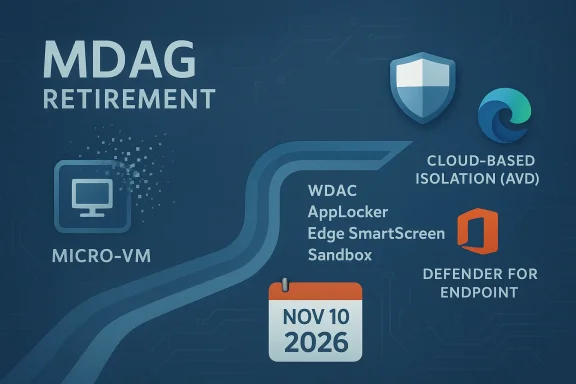
Microsoft’s long-running experiment with hardware-isolated browsing and document containment is finally being put out to pasture: Microsoft Defender Application Guard (commonly called MDAG) has a firm retirement timeline, and organizations that rely on its Hyper‑V container model need to act now. Microsoft has removed MDAG from new Windows 11 images (starting with Windows 11, version 24H2) and has set a final support cutoff that aligns with the end of servicing for Windows 11, version 23H2 — November 10, 2026. At the same time, Microsoft is phasing out the Office-integrated version of Application Guard across Microsoft 365 update channels with a staggered removal that completes by late 2027. These are not abstract deprecations: they affect browser-container workflows, extension APIs, Office sandboxing, and admin controls that many security teams built into their threat containment strategies.
Background / Overview
Microsoft Defender Application Guard launched as a defense-in-depth technology that used hardware virtualization (Hyper‑V) to run untrusted websites and documents inside isolated containers, preventing malware and exploit code from reaching the OS or user profile. For some enterprises this offered a powerful, low-friction way to contain risky web content and suspicious Office attachments without full virtual desktop infrastructure. Over time MDAG was integrated with Microsoft Edge for Business and with Microsoft 365 (Office) to create a coordinated isolation surface for untrusted content.In late 2023 Microsoft formally deprecated MDAG for Edge for Business and began advising customers to evaluate alternate safeguards. That deprecation is now complete for new Windows 11 installs — MDAG is no longer available starting with Windows 11, version 24H2 — and Microsoft has published a final support window for existing installations that expires when Windows 11, version 23H2 reaches end of servicing on November 10, 2026. The company has also published a separate, channel-driven timeline for removing MDAG from Office applications, stretching through 2026 and into late 2027 for some update channels.
Why this matters: the MDAG model couples a hardware‑backed isolation primitive (a Hyper‑V micro‑VM) to a browser or Office process. Removing the feature removes both user-facing capabilities (open in container) and management primitives (Windows Isolated App Launcher APIs, Edge extensions that redirect untrusted content into the container). Administrators who used these capabilities must now re-evaluate controls that depended on that isolation boundary.
What Microsoft has said — the official posture
Microsoft’s lifecycle documentation and Edge/MDAG guidance are explicit:- MDAG deprecated and removed for Edge for Business: Microsoft’s product pages state that Application Guard and the Windows Isolated App Launcher APIs are deprecated for Microsoft Edge for Business and are no longer available starting with Windows 11, version 24H2. Existing installations are not immediately broken, but the feature is not included in new 24H2 images.
- Windows servicing alignment: Support for MDAG will be tied to Windows release servicing. For devices remaining on Windows 11, version 23H2 (Enterprise/Education/IoT Enterprise), MDAG is supported until the servicing end date of November 10, 2026. After that, Microsoft may remove or disable the OS APIs that MDAG relies on.
- Office removal schedule: Microsoft’s Microsoft 365 messaging and independent reporting show a staged removal of the Office variant of Application Guard starting in early 2026 (Office version 2602) across different Office update channels, with a full phase-out reaching into late 2026/2027 for slower channels. During and after the removal, Office files that would have opened in the Application Guard container will instead open in Protected View or follow admin‑configured policies.
Why Microsoft is removing MDAG now
There are three practical drivers behind Microsoft’s decision:- Modern browser and platform mitigations have improved considerably, reducing the marginal value of a separate Hyper‑V containment layer for many customers. Edge now includes layered protections — Microsoft Defender SmartScreen, Enhanced Security Mode, site isolation improvements, and more granular extension management — that can mitigate many threats with less operational cost than VM-based containment.
- Operational complexity and adoption. MDAG required management of Hyper‑V host capabilities, driver and firmware compatibility, image composition, and specialized extensions or policies. Adoption outside targeted enterprise scenarios was limited; Microsoft’s product strategy favors integrating protections into the platform and browser where they’re easier to deploy and update.
- Product rationalization. Microsoft has been removing or consolidating low-usage or high-maintenance features across Windows and Office; MDAG’s removal aligns with a broader pruning of inbox components and APIs that are difficult to maintain across varied hardware and channel models.
What breaks (practical impacts) — short and medium term
For organizations and administrators, the deprecation means actual functionality and policy changes that require planning:- Edge extensions and Isolated App Launcher APIs: Browser extensions and Windows Store helpers that launched untrusted sites into an MDAG container will no longer be available for new Windows 11 24H2 installs. Existing installations will continue to function until the platform APIs are removed or disabled. If you relied on these APIs for automated workflows or auditing, those pipelines will need replacement.
- Office sandboxing (MDAG for Office): Office users who relied on the Application Guard sandbox to open untrusted Word, Excel, or PowerPoint files in a VM will see those files open in Protected View or be governed by other configured policies once the Office removal is rolled out to their update channel. Microsoft advises enabling compensating controls like Application Control and ASR rules in Defender for Endpoint.
- APIs and automation: Microsoft has warned that APIs could be disabled after the supporting Windows release reaches end of servicing. That means automation that toggled or orchestrated MDAG containers could fail when the underlying hooks disappear. Treat those scripts and management consoles as high-risk items to inventory and replace.
- Security posture changes: The loss of a hardware-backed containment model changes the attacker cost model; organizations that used MDAG as a primary containment control must adopt alternative layers to preserve defense-in-depth. This often means strengthening AppLocker/WDAC policies, Defender for Endpoint configuration, and network-level isolation for high-risk browsing.
Recommended alternatives and Microsoft’s official guidance
Microsoft and independent reporting point to a suite of alternative controls. None are a drop‑in perfect replacement for the exact protection model MDAG provided, but combined they can recreate strong containment and denial surfaces.Key alternatives to consider:
- Windows Defender Application Control (WDAC) — a robust code integrity policy engine that prevents unauthorized code from executing. WDAC is frequently recommended as a policy-level replacement to prevent unauthorized binaries and scripts from running.
- AppLocker — easier to configure in some enterprises and recommended for blocking specific apps or script hosts. Microsoft suggests admins use AppLocker or Microsoft Edge management to block unprotected browsers until MDAG workloads are retired.
- Microsoft Defender SmartScreen & Enhanced Security Mode (Edge) — modern browser protections that combine URL reputation, download scanning, and script hardening to reduce web-borne threats without VM containment. These are now integral parts of Edge and are part of Microsoft’s replacement guidance.
- Windows Sandbox — a lightweight, disposable desktop VM for running untrusted binaries in isolation. For ad‑hoc or user-driven tasks, Sandbox provides containment without persistent VM management.
- Azure Virtual Desktop (AVD) or cloud sandboxing — for high-risk browsing or document processing, isolating sessions in managed virtual desktops or cloud-hosted sandboxes shifts the risk outside the corporate endpoint. This is commonly used for sensitive workflows that previously relied on MDAG.
- Microsoft Defender for Endpoint (MDE) ASR rules & EDR — enabling Attack Surface Reduction rules, exploit mitigation, and endpoint detection and response helps detect, block, and investigate threats that used to be contained by MDAG. Microsoft explicitly recommends these controls when MDAG is removed from Office.
- Protected View and Office hardening — after Application Guard removal from Office, untrusted documents default to Protected View. Administrators should review Protected View settings and pair them with DLP, sensitivity labeling, and conditional access.
A practical migration and remediation roadmap (step-by-step)
If you manage endpoints that use MDAG, treat this as a prioritized operational project. The timeline below is a practical, risk-driven plan you can adopt immediately.- Inventory: Within 2 weeks
- Create an inventory of all devices, Edge policies, Office integrations, and automation/scripts that reference MDAG or the Windows Isolated App Launcher APIs.
- Flag critical business processes that depend on MDAG (e.g., targeted browsing kiosks, automated document pipelines, specialized extension workflows).
- Assess risk & coverage: Within 1 month
- For each dependency, determine whether Protected View + existing Edge protections meet the risk tolerance or whether sandboxing / cloud isolation is required.
- Identify endpoints that will remain on Windows 11, version 23H2 beyond November 10, 2026 (this is the last supported baseline for MDAG on Windows 11).
- Pilot alternative stack: 1–3 months
- Deploy WDAC or AppLocker policies in audit mode and monitor for block/exceptions.
- Pilot Windows Sandbox or AVD-based browsing for high-risk roles (e.g., procurement, finance).
- Harden Edge: enable Defender SmartScreen, Enhanced Security Mode, and block unapproved browsers via MDM/GPO.
- Policy enforcement & automation changes: 3–6 months
- Convert audited WDAC/AppLocker policies into enforced mode after addressing false positives.
- Replace automation that launched MDAG containers with workflows that route risky actions into Sandbox/AVD or to managed kiosks.
- Training & exceptions: 3–6 months
- Train support teams and users about Protected View behaviors and the new workflow for handling untrusted documents or links.
- Establish an exception workflow for business-critical sites that formerly required MDAG.
- Rollout & validation: 6–9 months
- Broadly enforce AppLocker/WDAC policies and the Edge hardening baseline.
- Validate EDR telemetry and review incident response playbooks for the new environment.
- Final decommission & retrospection: Before November 10, 2026
- Devices still on 23H2 should be migrated off MDAG capability or moved to a supported baseline before November 10, 2026, to avoid broken APIs.
- Archive MDAG configuration and audit logs, and update compliance artifacts and risk registers.
Technical notes and troubleshooting guidance
- If your environment used the Windows Isolated App Launcher APIs, inventory code that calls those APIs and replace it with an approved sandbox orchestration mechanism. These APIs are being removed from new Windows 11 images and may be disabled after the 23H2 servicing cut‑off.
- Edge extension replacements: The MDAG browser extensions are no longer maintained (there is no migration to Manifest V3 for MDAG extensions). Admins should use Edge policies and MDM controls to enforce browsing whitelist/blacklist.
- For Office file handling: Configure Protected View, DLP policies, and sensitivity labels to ensure untrusted documents cannot exfiltrate data or trigger undesired macros. Pair these with EDR and ASR rules to detect post‑open malicious behavior. Microsoft’s messaging recommends enabling these compensating controls as MDAG is removed from Office.
- Testing: Always pilot WDAC/AppLocker in audit mode; otherwise you risk large-scale application failures. Use telemetry to triage rule exceptions before changing enforcement states.
Strengths of Microsoft’s approach — and why some customers will agree
- Simplification of the security stack. Relying on a smaller set of well-maintained platform protections (SmartScreen, Enhanced Security Mode, WDAC) is easier to operate at scale than maintaining Hyper‑V containment on every endpoint. This reduces attack surface complexity and total cost of ownership.
- Better deployment reach. Browser-based protections are available across more device configurations, including machines that can’t support Hyper‑V, making a secure baseline available to more users.
- Encourages modern policy practices. Moving organizations toward policy-based code integrity and cloud-hosted isolation aligns with zero‑trust principles and the broader direction of enterprise security.
Risks, caveats, and classes of organizations that must be careful
- High-risk, high‑isolation workloads. Organizations that used MDAG as the primary containment mechanism for high-risk browsing or document processing (for example, legal discovery, procurement, or threat intelligence teams) will find the alternatives operationally heavier. AVD or dedicated sandboxing can be more expensive and require architectural changes.
- Legacy compatibility and automation breakage. Automated workflows, third‑party browser helpers, or in-house tooling that integrated MDAG APIs will likely break. Unsupported or slow-moving business applications can be disrupted if teams do not instrument a migration path.
- Compliance and audit evidence. Some auditors or compliance regimes explicitly called out the presence of hardware isolation as a control. Replacing MDAG with a policy‑based control set may require updated attestation and new evidence gathering. Capture logs and policy configs now to simplify future audits.
- Timing mismatch between Windows and Office rollouts. The Windows deprecation (Nov 10, 2026) and Office removals (through 2027 for some channels) are separate timelines; organizations must plan for both. Do not assume a single cutover date for all MDAG functionality — Office sandboxing can disappear later depending on your update channel.
- Potential for incomplete parity. There is no single alternative that exactly reproduces every MDAG capability (API hooks, seamless “open in container” UX, telemetry integration). Expect trade‑offs and plan compensating controls.
Real-world checklist for administrators (quick action items)
- Inventory all MDAG dependencies and tag owners.
- Map devices by Windows release (identify 23H2 devices that will host MDAG until Nov 10, 2026).
- Pilot WDAC/AppLocker in audit mode and tune rules.
- Harden Edge across the estate: SmartScreen, Enhanced Security Mode, disable extensions not centrally approved.
- Roll out Windows Sandbox for ad‑hoc isolation and evaluate AVD for heavy-duty needs.
- Update EDR/ASR/Defender for Endpoint policies to provide additional runtime protection.
- Update documentation, incident response playbooks, and compliance evidence before deprecation milestones.
Final assessment
Microsoft’s decision to remove Microsoft Defender Application Guard is the outcome of technical evolution: increased browser and platform hardening, low adoption of a hardware‑VM containment model at scale, and a desire to reduce maintenance burden for a legacy API surface. For many organizations the path forward — a layered stack of WDAC/AppLocker, Edge hardening, sandboxing options, and cloud isolation — will deliver comparable or better protection with lower operational friction. That said, organizations that treated MDAG as a core containment control must not treat this as a benign housekeeping item. The deprecation creates concrete operational and security work: inventory, policy migration, pilot testing, and staged enforcement will be necessary to avoid functional breakage and to maintain a resilient security posture.Plan now, execute with telemetry-driven pilots, and treat November 10, 2026 (Windows 11, version 23H2 end of servicing) and your Office channel’s removal dates as non-negotiable deadlines. If you haven’t already begun the inventory and pilot phases, accelerate them: MDAG’s removal is not only announced — it’s scheduled, and the window to migrate safely is finite.
Source: The Windows Club Defender Application Guard for Windows 11 to lose support
