

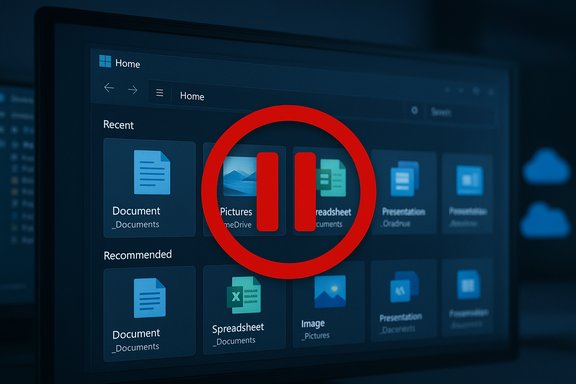
Microsoft has quietly paused the public rollout of File Explorer’s new Recommended files surface and the accompanying StorageProvider APIs, reversing a staged release that began appearing in preview builds on October 28 and was pulled back in the changelog on November 5.
Microsoft shipped the binaries for its October 28, 2025 non‑security preview (KB5067036) into Release Preview channels with a mix of immediately enabled fixes and server‑gated features. Among the highest‑visibility items were a redesigned Start menu, taskbar battery refinements, and a reworked File Explorer Home that surfaces Recommended files — large thumbnail tiles showing recently used, downloaded, or shared files — plus StorageProvider APIs intended to let third‑party cloud vendors surface suggested cloud files inside Explorer Home. The KB’s published notes were updated on November 5 to state that the File Explorer recommendations and StorageProvider APIs “previously listed in the October 2025 non‑security update will roll out in a future date,” effectively pausing the public rollout while the rest of the update remains available. That official changelog entry is the clearest, authoritative confirmation that Microsoft has delayed these specific features.
Microsoft’s decision to pause the rollout — reflected in the official KB update on November 5 — is therefore a prudent move while the company finishes ironing out policy, security, and regional compliance edges. For users and admins the immediate takeaway is simple and actionable: the feature is optional, can be disabled locally, and enterprises should use established policy controls to block unwanted exposure until Microsoft issues final guidance and a robust re‑enablement plan.
This pause is unlikely to be permanent; the underlying ideas remain sensible for many workflows. The difference now is that Microsoft appears to be buying time to make sure those ideas are rolled out without surprising admins, violating regulations, or creating security gaps — a cautious, if frustrating, approach that may ultimately benefit both users and enterprise operators when the feature returns.
Source: Windows Central Microsoft hits the breaks on Windows 11 File Explorer 'recommended files' feature
 Background / Overview
Microsoft shipped the binaries for its October 28, 2025 non‑security preview (KB5067036) into Release Preview channels with a mix of immediately enabled fixes and server‑gated features. Among the highest‑visibility items were a redesigned Start menu, taskbar battery refinements, and a reworked File Explorer Home that surfaces Recommended files — large thumbnail tiles showing recently used, downloaded, or shared files — plus StorageProvider APIs intended to let third‑party cloud vendors surface suggested cloud files inside Explorer Home. The KB’s published notes were updated on November 5 to state that the File Explorer recommendations and StorageProvider APIs “previously listed in the October 2025 non‑security update will roll out in a future date,” effectively pausing the public rollout while the rest of the update remains available. That official changelog entry is the clearest, authoritative confirmation that Microsoft has delayed these specific features. What the Recommended files feature was designed to do
- Surface recently accessed photos, documents, downloads, and shared files at the top of File Explorer Home as large thumbnail tiles.
- Include activity from cloud accounts such as OneDrive and shared documents, and show quick hover actions (for example, Open file location and Ask Copilot) on supported accounts.
- Be optional for end users — a Folder Options setting labeled Show recommended section lets users hide the panel and restore the classic Quick Access view.
Timeline: testing, limited launch, then pause
- Development and Insider testing: Microsoft tested the Recommended feed in Insider channels for months and initially enabled it for domain‑joined (enterprise) PCs before expanding to personal accounts and local accounts on Release Preview devices.
- Production preview rollout: The October 28 preview (KB5067036) documented the feature as part of a staged, server‑gated rollout to Release Preview users.
- Rollback/hold: On November 5 Microsoft updated the KB/changelog to say those File Explorer features will ship at a future date, pausing further exposure while leaving other parts of the preview intact.
Why Microsoft may have paused the rollout (evidence and analysis)
Microsoft has not published a public post‑mortem explaining the pause. However, several concrete factors likely contributed and are supported by public documentation and community reporting:- Official change: The Microsoft support note and KB explicitly mark the feature as deferred on November 5, which is the definitive administrative action. This is not a rumor — it’s in the product changelog.
- Privacy and regional gating complexity: Microsoft’s Release Preview notes and community tests show the Recommended feed was not rolling out in the EEA (European Economic Area) initially and that behavior differed for Entra ID (work/school) accounts compared with personal accounts. Those regional and account‑type exclusions suggest Microsoft was still reconciling regulatory and enterprise policy boundaries, making a pause plausible while the company adjusts compliance controls. This gating behavior is well documented in the preview notes.
- Security hardening around the Preview pane: Separate, recent Microsoft guidance changed File Explorer’s preview behavior for files marked with the Mark‑of‑the‑Web (MoTW) after an October security update, disabling previews for internet‑origin files to block potential NTLM hash leakage. Rolling out richer thumbnails and cloud‑integrated recommendations at the same time could have increased risk or user confusion around preview behavior, prompting a conservative rollback. Microsoft’s security guidance explicitly describes this preview change and the rationale.
- Performance and UX feedback: Community reports and early hands‑on coverage noted that the Recommended panel can feel intrusive or add background work (cloud queries, rendering thumbnails), which can impact File Explorer responsiveness on some configurations. While not an official reason given by Microsoft, staged rollouts are commonly paused when telemetry or user feedback uncovers unexpected regressions.
- Third‑party integration and attack surface: Opening Explorer Home to third‑party StorageProvider integrations increases the surface area for providers that must be vetted for performance, privacy, and security. Microsoft may be pausing to refine APIs, tighten permission models, or complete security reviews before enabling broader access.
The regulatory and enterprise dimension
- EEA and Entra ID differences: Microsoft’s rollout notes and preview posts explicitly excluded certain experiences from the EEA and treated Entra ID (work/school) accounts differently — sometimes removing Recent/Recommended exposures for Entra ID users in the EEA to satisfy GDPR and enterprise governance concerns. Enterprises should assume the feature’s visibility will remain policy‑sensitive.
- DLP and Copilot interactions: The Recommended feed and hover Ask Copilot affordances can surface and act on documents without opening them in their native apps. In regulated environments, those flows must be vetted against Data Loss Prevention (DLP) policies; IT teams will need to confirm whether Copilot summaries or cloud suggestion queries can transmit content off‑device and whether those transmissions are allowed by corporate policy. Microsoft’s documentation and independent analysis flagged these governance questions during the preview.
- Policy controls: Administrators have GPO/MDM knobs to disable recent‑item tracking and similar surfaces. For high‑compliance shops, blocking the feature centrally remains the fastest mitigation while Microsoft finalizes controls. Community guidance and forum summaries provide practical policy paths for admins, including registry and Group Policy settings to prevent recent‑item history from being built or surfaced.
Security considerations tied to the pause
Microsoft’s separate security advisory about File Explorer preview behavior for internet‑origin files is notable context: starting with mid‑October security updates, Explorer’s preview pane will not render files marked with MoTW to mitigate an NTLM hash leakage vulnerability. Blocking content in‑pane for internet files reduces an attack vector that could be amplified by thumbnail rendering or cloud preview handlers. That security posture makes it sensible for Microsoft to slow down any rollout that increases content surfaced directly in Explorer. StorageProvider APIs add new third‑party code paths into one of Windows’ most trusted UI surfaces. If a third‑party provider’s hooks run synchronously during Home load or thumbnail generation they could cause performance regressions or create privilege/authorization complexities. A measured rollout pause to validate those APIs across vendors is a defensible engineering decision.Practical steps for users and administrators right now
The Recommended tile surface is optional and, importantly, can be suppressed by users and controlled by IT. Until Microsoft confirms a re‑rollout and publishes final guidance, here are practical, verifiable controls:- Disable Recommended files (user):
- Open File Explorer (Win + E).
- Click the three‑dot (ellipsis) menu and choose Options (Folder Options).
- In the General tab, uncheck Show recommended section (or similar wording), then click Apply → OK.
- Turn off recent‑items tracking globally (admin/GPO):
- Use the Group Policy setting Do not keep a history of recently opened documents (User Configuration → Administrative Templates → Start Menu and Taskbar). This prevents the system from populating the central recent feed used by Start, Explorer, and Jump Lists. Community and forum guidance outline the registry and GPO keys involved for centralized enforcement.
- Review DLP and Copilot policies (IT):
- Audit which accounts have Copilot/Copilot+ entitlements and whether Copilot flows invoked from Explorer (Ask Copilot, hover commands) are allowed in your compliance posture.
- Whitelist or block StorageProvider integrations at the MDM/Intune level until vendors pass security reviews. Independent writeups recommend vetting third‑party provider code and permissions before enabling the integration in enterprise images.
- Monitor Microsoft’s KB and Release Preview blog for the re‑enablement notice:
- The KB entry that paused the rollout will be the authoritative place Microsoft updates when it decides to resume a staged rollout. Bookmark the update note for KB5067036 (or subsequent servicing) for future status.
Strengths of the feature (why Microsoft pursued it)
- Productivity gains: Surfacing frequently used and recently downloaded files in a tile view can save repetitive navigation steps for knowledge workers and creators.
- Parity for cloud providers: StorageProvider APIs give third‑party clouds a chance to offer OneDrive‑like experiences natively in Explorer Home, which is useful for customers who use alternative cloud vendors.
- Integration with Copilot: Hover actions and quick Copilot summaries aim to reduce context switching — summarizing a file without opening full apps can be a real time saver for tasks like triage, review, and content scanning (with appropriate governance).
Risks and tradeoffs (why caution is justified)
- Privacy surface area: Showing account‑based insights and combined local+cloud recommendations raises privacy concerns for shared or public PCs and increases regulatory complexity in jurisdictions with strong data‑protection laws.
- Consistency and fragmentation: Hardware, region, account type, and licensing gating (Copilot+ hardware, Microsoft 365 entitlements) will create inconsistent experiences across a fleet, complicating support and training.
- Security and preview behavior: Recent security hardening around the preview pane and MoTW means some expected preview behaviors will be limited for internet‑origin files, which may confuse users who expect thumbnails or quick previews to work the same way as before.
- Third‑party risk: Allowing third‑party storage providers deeper hooks into Explorer increases attack surface if providers are not vetted for secure handling of credentials, data, and background operations.
What to expect next
Microsoft’s updated KB explicitly promises a future rollout date but provides no firm ETA. Given the complexity — privacy/regulatory differences across regions, the security changes affecting preview handlers, and the third‑party integration surface — a cautious multi‑stage reintroduction is likely:- Microsoft will probably harden API permissioning and publish additional admin controls or policies before a broad consumer re‑enablement.
- Expect incremental pilot programs (Insider/Release Preview) to validate fixes and telemetry, followed by a controlled release to consumers and enterprises.
- Administrators should treat any re‑enabled feature as requiring renewed pilot testing, DLP validation, and imaging checks because of the fragmented gating across hardware and licensing.
Final assessment
The File Explorer Recommended surface and StorageProvider APIs represent the next logical step in making Windows 11 more contextually aware and cloud‑integrated. They have clear productivity upside for many users and a legitimate developer story for cloud vendors. At the same time, these changes materially expand the number of places where user data is aggregated, summarized, and potentially sent to cloud services, and that raises well‑founded privacy, security, and governance questions.Microsoft’s decision to pause the rollout — reflected in the official KB update on November 5 — is therefore a prudent move while the company finishes ironing out policy, security, and regional compliance edges. For users and admins the immediate takeaway is simple and actionable: the feature is optional, can be disabled locally, and enterprises should use established policy controls to block unwanted exposure until Microsoft issues final guidance and a robust re‑enablement plan.
This pause is unlikely to be permanent; the underlying ideas remain sensible for many workflows. The difference now is that Microsoft appears to be buying time to make sure those ideas are rolled out without surprising admins, violating regulations, or creating security gaps — a cautious, if frustrating, approach that may ultimately benefit both users and enterprise operators when the feature returns.
Source: Windows Central Microsoft hits the breaks on Windows 11 File Explorer 'recommended files' feature
