

Microsoft added Microsoft Entra passwordless resource account support for Teams Rooms on Windows to its Microsoft 365 roadmap, with general availability planned for August 2026 across worldwide commercial, GCC, and GCC High clouds. The change sounds narrow, but it strikes at one of the oldest weak points in meeting-room technology: shared room credentials that behave too much like user passwords. Microsoft is effectively trying to turn the conference room PC from a quasi-user into a managed device with a clean identity boundary. For IT teams that have spent years nursing Teams Rooms sign-in failures, password rotations, conditional access exceptions, and technician handoffs, that boundary matters.
The modern conference room is no longer an appliance in the old sense. A Teams Rooms on Windows device is a Windows endpoint, a Teams client, an Exchange calendar participant, an audio-video controller, and often a highly visible executive productivity dependency. When it fails, it does not fail quietly; it fails five minutes before a board meeting.
That is why identity design matters. Historically, many Teams Rooms deployments have depended on resource accounts with passwords, because the room needs a mailbox, a calendar, and a Teams identity. That model worked, but it always carried an uncomfortable fiction: a room account was not a person, yet it still had a secret that looked and behaved like a person’s password.
Microsoft’s roadmap item points to a more defensible model. Entra resource accounts for Teams Rooms on Windows are meant to provide secure, passwordless sign-in while separating device identity from user identity. That is the right architectural instinct, even if the practical success will depend on migration tooling, tenant readiness, and the inevitable edge cases in hybrid environments.
The timing also fits Microsoft’s broader identity push. Redmond has spent years telling customers to move toward passwordless authentication, stronger conditional access, and device-based trust. Teams Rooms has been one of the awkward places where that strategy met the messy physical world of installers, room consoles, wall panels, and shared spaces.
A person can reset a password, satisfy MFA, respond to prompts, or call the help desk. A room system cannot. It sits on a credenza or behind a display and is expected to sign in unattended after updates, reboots, network changes, and app refreshes. That unattended requirement is exactly what turns ordinary identity hygiene into operational drag.
This is why Teams Rooms administrators have long had to balance conflicting priorities. They want resource accounts that are protected from abuse, but they also want devices that do not fall off the calendar because a password expired or a policy changed. They want conditional access, but they do not want to strand a room at a sign-in prompt before an all-hands meeting.
Passwordless resource account support does not make those tensions disappear. It does, however, moves the control point away from a shared secret and toward an identity model better suited to devices. That is a meaningful shift because shared secrets are not merely inconvenient; they are hard to govern at scale.
In a clean design, the Windows device has its own identity and management posture, while the room resource account represents the room’s collaboration function. Those are related, but they are not the same thing. Blending them together makes policy design harder because administrators end up asking one identity to answer two different questions: “Is this a trusted endpoint?” and “Is this the room calendar?”
That distinction matters in Entra and Intune environments. Device compliance, join state, update posture, and management enrollment belong to the endpoint. Mailbox permissions, calendar processing, Teams licensing, and room behavior belong to the resource account. When those layers are mixed, troubleshooting becomes guesswork and conditional access policies become a forest of exceptions.
Microsoft’s current documentation around Teams Rooms on Windows already emphasizes Entra ID join as a prerequisite for passwordless resource account functionality. That is not a small requirement. It means organizations still running room systems as domain-joined relics, workgroup oddities, or inconsistently managed endpoints will have preparatory work to do.
For security teams, this is the part worth watching. Passwordless sign-in is useful, but a passwordless room account attached to a poorly governed Windows device is only a partial improvement. The stronger version of this story is one where the room PC is Entra joined, enrolled, monitored, and governed as a first-class endpoint.
A migration wizard suggests Microsoft knows this cannot be a white-paper exercise. Teams Rooms fleets often include multiple hardware vendors, varied Windows images, different app versions, older provisioning methods, and a mix of local IT practices. A button that works in a lab is not enough for the hoteling floor, the regional sales office, and the boardroom installed by a contractor three years ago.
The dashboard is equally important. Migration status is a control-plane problem. Admins need to know which rooms are ready, which are blocked, which have failed, and which have not checked in. Without that visibility, a passwordless migration becomes a spreadsheet-driven scavenger hunt.
Microsoft has been consolidating Teams Rooms device management into the Pro Management portal, and this roadmap item leans into that direction. The company appears to be treating the portal not just as a monitoring surface, but as the place where fleet-level identity transitions are orchestrated. That is sensible, but it also increases the importance of the Pro portal in daily operations.
There is a licensing undertone here as well. Teams Rooms Basic may be sufficient for smaller deployments, but Microsoft’s richer management story increasingly lives around Teams Rooms Pro. The roadmap language does not by itself rewrite licensing rules, but administrators should read the Pro Management portal reference as a signal: the most scalable version of this migration will likely be managed from Microsoft’s paid rooms operations plane.
The cloud coverage is notable. Microsoft lists worldwide standard multi-tenant, GCC, and GCC High. That matters because public-sector and regulated customers often arrive late to collaboration features, particularly those touching identity and device management. Including GCC High at the roadmap level signals that Microsoft intends this to be more than a commercial-only convenience.
Still, roadmap dates are not contracts. Microsoft 365 roadmap items move, slip, narrow, and sometimes arrive with caveats that are only obvious when documentation lands. IT leaders should treat August 2026 as a planning marker, not as a guaranteed weekend migration date.
The work that can begin now is boring but valuable. Inventory the Teams Rooms on Windows fleet. Confirm join state. Review resource account creation practices. Clean up stale room accounts. Check licensing. Validate Intune enrollment and compliance policies. Document who owns the room lifecycle from procurement through retirement.
That groundwork will pay off even if the feature shifts. The organizations that struggle with this migration will not be the ones that asked too many identity questions in advance. They will be the ones that discover during rollout that half their rooms were built differently from the other half.
Exceptions are not automatically bad. Enterprise IT runs on exceptions because real environments are full of edge cases. The problem is that exceptions age badly, especially when they are attached to identities that rarely receive human attention.
A room account excluded from a policy in 2021 can become a liability in 2026 if nobody remembers why the exclusion exists. A password set never to expire may have been a practical necessity, but it is still a credential with a long life. A technician who once needed credentials to finish an install may have copied them into a deployment note that outlived the project.
Passwordless resource accounts are an attempt to reduce this category of operational debt. They do not remove the need for policy design, but they can reduce the number of places where administrators must weaken normal controls to keep rooms online. In identity security, fewer exceptions usually means fewer surprises.
The counterpoint is that passwordless systems can create new dependencies. Certificates, device registration state, token lifetimes, app versions, and cloud availability all become part of the trust chain. The trade is not “complexity versus no complexity.” It is old complexity built around passwords versus newer complexity built around managed identity and device posture.
Microsoft’s own guidance has increasingly recommended cloud-only resource accounts using Microsoft Entra ID and Exchange Online. That recommendation is easy to understand. Cloud-only accounts reduce directory synchronization complexity and align with the service where Teams and Exchange Online already live. But “recommended” and “deployed everywhere” are different things.
Hybrid customers will need to examine how their room mailboxes were created, where identities are mastered, and which policies apply. They will also need to understand whether existing automation assumes password-based resource accounts. A migration wizard may simplify the path, but it cannot magically erase years of tenant-specific practice.
The danger is not that the new model will be impossible. The danger is that organizations will underestimate the number of hidden dependencies wrapped around the old one. Scripts that reset room passwords, monitoring that tests sign-in in a particular way, documentation that assumes a password exists, and help-desk workflows that treat room accounts like special users may all need revision.
This is where Microsoft’s dashboard could become more than a convenience. If it exposes meaningful blockers and status detail, it may help administrators convert a messy identity inventory into an actionable migration plan. If it merely shows red, yellow, and green without enough diagnostics, the support burden will move back to tenant admins.
The real security win is the reduction of reusable shared secrets. A Teams Rooms password can be mishandled, phished, stored, reused, or forgotten. A passwordless model makes those failure modes less central. That is a strong improvement, particularly for rooms installed and serviced by multiple people over time.
But room systems remain attractive targets. They are networked Windows devices with microphones, cameras, calendars, and access to meetings. They may sit in sensitive spaces. They may be physically accessible to visitors. They may run vendor components alongside Microsoft software. Identity is only one layer.
Admins should therefore avoid treating passwordless support as a reason to relax endpoint controls. The opposite is true. Once the room account is less dependent on a password, the device identity and management posture become even more important. Entra join, Intune compliance, update rings, local admin restrictions, network segmentation, and monitoring all deserve renewed attention.
There is also a governance question around lifecycle. What happens when a room device is replaced, repurposed, returned to a vendor, or moved to another space? Passwordless sign-in reduces credential exposure, but it does not eliminate the need to retire device identities cleanly and remove stale associations.
Microsoft’s move is best understood as a security architecture upgrade, not a one-click cure. It narrows one risk class while raising the bar for disciplined device management.
That is why this feature’s operational impact may be larger than its security branding. Password-related failures are particularly annoying in rooms because they often present as generic sign-in, calendar, or Teams connectivity problems. The cause may be identity, but the symptom is a meeting that starts late.
By removing password handling from the room account flow, Microsoft can reduce one recurring source of fragility. That should mean fewer manual interventions after password expiry, fewer credential handoffs during provisioning, and fewer rooms stuck in an authentication state after policy changes. The exact improvement will vary by tenant, but the direction is right.
The migration wizard also has a user-experience dimension. If administrators can convert rooms gradually and observe progress centrally, they can avoid disruptive cutovers. The best room identity migration is the one users never notice.
There is an irony here. The most successful version of this feature will be invisible. If Microsoft gets it right, executives will not praise Entra resource accounts in August 2026. They will simply stop asking why the conference room signed itself out again.
That shift favors organizations with mature endpoint management. If your desktop engineering team already understands Entra join, Intune, compliance baselines, update policies, and device lifecycle, Teams Rooms can fit into a broader operating model. If rooms are still treated as vendor-installed appliances outside normal IT governance, the new identity model may expose gaps.
This does not mean every conference room should be managed exactly like a laptop. Rooms have unique update windows, peripheral dependencies, AV certification considerations, and business visibility. A bad driver update on a user laptop is inconvenient; a broken room system outside the CEO’s office is a political event.
But the identity and management plane is converging. The room may be special, but it is not exempt from the rules of modern Windows operations. Microsoft’s passwordless resource account work reinforces that direction by requiring administrators to think about the device, the room identity, and the management service as a system.
The Surface Devices platform tag on the roadmap is another reminder of the hardware angle. Microsoft’s own room and collaboration devices sit inside this ecosystem, but Teams Rooms on Windows also spans certified systems from multiple vendors. That diversity is useful, yet it makes consistent identity posture harder. The more heterogeneous the fleet, the more valuable a centralized migration and reporting experience becomes.
This consolidation has benefits. Room administrators need fewer places to check health, migration progress, device status, and remediation steps. A purpose-built portal can present room-specific context that generic Entra or Intune views may not surface clearly. It can translate identity state into room operations language.
There are also risks. Microsoft’s admin ecosystem is already crowded: Teams admin center, Microsoft 365 admin center, Entra admin center, Intune admin center, Exchange admin center, and specialized portals for security and compliance. Moving more room operations into the Pro Management portal can simplify the Teams Rooms world while adding yet another surface for cross-functional teams to learn.
The key will be integration. If the dashboard links failures to actionable causes and aligns with Entra and Intune signals, it will help. If it becomes a glossy status page that still requires admins to hunt through logs elsewhere, it will frustrate the very customers it aims to rescue.
For large organizations, role-based access will matter too. The people who manage room hardware are not always the people allowed to modify identity policy. A successful migration workflow must respect that separation without turning every failed device into a ticket bounced between collaboration, endpoint, and identity teams.
That pattern is not unique to Teams Rooms. Windows sign-in, passkeys, conditional access, device compliance, and cloud management all point in the same direction. The old perimeter has been replaced by identity and device posture, and Microsoft wants every endpoint category to participate.
Rooms are especially interesting because they are shared, physical, and socially important. They sit at the intersection of security and embarrassment. A compromised room is a risk; a broken room is a public failure. That combination forces IT to care about both assurance and reliability.
Microsoft’s challenge is that Teams Rooms customers are not all at the same maturity level. Some are cloud-first, fully managed, and ready for passwordless room identities. Others are still dealing with inconsistent provisioning, hybrid account patterns, and legacy AV support models. The feature has to serve both without making the modern path hostage to the old one.
The August 2026 rollout will therefore be a test of Microsoft’s ability to make secure defaults operationally survivable. Enterprises generally support the destination. They object when the road there breaks production rooms.
That coordination is often the hard part. Meeting rooms occupy physical space, so the asset inventory must match reality. The room account should map cleanly to a mailbox and a device. The device should map to a location, a support owner, and a lifecycle plan. The policies should reflect how the room is actually used.
The least glamorous work will matter most. Naming conventions, stale accounts, duplicate rooms, orphaned devices, unlicensed resource accounts, undocumented local admin credentials, and inconsistent update practices will all complicate migration. Passwordless sign-in will not fix a messy estate; it will reveal it.
Organizations should also plan communications carefully. End users do not need a lecture about Entra resource accounts, but service desks and field technicians need to know what changed. If a room no longer has a password-based sign-in path, old troubleshooting scripts may cause confusion. If a migration fails, frontline support must know where to look and when to escalate.
The best preparation is a pilot that reflects reality, not a showcase. Include a standard room, an executive room, a regional office room, a recently deployed device, and an older device still in support. If the migration works across that mix, the broader rollout becomes much less frightening.
Microsoft’s Entra passwordless resource account support for Teams Rooms on Windows is a modest roadmap item with an ambitious subtext: the conference room is being pulled fully into the modern identity era. If Microsoft delivers the migration tooling well, admins get fewer shared secrets, cleaner separation between device and room identities, and a more manageable path away from brittle sign-in practices. If customers do their part, August 2026 could mark the moment Teams Rooms stops being an exception-filled collaboration appliance and becomes what it should have been all along: a governed Windows endpoint that happens to run the most visible meeting in the building.
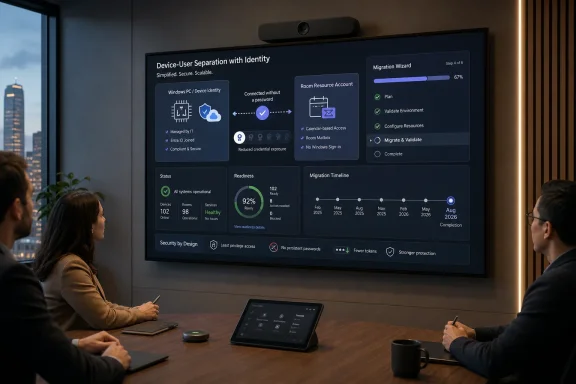 Microsoft Is Finally Treating the Meeting Room Like Infrastructure
The modern conference room is no longer an appliance in the old sense. A Teams Rooms on Windows device is a Windows endpoint, a Teams client, an Exchange calendar participant, an audio-video controller, and often a highly visible executive productivity dependency. When it fails, it does not fail quietly; it fails five minutes before a board meeting.That is why identity design matters. Historically, many Teams Rooms deployments have depended on resource accounts with passwords, because the room needs a mailbox, a calendar, and a Teams identity. That model worked, but it always carried an uncomfortable fiction: a room account was not a person, yet it still had a secret that looked and behaved like a person’s password.
Microsoft’s roadmap item points to a more defensible model. Entra resource accounts for Teams Rooms on Windows are meant to provide secure, passwordless sign-in while separating device identity from user identity. That is the right architectural instinct, even if the practical success will depend on migration tooling, tenant readiness, and the inevitable edge cases in hybrid environments.
The timing also fits Microsoft’s broader identity push. Redmond has spent years telling customers to move toward passwordless authentication, stronger conditional access, and device-based trust. Teams Rooms has been one of the awkward places where that strategy met the messy physical world of installers, room consoles, wall panels, and shared spaces.
The Password Was Always the Wrong Center of Gravity
A meeting room account is supposed to represent a place, not a person. It books meetings, exposes availability, joins calls, and enables a room experience. But when that account depends on a password, administrators inherit all the risk and fragility of password management without the compensating behavior of a human user.A person can reset a password, satisfy MFA, respond to prompts, or call the help desk. A room system cannot. It sits on a credenza or behind a display and is expected to sign in unattended after updates, reboots, network changes, and app refreshes. That unattended requirement is exactly what turns ordinary identity hygiene into operational drag.
This is why Teams Rooms administrators have long had to balance conflicting priorities. They want resource accounts that are protected from abuse, but they also want devices that do not fall off the calendar because a password expired or a policy changed. They want conditional access, but they do not want to strand a room at a sign-in prompt before an all-hands meeting.
Passwordless resource account support does not make those tensions disappear. It does, however, moves the control point away from a shared secret and toward an identity model better suited to devices. That is a meaningful shift because shared secrets are not merely inconvenient; they are hard to govern at scale.
The Device-User Split Is the Real Security Upgrade
The most important phrase in Microsoft’s roadmap description is not passwordless. It is the separation of device and user identities. That separation is where the security argument becomes more than a marketing line.In a clean design, the Windows device has its own identity and management posture, while the room resource account represents the room’s collaboration function. Those are related, but they are not the same thing. Blending them together makes policy design harder because administrators end up asking one identity to answer two different questions: “Is this a trusted endpoint?” and “Is this the room calendar?”
That distinction matters in Entra and Intune environments. Device compliance, join state, update posture, and management enrollment belong to the endpoint. Mailbox permissions, calendar processing, Teams licensing, and room behavior belong to the resource account. When those layers are mixed, troubleshooting becomes guesswork and conditional access policies become a forest of exceptions.
Microsoft’s current documentation around Teams Rooms on Windows already emphasizes Entra ID join as a prerequisite for passwordless resource account functionality. That is not a small requirement. It means organizations still running room systems as domain-joined relics, workgroup oddities, or inconsistently managed endpoints will have preparatory work to do.
For security teams, this is the part worth watching. Passwordless sign-in is useful, but a passwordless room account attached to a poorly governed Windows device is only a partial improvement. The stronger version of this story is one where the room PC is Entra joined, enrolled, monitored, and governed as a first-class endpoint.
Microsoft Is Packaging a Migration, Not Just a Feature
The roadmap entry mentions a migration wizard and a dashboard in the Teams Rooms Pro Management portal. That detail is more consequential than it first appears, because identity migrations fail less often from theory than from execution. The hard part is not convincing administrators that passwords are bad; it is moving hundreds or thousands of rooms without breaking Monday morning meetings.A migration wizard suggests Microsoft knows this cannot be a white-paper exercise. Teams Rooms fleets often include multiple hardware vendors, varied Windows images, different app versions, older provisioning methods, and a mix of local IT practices. A button that works in a lab is not enough for the hoteling floor, the regional sales office, and the boardroom installed by a contractor three years ago.
The dashboard is equally important. Migration status is a control-plane problem. Admins need to know which rooms are ready, which are blocked, which have failed, and which have not checked in. Without that visibility, a passwordless migration becomes a spreadsheet-driven scavenger hunt.
Microsoft has been consolidating Teams Rooms device management into the Pro Management portal, and this roadmap item leans into that direction. The company appears to be treating the portal not just as a monitoring surface, but as the place where fleet-level identity transitions are orchestrated. That is sensible, but it also increases the importance of the Pro portal in daily operations.
There is a licensing undertone here as well. Teams Rooms Basic may be sufficient for smaller deployments, but Microsoft’s richer management story increasingly lives around Teams Rooms Pro. The roadmap language does not by itself rewrite licensing rules, but administrators should read the Pro Management portal reference as a signal: the most scalable version of this migration will likely be managed from Microsoft’s paid rooms operations plane.
The August 2026 Date Gives Enterprises Time, but Not an Excuse
General availability is listed for August 2026, with the feature marked as in development. That gives organizations time to plan, but it should not invite procrastination. Identity changes in room systems have a long tail because the affected devices are scattered across physical spaces and are often owned operationally by a blend of facilities, AV, desktop engineering, collaboration teams, and security.The cloud coverage is notable. Microsoft lists worldwide standard multi-tenant, GCC, and GCC High. That matters because public-sector and regulated customers often arrive late to collaboration features, particularly those touching identity and device management. Including GCC High at the roadmap level signals that Microsoft intends this to be more than a commercial-only convenience.
Still, roadmap dates are not contracts. Microsoft 365 roadmap items move, slip, narrow, and sometimes arrive with caveats that are only obvious when documentation lands. IT leaders should treat August 2026 as a planning marker, not as a guaranteed weekend migration date.
The work that can begin now is boring but valuable. Inventory the Teams Rooms on Windows fleet. Confirm join state. Review resource account creation practices. Clean up stale room accounts. Check licensing. Validate Intune enrollment and compliance policies. Document who owns the room lifecycle from procurement through retirement.
That groundwork will pay off even if the feature shifts. The organizations that struggle with this migration will not be the ones that asked too many identity questions in advance. They will be the ones that discover during rollout that half their rooms were built differently from the other half.
The Old Room Account Model Created Exceptions by Design
One of the quiet costs of Teams Rooms deployments has been exception management. Room accounts often needed special treatment because standard user policies did not fit unattended devices. That meant password settings, MFA exclusions, conditional access carve-outs, and operational runbooks that existed specifically because the account was neither fully a user nor purely a device.Exceptions are not automatically bad. Enterprise IT runs on exceptions because real environments are full of edge cases. The problem is that exceptions age badly, especially when they are attached to identities that rarely receive human attention.
A room account excluded from a policy in 2021 can become a liability in 2026 if nobody remembers why the exclusion exists. A password set never to expire may have been a practical necessity, but it is still a credential with a long life. A technician who once needed credentials to finish an install may have copied them into a deployment note that outlived the project.
Passwordless resource accounts are an attempt to reduce this category of operational debt. They do not remove the need for policy design, but they can reduce the number of places where administrators must weaken normal controls to keep rooms online. In identity security, fewer exceptions usually means fewer surprises.
The counterpoint is that passwordless systems can create new dependencies. Certificates, device registration state, token lifetimes, app versions, and cloud availability all become part of the trust chain. The trade is not “complexity versus no complexity.” It is old complexity built around passwords versus newer complexity built around managed identity and device posture.
Hybrid Environments Will Feel the Friction First
The cleanest story is cloud-only: Entra ID, Exchange Online, Intune, Teams Rooms Pro Management, and modern resource accounts. Many organizations are not clean. They have hybrid identity, legacy Exchange dependencies, older provisioning scripts, rooms that predate current standards, and regional IT teams that solved problems locally.Microsoft’s own guidance has increasingly recommended cloud-only resource accounts using Microsoft Entra ID and Exchange Online. That recommendation is easy to understand. Cloud-only accounts reduce directory synchronization complexity and align with the service where Teams and Exchange Online already live. But “recommended” and “deployed everywhere” are different things.
Hybrid customers will need to examine how their room mailboxes were created, where identities are mastered, and which policies apply. They will also need to understand whether existing automation assumes password-based resource accounts. A migration wizard may simplify the path, but it cannot magically erase years of tenant-specific practice.
The danger is not that the new model will be impossible. The danger is that organizations will underestimate the number of hidden dependencies wrapped around the old one. Scripts that reset room passwords, monitoring that tests sign-in in a particular way, documentation that assumes a password exists, and help-desk workflows that treat room accounts like special users may all need revision.
This is where Microsoft’s dashboard could become more than a convenience. If it exposes meaningful blockers and status detail, it may help administrators convert a messy identity inventory into an actionable migration plan. If it merely shows red, yellow, and green without enough diagnostics, the support burden will move back to tenant admins.
The Security Win Is Real, but It Is Not Magic
Passwordless identity is sometimes discussed as if it were a spell. Remove the password and the risk disappears. Anyone who has operated enterprise systems knows better.The real security win is the reduction of reusable shared secrets. A Teams Rooms password can be mishandled, phished, stored, reused, or forgotten. A passwordless model makes those failure modes less central. That is a strong improvement, particularly for rooms installed and serviced by multiple people over time.
But room systems remain attractive targets. They are networked Windows devices with microphones, cameras, calendars, and access to meetings. They may sit in sensitive spaces. They may be physically accessible to visitors. They may run vendor components alongside Microsoft software. Identity is only one layer.
Admins should therefore avoid treating passwordless support as a reason to relax endpoint controls. The opposite is true. Once the room account is less dependent on a password, the device identity and management posture become even more important. Entra join, Intune compliance, update rings, local admin restrictions, network segmentation, and monitoring all deserve renewed attention.
There is also a governance question around lifecycle. What happens when a room device is replaced, repurposed, returned to a vendor, or moved to another space? Passwordless sign-in reduces credential exposure, but it does not eliminate the need to retire device identities cleanly and remove stale associations.
Microsoft’s move is best understood as a security architecture upgrade, not a one-click cure. It narrows one risk class while raising the bar for disciplined device management.
The User Experience Prize Is Fewer Dead Rooms
For end users, none of this matters unless the room works. The person walking into a conference room does not care whether the underlying account is passwordless, Entra joined, or beautifully compliant. They care that the calendar appears, the Join button works, and the meeting starts without a call to IT.That is why this feature’s operational impact may be larger than its security branding. Password-related failures are particularly annoying in rooms because they often present as generic sign-in, calendar, or Teams connectivity problems. The cause may be identity, but the symptom is a meeting that starts late.
By removing password handling from the room account flow, Microsoft can reduce one recurring source of fragility. That should mean fewer manual interventions after password expiry, fewer credential handoffs during provisioning, and fewer rooms stuck in an authentication state after policy changes. The exact improvement will vary by tenant, but the direction is right.
The migration wizard also has a user-experience dimension. If administrators can convert rooms gradually and observe progress centrally, they can avoid disruptive cutovers. The best room identity migration is the one users never notice.
There is an irony here. The most successful version of this feature will be invisible. If Microsoft gets it right, executives will not praise Entra resource accounts in August 2026. They will simply stop asking why the conference room signed itself out again.
Teams Rooms Is Becoming a Windows Endpoint Story Again
Teams Rooms on Windows has always depended on Windows, but the industry often discussed it as an AV or collaboration product. That framing is incomplete. As Microsoft adds Entra join requirements, passwordless resource account support, Autopilot-style provisioning, and Pro Management portal workflows, Teams Rooms increasingly looks like a specialized endpoint category.That shift favors organizations with mature endpoint management. If your desktop engineering team already understands Entra join, Intune, compliance baselines, update policies, and device lifecycle, Teams Rooms can fit into a broader operating model. If rooms are still treated as vendor-installed appliances outside normal IT governance, the new identity model may expose gaps.
This does not mean every conference room should be managed exactly like a laptop. Rooms have unique update windows, peripheral dependencies, AV certification considerations, and business visibility. A bad driver update on a user laptop is inconvenient; a broken room system outside the CEO’s office is a political event.
But the identity and management plane is converging. The room may be special, but it is not exempt from the rules of modern Windows operations. Microsoft’s passwordless resource account work reinforces that direction by requiring administrators to think about the device, the room identity, and the management service as a system.
The Surface Devices platform tag on the roadmap is another reminder of the hardware angle. Microsoft’s own room and collaboration devices sit inside this ecosystem, but Teams Rooms on Windows also spans certified systems from multiple vendors. That diversity is useful, yet it makes consistent identity posture harder. The more heterogeneous the fleet, the more valuable a centralized migration and reporting experience becomes.
The Pro Management Portal Becomes the Control Room
Microsoft’s mention of a dashboard in the Teams Rooms Pro Management portal is not incidental. The portal is becoming the operational center for Teams Rooms fleets, especially as Microsoft consolidates room management capabilities. Identity migration is exactly the kind of task that belongs in a fleet management surface rather than a maze of admin centers.This consolidation has benefits. Room administrators need fewer places to check health, migration progress, device status, and remediation steps. A purpose-built portal can present room-specific context that generic Entra or Intune views may not surface clearly. It can translate identity state into room operations language.
There are also risks. Microsoft’s admin ecosystem is already crowded: Teams admin center, Microsoft 365 admin center, Entra admin center, Intune admin center, Exchange admin center, and specialized portals for security and compliance. Moving more room operations into the Pro Management portal can simplify the Teams Rooms world while adding yet another surface for cross-functional teams to learn.
The key will be integration. If the dashboard links failures to actionable causes and aligns with Entra and Intune signals, it will help. If it becomes a glossy status page that still requires admins to hunt through logs elsewhere, it will frustrate the very customers it aims to rescue.
For large organizations, role-based access will matter too. The people who manage room hardware are not always the people allowed to modify identity policy. A successful migration workflow must respect that separation without turning every failed device into a ticket bounced between collaboration, endpoint, and identity teams.
The Roadmap Item Is Small, but the Pattern Is Big
Taken alone, Roadmap ID 558853 is a feature entry: Teams Rooms on Windows, Entra resource accounts, passwordless sign-in, migration wizard, dashboard, August 2026. In the broader Microsoft story, it is part of a pattern. Microsoft is pushing customers to remove passwords, bring devices under Entra and Intune governance, and manage specialized endpoints through cloud portals.That pattern is not unique to Teams Rooms. Windows sign-in, passkeys, conditional access, device compliance, and cloud management all point in the same direction. The old perimeter has been replaced by identity and device posture, and Microsoft wants every endpoint category to participate.
Rooms are especially interesting because they are shared, physical, and socially important. They sit at the intersection of security and embarrassment. A compromised room is a risk; a broken room is a public failure. That combination forces IT to care about both assurance and reliability.
Microsoft’s challenge is that Teams Rooms customers are not all at the same maturity level. Some are cloud-first, fully managed, and ready for passwordless room identities. Others are still dealing with inconsistent provisioning, hybrid account patterns, and legacy AV support models. The feature has to serve both without making the modern path hostage to the old one.
The August 2026 rollout will therefore be a test of Microsoft’s ability to make secure defaults operationally survivable. Enterprises generally support the destination. They object when the road there breaks production rooms.
The Rooms Team Just Made Identity Hygiene a Facilities Issue
The practical message for IT departments is straightforward: do not wait for general availability to start cleaning house. A Teams Rooms identity migration touches more than the Teams administrator. It may involve identity architects, endpoint managers, Exchange administrators, facilities teams, AV vendors, managed service providers, and local office coordinators.That coordination is often the hard part. Meeting rooms occupy physical space, so the asset inventory must match reality. The room account should map cleanly to a mailbox and a device. The device should map to a location, a support owner, and a lifecycle plan. The policies should reflect how the room is actually used.
The least glamorous work will matter most. Naming conventions, stale accounts, duplicate rooms, orphaned devices, unlicensed resource accounts, undocumented local admin credentials, and inconsistent update practices will all complicate migration. Passwordless sign-in will not fix a messy estate; it will reveal it.
Organizations should also plan communications carefully. End users do not need a lecture about Entra resource accounts, but service desks and field technicians need to know what changed. If a room no longer has a password-based sign-in path, old troubleshooting scripts may cause confusion. If a migration fails, frontline support must know where to look and when to escalate.
The best preparation is a pilot that reflects reality, not a showcase. Include a standard room, an executive room, a regional office room, a recently deployed device, and an older device still in support. If the migration works across that mix, the broader rollout becomes much less frightening.
August 2026 Will Reward the Tenants That Did the Boring Work
The concrete implications are already visible, even before Microsoft ships the final experience. This is not a feature to discover casually when it lands in the admin portal. It is a prompt to treat Teams Rooms as part of the identity and endpoint estate.- Organizations should inventory Teams Rooms on Windows devices now and confirm which ones are Entra joined, Intune managed, licensed correctly, and visible in the appropriate management portals.
- Administrators should review existing resource accounts and identify which ones are cloud-only, hybrid, stale, duplicated, or dependent on old password practices.
- Security teams should revisit conditional access policies for room systems, with the goal of reducing fragile exceptions rather than simply recreating them in a new model.
- Collaboration and endpoint teams should agree on ownership boundaries before migration begins, because device identity and room identity will be more clearly separated.
- Help desks and field technicians should expect sign-in runbooks to change, especially if older workflows assume that someone can reset or type a room account password.
- Enterprises should treat the August 2026 general availability date as a planning target, while remembering that Microsoft roadmap dates can shift before release.
Microsoft’s Entra passwordless resource account support for Teams Rooms on Windows is a modest roadmap item with an ambitious subtext: the conference room is being pulled fully into the modern identity era. If Microsoft delivers the migration tooling well, admins get fewer shared secrets, cleaner separation between device and room identities, and a more manageable path away from brittle sign-in practices. If customers do their part, August 2026 could mark the moment Teams Rooms stops being an exception-filled collaboration appliance and becomes what it should have been all along: a governed Windows endpoint that happens to run the most visible meeting in the building.
References
- Primary source: Microsoft 365 Roadmap
Published: 2026-06-23T23:15:39.6678540Z
Microsoft 365 Roadmap | Microsoft 365
The Microsoft 365 Roadmap lists updates that are currently planned for applicable subscribers. Check here for more information on the status of new features and updates.www.microsoft.com
- Official source: learn.microsoft.com
Entra ID Join for Teams Rooms on Windows - Teams | Microsoft Learn
Learn how to configure your environment and successfully Entra ID join a Teams Rooms on Windows devicelearn.microsoft.com - Official source: techcommunity.microsoft.com
Teams Rooms on Windows device management consolidation in the Teams Rooms Pro Management portal | Microsoft Community Hub
To meet customers’ needs for a one-stop destination to configure, monitor, and manage Teams rooms devices, we will be transitioning all Teams Rooms on... techcommunity.microsoft.com
- Related coverage: go-planet.com
GCC High Microsoft 365 Roadmap Updates - April 16, 2026 - Planet Technologies
Explore the April 2026 Microsoft GCC High Roadmap Updates, including Enforcing Passwordless Security for Teams Rooms with Entra Resource Accountsgo-planet.com - Related coverage: bleepingcomputer.com
Microsoft brings phishing-resistant Windows sign-ins via Entra passkeys
Microsoft is rolling out passkey support for Microsoft Entra on Windows devices, adding phishing-resistant passwordless authentication via Windows Hello.www.bleepingcomputer.com
