

Microsoft has launched live transcription for Microsoft Teams Rooms on Android in April 2026, giving Teams Rooms Pro customers the ability to view and control real-time meeting transcripts with speaker names, timestamps, translation settings, and front-of-room display options. This is not merely another meeting convenience feature arriving on another endpoint. It is Microsoft pushing the conference room closer to the same compliance, accessibility, and AI-readiness expectations that already surround the desktop Teams client. The important shift is that the room itself is no longer just an audio-video bridge; it is becoming a participant in the meeting record.
For years, the hybrid meeting problem has been framed as a camera-and-microphone problem. Can remote attendees see the whiteboard? Can they hear the person at the far end of the table? Can the room join on time without someone crawling under a credenza to reseat an HDMI cable?
Live transcription in Teams Rooms on Android changes the center of gravity. The issue is no longer just whether the room can transmit the meeting, but whether the room can help document it. A real-time transcript with speaker names and timestamps turns the shared room device into part of the organization’s memory system.
That matters because meeting artifacts now carry operational weight. Transcripts feed recaps, search, compliance review, accessibility workflows, action-item extraction, and increasingly AI-generated summaries. If the room is missing from that chain, then the most important discussions in many organizations remain oddly analog: captured by microphones, maybe recorded, but not fully available in the same textual layer as everything else.
Microsoft’s move also narrows a long-standing gap between personal Teams clients and room systems. Desktop users have grown accustomed to captions, transcription controls, language options, and meeting artifacts that follow them after the call. Room participants, by contrast, have often depended on someone else in the meeting to start transcription or manage language settings. With this launch, the Android room console becomes a control surface for the transcript itself.
That lag has been shrinking. Microsoft’s own feature comparison language has long acknowledged that features can roll out at different times across Windows and Android because of hardware, platform, and customer-feedback constraints. The April 2026 Teams Rooms on Android update continues that pattern: Android is not merely catching up on basic meeting participation; it is inheriting the richer meeting-layer controls that make rooms more useful to IT and end users alike.
The transcription launch is especially significant because it sits at the intersection of accessibility, compliance, localization, and AI. Those are not ornamental features. They are the pieces that make a meeting usable after it ends, understandable across languages while it is happening, and defensible when someone later asks what was actually said.
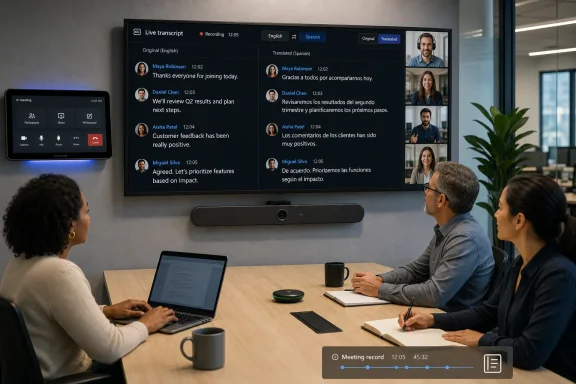
The supported experience includes viewing and controlling live transcription during a meeting from the Android room device. The transcript includes speaker attribution and timestamps, and users can adjust spoken language, translated language, and whether original and translated transcripts appear side by side on the front-of-room display. In plain terms, the room screen can now become a live meeting ledger rather than just a gallery of faces and shared content.
That front-of-room element deserves attention. Putting transcripts on the large display can help people in the room follow a fast-moving discussion, especially in multilingual meetings or acoustically difficult spaces. It also creates a new kind of social visibility: when the transcript is on the wall, the meeting record is not hidden in someone’s sidebar. Everyone can see, in real time, how the system is interpreting the conversation.
The Android room angle matters because accessibility cannot stop at the laptop. Conference rooms remain messy acoustic environments. People speak over one another, side conversations happen, microphones vary by vendor and room size, and the person who most needs captions may not be the person sitting at a personal device.
A front-of-room transcript can make the shared space more legible. It gives participants a common text layer that is not dependent on each attendee opening captions on a laptop or mobile device. That is particularly useful in rooms where personal-device use is discouraged, distracting, or impractical.
Translation extends the usefulness further, though it should be treated as assistance rather than magic. Side-by-side original and translated transcript views can make cross-language meetings more navigable, but they also expose the limits of automated language systems. Misheard names, technical jargon, acronyms, and overlapping speech will still produce errors, and those errors may be more consequential when they appear on a room display.
The right way to understand the feature is as a substantial improvement in meeting access, not as a substitute for good facilitation. Meeting organizers still need to set expectations, speak clearly, identify participants, and correct misunderstandings. Technology can make the room more accessible, but it cannot rescue a meeting culture that treats audibility and clarity as afterthoughts.
For small organizations using Teams Rooms Basic, this is the familiar pinch point. The basic license covers core meeting scenarios, but the features that turn a room into a managed, intelligent collaboration endpoint tend to sit behind Pro. That includes advanced management capabilities, richer room experiences, and now another feature that many users may perceive as fundamental once they have used it.
There is a reasonable argument for Microsoft’s approach. Transcription is not just a UI nicety; it touches policy, storage, identity, language processing, and compliance-sensitive meeting data. Organizations that want those capabilities in shared rooms are often the same organizations that need stronger device management and administrative controls.
But there is also a predictable frustration. Accessibility features feel different from cosmetic upgrades. When a capability helps people understand and participate in a meeting, customers may bristle at seeing it tied to a higher room license. Microsoft’s counterargument will be that Teams Rooms Pro is the enterprise room package and that shared meeting devices require different economics than individual Teams clients.
The practical outcome is straightforward: administrators should not assume that every Android room will receive this capability simply because the Teams app updates. Licensing, meeting policies, tenant configuration, and room account permissions will decide whether the feature is actually usable.
Room systems add another layer. A Teams Room is usually signed in with a resource account, not a human employee account. When that room can view and control transcription, administrators need to understand how meeting organizer policies, room account permissions, and tenant-level defaults interact. If the meeting organizer is allowed to transcribe but the room account is not properly configured, the experience may not match user expectations.
There is also the matter of social consent. Some organizations treat transcription as routine. Others require explicit notification or limit it to certain meeting types. Teams already surfaces transcription status in meetings, but room-based controls make it easier for a person at the console to interact with the feature in a shared setting. That is useful, but it also means meeting etiquette and policy need to be clear.
The front-of-room display option adds a particularly visible policy dimension. Showing the transcript on the big screen may be ideal for accessibility and multilingual participation, but it may not suit every meeting. Sensitive discussions, HR conversations, legal reviews, and executive sessions may require more deliberate handling of transcripts and translations.
This is where Microsoft’s steady expansion of Teams Rooms capabilities becomes a governance story. The more powerful the room becomes, the less acceptable it is to manage it like a glorified speakerphone. Room accounts, device groups, update rings, policies, and licensing now determine how the meeting record is created.
In a multinational company, the conference room is often where language barriers become most visible. Remote participants may have captions enabled on their own devices, but in-room participants are frequently looking at the shared display. If translation only lives on personal endpoints, the room remains a weaker link in the inclusive-meeting chain.
Side-by-side original and translated transcripts can be powerful in that setting. The original transcript gives participants a reference point for what was detected, while the translated transcript provides a working bridge for those who need it. That pairing is better than translation alone because it gives bilingual participants a chance to catch mistakes and resolve ambiguity in real time.
Still, the experience will depend heavily on audio quality and meeting discipline. Android room systems vary widely, from compact all-in-one bars to more complex configurations with external microphones and touch consoles. A noisy room with poor microphone placement will produce a worse transcript than a well-designed room, regardless of Microsoft’s software.
That is an important reminder for IT buyers. AI-era meeting features do not eliminate the need for good room hardware. They make the quality of that hardware more visible. If transcripts are inaccurate, users may blame Teams, but the root cause may be microphone coverage, reverberation, device firmware, or a room layout that was never designed for speech recognition.
That is why bringing live transcription to Android rooms has broader implications than the feature description suggests. The room is one of the last places where important organizational knowledge can still escape the software layer. People gather, debate, decide, and leave, while the official digital record may depend on whether someone remembered to turn on transcription from a laptop.
The more Microsoft invests in AI-assisted collaboration, the more costly those gaps become. An AI assistant can only summarize what it can access. It can only extract action items from meetings that are recorded or transcribed under the organization’s policies. If in-room discussions are undercaptured, the resulting knowledge graph is incomplete.
This is also why speaker attribution matters. A transcript without speaker names is useful, but limited. A transcript with speaker names and timestamps is a more navigable artifact. It lets participants reconstruct who made a decision, when a topic changed, and whether an action item was assigned or merely floated.
Of course, speaker attribution has its own failure modes. In shared rooms, identifying who is speaking may depend on microphone intelligence, voice profiles, meeting context, or other signals that are not always perfect. Organizations should treat transcripts as useful records, not courtroom stenography. The technology is valuable precisely because it is fast and integrated, but its output still deserves human judgment.
The cost of that diversity is fragmentation. Different devices may receive firmware and Teams app updates on different schedules. Some features may depend on console connection types, hardware capabilities, vendor certification status, or cloud availability. A roadmap item marked launched does not guarantee that every room in every tenant will behave the same way on the same day.
That is not a criticism unique to Microsoft. It is the natural tension of any platform that spans multiple hardware partners and enterprise deployment models. But it matters when the feature in question is visible to end users and executives. If one Android room shows live transcription and another does not, the help desk will hear about it.
Administrators should therefore treat this launch as a deployment project rather than a passive update. They need to inventory Android room models, confirm Teams Rooms Pro licensing, verify update status, review meeting transcription policies, and test multilingual display behavior in real rooms. A lab test with a pristine device and two speakers is not the same as a Monday morning operations review with eight people and a speakerphone habit imported from 2009.
The cloud-instance note is also important. The roadmap lists Worldwide Standard Multi-Tenant and GCC High availability. Government and regulated environments often receive features on different timelines or with different constraints, so admins in those tenants should validate behavior against their own policies and release channels rather than assuming commercial-tenant parity.
Live transcription intensifies that competition. A transcript can be incredibly useful, but it is also visually demanding. Put it on the main display during a presentation, and it may fight with the content. Put it beside a translated transcript, and the room gains accessibility while losing screen real estate. Hide it on the console, and the room may technically support transcription without delivering much shared value.
This is where product design meets meeting culture. Microsoft can provide the controls, but organizations must decide how they want rooms to behave. A training room, an executive boardroom, a multilingual project space, and a legal conference room may all need different defaults.
The best deployments will likely avoid one-size-fits-all assumptions. Some rooms should make transcripts prominent. Others should leave transcription available but not displayed by default. Still others may need stricter controls because the nature of the meetings held there demands it.
This is also an opportunity for IT to work more closely with facilities, accessibility teams, legal departments, and business units. Teams Rooms features are no longer only about whether the camera angle is flattering. They increasingly shape how meetings are experienced, recorded, translated, and remembered.
That is good news for many workers. Anyone who has joined a meeting late, missed a technical detail, struggled with accents, or tried to reconstruct decisions from memory understands the value of a transcript. The feature also helps reduce the tyranny of the perfect note-taker, a role that often falls unevenly across teams.
But there is a surveillance-adjacent edge to this story that deserves honesty. The more meetings are transcribed, translated, summarized, and indexed, the more organizations need explicit norms around use. Employees should know when meetings are transcribed, who can access transcripts, how long they persist, and whether AI systems can process them.
Microsoft gives administrators tools, but tools are not governance. A transcript can protect an organization by documenting decisions; it can also chill discussion if people feel every exploratory comment is permanently captured. The difference lies in policy, transparency, and restraint.
For WindowsForum.com readers, especially sysadmins and IT managers, the lesson is familiar: the hard part is not the toggle. The hard part is making the toggle fit the organization.
 Microsoft Turns the Room Into a First-Class Meeting Witness
For years, the hybrid meeting problem has been framed as a camera-and-microphone problem. Can remote attendees see the whiteboard? Can they hear the person at the far end of the table? Can the room join on time without someone crawling under a credenza to reseat an HDMI cable?Live transcription in Teams Rooms on Android changes the center of gravity. The issue is no longer just whether the room can transmit the meeting, but whether the room can help document it. A real-time transcript with speaker names and timestamps turns the shared room device into part of the organization’s memory system.
That matters because meeting artifacts now carry operational weight. Transcripts feed recaps, search, compliance review, accessibility workflows, action-item extraction, and increasingly AI-generated summaries. If the room is missing from that chain, then the most important discussions in many organizations remain oddly analog: captured by microphones, maybe recorded, but not fully available in the same textual layer as everything else.
Microsoft’s move also narrows a long-standing gap between personal Teams clients and room systems. Desktop users have grown accustomed to captions, transcription controls, language options, and meeting artifacts that follow them after the call. Room participants, by contrast, have often depended on someone else in the meeting to start transcription or manage language settings. With this launch, the Android room console becomes a control surface for the transcript itself.
Android Rooms Get Another Piece of the Windows Room Playbook
Teams Rooms on Android has always occupied a peculiar place in Microsoft’s meeting-room strategy. It is the lighter, appliance-like sibling to Teams Rooms on Windows: easier to deploy in many spaces, attractive to hardware vendors, and well suited to huddle rooms and mid-sized conference rooms. But it has also tended to trail Windows rooms in some of the more advanced meeting experiences.That lag has been shrinking. Microsoft’s own feature comparison language has long acknowledged that features can roll out at different times across Windows and Android because of hardware, platform, and customer-feedback constraints. The April 2026 Teams Rooms on Android update continues that pattern: Android is not merely catching up on basic meeting participation; it is inheriting the richer meeting-layer controls that make rooms more useful to IT and end users alike.
The transcription launch is especially significant because it sits at the intersection of accessibility, compliance, localization, and AI. Those are not ornamental features. They are the pieces that make a meeting usable after it ends, understandable across languages while it is happening, and defensible when someone later asks what was actually said.
The supported experience includes viewing and controlling live transcription during a meeting from the Android room device. The transcript includes speaker attribution and timestamps, and users can adjust spoken language, translated language, and whether original and translated transcripts appear side by side on the front-of-room display. In plain terms, the room screen can now become a live meeting ledger rather than just a gallery of faces and shared content.
That front-of-room element deserves attention. Putting transcripts on the large display can help people in the room follow a fast-moving discussion, especially in multilingual meetings or acoustically difficult spaces. It also creates a new kind of social visibility: when the transcript is on the wall, the meeting record is not hidden in someone’s sidebar. Everyone can see, in real time, how the system is interpreting the conversation.
The Accessibility Story Is Stronger Than the Marketing Copy
Microsoft will naturally frame this as part of a more inclusive meeting experience, and in this case the positioning is not empty. Live transcription can help deaf and hard-of-hearing participants, non-native speakers, remote attendees dealing with poor audio, and in-room participants who miss a comment because someone turned away from the microphone.The Android room angle matters because accessibility cannot stop at the laptop. Conference rooms remain messy acoustic environments. People speak over one another, side conversations happen, microphones vary by vendor and room size, and the person who most needs captions may not be the person sitting at a personal device.
A front-of-room transcript can make the shared space more legible. It gives participants a common text layer that is not dependent on each attendee opening captions on a laptop or mobile device. That is particularly useful in rooms where personal-device use is discouraged, distracting, or impractical.
Translation extends the usefulness further, though it should be treated as assistance rather than magic. Side-by-side original and translated transcript views can make cross-language meetings more navigable, but they also expose the limits of automated language systems. Misheard names, technical jargon, acronyms, and overlapping speech will still produce errors, and those errors may be more consequential when they appear on a room display.
The right way to understand the feature is as a substantial improvement in meeting access, not as a substitute for good facilitation. Meeting organizers still need to set expectations, speak clearly, identify participants, and correct misunderstandings. Technology can make the room more accessible, but it cannot rescue a meeting culture that treats audibility and clarity as afterthoughts.
The Pro License Is the Real Boundary Line
The feature is available in Teams Rooms Pro, and that detail is not incidental. Microsoft has spent the last several years making the Pro license the place where advanced room intelligence, management, and richer meeting experiences live. Live transcription on Android fits neatly into that commercial architecture.For small organizations using Teams Rooms Basic, this is the familiar pinch point. The basic license covers core meeting scenarios, but the features that turn a room into a managed, intelligent collaboration endpoint tend to sit behind Pro. That includes advanced management capabilities, richer room experiences, and now another feature that many users may perceive as fundamental once they have used it.
There is a reasonable argument for Microsoft’s approach. Transcription is not just a UI nicety; it touches policy, storage, identity, language processing, and compliance-sensitive meeting data. Organizations that want those capabilities in shared rooms are often the same organizations that need stronger device management and administrative controls.
But there is also a predictable frustration. Accessibility features feel different from cosmetic upgrades. When a capability helps people understand and participate in a meeting, customers may bristle at seeing it tied to a higher room license. Microsoft’s counterargument will be that Teams Rooms Pro is the enterprise room package and that shared meeting devices require different economics than individual Teams clients.
The practical outcome is straightforward: administrators should not assume that every Android room will receive this capability simply because the Teams app updates. Licensing, meeting policies, tenant configuration, and room account permissions will decide whether the feature is actually usable.
Transcription Controls Are Now an Admin Problem, Not Just a User Choice
The arrival of room-based transcription control should prompt IT teams to revisit their Teams meeting policies. Transcription is one of those features that feels simple to end users and complicated to administrators. It raises questions about who can start it, where the transcript is stored, who can access it afterward, and how long it is retained.Room systems add another layer. A Teams Room is usually signed in with a resource account, not a human employee account. When that room can view and control transcription, administrators need to understand how meeting organizer policies, room account permissions, and tenant-level defaults interact. If the meeting organizer is allowed to transcribe but the room account is not properly configured, the experience may not match user expectations.
There is also the matter of social consent. Some organizations treat transcription as routine. Others require explicit notification or limit it to certain meeting types. Teams already surfaces transcription status in meetings, but room-based controls make it easier for a person at the console to interact with the feature in a shared setting. That is useful, but it also means meeting etiquette and policy need to be clear.
The front-of-room display option adds a particularly visible policy dimension. Showing the transcript on the big screen may be ideal for accessibility and multilingual participation, but it may not suit every meeting. Sensitive discussions, HR conversations, legal reviews, and executive sessions may require more deliberate handling of transcripts and translations.
This is where Microsoft’s steady expansion of Teams Rooms capabilities becomes a governance story. The more powerful the room becomes, the less acceptable it is to manage it like a glorified speakerphone. Room accounts, device groups, update rings, policies, and licensing now determine how the meeting record is created.
The Translation Layer Pulls Teams Rooms Into Global Workflows
The ability to adjust spoken and translated language settings from a Teams Rooms on Android device is more than a convenience for bilingual meetings. It reflects how Microsoft sees Teams as infrastructure for global organizations, not just a chat-and-meeting app.In a multinational company, the conference room is often where language barriers become most visible. Remote participants may have captions enabled on their own devices, but in-room participants are frequently looking at the shared display. If translation only lives on personal endpoints, the room remains a weaker link in the inclusive-meeting chain.
Side-by-side original and translated transcripts can be powerful in that setting. The original transcript gives participants a reference point for what was detected, while the translated transcript provides a working bridge for those who need it. That pairing is better than translation alone because it gives bilingual participants a chance to catch mistakes and resolve ambiguity in real time.
Still, the experience will depend heavily on audio quality and meeting discipline. Android room systems vary widely, from compact all-in-one bars to more complex configurations with external microphones and touch consoles. A noisy room with poor microphone placement will produce a worse transcript than a well-designed room, regardless of Microsoft’s software.
That is an important reminder for IT buyers. AI-era meeting features do not eliminate the need for good room hardware. They make the quality of that hardware more visible. If transcripts are inaccurate, users may blame Teams, but the root cause may be microphone coverage, reverberation, device firmware, or a room layout that was never designed for speech recognition.
The Meeting Artifact Economy Keeps Expanding
Teams transcription used to be easy to describe: it was a text record of a meeting. That definition now feels too small. In Microsoft’s ecosystem, transcripts are increasingly raw material for recaps, search, Copilot-style assistance, compliance review, and asynchronous catch-up.That is why bringing live transcription to Android rooms has broader implications than the feature description suggests. The room is one of the last places where important organizational knowledge can still escape the software layer. People gather, debate, decide, and leave, while the official digital record may depend on whether someone remembered to turn on transcription from a laptop.
The more Microsoft invests in AI-assisted collaboration, the more costly those gaps become. An AI assistant can only summarize what it can access. It can only extract action items from meetings that are recorded or transcribed under the organization’s policies. If in-room discussions are undercaptured, the resulting knowledge graph is incomplete.
This is also why speaker attribution matters. A transcript without speaker names is useful, but limited. A transcript with speaker names and timestamps is a more navigable artifact. It lets participants reconstruct who made a decision, when a topic changed, and whether an action item was assigned or merely floated.
Of course, speaker attribution has its own failure modes. In shared rooms, identifying who is speaking may depend on microphone intelligence, voice profiles, meeting context, or other signals that are not always perfect. Organizations should treat transcripts as useful records, not courtroom stenography. The technology is valuable precisely because it is fast and integrated, but its output still deserves human judgment.
Android’s Room Momentum Comes With Fragmentation Risk
Teams Rooms on Android is attractive because it offers a broad hardware ecosystem and often simpler deployment than Windows-based room PCs. Vendors can build integrated bars, boards, panels, and consoles that feel appliance-like. For many organizations, that is exactly what a conference room needs.The cost of that diversity is fragmentation. Different devices may receive firmware and Teams app updates on different schedules. Some features may depend on console connection types, hardware capabilities, vendor certification status, or cloud availability. A roadmap item marked launched does not guarantee that every room in every tenant will behave the same way on the same day.
That is not a criticism unique to Microsoft. It is the natural tension of any platform that spans multiple hardware partners and enterprise deployment models. But it matters when the feature in question is visible to end users and executives. If one Android room shows live transcription and another does not, the help desk will hear about it.
Administrators should therefore treat this launch as a deployment project rather than a passive update. They need to inventory Android room models, confirm Teams Rooms Pro licensing, verify update status, review meeting transcription policies, and test multilingual display behavior in real rooms. A lab test with a pristine device and two speakers is not the same as a Monday morning operations review with eight people and a speakerphone habit imported from 2009.
The cloud-instance note is also important. The roadmap lists Worldwide Standard Multi-Tenant and GCC High availability. Government and regulated environments often receive features on different timelines or with different constraints, so admins in those tenants should validate behavior against their own policies and release channels rather than assuming commercial-tenant parity.
The Room Screen Is Becoming a Policy Surface
The front-of-room display used to be conceptually simple. It showed remote participants, shared content, or perhaps a layout such as Front Row. Microsoft’s newer room strategy makes that display more dynamic: chat, reactions, captions, transcripts, signage, webinars, and meeting controls all compete for attention.Live transcription intensifies that competition. A transcript can be incredibly useful, but it is also visually demanding. Put it on the main display during a presentation, and it may fight with the content. Put it beside a translated transcript, and the room gains accessibility while losing screen real estate. Hide it on the console, and the room may technically support transcription without delivering much shared value.
This is where product design meets meeting culture. Microsoft can provide the controls, but organizations must decide how they want rooms to behave. A training room, an executive boardroom, a multilingual project space, and a legal conference room may all need different defaults.
The best deployments will likely avoid one-size-fits-all assumptions. Some rooms should make transcripts prominent. Others should leave transcription available but not displayed by default. Still others may need stricter controls because the nature of the meetings held there demands it.
This is also an opportunity for IT to work more closely with facilities, accessibility teams, legal departments, and business units. Teams Rooms features are no longer only about whether the camera angle is flattering. They increasingly shape how meetings are experienced, recorded, translated, and remembered.
Microsoft’s Quiet Bet Is That Every Room Needs a Data Trail
There is a larger strategic pattern here. Microsoft is turning meetings into structured data and Teams Rooms into managed capture points for that data. The company rarely says it so bluntly, but the direction is clear: modern collaboration is not just the live exchange; it is the searchable, summarizable, governable residue left afterward.That is good news for many workers. Anyone who has joined a meeting late, missed a technical detail, struggled with accents, or tried to reconstruct decisions from memory understands the value of a transcript. The feature also helps reduce the tyranny of the perfect note-taker, a role that often falls unevenly across teams.
But there is a surveillance-adjacent edge to this story that deserves honesty. The more meetings are transcribed, translated, summarized, and indexed, the more organizations need explicit norms around use. Employees should know when meetings are transcribed, who can access transcripts, how long they persist, and whether AI systems can process them.
Microsoft gives administrators tools, but tools are not governance. A transcript can protect an organization by documenting decisions; it can also chill discussion if people feel every exploratory comment is permanently captured. The difference lies in policy, transparency, and restraint.
For WindowsForum.com readers, especially sysadmins and IT managers, the lesson is familiar: the hard part is not the toggle. The hard part is making the toggle fit the organization.
The Android Room Upgrade That Forces a Policy Review
This launch is useful enough that many organizations will want it enabled broadly, but it is sensitive enough that few should enable it casually. The concrete work is less glamorous than the feature demo: check licenses, test hardware, validate policies, and decide when the front-of-room display should show the transcript.- Teams Rooms on Android now supports live transcription controls for Teams Rooms Pro customers in the launched April 2026 release window.
- The real-time transcript can show speaker names and timestamps, making the room a more useful participant in the meeting record.
- Language settings matter because the room can manage spoken language, translated language, and side-by-side original and translated transcript display.
- Administrators should verify room account permissions, meeting transcription policies, and tenant settings before treating the feature as broadly available.
- Hardware quality will strongly affect the experience because transcription accuracy depends on microphone coverage, room acoustics, and device update health.
- Organizations should decide where transcripts belong on the front-of-room display before users discover the control in sensitive meetings.
References
- Primary source: Microsoft 365 Roadmap
Published: 2026-06-29T23:02:39.0286478Z
Microsoft 365 Roadmap | Microsoft 365
The Microsoft 365 Roadmap lists updates that are currently planned for applicable subscribers. Check here for more information on the status of new features and updates.www.microsoft.com
- Official source: support.microsoft.com
Start, stop, and download live transcripts in Microsoft Teams meetings | Microsoft Support
During any scheduled Teams meeting, you can start a live transcription of participant speech. The text appears alongside the meeting video or audio in real time.support.microsoft.com - Related coverage: alltechnerd.com
Microsoft to Introduce Live Transcription in Teams Rooms on Android Starting April 2026 | All Tech Nerd
Microsoft has confirmed that live transcription with speaker attribution, timestamps, and optional translationwww.alltechnerd.com - Official source: techcommunity.microsoft.com
What's New in Microsoft Teams | April 2026 | Microsoft Community Hub
Our team just wrapped up the M365 Community Conference in Orlando, FL, and it was an incredible way to close out April! Our teams were energized by... techcommunity.microsoft.com
- Related coverage: windowsreport.com
Microsoft Teams Rooms on Mobile to Get Live Meeting Transcription
Microsoft Teams Rooms on Android will soon support live meeting transcription with speaker names and timestamps starting April 2026. windowsreport.com
- Related coverage: thegrahamwalsh.com
- Related coverage: m365admin.handsontek.net
Microsoft Teams: AI-powered notes for in-person meetings with Facilitator in Teams Rooms on Android - M365 Admin
Microsoft Teams is expanding AI-powered meeting notes with the Facilitator agent to Teams Rooms on Android, enabling real-time note-taking during in-person meetings. Notes are securely stored in tenant-owned SharePoint and accessible via meeting recap. Rollout begins late June 2026, requiring...m365admin.handsontek.net - Related coverage: windowscentral.com
4 new Microsoft Teams features coming in April 2026 | Windows Central
Four new features are headed to Teams next month, including AI-powered video recaps and a UI tweak that finally lets you hide the meeting toolbar.www.windowscentral.com - Official source: cdn-dynmedia-1.microsoft.com
