

Microsoft is rolling out a June 2026 Microsoft Teams change that moves Android-based Teams Rooms, Teams panels, and Teams phones from the Teams admin center into the Teams Rooms Pro Management portal for inventory, monitoring, management, updates, analytics, and health operations across supported cloud environments. The move is not merely a console reshuffle. It is Microsoft turning the room system into a managed endpoint class of its own, with Windows and Android devices expected to live under the same operational roof. For admins, the promise is fewer swivel-chair workflows; the risk is that another Microsoft portal migration lands before every tenant, process, and help-desk script is ready for it.
The headline version of Roadmap ID 555235 sounds almost modest: a one-stop admin portal for Teams devices with Teams Rooms Pro Management. But the practical change is larger than the phrasing suggests. Microsoft is moving Android Teams device management — Teams Rooms on Android, Teams panels, and Teams phones — away from the Teams admin center and into the Pro Management portal that already plays a central role for Teams Rooms operations.
That matters because Teams devices are no longer just accessories hanging off a collaboration app. In many organizations they are the meeting infrastructure. A broken room console at 8:55 a.m. can cause more visible disruption than a failed laptop patch, because the failure happens in front of executives, customers, and hybrid attendees all at once.
Microsoft’s thesis is straightforward: if Teams Rooms on Windows, Teams Rooms on Android, phones, and panels are all part of the same collaboration estate, they should not be managed through split experiences. Inventory, health signals, settings, remote actions, updates, and analytics all belong in one portal. On paper, that is hard to argue against.
The sharper question is whether Microsoft can make the new control plane feel like consolidation rather than relocation. Admins have lived through enough “modern admin experience” transitions to know the difference. A good portal migration removes duplicate work; a bad one merely moves the buttons and calls it strategy.
Rooms and shared devices do not behave like ordinary Teams users. They have physical placement, resource accounts, firmware dependencies, manufacturer-specific behavior, network constraints, camera and microphone peripherals, and a support model that often involves facilities teams as much as IT. A phone on a reception desk and a boardroom system are both “Teams devices,” but their failure modes are not the same as a user who cannot change a meeting policy.
The Pro Management portal exists because rooms need a more operational view. Admins want to know whether a room is healthy, whether a device is signed in, whether an update failed, whether logs can be collected, and whether the room will be ready before the next meeting. Those are fleet-management questions, not just configuration questions.
By moving Android device management into the Pro Management portal, Microsoft is implicitly admitting that the Teams admin center is not the right long-term home for every Teams hardware workflow. The older model treated device administration as one branch of Teams administration. The new model treats Teams devices as managed infrastructure.
That is the right direction. But it also raises the bar. Once Microsoft asks admins to treat this portal as the operational source of truth, the portal must earn that trust every day.
But “simpler” has never meant “unmanaged.” Android Teams devices still need updates, sign-in control, health monitoring, settings management, remote restart, log collection, and lifecycle oversight. They also sit in public or semi-public spaces, where a device failure is immediately visible and a misconfiguration can create awkward security or privacy consequences.
The June 2026 transition recognizes that Android devices have matured into a serious part of the Teams estate. They are not sidecars to be handled in a lighter admin experience while Windows rooms receive the serious tooling. They need to be in the same fleet view, especially in organizations that mix manufacturers, room sizes, and operating systems.
That mixed environment is the reality Microsoft is designing for. A campus might have Windows-based Teams Rooms in large boardrooms, Android bars in huddle spaces, panels outside conference rooms, and Teams phones in common areas. Asking admins to manage those devices through different portals creates the kind of fragmentation that eventually produces missed updates, inconsistent settings, and inaccurate inventory.
The Pro Management portal is therefore less about Android catching up to Windows and more about Microsoft admitting that device sprawl has become a first-class administrative problem. The collaboration endpoint is now an estate, not a gadget drawer.
This is where Microsoft needs to be especially clear. A portal can be available to a tenant while specific actions, automation, or advanced analytics remain tied to particular licenses. Admins do not just need to know whether they can open the portal. They need to know whether they can perform the same operational tasks they previously handled in the Teams admin center.
The most sensitive areas are update management, automation, remote actions, and health signals. If a school, small business, or local government has standardized on Android rooms with lean licensing, it will not judge the migration by Microsoft’s architectural elegance. It will judge the migration by whether the help desk can still restart a device, collect logs, see health status, and keep rooms patched without an unexpected licensing discussion.
This is the familiar Microsoft 365 tension. The company is trying to rationalize administration across a giant cloud estate, but customers experience those changes through the lens of licensing, role permissions, and operational continuity. If any of those three feels ambiguous, the portal change becomes a support burden.
The safer reading is that admins should treat June 2026 as the start of an operational transition, not as a cosmetic feature arrival. Even where “no immediate action” is technically true, there is still work to do.
For security-minded teams, the inventory piece may be the most valuable. Shared meeting devices are easy to overlook because they are not assigned to a person in the same way as laptops or phones. They live in rooms, hallways, reception areas, and shared workspaces. If they are missing from the operational dashboard, they are easier to neglect.
A unified portal also gives Microsoft a stronger foundation for automation and AI-assisted management. Health signals become more useful when they are gathered across device types. Update rings become more meaningful when a fleet is visible in one place. Analytics become more credible when Windows rooms, Android rooms, panels, and phones are part of the same administrative picture.
But centralization also creates a larger blast radius for portal defects, permission mistakes, or workflow regressions. If admins increasingly depend on the Pro Management portal as the source of truth, an outage or confusing status model becomes more disruptive. The old fragmentation was inefficient, but it sometimes provided redundancy: if one experience was awkward, another might still expose the control an admin needed.
That is why Microsoft’s execution matters more than the roadmap description. The portal must be fast, reliable, and explicit about device state. It must distinguish between offline, unhealthy, update-pending, sign-in failure, and service-side uncertainty in ways that support staff can act on. A beautiful dashboard that blurs those states is worse than an ugly table that tells the truth.
For these organizations, portal consolidation is not just a convenience feature. It intersects with compliance boundaries, network allowlisting, identity roles, audit expectations, and change-control procedures. Moving a workflow from one admin center to another can require documentation updates, security review, and help-desk retraining even if the device itself keeps working.
The inclusion of GCC High and DoD also suggests Microsoft wants the Pro Management portal to be the durable management surface for Teams devices across the full Microsoft cloud stack. That is significant. Microsoft does not generally carry every admin experiment into sovereign or high-compliance environments unless it expects the experience to matter long term.
Still, public-sector rollout language should not be mistaken for uniform readiness on day one. Government tenants often encounter different timing, endpoint requirements, or feature availability details. Admins in those environments should read “rolling out” as a prompt to verify their own tenant behavior, not as a guarantee that every button appears everywhere at once.
The broader point is that Teams device management is becoming institutional infrastructure. Microsoft is not just improving a portal for conference-room hobbyists. It is standardizing how organizations watch, patch, and operate the hardware through which hybrid work actually happens.
But consistency has limits. Microsoft can provide the cloud management plane, but the device experience still depends on manufacturer firmware, Android builds, peripheral support, certification status, and vendor update behavior. Anyone who has managed room systems knows that “Teams device” is not a single hardware reality.
The Pro Management portal can help by abstracting common tasks: inventory, settings, updates, restart, sign-in, sign-out, provisioning, and log collection. That common layer reduces the need to jump between vendor tools for routine operations. It also gives central IT a better view of rooms that might otherwise be managed inconsistently by regional teams or facilities staff.
However, vendor portals and device-specific tools will not vanish. There will still be cases where firmware availability, accessory behavior, camera features, or hardware diagnostics live closer to the manufacturer than Microsoft. The best outcome is not a fantasy in which Microsoft replaces every OEM tool. The best outcome is a sane division of labor: Microsoft handles Teams-state and fleet operations, while vendors handle hardware-specific depth.
Admins should therefore resist the temptation to treat the Pro Management portal as the only tool they will ever need. It should become the default pane of glass for Teams readiness. It should not become an excuse to stop tracking vendor lifecycle notes, firmware advisories, or support matrices.
Help-desk runbooks need to change. Tier-one staff need to know where to look when a room is reported down. Teams admins need to confirm whether their existing roles provide the right portal access. Network teams need to know whether required endpoints are allowlisted. Change managers need to decide how update workflows will be documented when the old and new experiences overlap.
There is also a training issue. The Teams admin center is familiar to many administrators precisely because it is the central Teams surface. Moving device workflows to a specialized portal may be cleaner for experts but less obvious for occasional admins. The person who only touches Teams devices during an outage needs to know where the controls went before the outage happens.
That is why the phrase one-stop portal should be treated as an operational design challenge, not a marketing endpoint. A portal becomes one-stop only when the organization’s processes point to it. Until then, it is another stop.
The smart move is to run both maps during the transition. Document what Android device tasks currently happen in the Teams admin center, then verify where each task appears in the Pro Management portal. Do not wait for the first failed meeting to discover that a role assignment, network block, or licensing assumption was wrong.
That shift mirrors the larger endpoint-management trend. Laptops became cloud-managed identities with compliance state. Mobile devices became conditional-access participants. Servers became observable assets. Now rooms are entering the same world, because the meeting experience is too important and too distributed to leave to reactive support.
This also fits Microsoft’s broader pattern across Microsoft 365: consolidate admin surfaces where possible, expose more telemetry, and use licensing tiers to differentiate automation and management depth. The upside is better control at scale. The downside is that customers can feel pulled through a sequence of portal migrations that are logical from Redmond and disruptive in the trenches.
For WindowsForum readers, the Windows-versus-Android angle is interesting but not the whole story. Teams Rooms on Windows may have had a more obvious need for Pro Management because Windows endpoints carry their own maintenance gravity. Android rooms seemed appliance-like enough to sit elsewhere. Microsoft is now saying that distinction is less important than the room’s role in the collaboration estate.
That is probably correct. The operating system matters to deployment and troubleshooting, but it matters less to the executive who just wants the room to join a meeting. From the user’s perspective, a Teams room is either ready or it is not. Microsoft is trying to build the admin model around that reality.
But the center of gravity for device operations is moving. That distinction matters because organizations often structure responsibilities around portals. If a Teams admin center screen used to be the place where device support happened, the team that owns that portal may have owned the workflow by default. A separate Pro Management portal invites a more specialized operating model.
In larger enterprises, that may be welcome. Teams device administrators can focus on room readiness without navigating the full Teams admin sprawl. In smaller organizations, it may feel like another Microsoft 365 admin surface to remember. The same change can be rationalization for one tenant and fragmentation for another, depending on staffing and scale.
Microsoft’s challenge is to keep the handoff clean. The Teams admin center should not become a graveyard of partial device information that confuses admins about where to act. The Pro Management portal should not require admins to bounce back to TAC for routine device operations that supposedly moved. Split-brain administration is worse than two intentionally separate tools.
The most successful version of this transition would make the Teams admin center feel like the policy and service-administration hub, while the Pro Management portal becomes the operational cockpit for the hardware estate. That boundary is understandable. Microsoft now has to make it real in the product.
Admins should start by checking whether the right people can access the Pro Management portal today. That means Global Administrator, Teams Administrator, and Teams Device Administrator roles are worth reviewing, but least-privilege shops should go further and confirm exactly who needs access for day-to-day support. A portal that only global admins can comfortably use is not a support model.
Network readiness is the next obvious step. If the portal or device connectivity relies on endpoints that are not allowlisted, the migration will look like a Microsoft problem until someone finds the firewall rule. Meeting-room hardware often lives on segmented networks, guest-adjacent VLANs, or tightly controlled egress paths, so assumptions from ordinary user endpoints may not hold.
Then comes workflow testing. Pick representative devices: a Teams Room on Android, a panel, a phone, and if applicable a Windows room. Verify inventory accuracy, health status, update visibility, remote restart, sign-in state, log collection, settings, and any provisioning workflow your organization depends on. The goal is not to admire the dashboard. The goal is to prove that support can solve boring problems quickly.
Finally, admins should communicate the change to the people who file and handle room tickets. The worst portal migration is one that only the messaging center reader knows about. Facilities coordinators, executive support teams, and regional IT staff do not need a product lecture, but they do need to know where escalation evidence will come from.
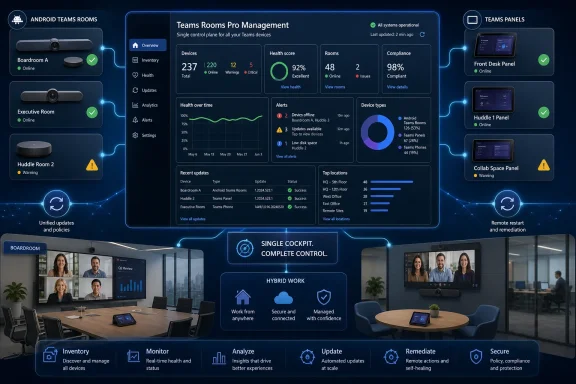 Microsoft Is Collapsing the Teams Device Map Into One Control Plane
The headline version of Roadmap ID 555235 sounds almost modest: a one-stop admin portal for Teams devices with Teams Rooms Pro Management. But the practical change is larger than the phrasing suggests. Microsoft is moving Android Teams device management — Teams Rooms on Android, Teams panels, and Teams phones — away from the Teams admin center and into the Pro Management portal that already plays a central role for Teams Rooms operations.That matters because Teams devices are no longer just accessories hanging off a collaboration app. In many organizations they are the meeting infrastructure. A broken room console at 8:55 a.m. can cause more visible disruption than a failed laptop patch, because the failure happens in front of executives, customers, and hybrid attendees all at once.
Microsoft’s thesis is straightforward: if Teams Rooms on Windows, Teams Rooms on Android, phones, and panels are all part of the same collaboration estate, they should not be managed through split experiences. Inventory, health signals, settings, remote actions, updates, and analytics all belong in one portal. On paper, that is hard to argue against.
The sharper question is whether Microsoft can make the new control plane feel like consolidation rather than relocation. Admins have lived through enough “modern admin experience” transitions to know the difference. A good portal migration removes duplicate work; a bad one merely moves the buttons and calls it strategy.
The Teams Admin Center Was Always Too Broad for the Room
The Teams admin center has become a sprawling administrative surface because Teams itself has become a sprawling product. It handles users, policies, meetings, voice, apps, messaging, devices, and various cross-product hooks into Microsoft 365. That breadth is useful, but it also makes the portal a compromise.Rooms and shared devices do not behave like ordinary Teams users. They have physical placement, resource accounts, firmware dependencies, manufacturer-specific behavior, network constraints, camera and microphone peripherals, and a support model that often involves facilities teams as much as IT. A phone on a reception desk and a boardroom system are both “Teams devices,” but their failure modes are not the same as a user who cannot change a meeting policy.
The Pro Management portal exists because rooms need a more operational view. Admins want to know whether a room is healthy, whether a device is signed in, whether an update failed, whether logs can be collected, and whether the room will be ready before the next meeting. Those are fleet-management questions, not just configuration questions.
By moving Android device management into the Pro Management portal, Microsoft is implicitly admitting that the Teams admin center is not the right long-term home for every Teams hardware workflow. The older model treated device administration as one branch of Teams administration. The new model treats Teams devices as managed infrastructure.
That is the right direction. But it also raises the bar. Once Microsoft asks admins to treat this portal as the operational source of truth, the portal must earn that trust every day.
Android Rooms Are No Longer the Lightweight Exception
Teams Rooms on Android have often been positioned as the simpler alternative to Windows-based room systems. They are appliance-like, vendor-integrated, and attractive for smaller rooms or organizations that want fewer moving parts. Teams panels and phones fit the same pattern: purpose-built devices that should be easier to deploy than a full Windows endpoint.But “simpler” has never meant “unmanaged.” Android Teams devices still need updates, sign-in control, health monitoring, settings management, remote restart, log collection, and lifecycle oversight. They also sit in public or semi-public spaces, where a device failure is immediately visible and a misconfiguration can create awkward security or privacy consequences.
The June 2026 transition recognizes that Android devices have matured into a serious part of the Teams estate. They are not sidecars to be handled in a lighter admin experience while Windows rooms receive the serious tooling. They need to be in the same fleet view, especially in organizations that mix manufacturers, room sizes, and operating systems.
That mixed environment is the reality Microsoft is designing for. A campus might have Windows-based Teams Rooms in large boardrooms, Android bars in huddle spaces, panels outside conference rooms, and Teams phones in common areas. Asking admins to manage those devices through different portals creates the kind of fragmentation that eventually produces missed updates, inconsistent settings, and inaccurate inventory.
The Pro Management portal is therefore less about Android catching up to Windows and more about Microsoft admitting that device sprawl has become a first-class administrative problem. The collaboration endpoint is now an estate, not a gadget drawer.
The Licensing Story Is Where Admins Will Look First
Microsoft says organizations using Teams Rooms licenses or Teams shared device licenses can access the Pro Management portal. That detail is important because Teams Rooms licensing has already trained admins to scrutinize every portal feature for entitlement boundaries. The words “Pro Management” naturally make people ask what is included, what is premium, and what will quietly become difficult for Basic-licensed rooms.This is where Microsoft needs to be especially clear. A portal can be available to a tenant while specific actions, automation, or advanced analytics remain tied to particular licenses. Admins do not just need to know whether they can open the portal. They need to know whether they can perform the same operational tasks they previously handled in the Teams admin center.
The most sensitive areas are update management, automation, remote actions, and health signals. If a school, small business, or local government has standardized on Android rooms with lean licensing, it will not judge the migration by Microsoft’s architectural elegance. It will judge the migration by whether the help desk can still restart a device, collect logs, see health status, and keep rooms patched without an unexpected licensing discussion.
This is the familiar Microsoft 365 tension. The company is trying to rationalize administration across a giant cloud estate, but customers experience those changes through the lens of licensing, role permissions, and operational continuity. If any of those three feels ambiguous, the portal change becomes a support burden.
The safer reading is that admins should treat June 2026 as the start of an operational transition, not as a cosmetic feature arrival. Even where “no immediate action” is technically true, there is still work to do.
Security Benefits Are Real, but So Is the Blast Radius
A single management portal can improve security. Centralized inventory helps admins find forgotten devices. Unified health monitoring can expose stale apps and failed updates. Remote actions and log collection can reduce the need for ad hoc local access. Consistent role-based access can make it easier to assign device administration without handing out broader Teams control than necessary.For security-minded teams, the inventory piece may be the most valuable. Shared meeting devices are easy to overlook because they are not assigned to a person in the same way as laptops or phones. They live in rooms, hallways, reception areas, and shared workspaces. If they are missing from the operational dashboard, they are easier to neglect.
A unified portal also gives Microsoft a stronger foundation for automation and AI-assisted management. Health signals become more useful when they are gathered across device types. Update rings become more meaningful when a fleet is visible in one place. Analytics become more credible when Windows rooms, Android rooms, panels, and phones are part of the same administrative picture.
But centralization also creates a larger blast radius for portal defects, permission mistakes, or workflow regressions. If admins increasingly depend on the Pro Management portal as the source of truth, an outage or confusing status model becomes more disruptive. The old fragmentation was inefficient, but it sometimes provided redundancy: if one experience was awkward, another might still expose the control an admin needed.
That is why Microsoft’s execution matters more than the roadmap description. The portal must be fast, reliable, and explicit about device state. It must distinguish between offline, unhealthy, update-pending, sign-in failure, and service-side uncertainty in ways that support staff can act on. A beautiful dashboard that blurs those states is worse than an ugly table that tells the truth.
Government Clouds Make This More Than a Commercial Tenant Story
The roadmap lists Worldwide, GCC, GCC High, and DoD availability. That breadth matters because Teams Rooms have become normal infrastructure in public-sector and regulated environments, not just corporate offices with polished hybrid-work strategies. Courtrooms, command centers, agency conference rooms, public universities, and defense-adjacent contractors all have a stake in predictable device management.For these organizations, portal consolidation is not just a convenience feature. It intersects with compliance boundaries, network allowlisting, identity roles, audit expectations, and change-control procedures. Moving a workflow from one admin center to another can require documentation updates, security review, and help-desk retraining even if the device itself keeps working.
The inclusion of GCC High and DoD also suggests Microsoft wants the Pro Management portal to be the durable management surface for Teams devices across the full Microsoft cloud stack. That is significant. Microsoft does not generally carry every admin experiment into sovereign or high-compliance environments unless it expects the experience to matter long term.
Still, public-sector rollout language should not be mistaken for uniform readiness on day one. Government tenants often encounter different timing, endpoint requirements, or feature availability details. Admins in those environments should read “rolling out” as a prompt to verify their own tenant behavior, not as a guarantee that every button appears everywhere at once.
The broader point is that Teams device management is becoming institutional infrastructure. Microsoft is not just improving a portal for conference-room hobbyists. It is standardizing how organizations watch, patch, and operate the hardware through which hybrid work actually happens.
The Manufacturer Layer Does Not Disappear
One of the most attractive claims in Microsoft’s roadmap language is consistent management across operating systems and manufacturers. That is the right aspiration. Teams rooms and devices come from an ecosystem that includes multiple OEMs, form factors, cameras, bars, panels, phones, and peripheral combinations.But consistency has limits. Microsoft can provide the cloud management plane, but the device experience still depends on manufacturer firmware, Android builds, peripheral support, certification status, and vendor update behavior. Anyone who has managed room systems knows that “Teams device” is not a single hardware reality.
The Pro Management portal can help by abstracting common tasks: inventory, settings, updates, restart, sign-in, sign-out, provisioning, and log collection. That common layer reduces the need to jump between vendor tools for routine operations. It also gives central IT a better view of rooms that might otherwise be managed inconsistently by regional teams or facilities staff.
However, vendor portals and device-specific tools will not vanish. There will still be cases where firmware availability, accessory behavior, camera features, or hardware diagnostics live closer to the manufacturer than Microsoft. The best outcome is not a fantasy in which Microsoft replaces every OEM tool. The best outcome is a sane division of labor: Microsoft handles Teams-state and fleet operations, while vendors handle hardware-specific depth.
Admins should therefore resist the temptation to treat the Pro Management portal as the only tool they will ever need. It should become the default pane of glass for Teams readiness. It should not become an excuse to stop tracking vendor lifecycle notes, firmware advisories, or support matrices.
The Human Migration Is Harder Than the Technical One
Microsoft’s documentation can say that no immediate action is required, and from a device-continuity perspective that may be true. But no serious admin team should interpret a portal migration as something that happens entirely inside Microsoft’s cloud. Operational habits are part of the system.Help-desk runbooks need to change. Tier-one staff need to know where to look when a room is reported down. Teams admins need to confirm whether their existing roles provide the right portal access. Network teams need to know whether required endpoints are allowlisted. Change managers need to decide how update workflows will be documented when the old and new experiences overlap.
There is also a training issue. The Teams admin center is familiar to many administrators precisely because it is the central Teams surface. Moving device workflows to a specialized portal may be cleaner for experts but less obvious for occasional admins. The person who only touches Teams devices during an outage needs to know where the controls went before the outage happens.
That is why the phrase one-stop portal should be treated as an operational design challenge, not a marketing endpoint. A portal becomes one-stop only when the organization’s processes point to it. Until then, it is another stop.
The smart move is to run both maps during the transition. Document what Android device tasks currently happen in the Teams admin center, then verify where each task appears in the Pro Management portal. Do not wait for the first failed meeting to discover that a role assignment, network block, or licensing assumption was wrong.
Microsoft Is Rewriting the Meaning of a Teams Room
The deeper story is that Microsoft is turning Teams Rooms into a managed service boundary. The meeting room used to be a collection of parts: a display, a PC or appliance, a camera, a microphone, a calendar resource, and a conferencing app. Now Microsoft wants the room to be a cloud-visible operational object with health, analytics, policy, update state, and remote remediation.That shift mirrors the larger endpoint-management trend. Laptops became cloud-managed identities with compliance state. Mobile devices became conditional-access participants. Servers became observable assets. Now rooms are entering the same world, because the meeting experience is too important and too distributed to leave to reactive support.
This also fits Microsoft’s broader pattern across Microsoft 365: consolidate admin surfaces where possible, expose more telemetry, and use licensing tiers to differentiate automation and management depth. The upside is better control at scale. The downside is that customers can feel pulled through a sequence of portal migrations that are logical from Redmond and disruptive in the trenches.
For WindowsForum readers, the Windows-versus-Android angle is interesting but not the whole story. Teams Rooms on Windows may have had a more obvious need for Pro Management because Windows endpoints carry their own maintenance gravity. Android rooms seemed appliance-like enough to sit elsewhere. Microsoft is now saying that distinction is less important than the room’s role in the collaboration estate.
That is probably correct. The operating system matters to deployment and troubleshooting, but it matters less to the executive who just wants the room to join a meeting. From the user’s perspective, a Teams room is either ready or it is not. Microsoft is trying to build the admin model around that reality.
The Admin Center Is Not Going Away, but Its Center of Gravity Is Moving
The Teams admin center will remain important. This roadmap does not suggest Microsoft is removing it as the hub for broader Teams administration. Policies, users, voice configuration, apps, meetings, and tenant-wide settings still belong there.But the center of gravity for device operations is moving. That distinction matters because organizations often structure responsibilities around portals. If a Teams admin center screen used to be the place where device support happened, the team that owns that portal may have owned the workflow by default. A separate Pro Management portal invites a more specialized operating model.
In larger enterprises, that may be welcome. Teams device administrators can focus on room readiness without navigating the full Teams admin sprawl. In smaller organizations, it may feel like another Microsoft 365 admin surface to remember. The same change can be rationalization for one tenant and fragmentation for another, depending on staffing and scale.
Microsoft’s challenge is to keep the handoff clean. The Teams admin center should not become a graveyard of partial device information that confuses admins about where to act. The Pro Management portal should not require admins to bounce back to TAC for routine device operations that supposedly moved. Split-brain administration is worse than two intentionally separate tools.
The most successful version of this transition would make the Teams admin center feel like the policy and service-administration hub, while the Pro Management portal becomes the operational cockpit for the hardware estate. That boundary is understandable. Microsoft now has to make it real in the product.
The June 2026 Rollout Rewards Tenants That Rehearse Early
The practical takeaway is not panic. Microsoft is not describing a sudden device shutdown, and the change is rolling out as a general availability transition across major cloud environments. But the organizations that treat this as a calendar event rather than an operational migration are the ones most likely to be surprised.Admins should start by checking whether the right people can access the Pro Management portal today. That means Global Administrator, Teams Administrator, and Teams Device Administrator roles are worth reviewing, but least-privilege shops should go further and confirm exactly who needs access for day-to-day support. A portal that only global admins can comfortably use is not a support model.
Network readiness is the next obvious step. If the portal or device connectivity relies on endpoints that are not allowlisted, the migration will look like a Microsoft problem until someone finds the firewall rule. Meeting-room hardware often lives on segmented networks, guest-adjacent VLANs, or tightly controlled egress paths, so assumptions from ordinary user endpoints may not hold.
Then comes workflow testing. Pick representative devices: a Teams Room on Android, a panel, a phone, and if applicable a Windows room. Verify inventory accuracy, health status, update visibility, remote restart, sign-in state, log collection, settings, and any provisioning workflow your organization depends on. The goal is not to admire the dashboard. The goal is to prove that support can solve boring problems quickly.
Finally, admins should communicate the change to the people who file and handle room tickets. The worst portal migration is one that only the messaging center reader knows about. Facilities coordinators, executive support teams, and regional IT staff do not need a product lecture, but they do need to know where escalation evidence will come from.
The Room Fleet Finally Gets Its Own Operating Manual
The concrete message for IT is simple: Microsoft is making the Teams Rooms Pro Management portal the operational home for more of the Teams device estate, and Android devices are now part of that consolidation. The exact experience will vary by tenant timing, license mix, cloud environment, and hardware fleet, but the direction is no longer ambiguous.- Admins should verify Pro Management portal access before Android device workflows disappear from their familiar Teams admin center routines.
- Organizations should test remote actions, update management, health signals, settings, provisioning, and log collection against real devices rather than relying on roadmap language.
- Teams Rooms on Android, Teams panels, and Teams phones should be treated as managed infrastructure, not as lightweight appliances that can be checked only after users complain.
- Licensing assumptions should be reviewed carefully, especially where Basic, Pro, or Teams shared device licenses are mixed across rooms and common-area devices.
- Help-desk and facilities workflows should be updated so room outages route quickly to the portal and team that can actually act.
References
- Primary source: Microsoft 365 Roadmap
Published: 2026-06-29T23:02:39.0286478Z
Microsoft 365 Roadmap | Microsoft 365
The Microsoft 365 Roadmap lists updates that are currently planned for applicable subscribers. Check here for more information on the status of new features and updates.www.microsoft.com
- Official source: learn.microsoft.com
Transitioning Teams Android Device Management from Teams Admin Center to the Teams Rooms Pro Management Portal - Microsoft Teams | Microsoft Learn
Transitioning Teams Android Device Management from Teams Admin Center to the Teams Rooms Pro Management Portallearn.microsoft.com - Related coverage: m365admin.handsontek.net
Microsoft Teams: One-stop admin portal for Teams devices with Teams Rooms Pro Management - M365 Admin
Admins now have a one-stop portal for inventory, health monitoring, management, and analytics for both Windows and Android devices with the Pro Management portal. Management of all Android Teams rooms, panels, and phone devices are transitioning to this portal from the Teams admin center...m365admin.handsontek.net - Official source: techcommunity.microsoft.com
- Official source: download.microsoft.com
- Official source: partner.rooms.microsoft.com
- Official source: cdn-dynmedia-1.microsoft.com
