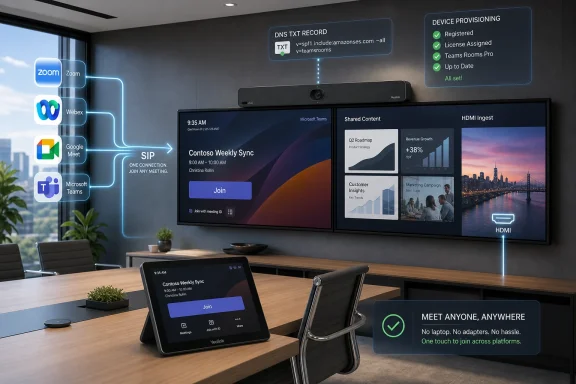
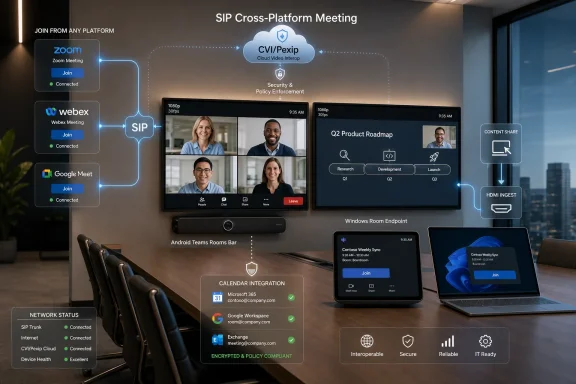
Microsoft will begin rolling out SIP-based cross-platform meeting join for Microsoft Teams Rooms on Android in early June 2026, with worldwide general availability expected by mid-August, giving Android room devices a native way to join Zoom, Webex, Google Meet, Amazon Chime, RingCentral, and other SIP-enabled meetings from the Teams Rooms interface. The practical headline is not merely that Android rooms are catching up to Windows rooms. It is that Microsoft is turning interoperability from a browser workaround into a licensed, policy-controlled room capability. For admins, that means the next two months are less about celebrating a feature and more about deciding which rooms deserve it, who will pay for it, and how much complexity the enterprise is willing to add in exchange for fewer failed meetings.
Teams Rooms has always carried a quiet platform hierarchy. Windows rooms have tended to receive the more advanced capabilities first, while Android rooms have won on appliance simplicity, lower deployment friction, and the appeal of video bars that do not require a mini PC under the table. That bargain has worked well enough for many organizations, especially those trying to modernize dozens or hundreds of small and medium meeting spaces.
But interoperability exposed the trade-off. A room that works beautifully for Teams meetings but stumbles when an executive receives a Zoom invite is not really a modern meeting room. It is a Teams endpoint with an asterisk.
The new SIP join capability for Teams Rooms on Android matters because it removes one of the most visible asterisks. Until now, Android rooms leaned heavily on Direct Guest Join for third-party meetings, a WebRTC-based approach that can be useful but limited. SIP join moves the room into a more traditional video-interoperability model, where the device can dial into external meeting services using the SIP address included in the invitation.
That distinction sounds technical because it is. But the user-facing effect is simple: the meeting room behaves less like a compromised web client and more like a proper conferencing endpoint.
But “good enough” has limits in a conference room. WebRTC guest experiences tend to inherit the constraints of the host platform’s web join flow. They can vary by provider, by browser capability, and by whatever the meeting service decides to expose to guests that month.
The most obvious constraints are video and content. Direct Guest Join is commonly described as a single-screen, 720p-class experience, without the same native HDMI ingest and dual-screen behavior admins expect from a fully integrated room system. In a huddle room, that may be acceptable. In a boardroom, training room, or executive space, it starts to look like a downgrade.
SIP join is Microsoft’s acknowledgment that room systems need a more predictable interop layer. When the invite includes a SIP dial string, Teams Rooms on Android can prioritize SIP over the browser-based path. When no SIP address exists, the room can still fall back to Direct Guest Join. That is the right architecture: use the richer protocol path when available, preserve the free fallback when it is not.
That mattered because mixed estates are not edge cases. Enterprises often deploy Windows-based Teams Rooms in larger or more complex spaces, then use Android video bars for smaller rooms where simplicity, cable reduction, and appliance-style management are more attractive. The result is a room fleet that looks consistent to procurement but not always to users.
From a user’s perspective, “Teams Room” is supposed to mean “tap the meeting and join.” If that works in Conference Room A but not Conference Room B because one room runs Windows and the other runs Android, the platform distinction becomes an IT problem masquerading as user error. Nobody walking into a meeting wants a lesson in endpoint architecture.
The Android rollout narrows that gap. It does not make the two platforms identical, and Microsoft’s room roadmap will likely continue to ship some features unevenly. But for cross-platform join, this is an important step toward making Teams Rooms behave like a room estate rather than a patchwork of device categories.
At launch, that supported partner is Pexip. Pexip Connect for Teams Rooms is a paid add-on, and the licensing model matters because the count is expected to align across the deployment: Teams Rooms Pro rooms on one side, Pexip Connect coverage on the other. This is not a switch most admins will casually flip for every room on a Friday afternoon.
That will create an uncomfortable but necessary segmentation exercise. Not every room needs full SIP interop. Some rooms live almost entirely inside Teams. Some rooms are rarely used. Some rooms are small enough that a laptop-based workaround remains tolerable. Others, however, are politically or operationally expensive when meetings fail.
Those are the rooms that will justify the added licensing and configuration. Executive suites, customer briefing centers, legal rooms, training spaces, and shared conference areas used by external partners are the obvious candidates. The feature’s value is highest where the cost of a failed join is not measured in minutes but in reputation.
None of that sounds terrifying to a Teams administrator. But room systems are a special category of IT asset because they fail in public. A bad policy, stale app version, licensing mismatch, or DNS oversight does not show up as an obscure back-end error. It shows up as a room full of people staring at a touch panel.
Microsoft’s own guidance reportedly emphasizes lower-ring testing, user-facing documentation, and helpdesk readiness. That is sensible because the feature changes expectations. Once users learn that Android rooms can join Zoom or Webex natively, they will stop treating failure as a limitation and start treating it as an outage.
The best deployment plan is therefore not “enable SIP join.” It is “define which rooms get SIP join, verify their app versions and licenses, test real invites from real external platforms, and brief support staff on what fallback behavior looks like.” If the SIP address is missing from an invite, Direct Guest Join may still be the path. If the meeting provider has disabled SIP dial-in or requires a host-side plan, the room cannot magically invent interoperability.
Microsoft benefits from this arrangement because it keeps Teams Rooms as the center of the room experience. Users do not need to learn a separate dialing interface or switch devices. Admins can keep investing in Teams Rooms hardware while reducing the awkwardness of joining meetings hosted elsewhere.
Pexip benefits because interoperability remains a business with real enterprise demand. The more organizations standardize on a primary meeting platform, the more they need reliable bridges to everyone else’s platform. Standardization does not eliminate interop; it makes the remaining interop failures more visible.
The risk is that customers may see this as yet another subscription layered on top of a subscription. Teams Rooms Pro already exists as the management and feature tier for serious room deployments. Adding CVI licensing for full cross-platform behavior may feel like paying extra to make expensive rooms do what users assumed they could already do.
The Android appeal is straightforward. A single bar can combine camera, microphones, speakers, compute, and the room app. Installation is cleaner. Support is often simpler. For small and medium spaces, the appliance model is easier to scale than a traditional Windows room kit.
Microsoft’s Device Ecosystem Platform is part of that shift. By giving hardware makers a more standardized Android-based foundation for Teams devices, Microsoft is trying to accelerate development while keeping devices within the Teams ecosystem. That matters because the room market is no longer just about a few large conference rooms; it is about every small room that became video-enabled after hybrid work stopped being temporary.
That is why the SIP join gap grew more painful over time. If Android bars were niche devices, waiting longer for interop would be annoying but manageable. When they make up a meaningful share of new room deployments, feature gaps become fleet strategy problems.
This is why Microsoft’s move matters beyond Android parity. It reflects a market reality: meeting rooms are shared infrastructure, not just endpoints for one vendor’s service. A laptop can install another app. A room system has to be ready before the meeting starts.
For admins, the question is no longer whether users will encounter third-party meetings. They will. The question is whether the room experience can absorb that diversity without requiring the user to become the integration layer.
SIP join is not a universal solvent. It depends on invitation formatting, provider support, CVI licensing, policy configuration, and the capabilities exposed in the SIP session. But it is a more mature answer than telling users to join from a laptop and share audio into the room, which remains one of the fastest ways to make a premium conferencing space feel amateur.
But SIP join reinforces the direction of travel: the capabilities that make rooms easier to manage at enterprise scale increasingly sit behind Teams Rooms Pro. That includes not just administrative conveniences but user-facing room behavior that executives and external-facing teams will notice.
This is not unusual in enterprise software. Vendors use the higher tier to house features that require management, compliance, analytics, or partner integration. But in the room context, the line can be jarring. A user does not care whether a room has Basic or Pro. They care whether the meeting on the calendar opens when they tap Join.
That makes licensing communication important inside IT. If only some rooms get SIP join, administrators should not let the estate become a mystery map. Room standards, naming conventions, support documentation, and booking guidance should make clear which spaces are intended for cross-platform external meetings.
The central issue is not that SIP is inherently suspect. It is that the room becomes part of a broader call path involving Microsoft, the CVI provider, and third-party meeting platforms. Identity, call routing, diagnostics, logs, and content behavior should all be understood before enabling the feature broadly.
Regulated organizations should pay attention to where metadata is processed, how support diagnostics are exposed, how the CVI provider handles tenancy, and what contractual commitments apply. They should also define whether users are allowed to manually dial SIP addresses or only join meetings from trusted calendar invites, if policy controls permit that level of restriction.
The practical security posture will depend less on the feature announcement and more on how narrowly admins scope the rollout. Enabling SIP join for carefully selected rooms with documented use cases is a different risk profile from enabling it everywhere because the toggle exists.
The first step is identifying Android Teams Rooms that are candidates for SIP join. That means checking not only hardware and app version readiness but also actual meeting behavior. Which rooms regularly host external meetings? Which departments complain most often about third-party joins? Which rooms are visible enough that failures become escalations?
The second step is validating invites from the platforms that matter to the business. It is not enough to test one perfect Zoom invite and declare victory. Admins should test Zoom, Webex, Google Meet, and any vertical-specific meeting services that appear in the organization’s calendars. They should also test bad cases: invites without SIP dial strings, rescheduled meetings, forwarded invites, meetings with passcodes, and meetings created by external tenants.
The third step is deciding what the support script says. If SIP join fails, should the helpdesk tell users to try Direct Guest Join? Should they ask whether the meeting invite includes a SIP address? Should they check the room’s license assignment, app version, or policy? These are mundane questions, but they determine whether the feature reduces support load or simply creates a more complicated class of tickets.
That is good news for centralized IT because it means room capabilities can be governed. It is bad news for anyone hoping that room systems are just appliances. They are not. They are managed endpoints that sit at the intersection of identity, collaboration, networking, device firmware, and user training.
The most successful organizations will treat Teams Rooms like a fleet, not like isolated conference-room gadgets. That means rings, pilots, standard images or firmware baselines where applicable, documented exception handling, and reporting that catches drift before users do. Android rooms may be simpler to install than Windows rooms, but they are not exempt from lifecycle management.
SIP join makes that more obvious. A room that has not updated to the required app version is not merely “behind.” It may lack a feature that users in another room already rely on. In a hybrid workplace, inconsistency is often the real outage.
 Microsoft Closes One of the More Annoying Gaps in Android Rooms
Teams Rooms has always carried a quiet platform hierarchy. Windows rooms have tended to receive the more advanced capabilities first, while Android rooms have won on appliance simplicity, lower deployment friction, and the appeal of video bars that do not require a mini PC under the table. That bargain has worked well enough for many organizations, especially those trying to modernize dozens or hundreds of small and medium meeting spaces.But interoperability exposed the trade-off. A room that works beautifully for Teams meetings but stumbles when an executive receives a Zoom invite is not really a modern meeting room. It is a Teams endpoint with an asterisk.
The new SIP join capability for Teams Rooms on Android matters because it removes one of the most visible asterisks. Until now, Android rooms leaned heavily on Direct Guest Join for third-party meetings, a WebRTC-based approach that can be useful but limited. SIP join moves the room into a more traditional video-interoperability model, where the device can dial into external meeting services using the SIP address included in the invitation.
That distinction sounds technical because it is. But the user-facing effect is simple: the meeting room behaves less like a compromised web client and more like a proper conferencing endpoint.
Direct Guest Join Was a Bridge, Not a Destination
Direct Guest Join was never a bad idea. It gave Teams Rooms a way to join selected third-party meetings without requiring users to bring a laptop, dial a conference ID manually, or ask the helpdesk why the expensive room system could not join the meeting on the calendar. For organizations that only occasionally cross platform boundaries, it was good enough to reduce embarrassment.But “good enough” has limits in a conference room. WebRTC guest experiences tend to inherit the constraints of the host platform’s web join flow. They can vary by provider, by browser capability, and by whatever the meeting service decides to expose to guests that month.
The most obvious constraints are video and content. Direct Guest Join is commonly described as a single-screen, 720p-class experience, without the same native HDMI ingest and dual-screen behavior admins expect from a fully integrated room system. In a huddle room, that may be acceptable. In a boardroom, training room, or executive space, it starts to look like a downgrade.
SIP join is Microsoft’s acknowledgment that room systems need a more predictable interop layer. When the invite includes a SIP dial string, Teams Rooms on Android can prioritize SIP over the browser-based path. When no SIP address exists, the room can still fall back to Direct Guest Join. That is the right architecture: use the richer protocol path when available, preserve the free fallback when it is not.
Android Rooms Finally Get the Treatment Windows Rooms Already Had
The frustration for mixed-estate customers is that Windows Teams Rooms already moved down this road. Pexip Connect for Teams Rooms brought SIP-based interop to Windows devices in 2024, which meant organizations with both Windows and Android rooms had a split operational reality. The same Teams Rooms brand did not guarantee the same interop behavior.That mattered because mixed estates are not edge cases. Enterprises often deploy Windows-based Teams Rooms in larger or more complex spaces, then use Android video bars for smaller rooms where simplicity, cable reduction, and appliance-style management are more attractive. The result is a room fleet that looks consistent to procurement but not always to users.
From a user’s perspective, “Teams Room” is supposed to mean “tap the meeting and join.” If that works in Conference Room A but not Conference Room B because one room runs Windows and the other runs Android, the platform distinction becomes an IT problem masquerading as user error. Nobody walking into a meeting wants a lesson in endpoint architecture.
The Android rollout narrows that gap. It does not make the two platforms identical, and Microsoft’s room roadmap will likely continue to ship some features unevenly. But for cross-platform join, this is an important step toward making Teams Rooms behave like a room estate rather than a patchwork of device categories.
The Catch Is That Interop Is Now a Licensed Feature, Not a Free Convenience
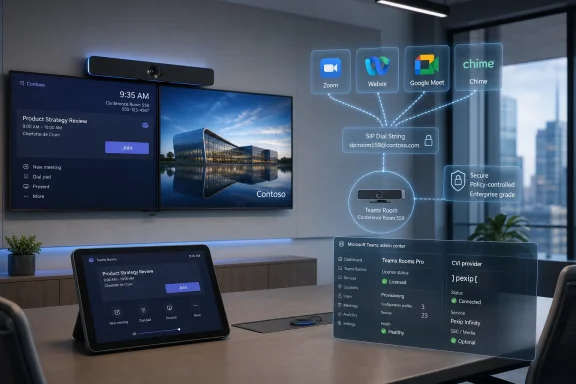
The feature arrives off by default, and that is not just a cautious rollout choice. It reflects the fact that SIP join is tied to a commercial Cloud Video Interop arrangement. Teams Rooms Basic is not enough. Organizations need Teams Rooms Pro, and they need a SIP calling plan from a supported CVI partner.At launch, that supported partner is Pexip. Pexip Connect for Teams Rooms is a paid add-on, and the licensing model matters because the count is expected to align across the deployment: Teams Rooms Pro rooms on one side, Pexip Connect coverage on the other. This is not a switch most admins will casually flip for every room on a Friday afternoon.
That will create an uncomfortable but necessary segmentation exercise. Not every room needs full SIP interop. Some rooms live almost entirely inside Teams. Some rooms are rarely used. Some rooms are small enough that a laptop-based workaround remains tolerable. Others, however, are politically or operationally expensive when meetings fail.
Those are the rooms that will justify the added licensing and configuration. Executive suites, customer briefing centers, legal rooms, training spaces, and shared conference areas used by external partners are the obvious candidates. The feature’s value is highest where the cost of a failed join is not measured in minutes but in reputation.
The Admin Work Is Small Enough to Miss and Important Enough to Break Things
The configuration described by Microsoft is not exotic, but it is exactly the kind of cross-system setup that deserves a change window. Admins need to add a DNS TXT record for the Microsoft 365 domain, then apply a PowerShell policy using the Pexip provider tenant ID. Devices must also be running Teams Rooms app version 5.2.115.0 or later.None of that sounds terrifying to a Teams administrator. But room systems are a special category of IT asset because they fail in public. A bad policy, stale app version, licensing mismatch, or DNS oversight does not show up as an obscure back-end error. It shows up as a room full of people staring at a touch panel.
Microsoft’s own guidance reportedly emphasizes lower-ring testing, user-facing documentation, and helpdesk readiness. That is sensible because the feature changes expectations. Once users learn that Android rooms can join Zoom or Webex natively, they will stop treating failure as a limitation and start treating it as an outage.
The best deployment plan is therefore not “enable SIP join.” It is “define which rooms get SIP join, verify their app versions and licenses, test real invites from real external platforms, and brief support staff on what fallback behavior looks like.” If the SIP address is missing from an invite, Direct Guest Join may still be the path. If the meeting provider has disabled SIP dial-in or requires a host-side plan, the room cannot magically invent interoperability.
Pexip Becomes the Quiet Control Plane Behind the Teams Button
The most interesting part of this rollout is that the user stays inside the Teams Rooms interface while the interop machinery comes from Pexip. That is the shape of enterprise collaboration in 2026: the branded front end belongs to one platform, but the meeting fabric increasingly depends on brokers, gateways, and identity-aware routing behind the scenes.Microsoft benefits from this arrangement because it keeps Teams Rooms as the center of the room experience. Users do not need to learn a separate dialing interface or switch devices. Admins can keep investing in Teams Rooms hardware while reducing the awkwardness of joining meetings hosted elsewhere.
Pexip benefits because interoperability remains a business with real enterprise demand. The more organizations standardize on a primary meeting platform, the more they need reliable bridges to everyone else’s platform. Standardization does not eliminate interop; it makes the remaining interop failures more visible.
The risk is that customers may see this as yet another subscription layered on top of a subscription. Teams Rooms Pro already exists as the management and feature tier for serious room deployments. Adding CVI licensing for full cross-platform behavior may feel like paying extra to make expensive rooms do what users assumed they could already do.
The Market Has Moved Toward Android Bars Faster Than Old Room Thinking Expected
The timing is not accidental. Android-based room systems have become far more important than they were when Teams Rooms was primarily associated with Windows PCs, USB peripherals, and more complex room integration. Video bars from vendors such as Yealink, Logitech, Poly, Neat, Jabra, Lenovo, MAXHUB, and others have changed the economics of room deployment.The Android appeal is straightforward. A single bar can combine camera, microphones, speakers, compute, and the room app. Installation is cleaner. Support is often simpler. For small and medium spaces, the appliance model is easier to scale than a traditional Windows room kit.
Microsoft’s Device Ecosystem Platform is part of that shift. By giving hardware makers a more standardized Android-based foundation for Teams devices, Microsoft is trying to accelerate development while keeping devices within the Teams ecosystem. That matters because the room market is no longer just about a few large conference rooms; it is about every small room that became video-enabled after hybrid work stopped being temporary.
That is why the SIP join gap grew more painful over time. If Android bars were niche devices, waiting longer for interop would be annoying but manageable. When they make up a meaningful share of new room deployments, feature gaps become fleet strategy problems.
Interop Is Becoming a Procurement Requirement, Not a Nice-to-Have
The larger story is that single-platform purity has lost the meeting room. Even organizations that standardize internally on Teams still receive Zoom invites from customers, Webex invites from partners, Google Meet invites from vendors, and sometimes RingCentral or Chime links from business units that inherited their own tooling. The calendar is messier than the collaboration strategy deck.This is why Microsoft’s move matters beyond Android parity. It reflects a market reality: meeting rooms are shared infrastructure, not just endpoints for one vendor’s service. A laptop can install another app. A room system has to be ready before the meeting starts.
For admins, the question is no longer whether users will encounter third-party meetings. They will. The question is whether the room experience can absorb that diversity without requiring the user to become the integration layer.
SIP join is not a universal solvent. It depends on invitation formatting, provider support, CVI licensing, policy configuration, and the capabilities exposed in the SIP session. But it is a more mature answer than telling users to join from a laptop and share audio into the room, which remains one of the fastest ways to make a premium conferencing space feel amateur.
The Feature Also Sharpens the Basic-versus-Pro Divide
Microsoft’s Teams Rooms Basic tier has always been attractive for smaller deployments, pilot rooms, and cost-conscious estates. It gives organizations a way to run a Teams Room without immediately committing every space to the full Pro management and feature model. For many rooms, that remains defensible.But SIP join reinforces the direction of travel: the capabilities that make rooms easier to manage at enterprise scale increasingly sit behind Teams Rooms Pro. That includes not just administrative conveniences but user-facing room behavior that executives and external-facing teams will notice.
This is not unusual in enterprise software. Vendors use the higher tier to house features that require management, compliance, analytics, or partner integration. But in the room context, the line can be jarring. A user does not care whether a room has Basic or Pro. They care whether the meeting on the calendar opens when they tap Join.
That makes licensing communication important inside IT. If only some rooms get SIP join, administrators should not let the estate become a mystery map. Room standards, naming conventions, support documentation, and booking guidance should make clear which spaces are intended for cross-platform external meetings.
Security and Compliance Teams Still Need to Look Past the “No Compliance Considerations” Label
Microsoft has indicated that the update carries no compliance considerations, which is useful for organizations that track Message Center changes through governance workflows. But “no compliance considerations” should not be read as “no security review required.” SIP interop changes how rooms connect to external services, and that deserves at least a basic architecture review.The central issue is not that SIP is inherently suspect. It is that the room becomes part of a broader call path involving Microsoft, the CVI provider, and third-party meeting platforms. Identity, call routing, diagnostics, logs, and content behavior should all be understood before enabling the feature broadly.
Regulated organizations should pay attention to where metadata is processed, how support diagnostics are exposed, how the CVI provider handles tenancy, and what contractual commitments apply. They should also define whether users are allowed to manually dial SIP addresses or only join meetings from trusted calendar invites, if policy controls permit that level of restriction.
The practical security posture will depend less on the feature announcement and more on how narrowly admins scope the rollout. Enabling SIP join for carefully selected rooms with documented use cases is a different risk profile from enabling it everywhere because the toggle exists.
The Rollout Window Is a Gift If Admins Use It
The early June to mid-August rollout window gives IT teams a rare advantage: time. Too many Teams features arrive in a way that feels simultaneous with the support tickets. Here, the delayed general availability window lets admins inventory, license, test, and decide before the feature becomes broadly expected.The first step is identifying Android Teams Rooms that are candidates for SIP join. That means checking not only hardware and app version readiness but also actual meeting behavior. Which rooms regularly host external meetings? Which departments complain most often about third-party joins? Which rooms are visible enough that failures become escalations?
The second step is validating invites from the platforms that matter to the business. It is not enough to test one perfect Zoom invite and declare victory. Admins should test Zoom, Webex, Google Meet, and any vertical-specific meeting services that appear in the organization’s calendars. They should also test bad cases: invites without SIP dial strings, rescheduled meetings, forwarded invites, meetings with passcodes, and meetings created by external tenants.
The third step is deciding what the support script says. If SIP join fails, should the helpdesk tell users to try Direct Guest Join? Should they ask whether the meeting invite includes a SIP address? Should they check the room’s license assignment, app version, or policy? These are mundane questions, but they determine whether the feature reduces support load or simply creates a more complicated class of tickets.
The Room Experience Is Becoming a Policy Decision
One of the underrated consequences of this update is that the meeting room experience is becoming increasingly policy-defined. The hardware matters, but less than it once did. The same Android bar may behave very differently depending on license tier, app version, Teams policy, CVI provisioning, and calendar invite structure.That is good news for centralized IT because it means room capabilities can be governed. It is bad news for anyone hoping that room systems are just appliances. They are not. They are managed endpoints that sit at the intersection of identity, collaboration, networking, device firmware, and user training.
The most successful organizations will treat Teams Rooms like a fleet, not like isolated conference-room gadgets. That means rings, pilots, standard images or firmware baselines where applicable, documented exception handling, and reporting that catches drift before users do. Android rooms may be simpler to install than Windows rooms, but they are not exempt from lifecycle management.
SIP join makes that more obvious. A room that has not updated to the required app version is not merely “behind.” It may lack a feature that users in another room already rely on. In a hybrid workplace, inconsistency is often the real outage.
The New Android SIP Path Is a Win, But Not a Free One
The concrete lesson for admins is that Microsoft’s Android Teams Rooms story is improving, but the improvement comes with dependencies. The feature closes a platform gap, raises the ceiling on third-party meeting quality, and gives mixed estates a more coherent interop path. It also introduces licensing, CVI provisioning, and operational decisions that must be made deliberately.- Organizations should expect SIP-based cross-platform join for Teams Rooms on Android to roll out from early June 2026 and reach worldwide general availability by mid-August 2026.
- The feature is off by default and requires Teams Rooms Pro, so Teams Rooms Basic deployments should not expect to receive the same interop behavior.
- Pexip is currently the relevant CVI provider for this Teams Rooms SIP join scenario, and its Connect licensing must be planned alongside Microsoft room licensing.
- Android rooms need Teams Rooms app version 5.2.115.0 or later, which makes update-ring validation a prerequisite rather than a formality.
- SIP join should improve cross-platform meeting quality through native one-touch join, dual-screen support, and HDMI content sharing when the invitation includes a SIP dial string.
- Direct Guest Join remains important as a fallback path when SIP details are absent, but it should no longer be treated as the premium interop experience.
References
- Primary source: UC Today
Published: Mon, 01 Jun 2026 13:03:33 GMT
Teams Rooms on Android SIP Join: What Admins Need to Know - UC Today
Microsoft is rolling out SIP-based cross-platform join for Teams Rooms on Android. Here's what it means, what it replaces, and how to prepare before August.www.uctoday.com - Related coverage: pexip.com

What is Pexip Connect for Teams Rooms | Pexip
Join any meeting from Teams Rooms with this Direct Guest Join alternative. Get screen sharing and dual screen support. Certified by Microsoft and trusted by leading enterprises and government agencies.
www.pexip.com
- Related coverage: docs.pexip.com
- Related coverage: windowsreport.com
Microsoft Teams Adds SIP Cross-Platform Join, Rollout Starts June 2026
Microsoft rolls out SIP-based cross-platform join for Teams Rooms on Android, enabling direct Zoom and Webex access starting June 2026. windowsreport.com
- Official source: learn.microsoft.com
Teams Rooms on Android certified devices - Microsoft Teams | Microsoft Learn
Find lists of certified systems and peripherals for use with Microsoft Teams Rooms systems on Android.learn.microsoft.com - Related coverage: help.pexip.com