Microsoft will begin rolling out SIP-based cross-platform meeting join for Microsoft Teams Rooms on Android in early June 2026, with worldwide general availability expected by mid-August, giving Android room devices a native way to join Zoom, Webex, Google Meet, Amazon Chime, RingCentral, and other SIP-enabled meetings from the Teams Rooms interface. The practical headline is not merely that Android rooms are catching up to Windows rooms. It is that Microsoft is turning interoperability from a browser workaround into a licensed, policy-controlled room capability. For admins, that means the next two months are less about celebrating a feature and more about deciding which rooms deserve it, who will pay for it, and how much complexity the enterprise is willing to add in exchange for fewer failed meetings.

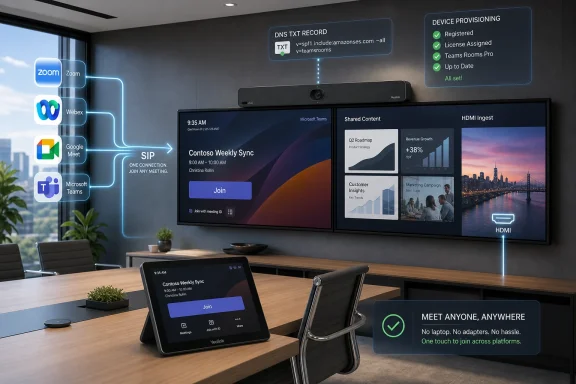
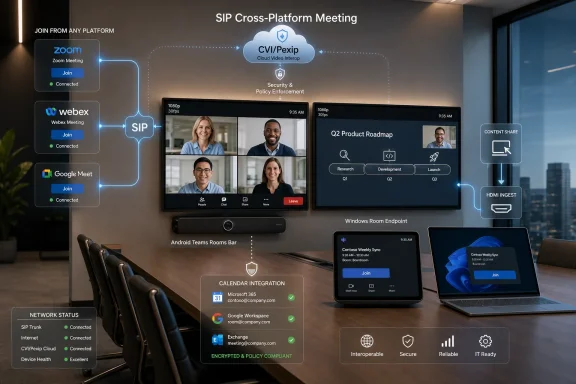
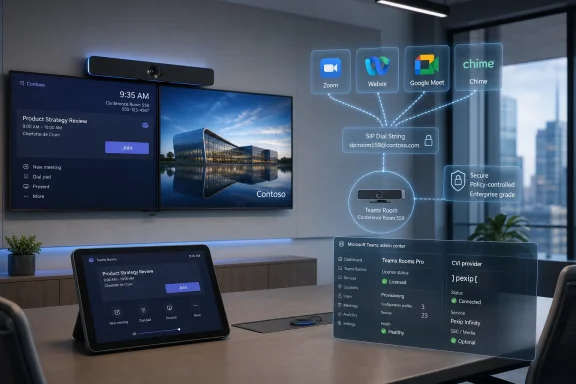
Modern office conference room displays Teams meetings, device connections, and video app integrations on multiple screens.Microsoft Closes One of the More Annoying Gaps in Android Rooms​

Teams Rooms has always carried a quiet platform hierarchy. Windows rooms have tended to receive the more advanced capabilities first, while Android rooms have won on appliance simplicity, lower deployment friction, and the appeal of video bars that do not require a mini PC under the table. That bargain has worked well enough for many organizations, especially those trying to modernize dozens or hundreds of small and medium meeting spaces.
But interoperability exposed the trade-off. A room that works beautifully for Teams meetings but stumbles when an executive receives a Zoom invite is not really a modern meeting room. It is a Teams endpoint with an asterisk.
The new SIP join capability for Teams Rooms on Android matters because it removes one of the most visible asterisks. Until now, Android rooms leaned heavily on Direct Guest Join for third-party meetings, a WebRTC-based approach that can be useful but limited. SIP join moves the room into a more traditional video-interoperability model, where the device can dial into external meeting services using the SIP address included in the invitation.
That distinction sounds technical because it is. But the user-facing effect is simple: the meeting room behaves less like a compromised web client and more like a proper conferencing endpoint.

Direct Guest Join Was a Bridge, Not a Destination​

Direct Guest Join was never a bad idea. It gave Teams Rooms a way to join selected third-party meetings without requiring users to bring a laptop, dial a conference ID manually, or ask the helpdesk why the expensive room system could not join the meeting on the calendar. For organizations that only occasionally cross platform boundaries, it was good enough to reduce embarrassment.
But “good enough” has limits in a conference room. WebRTC guest experiences tend to inherit the constraints of the host platform’s web join flow. They can vary by provider, by browser capability, and by whatever the meeting service decides to expose to guests that month.
The most obvious constraints are video and content. Direct Guest Join is commonly described as a single-screen, 720p-class experience, without the same native HDMI ingest and dual-screen behavior admins expect from a fully integrated room system. In a huddle room, that may be acceptable. In a boardroom, training room, or executive space, it starts to look like a downgrade.
SIP join is Microsoft’s acknowledgment that room systems need a more predictable interop layer. When the invite includes a SIP dial string, Teams Rooms on Android can prioritize SIP over the browser-based path. When no SIP address exists, the room can still fall back to Direct Guest Join. That is the right architecture: use the richer protocol path when available, preserve the free fallback when it is not.

Android Rooms Finally Get the Treatment Windows Rooms Already Had​

The frustration for mixed-estate customers is that Windows Teams Rooms already moved down this road. Pexip Connect for Teams Rooms brought SIP-based interop to Windows devices in 2024, which meant organizations with both Windows and Android rooms had a split operational reality. The same Teams Rooms brand did not guarantee the same interop behavior.
That mattered because mixed estates are not edge cases. Enterprises often deploy Windows-based Teams Rooms in larger or more complex spaces, then use Android video bars for smaller rooms where simplicity, cable reduction, and appliance-style management are more attractive. The result is a room fleet that looks consistent to procurement but not always to users.
From a user’s perspective, “Teams Room” is supposed to mean “tap the meeting and join.” If that works in Conference Room A but not Conference Room B because one room runs Windows and the other runs Android, the platform distinction becomes an IT problem masquerading as user error. Nobody walking into a meeting wants a lesson in endpoint architecture.
The Android rollout narrows that gap. It does not make the two platforms identical, and Microsoft’s room roadmap will likely continue to ship some features unevenly. But for cross-platform join, this is an important step toward making Teams Rooms behave like a room estate rather than a patchwork of device categories.

The Catch Is That Interop Is Now a Licensed Feature, Not a Free Convenience​

The feature arrives off by default, and that is not just a cautious rollout choice. It reflects the fact that SIP join is tied to a commercial Cloud Video Interop arrangement. Teams Rooms Basic is not enough. Organizations need Teams Rooms Pro, and they need a SIP calling plan from a supported CVI partner.
At launch, that supported partner is Pexip. Pexip Connect for Teams Rooms is a paid add-on, and the licensing model matters because the count is expected to align across the deployment: Teams Rooms Pro rooms on one side, Pexip Connect coverage on the other. This is not a switch most admins will casually flip for every room on a Friday afternoon.
That will create an uncomfortable but necessary segmentation exercise. Not every room needs full SIP interop. Some rooms live almost entirely inside Teams. Some rooms are rarely used. Some rooms are small enough that a laptop-based workaround remains tolerable. Others, however, are politically or operationally expensive when meetings fail.
Those are the rooms that will justify the added licensing and configuration. Executive suites, customer briefing centers, legal rooms, training spaces, and shared conference areas used by external partners are the obvious candidates. The feature’s value is highest where the cost of a failed join is not measured in minutes but in reputation.

The Admin Work Is Small Enough to Miss and Important Enough to Break Things​

The configuration described by Microsoft is not exotic, but it is exactly the kind of cross-system setup that deserves a change window. Admins need to add a DNS TXT record for the Microsoft 365 domain, then apply a PowerShell policy using the Pexip provider tenant ID. Devices must also be running Teams Rooms app version 5.2.115.0 or later.
None of that sounds terrifying to a Teams administrator. But room systems are a special category of IT asset because they fail in public. A bad policy, stale app version, licensing mismatch, or DNS oversight does not show up as an obscure back-end error. It shows up as a room full of people staring at a touch panel.
Microsoft’s own guidance reportedly emphasizes lower-ring testing, user-facing documentation, and helpdesk readiness. That is sensible because the feature changes expectations. Once users learn that Android rooms can join Zoom or Webex natively, they will stop treating failure as a limitation and start treating it as an outage.
The best deployment plan is therefore not “enable SIP join.” It is “define which rooms get SIP join, verify their app versions and licenses, test real invites from real external platforms, and brief support staff on what fallback behavior looks like.” If the SIP address is missing from an invite, Direct Guest Join may still be the path. If the meeting provider has disabled SIP dial-in or requires a host-side plan, the room cannot magically invent interoperability.

Pexip Becomes the Quiet Control Plane Behind the Teams Button​

The most interesting part of this rollout is that the user stays inside the Teams Rooms interface while the interop machinery comes from Pexip. That is the shape of enterprise collaboration in 2026: the branded front end belongs to one platform, but the meeting fabric increasingly depends on brokers, gateways, and identity-aware routing behind the scenes.
Microsoft benefits from this arrangement because it keeps Teams Rooms as the center of the room experience. Users do not need to learn a separate dialing interface or switch devices. Admins can keep investing in Teams Rooms hardware while reducing the awkwardness of joining meetings hosted elsewhere.
Pexip benefits because interoperability remains a business with real enterprise demand. The more organizations standardize on a primary meeting platform, the more they need reliable bridges to everyone else’s platform. Standardization does not eliminate interop; it makes the remaining interop failures more visible.
The risk is that customers may see this as yet another subscription layered on top of a subscription. Teams Rooms Pro already exists as the management and feature tier for serious room deployments. Adding CVI licensing for full cross-platform behavior may feel like paying extra to make expensive rooms do what users assumed they could already do.

The Market Has Moved Toward Android Bars Faster Than Old Room Thinking Expected​

The timing is not accidental. Android-based room systems have become far more important than they were when Teams Rooms was primarily associated with Windows PCs, USB peripherals, and more complex room integration. Video bars from vendors such as Yealink, Logitech, Poly, Neat, Jabra, Lenovo, MAXHUB, and others have changed the economics of room deployment.
The Android appeal is straightforward. A single bar can combine camera, microphones, speakers, compute, and the room app. Installation is cleaner. Support is often simpler. For small and medium spaces, the appliance model is easier to scale than a traditional Windows room kit.
Microsoft’s Device Ecosystem Platform is part of that shift. By giving hardware makers a more standardized Android-based foundation for Teams devices, Microsoft is trying to accelerate development while keeping devices within the Teams ecosystem. That matters because the room market is no longer just about a few large conference rooms; it is about every small room that became video-enabled after hybrid work stopped being temporary.
That is why the SIP join gap grew more painful over time. If Android bars were niche devices, waiting longer for interop would be annoying but manageable. When they make up a meaningful share of new room deployments, feature gaps become fleet strategy problems.

Interop Is Becoming a Procurement Requirement, Not a Nice-to-Have​

The larger story is that single-platform purity has lost the meeting room. Even organizations that standardize internally on Teams still receive Zoom invites from customers, Webex invites from partners, Google Meet invites from vendors, and sometimes RingCentral or Chime links from business units that inherited their own tooling. The calendar is messier than the collaboration strategy deck.
This is why Microsoft’s move matters beyond Android parity. It reflects a market reality: meeting rooms are shared infrastructure, not just endpoints for one vendor’s service. A laptop can install another app. A room system has to be ready before the meeting starts.
For admins, the question is no longer whether users will encounter third-party meetings. They will. The question is whether the room experience can absorb that diversity without requiring the user to become the integration layer.
SIP join is not a universal solvent. It depends on invitation formatting, provider support, CVI licensing, policy configuration, and the capabilities exposed in the SIP session. But it is a more mature answer than telling users to join from a laptop and share audio into the room, which remains one of the fastest ways to make a premium conferencing space feel amateur.

The Feature Also Sharpens the Basic-versus-Pro Divide​

Microsoft’s Teams Rooms Basic tier has always been attractive for smaller deployments, pilot rooms, and cost-conscious estates. It gives organizations a way to run a Teams Room without immediately committing every space to the full Pro management and feature model. For many rooms, that remains defensible.
But SIP join reinforces the direction of travel: the capabilities that make rooms easier to manage at enterprise scale increasingly sit behind Teams Rooms Pro. That includes not just administrative conveniences but user-facing room behavior that executives and external-facing teams will notice.
This is not unusual in enterprise software. Vendors use the higher tier to house features that require management, compliance, analytics, or partner integration. But in the room context, the line can be jarring. A user does not care whether a room has Basic or Pro. They care whether the meeting on the calendar opens when they tap Join.
That makes licensing communication important inside IT. If only some rooms get SIP join, administrators should not let the estate become a mystery map. Room standards, naming conventions, support documentation, and booking guidance should make clear which spaces are intended for cross-platform external meetings.

Security and Compliance Teams Still Need to Look Past the “No Compliance Considerations” Label​

Microsoft has indicated that the update carries no compliance considerations, which is useful for organizations that track Message Center changes through governance workflows. But “no compliance considerations” should not be read as “no security review required.” SIP interop changes how rooms connect to external services, and that deserves at least a basic architecture review.
The central issue is not that SIP is inherently suspect. It is that the room becomes part of a broader call path involving Microsoft, the CVI provider, and third-party meeting platforms. Identity, call routing, diagnostics, logs, and content behavior should all be understood before enabling the feature broadly.
Regulated organizations should pay attention to where metadata is processed, how support diagnostics are exposed, how the CVI provider handles tenancy, and what contractual commitments apply. They should also define whether users are allowed to manually dial SIP addresses or only join meetings from trusted calendar invites, if policy controls permit that level of restriction.
The practical security posture will depend less on the feature announcement and more on how narrowly admins scope the rollout. Enabling SIP join for carefully selected rooms with documented use cases is a different risk profile from enabling it everywhere because the toggle exists.

The Rollout Window Is a Gift If Admins Use It​

The early June to mid-August rollout window gives IT teams a rare advantage: time. Too many Teams features arrive in a way that feels simultaneous with the support tickets. Here, the delayed general availability window lets admins inventory, license, test, and decide before the feature becomes broadly expected.
The first step is identifying Android Teams Rooms that are candidates for SIP join. That means checking not only hardware and app version readiness but also actual meeting behavior. Which rooms regularly host external meetings? Which departments complain most often about third-party joins? Which rooms are visible enough that failures become escalations?
The second step is validating invites from the platforms that matter to the business. It is not enough to test one perfect Zoom invite and declare victory. Admins should test Zoom, Webex, Google Meet, and any vertical-specific meeting services that appear in the organization’s calendars. They should also test bad cases: invites without SIP dial strings, rescheduled meetings, forwarded invites, meetings with passcodes, and meetings created by external tenants.
The third step is deciding what the support script says. If SIP join fails, should the helpdesk tell users to try Direct Guest Join? Should they ask whether the meeting invite includes a SIP address? Should they check the room’s license assignment, app version, or policy? These are mundane questions, but they determine whether the feature reduces support load or simply creates a more complicated class of tickets.

The Room Experience Is Becoming a Policy Decision​

One of the underrated consequences of this update is that the meeting room experience is becoming increasingly policy-defined. The hardware matters, but less than it once did. The same Android bar may behave very differently depending on license tier, app version, Teams policy, CVI provisioning, and calendar invite structure.
That is good news for centralized IT because it means room capabilities can be governed. It is bad news for anyone hoping that room systems are just appliances. They are not. They are managed endpoints that sit at the intersection of identity, collaboration, networking, device firmware, and user training.
The most successful organizations will treat Teams Rooms like a fleet, not like isolated conference-room gadgets. That means rings, pilots, standard images or firmware baselines where applicable, documented exception handling, and reporting that catches drift before users do. Android rooms may be simpler to install than Windows rooms, but they are not exempt from lifecycle management.
SIP join makes that more obvious. A room that has not updated to the required app version is not merely “behind.” It may lack a feature that users in another room already rely on. In a hybrid workplace, inconsistency is often the real outage.
The New Android SIP Path Is a Win, But Not a Free One​

The concrete lesson for admins is that Microsoft’s Android Teams Rooms story is improving, but the improvement comes with dependencies. The feature closes a platform gap, raises the ceiling on third-party meeting quality, and gives mixed estates a more coherent interop path. It also introduces licensing, CVI provisioning, and operational decisions that must be made deliberately.
  • Organizations should expect SIP-based cross-platform join for Teams Rooms on Android to roll out from early June 2026 and reach worldwide general availability by mid-August 2026.
  • The feature is off by default and requires Teams Rooms Pro, so Teams Rooms Basic deployments should not expect to receive the same interop behavior.
  • Pexip is currently the relevant CVI provider for this Teams Rooms SIP join scenario, and its Connect licensing must be planned alongside Microsoft room licensing.
  • Android rooms need Teams Rooms app version 5.2.115.0 or later, which makes update-ring validation a prerequisite rather than a formality.
  • SIP join should improve cross-platform meeting quality through native one-touch join, dual-screen support, and HDMI content sharing when the invitation includes a SIP dial string.
  • Direct Guest Join remains important as a fallback path when SIP details are absent, but it should no longer be treated as the premium interop experience.
This is the right direction for Teams Rooms on Android, and it arrives at the right moment: after Android video bars have become too important to leave behind, but before every organization has locked its room strategy for the next hardware cycle. The winners will be the admins who treat SIP join not as a checkbox but as a room-service tier, tested and documented before users discover it by accident. The broader lesson is harder for vendors but better for customers: the future meeting room may have a default platform, but it cannot afford to have only one door.

References​

  1. Primary source: UC Today
    Published: Mon, 01 Jun 2026 13:03:33 GMT
  2. Related coverage: pexip.com
  3. Related coverage: docs.pexip.com
  4. Related coverage: windowsreport.com
  5. Official source: learn.microsoft.com
  6. Related coverage: help.pexip.com
 

Microsoft is rolling out SIP-based cross-platform meeting join for Microsoft Teams Rooms on Android in early June 2026, with worldwide general availability expected by mid-August 2026 for organizations using Teams Rooms Pro and Pexip’s Cloud Video Interop service. That sentence is the admin version of a very old conference-room dream: press one button, join the meeting, stop explaining which platform owns the room. The feature matters because Android Teams Rooms have become the practical choice for many smaller and mid-sized rooms, yet they have lagged behind Windows rooms on higher-end interoperability. Microsoft is not making third-party meetings disappear; it is acknowledging that the modern meeting room has to survive them.

Modern conference room with video/HDMI meeting screens, cloud app icons, and device provisioning status overlays.Microsoft Is Finally Closing the Android Room Gap​

For years, Teams Rooms has been less a single product than a two-track operating model. Windows rooms typically received the fuller feature set first, while Android rooms won on appliance simplicity, lower deployment friction, and a cleaner footprint in smaller spaces. That trade-off was acceptable when Android bars were used mostly for huddle rooms and casual spaces, but it became harder to defend as organizations standardized entire floors around all-in-one video bars.
SIP join for Teams Rooms on Android is therefore not just another checkbox in a roadmap. It addresses one of the most visible differences between the Windows and Android room estates: the ability to join non-Teams meetings through standards-based video interoperability rather than a browser-like guest experience. For users, the distinction is invisible until it is painfully visible: the wrong layout, no HDMI ingest, weaker video, or the familiar ritual of someone joining from a laptop just to share content.
The rollout also shows how Microsoft now thinks about Teams Rooms. The company still wants Teams to be the default collaboration layer, but it no longer pretends that every important meeting arrives as a Teams invite. Customers live with Zoom, Webex, Google Meet, RingCentral, Amazon Chime, and industry-specific platforms because customers, partners, suppliers, regulators, and interview candidates do not all coordinate their software choices.
That is the unglamorous reality behind this release. Microsoft is not conceding the meeting platform war. It is accepting that the room has to be more neutral than the tenant.

Direct Guest Join Was a Bridge, Not a Destination​

Until now, Teams Rooms on Android has leaned on Direct Guest Join for third-party meetings. Direct Guest Join was useful, and in many organizations it will remain useful, because it gave Teams Rooms a way into Zoom and Webex meetings without a second box, a laptop cart, or a USB cable workaround. It also worked without the paid Cloud Video Interop layer that SIP join now requires.
But Direct Guest Join has always carried the compromises of its architecture. It effectively wraps a third-party web meeting experience inside the Teams Room interface, which means the experience varies by host platform and inherits many of the limitations of browser-based meeting participation. In practice, admins learned to describe it less as “full interoperability” and more as “good enough for many meetings.”
SIP changes the conversation because it moves the join path into a protocol-level interop model. When a meeting invitation includes a SIP dial string and the Teams Room is properly licensed and configured, the room can prioritize SIP over WebRTC. If the invitation does not include a SIP address, the device can still fall back to Direct Guest Join, preserving the old path rather than replacing it outright.
That fallback is important. Interop projects fail when they demand perfection from every external invitation. Microsoft’s model here is more pragmatic: use SIP when the meeting ecosystem provides the necessary address, use WebRTC when it does not, and keep the join button familiar enough that end users should not need to know which transport was selected.
The practical difference is the meeting-room version of going from a passable web app to a more native endpoint experience. SIP join promises better video, dual-screen support, and in-room content sharing through HDMI ingest. Those are not luxury features in a conference room; they are the difference between a room that feels like enterprise infrastructure and a room that feels like a tablet taped to the wall.

The Room Bar Became Too Important to Treat as Second Class​

The timing is not accidental. Android-based room systems have become too common to leave behind on major collaboration features. All-in-one video bars are easy to deploy, easier to cable, and often simpler to support than classic Windows-room builds with separate compute, camera, audio, display, and controller components.
That simplicity is exactly why IT departments adopted them at scale. A company that once reserved video conferencing for boardrooms can now put credible meeting hardware into small rooms, focus rooms, training rooms, and regional offices. Android bars fit the post-pandemic facilities model: more rooms, smaller rooms, fewer assumptions about where people will join from.
The catch is that large estates make small feature gaps expensive. A Windows-only capability can be tolerated when Windows rooms are the flagship rooms and Android rooms are the edge cases. It becomes a deployment problem when the Android estate is hundreds or thousands of devices across sites, each one expected to join customer and partner meetings without drama.
Microsoft’s Android push also intersects with its Device Ecosystem Platform, the company’s effort to give hardware partners a more consistent base for Android-based collaboration devices. Barco, Jabra, Lenovo, MAXHUB, Yealink, and other vendors are part of the broader story here: Teams Rooms on Android is no longer a sidecar product for low-end deployments. It is a mainstream room platform, and mainstream room platforms need grown-up interop.
This is why the feature matters beyond Zoom and Webex. It is really about whether Microsoft can make Teams Rooms feel like a reliable room standard even when Teams is not the meeting host.

Pexip Gets the Strategic Middle Seat​

The catch, and it is a meaningful one, is that Microsoft’s SIP join story for Teams Rooms on Android currently runs through Pexip. Organizations need Teams Rooms Pro licensing, but they also need a SIP calling plan from a Cloud Video Interop partner. For this feature, Pexip is the enabled provider.
That makes the architecture commercially and operationally different from Direct Guest Join. Direct Guest Join is the built-in bridge; SIP join is a managed interop service. Pexip Connect for Teams Rooms is a paid add-on, and organizations need to align licensing counts between their Teams Rooms Pro estate and Pexip Connect coverage.
For many enterprises, that will be a reasonable price for predictability. Pexip has long occupied the awkward but valuable middle ground between collaboration platform tribes, providing Cloud Video Interop for environments that cannot tell every partner, customer, and board member which button to press. Its pitch is not that Teams, Zoom, Webex, and Meet are the same. Its pitch is that the room should not care as much as the calendar does.
Still, Microsoft’s reliance on a CVI partner complicates the otherwise clean message. Admins do not simply toggle on a Microsoft feature and call it done. They need provider provisioning, tenant configuration, DNS verification, policy application, and a support model that understands where Microsoft ends and Pexip begins.
That is not necessarily a flaw. Enterprise-grade interoperability has always required more than wishful thinking and a standards acronym. But it does mean the feature will divide customers into two groups: those already paying for interop and ready to extend it to Android rooms, and those who must now decide whether better cross-platform meetings justify a new vendor dependency.

The Admin Work Starts Before the Rollout Finishes​

The feature is off by default, which is exactly how it should be. Meeting-room changes are deceptively risky because users treat conference rooms as appliances. Nobody wants to discover five minutes before a board call that a new join path changed layouts, policies, firewall expectations, or helpdesk scripts.
Microsoft’s guidance points admins toward a staged deployment using lower-ring devices before broad rollout. That is not just boilerplate. Teams Rooms fleets often contain a mixture of hardware vendors, firmware baselines, network segments, room layouts, displays, and cable realities. A feature that looks simple in a cloud admin center can behave differently in a dual-screen executive room than it does in a single-display huddle space.
The minimum Teams Rooms app version is another practical gate. Devices need to be on version 5.2.115.0 or later, and Android room update behavior is not always as immediate as admins would like. Organizations with strict change windows, device rings, or vendor-managed update policies should treat the June-to-August rollout window as preparation time, not waiting time.
Configuration also reaches beyond Teams policy. Admins must add a DNS TXT record for the Microsoft 365 domain and apply PowerShell policy using the Pexip provider tenant ID. That makes this a cross-discipline change touching collaboration admins, DNS owners, identity or tenant admins, and possibly procurement if Pexip licensing is not already in place.
The helpdesk angle is equally important. Users should not need to learn SIP vocabulary, but support staff will need to know why one third-party meeting joins through SIP while another falls back to Direct Guest Join. They will also need a crisp script for the old room-support question: “Why did this meeting behave differently from the last one?”

Better Interop Does Not Mean Invisible Interop​

The strongest promise of SIP join is consistency, but consistency has limits. A Teams Room joining a Zoom meeting through SIP is still not the same thing as a native Zoom Room joining that meeting. A Teams Room joining Webex through SIP is still not a Webex device with every host-platform feature exposed. Standards-based interoperability reduces friction; it does not erase product boundaries.
That distinction matters because users often interpret “join any meeting” literally. In the meeting-room market, that phrase usually means “join the meeting with acceptable audio, video, content sharing, and control behavior.” It does not mean every breakout, reaction, whiteboard, transcription, host control, AI recap, companion mode, or platform-specific feature behaves identically across vendors.
Even so, the gain is substantial. A room that can show remote participants and content properly across two displays, accept HDMI ingest, and join from the calendar without laptop gymnastics is solving the majority of real-world room pain. Most meeting failures are not exotic; they are banal. The video is soft, the content will not share, the wrong screen is active, or the room joins but cannot participate in the way people expect.
This is also where Microsoft’s fallback design earns its keep. SIP will be preferred when a usable SIP dial string is present, while Direct Guest Join remains the path when it is not. That layered approach makes the feature more resilient in the messy calendar reality of external meetings, where invitation formats vary and not every host enables the same options.
The admin challenge is setting expectations without underselling the improvement. The right message to users is not “your Teams Room is now every room system at once.” It is “the room can join more external meetings with a better, more room-native experience, and the join button remains the place to start.”

Microsoft’s Interop Strategy Is Becoming More Honest​

For much of the Teams era, Microsoft’s meeting-room strategy carried an implicit tension. Teams Rooms was sold as a premium endpoint for Teams meetings, while the reality of corporate calendars demanded reliable access to other platforms. The company addressed the tension incrementally: Direct Guest Join, cross-cloud work, partner CVI options, and now broader SIP join parity for Android rooms.
This Android rollout makes the strategy more honest. Microsoft can still compete aggressively with Zoom, Cisco, Google, and others in the collaboration stack while recognizing that the endpoint market has a different center of gravity. Rooms are shared infrastructure. Shared infrastructure has to accommodate the outside world.
That is especially true for organizations with mixed estates. Many enterprises bought Windows Teams Rooms for larger spaces and Android bars for smaller ones. Until now, that could mean two different interoperability expectations under the same Teams Rooms brand. The Windows room might handle a SIP-enabled third-party meeting with richer content and display behavior, while the Android room used the more limited guest path.
Closing that gap reduces training burden and design complexity. Facilities teams can choose hardware based on room requirements rather than feature asymmetry. Collaboration teams can write more consistent user documentation. Procurement can compare Android and Windows room systems without treating SIP/H.323 support as an automatic Windows advantage.
There is a larger strategic signal, too. Microsoft’s meeting-room platform is maturing from a Teams-first endpoint into a managed room operating environment. That does not make it neutral, but it does make it more useful. The best enterprise platforms win not by pretending competitors do not exist, but by making themselves the safest place to manage the unavoidable mess.

The Licensing Line Will Shape Adoption​

The most controversial part of the rollout may not be technical at all. Teams Rooms Basic customers do not get this feature. Organizations need Teams Rooms Pro, and they need the Pexip layer. That licensing line will be easy for Microsoft to justify and easy for some customers to resent.
From Microsoft’s perspective, the argument is straightforward. Advanced room management, enterprise policy, and richer interoperability belong in the Pro tier. The feature also depends on a partner-provided service that has its own costs. If an organization wants professional-grade cross-platform meeting join, Microsoft is positioning that as a professional-grade room capability.
From the customer side, the frustration is equally predictable. The user problem is not advanced; it is ordinary. People receive Zoom invitations. They receive Webex invitations. They receive Google Meet invitations. They walk into a room and expect the room to join. The fact that the cleanest version of that workflow requires a higher Microsoft license and a partner add-on will feel like a tax on normal business reality.
That tension will influence how quickly the feature spreads. Enterprises with executive rooms, customer-facing spaces, legal proceedings, healthcare consultations, education use cases, and high-volume external collaboration will likely see the value. Smaller organizations may decide that Direct Guest Join is still good enough, especially if most external meetings are occasional and low-stakes.
The result will be a two-tier interop world inside Teams Rooms. Basic and no-CVI environments will continue using guest-based joins where available. Pro-plus-CVI environments will get the richer SIP path. Microsoft is not forcing the upgrade, but it is making the better experience visible enough that users may begin asking why some rooms have it and others do not.

Compliance Is Quietly Not the Headline​

Microsoft has reportedly said there are no compliance considerations attached to the update, which is notable mostly because regulated organizations will ask the question anyway. Any feature that changes how rooms connect to external services raises predictable concerns around data flow, meeting metadata, recording indicators, tenant policy, and provider handling.
The absence of a special compliance flag does not mean admins can skip governance. It means the feature should be assessed within the existing framework for Teams Rooms, third-party meetings, and Cloud Video Interop providers. Security teams will still want to understand which domains are verified, which provider is authorized, how SIP calls are routed, and what logging or diagnostics are available.
Pexip’s role may actually help in some environments because it gives administrators a defined interop provider rather than an unmanaged collection of room workarounds. A sanctioned CVI service is easier to document than users joining external meetings from laptops, personal devices, or ad hoc USB modes. Centralization is not the same as risk removal, but it does make risk more legible.
That matters for industries where the conference room is not casual infrastructure. In law, finance, government, healthcare, and critical operations, the room system is part of the communications control plane. A more reliable external join path can reduce user improvisation, and user improvisation is often where policy goes to die.
The smart governance posture is neither panic nor blind enablement. Treat SIP join as a managed expansion of room capability. Put it through change control, document the provider relationship, test meeting flows that matter to the business, and make sure the helpdesk knows how to distinguish feature behavior from policy failure.

The Real Competition Is the Laptop Workaround​

Vendors love to compare room systems against other room systems, but the enemy of every meeting-room platform is still the laptop workaround. When the room cannot join, share, or display correctly, someone opens a laptop, joins the meeting, uses the room as a dumb speakerphone, or gives up on the installed hardware entirely. Once that behavior becomes normal, the room investment is already losing.
SIP join for Android Teams Rooms is best understood as an attack on that workaround. It gives the room a better chance of being the primary meeting device even when Teams is not the host. That protects the value of installed displays, cameras, microphones, control panels, and room-management tooling.
This is why HDMI ingest matters more than it sounds. In-room content sharing is one of the oldest expectations in video conferencing, and it remains one of the fastest ways for a meeting to derail. If a user has to join from a laptop just to show content in a third-party meeting, the room is no longer the center of the experience. It is an accessory.
Dual-screen support belongs in the same category. Many rooms were designed around a separation of people and content. Forcing those rooms into a single-screen guest layout makes the hardware feel downgraded precisely when the meeting may involve external participants the business wants to impress.
The industry has spent years talking about AI cameras, intelligent recaps, voice isolation, and spatial audio. Those features are useful, sometimes impressive, and occasionally transformative. But the basic test remains brutal: can the room join the meeting on the calendar and let people see, hear, and share without calling IT? SIP join for Android is aimed squarely at that test.

The Calendar Is the New Interop Battlefield​

The deeper shift is that interoperability is moving from the dial pad to the calendar. Classic video conferencing assumed someone might type a SIP address, dial an H.323 number, or navigate a directory. Modern meeting rooms assume the calendar invite is the interface. If the invite is understood, the room works. If it is not, the room becomes a troubleshooting exercise.
Microsoft’s SIP join implementation fits that modern model. The user does not need to choose SIP as a philosophy. The room reads the invite, recognizes the join information, and takes the best available route. That is the right abstraction for a shared room, because shared-room users are not necessarily trained users.
This also explains why Google Meet and Teams interoperability efforts, Zoom interop investments, Cisco’s long-running standards posture, and Pexip’s CVI business all keep orbiting the same problem. The winner is not the vendor that invents the cleverest dial string. The winner is the vendor that makes the invite actionable with the least user thought.
For admins, that means testing should begin with real invitations, not lab-perfect examples. Use meetings generated by the external platforms your organization actually encounters. Test Zoom invites from customers, Webex invites from suppliers, Google Meet invites from partners, and edge cases from recurring meetings, forwarded invites, delegated calendars, and rooms in different policy scopes.
The SIP address is the hinge. If the meeting invitation includes a usable SIP dial string, the experience can move to the richer SIP path. If it does not, the room falls back. That makes external meeting hygiene part of the equation, even though the room team cannot control every outside organizer.
In that sense, interoperability is no longer just a room-device feature. It is a calendar parsing, policy, licensing, DNS, and partner-service feature that happens to reveal itself when someone taps Join.

Android Parity Will Not End the Windows Advantage​

The rollout narrows a meaningful gap, but it does not make Windows and Android Teams Rooms identical. Microsoft has a long history of shipping advanced room capabilities to Windows first, and Windows rooms still tend to serve the most complex spaces. Large rooms, divisible spaces, custom audio, multi-camera designs, and specialized peripherals often remain more natural Windows territory.
Android’s strength is different. It is the appliance model: fewer moving parts, vendor-integrated hardware, easier deployment, and a form factor suited to repeatable room rollouts. The better Android becomes at advanced features, the more credible it becomes as the default choice for broad room coverage.
That creates a healthier hardware decision. Instead of choosing Windows because Android lacks a necessary interop capability, admins can choose based on the actual room. A complex boardroom may still justify Windows. A fleet of medium rooms may not. A small room with a modern video bar may be better served by Android, especially if SIP join reduces the fear that external meetings will expose a platform compromise.
The market has been moving in that direction already. Android video bars are not fringe devices; they are a major part of the enterprise room landscape. Microsoft’s job is to keep that momentum from turning into fragmentation, where Teams Rooms means one user experience in one room and a different set of caveats in another.
SIP join does not solve every parity issue. But it solves one that users can feel immediately. That is often the difference between a roadmap item and a deployment accelerant.

The August Deadline Gives IT Just Enough Time to Be Ready​

The rollout window creates a useful planning horizon. Early June 2026 is not the finish line; mid-August 2026 is the point by which Microsoft expects general availability worldwide. That gives organizations a summer change window to sort licensing, identify pilot rooms, verify app versions, coordinate Pexip provisioning, and update documentation.
The worst implementation pattern would be to wait until the feature appears everywhere and then decide what it means. Meeting rooms do not tolerate surprise well. The best pattern is to treat the rollout as a controlled service introduction, with pilot rooms selected because they reflect real usage rather than because they are convenient.
Lower-ring testing should include rooms that regularly join third-party meetings. It should include both single-screen and dual-screen spaces. It should include HDMI sharing. It should include meetings hosted by the platforms that matter most to the business. A successful test is not “the call connected.” A successful test is “the room behaved the way a nontechnical user expected.”
There is also a communications task. Users do not need a technical memo about SIP, CVI, WebRTC, and DNS TXT records. They need to know that some rooms will join external meetings more smoothly, that the Join button remains the starting point, and that support should be contacted if a meeting lacks the expected room experience.
Helpdesk teams need the deeper version. They should know the licensing boundary, the fallback behavior, the minimum app version, the provider dependency, and the difference between an invitation that lacks SIP information and a room that is misconfigured. Without that knowledge, the first wave of support tickets will be noisier than necessary.

The Rooms That Need This Most Should Move First​

The first candidates are not necessarily the fanciest rooms. They are the rooms where external meetings are routine and visible. Sales briefing rooms, partner rooms, customer-success spaces, HR interview rooms, legal conference rooms, telehealth rooms, and executive spaces will expose the value quickly because the cost of a failed external join is high.
Organizations already using Pexip Connect for Windows Teams Rooms have the cleanest path. The infrastructure and service relationship already exist, so Android support becomes an estate-completion project rather than a new interop program. Those admins should focus on device readiness, policy scoping, and confirming that Android rooms behave consistently with their Windows counterparts.
Organizations not yet using a CVI provider face a more strategic choice. If Direct Guest Join meets their needs, there is no requirement to change. But if users frequently complain about external meeting quality, content sharing, or dual-screen limitations, SIP join provides a concrete reason to revisit the business case for Teams Rooms Pro plus Pexip Connect.
The key is to avoid making the decision purely by room count. A small number of high-impact rooms may justify the service before a broad deployment does. Conversely, a large estate with low external meeting volume may not need immediate full coverage. Interop licensing should follow business pain, not vendor enthusiasm.
That said, once some rooms get the better experience, user expectations may shift quickly. People remember which rooms work. They also remember which rooms embarrass them.

The Practical Wins Are Bigger Than the Protocol Acronyms​

SIP join for Teams Rooms on Android will not make every meeting platform behave identically, and it will not remove the need for licensing, policy, and provider configuration. Its value is more practical than magical: it gives Android rooms a richer, more consistent way to join the non-Teams meetings that already fill enterprise calendars. For admins preparing now, the important points are concrete.
  • Microsoft is rolling out SIP-based cross-platform join for Teams Rooms on Android from early June 2026, with worldwide general availability expected by mid-August 2026.
  • The feature is off by default and requires Teams Rooms Pro, the Teams Rooms app version 5.2.115.0 or later, and a supported Cloud Video Interop service.
  • Pexip is currently the enabled provider for this capability, and Pexip Connect for Teams Rooms is a paid add-on that must be planned alongside Teams Rooms Pro licensing.
  • SIP join should provide a better room experience than Direct Guest Join when a meeting invitation includes a SIP dial string, including stronger support for 1080p video, dual displays, and HDMI content sharing.
  • Direct Guest Join remains relevant because Teams Rooms can fall back to it when a third-party meeting invitation does not provide a usable SIP address.
  • The safest deployment path is to pilot lower-ring Android rooms that regularly join external meetings, then expand once helpdesk scripts, user guidance, DNS, policy, and licensing are confirmed.
The old dream of video conferencing was that standards would make every room talk to every other room. The cloud meeting era broke that dream into platform islands, then rebuilt parts of it through web joins, gateways, and partner services. Microsoft’s Android SIP rollout is not a return to a perfectly open world, but it is a meaningful correction toward rooms that behave like shared infrastructure rather than brand temples. If Microsoft, Pexip, and the hardware ecosystem execute well between June and August, the most important sign of success will be silence: fewer laptop workarounds, fewer panicked calls to support, and fewer meetings where the first ten minutes are spent negotiating with the room.

References​

  1. Primary source: UC Today
    Published: Mon, 01 Jun 2026 13:03:33 GMT
  2. Related coverage: pexip.com
  3. Official source: learn.microsoft.com
  4. Related coverage: docs.pexip.com
  5. Related coverage: help.pexip.com
 

Microsoft is rolling out SIP-based cross-platform meeting join for Microsoft Teams Rooms on Android, with global availability expected by mid-August 2026, letting supported Android room devices join Zoom, Cisco Webex, Google Meet, and other meetings without a laptop, tablet, or workaround. The feature is small in UI terms and large in operational meaning. It closes one of the most awkward gaps between Teams Rooms on Windows and Teams Rooms on Android. For IT departments, the story is not just that Android rooms are catching up; it is that Microsoft is making mixed meeting-room estates harder to treat as second class.

Modern conference room displays a cross-platform SIP meeting diagram linking Zoom, Webex, and Google Meet.Microsoft Finally Lets Android Rooms Speak the Old Enterprise Language​

The funny thing about the modern meeting room is that its future still depends on an old protocol. SIP is not glamorous, and nobody puts it in a glossy hybrid-work keynote unless they absolutely have to. Yet Session Initiation Protocol remains one of the connective tissues of enterprise video, particularly in organizations that have spent years wiring together room systems, conferencing bridges, partner networks, and vendor-specific meeting platforms.
That is why this Teams Rooms on Android change matters. Microsoft already had a cleaner answer for Windows-based Teams Rooms: use SIP-based cross-platform meeting join where supported, and let the room behave more like a proper video endpoint rather than a browser guest trapped inside another company’s web app. Android rooms, by contrast, have been left leaning more heavily on Direct Guest Join, the WebRTC route that has done useful work but always felt like a compromise.
The gap was not theoretical. It showed up in the ordinary rituals of office life: the executive boardroom that could join a customer’s Zoom call with the expected display behavior, and the smaller Android video bar that could technically join but lost fidelity, content-sharing options, or the dual-screen experience the room was designed to provide. Users do not care whether the culprit is WebRTC, SIP, licensing, or platform parity. They care that one room feels polished and another feels provisional.
Microsoft’s move is an admission that Android Teams Rooms are no longer merely the cheaper, simpler edge of the room portfolio. Android appliances have become a serious part of enterprise collaboration, especially in huddle rooms and midsize spaces where a Windows PC under the table feels unnecessary. If those devices are going to be first-class meeting endpoints, they need first-class interoperability.

Direct Guest Join Was a Bridge, Not a Destination​

Direct Guest Join deserves some credit before it is buried under the enthusiasm for SIP. It gave Teams Rooms a practical way to enter meetings hosted elsewhere, particularly on Zoom, Webex, and Google Meet, without asking users to drag in a laptop and start the familiar HDMI-and-audio-device roulette. For many rooms, that was enough to prevent the worst failure mode: the meeting that begins with ten minutes of apologizing.
But Direct Guest Join also carried the unmistakable smell of a browser workaround. It depended on the third-party web meeting experience, which made sense because WebRTC is the common language of the modern browser-based meeting. The price was that the room was not using the richer capabilities of a dedicated video endpoint in the same way SIP-based joining can.
The practical differences are easy to understand even for non-network engineers. SIP-based cross-platform meetings can support up to 1080p video at 30 frames per second, while Direct Guest Join is capped lower. SIP can support two front-of-room displays where Direct Guest Join is limited to one. SIP can send content through HDMI ingest and content camera paths that Direct Guest Join does not support in the same way.
Those differences are not spec-sheet trivia. A single-screen huddle room may survive happily on Direct Guest Join. A boardroom with two displays, a dedicated camera, local HDMI input, and executives expecting to see people and content in sensible places will expose Direct Guest Join’s limits almost immediately.
This is where Microsoft’s terminology can obscure the stakes. “Third-party meeting join” sounds like a convenience feature. In reality, it is a measure of whether a room system can participate in the messy, multi-vendor world that enterprises actually inhabit.

The Windows-Android Split Had Become Hard to Defend​

The uncomfortable part for Microsoft is that Windows-based Teams Rooms have been ahead here. Windows rooms have had the more complete SIP story since 2024, while Android rooms continued to lag behind on enhanced cross-platform interoperability and SIP/H.323-style capabilities. That split may have made engineering sense, but it made less and less customer sense as Android video bars moved deeper into serious deployments.
Microsoft has long positioned Teams Rooms on Windows and Teams Rooms on Android as answers to different room needs rather than as a strict hierarchy. Windows rooms tend to handle the more complex spaces, the more elaborate AV integrations, and the scenarios where flexibility matters. Android rooms tend to offer appliance simplicity, faster deployment, and fewer moving parts. That division is reasonable until the collaboration experience starts diverging in ways users can feel.
A room estate does not map neatly to Microsoft’s platform taxonomy. A company may have Windows rooms in headquarters, Android bars in branch offices, legacy SIP devices in training centers, and an assortment of Zoom Rooms or Webex endpoints inherited through mergers. The CIO does not want a theological debate about endpoint architecture. The CIO wants the meeting to start.
By bringing SIP-based cross-platform join to Android Teams Rooms, Microsoft is narrowing a gap that had become conspicuous. It is also protecting its own Teams Rooms strategy from a subtle form of erosion: the idea that Android rooms are fine for internal Teams meetings but not quite reliable enough for the external calendar reality of enterprise life.

The Real Upgrade Is Consistency Across Messy Estates​

The cleanest version of Microsoft’s collaboration vision assumes everyone uses Teams. The real world does not. Customers invite you to Zoom. Suppliers invite you to Webex. A partner runs a Google Meet. A newly acquired division has an existing video estate that nobody wants to rip out during year one of integration.
This is why interoperability has become a boardroom concern rather than an AV-team hobby. Hybrid work did not standardize the meeting market; it multiplied the number of meetings that cross organizational and platform boundaries. A Teams-only room is comfortable inside a Teams-only company, but most companies are not Teams-only in practice.
SIP-based join does not magically erase the differences between platforms. Features still vary by meeting service. Lobby behavior, chat, reactions, whiteboarding, transcription visibility, and control surfaces can differ depending on the host platform and the path used to connect. But SIP gives IT a more enterprise-native route through the problem, particularly where Cloud Video Interop providers already sit between Microsoft Teams, SIP endpoints, and third-party conferencing services.
That matters because the alternative is often behavioral drift. If a room cannot reliably join external meetings, users stop trusting the room. They bring laptops. They plug in dongles. They create duplicate meetings. They use personal accounts. In collaboration technology, a workaround is not just an inconvenience; it is often the beginning of unmanaged infrastructure.

The Feature Is Off by Default Because Interop Is Never Just a Toggle​

Microsoft is expected to ship the new Android capability disabled by default, and that is the right call. Cross-platform meeting join touches licensing, network policy, room resource mailboxes, calendar processing, URL rewriting, third-party provider behavior, and user expectations. Turning it on blindly across a large estate is the sort of “simple” change that creates help-desk tickets in five time zones.
Administrators will need to decide which meeting platforms should be enabled, then test whether meeting invitations produce the expected join buttons and SIP paths. They will need to ensure Exchange room mailboxes preserve enough invite content for Teams Rooms to parse third-party meeting details. They will need to look at security tooling that rewrites links, because a room device cannot join a meeting if the invite has been transformed into something it no longer recognizes.
The licensing requirement is also a boundary. SIP-based cross-platform meeting join is a Teams Rooms Pro feature and requires a paid SIP calling plan from a Cloud Video Interop partner. That means this is not a free parity gift for every Android room in the field. It is a capability aimed squarely at organizations willing to pay for a managed, enterprise-grade meeting-room experience.
That will annoy some customers, especially those who bought Android rooms precisely because they wanted inexpensive simplicity. But Microsoft’s segmentation is predictable. Basic licensing is for straightforward Teams Rooms functionality; Pro is where Microsoft places advanced management, customization, and enterprise meeting scenarios. SIP interoperability fits the Pro bucket because the underlying operational model is more complicated than “open a web meeting.”

Pexip and the CVI Layer Become More Important, Not Less​

Cloud Video Interop has always occupied a slightly awkward position in the Teams universe. Microsoft would prefer the world to join Teams meetings with Teams clients and certified Teams devices. Enterprises, however, have rooms full of SIP and H.323 systems, customer-facing workflows that span multiple conferencing platforms, and compliance requirements that do not disappear because a product marketer says “native.”
CVI providers such as Pexip exist because reality refuses to consolidate. They translate, bridge, and route between meeting systems that were not all designed to love each other. In the Teams context, CVI has often been discussed as a way for non-Teams video endpoints to join Teams meetings. This Android Rooms update flips part of that conversation: now Teams Rooms on Android can more fully use SIP-based paths to join meetings elsewhere.
That makes the CVI provider less of a legacy accommodation and more of a strategic interoperability layer. If an enterprise already uses Pexip Connect or a similar service for Windows Teams Rooms, extending the model to Android devices should be operationally familiar. The procurement and provisioning details still matter, but the architectural logic is already in place.
The broader lesson is that “native” collaboration has limits. Native is wonderful until the invitation comes from outside your tenant, outside your platform, or outside your preferred vendor relationship. At that point, the best room system is the one that can gracefully negotiate the border.

Android Rooms Are Growing Up Into the Hard Problems​

Android Teams Rooms have benefited from the appliance trend. The appeal is obvious: fewer components, cleaner installations, faster setup, and hardware that can be mounted around a display rather than assembled like a small desktop deployment. For many organizations, especially those scaling rooms quickly after the pandemic-era meeting-room rethink, Android video bars were the practical choice.
But simplicity has a ceiling. The more Android rooms move beyond small huddle spaces, the more they inherit the same problems that Windows rooms have been solving: multiple displays, content ingest, external meetings, conditional access constraints, network filtering, device management, and executive expectations. The device may be simpler, but the meeting environment is not.
That is the context for this update. Microsoft is not merely adding a feature; it is acknowledging that Android rooms have matured into environments where “good enough” WebRTC guest access is no longer enough. The room experience must handle serious external collaboration with fewer caveats.
This also changes the buying conversation. If Android Teams Rooms can more consistently handle external SIP-capable meetings, then some organizations may feel more comfortable deploying Android hardware in rooms that previously required Windows-based setups. Windows will still have advantages in complex AV spaces and certain feature areas, but the interoperability argument becomes less one-sided.

The Catch Is That SIP Does Not Make Every Meeting Equal​

SIP is a better path for many cross-platform room scenarios, but it is not a magic wand. Microsoft’s own documentation makes clear that feature availability varies by platform and meeting type. Some functions may appear through one provider and not another. Some controls depend on the third-party meeting service. Some experiences still fall back to WebRTC if the invite does not contain the necessary SIP details.
That fallback behavior is both useful and dangerous. It is useful because users should not have to understand why one external meeting has a SIP dial string and another does not. It is dangerous because two meetings that both appear as “Zoom” or “Webex” on the room calendar may behave differently depending on how the invitation was constructed and which join path the device uses.
This is where IT communication matters. Admins should not market the feature internally as “all external meetings now work like native Teams meetings.” That is not true, and it will create disappointment. The better promise is narrower and more durable: supported Android Teams Rooms can now use the richer SIP route for supported third-party meetings when properly licensed and configured.
That distinction sounds pedantic until a user tries to share HDMI content, expects two front-of-room displays to light up, or assumes a lobby control will behave the same way across platforms. Meeting-room trust is built in details, and interoperability is where details multiply.

Security Teams Will Notice the Calendar and Network Plumbing​

The most interesting deployment work may happen outside the Teams admin center. Third-party meeting join depends on calendar invitation parsing, which means Exchange resource mailbox settings matter. If room mailboxes strip message bodies or fail to process external meeting messages, the device may not have the information it needs to produce a usable join experience.
Security tooling can also get in the way. Link rewriting systems are designed to protect users by wrapping or modifying URLs, but meeting-room devices often need recognizable meeting links to generate one-touch joins. Microsoft’s guidance around URL rewrite exceptions is a reminder that security controls and collaboration convenience are often in tension.
That does not mean administrators should start whitelisting domains recklessly. It means the deployment has to be deliberate. The right model is a controlled allow-list for trusted meeting providers, combined with testing against the actual invitation formats used by customers, partners, and internal teams.
Network teams will have their own work. Direct Guest Join requires room devices to connect directly to third-party web meeting services. SIP-based join may reduce some of that browser-style dependency, but it introduces reliance on SIP routing, CVI provisioning, and whatever media paths the chosen provider requires. Either way, “the Teams room can join Teams meetings” is not the same as “the Teams room can join the outside world.”

Microsoft Is Selling Order in a Market Built on Fragmentation​

There is a commercial logic underneath the engineering. Microsoft wants Teams Rooms to be the default meeting-room layer for Microsoft 365 customers. That pitch only works if Teams Rooms can coexist with the rest of the conferencing market without making users feel punished for accepting an external invite.
Zoom, Webex, Google Meet, RingCentral, GoToMeeting, Amazon Chime, and other platforms are not disappearing from enterprise calendars. Some are entrenched through customer preference. Some arrive through regulated workflows or partner ecosystems. Some are simply the consequence of a world where every company standardized differently.
By improving Android room interoperability, Microsoft makes Teams Rooms less brittle in that world. It also makes Teams Rooms Pro more defensible. The company can argue that advanced cross-platform meeting behavior is not a niche add-on but part of the professional meeting-room stack.
That is a subtle but important shift. In the early hybrid-work scramble, the room hardware question was often “Can people see and hear each other?” Now the better question is “Can this room behave predictably across the meetings our business actually attends?” SIP support for Android pushes Teams Rooms closer to that second answer.

The Admin Burden Moves From Rescue Work to Design Work​

The best version of this update is not that users notice a new button. The best version is that users stop noticing which room they are in. A Zoom meeting in a branch-office Android room, a Webex call in a headquarters Windows room, and a Google Meet in a shared project space should not feel like three different IT experiments.
Getting there requires design work. Organizations should inventory which rooms run Android, which run Windows, which have dual displays, which depend on HDMI ingest, and which frequently host external meetings. They should identify whether existing CVI contracts cover the required use cases. They should test lower-end Android devices rather than assuming every certified endpoint has equal headroom.
They should also decide where SIP is worth paying for. Not every room needs the richer path. A phone booth or tiny huddle room may be perfectly served by Direct Guest Join. A customer-facing conference room, boardroom, training room, or hybrid classroom probably deserves the better experience.
The point is not to enable every feature everywhere. The point is to stop treating meeting-room interoperability as emergency glue applied after users complain. Microsoft is giving Android rooms a more capable tool; IT still has to decide where that tool changes the design.

The Mid-August Deadline Turns Room Parity Into a Summer Project​

For administrators, the calendar is part of the story. A mid-August 2026 global availability target means planning needs to happen before the feature simply appears as another option in the management surface. The safest deployments will start with a pilot, not a tenant-wide switch.
This is especially true for organizations with mixed Windows and Android rooms. If Windows rooms already use SIP-based cross-platform meeting join, the Android rollout should aim to mirror the working configuration where appropriate. That does not mean copying settings blindly, but it does mean using the existing Windows estate as a reference architecture.
The priority should be rooms where the existing Android limitations are visible. Dual-screen rooms, executive rooms, spaces that frequently join customer-hosted calls, and rooms with HDMI content-sharing workflows are the obvious candidates. Those are the places where Direct Guest Join’s ceiling has been most likely to embarrass the technology team.
The least productive response would be to frame this as an Android-versus-Windows scorecard. The useful framing is operational: which rooms need richer external meeting behavior, which rooms can stay simple, and which licensing or CVI changes are required to make the experience consistent?

The Rooms That Deserve the First Pilot​

The near-term playbook is refreshingly concrete. Microsoft’s feature may be about cross-platform interoperability, but the rollout should be judged by ordinary meeting outcomes: whether the join button appears, whether video quality improves, whether content sharing works, whether dual displays behave, and whether users stop reaching for laptops.
  • Organizations should confirm which Android Teams Rooms devices are eligible and whether their room accounts have Teams Rooms Pro licenses before promising users a better external meeting experience.
  • Administrators should review existing Cloud Video Interop contracts and SIP plans, especially if Windows Teams Rooms already use Pexip or another provider for cross-platform meeting join.
  • Pilot rooms should include at least one lower-tier Android device, one dual-display room, and one room that regularly joins externally hosted Zoom, Webex, or Google Meet sessions.
  • Exchange calendar processing, URL rewrite exceptions, and security tooling should be tested with real third-party invitations rather than synthetic meeting links.
  • Help-desk documentation should explain that SIP improves supported cross-platform meetings but does not make every third-party feature identical to a native Teams meeting.
  • The rollout should leave Direct Guest Join in the discussion, because some rooms and some invitations will still be better served by the simpler WebRTC path.
Microsoft’s Android Teams Rooms SIP upgrade is not the end of meeting-room fragmentation, but it is a meaningful retreat from pretending fragmentation can be ignored. The companies that benefit most will be the ones that treat the update less like a checkbox and more like an opportunity to redesign how rooms handle the outside world. By mid-August 2026, the best Teams Rooms estates will not be the ones with the most toggles enabled; they will be the ones where users no longer have to know which protocol saved the meeting.

References​

  1. Primary source: voip.review
    Published: Fri, 05 Jun 2026 08:43:00 GMT
 

Back
Top