

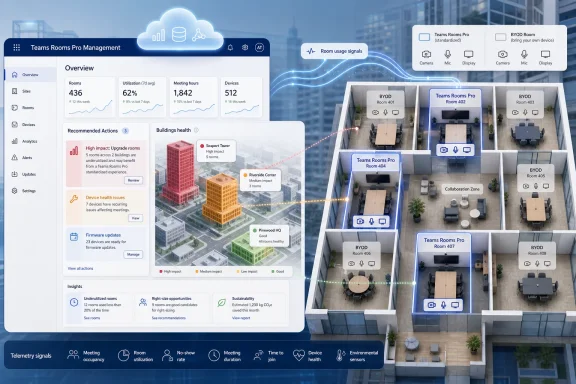
Microsoft is rolling out building-level insights for the Recommended Actions page in the Teams Rooms Pro Management portal in June 2026, giving IT administrators a way to identify office buildings with heavy Teams Rooms usage and prioritize upgrades for remaining BYOD meeting spaces. The feature, listed under Microsoft 365 Roadmap ID 553591, is not a flashy Teams client update; it is a management-plane nudge toward a more instrumented workplace. Microsoft is turning room utilization into an operational signal, and the signal is pointed squarely at the messy middle of hybrid work: buildings where demand is real but meeting-room technology is uneven.
For years, the conference room was treated like a hardware endpoint with a calendar. It had a display, a camera, a compute unit, maybe a touch console, and a resource mailbox that either worked or generated tickets. The new building-level recommendation model recasts that room as part of a larger spatial system.
That distinction matters. A single Teams Room with high usage can tell IT that one space is popular. A building with high Teams Rooms utilization and many remaining bring-your-own-device spaces tells IT something more useful: people in that location are depending on video meetings enough that inconsistent rooms may now be a productivity bottleneck.
This is the logic behind the new insight. The Recommended Actions page is designed to surface proactive recommendations based on tenant and device data, and Microsoft is now applying that pattern to physical office planning. Instead of asking admins to inspect room-by-room telemetry, the portal can point to buildings where the upgrade conversation should probably begin.
The immediate audience is IT, but the implication reaches facilities, workplace strategy, finance, and procurement. A meeting room upgrade is rarely just an endpoint decision. It is a budget line, a standards decision, a room-booking policy question, and sometimes a political argument between headquarters, regional offices, and hybrid-work skeptics.
That may be tolerable for occasional use. It becomes a tax when the same spaces are used all day by hybrid teams, client-facing groups, support organizations, or executives who expect meetings to simply begin. Microsoft’s feature is built on the assumption that high utilization should change the upgrade calculus.
The important move is not that Microsoft is identifying BYOD rooms. It is that Microsoft is connecting them to building-level Teams Rooms demand. An office with light in-person usage and a few BYOD huddle rooms may not need immediate capital spending. A building where Teams Rooms are heavily used while adjacent spaces remain unmanaged is a different story.
That is where the portal becomes more than a dashboard. It gives IT a defensible way to argue that upgrades should be prioritized where user behavior already proves demand. In organizations where conference-room modernization competes with endpoint refreshes, network projects, and security initiatives, this kind of evidence can matter.
That is a subtle but meaningful expansion. Traditional monitoring tools tell IT what is broken. Analytics tools tell IT what is being used. A recommendations system tries to translate both into a next step, and Microsoft is betting that admins want fewer charts and more direction.
The danger, of course, is that a recommendation can look more authoritative than the data behind it. A building might show high Teams Rooms utilization because a handful of rooms are booked constantly while others are avoided for cultural, location, acoustic, or scheduling reasons. A recommendation can start the investigation, but it should not end it.
Still, this is exactly the kind of signal many enterprises have lacked. Room modernization projects often begin with anecdotes: sales hates Building C, engineering always uses the big room on floor six, nobody trusts the small rooms after lunch. The portal’s new view gives IT a way to compare those stories against utilization patterns.
For admins, the licensing requirement is not just a procurement footnote. It shapes which rooms appear in the operational picture and which rooms remain functionally invisible. If an organization has a mixed estate of licensed Teams Rooms, unlicensed resource mailboxes, legacy AV systems, and unmanaged BYOD spaces, the portal’s view may be useful but incomplete.
That incompleteness is not necessarily a flaw. It is the reality of most enterprise meeting environments. The question is whether IT treats Microsoft’s recommendation as a precise map or as a high-confidence starting point.
There is also a commercial gravity here. When Microsoft tells customers which buildings have high Teams Rooms utilization and remaining BYOD spaces, it is not merely helping them optimize existing deployments. It is making the case for more Teams Rooms hardware, more standardized room experiences, and more licensed management coverage.
This is where many tenants will stumble. Room mailboxes are often created over many years by different teams, under different naming conventions, with uneven metadata. A room may have a friendly display name that humans understand but no usable building field. Another may have capacity set in the name but not in the resource property. A third may be hidden from address lists for reasons nobody remembers.
The new feature rewards organizations that have treated Places, room accounts, and resource metadata as infrastructure. It penalizes those that have relied on naming conventions and tribal knowledge. If the portal cannot confidently understand where rooms are, its building-level recommendations will be less complete.
This is one of the more interesting side effects of Microsoft’s workplace analytics push. Data hygiene is no longer just about clean address books or prettier room finders. It affects whether the admin portal can tell the difference between an isolated room problem and a building-level investment opportunity.
That routing around takes many forms. Users book the same known-good room weeks in advance. Teams cluster around upgraded spaces while other rooms sit underused. Remote participants get a second-class experience because the in-room setup favors whoever brought the laptop. IT sees the symptoms as support tickets, but the underlying problem is uneven experience design.
Building-level recommendations offer a way to attack that unevenness at scale. Rather than upgrading rooms one by one based on complaints, IT can identify locations where standardized Teams Rooms experiences would likely have the most impact. In theory, that means fewer awkward joins, fewer peripheral fights, and fewer meetings where remote participants are present but not truly included.
The word “consistent” is doing a lot of work here. Microsoft wants Teams Rooms to be the expected enterprise meeting interface, not one of several possible ways a room might behave. The more the portal can identify gaps in that standardization, the easier it becomes to turn consistency into a measurable operational goal.
A building-level insight in the Teams Rooms Pro Management portal is therefore not just an IT feature. It is a collaboration forcing function. The portal may belong to IT, but the recommended action may require facilities data, procurement planning, furniture changes, acoustic treatment, display mounting, cabling, and room-booking policy review.
This is where Microsoft Places becomes part of the larger backdrop. Microsoft has been building a workplace layer across Teams, Outlook, room resources, occupancy signals, and location hierarchy. Teams Rooms data is one piece of that puzzle, but it is a particularly valuable one because meetings are where hybrid work becomes visible.
The risk is that organizations treat the recommendation as an IT-only ticket. Upgrade the room, install the kit, close the action. That may improve the immediate experience, but it misses the bigger opportunity: using meeting-room demand as a signal for how office space is actually functioning.
No portal can fully understand those distinctions. Utilization data can be skewed by recurring meetings that nobody attends, rooms booked as private offices, poor calendar discipline, or teams that reserve upgraded rooms because everything else feels risky. Admins should expect the insight to be directional rather than definitive.
The best use of the feature will be as a filter. It can narrow the list of buildings worth investigating, then IT can combine that signal with ticket volume, network readiness, room capacity, employee attendance patterns, and business priority. The portal points to smoke; humans still need to decide whether there is a fire.
That human step matters because room upgrades can be surprisingly expensive. A proper Teams Room deployment may involve certified devices, displays, compute, control panels, cameras, microphones, installation labor, cabling, licensing, and support processes. A recommendation should begin the business case, not substitute for it.
Microsoft does not need every upgraded room to use Microsoft hardware. The Teams Rooms ecosystem includes many certified partners, and enterprise AV standards are often vendor-diverse. But Microsoft benefits when the room experience is standardized around Teams, certified devices, and cloud-managed lifecycle controls.
Building-level insights make that ecosystem easier to sell. Instead of an abstract pitch about better meetings, an admin can point to a building where demand is high and unmanaged spaces remain. Vendors and internal champions can then frame upgrades around observed behavior rather than generic modernization.
This is where IT pros should keep their eyes open. A useful recommendation can also be a sales funnel. That does not make it bad; it makes it a Microsoft cloud feature. The value is real when the data is accurate and the organization has a genuine experience gap. The pressure to expand licensing and hardware coverage is also real.
This consolidation matters because admins dislike fragmented control planes. If device health is in one portal, analytics in another, identity in a third, and room metadata somewhere else, meeting-room operations become a scavenger hunt. Microsoft’s direction is clear: make the Pro Management portal the place where room estate decisions happen.
The building-level insight is a natural next step in that strategy. Once the portal knows enough about device health, usage, account configuration, and location hierarchy, it can start offering recommendations that resemble planning advice. That turns the portal from a place admins visit after something goes wrong into a place they visit before the next budget cycle.
Enterprises should expect more of this. The management plane will increasingly blend operations, analytics, lifecycle planning, and procurement signals. Teams Rooms is simply a convenient early example because the pain is easy to recognize and the hardware upgrade path is well-defined.
Large enterprises, universities, hospitals, manufacturers, and distributed professional-services firms face a different problem. They may have hundreds or thousands of rooms across many buildings, with local variations in equipment, naming, support maturity, and utilization. In that environment, the difference between a room-level view and a building-level recommendation is meaningful.
A campus IT team might know that one headquarters building is overburdened, but a central collaboration team may not. A regional office might have a strong case for upgrades but weak visibility with global procurement. A recommendation surfaced in the management portal can help normalize those comparisons.
The feature also gives central IT a way to detect mismatches. If a building has high Teams Rooms utilization but many BYOD rooms, the site may be living with an avoidable inconsistency. If another building has many upgraded rooms but low usage, the issue may be adoption, attendance, location planning, or simply a bad assumption made during an earlier rollout.
That audit should include resource mailboxes, Places metadata, room visibility, licensing assignments, and device registration state. It should also include a sanity check against facilities records. The building names IT uses, the building names employees recognize, and the building names encoded in Microsoft 365 are not always the same.
This is not glamorous work, but it is the foundation for trustworthy recommendations. The more Microsoft leans on Graph-backed location hierarchy and utilization telemetry, the more old administrative shortcuts become visible. Hybrid workplace analytics is only as reliable as the directory and room data underneath it.
Admins should also verify role-based access control. If different teams are supposed to see different spaces, the portal’s recommendations need to respect those boundaries. A global collaboration engineering team may need broad visibility, while regional support teams may only need their assigned buildings.
Standards are what turn individual room upgrades into a manageable service. Without standards, every room becomes a custom integration, every support call requires local knowledge, and every replacement cycle becomes a negotiation. With standards, IT can define room types, supported devices, expected experiences, update rings, and support responsibilities.
Microsoft’s recommendation model nudges customers toward that maturity. A building with high utilization and many BYOD rooms becomes a candidate for a standardized upgrade package. That could mean small focus rooms with simple certified peripherals, medium rooms with dedicated Teams Rooms systems, or larger rooms with more advanced audio and camera coverage.
The strongest organizations will use the portal’s recommendation as input into a room taxonomy. They will not ask simply, “Which rooms should we upgrade?” They will ask, “Which kinds of rooms in which buildings need which standard experience, and why?”
Microsoft’s feature identifies buildings with high Teams Rooms utilization to help prioritize BYOD upgrades, but it does not automatically measure every aspect of meeting quality. Device health, peripheral reliability, call analytics, user feedback, and support-ticket trends still matter. So does the human reality of whether remote participants can hear, see, and contribute.
This is especially important for organizations that use room utilization to justify return-to-office strategies. High meeting-room usage does not necessarily mean employees are thriving in the office. It may mean teams are coordinating around scarce resources or compensating for spaces that do not support the way they work.
The right interpretation is narrower and more useful: high Teams Rooms utilization indicates that the building has demonstrated demand for managed hybrid meeting experiences. That is enough to prioritize investigation. It is not enough to declare victory.
For security-minded admins, standardizing high-demand rooms can reduce unknowns. Certified devices, managed update flows, known identities, and centralized monitoring create a more predictable environment. In regulated or high-sensitivity organizations, that predictability can be as important as meeting quality.
There is also a support benefit. When every room has a different combination of cables, adapters, displays, microphones, and local instructions, troubleshooting becomes slow and user-dependent. A managed room estate makes failures easier to categorize and remediate.
Microsoft’s public framing emphasizes user experience, but enterprise IT will hear the management story just as loudly. A better meeting is nice. A meeting room that can be inventoried, monitored, updated, and supported at scale is easier to defend.
That shift has obvious benefits. IT can make better decisions when it sees usage patterns across buildings. Facilities can plan space around actual demand. Employees can get more reliable meeting experiences. Finance can fund upgrades where the data is strongest.
It also raises governance questions. Utilization analytics should be handled with care, especially when workplace data can drift from operational planning into employee surveillance. Microsoft’s room-level and building-level framing is primarily about spaces, not individual productivity tracking, but organizations should still be clear about how the data is used and who can see it.
The lesson for IT leaders is to build policy around the insight layer early. Decide whether the data is for room planning, support prioritization, budget modeling, or workplace strategy. Do not let a helpful dashboard quietly become a proxy for measuring people.
 Microsoft Moves the Meeting Room From Asset Inventory to Business Signal
For years, the conference room was treated like a hardware endpoint with a calendar. It had a display, a camera, a compute unit, maybe a touch console, and a resource mailbox that either worked or generated tickets. The new building-level recommendation model recasts that room as part of a larger spatial system.That distinction matters. A single Teams Room with high usage can tell IT that one space is popular. A building with high Teams Rooms utilization and many remaining bring-your-own-device spaces tells IT something more useful: people in that location are depending on video meetings enough that inconsistent rooms may now be a productivity bottleneck.
This is the logic behind the new insight. The Recommended Actions page is designed to surface proactive recommendations based on tenant and device data, and Microsoft is now applying that pattern to physical office planning. Instead of asking admins to inspect room-by-room telemetry, the portal can point to buildings where the upgrade conversation should probably begin.
The immediate audience is IT, but the implication reaches facilities, workplace strategy, finance, and procurement. A meeting room upgrade is rarely just an endpoint decision. It is a budget line, a standards decision, a room-booking policy question, and sometimes a political argument between headquarters, regional offices, and hybrid-work skeptics.
BYOD Rooms Are the Hybrid Workplace’s Unfinished Business
The phrase BYOD meeting space sounds pleasantly flexible, but in practice it often means “the room where everyone hopes the cable works.” A user brings a laptop, joins a Teams meeting, selects the correct display, hunts for audio, and discovers five minutes later that the camera view is either absent, badly framed, or pointing at an empty chair.That may be tolerable for occasional use. It becomes a tax when the same spaces are used all day by hybrid teams, client-facing groups, support organizations, or executives who expect meetings to simply begin. Microsoft’s feature is built on the assumption that high utilization should change the upgrade calculus.
The important move is not that Microsoft is identifying BYOD rooms. It is that Microsoft is connecting them to building-level Teams Rooms demand. An office with light in-person usage and a few BYOD huddle rooms may not need immediate capital spending. A building where Teams Rooms are heavily used while adjacent spaces remain unmanaged is a different story.
That is where the portal becomes more than a dashboard. It gives IT a defensible way to argue that upgrades should be prioritized where user behavior already proves demand. In organizations where conference-room modernization competes with endpoint refreshes, network projects, and security initiatives, this kind of evidence can matter.
The Recommended Actions Page Becomes a Budget Argument
Microsoft’s Recommended Actions page already had a practical role: helping admins see device and account issues that affect Teams Rooms operations. The addition of building-level insights pushes it into a more strategic lane. It is no longer only about remediation; it is about planning.That is a subtle but meaningful expansion. Traditional monitoring tools tell IT what is broken. Analytics tools tell IT what is being used. A recommendations system tries to translate both into a next step, and Microsoft is betting that admins want fewer charts and more direction.
The danger, of course, is that a recommendation can look more authoritative than the data behind it. A building might show high Teams Rooms utilization because a handful of rooms are booked constantly while others are avoided for cultural, location, acoustic, or scheduling reasons. A recommendation can start the investigation, but it should not end it.
Still, this is exactly the kind of signal many enterprises have lacked. Room modernization projects often begin with anecdotes: sales hates Building C, engineering always uses the big room on floor six, nobody trusts the small rooms after lunch. The portal’s new view gives IT a way to compare those stories against utilization patterns.
Licensing Draws the Boundary Around the Insight
The feature is available with a Teams Rooms Pro or Shared Space license, which is both expected and revealing. Microsoft is positioning room intelligence as part of the paid management layer rather than as a general Teams administration capability. That tracks with the broader direction of Teams Rooms Pro Management: more centralized monitoring, more analytics, and more lifecycle control for organizations willing to license the room estate accordingly.For admins, the licensing requirement is not just a procurement footnote. It shapes which rooms appear in the operational picture and which rooms remain functionally invisible. If an organization has a mixed estate of licensed Teams Rooms, unlicensed resource mailboxes, legacy AV systems, and unmanaged BYOD spaces, the portal’s view may be useful but incomplete.
That incompleteness is not necessarily a flaw. It is the reality of most enterprise meeting environments. The question is whether IT treats Microsoft’s recommendation as a precise map or as a high-confidence starting point.
There is also a commercial gravity here. When Microsoft tells customers which buildings have high Teams Rooms utilization and remaining BYOD spaces, it is not merely helping them optimize existing deployments. It is making the case for more Teams Rooms hardware, more standardized room experiences, and more licensed management coverage.
The Data Hygiene Problem Comes for the Floor Plan
Building-level insight depends on building-level data. That means room accounts need accurate location metadata, including country, state or province, city, building, floor, and capacity where appropriate. Microsoft’s documentation ties these location hierarchies to the Places API room resource data in Microsoft Graph, which makes Exchange and Microsoft 365 location hygiene part of the meeting-room analytics story.This is where many tenants will stumble. Room mailboxes are often created over many years by different teams, under different naming conventions, with uneven metadata. A room may have a friendly display name that humans understand but no usable building field. Another may have capacity set in the name but not in the resource property. A third may be hidden from address lists for reasons nobody remembers.
The new feature rewards organizations that have treated Places, room accounts, and resource metadata as infrastructure. It penalizes those that have relied on naming conventions and tribal knowledge. If the portal cannot confidently understand where rooms are, its building-level recommendations will be less complete.
This is one of the more interesting side effects of Microsoft’s workplace analytics push. Data hygiene is no longer just about clean address books or prettier room finders. It affects whether the admin portal can tell the difference between an isolated room problem and a building-level investment opportunity.
Microsoft’s Real Bet Is Consistency, Not Utilization
Microsoft’s roadmap language emphasizes buildings with high Teams Rooms utilization, but the larger product story is about consistency. A hybrid meeting is only as good as the least reliable room in the chain. If employees cannot predict whether a meeting space will support high-quality audio, video, and joining behavior, they route around the system.That routing around takes many forms. Users book the same known-good room weeks in advance. Teams cluster around upgraded spaces while other rooms sit underused. Remote participants get a second-class experience because the in-room setup favors whoever brought the laptop. IT sees the symptoms as support tickets, but the underlying problem is uneven experience design.
Building-level recommendations offer a way to attack that unevenness at scale. Rather than upgrading rooms one by one based on complaints, IT can identify locations where standardized Teams Rooms experiences would likely have the most impact. In theory, that means fewer awkward joins, fewer peripheral fights, and fewer meetings where remote participants are present but not truly included.
The word “consistent” is doing a lot of work here. Microsoft wants Teams Rooms to be the expected enterprise meeting interface, not one of several possible ways a room might behave. The more the portal can identify gaps in that standardization, the easier it becomes to turn consistency into a measurable operational goal.
Facilities and IT Are Being Pushed Into the Same Dashboard
Meeting-room technology used to sit awkwardly between departments. Facilities owned the room, AV owned the equipment, IT owned the network and identity pieces, and end users owned the frustration. Hybrid work made that separation harder to maintain.A building-level insight in the Teams Rooms Pro Management portal is therefore not just an IT feature. It is a collaboration forcing function. The portal may belong to IT, but the recommended action may require facilities data, procurement planning, furniture changes, acoustic treatment, display mounting, cabling, and room-booking policy review.
This is where Microsoft Places becomes part of the larger backdrop. Microsoft has been building a workplace layer across Teams, Outlook, room resources, occupancy signals, and location hierarchy. Teams Rooms data is one piece of that puzzle, but it is a particularly valuable one because meetings are where hybrid work becomes visible.
The risk is that organizations treat the recommendation as an IT-only ticket. Upgrade the room, install the kit, close the action. That may improve the immediate experience, but it misses the bigger opportunity: using meeting-room demand as a signal for how office space is actually functioning.
The Portal Can Recommend, but It Cannot Know the Politics of a Building
A building with heavy room usage is not automatically a building that deserves the next upgrade budget. It may be a flagship office with executive visibility, or it may be a regional site where every meeting includes remote participants. It may also be a location where people overbook rooms because the booking culture is broken.No portal can fully understand those distinctions. Utilization data can be skewed by recurring meetings that nobody attends, rooms booked as private offices, poor calendar discipline, or teams that reserve upgraded rooms because everything else feels risky. Admins should expect the insight to be directional rather than definitive.
The best use of the feature will be as a filter. It can narrow the list of buildings worth investigating, then IT can combine that signal with ticket volume, network readiness, room capacity, employee attendance patterns, and business priority. The portal points to smoke; humans still need to decide whether there is a fire.
That human step matters because room upgrades can be surprisingly expensive. A proper Teams Room deployment may involve certified devices, displays, compute, control panels, cameras, microphones, installation labor, cabling, licensing, and support processes. A recommendation should begin the business case, not substitute for it.
The Surface Devices Platform Tag Hints at Microsoft’s Hardware Ambition
The roadmap entry lists Microsoft Teams across Teams and Surface Devices and the web. That is not an accident. Teams Rooms is both a software experience and a hardware ecosystem, and Microsoft’s own Surface Hub and room-adjacent devices sit inside the same strategic frame.Microsoft does not need every upgraded room to use Microsoft hardware. The Teams Rooms ecosystem includes many certified partners, and enterprise AV standards are often vendor-diverse. But Microsoft benefits when the room experience is standardized around Teams, certified devices, and cloud-managed lifecycle controls.
Building-level insights make that ecosystem easier to sell. Instead of an abstract pitch about better meetings, an admin can point to a building where demand is high and unmanaged spaces remain. Vendors and internal champions can then frame upgrades around observed behavior rather than generic modernization.
This is where IT pros should keep their eyes open. A useful recommendation can also be a sales funnel. That does not make it bad; it makes it a Microsoft cloud feature. The value is real when the data is accurate and the organization has a genuine experience gap. The pressure to expand licensing and hardware coverage is also real.
The Rollout Timing Fits a Broader Teams Rooms Consolidation
The feature is listed as rolling out with general availability in June 2026 for Worldwide standard multi-tenant cloud customers. That timing lands after years of Microsoft tightening the Teams Rooms management story, including greater emphasis on the Pro Management portal as the operational home for room monitoring, updates, insights, and recommendations.This consolidation matters because admins dislike fragmented control planes. If device health is in one portal, analytics in another, identity in a third, and room metadata somewhere else, meeting-room operations become a scavenger hunt. Microsoft’s direction is clear: make the Pro Management portal the place where room estate decisions happen.
The building-level insight is a natural next step in that strategy. Once the portal knows enough about device health, usage, account configuration, and location hierarchy, it can start offering recommendations that resemble planning advice. That turns the portal from a place admins visit after something goes wrong into a place they visit before the next budget cycle.
Enterprises should expect more of this. The management plane will increasingly blend operations, analytics, lifecycle planning, and procurement signals. Teams Rooms is simply a convenient early example because the pain is easy to recognize and the hardware upgrade path is well-defined.
Small Offices May See Less Magic Than Large Estates
For a small organization with a handful of meeting rooms, building-level insights may feel like overkill. If everyone already knows which rooms are busy and which spaces still rely on cables and laptop cameras, the portal is confirming the obvious. The value grows with scale.Large enterprises, universities, hospitals, manufacturers, and distributed professional-services firms face a different problem. They may have hundreds or thousands of rooms across many buildings, with local variations in equipment, naming, support maturity, and utilization. In that environment, the difference between a room-level view and a building-level recommendation is meaningful.
A campus IT team might know that one headquarters building is overburdened, but a central collaboration team may not. A regional office might have a strong case for upgrades but weak visibility with global procurement. A recommendation surfaced in the management portal can help normalize those comparisons.
The feature also gives central IT a way to detect mismatches. If a building has high Teams Rooms utilization but many BYOD rooms, the site may be living with an avoidable inconsistency. If another building has many upgraded rooms but low usage, the issue may be adoption, attendance, location planning, or simply a bad assumption made during an earlier rollout.
Admins Should Treat the First Wave as a Data Audit
The first practical response to this rollout should not be buying hardware. It should be checking whether the portal’s view of the estate matches reality. If buildings are missing, rooms are misclassified, or capacity data is incomplete, the insight layer will inherit those errors.That audit should include resource mailboxes, Places metadata, room visibility, licensing assignments, and device registration state. It should also include a sanity check against facilities records. The building names IT uses, the building names employees recognize, and the building names encoded in Microsoft 365 are not always the same.
This is not glamorous work, but it is the foundation for trustworthy recommendations. The more Microsoft leans on Graph-backed location hierarchy and utilization telemetry, the more old administrative shortcuts become visible. Hybrid workplace analytics is only as reliable as the directory and room data underneath it.
Admins should also verify role-based access control. If different teams are supposed to see different spaces, the portal’s recommendations need to respect those boundaries. A global collaboration engineering team may need broad visibility, while regional support teams may only need their assigned buildings.
The Feature Makes a Strong Case for Standards
The most persuasive argument for building-level insights is not that every room should become a fully equipped Teams Room. It is that organizations should know where inconsistency is hurting them. Some spaces can remain simple. Others need the full managed experience. The point is to make that decision deliberately.Standards are what turn individual room upgrades into a manageable service. Without standards, every room becomes a custom integration, every support call requires local knowledge, and every replacement cycle becomes a negotiation. With standards, IT can define room types, supported devices, expected experiences, update rings, and support responsibilities.
Microsoft’s recommendation model nudges customers toward that maturity. A building with high utilization and many BYOD rooms becomes a candidate for a standardized upgrade package. That could mean small focus rooms with simple certified peripherals, medium rooms with dedicated Teams Rooms systems, or larger rooms with more advanced audio and camera coverage.
The strongest organizations will use the portal’s recommendation as input into a room taxonomy. They will not ask simply, “Which rooms should we upgrade?” They will ask, “Which kinds of rooms in which buildings need which standard experience, and why?”
The Catch Is That Utilization Is Not Satisfaction
One of the oldest traps in analytics is mistaking usage for quality. A heavily used room may be beloved, or it may be the only room large enough for a team’s recurring meeting. A Teams Room may show strong utilization while users still complain about audio, camera framing, or join reliability.Microsoft’s feature identifies buildings with high Teams Rooms utilization to help prioritize BYOD upgrades, but it does not automatically measure every aspect of meeting quality. Device health, peripheral reliability, call analytics, user feedback, and support-ticket trends still matter. So does the human reality of whether remote participants can hear, see, and contribute.
This is especially important for organizations that use room utilization to justify return-to-office strategies. High meeting-room usage does not necessarily mean employees are thriving in the office. It may mean teams are coordinating around scarce resources or compensating for spaces that do not support the way they work.
The right interpretation is narrower and more useful: high Teams Rooms utilization indicates that the building has demonstrated demand for managed hybrid meeting experiences. That is enough to prioritize investigation. It is not enough to declare victory.
Security and Manageability Are Quietly Part of the Pitch
BYOD rooms are often discussed in terms of convenience, but security and manageability lurk underneath. A managed Teams Room device can be monitored, updated, configured, and governed in ways that an arbitrary user laptop connection cannot. That does not make BYOD inherently insecure, but it does make it operationally variable.For security-minded admins, standardizing high-demand rooms can reduce unknowns. Certified devices, managed update flows, known identities, and centralized monitoring create a more predictable environment. In regulated or high-sensitivity organizations, that predictability can be as important as meeting quality.
There is also a support benefit. When every room has a different combination of cables, adapters, displays, microphones, and local instructions, troubleshooting becomes slow and user-dependent. A managed room estate makes failures easier to categorize and remediate.
Microsoft’s public framing emphasizes user experience, but enterprise IT will hear the management story just as loudly. A better meeting is nice. A meeting room that can be inventoried, monitored, updated, and supported at scale is easier to defend.
Microsoft Is Turning Hybrid Work Into a Control Plane
The bigger story is that hybrid work is becoming software-defined. Presence, room booking, workplace attendance, meeting quality, device health, and building hierarchy are being folded into Microsoft 365’s administrative fabric. The office is no longer just a place employees go; it is a set of signals that the cloud can analyze.That shift has obvious benefits. IT can make better decisions when it sees usage patterns across buildings. Facilities can plan space around actual demand. Employees can get more reliable meeting experiences. Finance can fund upgrades where the data is strongest.
It also raises governance questions. Utilization analytics should be handled with care, especially when workplace data can drift from operational planning into employee surveillance. Microsoft’s room-level and building-level framing is primarily about spaces, not individual productivity tracking, but organizations should still be clear about how the data is used and who can see it.
The lesson for IT leaders is to build policy around the insight layer early. Decide whether the data is for room planning, support prioritization, budget modeling, or workplace strategy. Do not let a helpful dashboard quietly become a proxy for measuring people.
The Buildings Microsoft Flags First Will Shape the Upgrade Roadmap
The practical consequences of this rollout are straightforward, but they are not trivial. Organizations that already maintain clean room metadata and use Teams Rooms Pro Management may see immediate value. Organizations with messy location data will first discover how much cleanup stands between them and reliable recommendations.- Microsoft is rolling out building-level insights for the Recommended Actions page in the Teams Rooms Pro Management portal, with general availability listed for June 2026.
- The feature is intended to identify buildings with high Teams Rooms utilization so IT can prioritize upgrades for remaining BYOD meeting spaces.
- Access depends on Teams Rooms Pro or Shared Space licensing, which means the recommendation quality will reflect the licensed and visible room estate.
- Accurate building, floor, room, and capacity metadata matters because the portal’s location hierarchy depends on Microsoft 365 room resource data.
- The best use of the feature is as a planning signal combined with tickets, facilities data, business priority, and user feedback.
- The feature strengthens Microsoft’s broader push to make Teams Rooms Pro Management the operational hub for room health, utilization, lifecycle planning, and workplace recommendations.
References
- Primary source: Microsoft 365 Roadmap
Published: 2026-06-23T23:15:39.6678540Z
Microsoft 365 Roadmap | Microsoft 365
The Microsoft 365 Roadmap lists updates that are currently planned for applicable subscribers. Check here for more information on the status of new features and updates.www.microsoft.com
- Official source: learn.microsoft.com
Recommended Actions - Microsoft Teams | Microsoft Learn
Recommended Actions Overviewlearn.microsoft.com - Related coverage: m365admin.handsontek.net
Microsoft Teams: Building level insights on the Pro Management portal recommended actions page - M365 Admin
IT gets new building level insights on the recommended actions page in the Teams Rooms Pro Management portal. This feature intelligently identifies buildings with high Teams Rooms utilization to help IT prioritize upgrades of bring your own device (BYOD) meeting spaces and ensure consistent...m365admin.handsontek.net - Related coverage: kbworks.eu
Microsoft Roadmap, messagecenter and blogs updates from 21-03-2026 - KbWorks - SharePoint and Teams Specialist
21-March-2026 Below you will find a collection of news published yesterday. This news consists of Microsoft's Roadmap when it is updated it will be below withkbworks.eu - Official source: techcommunity.microsoft.com
Teams Rooms on Windows device management consolidation in the Teams Rooms Pro Management portal | Microsoft Community Hub
To meet customers’ needs for a one-stop destination to configure, monitor, and manage Teams rooms devices, we will be transitioning all Teams Rooms on... techcommunity.microsoft.com
