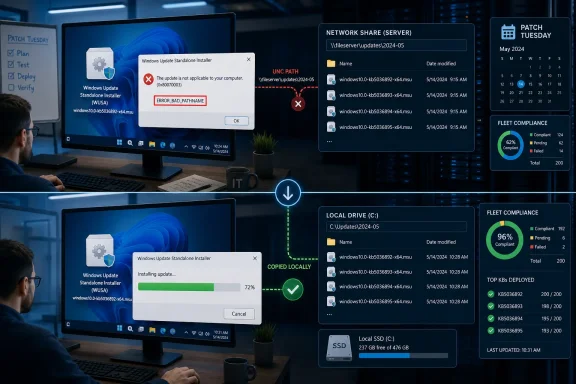
Microsoft’s June 2026 Patch Tuesday permanently fixes a Windows Update Standalone Installer failure on Windows Server 2025 through KB5094125, while the corresponding Windows 11 24H2 and 25H2 repair had already arrived in the March 24 preview update KB5079391 and later releases. The distinction matters because this was never just another nuisance error code. It was a reminder that enterprise patching still depends on old, brittle plumbing that can break in ways cloud-managed marketing glosses over. For administrators who still stage
WUSA is not glamorous technology. It is the Windows Update Standalone Installer, the tool many administrators reach for when an update needs to be installed directly from a Microsoft Update Catalog package rather than through Windows Update, Intune, Configuration Manager, WSUS, or a more automated pipeline.
That is precisely why this bug mattered. The failure did not hit the average home user clicking “Check for updates” in Settings. It hit the class of Windows environments where administrators deliberately keep local repositories of
The symptom was oddly specific. If a network share contained multiple
That specificity made the bug easy to work around and easy to underestimate. In a home setup, “copy the file locally” is barely an inconvenience. In an enterprise patching workflow, it means revising procedures, touching scripts, changing help desk guidance, and explaining why a path that worked for years had suddenly become suspect.
For Windows 11 version 24H2, Microsoft identifies KB5058499, released May 28, 2025, as the originating update. For Windows Server 2025, Microsoft’s release-health documentation points to the June 10, 2025 update KB5060842 as the originating server-side update in the same known-issue trail. The broader practical result was the same: modern Windows servicing logic had introduced a regression in a deployment path disproportionately used by managed environments.
Microsoft mitigated the issue beginning in September 2025 using Known Issue Rollback, or KIR. That mechanism is designed to roll back selected non-security changes without requiring a full uninstall of the update that introduced them. For home users and unmanaged business devices, KIR can quietly make a problem disappear after Microsoft pushes the mitigation and the machine checks in.
But the KIR story is less magical for managed fleets. Administrators may need to deploy a special Group Policy to apply the rollback in enterprise environments. That turns what sounds like an automatic cloud-era repair into another controlled change requiring validation, communication, and sometimes a maintenance window.
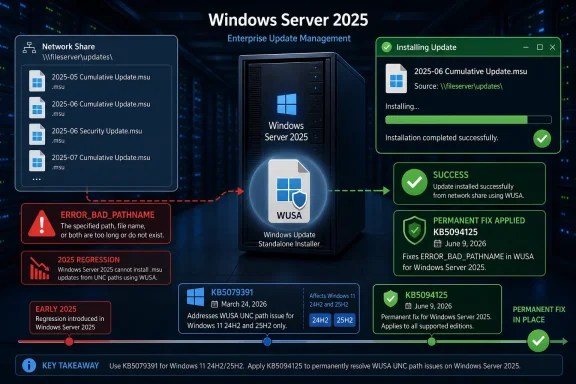
The June 2026 Patch Tuesday therefore closes the loop, but not in exactly the way some headlines imply. Windows Server 2025 gets the permanent fix in KB5094125, released June 9, 2026. Windows 11 24H2 and 25H2 had the permanent fix listed earlier, in KB5079391 from March 24, 2026, with later updates inheriting that repair.
Administrators keep multiple
The bug also collided with a wider reality of Windows 11 servicing. Microsoft has spent years nudging organizations toward cloud-managed update policies, Windows Update for Business, Autopatch, Intune, and analytics-driven rings. Those tools are powerful, but they do not eliminate the need for offline, semi-offline, lab, recovery, and manually staged update paths.
The further Windows moves toward managed abstraction, the more important the escape hatches become. WUSA is one of those escape hatches. When it breaks, it is not merely a legacy tool misbehaving; it is the safety valve failing during maintenance.
That is why the “only enterprise environments” framing cuts both ways. Yes, most consumers never saw this. But enterprises are exactly where patching reliability matters most, because a failed deployment can leave servers exposed, delay vulnerability remediation, or force administrators into undocumented workarounds.
For security teams, however, deployment bugs are security bugs by another route. A vulnerability fix that cannot be reliably installed is not fully a fix in the field. Every avoidable failure in the update chain creates a gap between Microsoft’s published remediation and an organization’s actual risk reduction.
That gap is where administrators live. They do not measure Patch Tuesday only by CVE counts or severity labels. They measure it by how many devices install cleanly, how many reboot properly, how many report accurately, and how many require manual intervention before the next business day.
The WUSA bug hit the “manual intervention” column. It did not prevent all updates. It did not make Windows Update unusable. But it broke a known deployment pattern at exactly the layer administrators use when standard channels are unavailable or insufficiently controlled.
In other words, Microsoft fixed a small installer bug that had a large operational blast radius for a subset of serious users. That is the kind of bug that rarely dominates consumer coverage but can consume real hours inside IT departments.
None of those instructions are unreasonable. They are the kind of practical guidance administrators can apply quickly. But they are also reminders that “workaround available” often means “customer absorbs the cost.”
Copying packages locally changes disk-space assumptions. Separating packages into single-file shares changes repository layout. Updating scripts requires testing. Help desk articles need edits. Deployment runbooks need warnings. Junior technicians need to know that
That last part is important. The name of the error pushes troubleshooting toward path syntax, share permissions, quoting, UNC handling, or filename length. In this case, the path could be perfectly valid. The failure depended on the presence of multiple update packages in the same network location after a specific servicing regression.
Good error messages compress time. Bad or misleading ones expand it.
The WUSA case shows both the value and the limit of that model. KIR helped many unmanaged devices automatically. It gave enterprises a policy-based path to mitigation. It reduced the pressure for an emergency reissue.
But KIR also normalizes a world where administrators must track not just which KBs are installed, but which hidden mitigations, policy templates, and rollback states apply to which rings of machines. The patch level is no longer the whole story. The effective behavior of Windows can depend on servicing metadata and policy state that is harder to see at a glance.
That is manageable for mature IT shops. It is messier for smaller organizations that rely on a few generalists to keep Windows clients and servers patched. The more Microsoft leans on KIR, the more transparent its release-health documentation must be.
To Microsoft’s credit, the WUSA issue was documented with clear triggers and workarounds. To Microsoft’s discredit, the regression persisted long enough that administrators had to carry the workaround across multiple patch cycles.
For Windows 11 24H2 and 25H2, Microsoft’s release-health pages list the issue as resolved by KB5079391, released March 24, 2026, and later updates. That means Windows 11 machines that had installed that preview update, or any later cumulative update containing the fix, should no longer require the workaround.
For Windows Server 2025, Microsoft lists KB5094125, released June 9, 2026, as the update that resolves the issue. That aligns more directly with the June Patch Tuesday framing.
This distinction is not pedantry. Administrators use KB numbers as operational coordinates. If a report conflates a March Windows 11 preview fix with a June server cumulative update, it risks muddying the very deployment decisions the story is supposed to clarify.
It also illustrates the increasingly uneven cadence of Windows fixes. Preview updates may deliver non-security repairs weeks or months before the next broadly embraced security baseline. Enterprises that skip previews by policy may not see the practical fix until a later Patch Tuesday. Servers often follow a more conservative rhythm still.
Yet WUSA remains. So does DISM. So do
This is not nostalgia. It is operational redundancy. A broken client, isolated server, lab image, air-gapped segment, or failed update ring often requires tools that do not care whether a device is elegantly enrolled in the future of management.
Microsoft sometimes talks about these layers as if they are transitional leftovers. Administrators know better. They are the layers that save a bad night from becoming a bad week.
That is why regressions in old tooling deserve modern scrutiny. The tools may be old, but the systems they service are current. Windows Server 2025 is not a museum exhibit. Windows 11 24H2 and 25H2 are part of Microsoft’s active desktop future. If WUSA is still supported, it has to be tested against realistic enterprise usage.
.msu packages on network shares, the end of ERROR_BAD_PATHNAME closes a year-long detour around a problem Microsoft should have caught sooner.
 A Small Installer Bug Exposed a Large Servicing Assumption
WUSA is not glamorous technology. It is the Windows Update Standalone Installer, the tool many administrators reach for when an update needs to be installed directly from a Microsoft Update Catalog package rather than through Windows Update, Intune, Configuration Manager, WSUS, or a more automated pipeline.That is precisely why this bug mattered. The failure did not hit the average home user clicking “Check for updates” in Settings. It hit the class of Windows environments where administrators deliberately keep local repositories of
.msu files, test deployment order, stage packages on shared folders, and use repeatable scripts because uptime windows are narrow and trust is earned one reboot at a time.The symptom was oddly specific. If a network share contained multiple
.msu files, installing one of them by double-clicking it or invoking WUSA could fail with ERROR_BAD_PATHNAME. If the same file was copied locally first, installation worked. If the share contained only one .msu file, the issue did not appear.That specificity made the bug easy to work around and easy to underestimate. In a home setup, “copy the file locally” is barely an inconvenience. In an enterprise patching workflow, it means revising procedures, touching scripts, changing help desk guidance, and explaining why a path that worked for years had suddenly become suspect.
The Timeline Makes the Fix Look Less Tidy Than Patch Tuesday Suggests
The issue traces back to updates released in late May 2025 for Windows 11 and the same servicing family that underpins Windows Server 2025. Microsoft later documented the problem in August 2025, describing the failure mode around WUSA, network shares, and folders containing multiple.msu packages.For Windows 11 version 24H2, Microsoft identifies KB5058499, released May 28, 2025, as the originating update. For Windows Server 2025, Microsoft’s release-health documentation points to the June 10, 2025 update KB5060842 as the originating server-side update in the same known-issue trail. The broader practical result was the same: modern Windows servicing logic had introduced a regression in a deployment path disproportionately used by managed environments.
Microsoft mitigated the issue beginning in September 2025 using Known Issue Rollback, or KIR. That mechanism is designed to roll back selected non-security changes without requiring a full uninstall of the update that introduced them. For home users and unmanaged business devices, KIR can quietly make a problem disappear after Microsoft pushes the mitigation and the machine checks in.
But the KIR story is less magical for managed fleets. Administrators may need to deploy a special Group Policy to apply the rollback in enterprise environments. That turns what sounds like an automatic cloud-era repair into another controlled change requiring validation, communication, and sometimes a maintenance window.
The June 2026 Patch Tuesday therefore closes the loop, but not in exactly the way some headlines imply. Windows Server 2025 gets the permanent fix in KB5094125, released June 9, 2026. Windows 11 24H2 and 25H2 had the permanent fix listed earlier, in KB5079391 from March 24, 2026, with later updates inheriting that repair.
The Network Share Was the Canary in the Servicing Mine
There is a temptation to treat this as an edge-case bug because the trigger sounds fussy: WUSA, a network path, multiple.msu files in the same folder. That would be the wrong lesson.Administrators keep multiple
.msu files together because Microsoft’s own servicing model increasingly encourages cumulative packages, servicing stack components, checkpoint cumulative updates, and catalog-based remediation workflows. A shared folder full of update packages is not exotic. It is the Windows equivalent of a parts bin: unglamorous, organized, and essential when automation fails or a machine cannot use the preferred channel.The bug also collided with a wider reality of Windows 11 servicing. Microsoft has spent years nudging organizations toward cloud-managed update policies, Windows Update for Business, Autopatch, Intune, and analytics-driven rings. Those tools are powerful, but they do not eliminate the need for offline, semi-offline, lab, recovery, and manually staged update paths.
The further Windows moves toward managed abstraction, the more important the escape hatches become. WUSA is one of those escape hatches. When it breaks, it is not merely a legacy tool misbehaving; it is the safety valve failing during maintenance.
That is why the “only enterprise environments” framing cuts both ways. Yes, most consumers never saw this. But enterprises are exactly where patching reliability matters most, because a failed deployment can leave servers exposed, delay vulnerability remediation, or force administrators into undocumented workarounds.
Patch Tuesday Fixed the Installer While Security Teams Watched the Clock
June 2026 Patch Tuesday was not a quiet release. It arrived with a large security payload, reportedly addressing more than 200 vulnerabilities across Microsoft products. In that context, a WUSA path bug may look like housekeeping.For security teams, however, deployment bugs are security bugs by another route. A vulnerability fix that cannot be reliably installed is not fully a fix in the field. Every avoidable failure in the update chain creates a gap between Microsoft’s published remediation and an organization’s actual risk reduction.
That gap is where administrators live. They do not measure Patch Tuesday only by CVE counts or severity labels. They measure it by how many devices install cleanly, how many reboot properly, how many report accurately, and how many require manual intervention before the next business day.
The WUSA bug hit the “manual intervention” column. It did not prevent all updates. It did not make Windows Update unusable. But it broke a known deployment pattern at exactly the layer administrators use when standard channels are unavailable or insufficiently controlled.
In other words, Microsoft fixed a small installer bug that had a large operational blast radius for a subset of serious users. That is the kind of bug that rarely dominates consumer coverage but can consume real hours inside IT departments.
Microsoft’s Workaround Was Sensible, But It Shifted Labor Downstream
The workaround was straightforward: save the.msu files locally before installing them. Administrators could also avoid triggering the bug by ensuring the network share contained only one .msu file. After installation and reboot, Microsoft also advised waiting at least 15 minutes before trusting the Update History page in Settings if it still claimed a restart was required.None of those instructions are unreasonable. They are the kind of practical guidance administrators can apply quickly. But they are also reminders that “workaround available” often means “customer absorbs the cost.”
Copying packages locally changes disk-space assumptions. Separating packages into single-file shares changes repository layout. Updating scripts requires testing. Help desk articles need edits. Deployment runbooks need warnings. Junior technicians need to know that
ERROR_BAD_PATHNAME may not mean what it appears to mean.That last part is important. The name of the error pushes troubleshooting toward path syntax, share permissions, quoting, UNC handling, or filename length. In this case, the path could be perfectly valid. The failure depended on the presence of multiple update packages in the same network location after a specific servicing regression.
Good error messages compress time. Bad or misleading ones expand it.
ERROR_BAD_PATHNAME almost certainly sent some administrators searching in the wrong direction before the pattern became clear.Known Issue Rollback Is Not a Substitute for Trust
Known Issue Rollback has become one of Microsoft’s most important safety mechanisms in the Windows servicing era. It lets Microsoft turn off certain problematic non-security changes while leaving the rest of an update installed. In theory, that is exactly what modern Windows needs: smaller blast radius, faster mitigation, fewer full uninstall scenarios.The WUSA case shows both the value and the limit of that model. KIR helped many unmanaged devices automatically. It gave enterprises a policy-based path to mitigation. It reduced the pressure for an emergency reissue.
But KIR also normalizes a world where administrators must track not just which KBs are installed, but which hidden mitigations, policy templates, and rollback states apply to which rings of machines. The patch level is no longer the whole story. The effective behavior of Windows can depend on servicing metadata and policy state that is harder to see at a glance.
That is manageable for mature IT shops. It is messier for smaller organizations that rely on a few generalists to keep Windows clients and servers patched. The more Microsoft leans on KIR, the more transparent its release-health documentation must be.
To Microsoft’s credit, the WUSA issue was documented with clear triggers and workarounds. To Microsoft’s discredit, the regression persisted long enough that administrators had to carry the workaround across multiple patch cycles.
The KB Numbers Tell a More Complicated Story Than the Headline
The headline version says Microsoft fixed the WUSA bug during June 2026 Patch Tuesday. That is true for Windows Server 2025, but incomplete for Windows 11.For Windows 11 24H2 and 25H2, Microsoft’s release-health pages list the issue as resolved by KB5079391, released March 24, 2026, and later updates. That means Windows 11 machines that had installed that preview update, or any later cumulative update containing the fix, should no longer require the workaround.
For Windows Server 2025, Microsoft lists KB5094125, released June 9, 2026, as the update that resolves the issue. That aligns more directly with the June Patch Tuesday framing.
This distinction is not pedantry. Administrators use KB numbers as operational coordinates. If a report conflates a March Windows 11 preview fix with a June server cumulative update, it risks muddying the very deployment decisions the story is supposed to clarify.
It also illustrates the increasingly uneven cadence of Windows fixes. Preview updates may deliver non-security repairs weeks or months before the next broadly embraced security baseline. Enterprises that skip previews by policy may not see the practical fix until a later Patch Tuesday. Servers often follow a more conservative rhythm still.
The Old Tools Keep Surviving Because the New Ones Do Not Cover Everything
Every few years, Microsoft’s Windows management story gets a new center of gravity. Group Policy gave way to MDM in some environments. WSUS became unfashionable but never disappeared. Configuration Manager was declared legacy in spirit long before it stopped being essential in practice. Intune and Windows Update for Business now occupy the strategic spotlight.Yet WUSA remains. So does DISM. So do
.msu files downloaded from the Microsoft Update Catalog. So do UNC shares full of packages maintained by administrators who have learned not to depend on a single control plane.This is not nostalgia. It is operational redundancy. A broken client, isolated server, lab image, air-gapped segment, or failed update ring often requires tools that do not care whether a device is elegantly enrolled in the future of management.
Microsoft sometimes talks about these layers as if they are transitional leftovers. Administrators know better. They are the layers that save a bad night from becoming a bad week.
That is why regressions in old tooling deserve modern scrutiny. The tools may be old, but the systems they service are current. Windows Server 2025 is not a museum exhibit. Windows 11 24H2 and 25H2 are part of Microsoft’s active desktop future. If WUSA is still supported, it has to be tested against realistic enterprise usage.
The Practical Reading for Patch Rooms This Month
The immediate action is simple, but the operational reading is broader. Administrators should verify which platforms in their estate are still relying on the local-copy workaround, which ones have received the relevant cumulative update, and whether any KIR Group Policy remains deployed unnecessarily.- Windows Server 2025 systems affected by the WUSA network-share failure should receive KB5094125 or a later cumulative update to remove the need for the workaround.
- Windows 11 24H2 and 25H2 systems should be considered fixed if they have KB5079391 from March 24, 2026, or a later cumulative update installed.
- Installations launched from a network share containing multiple
.msufiles were the risky path; local installation and single-package folders avoided the trigger. - Devices still on pre-fix builds can continue to work around the issue by copying
.msufiles to local storage before installation. - Administrators should wait at least 15 minutes after reboot before relying on the Settings app’s Update History status if it still reports that a restart is required.
- Any temporary Known Issue Rollback Group Policy should be reviewed once affected machines are fully updated, because old mitigations can become confusing technical debt.
References
- Primary source: Techzine Global
Published: Fri, 12 Jun 2026 13:30:50 GMT

Microsoft fixes WUSA bug during Patch Tuesday - Techzine Global
With Patch Tuesday in June 2026, Microsoft resolves the WUSA ERROR_BAD_PATHNAME error in Windows 11 and Windows Server 2025 (KB5079391, KB5094125). www.techzine.eu
- Official source: learn.microsoft.com

Windows 11, version 24H2 known issues and notifications | Microsoft Learn
View announcements and review known issues and fixes for Windows 11, version 24H2learn.microsoft.com - Related coverage: notebookcheck.net

Windows 11 KB5079391 fixes year-long WUSA network installation bug - Notebookcheck News
Microsoft says Windows 11 KB5079391 resolves the WUSA shared-folder install bug that could trigger ERROR_BAD_PATHNAME on enterprise-managed systems. www.notebookcheck.net
- Official source: support.microsoft.com

May 28, 2025—KB5058499 (OS Build 26100.4202) Preview - Microsoft Support
 support.microsoft.com
- Related coverage: network-security-magazine.com
Microsoft: Recent Windows updates may fail to install via WUSA - Network Security Magazine
Microsoft: Recent Windows updates may fail to install via WUSA — Windows [https://www.bleepstatic.com/content/hl-images/2025/01/27/Windows.jpg] Microsoft haswww.network-security-magazine.com - Related coverage: windowsforum.com

Fix WUSA ERROR_BAD_PATHNAME in May 2025 Windows Updates | Windows Forum
Microsoft confirmed that a change introduced in updates released on May 28, 2025 (starting with KB5058499) can cause the Windows Update Standalone Installer...windowsforum.com
- Official source: answers.microsoft.com
Important Issue After Latest Windows 11 Update (KB5058499) - Microsoft Q&A
Important Issue After Latest Windows 11 Update (KB5058499) To the public and Microsoft: After installing the latest Windows 11 update (KB5058499, dated May 29, 2025), users are experiencing document corruption in Microsoft Word (local Office 365).…answers.microsoft.com - Related coverage: notebookcheck.biz

Windows 11 KB5079391 corrige un problème d'installation du réseau WUSA qui dure depuis des années - NotebookCheck.biz News
Microsoft indique que Windows 11 KB5079391 résout le bogue d'installation du dossier partagé WUSA qui pouvait déclencher ERROR_BAD_PATHNAME sur les systèmes gérés par l'entreprise. www.notebookcheck.biz
- Related coverage: bleepingcomputer.com
Microsoft: Recent Windows updates may fail to install via WUSA
Microsoft has mitigated a known issue that caused Windows update failures when installing them from a network share using the Windows Update Standalone Installer (WUSA).www.bleepingcomputer.com - Related coverage: tbs.tech
- Official source: learn-attachment.microsoft.com
- Related coverage: unit42.paloaltonetworks.com

Microsoft WSUS Remote Code Execution (CVE-2025-59287) Actively Exploited in the Wild (Updated November 3)
CVE-2025-59287 is a critical RCE vulnerability identified in Microsoft’s WSUS. Our observations from cases show a consistent methodology.unit42.paloaltonetworks.com