

Before the next Patch Tuesday, administrators facing a large Microsoft vulnerability batch should stage a hardening plan around exposed Windows services, Exchange servicing, and rollback-tested deployment rings before approving broad patch rollout across servers, clients, cloud-connected appliances, and high-risk remote-access infrastructure. The point is not to slow patching down. It is to make fast patching survivable.
That distinction matters because Microsoft’s June 2026 security release again put enterprise defenders in the familiar position of moving quickly with incomplete comfort. The release highlighted multiple high-risk remote-code-execution issues across HTTP.sys, the Windows kernel, DHCP client, and Azure Stack Edge, while also calling out Exchange Server security updates separately. Microsoft’s own notes recommend early application of updates and point administrators to individual KB articles for known issues, which is a polite way of saying that “install everything everywhere” is not a deployment strategy.
The most useful pre-Patch Tuesday work happens before anyone knows whether the month will be quiet or punishing. Large CVE batches punish teams that treat vulnerability management as a calendar event rather than an operating model. If your first serious inventory review starts after Microsoft publishes the release notes, you are already spending the most valuable hours of the month finding systems instead of reducing risk.
The practical first step is to divide the estate into exposure groups. Internet-facing Windows servers, systems that accept unsolicited network traffic, Exchange servers, domain-adjacent infrastructure, VPN-adjacent services, DHCP-dependent networks, Azure Stack Edge deployments, and business-critical application servers should not sit in the same approval bucket as ordinary office endpoints. A high-risk RCE affecting a network-facing component has a different operational urgency from a client-side issue that requires user interaction.
That grouping should be done in your endpoint management platform, patch tool, CMDB, or even a controlled spreadsheet if that is the honest state of the environment. What matters is that the labels exist before the release. “All Windows servers” is too blunt. “Internet-exposed IIS and HTTP.sys consumers,” “Exchange,” “domain services,” “DHCP-sensitive networks,” “Azure Stack Edge,” and “rollback-sensitive line-of-business servers” are the kinds of groups that let administrators make decisions in hours rather than meetings.
The second step is to harden first and patch second. That does not mean delaying security updates. It means using the days before Patch Tuesday to make sure exposed services are only reachable where they must be reachable, backups are recent enough to matter, maintenance windows are real, and rollback paths have been tested rather than assumed.
For large Microsoft releases, the pre-release checklist should begin with four workstreams. First, identify network-reachable Windows services and confirm whether they are exposed only to the networks that require them. Second, isolate Exchange servicing into its own runbook rather than treating it like a routine Windows cumulative update. Third, confirm rollback and recovery procedures for the systems most likely to hurt the business if an update regresses authentication, networking, printing, storage, or application compatibility. Fourth, prepare validation tests that prove the patched system still performs its real job.
That last point is where many enterprises quietly fail. A server that reboots cleanly is not necessarily healthy. An Exchange server must send, receive, route, authenticate, and expose the expected client protocols. A DHCP-dependent site must still obtain addresses and renew leases. A web front end must still terminate traffic correctly. A kernel-level fix can leave the operating system patched while an old driver, endpoint agent, or storage filter becomes the problem everyone discovers at 8:15 a.m.
The checklist, then, is not “patch faster.” It is “make the fastest safe path the default path.” That means the emergency release process should already know which systems move first, who can approve, which telemetry is watched, which business owner is notified, and when deployment stops.
HTTP.sys can sit underneath Windows-hosted services in ways that are easy to forget once an application has become boring infrastructure. Patch planning should therefore start with discovery. Administrators should identify Windows servers accepting HTTP or HTTPS traffic, especially those reachable from the internet, partner networks, VPN users, or broad internal segments.
This is where prebuilt hardening earns its keep. If a service must be public, it should already be behind the intended reverse proxy, load balancer, web application firewall, or network security control. If it does not need to be public, the pre-Patch Tuesday action is to remove that reachability before attackers start diffing patches and scanning for exposed systems.
The same logic applies internally. “Internal-only” is not a magic shield when a vulnerability is reachable over the network and the organization assumes compromise somewhere else in the estate. Flat networks turn internal RCE into lateral movement infrastructure. Segmented networks turn the same bug into a smaller incident.
Kernel fixes deserve early testing on representative hardware and server roles. The test group should include systems with the security stack that actually runs in production: EDR, DLP, disk encryption, VPN, backup agents, storage drivers, and hypervisor integration components. A lab VM with none of those components may tell you that Windows boots; it does not tell you that your fleet is safe to update.
DHCP client risk is different but equally operational. If a DHCP-related fix is part of a high-risk batch, administrators should review the networks where address assignment failure would cause disproportionate pain: branch offices, Wi-Fi networks, manufacturing floors, kiosk fleets, lab environments, and recovery networks. The hardening move is not exotic. Confirm DHCP server redundancy, lease behavior, network access controls, and monitoring before the patch cycle starts.
The testing move is just as practical. After early deployment, validate lease acquisition, renewal, roaming behavior, VPN interaction, and any network access control workflows that depend on client posture. The regression that matters is not the one that breaks every machine. It is the one that breaks only the devices at a remote site where nobody with admin rights is standing nearby.
The June 2026 Exchange Server Subscription Edition RTM security update resolves multiple Exchange vulnerabilities, and Microsoft’s note also states that the fix for one listed Exchange remote-code-execution vulnerability is not included in the security update and requires administrators to follow the CVE documentation for mitigation. That is precisely why Exchange cannot be handled as a generic monthly reboot job.
The Exchange runbook should be explicit. Confirm supported versions and prerequisites. Run Microsoft’s Exchange Health Checker before deployment. Capture the current transport, client access, and certificate state. Verify backups and recovery procedures. Review load balancer rotation, maintenance mode steps, and post-update validation. If Extended Protection is not already part of the environment’s plan, it belongs in the pre-cycle review rather than in a rushed post-incident debate.
Exchange also deserves a communication plan. Mail is both a business service and an incident-response tool. If patching disrupts mail flow or authentication, the team may lose the channel it planned to use for updates. That is why the Exchange servicing window should include out-of-band contacts, escalation ownership, and a rollback decision point that is understood before the installer starts.
Known issues should be treated as deployment inputs, not postmortem explanations. The workflow should be simple: read the release notes, read the relevant KBs for each supported Windows version and server product, record any known issue that maps to your environment, and decide whether it changes sequencing, validation, or rollback thresholds. That record does not need to be beautiful. It needs to be available to the people approving deployment.
This is especially important when a large batch spans clients, servers, cloud-connected systems, and application platforms. A known issue that is irrelevant to one business unit may be a showstopper for another. A regression affecting a niche configuration may still matter if that niche is your revenue system, your call center, your warehouse, or your authentication path.
The worst version of patch management is discovering a documented known issue from a help-desk ticket. The better version is telling the help desk what symptoms to expect, what logs to collect, and when to escalate. Microsoft’s KB links are not homework for compliance. They are raw material for operational defense.
The rollback plan should be tiered by system type. For ordinary endpoints, that may mean update uninstall guidance, restore points where applicable, device management targeting, and a clear help-desk script. For servers, it means verified backups, snapshots where supported and safe, application-aware recovery, and a decision tree that separates “monitor” from “roll back now.” For Exchange, it means understanding the supported recovery posture before touching production.
Rollback does not mean every update can or should be removed cleanly. Some security updates are complicated, cumulative, or tied to servicing stack behavior. That is why rollback discipline starts with knowing what the rollback actually is: uninstall, restore, fail over, rebuild, disable a feature, drain a node, or shift traffic.
The most mature organizations also define rollback triggers before deployment. Authentication failures above a threshold, mail flow interruption, DHCP failure at a site, blue screens on a hardware model, application crash rates, or service health degradation can all be stop conditions. If the trigger is not defined in advance, the first hours of an incident become a debate about whether the problem is real.
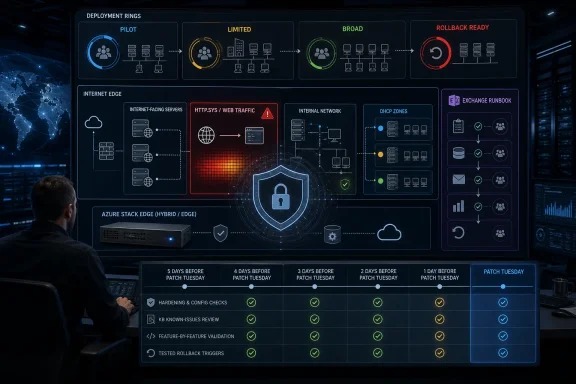
For large Microsoft batches, a better model is role-based rings. The first ring should contain sacrificial but representative systems: a small number of endpoints across hardware models, a non-critical server for each major role, and test systems with the actual endpoint security and management agents installed. The second ring should include limited production exposure in monitored environments. The third ring should carry broad rollout, with the most sensitive systems moving according to their own validated runbooks.
Exchange should not be hidden inside a generic server ring. Nor should Azure Stack Edge or other specialized infrastructure. If Microsoft’s release calls out a product family separately, administrators should assume it deserves separate validation until proven otherwise.
The practical cadence is simple. Prepare rings before Patch Tuesday. Apply to the first ring as soon as the updates are available and the relevant KBs are reviewed. Validate against role-specific tests. Expand to the second ring when telemetry is clean. Move to broad deployment only when the early rings have produced evidence, not just elapsed time.
The lesson is not that every month is equally catastrophic. It is that administrators should expect at least a few deployment-sensitive items inside large vulnerability sets. The headline number tells you how much reading you have to do. The product mix tells you where the business risk lives.
That is why Patch Tuesday preparation should be a standing monthly motion rather than a panic response. If the month is quiet, the work was still useful: inventories are cleaner, rollback is fresher, and maintenance windows are less theoretical. If the month is not quiet, the organization is not inventing process while attackers and vendors publish at the same time.
For Windows enthusiasts and home-lab operators, the same principle scales down. Know which systems are exposed, snapshot what matters, patch early, and read the known issues before blaming Windows for breaking a configuration that was never documented. The enterprise version has more meetings; the underlying discipline is the same.
That means validation should be feature-by-feature. For web-facing servers, confirm service startup, HTTP and HTTPS responses, authentication paths, reverse proxy behavior, certificate presentation, and representative application transactions. For Exchange, confirm mail flow, client access, transport behavior, health checks, and administrative tools. For DHCP-sensitive networks, confirm lease acquisition and renewal from representative client types. For kernel-sensitive fleets, confirm boot reliability, EDR health, VPN behavior, disk encryption status, and application launch.
This is not a call for endless testing. In fact, the goal is the opposite: narrow, repeatable tests that can be run quickly during every large batch. A five-minute validation script that administrators actually use is better than a 40-page test plan that appears only after an outage.
The best regression checks also produce artifacts. Screenshots, logs, monitoring snapshots, command output, or ticket notes give the deployment lead something concrete to review before approving the next ring. In a high-pressure month, evidence beats reassurance.
Start five business days before Patch Tuesday by refreshing asset groups and confirming ownership. Which systems are internet-facing? Which servers expose Windows network services? Which Exchange servers are in scope? Which systems support remote access, identity, DHCP-dependent sites, or specialized edge deployments? Which applications have no tested rollback?
Four business days out, check maintenance windows and communication paths. If the month is severe, can the organization patch sooner than usual? Are change approvers available? Does the help desk know that a larger batch may be coming? Are business owners aware that high-risk server roles may move ahead of ordinary cadence?
Three business days out, prepare rollback. Confirm backups, snapshots where appropriate, recovery media, vendor support contacts, and application owners. For Exchange, confirm health checks and servicing steps. For endpoint fleets, confirm that device management targeting and update deferral policies will not trap high-risk systems in the wrong ring.
Two business days out, prepare hardening. Review firewall exposure, remote access paths, web publication rules, unnecessary listeners, and network segmentation. If a service does not need to be reachable, remove the reachability before the release. If a system must remain exposed, increase monitoring and make sure it is in the first practical deployment group.
One business day out, prepare validation. Write the exact tests that will decide whether ring one passes. For each critical service, define what “healthy” means. A server that merely reboots is not healthy until its business function works.
On Patch Tuesday, read the release notes and relevant KBs before broad approval. Then map the actual release to the prebuilt groups. If the batch includes high-risk RCE in network-facing Windows components, accelerate exposed systems. If Exchange is called out, run the Exchange playbook. If known issues intersect with your environment, adjust rings rather than pretending the issue will be someone else’s problem.
In practical terms, Exchange teams should treat each security update as a package of actions. The installer is one action. The health check is another. Any required mitigation, configuration change, or documented follow-up is part of the same security response. If the ticket closes when the installer exits, the organization may be patched on paper and exposed in reality.
This is where large-batch fatigue becomes dangerous. When dozens or hundreds of vulnerabilities are competing for attention, administrators naturally look for the fastest visible win. But Exchange has repeatedly taught the industry that the details matter: prerequisites, post-install steps, mitigations, and configuration posture can decide whether the update actually reduces risk.
The better operating model is to assign an Exchange owner for Patch Tuesday review before the release lands. That person is responsible for reading the Exchange-specific material, confirming the deployment plan, and translating any Microsoft caveats into local action. Treating Exchange as just another Windows server is how organizations turn a security release into a mail outage or, worse, a false sense of protection.
Administrators should therefore include cloud-connected appliances and hybrid infrastructure in the same pre-Patch Tuesday triage. Who owns the device? How is it updated? What is the support path? What happens if an update affects connectivity or workloads? Is there a maintenance window, or has the device quietly become “always on” because nobody wants to negotiate downtime?
This is a governance problem as much as a technical one. Traditional Windows patch teams may not own edge appliances, while cloud teams may not follow the same monthly servicing rituals as endpoint teams. Large vulnerability batches expose those seams. Attackers do not care which team owns the asset.
The fix is to put hybrid infrastructure into the patch calendar explicitly. If a Microsoft release names the product family, it gets an owner, a validation step, and a rollback discussion. That is not bureaucracy. It is how an organization prevents a high-risk advisory from bouncing between teams until the urgency is gone.
That metric changes incentives. Inventory work becomes acceleration, not paperwork. Segmentation becomes patch support, not a separate network project. Rollback testing becomes what lets security move faster. Known-issue review becomes a deployment control rather than a bureaucratic delay.
It also makes the patch discussion more honest. Some systems should move immediately because exposure and severity justify the operational risk. Some should move through a short validation path because their failure would be expensive. Some low-risk systems can follow the normal cadence. The mistake is pretending a single deployment rule fits all three.
Microsoft’s recommendation to apply updates early is right, but incomplete without local discipline. Early application works best when the organization has already decided what “early” means for different asset classes. Otherwise, urgency becomes a slogan rather than a plan.
That distinction matters because Microsoft’s June 2026 security release again put enterprise defenders in the familiar position of moving quickly with incomplete comfort. The release highlighted multiple high-risk remote-code-execution issues across HTTP.sys, the Windows kernel, DHCP client, and Azure Stack Edge, while also calling out Exchange Server security updates separately. Microsoft’s own notes recommend early application of updates and point administrators to individual KB articles for known issues, which is a polite way of saying that “install everything everywhere” is not a deployment strategy.
 The First Move Is to Shrink the Blast Radius Before the Patch Lands
The most useful pre-Patch Tuesday work happens before anyone knows whether the month will be quiet or punishing. Large CVE batches punish teams that treat vulnerability management as a calendar event rather than an operating model. If your first serious inventory review starts after Microsoft publishes the release notes, you are already spending the most valuable hours of the month finding systems instead of reducing risk.The practical first step is to divide the estate into exposure groups. Internet-facing Windows servers, systems that accept unsolicited network traffic, Exchange servers, domain-adjacent infrastructure, VPN-adjacent services, DHCP-dependent networks, Azure Stack Edge deployments, and business-critical application servers should not sit in the same approval bucket as ordinary office endpoints. A high-risk RCE affecting a network-facing component has a different operational urgency from a client-side issue that requires user interaction.
That grouping should be done in your endpoint management platform, patch tool, CMDB, or even a controlled spreadsheet if that is the honest state of the environment. What matters is that the labels exist before the release. “All Windows servers” is too blunt. “Internet-exposed IIS and HTTP.sys consumers,” “Exchange,” “domain services,” “DHCP-sensitive networks,” “Azure Stack Edge,” and “rollback-sensitive line-of-business servers” are the kinds of groups that let administrators make decisions in hours rather than meetings.
The second step is to harden first and patch second. That does not mean delaying security updates. It means using the days before Patch Tuesday to make sure exposed services are only reachable where they must be reachable, backups are recent enough to matter, maintenance windows are real, and rollback paths have been tested rather than assumed.
The Checklist Starts With Exposure, Not With CVE Counts
CVE volume makes headlines, but exposure determines operational risk. A month with a smaller count can still be brutal if it includes actively exploited bugs or remotely reachable services. A month with a very large count can be manageable if the highest-risk components are already segmented, monitored, and staged for rapid update.For large Microsoft releases, the pre-release checklist should begin with four workstreams. First, identify network-reachable Windows services and confirm whether they are exposed only to the networks that require them. Second, isolate Exchange servicing into its own runbook rather than treating it like a routine Windows cumulative update. Third, confirm rollback and recovery procedures for the systems most likely to hurt the business if an update regresses authentication, networking, printing, storage, or application compatibility. Fourth, prepare validation tests that prove the patched system still performs its real job.
That last point is where many enterprises quietly fail. A server that reboots cleanly is not necessarily healthy. An Exchange server must send, receive, route, authenticate, and expose the expected client protocols. A DHCP-dependent site must still obtain addresses and renew leases. A web front end must still terminate traffic correctly. A kernel-level fix can leave the operating system patched while an old driver, endpoint agent, or storage filter becomes the problem everyone discovers at 8:15 a.m.
The checklist, then, is not “patch faster.” It is “make the fastest safe path the default path.” That means the emergency release process should already know which systems move first, who can approve, which telemetry is watched, which business owner is notified, and when deployment stops.
HTTP.sys Turns Web Exposure Into a Patch Priority
Microsoft’s June 2026 release highlighted HTTP.sys among the high-risk remote-code-execution areas, and that should immediately focus attention on Windows systems that process HTTP traffic through the Windows HTTP protocol stack. The administrative lesson is broader than a single month: when a core network-facing Windows component appears in a large batch, the riskiest machines are not always the ones with the most obvious application names.HTTP.sys can sit underneath Windows-hosted services in ways that are easy to forget once an application has become boring infrastructure. Patch planning should therefore start with discovery. Administrators should identify Windows servers accepting HTTP or HTTPS traffic, especially those reachable from the internet, partner networks, VPN users, or broad internal segments.
This is where prebuilt hardening earns its keep. If a service must be public, it should already be behind the intended reverse proxy, load balancer, web application firewall, or network security control. If it does not need to be public, the pre-Patch Tuesday action is to remove that reachability before attackers start diffing patches and scanning for exposed systems.
The same logic applies internally. “Internal-only” is not a magic shield when a vulnerability is reachable over the network and the organization assumes compromise somewhere else in the estate. Flat networks turn internal RCE into lateral movement infrastructure. Segmented networks turn the same bug into a smaller incident.
Kernel and DHCP Risk Belong in the Same War Room
The June 2026 release also highlighted high-risk remote-code-execution issues in the Windows kernel and DHCP client. Administrators should resist the temptation to classify these as purely separate concerns. In large estates, kernel-level changes and network-client behavior both intersect with drivers, endpoint security agents, VPN clients, virtualization platforms, and device management tooling.Kernel fixes deserve early testing on representative hardware and server roles. The test group should include systems with the security stack that actually runs in production: EDR, DLP, disk encryption, VPN, backup agents, storage drivers, and hypervisor integration components. A lab VM with none of those components may tell you that Windows boots; it does not tell you that your fleet is safe to update.
DHCP client risk is different but equally operational. If a DHCP-related fix is part of a high-risk batch, administrators should review the networks where address assignment failure would cause disproportionate pain: branch offices, Wi-Fi networks, manufacturing floors, kiosk fleets, lab environments, and recovery networks. The hardening move is not exotic. Confirm DHCP server redundancy, lease behavior, network access controls, and monitoring before the patch cycle starts.
The testing move is just as practical. After early deployment, validate lease acquisition, renewal, roaming behavior, VPN interaction, and any network access control workflows that depend on client posture. The regression that matters is not the one that breaks every machine. It is the one that breaks only the devices at a remote site where nobody with admin rights is standing nearby.
Exchange Is Still Its Own Servicing Surface
Microsoft separately called out Exchange Server security updates in the June 2026 material, and that separate treatment is the signal administrators should heed. Exchange remains one of the Windows ecosystem’s most consequential servicing surfaces because it combines identity, mail flow, client access, transport rules, third-party integrations, and a long institutional memory of emergency patch cycles.The June 2026 Exchange Server Subscription Edition RTM security update resolves multiple Exchange vulnerabilities, and Microsoft’s note also states that the fix for one listed Exchange remote-code-execution vulnerability is not included in the security update and requires administrators to follow the CVE documentation for mitigation. That is precisely why Exchange cannot be handled as a generic monthly reboot job.
The Exchange runbook should be explicit. Confirm supported versions and prerequisites. Run Microsoft’s Exchange Health Checker before deployment. Capture the current transport, client access, and certificate state. Verify backups and recovery procedures. Review load balancer rotation, maintenance mode steps, and post-update validation. If Extended Protection is not already part of the environment’s plan, it belongs in the pre-cycle review rather than in a rushed post-incident debate.
Exchange also deserves a communication plan. Mail is both a business service and an incident-response tool. If patching disrupts mail flow or authentication, the team may lose the channel it planned to use for updates. That is why the Exchange servicing window should include out-of-band contacts, escalation ownership, and a rollback decision point that is understood before the installer starts.
Known Issues Are Not Fine Print
Microsoft’s June 2026 notes recommend early application of updates and direct readers to individual KB articles for known issues. That combination captures the modern Patch Tuesday dilemma. Microsoft wants customers to move quickly, but the practical state of Windows servicing still requires administrators to read the KBs before they turn a patch into a fleet-wide event.Known issues should be treated as deployment inputs, not postmortem explanations. The workflow should be simple: read the release notes, read the relevant KBs for each supported Windows version and server product, record any known issue that maps to your environment, and decide whether it changes sequencing, validation, or rollback thresholds. That record does not need to be beautiful. It needs to be available to the people approving deployment.
This is especially important when a large batch spans clients, servers, cloud-connected systems, and application platforms. A known issue that is irrelevant to one business unit may be a showstopper for another. A regression affecting a niche configuration may still matter if that niche is your revenue system, your call center, your warehouse, or your authentication path.
The worst version of patch management is discovering a documented known issue from a help-desk ticket. The better version is telling the help desk what symptoms to expect, what logs to collect, and when to escalate. Microsoft’s KB links are not homework for compliance. They are raw material for operational defense.
Rollback Discipline Is Security Work, Not Cowardice
Rollback planning often gets treated as the opposite of security urgency. In reality, it is what allows administrators to act with urgency. Teams that cannot reverse a bad deployment will delay broad rollout, over-test in fear, or push patches blindly and hope the business absorbs the blast.The rollback plan should be tiered by system type. For ordinary endpoints, that may mean update uninstall guidance, restore points where applicable, device management targeting, and a clear help-desk script. For servers, it means verified backups, snapshots where supported and safe, application-aware recovery, and a decision tree that separates “monitor” from “roll back now.” For Exchange, it means understanding the supported recovery posture before touching production.
Rollback does not mean every update can or should be removed cleanly. Some security updates are complicated, cumulative, or tied to servicing stack behavior. That is why rollback discipline starts with knowing what the rollback actually is: uninstall, restore, fail over, rebuild, disable a feature, drain a node, or shift traffic.
The most mature organizations also define rollback triggers before deployment. Authentication failures above a threshold, mail flow interruption, DHCP failure at a site, blue screens on a hardware model, application crash rates, or service health degradation can all be stop conditions. If the trigger is not defined in advance, the first hours of an incident become a debate about whether the problem is real.
Rings Should Follow Business Risk, Not Org Charts
Deployment rings are now standard advice, but they are often implemented lazily. A ring is only useful if it contains systems that reveal the risks you care about. A pilot made entirely of IT laptops will not expose a server-side regression. A server pilot with only low-traffic machines will not reveal problems in the systems that carry the business.For large Microsoft batches, a better model is role-based rings. The first ring should contain sacrificial but representative systems: a small number of endpoints across hardware models, a non-critical server for each major role, and test systems with the actual endpoint security and management agents installed. The second ring should include limited production exposure in monitored environments. The third ring should carry broad rollout, with the most sensitive systems moving according to their own validated runbooks.
Exchange should not be hidden inside a generic server ring. Nor should Azure Stack Edge or other specialized infrastructure. If Microsoft’s release calls out a product family separately, administrators should assume it deserves separate validation until proven otherwise.
The practical cadence is simple. Prepare rings before Patch Tuesday. Apply to the first ring as soon as the updates are available and the relevant KBs are reviewed. Validate against role-specific tests. Expand to the second ring when telemetry is clean. Move to broad deployment only when the early rings have produced evidence, not just elapsed time.
WindowsForum’s Recent Patch Tuesday Pattern Points to the Same Lesson
WindowsForum’s own coverage over the past year has circled the same reality from different angles: big Microsoft batches are not rare enough to treat as exceptional anymore. June and July 2025 coverage emphasized critical zero-days, wormable vulnerabilities, and urgent security fixes. September 2025 brought another broad operationally important set of fixes, with reporting around more than 80 CVEs and a familiar concentration of remote-code-execution and elevation-of-privilege risk.The lesson is not that every month is equally catastrophic. It is that administrators should expect at least a few deployment-sensitive items inside large vulnerability sets. The headline number tells you how much reading you have to do. The product mix tells you where the business risk lives.
That is why Patch Tuesday preparation should be a standing monthly motion rather than a panic response. If the month is quiet, the work was still useful: inventories are cleaner, rollback is fresher, and maintenance windows are less theoretical. If the month is not quiet, the organization is not inventing process while attackers and vendors publish at the same time.
For Windows enthusiasts and home-lab operators, the same principle scales down. Know which systems are exposed, snapshot what matters, patch early, and read the known issues before blaming Windows for breaking a configuration that was never documented. The enterprise version has more meetings; the underlying discipline is the same.
Regression Testing Has to Be Feature-by-Feature
The phrase “test the patch” is too vague to be useful. Administrators do not need a metaphysical answer to whether an update is good. They need to know whether the patched machine can still perform the functions the business expects.That means validation should be feature-by-feature. For web-facing servers, confirm service startup, HTTP and HTTPS responses, authentication paths, reverse proxy behavior, certificate presentation, and representative application transactions. For Exchange, confirm mail flow, client access, transport behavior, health checks, and administrative tools. For DHCP-sensitive networks, confirm lease acquisition and renewal from representative client types. For kernel-sensitive fleets, confirm boot reliability, EDR health, VPN behavior, disk encryption status, and application launch.
This is not a call for endless testing. In fact, the goal is the opposite: narrow, repeatable tests that can be run quickly during every large batch. A five-minute validation script that administrators actually use is better than a 40-page test plan that appears only after an outage.
The best regression checks also produce artifacts. Screenshots, logs, monitoring snapshots, command output, or ticket notes give the deployment lead something concrete to review before approving the next ring. In a high-pressure month, evidence beats reassurance.
The Pre-Patch Tuesday Runbook That Actually Changes the Outcome
A useful runbook has to fit into the week before Patch Tuesday. If it requires a quarter-long transformation, it may be good strategy, but it is not a checklist. The point here is to build enough discipline that when Microsoft ships an unusually large set, the organization already knows what to do first.Start five business days before Patch Tuesday by refreshing asset groups and confirming ownership. Which systems are internet-facing? Which servers expose Windows network services? Which Exchange servers are in scope? Which systems support remote access, identity, DHCP-dependent sites, or specialized edge deployments? Which applications have no tested rollback?
Four business days out, check maintenance windows and communication paths. If the month is severe, can the organization patch sooner than usual? Are change approvers available? Does the help desk know that a larger batch may be coming? Are business owners aware that high-risk server roles may move ahead of ordinary cadence?
Three business days out, prepare rollback. Confirm backups, snapshots where appropriate, recovery media, vendor support contacts, and application owners. For Exchange, confirm health checks and servicing steps. For endpoint fleets, confirm that device management targeting and update deferral policies will not trap high-risk systems in the wrong ring.
Two business days out, prepare hardening. Review firewall exposure, remote access paths, web publication rules, unnecessary listeners, and network segmentation. If a service does not need to be reachable, remove the reachability before the release. If a system must remain exposed, increase monitoring and make sure it is in the first practical deployment group.
One business day out, prepare validation. Write the exact tests that will decide whether ring one passes. For each critical service, define what “healthy” means. A server that merely reboots is not healthy until its business function works.
On Patch Tuesday, read the release notes and relevant KBs before broad approval. Then map the actual release to the prebuilt groups. If the batch includes high-risk RCE in network-facing Windows components, accelerate exposed systems. If Exchange is called out, run the Exchange playbook. If known issues intersect with your environment, adjust rings rather than pretending the issue will be someone else’s problem.
The Exchange Lesson Is That Updates Can Include Homework
The June 2026 Exchange Server update is a useful reminder that security updates are sometimes not the whole remediation story. Microsoft’s support note lists several Exchange vulnerabilities and says the fix for one Exchange remote-code-execution vulnerability is not included in the security update, directing administrators to the CVE documentation for instructions. That kind of language should stop an automated approval workflow in its tracks.In practical terms, Exchange teams should treat each security update as a package of actions. The installer is one action. The health check is another. Any required mitigation, configuration change, or documented follow-up is part of the same security response. If the ticket closes when the installer exits, the organization may be patched on paper and exposed in reality.
This is where large-batch fatigue becomes dangerous. When dozens or hundreds of vulnerabilities are competing for attention, administrators naturally look for the fastest visible win. But Exchange has repeatedly taught the industry that the details matter: prerequisites, post-install steps, mitigations, and configuration posture can decide whether the update actually reduces risk.
The better operating model is to assign an Exchange owner for Patch Tuesday review before the release lands. That person is responsible for reading the Exchange-specific material, confirming the deployment plan, and translating any Microsoft caveats into local action. Treating Exchange as just another Windows server is how organizations turn a security release into a mail outage or, worse, a false sense of protection.
The Cloud Edge Is Still Part of the Windows Patch Story
Azure Stack Edge appearing among the high-risk areas in Microsoft’s June 2026 release underlines another uncomfortable truth: the Windows patch story is no longer confined to desktops and domain-joined servers. Hybrid and edge infrastructure has become part of the same operational surface. It often sits close to sensitive data, operational technology, or remote locations where hands-on recovery is harder.Administrators should therefore include cloud-connected appliances and hybrid infrastructure in the same pre-Patch Tuesday triage. Who owns the device? How is it updated? What is the support path? What happens if an update affects connectivity or workloads? Is there a maintenance window, or has the device quietly become “always on” because nobody wants to negotiate downtime?
This is a governance problem as much as a technical one. Traditional Windows patch teams may not own edge appliances, while cloud teams may not follow the same monthly servicing rituals as endpoint teams. Large vulnerability batches expose those seams. Attackers do not care which team owns the asset.
The fix is to put hybrid infrastructure into the patch calendar explicitly. If a Microsoft release names the product family, it gets an owner, a validation step, and a rollback discussion. That is not bureaucracy. It is how an organization prevents a high-risk advisory from bouncing between teams until the urgency is gone.
The Real Patch Tuesday Metric Is Time to Confident Deployment
Security teams often measure time to patch. Operations teams often measure outage avoidance. Large Microsoft batches require a better metric: time to confident deployment. How quickly can the organization apply the update to the systems that matter most while knowing what to watch and how to recover?That metric changes incentives. Inventory work becomes acceleration, not paperwork. Segmentation becomes patch support, not a separate network project. Rollback testing becomes what lets security move faster. Known-issue review becomes a deployment control rather than a bureaucratic delay.
It also makes the patch discussion more honest. Some systems should move immediately because exposure and severity justify the operational risk. Some should move through a short validation path because their failure would be expensive. Some low-risk systems can follow the normal cadence. The mistake is pretending a single deployment rule fits all three.
Microsoft’s recommendation to apply updates early is right, but incomplete without local discipline. Early application works best when the organization has already decided what “early” means for different asset classes. Otherwise, urgency becomes a slogan rather than a plan.
The June 2026 Playbook Administrators Should Have Ready
The concrete lesson from this cycle is that administrators need a repeatable large-batch playbook, not a heroic one-off response. Microsoft’s June 2026 release put high-risk RCE concerns, Exchange servicing, and known-issue validation in the same operational frame. The checklist below is the minimum useful version of that playbook.- Create separate deployment groups for internet-facing Windows services, Exchange servers, DHCP-sensitive networks, Azure Stack Edge or similar hybrid infrastructure, and rollback-sensitive business systems.
- Review Microsoft’s release notes and the relevant KB articles before broad approval, because known issues and product-specific instructions can change the safe deployment order.
- Harden exposed services before rollout by removing unnecessary reachability, tightening firewall rules, confirming segmentation, and increasing monitoring on systems that must remain reachable.
- Run Exchange as a dedicated servicing workflow with health checks, prerequisites, post-update validation, and any Microsoft-documented follow-up actions treated as part of remediation.
- Test by feature rather than by reboot status, including web responses, mail flow, address assignment, authentication, endpoint security health, VPN behavior, and representative business transactions.
- Define rollback triggers before deployment begins, so a failed ring produces a decision instead of an argument.
References
- Primary source: support.microsoft.com
- Independent coverage: microsoft.com
A note on patch Tuesday
www.microsoft.com
- Independent coverage: msrc.microsoft.com
Security Update Guide - Microsoft Security Response Center
 msrc.microsoft.com
- Primary source: WindowsForum
Microsoft September 2025 Patch Tuesday: 80+ CVEs, RCEs, and hardening | Windows Forum
Microsoft’s September Patch Tuesday delivered a broad, operationally important set of security updates on September 9, 2025, covering Windows, Microsoft...windowsforum.com

