

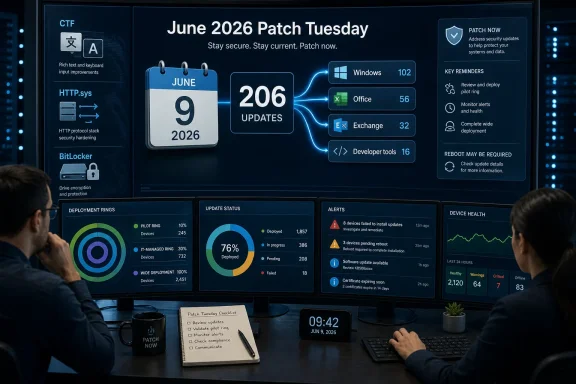
Microsoft’s June 2026 Patch Tuesday, released on June 9, delivers 206 security updates across Windows, Office, Exchange Server, and developer tools, including three publicly disclosed Windows flaws in CTF, HTTP.sys, and BitLocker that Microsoft says are not yet known to be actively exploited. The absence of a confirmed in-the-wild exploit is the least comforting thing about this release. June is the month where “no active exploitation” still translates into “patch now,” because the breadth of affected products, the presence of public disclosure, and Exchange’s return to the urgent column all compress the normal testing window.
This is the kind of Patch Tuesday that exposes the fiction at the heart of enterprise patch management: that monthly updates can be treated as routine maintenance. For home users, the advice is boring and correct — install the updates. For administrators, the practical story is messier: validate quickly, prioritize exposed systems, watch for regressions, and accept that Microsoft’s consolidation of fixes into ever-larger cumulative packages has turned the second Tuesday of the month into a recurring operational stress test.
Patch Tuesday has always been a calendar event, but June’s release is less a list of fixes than a workload allocation problem. Two hundred and six updates is not just a big number for vulnerability managers to paste into a report; it is a large attack-surface map spanning client operating systems, server roles, productivity applications, and developer tooling. The products affected are the products that sit at the center of corporate life.
That makes this release different from a narrow emergency patch. A single actively exploited zero-day can be terrifying, but it is also clarifying. You know where to look, what to patch first, and which compensating controls to verify while the deployment wave moves outward.
June is more diffuse. Windows endpoints matter because they are everywhere. Office matters because document handling remains one of the most reliable ways to put untrusted content in front of users. Exchange matters because on-premises messaging servers have become perennial high-value targets, especially in hybrid environments where identity and mail flows can overlap in uncomfortable ways.
The result is a scramble without the clean drama of a headline zero-day. IT teams still have to move with urgency, but they cannot move blindly. A bad Windows cumulative update on a fleet of laptops is disruptive; a bad server patch on identity-adjacent infrastructure can become an outage; a delayed Exchange patch can become an incident waiting for someone else’s proof-of-concept code to mature.
None of those descriptions, on its own, sounds like the cinematic version of a breach. Elevation of privilege generally requires an attacker to already have some foothold. Denial of service may not produce data theft. A BitLocker bypass tends to raise different alarms depending on whether an organization worries more about stolen devices, physical access, or regulated data exposure.
But public disclosure changes the operating model. Once a vulnerability is known outside Microsoft’s controlled advisory process, defenders are no longer simply racing against theoretical exploitation. They are racing against interpretation, reproduction, weaponization, and opportunistic scanning.
Microsoft’s “Exploitation More Likely” rating is therefore more important than the lack of observed exploitation. It is a forecast, not a historical statement. It tells administrators that the ingredients are present for attackers to turn disclosure into working technique, especially where exploitation can be chained with other weaknesses or used after initial access.
That is why elevation-of-privilege bugs remain so valuable. In modern intrusions, attackers often do not begin with domain administrator rights. They land through phishing, stolen credentials, malicious documents, exposed services, or compromised remote access, then look for the next rung on the ladder.
A local privilege escalation in a widely deployed Windows component can turn a constrained foothold into something more durable. It can help bypass endpoint controls, tamper with security tools, harvest credentials, or move from a user-level compromise into a position where persistence becomes easier.
For administrators, the CTF vulnerability is a classic example of why endpoint patching is not merely desktop hygiene. Laptops, jump boxes, virtual desktops, and administrator workstations all sit somewhere in the path between user compromise and enterprise compromise. If attackers can rely on a known local privilege escalation remaining unpatched for weeks, the organization has effectively gifted them part of the intrusion chain.
Denial of service is often treated as a lesser category because it does not necessarily imply code execution. That is a mistake in environments where availability is the security requirement customers actually feel. A web-facing Windows service that can be knocked over remotely may not leak data, but it can still interrupt revenue, authentication, monitoring, management portals, line-of-business applications, or public services.
The HTTP.sys flaw also matters because exposed services are easier for attackers to find than internal-only bugs. Once technical details circulate, defenders should expect probes against anything that looks like it might be reachable. The right response is not panic; it is inventory.
Organizations should know which Windows servers expose HTTP services, which sit behind load balancers or web application firewalls, and which are business critical. They should also know whether they can safely stage the cumulative update, reboot within a maintenance window, and monitor for service behavior afterward. That sounds basic until Patch Tuesday turns it into a same-week exercise across hundreds or thousands of systems.
That makes CVE-2026-50507 uncomfortable. A security feature bypass does not necessarily mean every encrypted drive is suddenly exposed, but it does mean administrators cannot treat encryption as a static box checked during imaging. The details matter: device state, TPM configuration, pre-boot authentication, recovery key handling, and the distinction between a powered-off stolen laptop and a live compromised endpoint.
For regulated industries, the optics matter too. Full-disk encryption is often part of the story organizations tell auditors, insurers, customers, and internal risk committees. A publicly disclosed bypass forces security teams to ask whether their encryption posture depends on assumptions that need to be revisited.
This is where patch management intersects with asset management. The most sensitive BitLocker-protected devices are not always the easiest to patch. Executives travel. Field machines sit off-network. Contractors disappear from management consoles until the next VPN connection. If June’s update fixes a bypass that could matter under physical-access conditions, those devices should not be allowed to drift indefinitely.
Exchange is not just another server workload. It is exposed, identity-aware, deeply integrated, and often burdened by years of operational exception-making. Many organizations have reduced their Exchange footprint by moving mailboxes to Microsoft 365, but hybrid deployments, relay functions, management dependencies, and legacy business processes keep on-premises Exchange alive long after executives think it has been “migrated.”
That residue is dangerous. An Exchange server that exists only for hybrid management can still be security relevant. A server that no one wants to touch because the last cumulative update was painful can become the forgotten door attackers are most grateful to find.
Microsoft’s consolidation of the June Exchange security update is helpful in one sense: it packages the work into a clear deployment event. But it also leaves administrators with little excuse for postponement. Exchange patching has a known choreography — check prerequisites, confirm supported builds, run health checks, back up, patch, reboot, verify services, and keep an eye on transport and client access. The hard part is not knowing what to do. The hard part is getting permission to do it quickly.
Attackers live in the second life. They do not need to beat Microsoft to a patch if they can beat enterprises to deployment. Public disclosure accelerates that dynamic because it gives researchers, red teams, criminals, and opportunists the same starting pistol.
This is why “not actively exploited” should never be translated as “safe to wait.” The right translation is “there may still be time to patch before broad exploitation.” That is a very different sentence.
The practical challenge is that cumulative updates are not free of operational risk. Windows updates can break VPN clients, endpoint agents, printing paths, authentication behavior, or niche business applications. Exchange updates can fail in messy environments, especially where prior updates were skipped or customizations accumulated over time. Administrators are not irrational when they test before deploying; they are doing their jobs.
The problem is that attackers do not care about change-control boards. When the vulnerability class is attractive and disclosure is public, a two-week approval cycle may be indistinguishable from negligence.
That model reduces fragmentation. It also concentrates risk. You cannot easily take the security part without the rest of the package, and that means testing has to focus less on debating whether a fix is needed and more on whether the environment can absorb the whole update.
For mature shops, the answer is rings. Pilot machines first, then IT-owned systems, then representative business units, then broad deployment, with faster lanes for exposed servers and high-risk roles. For less mature shops, the answer is often hope, followed by a help desk spike.
June’s release punishes the second model. The sheer number of fixes and the presence of Exchange mean organizations need a clear picture of which systems are internet-facing, which systems hold privileged workflows, and which systems can be rebooted without business drama. Without that, the patch process becomes a negotiation conducted under uncertainty.
Rollback planning should not be treated as pessimism. It is what lets teams move faster. If administrators know how to restore a server, remove a problematic update where supported, shift traffic, drain a node, or isolate a broken client population, they can patch with less fear.
The lesson of the past decade is not that users are foolish. It is that attackers are patient and workflows are porous. Invoices, resumes, shared spreadsheets, exported reports, and internal-looking attachments still move through organizations every day.
A vulnerability in Office does not need to be the most elegant bug in the release to matter. It only needs to fit into a plausible lure. If a malicious document can trigger code execution, leak information, bypass protection, or create a foothold when opened by the right target, it becomes part of the initial access economy.
That makes Office patching a security priority, not a desktop convenience. Administrators who patch servers first and leave productivity apps to update “eventually” are leaving the front door on a slower schedule than the rest of the house.
A compromise of a developer environment can be more consequential than a compromise of a random endpoint. It can lead into source repositories, CI/CD pipelines, package feeds, container registries, and infrastructure-as-code workflows. In that context, developer tools are not secondary software; they are part of the software supply chain.
This is especially relevant for organizations that exempt developers from standard endpoint management because “they need flexibility.” Flexibility is sometimes real. Developers do need tools that ordinary business users do not. But unmanaged flexibility becomes a security debt that compounds quietly.
June’s patch set should push IT and engineering leadership toward a shared operating model. Developer machines should be patched aggressively, but not carelessly. Build agents should be inventoried. Toolchains should be updated in a way that does not break releases without warning. The compromise position is not to delay indefinitely; it is to test quickly and deploy deliberately.
That is why Patch Tuesday coverage often sounds repetitive. “Patch now” is true, but insufficient. The missing sentence is: patch according to your real exposure, not according to the neatness of your asset spreadsheet.
For WindowsForum readers, the practical hierarchy is familiar. Internet-facing systems go first. Systems tied to identity, email, remote access, and management go next. Privileged workstations and developer endpoints deserve faster treatment than ordinary kiosks. Consumer PCs should take the update unless there is a known issue specific to the device.
The uncomfortable part is that many organizations still cannot answer the basic questions quickly. Which servers expose HTTP.sys-dependent services? Which Exchange builds are deployed? Which BitLocker policies are enforced across mobile fleets? Which Office channels are lagging behind? The patch is released on Tuesday; the inventory should not begin on Wednesday.
The scramble begins when patching depends on heroics. One administrator knows the Exchange environment. One team owns the endpoint tool but not the reboot policy. One business unit refuses updates during quarter close. One legacy app breaks whenever a dependency changes, but no one has funded its replacement.
June’s release exposes those governance failures because it touches too much of the estate at once. Windows, Office, Exchange, and developer tools are not niche systems. They are the substrate. When the substrate needs urgent maintenance, every unresolved exception becomes visible.
This is where security teams should resist the temptation to frame the problem as user negligence or administrator caution. The issue is usually organizational. If leadership wants fast patching, it has to fund testing environments, tolerate maintenance windows, modernize brittle applications, and support endpoint management that can actually enforce deadlines.
The usual caveats apply. Back up important files. Leave the machine plugged in during the update. If the PC is mission-critical for a deadline, choose a time when a restart will not ruin the day. Those are operational habits, not reasons to avoid the update.
Windows 10 users in particular should be attentive to support status and update eligibility. As Microsoft’s supported Windows landscape continues to narrow, the security distinction between “patched” and “unsupported” becomes more than academic. A fully updated supported system is not invulnerable, but an unsupported system is increasingly a permanent exception in a threat model that has no patience for nostalgia.
Enthusiasts sometimes treat Patch Tuesday as a performance lottery: will this update slow the machine, change a setting, or introduce some new annoyance? That skepticism is earned by years of imperfect updates. It still does not outweigh the security reality of a publicly disclosed vulnerability becoming common knowledge.
June 2026 will not be remembered only for the number 206. It will be remembered by administrators as another month when Microsoft’s unified patching model forced every organization to reveal how much of its Windows estate is truly managed, how much is merely assumed, and how much is waiting for an attacker to turn “Exploitation More Likely” into yesterday’s incident report.
This is the kind of Patch Tuesday that exposes the fiction at the heart of enterprise patch management: that monthly updates can be treated as routine maintenance. For home users, the advice is boring and correct — install the updates. For administrators, the practical story is messier: validate quickly, prioritize exposed systems, watch for regressions, and accept that Microsoft’s consolidation of fixes into ever-larger cumulative packages has turned the second Tuesday of the month into a recurring operational stress test.
 June Turns Patch Tuesday Into a Capacity Problem
Patch Tuesday has always been a calendar event, but June’s release is less a list of fixes than a workload allocation problem. Two hundred and six updates is not just a big number for vulnerability managers to paste into a report; it is a large attack-surface map spanning client operating systems, server roles, productivity applications, and developer tooling. The products affected are the products that sit at the center of corporate life.That makes this release different from a narrow emergency patch. A single actively exploited zero-day can be terrifying, but it is also clarifying. You know where to look, what to patch first, and which compensating controls to verify while the deployment wave moves outward.
June is more diffuse. Windows endpoints matter because they are everywhere. Office matters because document handling remains one of the most reliable ways to put untrusted content in front of users. Exchange matters because on-premises messaging servers have become perennial high-value targets, especially in hybrid environments where identity and mail flows can overlap in uncomfortable ways.
The result is a scramble without the clean drama of a headline zero-day. IT teams still have to move with urgency, but they cannot move blindly. A bad Windows cumulative update on a fleet of laptops is disruptive; a bad server patch on identity-adjacent infrastructure can become an outage; a delayed Exchange patch can become an incident waiting for someone else’s proof-of-concept code to mature.
Public Disclosure Changes the Clock Even Without Exploitation
The three publicly disclosed Windows vulnerabilities are the release’s most important signal. CVE-2026-45586 affects the Windows Collaborative Translation Framework and is an elevation-of-privilege flaw. CVE-2026-49160 affects HTTP.sys and is a denial-of-service issue. CVE-2026-50507 is a BitLocker security feature bypass.None of those descriptions, on its own, sounds like the cinematic version of a breach. Elevation of privilege generally requires an attacker to already have some foothold. Denial of service may not produce data theft. A BitLocker bypass tends to raise different alarms depending on whether an organization worries more about stolen devices, physical access, or regulated data exposure.
But public disclosure changes the operating model. Once a vulnerability is known outside Microsoft’s controlled advisory process, defenders are no longer simply racing against theoretical exploitation. They are racing against interpretation, reproduction, weaponization, and opportunistic scanning.
Microsoft’s “Exploitation More Likely” rating is therefore more important than the lack of observed exploitation. It is a forecast, not a historical statement. It tells administrators that the ingredients are present for attackers to turn disclosure into working technique, especially where exploitation can be chained with other weaknesses or used after initial access.
The CTF Bug Is a Reminder That Local Bugs Still Matter
The Collaborative Translation Framework is not a brand that most Windows users recognize, but Windows security is full of such plumbing. The operating system’s attack surface is not only its browser, its kernel, or its network stack. It is also the frameworks and brokers that glue input, language, text services, windows, sessions, and user interactions together.That is why elevation-of-privilege bugs remain so valuable. In modern intrusions, attackers often do not begin with domain administrator rights. They land through phishing, stolen credentials, malicious documents, exposed services, or compromised remote access, then look for the next rung on the ladder.
A local privilege escalation in a widely deployed Windows component can turn a constrained foothold into something more durable. It can help bypass endpoint controls, tamper with security tools, harvest credentials, or move from a user-level compromise into a position where persistence becomes easier.
For administrators, the CTF vulnerability is a classic example of why endpoint patching is not merely desktop hygiene. Laptops, jump boxes, virtual desktops, and administrator workstations all sit somewhere in the path between user compromise and enterprise compromise. If attackers can rely on a known local privilege escalation remaining unpatched for weeks, the organization has effectively gifted them part of the intrusion chain.
HTTP.sys Keeps the Server Team in the Blast Radius
HTTP.sys is a more immediately recognizable concern for Windows server administrators. It is the Windows kernel-mode HTTP protocol stack used by components that need to receive HTTP traffic efficiently. When HTTP.sys appears in a Patch Tuesday advisory, the server team should assume the issue deserves prompt triage even if the bug is “only” denial of service.Denial of service is often treated as a lesser category because it does not necessarily imply code execution. That is a mistake in environments where availability is the security requirement customers actually feel. A web-facing Windows service that can be knocked over remotely may not leak data, but it can still interrupt revenue, authentication, monitoring, management portals, line-of-business applications, or public services.
The HTTP.sys flaw also matters because exposed services are easier for attackers to find than internal-only bugs. Once technical details circulate, defenders should expect probes against anything that looks like it might be reachable. The right response is not panic; it is inventory.
Organizations should know which Windows servers expose HTTP services, which sit behind load balancers or web application firewalls, and which are business critical. They should also know whether they can safely stage the cumulative update, reboot within a maintenance window, and monitor for service behavior afterward. That sounds basic until Patch Tuesday turns it into a same-week exercise across hundreds or thousands of systems.
BitLocker Bypass Puts Physical Security Back in the Conversation
BitLocker vulnerabilities occupy an awkward place in enterprise risk ranking. They rarely generate the same urgency as remote code execution because they often depend on device access, configuration details, or recovery workflows. Yet the purpose of BitLocker is to make a lost or stolen device less interesting to an attacker.That makes CVE-2026-50507 uncomfortable. A security feature bypass does not necessarily mean every encrypted drive is suddenly exposed, but it does mean administrators cannot treat encryption as a static box checked during imaging. The details matter: device state, TPM configuration, pre-boot authentication, recovery key handling, and the distinction between a powered-off stolen laptop and a live compromised endpoint.
For regulated industries, the optics matter too. Full-disk encryption is often part of the story organizations tell auditors, insurers, customers, and internal risk committees. A publicly disclosed bypass forces security teams to ask whether their encryption posture depends on assumptions that need to be revisited.
This is where patch management intersects with asset management. The most sensitive BitLocker-protected devices are not always the easiest to patch. Executives travel. Field machines sit off-network. Contractors disappear from management consoles until the next VPN connection. If June’s update fixes a bypass that could matter under physical-access conditions, those devices should not be allowed to drift indefinitely.
Exchange’s Return Makes This More Than a Windows Month
The June release would already be large if it were only about Windows. Exchange makes it heavier. Microsoft’s consolidated security update for Exchange Server brings on-premises messaging back into the “install as soon as possible” category, and that phrase carries history.Exchange is not just another server workload. It is exposed, identity-aware, deeply integrated, and often burdened by years of operational exception-making. Many organizations have reduced their Exchange footprint by moving mailboxes to Microsoft 365, but hybrid deployments, relay functions, management dependencies, and legacy business processes keep on-premises Exchange alive long after executives think it has been “migrated.”
That residue is dangerous. An Exchange server that exists only for hybrid management can still be security relevant. A server that no one wants to touch because the last cumulative update was painful can become the forgotten door attackers are most grateful to find.
Microsoft’s consolidation of the June Exchange security update is helpful in one sense: it packages the work into a clear deployment event. But it also leaves administrators with little excuse for postponement. Exchange patching has a known choreography — check prerequisites, confirm supported builds, run health checks, back up, patch, reboot, verify services, and keep an eye on transport and client access. The hard part is not knowing what to do. The hard part is getting permission to do it quickly.
The Real Risk Is the Patch Gap After the Headlines Fade
Every major Patch Tuesday has two lives. The first is the news cycle, where counts, CVEs, and severity ratings dominate. The second is the patch gap, where organizations slowly diverge into those that deployed, those that staged, those that deferred, and those that never had the affected asset in a reliable inventory.Attackers live in the second life. They do not need to beat Microsoft to a patch if they can beat enterprises to deployment. Public disclosure accelerates that dynamic because it gives researchers, red teams, criminals, and opportunists the same starting pistol.
This is why “not actively exploited” should never be translated as “safe to wait.” The right translation is “there may still be time to patch before broad exploitation.” That is a very different sentence.
The practical challenge is that cumulative updates are not free of operational risk. Windows updates can break VPN clients, endpoint agents, printing paths, authentication behavior, or niche business applications. Exchange updates can fail in messy environments, especially where prior updates were skipped or customizations accumulated over time. Administrators are not irrational when they test before deploying; they are doing their jobs.
The problem is that attackers do not care about change-control boards. When the vulnerability class is attractive and disclosure is public, a two-week approval cycle may be indistinguishable from negligence.
Cumulative Updating Has Made Rollback the New Planning Discipline
Microsoft’s modern update model has made patch selection simpler and rollback planning more important. Administrators are no longer choosing among dozens of individual Windows security bulletins in the old style. They are generally deploying cumulative updates that contain security fixes, reliability changes, and sometimes feature-adjacent behavior that arrived through preview channels.That model reduces fragmentation. It also concentrates risk. You cannot easily take the security part without the rest of the package, and that means testing has to focus less on debating whether a fix is needed and more on whether the environment can absorb the whole update.
For mature shops, the answer is rings. Pilot machines first, then IT-owned systems, then representative business units, then broad deployment, with faster lanes for exposed servers and high-risk roles. For less mature shops, the answer is often hope, followed by a help desk spike.
June’s release punishes the second model. The sheer number of fixes and the presence of Exchange mean organizations need a clear picture of which systems are internet-facing, which systems hold privileged workflows, and which systems can be rebooted without business drama. Without that, the patch process becomes a negotiation conducted under uncertainty.
Rollback planning should not be treated as pessimism. It is what lets teams move faster. If administrators know how to restore a server, remove a problematic update where supported, shift traffic, drain a node, or isolate a broken client population, they can patch with less fear.
Office Remains the User-Facing Attack Surface Everyone Underestimates
Office updates rarely receive the same attention as Windows kernel flaws or Exchange server advisories, but they deserve a central place in June’s triage. Office is where untrusted files meet impatient humans. It is also where security controls depend on a stack that includes application hardening, macro policy, Protected View, file type handling, identity, and user training.The lesson of the past decade is not that users are foolish. It is that attackers are patient and workflows are porous. Invoices, resumes, shared spreadsheets, exported reports, and internal-looking attachments still move through organizations every day.
A vulnerability in Office does not need to be the most elegant bug in the release to matter. It only needs to fit into a plausible lure. If a malicious document can trigger code execution, leak information, bypass protection, or create a foothold when opened by the right target, it becomes part of the initial access economy.
That makes Office patching a security priority, not a desktop convenience. Administrators who patch servers first and leave productivity apps to update “eventually” are leaving the front door on a slower schedule than the rest of the house.
Developer Tools Expand the Definition of a Production System
The inclusion of developer tools in a large Patch Tuesday release is another reminder that production risk is not confined to production servers. Developer workstations are high-value assets. They hold credentials, source code, signing materials, access tokens, build configurations, and privileged pathways into cloud and deployment systems.A compromise of a developer environment can be more consequential than a compromise of a random endpoint. It can lead into source repositories, CI/CD pipelines, package feeds, container registries, and infrastructure-as-code workflows. In that context, developer tools are not secondary software; they are part of the software supply chain.
This is especially relevant for organizations that exempt developers from standard endpoint management because “they need flexibility.” Flexibility is sometimes real. Developers do need tools that ordinary business users do not. But unmanaged flexibility becomes a security debt that compounds quietly.
June’s patch set should push IT and engineering leadership toward a shared operating model. Developer machines should be patched aggressively, but not carelessly. Build agents should be inventoried. Toolchains should be updated in a way that does not break releases without warning. The compromise position is not to delay indefinitely; it is to test quickly and deploy deliberately.
Microsoft’s Messaging Is Urgent, but the Burden Is Still Local
Microsoft can rate vulnerabilities, publish advisories, ship cumulative updates, and recommend speed. It cannot know the topology of every customer network. It cannot know which Exchange server is half-retired but still exposed, which executive laptop has been offline for a month, or which vendor appliance depends on a Windows component no one remembers installing.That is why Patch Tuesday coverage often sounds repetitive. “Patch now” is true, but insufficient. The missing sentence is: patch according to your real exposure, not according to the neatness of your asset spreadsheet.
For WindowsForum readers, the practical hierarchy is familiar. Internet-facing systems go first. Systems tied to identity, email, remote access, and management go next. Privileged workstations and developer endpoints deserve faster treatment than ordinary kiosks. Consumer PCs should take the update unless there is a known issue specific to the device.
The uncomfortable part is that many organizations still cannot answer the basic questions quickly. Which servers expose HTTP.sys-dependent services? Which Exchange builds are deployed? Which BitLocker policies are enforced across mobile fleets? Which Office channels are lagging behind? The patch is released on Tuesday; the inventory should not begin on Wednesday.
The Scramble Is a Symptom of Deferred Hygiene
A well-run patch program still has a busy week after a release like this. It does not have an existential crisis. The difference is preparation. Rings exist. Owners are assigned. Maintenance windows are known. Backups are recent. Monitoring is in place. Exceptions expire.The scramble begins when patching depends on heroics. One administrator knows the Exchange environment. One team owns the endpoint tool but not the reboot policy. One business unit refuses updates during quarter close. One legacy app breaks whenever a dependency changes, but no one has funded its replacement.
June’s release exposes those governance failures because it touches too much of the estate at once. Windows, Office, Exchange, and developer tools are not niche systems. They are the substrate. When the substrate needs urgent maintenance, every unresolved exception becomes visible.
This is where security teams should resist the temptation to frame the problem as user negligence or administrator caution. The issue is usually organizational. If leadership wants fast patching, it has to fund testing environments, tolerate maintenance windows, modernize brittle applications, and support endpoint management that can actually enforce deadlines.
Home Users Get the Simple Version, but Not a Free Pass
For individual Windows users, June’s Patch Tuesday is less complicated but still important. Install the Windows update, restart when prompted, and update Office if it is not handled automatically. If a device uses BitLocker, especially a laptop that travels, do not treat encryption as a substitute for patching.The usual caveats apply. Back up important files. Leave the machine plugged in during the update. If the PC is mission-critical for a deadline, choose a time when a restart will not ruin the day. Those are operational habits, not reasons to avoid the update.
Windows 10 users in particular should be attentive to support status and update eligibility. As Microsoft’s supported Windows landscape continues to narrow, the security distinction between “patched” and “unsupported” becomes more than academic. A fully updated supported system is not invulnerable, but an unsupported system is increasingly a permanent exception in a threat model that has no patience for nostalgia.
Enthusiasts sometimes treat Patch Tuesday as a performance lottery: will this update slow the machine, change a setting, or introduce some new annoyance? That skepticism is earned by years of imperfect updates. It still does not outweigh the security reality of a publicly disclosed vulnerability becoming common knowledge.
The June Patch Map Should Drive the Week’s Work
The useful takeaway from this release is not that administrators should panic. It is that they should replace vague urgency with a short, defensible order of operations. June’s update is too broad for improvisation and too public for complacency.- Organizations should prioritize Windows systems that are internet-facing, privilege-bearing, or used for administration before treating ordinary endpoints as the only patch population.
- Exchange Server updates should be handled as urgent maintenance, with health checks, backups, service verification, and post-update monitoring rather than indefinite deferral.
- Office updates should be treated as part of initial-access defense because document workflows remain a common route for attackers into otherwise hardened environments.
- BitLocker-protected mobile devices should be driven back into compliance quickly, especially where lost-device risk, travel, or regulated data exposure matters.
- Developer workstations and build systems should be included in patch enforcement because compromised tooling can become a supply-chain problem.
- Public disclosure should shorten the acceptable delay even when Microsoft has not yet observed active exploitation.
June 2026 will not be remembered only for the number 206. It will be remembered by administrators as another month when Microsoft’s unified patching model forced every organization to reveal how much of its Windows estate is truly managed, how much is merely assumed, and how much is waiting for an attacker to turn “Exploitation More Likely” into yesterday’s incident report.
References
- Primary source: Computerworld
Published: Fri, 12 Jun 2026 15:53:15 GMT
For June, Patch Tuesday means an IT scramble – Computerworld
Microsoft’s monthly update included 206 fixes for flaws in everything from Windows to Office to Exchange Server, not to mention three zero-days. www.computerworld.com
- Related coverage: techradar.com
Microsoft breaks Patch Tuesday record with fixes for over 200 security flaws | TechRadar
AI use is really starting to showwww.techradar.com - Related coverage: techtimes.com
Microsoft Patch Tuesday June 2026: Record 208 CVEs, Wormable Kernel Flaw Demands Patching
Microsoft Patch Tuesday June 2026 set an all-time record at 208 CVEs, including a wormable CVSS 9.8 Windows Kernel flaw under active patch reversal, two vulnerabilities confirmed exploited in thewww.techtimes.com - Related coverage: notebookcheck.net
Microsoft's June 2026 Patch Tuesday: High-stakes updates and hidden features - Notebookcheck News
Microsoft's June 2026 Patch Tuesday introduces core shell performance updates and expanded Task Manager NPU metrics, alongside critical Secure Boot certificate-validation requirements. www.notebookcheck.net
- Related coverage: absolute.com
Patch Tuesday June 2026: 211 Fixes, Critical CVEs | Absolute Security Blog
Microsoft Patch Tuesday June 2026 delivers 211 fixes and 37 critical vulnerabilities. Learn key risks, CVEs, and how to prioritize enterprise patching.www.absolute.com - Related coverage: tweaktown.com
Microsoft sets a Patch Tuesday record with 206 fixes, and finally patches every zero-day Nightmare Eclipse disclosed
Microsoft's June 2026 Patch Tuesday update fixes 206 vulnerabilities, including all zero-days disclosed by Nightmare Eclipse and one active exploit. www.tweaktown.com
- Related coverage: pdq.com
Patch Tuesday - June 9, 2026 | PDQ
Patch Tuesday is the second Tuesday of every month where companies, like Microsoft, release major patches for their products. Read PDQ's Patch Tuesday breakdowns.www.pdq.com - Related coverage: windowscentral.com
Here are the 6 biggest features and improvements coming to Windows 11 in the June 2026 update on Tuesday | Windows Central
Microsoft's June 2026 Windows 11 update boosts responsiveness, adds Shared Audio, expands NPU metrics, and improves OOBE.www.windowscentral.com - Related coverage: splashtop.com
June 2026 Patch Tuesday: 200+ Security Fixes
Microsoft’s June 2026 Patch Tuesday fixes 206 flaws, including 3 zero-days and Critical risks across Windows, Azure, HTTP.sys, and more.www.splashtop.com - Official source: support.microsoft.com
- Related coverage: computerweekly.com
Microsoft releases rare zero-day free Patch Tuesday update | Computer Weekly
Zero zero-day flaws were addressed in May’s Patch Tuesday update but as usual there is much for admins to chew over in the coming days.www.computerweekly.com - Related coverage: tomshardware.com
Microsoft's April patch puts Windows domain controllers into reboot loops — third known issue from KB5082063 is affecting Windows Server 2016 through 2025 | Tom's Hardware
Microsoft has confirmed the issuewww.tomshardware.com - Related coverage: tomsguide.com
Microsoft's first Patch Tuesday of 2026 fixes over 100 bugs and one active zero-day flaw — don't wait to update your PC | Tom's Guide
Microsoft if back with its first round of Patch Tuesday updates for the new year which fix 114 security flaws in total.www.tomsguide.com - Official source: techcommunity.microsoft.com
Released: June 2026 Exchange Server Security Updates | Microsoft Community Hub
We have released Security Updates for Exchange Server SE. Exchange Server 2019 and 2016 ESU updates only. techcommunity.microsoft.com
- Related coverage: messageware.com
Patch Tuesday: Exchange Server Security Updates for June 2026 - Messageware
Microsoft released June 2026 Exchange Server security updates addressing CVE-2026-42897, a critical Outlook Web Access vulnerability.www.messageware.com - Related coverage: blog.qualys.com
Microsoft and Adobe Patch Tuesday, June 2026 Security Update Review | Qualys
Every Patch Tuesday presents a race between defenders applying fixes and attackers seeking opportunities. Microsoft’s June 2026 release is no exception…blog.qualys.com - Related coverage: sra.io
- Related coverage: hivepro.com
- Related coverage: hologic.com

