

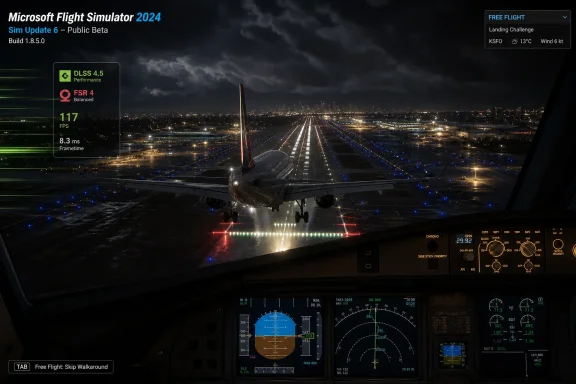
Microsoft and Asobo opened the Microsoft Flight Simulator 2024 Sim Update 6 public beta on July 6, 2026, making build 1.8.5.0 available to testers on Windows PC, Steam, Xbox Series X|S, and PlayStation 5 ahead of a planned July-or-August public release. The headline looks simple — another beta, another patch train — but the substance is more interesting: this is a performance, lighting, and workflow update disguised as a routine maintenance drop. As Windows Central reported, the first test build adds DLSS 4.5, FSR 4 support, airport lighting work, and a much-requested way to skip the pre-flight walkaround in Free Flight. Microsoft’s own Flight Simulator forum release notes make clear that Sim Update 6 is not just adding scenery; it is trying to sand down the places where the 2024 sim still feels slower, heavier, and more procedural than players want.
The public beta matters because Microsoft Flight Simulator 2024 has lived under a sharper microscope than its predecessor. The 2020 reboot had the advantage of novelty: it was a technical marvel, a streaming-world showcase, and a pandemic-era escapist machine. Flight Simulator 2024 launched into a more demanding audience, one that expected not merely a better-looking sim but a more reliable platform for careers, add-ons, aircraft systems, Marketplace purchases, and console parity.
That is why Sim Update 6 arriving in public testing before its final July-or-August release window is not just a courtesy to hobbyists. It is part of Microsoft and Asobo’s broader attempt to make Flight Simulator 2024 feel less like a monolithic release and more like a living service with visible repair work. The beta channel gives power users and simmers a place to validate changes before they land on the stable branch, and it gives Microsoft a way to catch regressions across an unusually fragmented audience of PC rigs, Xbox consoles, Steam installs, Microsoft Store installs, and now PlayStation 5 players.
The initial build, version 1.8.5.0, does not include every feature previously discussed for Sim Update 6 at FSExpo. That is normal for a first beta. What it does include is revealing: rendering upgrades, early airport lighting work, user-interface polish, and practical quality-of-life changes. This is the kind of patch that tells us where the pain points are.
The most important point is that Microsoft is not leading with a new aircraft or a landmark tour. It is leading with the daily texture of using the simulator: how it performs, how quickly a player can get into the cockpit, how airports look at night, and how much friction surrounds common actions. That is the right target.
Flight Simulator is unusually punishing because it is not simply rendering enclosed game levels. It is streaming terrain, weather, photogrammetry, aircraft systems, traffic, glass cockpits, and lighting over a world-scale simulation. Players do not judge performance only by average frame rate; they judge it by smoothness on final approach, stutter during scenery loads, latency in dense airport environments, and whether a long-haul flight remains stable after hours in the air.
That makes modern upscaling a structural requirement rather than a luxury. DLSS 4.5 becoming the default for supported Nvidia RTX hardware is Microsoft acknowledging where high-end simming has already gone. The point is not merely to make the game faster. It is to create enough rendering headroom for the sim’s more demanding ambitions: richer lighting, denser airports, more complex aircraft, higher-resolution displays, and VR-adjacent expectations even from users who are still flying on flat panels.
The AMD side is more complicated. FSR 4 support is welcome, but Windows Central notes that the specific FSR path users get depends on driver support and hardware generation. That means AMD users may see a more uneven benefit than Nvidia RTX users, particularly if they are on older GPUs. The distinction matters because Flight Simulator’s community spans everything from boutique cockpit rigs to aging midrange PCs that survive by carefully tuned settings.
There is also a political subtext here. Flight Simulator has always been one of Microsoft’s great PC-flex titles, the sort of software that justifies expensive GPUs and high-refresh displays while still being sold as a mainstream Xbox and Game Pass product. The more the sim leans on vendor-specific reconstruction and frame-generation technologies, the more its performance story becomes tied to the GPU ecosystem. That is good news for users with recent hardware, but it also widens the gap between “supported” and “pleasant.”
Flight Simulator 2024 made a larger design bet on pre-flight presence. The walkaround feature fits the product’s broader premise: aviation is not just cockpit operation, but inspection, procedure, context, and physical relationship with the aircraft. As an idea, that is defensible. As a required rhythm for quick flying, it can become irritating fast.
Microsoft says the skip option was added following community feedback, and that phrasing is doing real work. Free Flight is the mode where many players go to relax, test hardware, learn a new aircraft, grab screenshots, or spend 20 minutes flying over a familiar city before dinner. Forcing a more procedural start every time risks turning fidelity into resistance. A simulator can model aviation discipline without making every session feel like paperwork.
The change also shows the different audiences Flight Simulator 2024 must serve simultaneously. Career-mode players may want structure, progression, and a sense of aviation labor. Hardcore simmers may want checklists and discipline. Casual pilots may want to spawn cold and dark one day and airborne over the Alps the next. A healthy sim platform does not pick only one of those users; it gives them switches.
That is why the walkaround skip may end up being one of Sim Update 6’s most widely appreciated changes. Not because it is technically impressive, but because it respects time. In software this large, reducing one repeated annoyance can do more for user sentiment than adding a feature used by only a slice of the audience.
This matters because Flight Simulator’s world can look spectacular from 8,000 feet and still break immersion at the point where aviation becomes operational. Airports are not just scenery objects. They are the beginning and end of almost every flight, the place where taxi instructions, approach planning, visibility, signage, and lighting have to make sense.
Missing or weak night lighting is not merely cosmetic. It limits the credibility of night operations, especially in Career mode, where Microsoft wants players to move through structured aviation work rather than isolated sightseeing. If a landing environment is underlit or inconsistent, the sim undermines its own mission design. The aircraft can be beautiful, the weather convincing, and the terrain streamed in from the cloud — but the experience falls apart if the airport behaves like a dark texture pack.
The emphasis on generic airports is also important. Hand-crafted airports and premium Marketplace hubs get attention because they are visible and monetizable. Generic airports are the connective tissue of the simulator. They are where many real-world local flights begin, where bush trips end, and where users discover whether the system is robust outside the glamour locations.
That has always been the core tension in modern Flight Simulator. Microsoft sells the dream of the whole planet, but users experience the product in very specific places. If the global layer improves, the sim gets better for everyone, not just for players flying over a newly updated city or national park.
This is the patch-note equivalent of cleaning a hangar after a storm. None of these items will sell the game in a trailer. Many of them will never be noticed by players who did not personally hit the bug. But each one removes a small piece of distrust from a platform that depends heavily on long-session confidence.
Flight Simulator players are uniquely intolerant of uncertainty because their sessions are long and often self-directed. A bug in a shooter might cost a round. A bug in a flight sim can invalidate a two-hour trip, break a carefully planned approach, or force a restart after a user has already spent 15 minutes configuring weather, route, payload, controls, and camera views. The emotional cost of instability is higher because the game asks for more patience up front.
That is why fixes such as mouse deadzone tuning, taxi ribbon behavior, and cockpit interaction persistence deserve more respect than they usually get. They sit at the boundary between simulation depth and user exhaustion. If basic interaction feels unreliable, users do not blame a subsystem; they blame the sim.
The warning about outdated Community folder packages on PC is also worth taking seriously. Microsoft’s release notes again caution that third-party packages can affect performance and behavior. That is not blame-shifting so much as a reminder that Flight Simulator is a platform, and platforms inherit the fragility of their ecosystems. The same openness that makes the sim vibrant also makes every major update a compatibility event.
On Steam, joining the beta is a familiar branch-selection exercise through the game’s properties menu. On Microsoft Store PC and Xbox, the process runs through the Flight Simulator Insider sign-up and Xbox Insider Hub. On PS5, players access the beta through the PlayStation Store. The fact that this machinery now spans all those platforms says a lot about how much Flight Simulator has changed from a PC-first specialist product into a cross-platform service.
But Microsoft’s own beta guidance contains a caution that should not be ignored. For Microsoft Store PC users, joining or leaving a flight can involve reinstall risk, especially depending on where sim content is installed. The company recommends custom paths for sim content to reduce the chance of a full reinstall when moving between test and public builds.
That warning is not a footnote for anyone with a large Flight Simulator installation. Between base content, cached data, Marketplace purchases, aircraft, liveries, scenery, and community packages, a reinstall can be less like downloading a game and more like rebuilding a workstation. Test builds are useful, but they are not cost-free.
Career mode and Challenge League are also treated separately in the flighting build. Microsoft says Career progress from the live build does not carry into the beta, beta progress does not carry back, and Challenge League leaderboards remain separate. That is the correct choice for testing, but it means players should not treat the beta as an early upgrade path for their main progression.
The practical advice is straightforward: if Flight Simulator 2024 is your nightly hobby machine, think before enrolling. If it is your test bench, your hardware playground, or your way to help shape the platform, the beta is exactly where you should be.
The beta therefore starts a familiar process: the glossy roadmap becomes a sequence of testable builds. That is when community excitement turns into bug reports, forum threads, regression hunting, YouTube walkthroughs, and arguments over whether a feature is implemented deeply enough. For a simulator, that scrutiny is not a problem. It is the operating model.
Bush Trips may be the most emotionally resonant promised addition because they represent a bridge back to Flight Simulator 2020. Many players do not experience Flight Simulator as a sandbox alone; they experience it as curated journeys, structured exploration, and reasons to fly somewhere they would not have chosen on their own. Bringing those trips forward into the 2024 platform is both content preservation and product repair.
The developer-facing helicopter tools are less glamorous to ordinary users, but they could matter more over time. Flight Simulator’s long-term value depends on third-party aircraft creators being able to tune, debug, and trust the platform. Better tools for helicopter behavior, turbulence interpretation, and aircraft assistance systems are investments in the add-on economy, not just the base sim.
That is the real test for Sim Update 6. Microsoft does not need to prove that Flight Simulator 2024 can receive more content. It needs to prove that its platform layer is becoming more stable, more legible, and more useful for the people who build around it.
That rhythm is comforting because it signals commitment. The worst thing for a live simulation platform is silence. Regular updates reassure users that rough edges are being addressed and that the enormous investment in hardware, peripherals, add-ons, and learning will not be stranded.
But a packed roadmap also creates risk. Every update touches aircraft, scenery, avionics, input systems, Marketplace content, streaming behavior, and third-party packages. The more frequent the cadence, the more important beta discipline becomes. A beautiful roadmap can become a treadmill if each release fixes one class of problems while introducing another.
Microsoft and Asobo are trying to thread a difficult needle. They must keep Flight Simulator 2024 visibly improving for players who felt the launch state was not where it should have been. They must maintain compatibility for a broad add-on ecosystem. They must keep console users from feeling like second-class citizens while not flattening the PC version’s ambitions. And they must do all of this for a product whose users often notice tiny deviations in aircraft behavior, lighting logic, and navigation data.
That is why Sim Update 6 should be judged less by the novelty of its feature list and more by whether it reduces the sense of friction. Does the sim start more cleanly? Does it hold frame pacing better? Are night airports more credible? Do controls and UI states persist as expected? Can users get into the air with fewer rituals when they want to?
The opportunity now is to turn a promising beta into a boringly reliable public update, which is exactly the kind of achievement a platform this ambitious needs. Flight Simulator 2024 will always chase spectacle — clouds, mountains, cities, aircraft, and the strange romance of seeing your own neighborhood from the air — but its future will be decided in quieter places: frame pacing on approach, readable airports at night, clean upgrade paths, and the confidence that when you finally click “Fly,” the simulator is ready to get out of the way.
 Microsoft Puts the Next Fix in Players’ Hands Early
The public beta matters because Microsoft Flight Simulator 2024 has lived under a sharper microscope than its predecessor. The 2020 reboot had the advantage of novelty: it was a technical marvel, a streaming-world showcase, and a pandemic-era escapist machine. Flight Simulator 2024 launched into a more demanding audience, one that expected not merely a better-looking sim but a more reliable platform for careers, add-ons, aircraft systems, Marketplace purchases, and console parity.That is why Sim Update 6 arriving in public testing before its final July-or-August release window is not just a courtesy to hobbyists. It is part of Microsoft and Asobo’s broader attempt to make Flight Simulator 2024 feel less like a monolithic release and more like a living service with visible repair work. The beta channel gives power users and simmers a place to validate changes before they land on the stable branch, and it gives Microsoft a way to catch regressions across an unusually fragmented audience of PC rigs, Xbox consoles, Steam installs, Microsoft Store installs, and now PlayStation 5 players.
The initial build, version 1.8.5.0, does not include every feature previously discussed for Sim Update 6 at FSExpo. That is normal for a first beta. What it does include is revealing: rendering upgrades, early airport lighting work, user-interface polish, and practical quality-of-life changes. This is the kind of patch that tells us where the pain points are.
The most important point is that Microsoft is not leading with a new aircraft or a landmark tour. It is leading with the daily texture of using the simulator: how it performs, how quickly a player can get into the cockpit, how airports look at night, and how much friction surrounds common actions. That is the right target.
Upscaling Is Now a Core Flight System
The most technically consequential change in the beta is the graphics stack. Sim Update 6 upgrades Nvidia DLSS to version 4.5 and adds support for AMD FSR 4, according to the release coverage from Windows Central and the Microsoft Flight Simulator community notes. In a normal PC game, that would be a bullet point for the settings menu. In Flight Simulator, it is closer to an avionics upgrade.Flight Simulator is unusually punishing because it is not simply rendering enclosed game levels. It is streaming terrain, weather, photogrammetry, aircraft systems, traffic, glass cockpits, and lighting over a world-scale simulation. Players do not judge performance only by average frame rate; they judge it by smoothness on final approach, stutter during scenery loads, latency in dense airport environments, and whether a long-haul flight remains stable after hours in the air.
That makes modern upscaling a structural requirement rather than a luxury. DLSS 4.5 becoming the default for supported Nvidia RTX hardware is Microsoft acknowledging where high-end simming has already gone. The point is not merely to make the game faster. It is to create enough rendering headroom for the sim’s more demanding ambitions: richer lighting, denser airports, more complex aircraft, higher-resolution displays, and VR-adjacent expectations even from users who are still flying on flat panels.
The AMD side is more complicated. FSR 4 support is welcome, but Windows Central notes that the specific FSR path users get depends on driver support and hardware generation. That means AMD users may see a more uneven benefit than Nvidia RTX users, particularly if they are on older GPUs. The distinction matters because Flight Simulator’s community spans everything from boutique cockpit rigs to aging midrange PCs that survive by carefully tuned settings.
There is also a political subtext here. Flight Simulator has always been one of Microsoft’s great PC-flex titles, the sort of software that justifies expensive GPUs and high-refresh displays while still being sold as a mainstream Xbox and Game Pass product. The more the sim leans on vendor-specific reconstruction and frame-generation technologies, the more its performance story becomes tied to the GPU ecosystem. That is good news for users with recent hardware, but it also widens the gap between “supported” and “pleasant.”
The Walkaround Skip Is Small Because the Friction Was Big
The beta’s new option to start a Free Flight session without a walkaround sounds almost comically minor. It is not. It is one of those changes that reveals whether a developer is listening to how people actually use a game after launch.Flight Simulator 2024 made a larger design bet on pre-flight presence. The walkaround feature fits the product’s broader premise: aviation is not just cockpit operation, but inspection, procedure, context, and physical relationship with the aircraft. As an idea, that is defensible. As a required rhythm for quick flying, it can become irritating fast.
Microsoft says the skip option was added following community feedback, and that phrasing is doing real work. Free Flight is the mode where many players go to relax, test hardware, learn a new aircraft, grab screenshots, or spend 20 minutes flying over a familiar city before dinner. Forcing a more procedural start every time risks turning fidelity into resistance. A simulator can model aviation discipline without making every session feel like paperwork.
The change also shows the different audiences Flight Simulator 2024 must serve simultaneously. Career-mode players may want structure, progression, and a sense of aviation labor. Hardcore simmers may want checklists and discipline. Casual pilots may want to spawn cold and dark one day and airborne over the Alps the next. A healthy sim platform does not pick only one of those users; it gives them switches.
That is why the walkaround skip may end up being one of Sim Update 6’s most widely appreciated changes. Not because it is technically impressive, but because it respects time. In software this large, reducing one repeated annoyance can do more for user sentiment than adding a feature used by only a slice of the audience.
Night Flying Exposes the Difference Between Scenery and Infrastructure
Airport lighting is another deceptively practical change. The beta adds lights to generic airports, with Microsoft indicating that broader improvements will continue through Sim Update 6. Windows Central’s earlier FSExpo coverage said the update is expected to bring a significant lighting pass, including automatically added apron lighting to thousands of airports and fixes for missing runway lights at hundreds more.This matters because Flight Simulator’s world can look spectacular from 8,000 feet and still break immersion at the point where aviation becomes operational. Airports are not just scenery objects. They are the beginning and end of almost every flight, the place where taxi instructions, approach planning, visibility, signage, and lighting have to make sense.
Missing or weak night lighting is not merely cosmetic. It limits the credibility of night operations, especially in Career mode, where Microsoft wants players to move through structured aviation work rather than isolated sightseeing. If a landing environment is underlit or inconsistent, the sim undermines its own mission design. The aircraft can be beautiful, the weather convincing, and the terrain streamed in from the cloud — but the experience falls apart if the airport behaves like a dark texture pack.
The emphasis on generic airports is also important. Hand-crafted airports and premium Marketplace hubs get attention because they are visible and monetizable. Generic airports are the connective tissue of the simulator. They are where many real-world local flights begin, where bush trips end, and where users discover whether the system is robust outside the glamour locations.
That has always been the core tension in modern Flight Simulator. Microsoft sells the dream of the whole planet, but users experience the product in very specific places. If the global layer improves, the sim gets better for everyone, not just for players flying over a newly updated city or national park.
The Patch Notes Read Like a Map of Daily Irritation
The official 1.8.5.0 notes are long, and their value is not in any single fix. It is in the pattern. Microsoft lists changes for UI behavior, weather synchronization, fuel and payload data, taxi ribbons, subtitles, rolling cache handling, text sizing, world search, cockpit interaction settings, ATC frequency behavior, and controller inputs.This is the patch-note equivalent of cleaning a hangar after a storm. None of these items will sell the game in a trailer. Many of them will never be noticed by players who did not personally hit the bug. But each one removes a small piece of distrust from a platform that depends heavily on long-session confidence.
Flight Simulator players are uniquely intolerant of uncertainty because their sessions are long and often self-directed. A bug in a shooter might cost a round. A bug in a flight sim can invalidate a two-hour trip, break a carefully planned approach, or force a restart after a user has already spent 15 minutes configuring weather, route, payload, controls, and camera views. The emotional cost of instability is higher because the game asks for more patience up front.
That is why fixes such as mouse deadzone tuning, taxi ribbon behavior, and cockpit interaction persistence deserve more respect than they usually get. They sit at the boundary between simulation depth and user exhaustion. If basic interaction feels unreliable, users do not blame a subsystem; they blame the sim.
The warning about outdated Community folder packages on PC is also worth taking seriously. Microsoft’s release notes again caution that third-party packages can affect performance and behavior. That is not blame-shifting so much as a reminder that Flight Simulator is a platform, and platforms inherit the fragility of their ecosystems. The same openness that makes the sim vibrant also makes every major update a compatibility event.
The Beta Is Cross-Platform, but the Risk Is Not Equal
The Sim Update 6 beta is available across Steam, Windows PC through the Microsoft Store and Xbox app path, Xbox Series X|S, and PlayStation 5. That breadth is impressive. It also means the word beta does not mean the same thing for every participant.On Steam, joining the beta is a familiar branch-selection exercise through the game’s properties menu. On Microsoft Store PC and Xbox, the process runs through the Flight Simulator Insider sign-up and Xbox Insider Hub. On PS5, players access the beta through the PlayStation Store. The fact that this machinery now spans all those platforms says a lot about how much Flight Simulator has changed from a PC-first specialist product into a cross-platform service.
But Microsoft’s own beta guidance contains a caution that should not be ignored. For Microsoft Store PC users, joining or leaving a flight can involve reinstall risk, especially depending on where sim content is installed. The company recommends custom paths for sim content to reduce the chance of a full reinstall when moving between test and public builds.
That warning is not a footnote for anyone with a large Flight Simulator installation. Between base content, cached data, Marketplace purchases, aircraft, liveries, scenery, and community packages, a reinstall can be less like downloading a game and more like rebuilding a workstation. Test builds are useful, but they are not cost-free.
Career mode and Challenge League are also treated separately in the flighting build. Microsoft says Career progress from the live build does not carry into the beta, beta progress does not carry back, and Challenge League leaderboards remain separate. That is the correct choice for testing, but it means players should not treat the beta as an early upgrade path for their main progression.
The practical advice is straightforward: if Flight Simulator 2024 is your nightly hobby machine, think before enrolling. If it is your test bench, your hardware playground, or your way to help shape the platform, the beta is exactly where you should be.
FSExpo’s Promises Are Now Entering the Accountability Phase
Sim Update 6 was previewed at FSExpo with a broader set of features than this first beta exposes. Windows Central’s coverage of that presentation highlighted downdraft airflow visualization, helicopter debug tools for developers, turbulence warnings, Career mode filtering changes, the return of Bush Trips from Microsoft Flight Simulator 2020, and a larger airport night-lighting overhaul.The beta therefore starts a familiar process: the glossy roadmap becomes a sequence of testable builds. That is when community excitement turns into bug reports, forum threads, regression hunting, YouTube walkthroughs, and arguments over whether a feature is implemented deeply enough. For a simulator, that scrutiny is not a problem. It is the operating model.
Bush Trips may be the most emotionally resonant promised addition because they represent a bridge back to Flight Simulator 2020. Many players do not experience Flight Simulator as a sandbox alone; they experience it as curated journeys, structured exploration, and reasons to fly somewhere they would not have chosen on their own. Bringing those trips forward into the 2024 platform is both content preservation and product repair.
The developer-facing helicopter tools are less glamorous to ordinary users, but they could matter more over time. Flight Simulator’s long-term value depends on third-party aircraft creators being able to tune, debug, and trust the platform. Better tools for helicopter behavior, turbulence interpretation, and aircraft assistance systems are investments in the add-on economy, not just the base sim.
That is the real test for Sim Update 6. Microsoft does not need to prove that Flight Simulator 2024 can receive more content. It needs to prove that its platform layer is becoming more stable, more legible, and more useful for the people who build around it.
The Roadmap Is Packed, and That Is Both Comforting and Dangerous
Flight Simulator 2024 has had a busy summer cadence. City Update 15 arrived with new locations in the Upper Midwest, and World Update 22 focused on U.S. national parks and monuments. Sim Update 6 follows as the systems-heavy release in the sequence, while Windows Central has reported that Sim Update 7 is planned for October.That rhythm is comforting because it signals commitment. The worst thing for a live simulation platform is silence. Regular updates reassure users that rough edges are being addressed and that the enormous investment in hardware, peripherals, add-ons, and learning will not be stranded.
But a packed roadmap also creates risk. Every update touches aircraft, scenery, avionics, input systems, Marketplace content, streaming behavior, and third-party packages. The more frequent the cadence, the more important beta discipline becomes. A beautiful roadmap can become a treadmill if each release fixes one class of problems while introducing another.
Microsoft and Asobo are trying to thread a difficult needle. They must keep Flight Simulator 2024 visibly improving for players who felt the launch state was not where it should have been. They must maintain compatibility for a broad add-on ecosystem. They must keep console users from feeling like second-class citizens while not flattening the PC version’s ambitions. And they must do all of this for a product whose users often notice tiny deviations in aircraft behavior, lighting logic, and navigation data.
That is why Sim Update 6 should be judged less by the novelty of its feature list and more by whether it reduces the sense of friction. Does the sim start more cleanly? Does it hold frame pacing better? Are night airports more credible? Do controls and UI states persist as expected? Can users get into the air with fewer rituals when they want to?
The Sim Update 6 Beta Tells Simmers Where Microsoft Is Looking
The first beta is not the whole update, but it gives a clear picture of Microsoft’s priorities. The most concrete lesson is that the company is focusing on rendering technology, operational lighting, and repeated user annoyances rather than treating Sim Update 6 as a scenery showcase.- Sim Update 6 beta build 1.8.5.0 became available on July 6, 2026, ahead of a planned public release window in July or August.
- The beta upgrades Nvidia DLSS to version 4.5 and adds AMD FSR 4 support, though the AMD experience depends on hardware and driver support.
- Free Flight now includes an option to start without a walkaround, a small but meaningful concession to players who want faster cockpit access.
- Generic airports begin receiving added lights in this beta, with broader night-lighting improvements expected as Sim Update 6 develops.
- Career mode and Challenge League progress in the beta are separate from the live build, so testers should not treat flighting as a progression shortcut.
- PC users, especially on the Microsoft Store path, should read Microsoft’s reinstall and Community folder warnings before joining the test branch.
The opportunity now is to turn a promising beta into a boringly reliable public update, which is exactly the kind of achievement a platform this ambitious needs. Flight Simulator 2024 will always chase spectacle — clouds, mountains, cities, aircraft, and the strange romance of seeing your own neighborhood from the air — but its future will be decided in quieter places: frame pacing on approach, readable airports at night, clean upgrade paths, and the confidence that when you finally click “Fly,” the simulator is ready to get out of the way.
References
- Primary source: Windows Central
Published: 2026-07-07T14:52:08.078327
Microsoft Flight Simulator 2024 Sim Update 6 is on the way and you can already try it early | Windows Central
Sim Update 6 is due at some point in July or August, but if you want to jump on the beta, you can start testing it now.www.windowscentral.com - Related coverage: msfsaddons.com
MSFS 2024 Sim Update 6 beta arrives with DLSS 4.5, optional walkaround skip, and lights at generic airports - MSFS Addons
Build 1.8.5.0 opens the next beta cycle with a new upscaling pipeline, ILS alignment fixes, and one of the most requested quality-of-life options since launch.msfsaddons.com