

Microsoft has added more Copilot entry points to Microsoft Forms and Word for iPad this week, bringing a new chat-based Forms experience to commercial Microsoft 365 Copilot users worldwide and extending in-place AI document editing to iPad users on Word version 2.109 or later.
The changes, first spotted by Neowin and backed by Microsoft’s support and Microsoft 365 Insider materials, are not a major product launch. They are another sign of Microsoft’s current Copilot strategy: put the assistant directly in the workflow, make it context-aware, and reduce the number of places where users have to go looking for it.
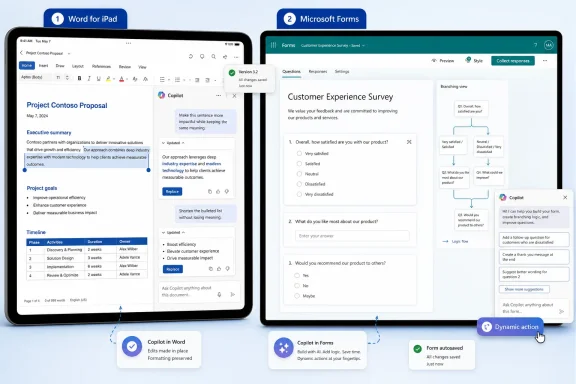
In Microsoft Forms, Copilot is being tied into Microsoft 365 Copilot Chat and surfaced through a floating Dynamic Action Button in the lower-right corner of the form editor. Microsoft has been using that button pattern across Office apps, and its support documentation describes it as a way to expose contextual Copilot actions inside Word, Excel, and PowerPoint.
For Forms authors, the practical change is that Copilot can now work against the active form rather than acting only as a more generic drafting helper. Microsoft says Copilot in Forms can already help generate surveys, polls, and quizzes, review questions for quality, suggest improvements, and assist with analysis. The updated experience adds a more conversational layer for tasks such as improving layout, reorganizing sections, identifying missing questions, checking conflicting settings, making bulk edits, and summarizing results.
Microsoft is also adding support for basic branching logic through the AI assistant. That is useful for common survey flows, such as sending respondents to different questions based on a previous answer, but it is not a replacement for careful form review. Complex branching scenarios are still limited, so admins and form owners should manually validate logic before distributing anything important.
The new Forms experience is rolling out worldwide for Microsoft 365 commercial Copilot users. Consumer users will continue to see the older Copilot integration for now.
The feature lets Copilot make edits directly inside the open document while preserving formatting and structure through Word styles. Users can open a document, tap Edit document, select the Copilot button, and ask for revisions through the chat interface. Microsoft says changes can be previewed before being applied, and users can roll them back if the result is not useful.
There are still limits. Copilot cannot create a new document from this iPad feature, insert images, or add and edit comments. It is aimed at rewriting, restructuring, and refining an existing document rather than replacing the full authoring workflow.
Organizations already licensing Microsoft 365 Copilot should expect more user questions about where Copilot appears, why experiences differ by app and license, and whether AI-generated edits are subject to the same review rules as manual edits. For Forms in particular, branching logic created by Copilot should be treated as draft automation, not trusted configuration.
Users who want the Word for iPad feature should update to version 2.109 or later and sign in with an account that has Microsoft 365 Copilot access.
The changes, first spotted by Neowin and backed by Microsoft’s support and Microsoft 365 Insider materials, are not a major product launch. They are another sign of Microsoft’s current Copilot strategy: put the assistant directly in the workflow, make it context-aware, and reduce the number of places where users have to go looking for it.
 Copilot gets deeper into Forms
In Microsoft Forms, Copilot is being tied into Microsoft 365 Copilot Chat and surfaced through a floating Dynamic Action Button in the lower-right corner of the form editor. Microsoft has been using that button pattern across Office apps, and its support documentation describes it as a way to expose contextual Copilot actions inside Word, Excel, and PowerPoint.For Forms authors, the practical change is that Copilot can now work against the active form rather than acting only as a more generic drafting helper. Microsoft says Copilot in Forms can already help generate surveys, polls, and quizzes, review questions for quality, suggest improvements, and assist with analysis. The updated experience adds a more conversational layer for tasks such as improving layout, reorganizing sections, identifying missing questions, checking conflicting settings, making bulk edits, and summarizing results.
Microsoft is also adding support for basic branching logic through the AI assistant. That is useful for common survey flows, such as sending respondents to different questions based on a previous answer, but it is not a replacement for careful form review. Complex branching scenarios are still limited, so admins and form owners should manually validate logic before distributing anything important.
The new Forms experience is rolling out worldwide for Microsoft 365 commercial Copilot users. Consumer users will continue to see the older Copilot integration for now.
Word for iPad catches up
Word for iPad is getting a Copilot editing feature that Microsoft has already made available in other Word clients. According to Microsoft’s Microsoft 365 Insider post, “co-create documents with Copilot in Word for iPad” is available to users with Microsoft 365 Copilot access on Word for iPad version 2.109, build 26051516, or later.The feature lets Copilot make edits directly inside the open document while preserving formatting and structure through Word styles. Users can open a document, tap Edit document, select the Copilot button, and ask for revisions through the chat interface. Microsoft says changes can be previewed before being applied, and users can roll them back if the result is not useful.
There are still limits. Copilot cannot create a new document from this iPad feature, insert images, or add and edit comments. It is aimed at rewriting, restructuring, and refining an existing document rather than replacing the full authoring workflow.
What admins should note
For WindowsForum readers managing Microsoft 365 tenants, the main issue is less the individual feature and more the spread of Copilot surfaces across apps and devices. Forms now gets a more prominent Copilot Chat entry point, while iPad users gain a document-editing capability that may affect how reviewed or regulated content is changed on mobile devices.Organizations already licensing Microsoft 365 Copilot should expect more user questions about where Copilot appears, why experiences differ by app and license, and whether AI-generated edits are subject to the same review rules as manual edits. For Forms in particular, branching logic created by Copilot should be treated as draft automation, not trusted configuration.
Users who want the Word for iPad feature should update to version 2.109 or later and sign in with an account that has Microsoft 365 Copilot access.
References
- Primary source: Neowin
Published: 2026-07-08T08:50:10.535050
Loading…
www.neowin.net - Official source: support.microsoft.com
The Copilot Dynamic Action Button in Word Excel and PowerPoint | Microsoft Support
Learn about the Copilot Dynamic Action Button (DAB) in Word, Excel, and PowerPoint - how to open Copilot, dock the button, and find it if it's missing.support.microsoft.com - Official source: microsoft.com
Loading…
www.microsoft.com - Official source: techcommunity.microsoft.com
Loading…
techcommunity.microsoft.com - Official source: blogs.microsoft.com
Introducing Microsoft Dynamics 365 Copilot, the world’s first copilot in both CRM and ERP, that brings next-generation AI to every line of business - The Official Microsoft Blog
Today, we’re announcing the next generation of AI product updates across our business applications portfolio, including the launch of the new Microsoft Dynamics 365 Copilot – providing interactive, AI-powered assistance across business functions. According to our recent survey on business...blogs.microsoft.com - Related coverage: windowscentral.com
Microsoft 365 is paywalling most of Copilot in its Office apps | Windows Central
Commercial customers will soon need a Microsoft 365 Copilot license to use Copilot Chat in Word, Excel, PowerPoint, and OneNote.www.windowscentral.com
- Related coverage: axios.com
Microsoft Copilot Checkout launches with Shopify, PayPal, Etsy, Stripe
Microsoft is pushing shopping — and checkout — directly into its Copilot assistant, the company announced Thursday.www.axios.com
- Related coverage: office-watch.com
Loading…
office-watch.com - Official source: cdn-dynmedia-1.microsoft.com
- Official source: learn.microsoft.com
Loading…
learn.microsoft.com - Related coverage: cdn.graph.office.net
Loading…
cdn.graph.office.net - Related coverage: aldridge.com
microsoft copilot in 2025
</rdf:Alt> </dc:description> <dc:creator> <rdf:Seq> <rdf:li>Mason Conealdridge.com