

Microsoft Graph Toolkit reaches full retirement on August 28, 2026, but organizations should not treat that date as an automatic shutdown switch. Existing bundled code may continue to execute; the practical question is whether each SharePoint Framework or Teams web part can responsibly retain an unsupported dependency involved in Microsoft 365 authentication, permissions, Graph data, or user-facing workflows.
Microsoft’s Graph Toolkit overview confirms the retirement date. By then, every deployment should have one of three outcomes: a supported replacement, a documented and time-limited freeze, or removal.
A tenant-wide rule such as “remove all MGT immediately” or “freeze everything” ignores how differently organizations use the Toolkit. A read-only directory tile on a restricted intranet page does not present the same operational exposure as an identity selector embedded in an approval process.
WindowsForum user reports about Microsoft 365 retirements consistently illustrate the planning problem: several lifecycle changes can compete for the same administrators, developers, testers, and business owners. WindowsForum’s coverage of Project Online retirement, for example, focuses on PMO migration and governance rather than treating retirement as a simple software uninstall. Its reports on Teams dropping older Windows support likewise show how a platform change can affect endpoints, deployment policy, and workflow continuity simultaneously.
Apply that same discipline to MGT. Start with an inventory that covers:
The package history can also create false reassurance. MGT v4 removed
If a part falls into more than one row, use the more restrictive outcome. “Read-only” is not enough to justify a freeze if the part exposes sensitive profile or organizational data to a broad audience.
A people picker is more than a text field with search results. A replacement may need to query appropriate Graph data, distinguish similar identities, preserve selected values, enforce selection rules, support keyboard and screen-reader interaction, and pass a validated identity object to the surrounding workflow. It must also behave correctly when the user lacks permission, a result is missing expected fields, or Graph returns no matching data.
Person Card presents a related product-design problem. Replacing it requires decisions about which profile fields to retrieve, what the user may see, how missing data appears, and whether any associated action belongs in the new interface.
Treat these as product rebuilds, not package substitutions. Microsoft points developers toward Microsoft Graph SDKs for Graph access and Fluent UI Web Components for interface construction, but not every MGT component has a direct modern equivalent. Fluent UI supplies visual and interaction building blocks; it does not recreate Graph-aware behavior through an import change.
Other MGT-based experiences should be ranked by what they actually do, not by their component names. A control that writes Microsoft 365 data, influences an approval, or participates in a permission-sensitive process belongs near the front of the queue. A display-only component may be lower risk, but its endpoint, permissions, audience, and data classification still require review.
WindowsForum’s report on Microsoft retiring legacy external meeting controls in Teams is separate coverage, not evidence about MGT’s lifecycle. It is nevertheless a useful planning reminder: Microsoft may remove older client-side integration paths even when organizations still find them useful. Teams applications and SPFx parts therefore need explicit ownership rather than an assumption that a useful integration will remain supported indefinitely.
A responsible freeze should include all of the following:
For organizations with formal support, accessibility, vendor-management, or software-lifecycle requirements, unsupported status may itself rule out a freeze. A web part does not have to fail visibly before it violates internal policy.
Define how the host supplies identity and tokens, place Graph requests behind a small application-owned service layer, and let the UI consume typed application data. Use Microsoft Graph SDKs for Graph access and Fluent UI components where they fit the required interface.
This separation makes failures easier to diagnose. Authentication errors can be distinguished from denied permissions, Graph errors, empty datasets, rendering defects, and failures in the underlying business action. It also allows a later UI-library change without another rewrite of token and data-access logic.
Use this implementation sequence for each replacement:
Migration is also an opportunity to revisit consent. Request only the Graph access required for the defined behavior. An older component’s permissions are not proof that the replacement needs the same breadth of access.
WindowsForum users tracking broader Microsoft 365 feature retirements have emphasized the cumulative effect on sysadmins. That context matters directly to MGT planning: organizations should reserve development and acceptance-testing capacity according to data sensitivity and business impact, not simply according to which retirement project is most visible.
Identity selection, write actions, sensitive data, and business-critical workflows should be rebuilt now. Internal read-only parts may receive a short freeze only when they have limited scope, an owner, an approved exception, and a fixed end date. Abandoned or ownerless parts should be removed.
That approach converts the retirement from a vague dependency concern into a manageable portfolio of applications, permissions, business owners, and deadlines.
Is upgrading to
No. That package addressed the SPFx integration path after
Microsoft’s Graph Toolkit overview confirms the retirement date. By then, every deployment should have one of three outcomes: a supported replacement, a documented and time-limited freeze, or removal.
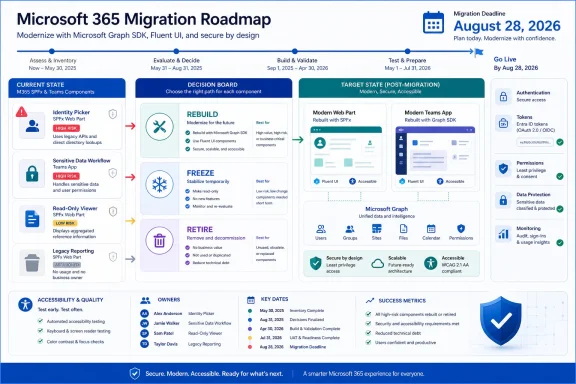 Make the Decision Per Web Part, Not Per Tenant
A tenant-wide rule such as “remove all MGT immediately” or “freeze everything” ignores how differently organizations use the Toolkit. A read-only directory tile on a restricted intranet page does not present the same operational exposure as an identity selector embedded in an approval process.WindowsForum user reports about Microsoft 365 retirements consistently illustrate the planning problem: several lifecycle changes can compete for the same administrators, developers, testers, and business owners. WindowsForum’s coverage of Project Online retirement, for example, focuses on PMO migration and governance rather than treating retirement as a simple software uninstall. Its reports on Teams dropping older Windows support likewise show how a platform change can affect endpoints, deployment policy, and workflow continuity simultaneously.
Apply that same discipline to MGT. Start with an inventory that covers:
- Imports from
@microsoft/mgt-components, MGT React packages, customized wrappers, and SPFx integration packages. - Custom elements in templates, JSX, or runtime-generated markup.
- Shared libraries that may conceal MGT behind organization-specific component names.
- MGT v4 registration modules, because v4 components can be registered explicitly rather than appearing only as obvious imports.
- Authentication providers, Graph calls, required permissions, deployment scope, business owner, and data sensitivity.
- Whether the part only displays data or participates in identity selection, writes, access decisions, or critical business actions.
The package history can also create false reassurance. MGT v4 removed
@microsoft/mgt-spfx from the SharePoint Framework integration path in favor of @microsoft/mgt-spfx-utils. Adopting that utility addressed an earlier packaging change; it did not remove the application’s reliance on the Toolkit now being retired.Decision matrix
| Web-part profile | Decision | Required threshold |
|---|---|---|
| Selects identities, performs write actions, exposes sensitive data, or supports a business-critical workflow | Rebuild now | Any one of these conditions is enough to require active migration |
| Internal, read-only, narrowly deployed, and limited in scope | Freeze temporarily | Must also have a named owner, documented exception, replacement or removal plan, and fixed end date |
| Abandoned, duplicative, ownerless, or no longer tied to a valid business need | Retire | Remove the package and deployment rather than carrying it into another lifecycle |
Put Identity and Permission Workflows First
The highest-priority rebuilds are components where a person’s selection or displayed identity drives another action. Microsoft’s retirement material highlights the migration gap around People Picker and Person Card because Fluent UI does not provide a one-for-one replacement for the complete MGT experience.A people picker is more than a text field with search results. A replacement may need to query appropriate Graph data, distinguish similar identities, preserve selected values, enforce selection rules, support keyboard and screen-reader interaction, and pass a validated identity object to the surrounding workflow. It must also behave correctly when the user lacks permission, a result is missing expected fields, or Graph returns no matching data.
Person Card presents a related product-design problem. Replacing it requires decisions about which profile fields to retrieve, what the user may see, how missing data appears, and whether any associated action belongs in the new interface.
Treat these as product rebuilds, not package substitutions. Microsoft points developers toward Microsoft Graph SDKs for Graph access and Fluent UI Web Components for interface construction, but not every MGT component has a direct modern equivalent. Fluent UI supplies visual and interaction building blocks; it does not recreate Graph-aware behavior through an import change.
Other MGT-based experiences should be ranked by what they actually do, not by their component names. A control that writes Microsoft 365 data, influences an approval, or participates in a permission-sensitive process belongs near the front of the queue. A display-only component may be lower risk, but its endpoint, permissions, audience, and data classification still require review.
WindowsForum’s report on Microsoft retiring legacy external meeting controls in Teams is separate coverage, not evidence about MGT’s lifecycle. It is nevertheless a useful planning reminder: Microsoft may remove older client-side integration paths even when organizations still find them useful. Teams applications and SPFx parts therefore need explicit ownership rather than an assumption that a useful integration will remain supported indefinitely.
A Freeze Is an Exception, Not a Migration Plan
A temporary freeze can be defensible for an internal, read-only, limited-scope part that is operationally stable and already scheduled for replacement or removal. It is difficult to justify for a part that obtains tokens, writes Microsoft 365 data, selects users, exposes sensitive information, or supports a critical process.A responsible freeze should include all of the following:
- Lock the exact MGT packages and versions instead of permitting drift through broad dependency ranges.
- Preserve the source, build process, deployment package, and required toolchain in reproducible form.
- Assign a named technical owner and business owner.
- Record a fixed end date and approved exception.
- Review and reduce Graph permissions where possible.
- Document the authentication path and deployment scope.
- Maintain repeatable tests for sign-in, token acquisition, denied permissions, Graph responses, empty results, rendering, and the principal business action.
- Provide monitoring and a rollback or disablement method.
- Record that the organization, rather than Microsoft support, owns the decision to continue operating the retired dependency.
For organizations with formal support, accessibility, vendor-management, or software-lifecycle requirements, unsupported status may itself rule out a freeze. A web part does not have to fail visibly before it violates internal policy.
Rebuild Authentication, Data Access, and UI as Separate Layers
MGT’s convenience came from combining several concerns. A migration should separate them rather than creating an organization-specific monolith with a new name.Define how the host supplies identity and tokens, place Graph requests behind a small application-owned service layer, and let the UI consume typed application data. Use Microsoft Graph SDKs for Graph access and Fluent UI components where they fit the required interface.
This separation makes failures easier to diagnose. Authentication errors can be distinguished from denied permissions, Graph errors, empty datasets, rendering defects, and failures in the underlying business action. It also allows a later UI-library change without another rewrite of token and data-access logic.
Use this implementation sequence for each replacement:
- Locate package imports, custom elements, shared wrappers, and runtime references.
- Identify MGT v4 component-registration modules.
- Map each component to its Graph calls, data fields, delegated or application permissions, and business behavior.
- Design the replacement using a Microsoft Graph SDK-backed service layer plus Fluent UI where appropriate.
- Test authentication, expired or unavailable tokens, denied permissions, Graph errors, empty data, incomplete records, and the principal business action.
- Validate keyboard use, focus behavior, accessible names, loading states, and error messages.
- Compare the replacement with the existing workflow using representative users and permission levels.
- Remove MGT imports, registrations, provider setup, transitive dependencies, and unused permissions.
- Confirm that MGT is absent from the production bundle before closing the migration item.
Migration is also an opportunity to revisit consent. Request only the Graph access required for the defined behavior. An older component’s permissions are not proof that the replacement needs the same breadth of access.
WindowsForum users tracking broader Microsoft 365 feature retirements have emphasized the cumulative effect on sysadmins. That context matters directly to MGT planning: organizations should reserve development and acceptance-testing capacity according to data sensitivity and business impact, not simply according to which retirement project is most visible.
Ownership Must Be Settled Before August 28, 2026
The key deliverable is not a promise that every component will be rewritten at once. It is an accountable disposition for every MGT-dependent part.Identity selection, write actions, sensitive data, and business-critical workflows should be rebuilt now. Internal read-only parts may receive a short freeze only when they have limited scope, an owner, an approved exception, and a fixed end date. Abandoned or ownerless parts should be removed.
That approach converts the retirement from a vague dependency concern into a manageable portfolio of applications, permissions, business owners, and deadlines.
Frequently Asked Questions
Will every MGT web part stop working on August 28, 2026?
The retirement date should not be interpreted as a universal technical shutdown date. Organizations should evaluate continued operation as an unsupported-dependency decision rather than waiting for visible failure.Is upgrading to @microsoft/mgt-spfx-utils enough?
No. That package addressed the SPFx integration path after @microsoft/mgt-spfx was removed in MGT v4. It does not migrate an application away from Microsoft Graph Toolkit.Can Fluent UI directly replace MGT components?
Not necessarily. Fluent UI can provide interface components and design patterns, but application teams must still implement Graph access, permissions, state management, error handling, and business behavior. People Picker and Person Card require particular design attention because there is no simple one-for-one substitution for the complete MGT experience.Which web parts should be migrated first?
Rebuild any part that selects identities, performs write actions, exposes sensitive data, or supports a business-critical workflow. Consider a temporary freeze only for limited-scope, internal, read-only parts with an owner and end date.What must be tested before removing MGT?
Test authentication, token failures, denied permissions, Graph errors, empty and incomplete data, accessibility behavior, and the principal business action. Then remove MGT registrations and dependencies, reduce unnecessary permissions, and verify that the Toolkit is no longer present in the production bundle.References
- Primary source: learn.microsoft.com
Microsoft Graph Toolkit overview - Microsoft Graph | Microsoft Learn
Use Microsoft Graph Toolkit to find authentication providers and reusable, framework-agnostic web components for accessing and working with Microsoft Graph.learn.microsoft.com - Independent coverage: devblogs.microsoft.com
Microsoft Graph CLI retirement - Microsoft 365 Developer Blog
We are announcing the retirement of the Microsoft Graph command-line interface (CLI). The Microsoft Graph CLI has served as a powerful tool for developersdevblogs.microsoft.com - Independent coverage: github.com
Releases · microsoftgraph/microsoft-graph-toolkit · GitHub
Authentication Providers and UI components for Microsoft Graph 🦒 - Releases · microsoftgraph/microsoft-graph-toolkit github.com
- Primary source: WindowsForum
Microsoft Teams Retires Legacy External Meeting Controls (June 30, 2026) | Windows Forum
Microsoft’s latest Teams cleanup is another sign that Redmond is actively pruning older client-side integrations in the name of security, even when those...windowsforum.com