

Microsoft’s little bitmap editor is no longer just nostalgia — it’s a testbed for UI tweaks and generative AI, and the company now faces a clear crossroads: gently modernize Paint while preserving the simple, predictable experience millions expect, or push harder into new territory and risk alienating that same audience.
Microsoft Paint launched with Windows 1.0 and for decades has been the quintessential low-friction image tool: fast to open, simple to use, and reliable for ad-hoc edits, annotations, and pixel art. That cultural status turned every attempted change into a headline and every proposed replacement into a debate about legacy stewardship versus product evolution. The most visible example was Paint 3D — introduced as a modern successor focused on 3D and touch-first workflows — which failed to find broad adoption and was formally deprecated and removed from the Microsoft Store in late 2024. Microsoft’s documentation confirms Paint 3D was deprecated and removed from the Store on November 4, 2024. That episode left two important lessons: first, users love the simple, deterministic behavior of classic Paint; second, Microsoft is willing to experiment and pivot aggressively when product fit or strategic priorities change. The question now is whether Paint should remain a conservative, stable utility or evolve into a modern creative surface that embraces AI and subscription economics.
The right strategy is incremental: continue to deliver small, low-risk UX wins (like the collapsible toolbar) while iterating on generative capabilities in a tightly controlled, opt-in manner. Preserve the classic mode for users who want stability, provide transparent documentation for AI features and data handling, and steer monetization toward clearly premium scenarios rather than core functionality.
If Microsoft executes along these lines — prioritize user control, enterprise governance, and clear packaging — Paint can be both a nostalgic icon and a useful, modern creative tool. If it insists on forcing change, gating basics behind subscriptions, or obfuscating AI data flows, it risks repeating the missteps of the Paint 3D era and alienating the community that still values Paint’s simplicity. The collapse-toolbar update and the measured rollout of Copilot features suggest Microsoft understands the tradeoffs; the next year will reveal whether it respects them.
Microsoft’s decision will shape not just an app but a broader expectation: whether inbox utilities remain humble, durable tools or evolve into gateways for platform-scale AI services. For a program that taught millions to pick up a mouse and draw, that is a consequential choice — one that must be taken with both technical rigor and cultural sensitivity.
Source: Windows Central Should Microsoft finally reinvent Paint, or leave it as nostalgia?
 Background
Microsoft Paint launched with Windows 1.0 and for decades has been the quintessential low-friction image tool: fast to open, simple to use, and reliable for ad-hoc edits, annotations, and pixel art. That cultural status turned every attempted change into a headline and every proposed replacement into a debate about legacy stewardship versus product evolution. The most visible example was Paint 3D — introduced as a modern successor focused on 3D and touch-first workflows — which failed to find broad adoption and was formally deprecated and removed from the Microsoft Store in late 2024. Microsoft’s documentation confirms Paint 3D was deprecated and removed from the Store on November 4, 2024. That episode left two important lessons: first, users love the simple, deterministic behavior of classic Paint; second, Microsoft is willing to experiment and pivot aggressively when product fit or strategic priorities change. The question now is whether Paint should remain a conservative, stable utility or evolve into a modern creative surface that embraces AI and subscription economics.Recent changes and the present moment
Microsoft has been quietly and deliberately reshaping Paint’s capabilities throughout the Windows 11 era. Two categories of change matter most right now: small, pragmatic UI improvements that respect workflows, and larger, more strategic additions driven by generative AI.Pragmatic UX changes
A small but telling example of Microsoft’s approach is the new collapse toolbar option in Paint. Insiders testing the update can set Paint to automatically hide the ribbon/toolbar to reclaim canvas space, toggle it back, or keep the traditional Always show toolbar view. Microsoft published the change as part of an Insider flight and explicitly noted the Paint version involved: 11.2511.281.0. That update is in the Dev and Canary distribution for Insiders and was described in Microsoft’s Windows Insider update notes. This kind of tweak is the sort of low-risk, high-benefit improvement that many users welcome: it doesn’t change how tools behave, it simply reduces visual friction for those who want an unobstructed canvas. It signals Microsoft is listening to workflow complaints and is prepared to make classic Paint feel more modern without altering its core identity. The feature is already visible in Insider rollouts and has been covered by independent outlets that track Windows updates.Strategic AI additions
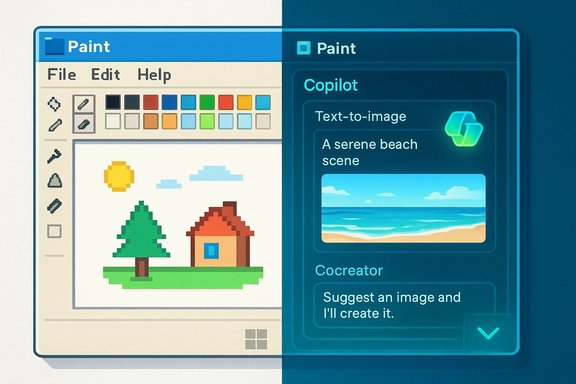
More consequential is Paint’s rapid embrace of generative features under the Copilot umbrella: Image Creator (text-to-image), Generative Erase/Fill, Cocreator (a sketch + prompt hybrid that steers image output), and other experimental flows that can animate still images or restyle scenes. Microsoft’s own communications place many of these capabilities behind staged experiments (Windows AI Labs or Copilot integrations), with availability gated by Insider channels, hardware (Copilot+ devices), or subscription tiers in some markets. Microsoft’s support pages document Cocreator and Copilot+ hardware requirements; the Windows Insider blog and major tech outlets have reported on the Copilot hub and rollout. Those features change what Paint is: from a simple raster editor to a creativity surface that helps users generate, compose, and modify content using natural language and model-driven edits. For casual users, the promise is notable: generate imagery, remove backgrounds, and do substantial edits without switching apps. But adding generative AI comes with new costs and responsibilities for Microsoft and its users.Verifying the technical claims
To make recommendations rooted in facts, several claims across recent reporting were checked against primary sources:- The collapsible toolbar is included in the Paint update tracked as version 11.2511.281.0, and the setting is exposed via a chevron in the bottom-right of the ribbon allowing Automatically hide toolbar or Always show toolbar. This is recorded in Microsoft’s Windows Insider release notes.
- Paint 3D was deprecated and removed from the Microsoft Store on November 4, 2024, and Microsoft’s deprecated features page documents the deletion and practical implications for users. Independent coverage at major outlets also reported the delist and its timing.
- Cocreator and other Copilot-driven experiences are real features with deployment constraints: Cocreator initially required Copilot+ hardware (an NPU-equipped device) and is being expanded to more platforms; Microsoft’s support guidance details these requirements and usage steps. The Windows Insider blog and several independent reports confirm Copilot consolidation inside Paint’s toolbar.
Why the debate is so charged
There are three overlapping reasons users and observers argue passionately about Paint’s future.- Cultural inertia. Paint is part of computing memory for generations. That generates an emotional attachment that amplifies any change. Removing or fundamentally altering Paint is perceived as erasing a piece of the Windows experience.
- Practical utility. Paint’s strength is simplicity. For administrators, schools, kiosks and many day-to-day tasks, the tool’s predictability matters more than advanced features. If Microsoft were to change file formats, remove default installation, or gate common functionality behind accounts or subscriptions, that would create friction.
- New expectations. Generative AI has shifted what users expect from even small apps: accessible creative tools and one-click transformations. Paint can be an efficient conduit for those expectations because it’s ubiquitous — but that ubiquity also magnifies governance, privacy, and policy questions when AI capabilities are added.
The case for reinvention
Reinventing Paint — thoughtfully — offers clear, practical benefits:- Democratizing creativity: built-in image generation and prompt-driven edits can help students, hobbyists, and small businesses create visuals without subscriptions to complex tools.
- Reduced app switching: integrating background removal, generative fill, and simple animation keeps short creative tasks in one place.
- Modern UX parity: features like collapsible toolbars, layers, project files, better color controls and stylus improvements make Paint useful for more advanced, but still casual, workflows.
- Platform leverage: shipping AI features in a built-in app helps Microsoft demonstrate Windows as a differentiated platform for Copilot-driven experiences.
The case for preserving nostalgia
Opposing arguments are equally compelling:- Complexity creep: adding AI and new features can dilute Paint’s simplicity. A cluttered UI or confusing experiments could make the app worse for quick edits.
- Accessibility and resource constraints: not all machines can run NPU-dependent features; gating features by hardware fragments the user base.
- Subscription creep: locking advanced AI behind Microsoft 365 or Copilot+ tiers risks monetizing an app historically free and bundled with Windows, producing user resentment.
- Enterprise and education impact: removing Paint from default installs, changing support guarantees, or altering file behavior complicates imaging, training and long-term archival workflows.
Practical recommendations for Microsoft (and for users)
If Microsoft wants to have it both ways—modern and familiar—the following path balances ambition with stewardship.- Preserve the classic experience by default.
- Keep an Always show toolbar default and a lightweight, option-driven UI model so legacy users get the expected behavior out of the box. The collapse-toolbar approach is a good example of non-destructive modernization.
- Make advanced features clearly opt-in.
- Place generative tools behind an explicit Copilot hub or Labs flag; do not surface them by default to users who don’t ask for them. Use clear onboarding cards that explain where data is processed and whether a Microsoft Account or subscription is required.
- Avoid gating essential functionality behind subscriptions.
- Reserve subscriptions for premium, high-cost compute features (e.g., high-resolution image generation or Copilot Pro tiers) while keeping background removal, basic generative erase, and offline brushes free. Users rely on Paint for basics; monetizing them would be a trust-breaking move.
- Provide robust governance for enterprises and education.
- Add Group Policy / MDM switches to disable AI features, require local-only processing, and control Microsoft Store deployments. Document file-format compatibility guarantees and support channels for archived projects. Microsoft’s deprecated-features guidance for Paint 3D should be the model for transparent timelines.
- Build transparency into models and data flows.
- Publish clear documentation on whether AI work is done locally or in the cloud, what data (images, prompts) is logged, retention policies, and what moderation safeguards exist. When models are trained on third-party data, disclose opt-out or provenance controls.
- Offer a stable classic Paint package.
- Continue to provide a standalone Microsoft Store package or offline installer that organizations can bundle into images where a strictly controlled, minimal Paint is required. The deprecation of Paint 3D highlighted the need for predictable packaging and availability.
Risks and mitigations in detail
- Privacy and data residency. If generative edits are sent to the cloud, customers need clarity and controls. Mitigation: offer local-only model options, per-tenant data residency choices, and explicit consent prompts for images that may contain personal data.
- Model reliability and hallucination. Generative tools can produce plausible but false content. Mitigation: add preview modes, human-in-the-loop workflows, and conservative defaults for sensitive edits.
- Fragmentation by hardware. Cocreator or certain Copilot features requiring NPUs will not run everywhere. Mitigation: provide functionally equivalent but lower-fidelity fallbacks or server-side options that respect privacy constraints.
- Monetization backlash. Charging for formerly free capabilities can provoke community pushback. Mitigation: clearly distinguish free core functionality from optional premium tiers, and keep long-standing basic features free.
- Accessibility regressions. New UI metaphors must remain accessible via keyboard, screen readers and high-contrast modes. Mitigation: prioritize accessibility testing early and publish accessibility statements with each major update.
What users and admins should do now
- Casual users: test the new features in Windows Insider builds if curious, but don’t rely on experimental flows for production work. Keep copies of originals when using generative edits.
- Power users and creators: try the Copilot tools for rapid ideation, but validate outputs before publishing. Export work to widely supported formats (PNG, JPEG, TIFF) for archival reliability.
- IT admins and educators: inventory workflows that depend on Paint; prepare images and policies for optional Store delivery; require pilot testing before mass deployment of AI features. Microsoft’s deprecation notices and documentation around Paint 3D show that inbox app lifecycles can change — so preserve installers and canonical assets where necessary.
Final assessment — reinvent, but cautiously
Microsoft should not leave Paint frozen as a nostalgic relic. The operating system’s inbox apps are not museum pieces; they are living tools that must evolve with user needs. That said, reinvention must be conservative, reversible and respectful of the app’s history.The right strategy is incremental: continue to deliver small, low-risk UX wins (like the collapsible toolbar) while iterating on generative capabilities in a tightly controlled, opt-in manner. Preserve the classic mode for users who want stability, provide transparent documentation for AI features and data handling, and steer monetization toward clearly premium scenarios rather than core functionality.
If Microsoft executes along these lines — prioritize user control, enterprise governance, and clear packaging — Paint can be both a nostalgic icon and a useful, modern creative tool. If it insists on forcing change, gating basics behind subscriptions, or obfuscating AI data flows, it risks repeating the missteps of the Paint 3D era and alienating the community that still values Paint’s simplicity. The collapse-toolbar update and the measured rollout of Copilot features suggest Microsoft understands the tradeoffs; the next year will reveal whether it respects them.
Microsoft’s decision will shape not just an app but a broader expectation: whether inbox utilities remain humble, durable tools or evolve into gateways for platform-scale AI services. For a program that taught millions to pick up a mouse and draw, that is a consequential choice — one that must be taken with both technical rigor and cultural sensitivity.
Source: Windows Central Should Microsoft finally reinvent Paint, or leave it as nostalgia?
