
Microsoft has quietly paused the public rollout of File Explorer’s new Recommended section and the companion StorageProvider APIs, removing the feature from the October 2025 non‑security preview (KB5067036) changelog and signaling a deferral while other patches from the same update continue to ship.
Microsoft distributed KB5067036 as an October 2025 non‑security preview (Release Preview channel) packaged for Windows 11 builds 24H2 and 25H2, where many user‑facing improvements were intentionally server‑gated so features could be enabled gradually across machines and regions. The package was published in late October and included platform binaries plus a set of staged experiences — among them a redesigned Start menu, taskbar refinements, deeper Copilot hooks, and a reworked File Explorer Home that would surface Recommended files.
The October preview model Microsoft used intentionally separates binary delivery from feature exposure. That means a single optional preview package can contain fixes that apply immediately while higher‑value experiences are toggled on later via server flags — a practice that reduces distribution friction but also creates uneven visibility across identically configured devices. KB5067036 followed that pattern.
Privacy and regional/regulatory gating
Actionable guidance:
Microsoft’s change log is the authoritative record for the state of KB5067036 and future updates; monitor that KB entry and Release Preview notes for the official re‑enablement timeline and any new admin controls that accompany the revived rollout.
Source: Windows Report Microsoft Delays Roll Out of File Explorer's New "Recommended" Section
 Background
Microsoft distributed KB5067036 as an October 2025 non‑security preview (Release Preview channel) packaged for Windows 11 builds 24H2 and 25H2, where many user‑facing improvements were intentionally server‑gated so features could be enabled gradually across machines and regions. The package was published in late October and included platform binaries plus a set of staged experiences — among them a redesigned Start menu, taskbar refinements, deeper Copilot hooks, and a reworked File Explorer Home that would surface Recommended files.The October preview model Microsoft used intentionally separates binary delivery from feature exposure. That means a single optional preview package can contain fixes that apply immediately while higher‑value experiences are toggled on later via server flags — a practice that reduces distribution friction but also creates uneven visibility across identically configured devices. KB5067036 followed that pattern.
What Microsoft changed (the immediate news)
- Microsoft updated the KB changelog on November 5 to state that the Recommended section in File Explorer (and the StorageProvider APIs) previously listed in KB5067036 “will roll out at a future date,” effectively pausing the staged rollout that had begun appearing for some Release Preview devices.
- The changelog entry shows the rest of KB5067036 remains available and that other fixes in the package have not been pulled; this is a targeted deferral rather than a full rollback of the entire update.
- Microsoft did not publish a detailed public explanation for the deferral in the changelog; beyond the KB note there is no official post‑mortem, so outside analysis must rely on the change in the KB entry plus observed behavior in Insider and Release Preview channels.
The promised feature: what “Recommended” in File Explorer was meant to do
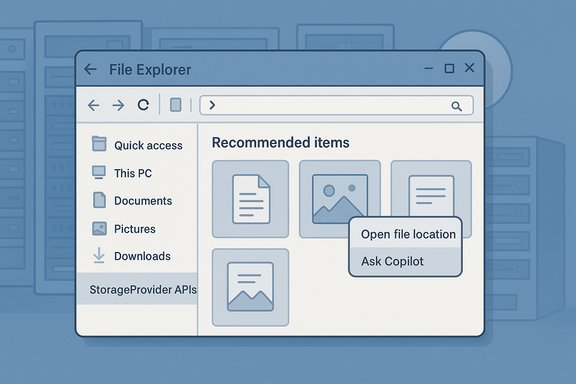
The Recommended section in File Explorer Home was designed as a small, tile‑style feed at the top of Explorer’s Home page to surface files users frequently open, recently downloaded, or recently accessed via cloud/shared links. Key aspects of the planned experience included:- Large thumbnail tiles for quick visual identification of recently‑used documents, photos, downloads, and shared files.
- Hover quick actions such as Open file location and Ask Copilot for supported accounts, enabling fast workflows without opening an app.
- Integration with cloud accounts (OneDrive and, via StorageProvider APIs, third‑party providers), so cloud‑hosted or shared content could appear alongside local items.
- A user toggle in Folder Options — Show recommended section — to turn the surface off and restore a classic Quick Access view for users or admins who prefer it.
Timeline: preview, partial roll, then hold
- Microsoft shipped KB5067036 to the Release Preview channel in late October 2025, delivering build packages that contained the new features in a gated form.
- Over the following days some Release Preview devices and Insiders began seeing the Recommended surface and StorageProvider integration appear as server flags flipped. Early hands‑on reports surfaced in tech coverage and community threads.
- On November 5 Microsoft updated the KB/changelog to say the File Explorer Recommended section and StorageProvider APIs “previously listed in the October 2025 non‑security update (KB5067036) will roll out in a future date,” pausing that staged rollout while leaving other fixes active.
Why Microsoft may have paused the rollout — analysis and plausible explanations
Microsoft’s changelog provides the administrative fact of the pause but not a rationale. Multiple plausible engineering, privacy, regulatory, and integration reasons align with public signals from the preview notes and community feedback. These are inferences grounded in available reporting and observed gating behavior; none should be read as an official Microsoft explanation.Privacy and regional/regulatory gating
- The feature’s behavior differed by region and account type during the preview: early distributions excluded parts of the EEA (European Economic Area) and applied different rules for Entra ID (work/school) accounts versus personal Microsoft accounts. Those exclusions are classic signs of Microsoft reconciling GDPR/enterprise governance obligations and may have required additional policy or consent controls before a global rollout.
- Mid‑October security guidance from Microsoft tightened preview behavior for files marked with Mark‑of‑the‑Web (MoTW) to mitigate an NTLM hash leakage attack vector. Introducing richer thumbnails, hover actions, and third‑party preview handlers at the same time as those security changes can create unexpected interactions. It’s reasonable to suspect Microsoft paused the rollout to ensure the Recommended feed didn’t re‑expose content or conflict with the new preview‑pane restrictions.
- Early hands‑on and community reports flagged scenarios where the Recommended ribbon felt intrusive or created additional background work (cloud queries, thumbnail generation) that could affect File Explorer responsiveness on some configurations. Staged rollouts are often paused when telemetry or user feedback uncovers regressions that reach a certain threshold.
- The new StorageProvider APIs were intended to let third‑party cloud vendors surface suggested files in Explorer Home, closing a parity gap with OneDrive. Opening Explorer Home to external providers increases the security and reliability surface; Microsoft may have paused to refine API permissioning, vet common provider patterns, or harden how providers query and present suggestions to avoid sync storms or credential leaks.
- Because Microsoft gates features by hardware, region, licensing, and account type, large organizations can end up with mixed experiences across identical devices — complicating rollouts and support. Pausing gives Microsoft time to add admin controls and Group Policy mappings so enterprises can enforce consistent behavior.
What else shipped in KB5067036 (what remains available)
While the Recommended section and StorageProvider APIs were deferred, Microsoft continued to ship other items in the same preview, including a long list of practical reliability and security‑adjacent fixes and platform enhancements that remained in the KB notes:- Stability and File Explorer bug fixes (context‑menu flicker, archive extraction fixes, folder view persistence, and other practical fixes that matter for day‑to‑day reliability).
- Start menu redesign and taskbar refinements (Category/Grid/List views, Phone Link integration, colored battery icons, etc..
- Expanded Copilot integrations (hover quick actions, Click to Do enhancements) that continue to be gated by hardware and entitlement checks.
- The KB notes also reference other platform improvements that shipped or remain part of the preview package; Microsoft has continued to update the changelog for KB5067036 to reflect those delivered items.
Impact for users, IT administrators, and developers
Consumers and enthusiasts- If you installed KB5067036 in the Release Preview ring, you may or may not have seen the Recommended section — feature enablement was phased and now paused. Users who do not want the feature (or who saw it and want it removed) can hide it in Folder Options by disabling Show recommended section.
- The pause is an opportunity to plan: treat any future re‑enablement as requiring pilot testing that represents your hardware diversity, DLP posture, and licensing model.
- Recommended mitigations include disabling recent‑item tracking with Group Policy (Do not keep a history of recently opened documents) and validating whether Copilot flows from Explorer perform cloud uploads that conflict with corporate DLP rules.
- StorageProvider APIs promised to let third‑party clouds present suggestions inside Explorer Home. The pause means developers must delay experiments and integration plans until Microsoft reopens the API surface — and when it does, expect refined permission models, vetting requirements, and potentially new documentation and samples. Consider this a planning window: use the delay to prepare secure integration patterns and test harnesses that limit background queries and respect user consent.
- Mixed visibility across a fleet increases helpdesk load. If your environment uses Release Preview or opt‑in preview channels, document how to identify, enable, or disable the Recommended surface and prepare scripts or Group Policy templates that enforce the desired state for pilot groups.
Practical controls and immediate steps to take
- Disable Recommended for end users: File Explorer → View → Options → General tab → uncheck Show recommended section → Apply → OK. This restores the classic Quick Access view.
- Block recent‑items aggregation across an estate: Set Group Policy — Do not keep a history of recently opened documents (User Configuration → Administrative Templates → Start Menu and Taskbar). This prevents the central recent feed used by Start, Explorer, and Jump Lists from being populated.
- Validate Copilot and DLP: Audit which accounts have Copilot/Copilot+ entitlements and whether Copilot actions invoked from Explorer (Ask Copilot) are permitted by your DLP and data residency rules. Consider blocking Copilot flows or restricting access to Copilot entitlements for high‑risk groups.
- Vet third‑party providers: If you plan to permit StorageProvider integrations, require vendor security reviews and attestations about how they handle credentials, thumbnails, telemetry, and background queries. Maintain a whitelist for approved providers via MDM/Intune.
Strengths of Microsoft’s design intent — why this feature mattered
- Productivity: Surfacing recently used and frequently accessed files reduces friction for everyday workflows and can save repeated navigation steps.
- Parity for cloud providers: StorageProvider APIs aimed to give non‑OneDrive vendors a way to offer OneDrive‑like suggestions in Explorer Home, which improves choice for customers using alternative storage vendors.
- User controls: The UI included toggles to hide the Recommended surface, giving users and admins an escape hatch if the feature is undesired.
Risks and trade‑offs — why the pause is defensible
- Privacy/regulatory complexity: Account‑based recommendations that mix local and cloud signals create complexity in jurisdictions with strict data‑protection laws. Enterprise contexts with regulated data need conservative default behavior and strong admin controls.
- Fragmentation and support overhead: Hardware, licensing, region, and account gating means uneven experiences across a fleet — harder to troubleshoot, document, and train around.
- Third‑party attack surface: Allowing external StorageProvider code paths into Explorer Home increases the potential for performance regressions and security issues if providers aren’t thoroughly vetted. Pausing to harden permissioning is a prudent engineering choice.
- UX regressions and performance: Early user sentiment flagged the panel as potentially intrusive or costly on lower‑spec machines; server‑gated rollouts give Microsoft the telemetry window to detect and fix regressions.
What to watch next — expectations for a reintroduction
When and how Microsoft re‑enables the Recommended section and StorageProvider APIs will likely depend on several steps:- Additional admin controls and Group Policy mappings to allow enterprise enforcement.
- API permissioning and vendor vetting guidance for StorageProvider implementers.
- Regional and account‑type compliance clarifications (EEA, Entra ID, etc. so the feature can be offered without regulatory risk.
- Telemetry‑driven validation that any performance or security regressions observed during the prior staged rollout are addressed.
Final assessment and recommendations
KB5067036 remains an important preview package: it bundles tangible reliability fixes and meaningful UX experiments that accelerate Microsoft’s effort to surface context‑aware assistance in Windows. The pause on the File Explorer Recommended surface and StorageProvider APIs is not a rejection of the idea — it’s a cautious engineering decision that acknowledges the non‑trivial governance, privacy, and integration complexities these features introduce.Actionable guidance:
- For conservative users and admins: Defer optional previews until Microsoft confirms a safe re‑rollout and include the feature in a controlled pilot with representative devices.
- For enthusiasts and pilot teams: Continue to test KB5067036 in Release Preview rings but document feature visibility and prepare rollback/playbook steps. Disable Recommended or apply Group Policy if the behavior is not acceptable for your environment.
- For developers and cloud providers: Use the delay to harden integration scenarios, reduce background telemetry, and prepare for stricter permission models when StorageProvider APIs reopen.
Microsoft’s change log is the authoritative record for the state of KB5067036 and future updates; monitor that KB entry and Release Preview notes for the official re‑enablement timeline and any new admin controls that accompany the revived rollout.
Source: Windows Report Microsoft Delays Roll Out of File Explorer's New "Recommended" Section
