Microsoft Peak Debate: Nostalgia Copilot and the Ugly Xmas Sweater

  • Thread Author
The online raffle that handed a knitted collage of Microsoft history to a reader who promised to wear it while his wife delivered their child is an unexpectedly sharp little mirror for the company’s public image: equal parts nostalgia, awkwardness and brand theatre. In a piece of seasonal whimsy that quickly became a conversation about corporate identity, The Register ran a reader competition for one of Microsoft’s so‑called “Artifact” or “ugly” sweaters and crowdsourced the question of when — if ever — Microsoft hit its cultural or engineering “peak.” The winners, the jokes, and the ensuing debate reveal far more than a bad holiday jumper: they illuminate how nostalgia, product narratives, and AI-first branding are colliding in Microsoft’s public story right now.

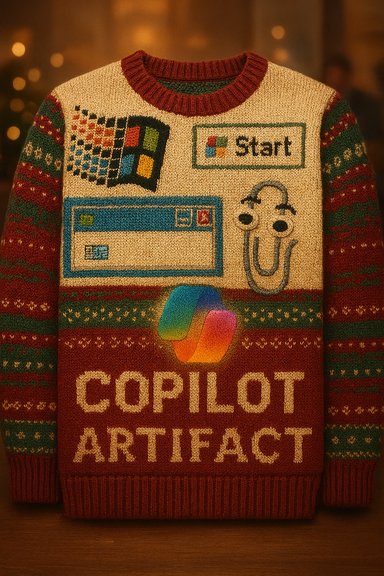
Festive knit sweater featuring retro computer icons and the label “COPILOT ARTIFACT.”Background​

Microsoft’s Christmas‑sweater giveaway is small in scale but rich in symbolic content. The garment stitches together decades of logos, UI icons and now, controversially, the Copilot emblem — a visible signal that Microsoft’s marketing wants its AI narrative to sit alongside the company’s legacy artifacts. Reporters and community commentators noted rapid interest and sell‑outs for the sweater, and discussions about product design, PR and fandom followed.
This is an instructive moment because it condenses several ongoing threads about Microsoft into a single, public piece of merch: the company’s nostalgia for past triumphs; community mockery of its missteps; and the push to normalize Microsoft Copilot as a defining future feature. The sweater, as a cultural artifact, is both homage and satire.

Overview: what happened and why people cared​

  • The Register ran a reader giveaway of a Microsoft “Artifact” or “ugly” Christmas sweater that includes references to Microsoft products and icons, including Copilot. The story drew a lively comment thread debating when Microsoft peaked as a company.
  • The winning comment — a quip that Microsoft “peaked” when it released Clippy, combined with a promise to wear the sweater during childbirth — summed up how affection and disdain can coexist in community reactions.
  • Commenters invoked a range of candidates for “peak Microsoft”: the Windows 95 launch spectacle; the stability of Windows XP; the engineering era around Windows NT 3.51; the failed mobile push (Windows Phone); and even small UX moments like Task Manager on XP SP2. The breadth of answers underlines how “peak” is as much cultural and emotional as it is technical.

Background and timelines: anchoring the nostalgia in facts​

Before parsing the deeper implications of the sweater and the “peak” debate, it helps to set a few technical and historical anchors straight.
  • Windows 95: The launch campaign for Windows 95 remains one of Microsoft’s most iconic marketing moments. The global advertising push featured The Rolling Stones’ “Start Me Up,” and it helped turn a platform upgrade into a mainstream cultural event. Contemporary reports and advertising retrospectives document that the launch and associated campaign were major brand moments for Microsoft.
  • Windows NT 3.51: This release sits in Microsoft’s mid‑1990s workstation/server lineage. Windows NT 3.51 shipped in 1995 and is remembered among some engineers as the last release before significant architectural changes (for example, later moves to consolidate graphics subsystems). That technical timestamp is often used by enthusiasts to mark the end of a particular engineering era.
  • Windows XP: Launched to worldwide availability on October 25, 2001, Windows XP is widely regarded as a milestone for stability, usability and mainstream adoption — which explains why multiple commenters selected XP as a high water mark for Microsoft. Microsoft’s own press materials and lifecycle documentation confirm the 2001 launch and long enterprise life that followed.
  • Clippy (Office Assistant): Introduced with Microsoft Office 97, the animated Office Assistant — popularly known as Clippy — became a cultural shorthand for intrusive, poorly timed help. Clippy was later retired as part of the Office 2007 redesign. That arc makes Clippy a perfect emblem for the kinds of well‑intentioned but awkward UX choices that become public jokes.
These anchor points are factual; what’s contested is the interpretive label of “peak.” Is it technical achievement, mainstream cultural dominance, ingenuity, market power, or some mix of those? The answers vary with the lens.

The “peak Microsoft” debate: four common narratives and what they mean​

Community answers fall roughly into four interpretive camps. Each is valuable because it reflects different metrics for “peak”: commercial, cultural, technical, and tectonic (strategic).

1) Peak as cultural spectacle — Windows 95 and the era of mass launch theatre​

For many, peak is the moment Microsoft felt unstoppable and culturally central. Windows 95’s launch was a turning point in consumer computing, elevated by mass‑market advertising, massive PR spend and a campaign that made the “Start” button into shorthand for a new era. The tape of executives dancing and the use of The Rolling Stones in the ads are part of a collective memory of corporate bravado. This is peak as cultural ubiquity. Strengths of this view:
  • Demonstrable reach and brand recognition.
  • A narrative of mainstreaming personal computing.
Risks and blind spots:
  • Spectacle doesn’t ensure long‑term engineering superiority.
  • Marketing can mask product fragility; nostalgia inflates the memory of the moment.

2) Peak as engineering high water mark — NT, XP and the ‘golden OS’ argument​

Another frequent claim is that Windows NT 3.51 or Windows XP represent a technical golden age: codebases that balanced performance, enterprise needs and user experience in ways that later releases arguably struggled to match. Engineers who lived through the NT → XP transitions often frame those releases as a combination of technical discipline and product focus that later shifted toward feature proliferation and monetization. Strengths:
  • Tangible engineering artifacts to defend the claim.
  • Long enterprise lifecycles that signal quality.
Risks:
  • This reading underrates later server, cloud and Azure investments where Microsoft arguably rebuilt its engineering muscle.
  • “Peak” framed as a specific OS ignores Microsoft’s multi‑decade evolution into services and cloud first; excellence moved beyond desktop OS work.

3) Peak as strategic misstep turned folklore — Clippy and product flops​

Some choose a deliberately cheeky moment (release of Clippy) as the symbolic peak: the idea being that Microsoft’s product instincts peaked in their ability to both charm and embarrass simultaneously. Clippy is an emblem of friendly hubris — a feature intended to humanize software that instead became synonymous with intrusive automation. The paperclip’s staying power in public imagination is its own kind of success and a cautionary tale. Strengths:
  • Cultural resonance; Clippy is universally understood as a metaphor.
  • Captures the duality of innovation and misjudgment.
Risks:
  • Selecting a “peak” as a flop is intentionally ironic; it’s better read as critique than a neutral benchmark.

4) Peak as “not yet reached” — Microsoft’s AI and cloud momentum​

A minority view in the thread suggested Microsoft hasn’t peaked — at least not in the way that matters now. With Azure, enterprise cloud, and a large bet on Copilot and agentic AI, Microsoft’s reach in 2024–2025 is arguably broader than at any single desktop era. That reading treats “peak” as a moving target tied to strategic relevance in the current technological axis: cloud, AI and services. Files and commentary around the sweater and Copilot inclusion raise precisely this question: is Copilot being normalized as a brand icon before it has earned unquestioned user trust?
Strengths:
  • Grounded in present revenue mix, acquisitions, and cloud growth.
  • Recognizes platform power beyond consumer OS.
Risks:
  • AI rollouts create novel regulatory and security risks; peak in reach could precede long periods of scrutiny and correction.
  • Mass adoption doesn’t equal user satisfaction; PR visibility must be matched by functional reliability.

The sweater as PR — why Microsoft’s merch matters​

The sweater does what good corporate merch does: it creates conversation, surfaces nostalgia, and gives fans (and critics) a tangible object to argue over. But the Copilot logo appearing alongside classic icons introduces an obvious tension: branding a still‑maturing AI as a legacy emblem risks legitimizing an offering that many users find inconsistent. This was precisely the criticism noted in community threads: an emblem on a sweater is small theatre; real trust requires demonstrable, persistent reliability and safe, opt‑in governance.
PR benefits:
  • Viral social content and collector value.
  • Reaches culture‑curious audiences beyond enterprise buyers.
Strategic dangers:
  • Symbolic gestures can look tone deaf if the product isn’t meeting expectations.
  • Inserting Copilot into nostalgic iconography conflates legacy trust with nascent technology risk.

Technical and product reality checks (verified facts)​

The debate mixes emotion and fact. To keep the record straight:
  • Windows XP’s public availability date is October 25, 2001 — a major milestone confirmed by Microsoft’s launch materials and lifecycle pages.
  • Windows NT 3.51 shipped in 1995; it’s widely referenced in historical records as a mid‑1990s NT family release.
  • Windows 95’s marketing used The Rolling Stones’ “Start Me Up” and is remembered as a cultural spectacle built around the new “Start” button. Contemporary press documented the licensing and the campaign scale.
  • Clippy (Clippit) first appeared in Office 97 and was later retired with Office 2007; its lifecycle and cultural impact are well documented.
Any claim that treats these moments as equivalent metrics of “peak” needs to make explicit which metric it is using: marketing reach, engineering quality, user experience, or product influence.

Risk analysis: what the sweater debate reveals about Microsoft’s trajectory​

  • Branding ahead of product maturity
    Sewing Copilot onto a nostalgia sweater signals a desire to normalize the brand visually. That’s useful PR, but it raises the risk that symbolic normalization will outpace functional trust. When users feel alienated by intrusive or inconsistent AI features, the emblem becomes a lightning rod rather than a rallying icon.
  • Regulatory and enterprise scrutiny
    Rapid AI integration brings new security, privacy and governance demands. Enterprises will evaluate agentic capabilities by their compliance and auditability; consumer merch won’t move those technical levers. Microsoft’s ability to align Copilot with enterprise risk frameworks will determine whether the brand gains durable credibility.
  • Nostalgia’s double edge
    Nostalgic merch pleases long‑time fans but can amplify critique if the company’s current strategy is contentious. The sweater compresses decades into a single artifact — a clever move — but also invites wry readings that can reinforce existing user skepticism.
  • Cultural memory vs. engineering reality
    People’s memories of “peak” are shaped by emotion — the midnight queues for Windows shipments, the relief when XP stopped crashing, or the irritation of Clippy. Those memories are real and valuable, but they are not precise measures of strategic health. Microsoft’s long game now plays out across cloud infrastructure, AI services, and platform economics — areas where the company’s footprint is both large and scrutinized.

What the community discussion teaches product teams​

  • Treat nostalgia as a platform for constructive storytelling, not cover for strategic ambiguity. If a brand uses heritage icons, accompany it with clear, actionable signals about product quality and governance.
  • Don’t confuse symbol adoption with functional readiness. When embedding AI logos into mass marketing, ensure the product has predictable failure modes and transparent controls.
  • Use community ridicule as feedback. The same people who mock a sweater are influential early adopters and vocal critics — their commentary is an inexpensive, high‑signal product test.

Conclusion: peak is a matter of perspective, not a single date​

The sweater giveaway was a light, human moment that turned into a surprisingly incisive public diagnosis: Microsoft sits at the intersection of enduring nostalgia and ambitious future bets. Whether the company’s “peak” happened during the Windows 95 launch spectacle, the stability of Windows XP, the engineering era of NT 3.51, the comical misfire of Clippy, or remains ahead with Azure and Copilot depends on what metric you choose.
  • If peak is cultural ubiquity and spectacle, many will point to Windows 95.
  • If peak is durable engineering and enterprise confidence, XP (2001) is a defensible candidate.
  • If peak is a cautionary emblem of overreach, Clippy is the perfect, ironic trophy.
  • And if peak is about strategic scale and ongoing influence, the cloud + AI era still has arguments left to win or lose.
The sweater does two things well: it invites laughter, and it provokes a sharp, public inventory of what people love, fear, and remember about a company that has been central to personal and enterprise computing for decades. In that sense, the conversation it sparked was less about a single “peak” moment and more about the shape of Microsoft’s continuing narrative — one knitted from triumphs, pratfalls and the next big bet we’re all being asked to trust.

Source: theregister.com And the winner of the Microsoft Christmas sweater is...
 

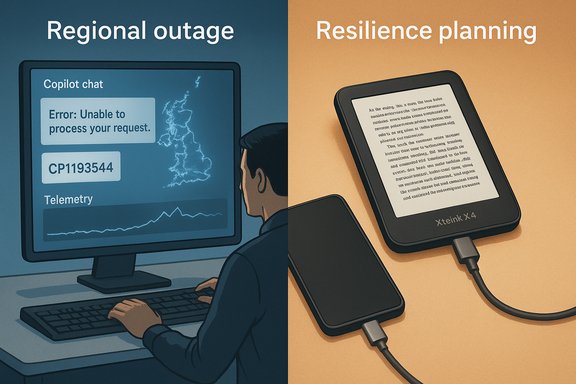
Microsoft’s Copilot suffered a regionally concentrated outage on December 9, 2025, leaving thousands of users in the United Kingdom and parts of Europe unable to access AI assistance inside Microsoft 365 and the standalone Copilot surfaces while sparking a fresh wave of operational questions about the resilience of AI-first workflows.

Split scene: left shows a regional outage with a computer error; right depicts resilience planning via devices.Background​

Microsoft Copilot has been folded into a wide variety of Microsoft surfaces — from Word, Excel and Teams to a standalone Copilot app and web chat endpoints — and is increasingly used as a productivity layer that can both advise and act on files and workflows. That expanded role makes Copilot more consequential to everyday work, but also increases the operational blast radius when the assistant is degraded or unavailable. Independent reporting and Microsoft’s own status messaging show the December 9 incident was tracked under internal incident code CP1193544, and Microsoft acknowledged the impact was concentrated in the United Kingdom and nearby European regions. The outage surfaced in the classic way: spike in user reports on outage trackers and social feeds, enterprise tickets piling into help desks, and administrative notices in the Microsoft 365 Admin Center. Microsoft’s initial public description cited an unexpected increase in traffic that stressed autoscaling and forced manual scaling and load-balancing changes while engineers worked through telemetry and diagnostic logs. That explanation has been repeated in multiple community threads and support reports.

What happened — verified facts and timeline​

Early detection and public signals​

  • Microsoft posted incident notifications for Copilot (CP1193544) on December 9, 2025 indicating users in the UK and parts of Europe may be unable to access Copilot or could experience degraded functionality.
  • Large numbers of end users reported Copilot returning repeated “Sorry, I wasn't able to respond to that” messages or experienced timeouts and failure to execute file actions. These user reports showed up on Microsoft Q&A, forum threads and outage aggregators within minutes of the first complaints.

Microsoft response and immediate remediation​

  • Engineers reviewed telemetry and diagnostic logs to reproduce the behavior.
  • Microsoft’s initial remediation focused on manually scaling capacity, adjusting load‑balancing rules, and targeted restarts of affected services.
  • The company posted ongoing updates via Microsoft 365 status channels and advised administrators to monitor tenant-level alerts in the Admin Center.

Scope and symptoms observed by users​

  • Affected Copilot surfaces: web Copilot, Copilot inside Microsoft 365 apps (Word/Excel/Teams), and the standalone Copilot app. Some users toggled between surfaces and found inconsistent behavior, which is typical when an edge, routing, or regionally constrained workload is implicated.
  • Main symptoms: repeated generic error messages, failed file actions (summarize/convert), slow or partial responses, and in some cases complete inability to launch Copilot chat windows.

Technical analysis — what likely failed and what is confirmed​

Confirmed items​

  • The incident was recorded as CP1193544 and Microsoft publicly acknowledged it by region.
  • Microsoft’s telemetry pointed to an unexpected surge in traffic and engineers executed manual scaling and load‑balancing interventions as part of remediation.

Plausible technical failure modes (evidence‑based, not all confirmed)​

  • Autoscaling stress or throttling: sudden surges can outpace autoscaling triggers or temporarily exhaust capacity in regional clusters, forcing manual interventions until orchestration stabilizes.
  • Load‑balancer or routing misconfiguration: the incident window included reports that Microsoft adjusted load‑balancing rules and performed targeted restarts — classic mitigations for asymmetric traffic distribution or stuck connection pools.
  • Edge or CDN coupling: several recent incidents across major providers have shown that edge or CDN problems can manifest as apparent application outages even when back‑end model servers are healthy. The timing and symptoms in prior months make edge/routing a plausible contributing factor, though Microsoft did not publicly attribute this specific incident to a third‑party CDN.

What remains unverified​

  • Any direct causal linkage to a Cloudflare or other third‑party edge outage has not been confirmed by Microsoft in its incident message for CP1193544. Independent feeds noted Cloudflare disruptions at times around early December, and those events complicate root‑cause analysis because edge failures can mimic internal service faults; however, a definitive causal link for this particular Copilot outage was not established in Microsoft’s public messages. This distinction matters: appearance of failure and root cause are distinct and should not be conflated without evidence.

Impact assessment — productivity, compliance and trust​

For individual users​

  • Short-term disruption to drafting, summarization, meeting prep and other Copilot-accelerated workflows.
  • Interruptions were especially painful for users who had adopted Copilot features as their primary drafting assistant in email and documents.

For teams and organizations​

  • Automated processes that relied on Copilot file actions (summaries, conversions, bulk edits) encountered failures that required manual workarounds.
  • Help desks and IT staff experienced surges in tickets and had to triage whether the issue was tenant-specific, client-side, or a regional service incident. Community threads captured admins sharing quick triage steps to isolate local config issues from the public incident.

Wider implications​

  • Reputational and operational risk: as organizations embed AI assistants into business processes, intermittent outages translate directly into downtime for mission‑critical tasks.
  • Governance and compliance: when Copilot is used to transform documents that require auditability, the temporary loss of automated actions can complicate timelines and compliance checks if not anticipated in governance playbooks.

Lessons learned and practical steps for IT teams​

Short-term triage checklist for administrators​

  • Check Microsoft 365 Admin Center incident messages and internal tenant alerts for incident IDs such as CP1193544.
  • Verify whether the issue is regional by testing Copilot from multiple network vantage points (cellular hotspot vs corporate network).
  • Attempt known-good alternate surfaces (direct Office desktop client, copilot.microsoft.com) to determine whether the problem is client or service-wide.
  • Collect error texts, timestamps, and screenshots for escalation and post‑incident analysis. Community guidance emphasized the diagnostic value of these artifacts.

Medium-term resilience recommendations​

  • Design critical workflows with fallbacks or human-in-the-loop checkpoints so a transient Copilot outage does not stop operations.
  • Monitor dependency maps that show which services transit third‑party edges or CDNs and plan tiered runbooks for edge vs backend failures.
  • Pressure‑test autoscaling and load‑balancing configurations in non‑production to exercise the same failure modes that appear in production surges.

Strategic resilience (governance)​

  • Establish explicit SLAs and incident playbooks for AI assistant–driven workflows, including manual override policies.
  • Maintain clear logging and audit trails for Copilot actions; ensure alternative, auditable processes exist for regulated tasks.

Broader context: why Copilot outages matter more in 2025​

AI assistants are no longer novelty features — they are being integrated as a productivity layer that can execute actions on behalf of users. That evolution creates a single point of operational dependency: when the assistant is down, systems that have routed labor and automation through it may be effectively paused. The December 9 outage is a reminder that introducing intelligent intermediaries changes the operational calculus: resilience planning must now include model-serving pipelines, agent orchestration layers, and the edge fabrics that route requests. Community posts and incident analyses in the days following the event captured this theme repeatedly.

Meanwhile, a different kind of distraction: Xteink X4 — a tiny magnetic e‑ink “sidekick”​

While the Copilot outage dominated enterprise attention on December 9, consumer gadget news delivered a contrasting story of focused simplicity: the Xteink X4, a 4.3‑inch magnetic back eReader that snaps onto phones and promises distraction‑free reading wherever your handset goes. The X4 is a pocketable, low‑cost attempt to move readers away from phones without asking them to carry a separate tablet.

What the Xteink X4 is (quick overview)​

  • Form factor: 4.3‑inch e‑ink display, footprint closer to a deck of cards (114 × 69 × 5.9 mm), weight 74 g.
  • Attachment: Magnetic mounting compatible with MagSafe and Qi2, and an adhesive magnetic ring for other phones.
  • Display: 220 ppi e‑ink (non‑touch, no front‑light).
  • Controls: Physical page turn buttons and a power button — no touchscreen gestures.
  • Hardware: ESP32 CPU, 128 MB RAM, 32 GB microSD included (expandable to 512 GB), 650 mAh battery (claimed up to 14 days at 1–3 hours/day). USB‑C charging; Wi‑Fi 2.4 GHz and Bluetooth for transfers. Formats: EPUB and TXT for documents; JPEG/BMP for images.

Cross‑verification of specs​

The Xteink official product listing matches coverage in major tech outlets: The Verge’s hands‑on reporting and Xteink’s spec sheet both list the 4.3‑inch 220ppi display, 74 g weight, lack of frontlight/touch, and the 650 mAh battery estimate — giving independent confirmation of the product’s core specifications. Those two independent sources align on the device’s positioning as a minimalist, low‑cost e‑ink companion rather than a direct competitor to mainstream 6–7‑inch eReaders.

Practical evaluation: strengths and trade‑offs of the Xteink X4​

Strengths​

  • Ultra‑portable, magnetic convenience: The magnetic attachment is the product’s defining convenience — it goes with your phone rather than asking you to carry another device.
  • Distraction‑free reading surface: With no touchscreen, no frontlight, and a simple button interface, the X4 enforces a focus that a phone reading app cannot.
  • Battery life and storage: The claimed two‑week battery life under light reading and a 32 GB microSD card (expandable) make it usable for extended travel and large local libraries.
  • Price: At a substantially lower price point than premium eReaders, the X4 offers an accessible way to adopt e‑ink reading for those who mainly consume DRM‑free books.

Trade‑offs and limitations​

  • Display density: 220 ppi is a noticeable step down from mainstream eReaders like the Kindle Paperwhite (~300 ppi). At 4.3 inches the difference is visible in fine typography and small fonts.
  • No frontlight or touchscreen: Lack of built‑in illumination and touch navigation limits night reading and some usability expectations; the device requires ambient light and physical buttons for page turns.
  • DRM and store limitations: The X4 supports DRM‑free EPUB/TXT only — it does not natively access Amazon Kindle or Kobo stores, so users must sideload content from other sources or use conversion workflows.
  • Minimal internals and software: The ESP32 and limited RAM imply basic firmware, limited font/customization options unless advanced users add custom BIN fonts, and no third‑party apps.

Who should consider the Xteink X4?​

  • Readers who want a pocketable, distraction‑free reading surface that stays attached to their phone.
  • Commuters and casual readers who prioritize portability and battery life over small text fidelity or night‑time reading without external light.
  • Users who maintain personal libraries of DRM‑free EPUBs or who are comfortable sideloading content via Wi‑Fi, Bluetooth, or microSD.
Who should not buy it:
  • Avid readers who rely on DRM‑protected books from Amazon/Kobo without willingness to convert files.
  • Night readers who need a built‑in frontlight or those who prefer a touchscreen navigation experience.
  • Users who expect higher‑resolution typography at small sizes; the 220 ppi panel will appear softer than modern 300 ppi e‑ink screens.

Product verdict and practical tips​

The Xteink X4 is valuable as a secondary device with a clear design tradeoff: it privileges portability and distraction‑free reading over absolute display fidelity or storefront convenience. For $69 (reported street price), it’s a compelling experiment in reducing phone-based reading friction, but potential buyers should accept the requirement to sideload DRM‑free content and to read under ambient light.
Practical tips:
  • Use adjustable font sizes and add custom BIN fonts if small text appears too soft.
  • Keep a small LED reading light in a bag or nightstand for low‑light reading sessions.
  • Use the included magnetic ring only on cases where adhesive will not harm finishes — remove and reapply carefully.

Connecting the two threads: a small gadget and large-scale AI outages​

There is an instructive contrast between the two stories: the Xteink X4 intentionally reduces surface area for failure — no network dependence for reading once content is loaded — while modern AI assistants like Copilot increase the surface area of operational dependencies by design. One is a focused, offline‑capable gadget built to make a single experience stable and distraction‑free. The other is a distributed, cloud‑native agent that adds capability at the price of new failure modes across edge fabrics, autoscaling systems, model‑serving pipelines, and orchestration layers.
This is not to suggest AI assistants should be avoided; rather, organizations and users must understand and manage the new dependencies that AI injects into workflows. The Copilot outage underlines the need for mature resilience planning whenever intelligent agents are permitted to act on files or automate business processes. Conversely, the popularity of simple, offline reading devices shows there remains strong demand for services and products that minimize dependency and potentially reduce operational risk.

Final takeaways​

  • The Microsoft Copilot outage on December 9, 2025 (incident CP1193544) was a regionally focused event affecting the UK and parts of Europe; Microsoft attributed the impact to an unexpected traffic surge and performed manual scaling and load‑balancing interventions. Administrators were advised to follow tenant alerts in the Microsoft 365 Admin Center while engineers monitored telemetry.
  • The root cause beyond Microsoft’s initial traffic and autoscaling notes remains partially unverified in public statements; while edge/CDN incidents have complicated recent outages elsewhere, no definitive third‑party causal attribution was published for CP1193544 at the time of Microsoft’s incident notices. Readers should treat any unconfirmed causal claims with caution.
  • The Xteink X4 is a well‑specified, pocketable magnetic e‑ink reader that deliberately trades raw display fidelity and store integration for portability and distraction‑free reading. Specs and independent coverage line up on core claims such as 4.3‑inch 220 ppi, 74 g weight, 650 mAh battery, and MagSafe/Qi2 magnetic mounting. Potential buyers should weigh the device’s minimalism against the lack of DRM store support and the absence of a frontlight.
  • Operationally, December 9’s Copilot disruption is a practical reminder for IT teams and business leaders to bake redundancy and degraded‑mode plans into AI-enabled workflows, and for product designers to think carefully about where simplicity and local resilience add real user value.
In an era where both always‑on AI services and intentionally offline devices coexist, the smartest choices are those that match tool design to use case and put contingency planning at the center of AI adoption strategies.


Source: Newswav Microsoft Copilot down: AI assistant not working in major outage
 

Back
Top