

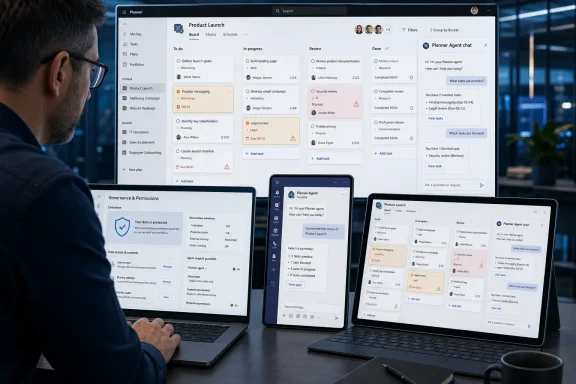
Microsoft began rolling out Planner Agent chat in June 2026 for Microsoft 365 Copilot customers in Preview, bringing natural-language task Q&A, task discovery, and in-plan task management to Planner on the web, Teams, and Surface devices. The feature is not a cosmetic Copilot button bolted onto another Microsoft 365 app. It is a small but revealing step in Microsoft’s larger campaign to turn work management from a place where humans record decisions into a surface where software proposes, edits, and operationalizes them. That makes Planner Agent chat useful, but also administratively consequential in a way many “AI productivity” announcements are not.
Planner has always lived in the unglamorous middle of Microsoft 365. It is not as executive-facing as PowerPoint, not as legally sensitive as Exchange, and not as culturally central as Teams. Yet it is exactly the kind of application where Microsoft’s agent strategy has a plausible shot at changing daily work, because task management is mostly friction: finding what matters, clarifying ownership, updating stale cards, and turning meeting residue into accountable next steps.
Planner Agent chat aims at that friction directly. Microsoft describes the feature as a built-in chat experience for asking questions about a plan, discovering work that needs attention, and managing tasks without leaving the plan. In plain English, a user should be able to ask what is overdue, which tasks are blocked, who owns the next action, or whether a project plan is missing obvious work.
That is a more interesting promise than “Copilot can summarize this page.” Summaries are convenient, but they are still largely passive. Planner Agent chat moves closer to the uncomfortable heart of enterprise AI: a system that can inspect operational data, infer what needs to happen, and help change the record of work.
The rollout is still in Preview, and that matters. Microsoft is not declaring that every Planner tenant now has a fully mature AI project manager. It is testing a user experience that could become a default expectation across Microsoft 365: instead of navigating an app, you interrogate it.
Teams is the obvious center of gravity. For many organizations, Teams has become the front door to meetings, chats, files, calls, approvals, and shared channels. If Planner is where the work is tracked, Teams is where the work is negotiated, forgotten, rediscovered, and escalated. Putting Planner Agent chat there reduces the distance between conversation and commitment.
The web experience matters for a different reason. Planner on the web is the canonical workspace for people who still need to see the board, buckets, filters, assignments, due dates, and plan structure. Chat does not replace those visual affordances. It overlays a second mode of interaction on top of them: ask, refine, act, verify.
Surface devices in the roadmap entry are a subtle reminder that Microsoft’s Copilot strategy is not only about cloud services. The company increasingly wants AI to feel like part of the device-and-productivity bundle, not a separate destination. Whether users arrive through Teams on a laptop, a browser tab, or a Microsoft-branded device, the intended message is the same: the agent follows the work.
This is where the feature could either become genuinely useful or merely noisy. If Planner Agent chat feels like another place to ask a chatbot vague questions, users will try it twice and return to manual filters. If it reliably answers concrete plan questions and helps update work without misfiring, it will become one of those quiet features that changes habits faster than a keynote demo ever could.
Preview also gives Microsoft room to tune the boundaries of authority. A task-management agent is not just reading prose; it is operating on collaborative records that teams use to coordinate responsibility. A bad summary is annoying. A bad task update can misassign work, bury a deadline, or create false confidence that a dependency is handled.
That is why this feature is more sensitive than it first appears. Planner is lightweight compared with full project portfolio management, but lightweight tools are often where messy, real work lives. Sales launches, IT migrations, security remediation efforts, HR onboarding, facilities work, event planning, product checklists, and departmental OKRs all end up in these systems because they are easier to adopt than formal project management software.
Preview lets Microsoft learn which commands users actually trust. People may be comfortable asking, “What is overdue?” long before they are comfortable saying, “Reassign everything blocked by legal review and update due dates.” The more the agent moves from read-only insight to write-capable task management, the more the experience must show its work.
The deeper test is not whether Planner Agent chat can produce plausible language. Large language models have cleared that bar many times over. The test is whether it can operate in a structured, permissioned, multi-user work graph without becoming another source of ambiguity.
That boundedness is useful. General-purpose Copilot chat often suffers from expectation sprawl. Users ask it to reason across email, meetings, files, chats, and organizational knowledge, then judge it harshly when the answer misses context. Planner gives the agent a more constrained arena where the data model is legible.
A plan has tasks. Tasks have fields. People have assignments. Dates can be compared. Status can be filtered. Buckets and labels give work additional structure. This is exactly the kind of environment where an agent can be more than a text generator because the application already has actions the agent can map to.
But the same structure also raises the bar. If a user asks which tasks are at risk, the answer should not merely sound like project-management advice. It should reflect actual overdue items, unassigned work, dependency clues, stale updates, and priority metadata. The value of Planner Agent chat will depend on whether it uses the plan as a system of record rather than a prompt backdrop.
Microsoft’s advantage is integration. Planner sits inside Microsoft 365, close to Teams, Outlook, Loop, SharePoint, and Copilot. Its disadvantage is also integration: every new AI capability inherits the complexity, licensing, governance, and admin controls of the Microsoft 365 estate.
Planner Agent chat is tied to Microsoft 365 Copilot, not a free-floating consumer AI feature. That keeps it inside the commercial Microsoft 365 governance model, but it also means the experience is part of the broader Copilot licensing and adoption calculus. Organizations that have been piloting Copilot selectively will need to decide whether Planner is a good candidate for expansion or another reason to slow down.
The permission model is central. Microsoft’s support materials describe Planner Agent as using content the signed-in user already has permission to access. That is the correct baseline, but administrators know that “existing permissions” are not always tidy. Many Microsoft 365 tenants contain overshared groups, legacy Teams, abandoned plans, guest access, and inconsistent ownership hygiene.
An AI layer does not necessarily create new exposure by itself. It can, however, make existing exposure easier to discover. A user who would never manually inspect dozens of old plans might ask an agent to summarize open work, identify risks, or surface relevant tasks. If the permission model says the user can see the plan, the agent may make that access more meaningful.
That is not a reason to reject the feature. It is a reason to treat it as a governance event, not just a productivity toggle. Before broad deployment, tenants should revisit plan ownership, group membership, guest access, sensitivity expectations, and lifecycle management for stale workspaces.
A graphical interface forces some structure on the user. You click a filter, open a card, change a due date, assign a person, or move a task between buckets. Chat compresses these steps into intent. That is the point, but it also changes how mistakes happen.
A user might ask for “all urgent tasks” without realizing the plan uses priority fields inconsistently. They might ask the agent to “clean up” a plan and receive suggestions that reflect the model’s inference rather than the team’s operating norms. They might request task discovery based on incomplete plan data and mistake the resulting list for a comprehensive audit.
The best implementation will make uncertainty visible. It should distinguish between facts in the plan, inferences from plan structure, and suggestions based on general project-management patterns. It should also make task-changing actions explicit enough that users understand what will be modified before the record changes.
This is where enterprise AI succeeds or fails in practice. Users do not need a perfect oracle. They need a tool that is fast, candid about its limits, and reversible when it acts.
In the best case, task discovery finds the missing operational glue. It may notice unassigned work, vague task names, stale deadlines, overloaded owners, or clusters of activity that imply a new task should exist. For a project lead staring at a half-maintained Planner board, that could be genuinely valuable.
In the worst case, task discovery becomes a machine for manufacturing administrative clutter. Anyone who has worked in a task system knows that not every implied action deserves a card. Some work is handled in a thread, some in a meeting, some by convention, and some by a person who knows the context better than the plan does.
The boundary between helpful discovery and bureaucratic overproduction is thin. A good agent should reduce coordination cost, not inflate it. If every meeting note, chat exchange, or ambiguous plan field becomes a suggested task, users will learn to ignore the suggestions.
Microsoft’s challenge is therefore editorial as much as technical. The agent must decide what is worth elevating. That requires an understanding of priority, ownership, timing, and organizational habit that cannot be solved by language fluency alone.
Planner Agent chat strengthens that position. It gives Planner a capability that many teams associate with newer AI-native productivity tools: the ability to ask the workspace what is going on. Instead of building custom reports or manually slicing a board, a manager can request a status view in ordinary language.
That does not make Planner a full substitute for serious project management. Complex dependencies, resource planning, earned value analysis, portfolio governance, and deep scheduling remain specialized needs. But many teams do not need that machinery. They need a shared place to track work, a fast way to understand status, and enough intelligence to catch obvious drift.
This is where Microsoft can win by being boring. Planner is already present in many tenants, already tied to Microsoft identities, already adjacent to Teams, and already acceptable to users who do not want to learn another tool. Adding agentic assistance to a familiar product may drive more adoption than launching a glamorous standalone AI project manager.
The downside is that familiar products often carry old habits. If teams treat Planner as a dumping ground for half-defined tasks, Planner Agent chat will inherit that mess. AI can help organize work, but it cannot magically create operational discipline where none exists.
On Teams, the agent fits naturally into the collaboration flow. On the web, it fits into the application workflow. On Surface, it supports the idea that Microsoft’s hardware is an endpoint for AI-enhanced productivity rather than simply a Windows device with a nice screen.
This matters because Microsoft is competing not only with other task-management apps but with the growing perception that AI work happens in separate chat products. If users leave Microsoft 365 to ask an external assistant about work, Microsoft loses context, governance, telemetry, and product gravity. Built-in Planner chat is a defensive move as much as an innovative one.
It also reflects the company’s belief that agents need distribution more than novelty. The average employee will not go hunting for an AI task assistant. They might, however, use one that appears inside the plan they already opened after a Teams meeting.
That distribution advantage is enormous. It is also why Microsoft’s AI features need especially careful defaults. When a capability is placed directly in the path of work, adoption can become accidental before it becomes intentional.
AI changes the practical value of access. A user with permission to a plan can already read it, but an agent can help synthesize it. That can expose patterns, priorities, sensitive project names, customer references, internal deadlines, and personnel assignments more efficiently than manual browsing.
This is especially relevant for organizations that use Planner for security remediation, incident response tracking, customer implementation work, legal-adjacent processes, or internal reorganizations. These are not always treated as highly sensitive repositories, but the aggregate picture can be revealing.
Administrators should pay attention to whether Planner content aligns with the tenant’s broader sensitivity and retention posture. If a plan contains confidential work, the controls around the group, Team, SharePoint site, and membership matter. If a plan has external guests, the organization should understand what those guests can see and how agentic features may summarize accessible content.
The practical answer is not panic. It is inventory. Know where sensitive plans live, who owns them, who has access, and whether old plans are still discoverable. Copilot features tend to reward tenants that already did the boring governance work.
Trust will be built through small wins. Showing the three highest-risk tasks is useful if the reasoning is clear. Creating a task from a natural-language instruction is useful if the fields are accurate. Summarizing plan progress is useful if it does not smooth over blocked work or stale assignments.
The risk is that users project too much authority onto the agent. A confident answer in a corporate interface can feel official even when it is probabilistic. Microsoft has to design the experience so that the agent is treated as an assistant to the plan owner, not a replacement for judgment.
That distinction matters for managers as well as individual contributors. If managers begin asking the agent for team status, workers may feel pressure to keep the board optimized for machine readability. That could be healthy if it improves clarity. It could be corrosive if it turns work tracking into performance theater.
Planner Agent chat will therefore shape behavior beyond the literal feature set. Tools that summarize work often change how work is written down.
Planner is a strong candidate for that argument. Not every employee writes long documents or builds spreadsheets every day. Many employees, however, deal with tasks, deadlines, handoffs, and projects. A Copilot feature that helps with the universal mess of coordination can feel more broadly relevant than a feature confined to one Office app.
This is also why Microsoft is likely to keep building specialized agents around everyday work objects. Email has messages and meetings. Planner has tasks. OneDrive and SharePoint have files. Teams has conversations. The more Copilot can traverse those objects with useful actions, the easier it becomes for Microsoft to argue that the subscription is an operating layer for work.
The danger is feature fragmentation. Users may struggle to understand the difference between Copilot Chat, Planner Agent, Project Manager Agent, Copilot in Teams, and other app-specific agents. If every surface has a slightly different AI persona with slightly different capabilities, the experience can become confusing.
Microsoft’s answer appears to be agent discovery inside Copilot and contextual entry points inside apps. That may work, but only if the agents behave consistently enough that users develop intuition. Planner Agent chat is one more test of whether Microsoft can make its AI ecosystem feel coherent rather than crowded.
This could improve team hygiene. If users know the agent can surface overdue work or summarize blockers, they may keep tasks more current. Managers may standardize fields and buckets. Teams may become more disciplined about closing completed work and assigning owners.
It could also create a new burden. People may spend more time formatting work for the assistant, not for one another. The history of enterprise software is full of tools that promised to reduce administrative overhead and instead created new rituals of data upkeep.
The outcome will depend on whether Planner Agent chat makes maintenance easier. If it can help users find stale tasks and update them in batches, it may reduce the cleanup burden it creates. If it merely points out disorder without helping resolve it, frustration will follow.
The healthiest version of this feature would make better plan hygiene feel like a byproduct of daily work, not a separate compliance exercise. That is a high bar, but it is the bar Microsoft has set by calling these experiences agents rather than assistants.
Some teams will embrace Planner Agent chat as a way to reduce coordination drag. They will ask it for status, use it to create tasks, and treat it as a useful junior project coordinator. Other teams will resist, especially where task data is politically sensitive or where managers already over-index on dashboard metrics.
The feature may also expose differences between mature and immature work practices. A team with clear owners, updated tasks, and consistent priorities will get better answers. A team with vague cards and abandoned buckets will get a mirror held up to its disorder.
That makes Planner Agent chat less of a plug-and-play productivity miracle than Microsoft’s promotional language may imply. The agent can accelerate clarity, but it cannot manufacture agreement. If the plan does not reflect reality, the agent’s understanding of reality will be compromised.
In that sense, the feature is a practical test of the entire enterprise AI wave. The best AI tools do not replace process; they amplify the process that exists. Whether that amplification is helpful or embarrassing depends on what the organization has already built.
That is different from putting Copilot in Word or PowerPoint. Documents and slides are artifacts. Planner tasks are commitments. When AI starts helping manage commitments, the stakes shift from expression to execution.
The feature also lands at a moment when Microsoft is trying to normalize agents as first-class participants in Microsoft 365. The company’s challenge is to make them useful enough to be trusted and constrained enough to be governable. Planner Agent chat sits almost perfectly at that crossroads.
If Microsoft gets it right, users will stop thinking of Planner as a board they must maintain and start thinking of it as a workspace they can query. If it gets it wrong, Planner will become yet another Microsoft 365 surface with an AI panel that admins must explain and users half-ignore.
A sensible pilot should include project-heavy teams, managers who actually use Planner today, and security or compliance reviewers who understand the tenant’s collaboration model. The goal should be to learn where the agent saves time, where it hallucinates structure, and where permissions or stale plans create risk.
 Microsoft Is Turning Planner Into a Conversation, Not a Checklist
Planner has always lived in the unglamorous middle of Microsoft 365. It is not as executive-facing as PowerPoint, not as legally sensitive as Exchange, and not as culturally central as Teams. Yet it is exactly the kind of application where Microsoft’s agent strategy has a plausible shot at changing daily work, because task management is mostly friction: finding what matters, clarifying ownership, updating stale cards, and turning meeting residue into accountable next steps.Planner Agent chat aims at that friction directly. Microsoft describes the feature as a built-in chat experience for asking questions about a plan, discovering work that needs attention, and managing tasks without leaving the plan. In plain English, a user should be able to ask what is overdue, which tasks are blocked, who owns the next action, or whether a project plan is missing obvious work.
That is a more interesting promise than “Copilot can summarize this page.” Summaries are convenient, but they are still largely passive. Planner Agent chat moves closer to the uncomfortable heart of enterprise AI: a system that can inspect operational data, infer what needs to happen, and help change the record of work.
The rollout is still in Preview, and that matters. Microsoft is not declaring that every Planner tenant now has a fully mature AI project manager. It is testing a user experience that could become a default expectation across Microsoft 365: instead of navigating an app, you interrogate it.
The Feature Arrives Right Where Work Already Happens
The supported surfaces tell the story. Planner Agent chat is listed for Teams and Surface devices, as well as the web. That is not an arbitrary platform note; it is a statement about where Microsoft thinks work management belongs.Teams is the obvious center of gravity. For many organizations, Teams has become the front door to meetings, chats, files, calls, approvals, and shared channels. If Planner is where the work is tracked, Teams is where the work is negotiated, forgotten, rediscovered, and escalated. Putting Planner Agent chat there reduces the distance between conversation and commitment.
The web experience matters for a different reason. Planner on the web is the canonical workspace for people who still need to see the board, buckets, filters, assignments, due dates, and plan structure. Chat does not replace those visual affordances. It overlays a second mode of interaction on top of them: ask, refine, act, verify.
Surface devices in the roadmap entry are a subtle reminder that Microsoft’s Copilot strategy is not only about cloud services. The company increasingly wants AI to feel like part of the device-and-productivity bundle, not a separate destination. Whether users arrive through Teams on a laptop, a browser tab, or a Microsoft-branded device, the intended message is the same: the agent follows the work.
This is where the feature could either become genuinely useful or merely noisy. If Planner Agent chat feels like another place to ask a chatbot vague questions, users will try it twice and return to manual filters. If it reliably answers concrete plan questions and helps update work without misfiring, it will become one of those quiet features that changes habits faster than a keynote demo ever could.
Preview Is Doing More Than Buying Microsoft Time
The roadmap status is “Rolling out,” with Preview availability and general availability both listed for June 2026. That combination deserves scrutiny. In Microsoft 365, a feature can be simultaneously real, limited, and still subject to the usual unevenness of tenant-by-tenant rollout.Preview also gives Microsoft room to tune the boundaries of authority. A task-management agent is not just reading prose; it is operating on collaborative records that teams use to coordinate responsibility. A bad summary is annoying. A bad task update can misassign work, bury a deadline, or create false confidence that a dependency is handled.
That is why this feature is more sensitive than it first appears. Planner is lightweight compared with full project portfolio management, but lightweight tools are often where messy, real work lives. Sales launches, IT migrations, security remediation efforts, HR onboarding, facilities work, event planning, product checklists, and departmental OKRs all end up in these systems because they are easier to adopt than formal project management software.
Preview lets Microsoft learn which commands users actually trust. People may be comfortable asking, “What is overdue?” long before they are comfortable saying, “Reassign everything blocked by legal review and update due dates.” The more the agent moves from read-only insight to write-capable task management, the more the experience must show its work.
The deeper test is not whether Planner Agent chat can produce plausible language. Large language models have cleared that bar many times over. The test is whether it can operate in a structured, permissioned, multi-user work graph without becoming another source of ambiguity.
Planner Is Becoming a Test Bed for Microsoft’s Agentic Office
The timing fits Microsoft’s larger shift from Copilot as assistant to Copilot as operator. Over the past few years, Microsoft has moved from embedding chat and drafting tools into Office apps toward specialized agents that perform narrower jobs inside Microsoft 365. Planner Agent is one of the cleaner examples because the domain is bounded: plans, tasks, assignments, due dates, priorities, and progress.That boundedness is useful. General-purpose Copilot chat often suffers from expectation sprawl. Users ask it to reason across email, meetings, files, chats, and organizational knowledge, then judge it harshly when the answer misses context. Planner gives the agent a more constrained arena where the data model is legible.
A plan has tasks. Tasks have fields. People have assignments. Dates can be compared. Status can be filtered. Buckets and labels give work additional structure. This is exactly the kind of environment where an agent can be more than a text generator because the application already has actions the agent can map to.
But the same structure also raises the bar. If a user asks which tasks are at risk, the answer should not merely sound like project-management advice. It should reflect actual overdue items, unassigned work, dependency clues, stale updates, and priority metadata. The value of Planner Agent chat will depend on whether it uses the plan as a system of record rather than a prompt backdrop.
Microsoft’s advantage is integration. Planner sits inside Microsoft 365, close to Teams, Outlook, Loop, SharePoint, and Copilot. Its disadvantage is also integration: every new AI capability inherits the complexity, licensing, governance, and admin controls of the Microsoft 365 estate.
The Administrative Story Is the Real Enterprise Story
For IT administrators, the most important sentence in any Copilot rollout is rarely the marketing sentence. It is the one that explains who can access it, under which license, in which release ring, with which admin controls, and what data it can see.Planner Agent chat is tied to Microsoft 365 Copilot, not a free-floating consumer AI feature. That keeps it inside the commercial Microsoft 365 governance model, but it also means the experience is part of the broader Copilot licensing and adoption calculus. Organizations that have been piloting Copilot selectively will need to decide whether Planner is a good candidate for expansion or another reason to slow down.
The permission model is central. Microsoft’s support materials describe Planner Agent as using content the signed-in user already has permission to access. That is the correct baseline, but administrators know that “existing permissions” are not always tidy. Many Microsoft 365 tenants contain overshared groups, legacy Teams, abandoned plans, guest access, and inconsistent ownership hygiene.
An AI layer does not necessarily create new exposure by itself. It can, however, make existing exposure easier to discover. A user who would never manually inspect dozens of old plans might ask an agent to summarize open work, identify risks, or surface relevant tasks. If the permission model says the user can see the plan, the agent may make that access more meaningful.
That is not a reason to reject the feature. It is a reason to treat it as a governance event, not just a productivity toggle. Before broad deployment, tenants should revisit plan ownership, group membership, guest access, sensitivity expectations, and lifecycle management for stale workspaces.
Natural Language Is a User Interface, Not a Governance Model
The phrase natural language Q&A sounds harmless because it emphasizes ease. The user asks a question; the system answers. In enterprise software, though, natural language is often a new command line with fewer visible guardrails.A graphical interface forces some structure on the user. You click a filter, open a card, change a due date, assign a person, or move a task between buckets. Chat compresses these steps into intent. That is the point, but it also changes how mistakes happen.
A user might ask for “all urgent tasks” without realizing the plan uses priority fields inconsistently. They might ask the agent to “clean up” a plan and receive suggestions that reflect the model’s inference rather than the team’s operating norms. They might request task discovery based on incomplete plan data and mistake the resulting list for a comprehensive audit.
The best implementation will make uncertainty visible. It should distinguish between facts in the plan, inferences from plan structure, and suggestions based on general project-management patterns. It should also make task-changing actions explicit enough that users understand what will be modified before the record changes.
This is where enterprise AI succeeds or fails in practice. Users do not need a perfect oracle. They need a tool that is fast, candid about its limits, and reversible when it acts.
Task Discovery Is the Most Promising and Most Dangerous Piece
“Smart task discovery” is the phrase in the roadmap entry that deserves the most attention. Q&A is straightforward. In-plan task management is powerful but easy to conceptualize. Task discovery is fuzzier, and therefore more consequential.In the best case, task discovery finds the missing operational glue. It may notice unassigned work, vague task names, stale deadlines, overloaded owners, or clusters of activity that imply a new task should exist. For a project lead staring at a half-maintained Planner board, that could be genuinely valuable.
In the worst case, task discovery becomes a machine for manufacturing administrative clutter. Anyone who has worked in a task system knows that not every implied action deserves a card. Some work is handled in a thread, some in a meeting, some by convention, and some by a person who knows the context better than the plan does.
The boundary between helpful discovery and bureaucratic overproduction is thin. A good agent should reduce coordination cost, not inflate it. If every meeting note, chat exchange, or ambiguous plan field becomes a suggested task, users will learn to ignore the suggestions.
Microsoft’s challenge is therefore editorial as much as technical. The agent must decide what is worth elevating. That requires an understanding of priority, ownership, timing, and organizational habit that cannot be solved by language fluency alone.
The Feature Makes Planner More Competitive Without Turning It Into Project
Planner has long occupied an awkward but useful place in Microsoft’s work-management stack. It is more collaborative than personal To Do, less formal than Project, and more approachable than heavyweight portfolio tools. Microsoft’s consolidation of task and project experiences under the Planner brand has made that middle ground more strategic.Planner Agent chat strengthens that position. It gives Planner a capability that many teams associate with newer AI-native productivity tools: the ability to ask the workspace what is going on. Instead of building custom reports or manually slicing a board, a manager can request a status view in ordinary language.
That does not make Planner a full substitute for serious project management. Complex dependencies, resource planning, earned value analysis, portfolio governance, and deep scheduling remain specialized needs. But many teams do not need that machinery. They need a shared place to track work, a fast way to understand status, and enough intelligence to catch obvious drift.
This is where Microsoft can win by being boring. Planner is already present in many tenants, already tied to Microsoft identities, already adjacent to Teams, and already acceptable to users who do not want to learn another tool. Adding agentic assistance to a familiar product may drive more adoption than launching a glamorous standalone AI project manager.
The downside is that familiar products often carry old habits. If teams treat Planner as a dumping ground for half-defined tasks, Planner Agent chat will inherit that mess. AI can help organize work, but it cannot magically create operational discipline where none exists.
The Surface and Teams Angle Hints at a Broader Device Strategy
The inclusion of Surface devices in the platform list may look like roadmap boilerplate, but it points toward a broader Microsoft theme. The company wants Copilot and agents to feel ambient across the Microsoft work environment. Planner Agent chat is another stitch in that fabric.On Teams, the agent fits naturally into the collaboration flow. On the web, it fits into the application workflow. On Surface, it supports the idea that Microsoft’s hardware is an endpoint for AI-enhanced productivity rather than simply a Windows device with a nice screen.
This matters because Microsoft is competing not only with other task-management apps but with the growing perception that AI work happens in separate chat products. If users leave Microsoft 365 to ask an external assistant about work, Microsoft loses context, governance, telemetry, and product gravity. Built-in Planner chat is a defensive move as much as an innovative one.
It also reflects the company’s belief that agents need distribution more than novelty. The average employee will not go hunting for an AI task assistant. They might, however, use one that appears inside the plan they already opened after a Teams meeting.
That distribution advantage is enormous. It is also why Microsoft’s AI features need especially careful defaults. When a capability is placed directly in the path of work, adoption can become accidental before it becomes intentional.
Security Teams Should Read This as a Data Hygiene Warning
Planner Agent chat does not automatically mean disaster for security and compliance teams. But it does provide another reason to clean up the collaboration sprawl that many organizations tolerated when only humans were doing the searching.AI changes the practical value of access. A user with permission to a plan can already read it, but an agent can help synthesize it. That can expose patterns, priorities, sensitive project names, customer references, internal deadlines, and personnel assignments more efficiently than manual browsing.
This is especially relevant for organizations that use Planner for security remediation, incident response tracking, customer implementation work, legal-adjacent processes, or internal reorganizations. These are not always treated as highly sensitive repositories, but the aggregate picture can be revealing.
Administrators should pay attention to whether Planner content aligns with the tenant’s broader sensitivity and retention posture. If a plan contains confidential work, the controls around the group, Team, SharePoint site, and membership matter. If a plan has external guests, the organization should understand what those guests can see and how agentic features may summarize accessible content.
The practical answer is not panic. It is inventory. Know where sensitive plans live, who owns them, who has access, and whether old plans are still discoverable. Copilot features tend to reward tenants that already did the boring governance work.
The User Experience Will Live or Die on Trust
For end users, the success of Planner Agent chat will come down to whether it saves time without creating rework. A good task assistant should answer quickly, cite the plan’s actual state in plain terms, and make suggested edits obvious before committing them. A bad one will become another novelty panel that users close.Trust will be built through small wins. Showing the three highest-risk tasks is useful if the reasoning is clear. Creating a task from a natural-language instruction is useful if the fields are accurate. Summarizing plan progress is useful if it does not smooth over blocked work or stale assignments.
The risk is that users project too much authority onto the agent. A confident answer in a corporate interface can feel official even when it is probabilistic. Microsoft has to design the experience so that the agent is treated as an assistant to the plan owner, not a replacement for judgment.
That distinction matters for managers as well as individual contributors. If managers begin asking the agent for team status, workers may feel pressure to keep the board optimized for machine readability. That could be healthy if it improves clarity. It could be corrosive if it turns work tracking into performance theater.
Planner Agent chat will therefore shape behavior beyond the literal feature set. Tools that summarize work often change how work is written down.
Microsoft’s Copilot Economics Are Hiding in the Rollout
Because Planner Agent chat is associated with Microsoft 365 Copilot, it also fits the commercial logic of Microsoft’s AI push. The company needs Copilot to become more than a premium writing assistant. It needs customers to see enough workflow-specific value to justify licensing across more roles.Planner is a strong candidate for that argument. Not every employee writes long documents or builds spreadsheets every day. Many employees, however, deal with tasks, deadlines, handoffs, and projects. A Copilot feature that helps with the universal mess of coordination can feel more broadly relevant than a feature confined to one Office app.
This is also why Microsoft is likely to keep building specialized agents around everyday work objects. Email has messages and meetings. Planner has tasks. OneDrive and SharePoint have files. Teams has conversations. The more Copilot can traverse those objects with useful actions, the easier it becomes for Microsoft to argue that the subscription is an operating layer for work.
The danger is feature fragmentation. Users may struggle to understand the difference between Copilot Chat, Planner Agent, Project Manager Agent, Copilot in Teams, and other app-specific agents. If every surface has a slightly different AI persona with slightly different capabilities, the experience can become confusing.
Microsoft’s answer appears to be agent discovery inside Copilot and contextual entry points inside apps. That may work, but only if the agents behave consistently enough that users develop intuition. Planner Agent chat is one more test of whether Microsoft can make its AI ecosystem feel coherent rather than crowded.
The Planner Board Now Has a Second Audience
One underappreciated consequence of agentic work tools is that they make structured data more valuable. A Planner board that was once “good enough for humans” may not be good enough for an agent asked to analyze risk or discover missing work. Dates, assignments, priorities, labels, and descriptions suddenly matter more.This could improve team hygiene. If users know the agent can surface overdue work or summarize blockers, they may keep tasks more current. Managers may standardize fields and buckets. Teams may become more disciplined about closing completed work and assigning owners.
It could also create a new burden. People may spend more time formatting work for the assistant, not for one another. The history of enterprise software is full of tools that promised to reduce administrative overhead and instead created new rituals of data upkeep.
The outcome will depend on whether Planner Agent chat makes maintenance easier. If it can help users find stale tasks and update them in batches, it may reduce the cleanup burden it creates. If it merely points out disorder without helping resolve it, frustration will follow.
The healthiest version of this feature would make better plan hygiene feel like a byproduct of daily work, not a separate compliance exercise. That is a high bar, but it is the bar Microsoft has set by calling these experiences agents rather than assistants.
The Real Deployment Decision Is Cultural
IT departments will rightly focus on licenses, controls, release rings, and data access. But deployment will also be a cultural decision. Organizations need to decide how much authority they want to give AI in the management of work.Some teams will embrace Planner Agent chat as a way to reduce coordination drag. They will ask it for status, use it to create tasks, and treat it as a useful junior project coordinator. Other teams will resist, especially where task data is politically sensitive or where managers already over-index on dashboard metrics.
The feature may also expose differences between mature and immature work practices. A team with clear owners, updated tasks, and consistent priorities will get better answers. A team with vague cards and abandoned buckets will get a mirror held up to its disorder.
That makes Planner Agent chat less of a plug-and-play productivity miracle than Microsoft’s promotional language may imply. The agent can accelerate clarity, but it cannot manufacture agreement. If the plan does not reflect reality, the agent’s understanding of reality will be compromised.
In that sense, the feature is a practical test of the entire enterprise AI wave. The best AI tools do not replace process; they amplify the process that exists. Whether that amplification is helpful or embarrassing depends on what the organization has already built.
The June Rollout Is Small, but the Direction Is Not
The concrete facts are modest: a Preview rollout, a Planner feature, a Microsoft 365 Copilot dependency, and availability through web and Teams-oriented surfaces. But the direction is larger. Microsoft is pushing AI deeper into the operational layer of work.That is different from putting Copilot in Word or PowerPoint. Documents and slides are artifacts. Planner tasks are commitments. When AI starts helping manage commitments, the stakes shift from expression to execution.
The feature also lands at a moment when Microsoft is trying to normalize agents as first-class participants in Microsoft 365. The company’s challenge is to make them useful enough to be trusted and constrained enough to be governable. Planner Agent chat sits almost perfectly at that crossroads.
If Microsoft gets it right, users will stop thinking of Planner as a board they must maintain and start thinking of it as a workspace they can query. If it gets it wrong, Planner will become yet another Microsoft 365 surface with an AI panel that admins must explain and users half-ignore.
The Part IT Should Pilot Before Users Find It Themselves
This rollout is worth a measured pilot rather than a blanket yes or no. The feature is narrow enough to test with real teams and consequential enough that administrators should not let adoption happen entirely by accident.A sensible pilot should include project-heavy teams, managers who actually use Planner today, and security or compliance reviewers who understand the tenant’s collaboration model. The goal should be to learn where the agent saves time, where it hallucinates structure, and where permissions or stale plans create risk.
- Organizations should confirm which users have Microsoft 365 Copilot access before assuming Planner Agent chat will appear uniformly across the tenant.
- Administrators should review Planner group membership, guest access, and stale plans before encouraging broad use of agentic task discovery.
- Pilot teams should test read-only questions separately from task-changing commands, because trust in insight does not automatically translate into trust in action.
- Plan owners should standardize basic fields such as owner, due date, priority, and status if they expect useful answers from the agent.
- Security teams should treat AI-powered summarization as a reason to revisit existing access, not as evidence of a new permission model by itself.
- Managers should make clear that Planner Agent chat is an aid to coordination, not an automated performance judge.
References
- Primary source: Microsoft 365 Roadmap
Published: 2026-06-22T23:00:47.0315291Z
Microsoft 365 Roadmap | Microsoft 365
The Microsoft 365 Roadmap lists updates that are currently planned for applicable subscribers. Check here for more information on the status of new features and updates.www.microsoft.com
- Related coverage: techradar.com
Microsoft makes Copilot Cowork open to everyone, and wants to help you tackle even the trickiest work tasks | TechRadar
Copilot Cowork gets an upgrade as it opens to all userswww.techradar.com - Official source: support.microsoft.com
What is Planner Agent in Copilot? | Microsoft Support
Planner Agent in Microsoft 365 Copilot is a specialized agent for intelligent work and task management.support.microsoft.com - Official source: learn.microsoft.com
Turn off or restrict access to Planner Agent and Planner Agent chat in Planner - Microsoft Planner | Microsoft Learn
This document walks you through the process of turning off the Planner Agent and Planner Agent chat feature for your organization through our PowerShell suitelearn.microsoft.com - Official source: news.microsoft.com
Introducing the Frontier Suite - Source EMEA
 news.microsoft.com
- Official source: marketplace.microsoft.com
Planner Agent
Chat with AI to manage team projects and everyday tasks in Microsoft Planner.marketplace.microsoft.com
- Official source: techcommunity.microsoft.com
Planner Agent brings work management directly into Microsoft 365 Copilot | Microsoft Community Hub
Learn how Planner Agent brings work across Microsoft 365 into one place, so you can see what matters and take action. techcommunity.microsoft.com
- Related coverage: tomshardware.com
Microsoft unveils Project Solara AI, a chip-to-cloud platform built to power a new generation of 'agent-first' enterprise devices — hardware designed to run AI agents instead of traditional apps | Tom's Hardware
Microsoft ditches Windows to build OS on Androidwww.tomshardware.com - Related coverage: windowscentral.com
This is Microsoft's new "Copilot Cowork": An experiment with Anthropic's Claude AI models that plans and delegates your work | Windows Central
Microsoft ships Copilot Cowork to its Frontier program.www.windowscentral.com - Related coverage: tomsguide.com
Biggest Microsoft Build 2026 announcements — agentic AI, RTX Spark Dev Box, GitHub Copilot app, new MAI models, and more | Tom's Guide
All the big news from Microsoft's AI-focused eventwww.tomsguide.com - Related coverage: itpro.com
Anthropic's Cowork tool is coming to Microsoft Copilot | IT Pro
The new Copilot Cowork tool will be made available through a new Microsoft 365 tier at the end of March.www.itpro.com - Related coverage: its.fsu.edu
- Official source: cdn-dynmedia-1.microsoft.com
