

Microsoft has made Planner Agent generally available worldwide in mid-to-late June 2026 for customers with a Microsoft 365 Copilot license, bringing natural-language task and plan management into Copilot experiences across Microsoft 365. The feature is not just another Copilot button grafted onto an Office app. It is Microsoft’s clearest attempt yet to turn the messy middle of office work—task creation, assignment, follow-up, prioritization, and status reporting—into an AI-mediated workflow. The question for WindowsForum readers is not whether Planner Agent can make a task list faster, but whether Microsoft has finally found a practical enterprise use case for agents that does not require users to pretend chatbots are coworkers.
For most of its short life, Microsoft 365 Copilot has been strongest when summarizing, rewriting, or drafting. Those are useful jobs, but they sit at the edge of work rather than inside its machinery. Planner Agent pushes Copilot into a more consequential role: not merely describing what happened in a document or meeting, but helping decide what should happen next.
That is why this release matters more than its modest name suggests. Planner is not glamorous software. It is a board, a list, a deadline tracker, a bucket system, and a compromise between the informality of Microsoft To Do and the formality of Project. Precisely because it is unglamorous, it is where a lot of real organizational work goes to become visible.
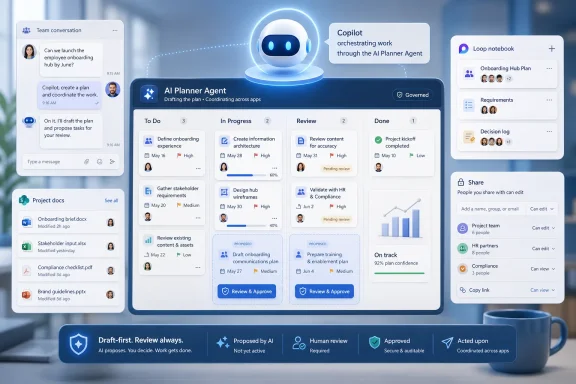
The new agent lets users create and update tasks, change names and due dates, adjust priorities and statuses, surface insights, and generate plan structures from natural-language prompts. Microsoft says it can work with plans and tasks inside Microsoft 365 Copilot, while also surfacing through Microsoft 365 apps such as Teams, Loop, SharePoint, and Planner itself. The strategic move is obvious: Copilot becomes less of a separate destination and more of a command layer over the Microsoft 365 work graph.
This is the agent pitch in its most defensible form. Not “let the AI run your company,” not “replace your project manager,” and not “summon a digital employee.” It is closer to “use the information Microsoft already stores about your work to reduce the administrative drag of keeping work organized.”
That makes Planner Agent a more serious test than a summarization demo. The feature is being asked to perform operations against shared business data, not simply produce text. If it misunderstands a request, duplicates work, changes the wrong task, or overstates progress, the mistake lands in the system of record for the team.
Microsoft appears to understand that risk. AI-generated plans and tasks are created in draft mode by default, requiring review and approval before changes are applied. That is not a decorative safety measure; it is the difference between a useful assistant and an uncontrolled automation layer.
Draft mode also reveals where Microsoft has learned from the first wave of Copilot fatigue. Users do not need another black box confidently editing shared workspaces. They need a system that can propose structured changes, show its work clearly enough to be inspected, and wait for a human decision before touching the board.
Task systems are social systems. Changing a due date can imply blame. Moving a task to completed can conceal risk. Assigning a task to a colleague can create an obligation that never existed. Even if the AI is technically accurate, the human meaning of the change may be wrong.
Draft mode gives Planner Agent a defensible operating model: suggest, structure, and accelerate, but do not silently commit. That aligns with how many organizations actually adopt automation. They do not begin by delegating authority; they begin by asking software to prepare work for a person with authority to approve.
This matters because Microsoft’s broader agent strategy depends on trust at the workflow level. A chatbot that hallucinates a paragraph is irritating. An agent that quietly alters a plan, assigns work, or misreads a document is operationally dangerous. Planner Agent’s draft-first approach is a recognition that the road to autonomous office work runs through supervised automation.
There is also a subtler benefit. Drafts make the agent auditable in everyday use. The user can see the proposed task name, due date, status, and priority before accepting it. That interaction creates a feedback loop: not just “Copilot gave me an answer,” but “Copilot proposed a change to a business object, and I approved or rejected it.”
In that world, “update the launch plan” is not a simple command. Which launch plan? The one in last quarter’s Team? The one under the marketing group? The private plan created during the pilot? The copied board from an old project? Microsoft’s productivity suite has always been powerful partly because everything can become connected, and maddening because everything can become duplicated.
The plan picker is an admission that natural language does not eliminate information architecture. It only makes the consequences of bad information architecture arrive faster. If Copilot can act across multiple plans, users need confidence that it is acting on the right one.
For admins and power users, this is where the feature becomes less magical and more practical. Agentic interfaces are often sold as if users can simply ask for outcomes. In enterprise software, the first step is frequently selecting the correct scope. Planner Agent’s plan picker is a boring feature in the best sense: it handles the ambiguity that would otherwise make the agent feel unsafe.
That distinction matters for AI. A task list with buckets tells the model where items sit. A task list with goals gives the model more context about why the items exist. If a user asks Planner Agent to build a plan from a document or break down an initiative, goal-oriented grouping can make the output more useful than a flat list of action items.
It also brings Planner closer to the language of management. Executives do not usually ask whether all the cards in “Phase 2” are updated. They ask whether the launch readiness goal is at risk, whether the compliance remediation effort is on track, or whether the team has enough work assigned to meet a deadline. Goals create a bridge between tactical tasks and managerial reporting.
The risk is that goals become another layer of corporate taxonomy for users to maintain. Microsoft is betting that Copilot can offset that burden by generating and organizing the structure. If it works, Planner becomes more than a board. It becomes a lightweight planning system with AI-assisted interpretation.
The first generation of enterprise AI often implied that there was one big model behind the curtain. The actual product reality is becoming more layered. Different jobs require different reasoning depth, latency, cost, and context handling. Updating a task’s status should not need the same computational muscle as extracting a project plan from a slide deck and mapping it to goals, buckets, and deadlines.
This is partly about user experience. If every simple request feels slow because it is being overprocessed, users will go back to clicking. The whole point of a natural-language task agent is to make small administrative actions feel lighter, not ceremonious.
It is also about economics. Microsoft 365 Copilot is a premium subscription product, but large-scale agent use still has compute costs. Routing work intelligently helps Microsoft preserve performance and margins while giving customers the feeling that Copilot is responsive. Behind the friendly “agent” label is an increasingly important infrastructure problem: deciding how much AI to spend on each unit of office work.
For IT pros, model routing is another reminder that Copilot is not a single feature to enable and forget. It is a service fabric. The more Microsoft embeds it into operational workflows, the more admins will care about latency, reliability, governance, and licensing boundaries.
That matters because Microsoft has spent the past several years turning AI features into a licensing strategy as much as a product strategy. The company wants Copilot to be the premium layer across Microsoft 365, not a collection of isolated app features. Planner Agent strengthens that position by giving paying users a concrete workflow benefit that is easier to understand than abstract productivity claims.
The licensing model will also shape adoption. In many organizations, Microsoft 365 Copilot is not deployed to every user. It is piloted with executives, analysts, IT staff, sales teams, or selected knowledge workers. Planner, by contrast, often supports mixed teams where only some participants may have premium capabilities. Microsoft says users without a Copilot license can still collaborate on plans, but they cannot interact with the agent.
That split can create awkward dynamics. If only licensed users can ask the agent to generate tasks or status insights, the AI layer becomes unevenly distributed across the team. The board remains shared, but the ability to automate and interpret it does not. In the short term, that may be fine for pilots. In the long term, it could push organizations toward broader Copilot licensing if Planner Agent proves genuinely useful.
This is exactly the kind of feature Microsoft needs to justify Copilot as more than an executive toy. A writing assistant is nice. A task agent that turns meeting debris, documents, and vague goals into actionable plan drafts is closer to a business case.
That is the broader Microsoft 365 pattern. Work rarely starts in the app where it is supposed to be tracked. It starts in a Teams thread, an email, a meeting transcript, a PowerPoint, a Word proposal, or a spreadsheet that nobody admits is the real project plan. Planner Agent is designed to harvest structure from that sprawl.
If the agent can reliably turn those artifacts into draft plans, it solves one of the oldest problems in collaboration software: the gap between discussion and execution. Every organization has meetings where the action items are clear in the room and gone by the next morning. A Planner Agent embedded in the daily flow of Microsoft 365 can reduce that loss.
But this also raises the stakes for permissions and data hygiene. Copilot’s usefulness depends on the content it can see. If SharePoint sites are over-permissioned, Teams sprawl is unmanaged, or sensitive documents are accessible too broadly, an agent that extracts work from the graph may surface more than the organization intended. The feature is only as safe as the tenant’s information governance.
That is not a reason to avoid it. It is a reason to treat Planner Agent as part of the same governance conversation as SharePoint permissions, sensitivity labels, retention, audit logging, and Copilot readiness. The agent does not create the underlying mess, but it can make the mess operational.
A project manager does not simply create tasks. They negotiate scope, understand politics, protect teams from unrealistic commitments, interpret risk, escalate blockers, and decide when a plan is lying. Those are not just information-processing functions. They require judgment, authority, and institutional context that software does not possess by default.
What Planner Agent can attack is the chore layer around project management. Turning a document into a draft task list is a chore. Updating multiple due dates after a schedule shift is a chore. Asking which tasks are overdue, which are high priority, or which goal has the most open work is a chore. Summarizing plan status from structured data is often a chore.
That is where Microsoft’s agent vision becomes credible. The best use case is not replacing the person accountable for the plan. It is reducing the amount of clerical manipulation required to keep the plan current enough for accountability to mean something.
This is especially relevant for small teams and departments that never had formal project management support. Planner has long served those teams precisely because it is approachable. Adding an agent may give them a way to create more disciplined plans without adopting heavyweight project-management software.
Admins will need to understand where the agent is available, which licenses unlock it, how it interacts with basic and premium plans, and how to restrict or disable access where needed. Microsoft has published administrative guidance for controlling access to Planner Agent and Planner Agent chat, which suggests the company knows this cannot be treated as a purely user-facing rollout.
The practical concerns are familiar but sharper with agents. Who can ask the agent to modify shared plans? What data can be used as context? What happens when a file is uploaded as a knowledge source? How are generated outputs reviewed? Which changes are logged? How will help desks distinguish user error from agent error?
There is also a training issue. Users tend to anthropomorphize agents, especially when the software responds fluently and appears inside familiar productivity tools. Organizations should teach users to treat Planner Agent as a drafting and structuring tool, not as a decision-maker. The draft workflow helps, but it does not replace user education.
The most mature deployments will likely pair Copilot expansion with a cleanup of Microsoft 365 permissions and lifecycle policies. That is not glamorous work, but it is where the difference between a useful AI rollout and a compliance headache will be decided.
Planner Agent is useful because it gives the word agent a more concrete shape. It can inspect plan data, respond to task-management prompts, propose updates, generate plans from files, and work within the boundaries of Microsoft 365 identity and licensing. It is not science fiction. It is enterprise software with a chat interface and controlled write access.
That concreteness makes it easier to judge. Does it save time? Does it create accurate drafts? Does it choose the right plan? Does it respect permissions? Does it surface meaningful insights instead of generic summaries? Does it reduce the number of clicks enough that users keep coming back?
Those are better questions than the usual “will AI transform work?” Planner Agent will transform work only if it becomes boringly reliable. The mark of success will not be a dramatic demo. It will be an employee using Copilot to turn a messy project document into a task plan, reviewing the draft, making two edits, and moving on with their day.
Plausible wrongness is hard to catch because it looks like competence. That is why draft review is necessary but not sufficient. Users need to inspect the substance, not merely approve the formatting. A task list can be neat, complete-looking, and still wrong.
The danger is especially acute when generating plans from Word, Excel, or PowerPoint files. Business documents are full of assumptions, aspirational timelines, outdated tables, and political phrasing. An AI system can turn those into tasks with impressive speed, but it cannot guarantee that the source material was a sound plan in the first place.
This is where human judgment remains central. Planner Agent can reduce the friction of creating structure. It cannot eliminate the need to decide whether the structure reflects reality. In many organizations, that will be the hard part.
Microsoft is uniquely positioned to attack that problem because Microsoft 365 is where much of the fragmentation already lives. That is also why the company’s responsibility is unusually high. The same integration that makes Copilot powerful can make it invasive, confusing, or risky if controls are weak.
The best version of Planner Agent is not a flashy autonomous worker. It is a disciplined translation layer. It translates documents into draft plans, conversations into tasks, goals into work breakdowns, and plan data into status insights. It gives users structure without pretending structure is the same as strategy.
That is the kind of AI feature enterprise users may actually adopt. It does not require them to change careers, change vendors, or trust a bot with everything. It asks them to let Copilot do the tedious first pass, then keep the human in charge.
The most concrete implications are straightforward:
Microsoft’s bet is that the next phase of AI in the workplace will not be won by the chatbot that sounds most human, but by the agent that most reliably turns scattered intent into supervised action. Planner Agent is a cautious, practical step in that direction: bounded, reviewable, and tied to a task system people already use. If Microsoft can keep that discipline as its agents become more capable, Copilot may finally move from impressive demo to dependable office infrastructure.
 Microsoft Moves Copilot From Commentary to Coordination
For most of its short life, Microsoft 365 Copilot has been strongest when summarizing, rewriting, or drafting. Those are useful jobs, but they sit at the edge of work rather than inside its machinery. Planner Agent pushes Copilot into a more consequential role: not merely describing what happened in a document or meeting, but helping decide what should happen next.That is why this release matters more than its modest name suggests. Planner is not glamorous software. It is a board, a list, a deadline tracker, a bucket system, and a compromise between the informality of Microsoft To Do and the formality of Project. Precisely because it is unglamorous, it is where a lot of real organizational work goes to become visible.
The new agent lets users create and update tasks, change names and due dates, adjust priorities and statuses, surface insights, and generate plan structures from natural-language prompts. Microsoft says it can work with plans and tasks inside Microsoft 365 Copilot, while also surfacing through Microsoft 365 apps such as Teams, Loop, SharePoint, and Planner itself. The strategic move is obvious: Copilot becomes less of a separate destination and more of a command layer over the Microsoft 365 work graph.
This is the agent pitch in its most defensible form. Not “let the AI run your company,” not “replace your project manager,” and not “summon a digital employee.” It is closer to “use the information Microsoft already stores about your work to reduce the administrative drag of keeping work organized.”
The Humble Task List Becomes Microsoft’s Agent Test Bed
The office task list is a perfect proving ground for AI agents because it is structured enough to constrain the model and ambiguous enough to benefit from assistance. A Word document can be summarized badly and still be recognizable. A task system has harder edges: a due date is either wrong or right, a status change has consequences, and an assignment can create work for someone else.That makes Planner Agent a more serious test than a summarization demo. The feature is being asked to perform operations against shared business data, not simply produce text. If it misunderstands a request, duplicates work, changes the wrong task, or overstates progress, the mistake lands in the system of record for the team.
Microsoft appears to understand that risk. AI-generated plans and tasks are created in draft mode by default, requiring review and approval before changes are applied. That is not a decorative safety measure; it is the difference between a useful assistant and an uncontrolled automation layer.
Draft mode also reveals where Microsoft has learned from the first wave of Copilot fatigue. Users do not need another black box confidently editing shared workspaces. They need a system that can propose structured changes, show its work clearly enough to be inspected, and wait for a human decision before touching the board.
Draft Mode Is the Product, Not the Disclaimer
The most important design decision in Planner Agent may be that its output starts as a draft. In the consumer AI market, that sounds cautious. In enterprise collaboration software, it is table stakes.Task systems are social systems. Changing a due date can imply blame. Moving a task to completed can conceal risk. Assigning a task to a colleague can create an obligation that never existed. Even if the AI is technically accurate, the human meaning of the change may be wrong.
Draft mode gives Planner Agent a defensible operating model: suggest, structure, and accelerate, but do not silently commit. That aligns with how many organizations actually adopt automation. They do not begin by delegating authority; they begin by asking software to prepare work for a person with authority to approve.
This matters because Microsoft’s broader agent strategy depends on trust at the workflow level. A chatbot that hallucinates a paragraph is irritating. An agent that quietly alters a plan, assigns work, or misreads a document is operationally dangerous. Planner Agent’s draft-first approach is a recognition that the road to autonomous office work runs through supervised automation.
There is also a subtler benefit. Drafts make the agent auditable in everyday use. The user can see the proposed task name, due date, status, and priority before accepting it. That interaction creates a feedback loop: not just “Copilot gave me an answer,” but “Copilot proposed a change to a business object, and I approved or rejected it.”
The Plan Picker Solves a Very Microsoft Problem
One of the new additions in general availability is a plan picker that lets users search and filter plans by name before making updates. That sounds small until you remember how Microsoft 365 environments evolve in the wild. A mature tenant can contain years of Teams, groups, SharePoint sites, copied projects, abandoned boards, renamed departments, and half-retired initiatives.In that world, “update the launch plan” is not a simple command. Which launch plan? The one in last quarter’s Team? The one under the marketing group? The private plan created during the pilot? The copied board from an old project? Microsoft’s productivity suite has always been powerful partly because everything can become connected, and maddening because everything can become duplicated.
The plan picker is an admission that natural language does not eliminate information architecture. It only makes the consequences of bad information architecture arrive faster. If Copilot can act across multiple plans, users need confidence that it is acting on the right one.
For admins and power users, this is where the feature becomes less magical and more practical. Agentic interfaces are often sold as if users can simply ask for outcomes. In enterprise software, the first step is frequently selecting the correct scope. Planner Agent’s plan picker is a boring feature in the best sense: it handles the ambiguity that would otherwise make the agent feel unsafe.
Goals Give the Agent Something Better Than a Bucket
Planner’s Goals view has been part of Microsoft’s broader refresh of the app, and Planner Agent now leans into that model by allowing tasks to be grouped under specific goals. This is a meaningful shift from merely organizing work into buckets. Buckets often reflect process or ownership; goals reflect intent.That distinction matters for AI. A task list with buckets tells the model where items sit. A task list with goals gives the model more context about why the items exist. If a user asks Planner Agent to build a plan from a document or break down an initiative, goal-oriented grouping can make the output more useful than a flat list of action items.
It also brings Planner closer to the language of management. Executives do not usually ask whether all the cards in “Phase 2” are updated. They ask whether the launch readiness goal is at risk, whether the compliance remediation effort is on track, or whether the team has enough work assigned to meet a deadline. Goals create a bridge between tactical tasks and managerial reporting.
The risk is that goals become another layer of corporate taxonomy for users to maintain. Microsoft is betting that Copilot can offset that burden by generating and organizing the structure. If it works, Planner becomes more than a board. It becomes a lightweight planning system with AI-assisted interpretation.
Model Routing Reveals the Economics Behind the Magic
Microsoft says Planner Agent handles simple tasks quickly while routing more complex jobs—such as building a plan from a Word, Excel, or PowerPoint file—to a more capable model. That detail is easy to skim past, but it is one of the more revealing parts of the announcement.The first generation of enterprise AI often implied that there was one big model behind the curtain. The actual product reality is becoming more layered. Different jobs require different reasoning depth, latency, cost, and context handling. Updating a task’s status should not need the same computational muscle as extracting a project plan from a slide deck and mapping it to goals, buckets, and deadlines.
This is partly about user experience. If every simple request feels slow because it is being overprocessed, users will go back to clicking. The whole point of a natural-language task agent is to make small administrative actions feel lighter, not ceremonious.
It is also about economics. Microsoft 365 Copilot is a premium subscription product, but large-scale agent use still has compute costs. Routing work intelligently helps Microsoft preserve performance and margins while giving customers the feeling that Copilot is responsive. Behind the friendly “agent” label is an increasingly important infrastructure problem: deciding how much AI to spend on each unit of office work.
For IT pros, model routing is another reminder that Copilot is not a single feature to enable and forget. It is a service fabric. The more Microsoft embeds it into operational workflows, the more admins will care about latency, reliability, governance, and licensing boundaries.
The Licensing Line Keeps the Agent Inside the Copilot Paywall
Planner Agent is available to users with a Microsoft 365 Copilot license. Users with additional Planner premium licenses get premium functionality, but the key line is clear: interaction with the agent belongs to the Copilot tier.That matters because Microsoft has spent the past several years turning AI features into a licensing strategy as much as a product strategy. The company wants Copilot to be the premium layer across Microsoft 365, not a collection of isolated app features. Planner Agent strengthens that position by giving paying users a concrete workflow benefit that is easier to understand than abstract productivity claims.
The licensing model will also shape adoption. In many organizations, Microsoft 365 Copilot is not deployed to every user. It is piloted with executives, analysts, IT staff, sales teams, or selected knowledge workers. Planner, by contrast, often supports mixed teams where only some participants may have premium capabilities. Microsoft says users without a Copilot license can still collaborate on plans, but they cannot interact with the agent.
That split can create awkward dynamics. If only licensed users can ask the agent to generate tasks or status insights, the AI layer becomes unevenly distributed across the team. The board remains shared, but the ability to automate and interpret it does not. In the short term, that may be fine for pilots. In the long term, it could push organizations toward broader Copilot licensing if Planner Agent proves genuinely useful.
This is exactly the kind of feature Microsoft needs to justify Copilot as more than an executive toy. A writing assistant is nice. A task agent that turns meeting debris, documents, and vague goals into actionable plan drafts is closer to a business case.
Teams, Loop, and SharePoint Make Planner Agent Harder to Ignore
The availability of Planner Agent across Microsoft 365 apps is not incidental. Microsoft does not want users to think of Planner as a place they visit. It wants planning to become an ambient layer across Teams conversations, Loop workspaces, SharePoint content, and Copilot chat.That is the broader Microsoft 365 pattern. Work rarely starts in the app where it is supposed to be tracked. It starts in a Teams thread, an email, a meeting transcript, a PowerPoint, a Word proposal, or a spreadsheet that nobody admits is the real project plan. Planner Agent is designed to harvest structure from that sprawl.
If the agent can reliably turn those artifacts into draft plans, it solves one of the oldest problems in collaboration software: the gap between discussion and execution. Every organization has meetings where the action items are clear in the room and gone by the next morning. A Planner Agent embedded in the daily flow of Microsoft 365 can reduce that loss.
But this also raises the stakes for permissions and data hygiene. Copilot’s usefulness depends on the content it can see. If SharePoint sites are over-permissioned, Teams sprawl is unmanaged, or sensitive documents are accessible too broadly, an agent that extracts work from the graph may surface more than the organization intended. The feature is only as safe as the tenant’s information governance.
That is not a reason to avoid it. It is a reason to treat Planner Agent as part of the same governance conversation as SharePoint permissions, sensitivity labels, retention, audit logging, and Copilot readiness. The agent does not create the underlying mess, but it can make the mess operational.
The Project Manager Is Not Replaced, but the Chore List Is Under Attack
Microsoft’s naming has shifted over time around Copilot in Planner and project-management-style agents, and that history matters. The temptation is to read “Planner Agent” as a digital project manager. That overstates what the product should be expected to do.A project manager does not simply create tasks. They negotiate scope, understand politics, protect teams from unrealistic commitments, interpret risk, escalate blockers, and decide when a plan is lying. Those are not just information-processing functions. They require judgment, authority, and institutional context that software does not possess by default.
What Planner Agent can attack is the chore layer around project management. Turning a document into a draft task list is a chore. Updating multiple due dates after a schedule shift is a chore. Asking which tasks are overdue, which are high priority, or which goal has the most open work is a chore. Summarizing plan status from structured data is often a chore.
That is where Microsoft’s agent vision becomes credible. The best use case is not replacing the person accountable for the plan. It is reducing the amount of clerical manipulation required to keep the plan current enough for accountability to mean something.
This is especially relevant for small teams and departments that never had formal project management support. Planner has long served those teams precisely because it is approachable. Adding an agent may give them a way to create more disciplined plans without adopting heavyweight project-management software.
Windows Admins Should Read This as a Governance Story
For WindowsForum’s IT audience, the desktop UI is not the center of this story. The center is governance. Planner Agent is another example of Microsoft moving from application features toward cross-app agents that act on organizational data.Admins will need to understand where the agent is available, which licenses unlock it, how it interacts with basic and premium plans, and how to restrict or disable access where needed. Microsoft has published administrative guidance for controlling access to Planner Agent and Planner Agent chat, which suggests the company knows this cannot be treated as a purely user-facing rollout.
The practical concerns are familiar but sharper with agents. Who can ask the agent to modify shared plans? What data can be used as context? What happens when a file is uploaded as a knowledge source? How are generated outputs reviewed? Which changes are logged? How will help desks distinguish user error from agent error?
There is also a training issue. Users tend to anthropomorphize agents, especially when the software responds fluently and appears inside familiar productivity tools. Organizations should teach users to treat Planner Agent as a drafting and structuring tool, not as a decision-maker. The draft workflow helps, but it does not replace user education.
The most mature deployments will likely pair Copilot expansion with a cleanup of Microsoft 365 permissions and lifecycle policies. That is not glamorous work, but it is where the difference between a useful AI rollout and a compliance headache will be decided.
Microsoft’s Agent Strategy Is Becoming Less Abstract
Microsoft has spent years describing Copilot as an AI companion for work, and more recently it has leaned heavily into the language of agents. That language can be slippery. Sometimes an agent is a chatbot with a workflow. Sometimes it is an automation connected to business data. Sometimes it is a branded promise that the software will be less passive than before.Planner Agent is useful because it gives the word agent a more concrete shape. It can inspect plan data, respond to task-management prompts, propose updates, generate plans from files, and work within the boundaries of Microsoft 365 identity and licensing. It is not science fiction. It is enterprise software with a chat interface and controlled write access.
That concreteness makes it easier to judge. Does it save time? Does it create accurate drafts? Does it choose the right plan? Does it respect permissions? Does it surface meaningful insights instead of generic summaries? Does it reduce the number of clicks enough that users keep coming back?
Those are better questions than the usual “will AI transform work?” Planner Agent will transform work only if it becomes boringly reliable. The mark of success will not be a dramatic demo. It will be an employee using Copilot to turn a messy project document into a task plan, reviewing the draft, making two edits, and moving on with their day.
The Risk Is Not Hallucination, It Is Plausible Wrongness
The usual AI warning label focuses on hallucination, but in task management the more dangerous failure mode is plausible wrongness. A bad status summary may sound reasonable. A generated plan may include the obvious tasks while missing the critical dependency. A priority recommendation may reflect the wording of a document rather than the reality of the business.Plausible wrongness is hard to catch because it looks like competence. That is why draft review is necessary but not sufficient. Users need to inspect the substance, not merely approve the formatting. A task list can be neat, complete-looking, and still wrong.
The danger is especially acute when generating plans from Word, Excel, or PowerPoint files. Business documents are full of assumptions, aspirational timelines, outdated tables, and political phrasing. An AI system can turn those into tasks with impressive speed, but it cannot guarantee that the source material was a sound plan in the first place.
This is where human judgment remains central. Planner Agent can reduce the friction of creating structure. It cannot eliminate the need to decide whether the structure reflects reality. In many organizations, that will be the hard part.
The Best Copilot Features Are the Ones That Admit Microsoft 365 Is Messy
Planner Agent succeeds conceptually because it starts from an honest premise: modern office work is fragmented. Tasks are scattered across chat, email, meetings, documents, and personal memory. People do not fail to track work because they lack yet another app; they fail because maintaining the system takes effort after the real conversation has already happened.Microsoft is uniquely positioned to attack that problem because Microsoft 365 is where much of the fragmentation already lives. That is also why the company’s responsibility is unusually high. The same integration that makes Copilot powerful can make it invasive, confusing, or risky if controls are weak.
The best version of Planner Agent is not a flashy autonomous worker. It is a disciplined translation layer. It translates documents into draft plans, conversations into tasks, goals into work breakdowns, and plan data into status insights. It gives users structure without pretending structure is the same as strategy.
That is the kind of AI feature enterprise users may actually adopt. It does not require them to change careers, change vendors, or trust a bot with everything. It asks them to let Copilot do the tedious first pass, then keep the human in charge.
The Planner Agent Rollout Draws the Boundary Lines
Microsoft’s general availability release gives organizations enough specificity to start making real decisions. This is no longer a curiosity inside an early-access program. It is part of the Microsoft 365 Copilot value proposition, and it will show up in the everyday workflows of licensed users.The most concrete implications are straightforward:
- Planner Agent is now generally available to users with a Microsoft 365 Copilot license, with premium Planner licensing still determining access to some advanced Planner functionality.
- The agent can create, view, and update tasks and plans through natural-language prompts, including task names, statuses, due dates, and priorities.
- AI-generated plans and task updates are created as drafts by default, which keeps humans in the approval loop before shared work changes.
- The new plan picker helps users choose the correct plan before making updates, a necessary safeguard in large Microsoft 365 tenants.
- Goals-based task grouping gives the agent more meaningful structure than buckets alone, especially when generating plans from documents or high-level objectives.
- IT teams should treat Planner Agent as a governance rollout, not merely a productivity feature, because it operates against shared work data inside Microsoft 365.
Microsoft’s bet is that the next phase of AI in the workplace will not be won by the chatbot that sounds most human, but by the agent that most reliably turns scattered intent into supervised action. Planner Agent is a cautious, practical step in that direction: bounded, reviewable, and tied to a task system people already use. If Microsoft can keep that discipline as its agents become more capable, Copilot may finally move from impressive demo to dependable office infrastructure.
References
- Primary source: Neowin
Published: Mon, 15 Jun 2026 20:26:00 GMT
Microsoft brings Planner Agent to all Microsoft 365 Copilot users - Neowin
You can now create, manage, and get insights about Planner tasks with prompts inside Microsoft 365 Copilot. www.neowin.net
- Official source: support.microsoft.com
Access Planner Agent | Microsoft Support
Planner Agent works alongside your team to help you get work done faster. It can create your plan based on goals, execute tasks, and act on feedback.support.microsoft.com - Related coverage: blog-en.topedia.com
Planner Agent in Microsoft 365 Copilot reaches general availability | Topedia Blog
Microsoft will release the Planner Agent to general availability, enabling all Microsoft 365 Copilot users to create and manage tasks and plans within Copilot experiences. The agent is automatically preinstalled for eligible users, with no option to restrict the availability to specific users.blog-en.topedia.com - Official source: techcommunity.microsoft.com
Planner Agent brings work management directly into Microsoft 365 Copilot | Microsoft Community Hub
Learn how Planner Agent brings work across Microsoft 365 into one place, so you can see what matters and take action. techcommunity.microsoft.com
- Official source: learn.microsoft.com
Turn off or restrict access to Planner Agent and Planner Agent chat in Planner - Microsoft Planner | Microsoft Learn
This document walks you through the process of turning off the Planner Agent and Planner Agent chat feature for your organization through our PowerShell suitelearn.microsoft.com - Related coverage: m365admin.handsontek.net
Microsoft 365 Copilot: Planner agent general availability - M365 Admin
Microsoft 365 Copilot’s Planner agent is generally available worldwide from mid to late June 2026. It enables users with active Copilot licenses to create, update, and manage tasks and plans within Copilot, offering insights on priorities and deadlines. Admins can control its availability...m365admin.handsontek.net
- Official source: microsoft.com
Microsoft 365 Roadmap | Microsoft 365
The Microsoft 365 Roadmap lists updates that are currently planned for applicable subscribers. Check here for more information on the status of new features and updates.www.microsoft.com
- Related coverage: ebisuda.net
Microsoft Planner にAIエージェントが本格統合——ライセンス拡充で「タスク管理×AI」が一般ユーザーにも届く | ebisuda.net
Planner AgentがM365 Copilotライセンス+基本プランで利用可能になり、AIによるタスク実行支援が広がった。www.ebisuda.net
- Related coverage: supersimple365.com
Create and manage tasks with the Copilot Planner Agent - Super Simple 365
Short VersionThe new Copilot Planner Agent lets you create and manage Planner tasks from within Copilot chat. Due mid-March to late April 2026 (public preview). DetailsThe new Planner Agent brings Planner’s work management directly into Copilot chat, enabling you to: Create, view, and update... supersimple365.com
- Related coverage: windowscentral.com
Microsoft Copilot Wave 3 adds AI agents and E7 Frontier Suite | Windows Central
Microsoft Copilot is rolling out more agentic AI control and model support in a new subscription tier for Microsoft 365.www.windowscentral.com - Official source: cdn-dynmedia-1.microsoft.com
- Related coverage: arturmarkus.com
Microsoft 365 Copilot Rolls Out 27 New Features in January 2026, Adds GPT-5.2 Model Selector with 3 Reasoning Modes
PDF documentwww.arturmarkus.com
- Official source: cdn.techcommunity.microsoft.com
