

Microsoft began pulling back visible Copilot branding and entry points from parts of Windows 11 and Microsoft 365 in spring 2026, after years of aggressively pushing its AI assistant into Windows, Office, Notepad, Paint, Photos, and dedicated Copilot+ PCs. The retreat is not a full abandonment of AI, and it is not even a clean uninstall story. It is something more revealing: Microsoft has learned that a button is not a product strategy, especially when the button keeps landing on top of work users were already trying to finish.
The company’s Copilot push was supposed to make Windows feel modern again. Instead, it made Windows feel interrupted. Now Microsoft is trying to separate the AI future it still wants from the AI clutter users have been rejecting.
For a brief moment in 2023, Microsoft looked like the adult in the generative AI room. OpenAI had the cultural lightning strike, but Microsoft had the cloud, the enterprise accounts, the productivity suite, the operating system, and a search engine badly in need of a second act. The company’s early Bing Chat rollout was messy, fascinating, and unmistakably bold.
That mattered because Microsoft is rarely rewarded for looking fast. Windows users know the company as an institution of migration wizards, licensing pages, control panels that refuse to die, and feature rollouts that sometimes feel less designed than negotiated among departments. Copilot gave Microsoft the chance to look like it had skipped a generation.
The result was a campaign of almost total saturation. Copilot moved from Bing into Windows 11, then into Microsoft 365, Edge, Teams, GitHub, Notepad, Paint, Photos, and the marketing vocabulary of nearly every product group. The company even gave PC makers a new keyboard key to signal that AI was no longer an app but part of the machine.
The error was not that Microsoft bet on AI. Any large software company that ignored large language models would have been negligent. The error was that Microsoft often treated presence as proof of usefulness, assuming that if Copilot appeared in enough places, users would eventually build their workflows around it.
That assumption underestimated Windows users in the most Microsoft way possible. People who live in Windows all day do not judge features by keynote promise. They judge them by whether Explorer freezes less, whether the taskbar behaves, whether updates respect their time, whether Office leaves the document canvas alone, and whether a new feature can be ignored without fighting the operating system.
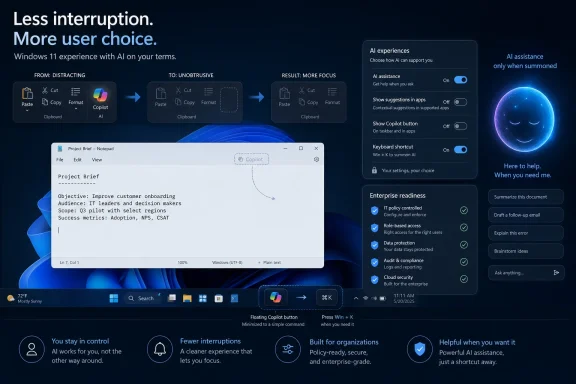
A Copilot button in a ribbon is one thing. A persistent floating affordance in Word, Excel, or PowerPoint is another. When a feature hovers over the workspace, blocks content, and cannot be dismissed in the obvious way, it crosses from discoverability into nagware.
Microsoft reportedly acknowledged that the floating Copilot button in Office went too far, while also noting that engagement increased. That is the kind of metric that can be technically true and strategically poisonous. If you place an AI button in the user’s path, more users will press it; that does not mean they wanted it there.
This is where the Copilot rollout became a trust problem. Windows users are not naïve about software promotion. They understand that Microsoft wants to sell subscriptions, cloud services, and AI add-ons. What irritates them is when the operating system and productivity apps feel like distribution channels first and tools second.
The backlash also sharpened because Copilot’s identity became muddled. Was it a Windows assistant? A web chatbot? A Microsoft 365 feature? A security-controlled enterprise tool? A consumer companion? A local AI layer for Copilot+ PCs? Microsoft’s answer was often “yes,” which is not a product definition so much as a branding strategy.
But AI usage matured faster than Microsoft’s packaging. Users began to sort models and tools by task. Developers gravitated toward coding-focused products. Writers compared tone and revision quality. Researchers cared about retrieval and citations. Designers tested image and video systems separately. Enterprises evaluated security boundaries, admin controls, data residency, and auditability.
In that environment, a general assistant bundled everywhere starts to look less like the center of the AI universe and more like the default app you replace. Copilot did not have to be bad to lose mindshare. It merely had to be less loved than the best tool for a given job.
That is a brutal position for Microsoft because its historic strength is integration. Office won because Word, Excel, PowerPoint, Outlook, SharePoint, Exchange, and Windows formed a gravity well. But AI does not obey the same lock-in logic as neatly, especially when users can keep multiple assistants open in browser tabs and switch models as casually as they switch search queries.
The rise of agentic tools made the contrast sharper. The industry’s center of excitement moved from “chat with a model” to “delegate a task to a system that can plan, use tools, and take action.” Whether the poster child is OpenClaw, Claude Code, OpenAI’s agent work, Gemini’s newer agentic push, or a local automation stack, the point is the same: users are increasingly judging AI by execution, not conversation.
Copilot’s Windows-era problem is that too much of it felt like a doorbell. Press here to ask the assistant. Press here to rewrite text. Press here to generate an image. That can be useful, but it is not the same as an operating system that intelligently removes friction.
The name sounds like a new version of Windows. In practice, it appears to be more of a product discipline exercise. After years in which Windows 11 often felt like it was being asked to serve the AI narrative, K2 is being framed as an attempt to make Windows better at being Windows.
That distinction matters. Windows 11 has never lacked ambition; it has lacked user confidence. Its hardware requirements complicated the upgrade path. Its redesigned taskbar lost capabilities that longtime users considered basic. Its Start menu has been a recurring grievance. Its update reliability and performance perception have been fragile enough that every bad patch feeds a broader story of decline.
Copilot did not create those issues, but it became a symbol for them. When users are frustrated by the taskbar, Start menu, ads, account prompts, update bugs, and shifting settings surfaces, a shiny AI button feels less like innovation and more like avoidance. It tells customers Microsoft had time for a Copilot key but not for the papercuts they hit every day.
That is why K2, if it is real in the way reports describe it, is potentially more important than any single Copilot demotion. It suggests Microsoft understands that Windows’ reputation has strategic value beyond direct OS revenue. A degraded Windows brand does not merely hurt enthusiasts; it weakens the default platform on which Microsoft wants to sell security, cloud, productivity, gaming, developer tools, and AI.
In Notepad, for example, Microsoft’s removal of the Copilot-branded button does not necessarily mean the AI writing functionality is gone. It can be relabeled as writing tools. In Photos or Paint, AI features can remain even if the Copilot word becomes less prominent. In Microsoft 365, Copilot can move from a floating button back into the ribbon, where users expect commands to live.
That makes the retreat both real and limited. Microsoft is not giving up on generative AI in Windows; it is trying to stop making every AI affordance feel like an advertisement for Copilot. The company still wants AI woven through productivity, search, security, development, and device experiences. It simply appears to be learning that the weave matters.
For Windows users, this distinction is practical. Removing Copilot branding may reduce annoyance, but it does not answer deeper questions about telemetry, local processing, subscription gating, admin policy, and whether AI features can be disabled cleanly. It also does not guarantee that future Windows experiences will be less promotional.
For administrators, the difference is even sharper. A consumer can grumble about a button. An IT department has to decide whether a feature touches regulated data, whether it changes user behavior, whether it introduces support tickets, and whether policy controls are granular enough to match organizational risk. Copilot’s visibility problem is annoying; Copilot’s governance problem is operational.
Microsoft changed course, delayed availability, and reworked security and privacy controls. But the episode damaged the trust context in which every later AI feature is evaluated. Once users believe a company’s AI ambition may outrun its privacy judgment, even smaller integrations face a colder reception.
That does not mean Recall was doomed as a concept. A secure, opt-in, locally processed memory layer could be genuinely useful for some users. The problem was that Microsoft introduced it into an environment where Windows users were already primed to suspect that defaults would favor Microsoft’s strategic goals over user agency.
Copilot inherited that suspicion. A button in Notepad is not Recall. A floating Office affordance is not a screenshot database. But to a user who has spent years dismissing prompts, fighting defaults, and reading about AI features arriving before controls feel mature, all of these things become part of one story: Microsoft wants AI in the workflow whether the workflow asked for it or not.
That is the hole K2 has to climb out of. It is not enough to make AI features more secure or more useful. Microsoft has to make them feel optional in the ordinary, emotional sense of the word — not merely controllable through a buried admin policy, registry setting, subscription entitlement, or phased rollout note.
But enterprise customers are also where Microsoft’s “ship the button” habit is most dangerous. IT departments do not want consumer-style surprise in business-critical apps. They want clear controls, stable defaults, documentation, audit trails, licensing clarity, and a rollout path that does not turn every help desk into a Copilot support desk overnight.
The Office floating button controversy is a small but telling example. If a visual element suddenly appears in core applications and interferes with documents, spreadsheets, or presentations, that is not merely an annoyance. It is a change management problem multiplied across departments, accessibility needs, training material, screenshots, templates, and support scripts.
There is also the question of AI fatigue. Many organizations have spent the last two years being told that every workflow is about to be transformed. In reality, adoption is uneven. Some teams find clear value in summarization and drafting. Others see hallucinations, mediocre output, or compliance headaches. Many employees are simply busy and do not want their familiar tools rearranged around a feature they did not request.
Microsoft can still win here, but not by making Copilot unavoidable. It wins by making Copilot accountable. That means features that respect tenant policy, explain data boundaries, work consistently, and disappear when an organization decides they are not appropriate.
The anger comes from a different place. Enthusiasts dislike being treated as a funnel. They are willing to experiment, but they want switches. They are willing to test new interfaces, but they want reversibility. They are willing to accept change, but not when it arrives as a downgrade to control.
That is why terms like “Microslop” have traction. The insult is crude, but the sentiment behind it is more precise than Microsoft may want to admit. It suggests a company shipping features that feel algorithmically prioritized, promotion-heavy, and insufficiently polished. It is not only a complaint about AI; it is a complaint about taste.
Windows has always survived a certain amount of mess because it is useful, compatible, and everywhere. But usefulness is not an infinite reputational subsidy. If each release feels like another negotiation over ads, defaults, accounts, AI, and removed power-user options, users begin to interpret every Microsoft decision through suspicion.
Copilot became a lightning rod because it arrived with enormous corporate enthusiasm at a time when many users wanted boring improvements. The taskbar did not need a keynote. File Explorer did not need a manifesto. Windows Update did not need a neural network brand halo. They needed refinement.
The problem is that the key landed before the use case felt universal. The Windows key made sense because it opened the operating system’s central navigation surface. Media keys made sense because volume and playback are everyday controls. A dedicated AI assistant key assumes that invoking Copilot is a similarly basic action.
For some users, it may become one. But for many, the key has felt like a billboard embedded in hardware. That is especially risky because hardware outlasts hype cycles. If Copilot’s visible role is now being toned down in software, millions of machines still carry a reminder of Microsoft’s maximalist AI phase.
Microsoft has reportedly been working on making the key’s behavior more flexible, which is the right direction. A key that can open search, launch an assistant, invoke a command palette, or be remapped into a useful workflow is easier to defend. A key that exists primarily to reinforce branding is harder to justify.
This is the lesson Microsoft keeps relearning across decades: users tolerate defaults when they feel useful, but resent them when they feel captured. A hardware key is a default with plastic around it.
Some of that vision overlaps with what Microsoft has already described for Copilot+ PCs and agentic Windows experiences. Local models can reduce latency and improve privacy for certain tasks. NPUs can make background intelligence less dependent on cloud round trips. System-level context can make assistance more relevant than a generic chatbot in a browser.
But the implementation has to start from user problems, not from brand placement. If a user searches Settings for “make text easier to read,” Windows should help. If a driver update causes repeated crashes, Windows should explain what changed and offer a rollback path. If a user wants to batch rename files, clean up downloads, or create a rule for repetitive window layouts, AI could become a natural-language bridge to actions Windows already supports or should support.
That kind of AI would not need to shout. It would feel like the operating system getting smarter rather than like a subscription feature wandering through the UI looking for attention.
The same principle applies to Office. Users do not object to Word helping them rewrite a paragraph or Excel explaining a formula. They object when the AI assistant occupies the document surface like it owns the room. The best productivity AI will be available when summoned, excellent when used, and invisible when not.
Windows 11 has suffered from that kind of internal incentives problem. The OS has been asked to promote Edge, Microsoft accounts, OneDrive, Microsoft 365, Game Pass, widgets, Start menu recommendations, Bing, and Copilot, all while convincing users it is a clean, modern desktop. Each individual prompt or button can be defended. Together, they make the product feel needy.
K2, if it is more than a slogan, has to change the internal reward system. Engineers and designers need to be rewarded for removing friction, not merely adding entry points. Product leaders need permission to say no to cross-company promotional demands. Windows needs a stronger editorial voice, the kind that asks whether a feature belongs in the shell before asking whether it can be inserted there.
That is not a small change. Microsoft’s business is now a web of subscriptions, cloud services, AI infrastructure, security bundles, and enterprise upsells. Windows is both a product and a distribution surface for all of them. The temptation to monetize attention will not vanish because users complained about a Copilot button.
Still, the backlash has created a rare opening. Microsoft can plausibly argue internally that restraint is not anti-AI; it is pro-adoption. If users trust the platform more, they may be more willing to try the AI features that remain.
The company that made Windows indispensable did so by becoming the place where other people got their work done. Copilot can still belong in that future, but only if Microsoft stops treating every screen, ribbon, key, and text box as territory to be occupied. The lesson of the backlash is not that users hate AI; it is that they know the difference between a tool and an agenda, and Windows will only recover its footing when Microsoft remembers the same thing.
The company’s Copilot push was supposed to make Windows feel modern again. Instead, it made Windows feel interrupted. Now Microsoft is trying to separate the AI future it still wants from the AI clutter users have been rejecting.
 Microsoft Won the AI Starting Gun and Then Mistook Distribution for Desire
For a brief moment in 2023, Microsoft looked like the adult in the generative AI room. OpenAI had the cultural lightning strike, but Microsoft had the cloud, the enterprise accounts, the productivity suite, the operating system, and a search engine badly in need of a second act. The company’s early Bing Chat rollout was messy, fascinating, and unmistakably bold.That mattered because Microsoft is rarely rewarded for looking fast. Windows users know the company as an institution of migration wizards, licensing pages, control panels that refuse to die, and feature rollouts that sometimes feel less designed than negotiated among departments. Copilot gave Microsoft the chance to look like it had skipped a generation.
The result was a campaign of almost total saturation. Copilot moved from Bing into Windows 11, then into Microsoft 365, Edge, Teams, GitHub, Notepad, Paint, Photos, and the marketing vocabulary of nearly every product group. The company even gave PC makers a new keyboard key to signal that AI was no longer an app but part of the machine.
The error was not that Microsoft bet on AI. Any large software company that ignored large language models would have been negligent. The error was that Microsoft often treated presence as proof of usefulness, assuming that if Copilot appeared in enough places, users would eventually build their workflows around it.
That assumption underestimated Windows users in the most Microsoft way possible. People who live in Windows all day do not judge features by keynote promise. They judge them by whether Explorer freezes less, whether the taskbar behaves, whether updates respect their time, whether Office leaves the document canvas alone, and whether a new feature can be ignored without fighting the operating system.
Copilot Became the New Toolbar Problem
The PC industry has seen this movie before. In the 2000s, users learned to hate browser toolbars not because every toolbar was useless, but because the software ecosystem treated screen real estate and attention as things to be occupied before they could be earned. Copilot’s problem in Windows and Office has increasingly looked like a modernized version of the same mistake.A Copilot button in a ribbon is one thing. A persistent floating affordance in Word, Excel, or PowerPoint is another. When a feature hovers over the workspace, blocks content, and cannot be dismissed in the obvious way, it crosses from discoverability into nagware.
Microsoft reportedly acknowledged that the floating Copilot button in Office went too far, while also noting that engagement increased. That is the kind of metric that can be technically true and strategically poisonous. If you place an AI button in the user’s path, more users will press it; that does not mean they wanted it there.
This is where the Copilot rollout became a trust problem. Windows users are not naïve about software promotion. They understand that Microsoft wants to sell subscriptions, cloud services, and AI add-ons. What irritates them is when the operating system and productivity apps feel like distribution channels first and tools second.
The backlash also sharpened because Copilot’s identity became muddled. Was it a Windows assistant? A web chatbot? A Microsoft 365 feature? A security-controlled enterprise tool? A consumer companion? A local AI layer for Copilot+ PCs? Microsoft’s answer was often “yes,” which is not a product definition so much as a branding strategy.
The AI Assistant Lost the Specialist War
Microsoft’s early Copilot strategy made sense in the first phase of the generative AI boom, when chatbots were still being imagined as universal assistants. The pitch was simple: ask one thing anything, and it will help. That was compelling enough when the public was still marveling that a model could draft an email, explain code, summarize a meeting, or generate an image from a sentence.But AI usage matured faster than Microsoft’s packaging. Users began to sort models and tools by task. Developers gravitated toward coding-focused products. Writers compared tone and revision quality. Researchers cared about retrieval and citations. Designers tested image and video systems separately. Enterprises evaluated security boundaries, admin controls, data residency, and auditability.
In that environment, a general assistant bundled everywhere starts to look less like the center of the AI universe and more like the default app you replace. Copilot did not have to be bad to lose mindshare. It merely had to be less loved than the best tool for a given job.
That is a brutal position for Microsoft because its historic strength is integration. Office won because Word, Excel, PowerPoint, Outlook, SharePoint, Exchange, and Windows formed a gravity well. But AI does not obey the same lock-in logic as neatly, especially when users can keep multiple assistants open in browser tabs and switch models as casually as they switch search queries.
The rise of agentic tools made the contrast sharper. The industry’s center of excitement moved from “chat with a model” to “delegate a task to a system that can plan, use tools, and take action.” Whether the poster child is OpenClaw, Claude Code, OpenAI’s agent work, Gemini’s newer agentic push, or a local automation stack, the point is the same: users are increasingly judging AI by execution, not conversation.
Copilot’s Windows-era problem is that too much of it felt like a doorbell. Press here to ask the assistant. Press here to rewrite text. Press here to generate an image. That can be useful, but it is not the same as an operating system that intelligently removes friction.
Windows K2 Is a Rebellion Against Microsoft’s Own Marketing
The most interesting part of the current pullback is not the disappearance of a Copilot icon from Notepad. It is the reported internal reorientation behind what has been called Windows K2: a renewed push to fix everyday Windows 11 pain points and reduce unnecessary AI entry points.The name sounds like a new version of Windows. In practice, it appears to be more of a product discipline exercise. After years in which Windows 11 often felt like it was being asked to serve the AI narrative, K2 is being framed as an attempt to make Windows better at being Windows.
That distinction matters. Windows 11 has never lacked ambition; it has lacked user confidence. Its hardware requirements complicated the upgrade path. Its redesigned taskbar lost capabilities that longtime users considered basic. Its Start menu has been a recurring grievance. Its update reliability and performance perception have been fragile enough that every bad patch feeds a broader story of decline.
Copilot did not create those issues, but it became a symbol for them. When users are frustrated by the taskbar, Start menu, ads, account prompts, update bugs, and shifting settings surfaces, a shiny AI button feels less like innovation and more like avoidance. It tells customers Microsoft had time for a Copilot key but not for the papercuts they hit every day.
That is why K2, if it is real in the way reports describe it, is potentially more important than any single Copilot demotion. It suggests Microsoft understands that Windows’ reputation has strategic value beyond direct OS revenue. A degraded Windows brand does not merely hurt enthusiasts; it weakens the default platform on which Microsoft wants to sell security, cloud, productivity, gaming, developer tools, and AI.
Removing the Button Is Not the Same as Removing the Strategy
There is a temptation to treat every Copilot removal as evidence that Microsoft is abandoning its AI plans. That would be wishful thinking. What appears to be happening is a branding and placement correction, not a philosophical surrender.In Notepad, for example, Microsoft’s removal of the Copilot-branded button does not necessarily mean the AI writing functionality is gone. It can be relabeled as writing tools. In Photos or Paint, AI features can remain even if the Copilot word becomes less prominent. In Microsoft 365, Copilot can move from a floating button back into the ribbon, where users expect commands to live.
That makes the retreat both real and limited. Microsoft is not giving up on generative AI in Windows; it is trying to stop making every AI affordance feel like an advertisement for Copilot. The company still wants AI woven through productivity, search, security, development, and device experiences. It simply appears to be learning that the weave matters.
For Windows users, this distinction is practical. Removing Copilot branding may reduce annoyance, but it does not answer deeper questions about telemetry, local processing, subscription gating, admin policy, and whether AI features can be disabled cleanly. It also does not guarantee that future Windows experiences will be less promotional.
For administrators, the difference is even sharper. A consumer can grumble about a button. An IT department has to decide whether a feature touches regulated data, whether it changes user behavior, whether it introduces support tickets, and whether policy controls are granular enough to match organizational risk. Copilot’s visibility problem is annoying; Copilot’s governance problem is operational.
The Recall Shadow Still Hangs Over Every AI Promise
No discussion of Microsoft’s AI-on-Windows strategy can avoid Recall. The original Copilot+ PC pitch in 2024 placed Recall at the center of a new class of AI PCs, promising a searchable memory of user activity powered by on-device models. The reaction was immediate and severe because the feature touched the most sensitive surface imaginable: a running visual history of what a user had done on their PC.Microsoft changed course, delayed availability, and reworked security and privacy controls. But the episode damaged the trust context in which every later AI feature is evaluated. Once users believe a company’s AI ambition may outrun its privacy judgment, even smaller integrations face a colder reception.
That does not mean Recall was doomed as a concept. A secure, opt-in, locally processed memory layer could be genuinely useful for some users. The problem was that Microsoft introduced it into an environment where Windows users were already primed to suspect that defaults would favor Microsoft’s strategic goals over user agency.
Copilot inherited that suspicion. A button in Notepad is not Recall. A floating Office affordance is not a screenshot database. But to a user who has spent years dismissing prompts, fighting defaults, and reading about AI features arriving before controls feel mature, all of these things become part of one story: Microsoft wants AI in the workflow whether the workflow asked for it or not.
That is the hole K2 has to climb out of. It is not enough to make AI features more secure or more useful. Microsoft has to make them feel optional in the ordinary, emotional sense of the word — not merely controllable through a buried admin policy, registry setting, subscription entitlement, or phased rollout note.
Enterprise IT Wants AI That Behaves Like Infrastructure, Not a Campaign
The enterprise market is where Microsoft’s AI ambitions still have their strongest logic. Copilot for Microsoft 365 can, in theory, sit atop mail, calendar, documents, meetings, chats, and organizational knowledge in a way few competitors can match. The value proposition is obvious: reduce administrative drag, summarize information, draft routine work, and help employees navigate internal data.But enterprise customers are also where Microsoft’s “ship the button” habit is most dangerous. IT departments do not want consumer-style surprise in business-critical apps. They want clear controls, stable defaults, documentation, audit trails, licensing clarity, and a rollout path that does not turn every help desk into a Copilot support desk overnight.
The Office floating button controversy is a small but telling example. If a visual element suddenly appears in core applications and interferes with documents, spreadsheets, or presentations, that is not merely an annoyance. It is a change management problem multiplied across departments, accessibility needs, training material, screenshots, templates, and support scripts.
There is also the question of AI fatigue. Many organizations have spent the last two years being told that every workflow is about to be transformed. In reality, adoption is uneven. Some teams find clear value in summarization and drafting. Others see hallucinations, mediocre output, or compliance headaches. Many employees are simply busy and do not want their familiar tools rearranged around a feature they did not request.
Microsoft can still win here, but not by making Copilot unavoidable. It wins by making Copilot accountable. That means features that respect tenant policy, explain data boundaries, work consistently, and disappear when an organization decides they are not appropriate.
Enthusiasts Are Not Anti-AI; They Are Anti-Being Managed
It is too easy to caricature the backlash as reactionary. Windows enthusiasts and sysadmins are not generally hostile to powerful new tools. This is a community that automates installations, writes PowerShell scripts, tests Insider builds, runs local models, debates file systems, and spends weekends making unsupported hardware do useful things.The anger comes from a different place. Enthusiasts dislike being treated as a funnel. They are willing to experiment, but they want switches. They are willing to test new interfaces, but they want reversibility. They are willing to accept change, but not when it arrives as a downgrade to control.
That is why terms like “Microslop” have traction. The insult is crude, but the sentiment behind it is more precise than Microsoft may want to admit. It suggests a company shipping features that feel algorithmically prioritized, promotion-heavy, and insufficiently polished. It is not only a complaint about AI; it is a complaint about taste.
Windows has always survived a certain amount of mess because it is useful, compatible, and everywhere. But usefulness is not an infinite reputational subsidy. If each release feels like another negotiation over ads, defaults, accounts, AI, and removed power-user options, users begin to interpret every Microsoft decision through suspicion.
Copilot became a lightning rod because it arrived with enormous corporate enthusiasm at a time when many users wanted boring improvements. The taskbar did not need a keynote. File Explorer did not need a manifesto. Windows Update did not need a neural network brand halo. They needed refinement.
The Copilot Key Was the Hardware Version of the Same Bet
The Copilot key deserves its own place in the story because it turned a software strategy into a physical commitment. Adding a new key to PC keyboards is not a casual gesture. It tells manufacturers, retailers, developers, and users that Microsoft believes a new interaction model has arrived.The problem is that the key landed before the use case felt universal. The Windows key made sense because it opened the operating system’s central navigation surface. Media keys made sense because volume and playback are everyday controls. A dedicated AI assistant key assumes that invoking Copilot is a similarly basic action.
For some users, it may become one. But for many, the key has felt like a billboard embedded in hardware. That is especially risky because hardware outlasts hype cycles. If Copilot’s visible role is now being toned down in software, millions of machines still carry a reminder of Microsoft’s maximalist AI phase.
Microsoft has reportedly been working on making the key’s behavior more flexible, which is the right direction. A key that can open search, launch an assistant, invoke a command palette, or be remapped into a useful workflow is easier to defend. A key that exists primarily to reinforce branding is harder to justify.
This is the lesson Microsoft keeps relearning across decades: users tolerate defaults when they feel useful, but resent them when they feel captured. A hardware key is a default with plastic around it.
The Better AI Future Is Quieter and More Local
The irony is that Microsoft’s best AI ideas for Windows may require less Copilot branding, not more. A genuinely useful AI layer in an operating system would often work below the level of a big button. It would help find settings, repair broken configurations, summarize system events, explain errors, improve accessibility, automate repetitive tasks, and connect actions across applications without demanding constant attention.Some of that vision overlaps with what Microsoft has already described for Copilot+ PCs and agentic Windows experiences. Local models can reduce latency and improve privacy for certain tasks. NPUs can make background intelligence less dependent on cloud round trips. System-level context can make assistance more relevant than a generic chatbot in a browser.
But the implementation has to start from user problems, not from brand placement. If a user searches Settings for “make text easier to read,” Windows should help. If a driver update causes repeated crashes, Windows should explain what changed and offer a rollback path. If a user wants to batch rename files, clean up downloads, or create a rule for repetitive window layouts, AI could become a natural-language bridge to actions Windows already supports or should support.
That kind of AI would not need to shout. It would feel like the operating system getting smarter rather than like a subscription feature wandering through the UI looking for attention.
The same principle applies to Office. Users do not object to Word helping them rewrite a paragraph or Excel explaining a formula. They object when the AI assistant occupies the document surface like it owns the room. The best productivity AI will be available when summoned, excellent when used, and invisible when not.
Microsoft’s Hardest Fix Is Cultural
The Copilot pullback exposes a familiar Microsoft tension: the company is very good at platforms, but sometimes very bad at restraint. Once leadership declares a strategic priority, every product surface is tempted to prove alignment. The result can be a thousand small integrations that make sense in quarterly planning decks and feel exhausting in the actual product.Windows 11 has suffered from that kind of internal incentives problem. The OS has been asked to promote Edge, Microsoft accounts, OneDrive, Microsoft 365, Game Pass, widgets, Start menu recommendations, Bing, and Copilot, all while convincing users it is a clean, modern desktop. Each individual prompt or button can be defended. Together, they make the product feel needy.
K2, if it is more than a slogan, has to change the internal reward system. Engineers and designers need to be rewarded for removing friction, not merely adding entry points. Product leaders need permission to say no to cross-company promotional demands. Windows needs a stronger editorial voice, the kind that asks whether a feature belongs in the shell before asking whether it can be inserted there.
That is not a small change. Microsoft’s business is now a web of subscriptions, cloud services, AI infrastructure, security bundles, and enterprise upsells. Windows is both a product and a distribution surface for all of them. The temptation to monetize attention will not vanish because users complained about a Copilot button.
Still, the backlash has created a rare opening. Microsoft can plausibly argue internally that restraint is not anti-AI; it is pro-adoption. If users trust the platform more, they may be more willing to try the AI features that remain.
The Retreat From Copilot Clutter Has a Scorecard
The next year will show whether Microsoft is serious about fixing Windows or merely sanding down the sharpest edges of the Copilot rollout. The signs to watch are concrete, because users have already been clear about what they want.- Microsoft needs to remove unnecessary Copilot entry points without simply renaming them and leaving the same interruptions in place.
- Microsoft needs to make AI controls obvious for consumers and enforceable for administrators, including clean disablement where appropriate.
- Microsoft needs to prioritize long-standing Windows 11 complaints such as taskbar flexibility, Start menu quality, performance, reliability, and update confidence.
- Microsoft needs to treat Microsoft 365’s document canvas as user workspace first and AI discovery space second.
- Microsoft needs to prove that Copilot+ PC features are secure, opt-in where sensitive, and useful enough to justify the hardware narrative.
- Microsoft needs to let Windows feel less like a campaign for Microsoft’s current strategy and more like a stable platform for the user’s work.
The company that made Windows indispensable did so by becoming the place where other people got their work done. Copilot can still belong in that future, but only if Microsoft stops treating every screen, ribbon, key, and text box as territory to be occupied. The lesson of the backlash is not that users hate AI; it is that they know the difference between a tool and an agenda, and Windows will only recover its footing when Microsoft remembers the same thing.
References
- Primary source: XDA
Published: Tue, 26 May 2026 13:00:21 GMT
Microsoft's Copilot obsession backfired, and now it's frantically erasing it from Windows
It was a good idea on paper. www.xda-developers.com
- Related coverage: windowscentral.com
Microsoft admits forcing the floating Copilot button on Office users was a mistake—but engagement went up anyway | Windows Central
After a wave of user backlash over "intrusive" design, Microsoft is rolling out a fix that allows Word and Excel users to move the AI assistant back to the ribbon.www.windowscentral.com - Official source: support.microsoft.com
Turn off Copilot in Microsoft 365 apps | Microsoft Support
Turn off Copilot in Microsoft 365 appssupport.microsoft.com - Related coverage: windowslatest.com
Microsoft begins removing Copilot from Windows 11, starting with Notepad, Snipping Tool, but not entirely
Microsoft removes Copilot branding from Notepad and Snipping Tool after committing to scale back on AI, back in March. www.windowslatest.com
- Official source: microsoft.com
How to turn off Copilot in Microsoft 365 – Microsoft 365
Copilot in Microsoft 365 streamlines your workflow. However, you may need to turn it off for personal preferences or other reasons. Learn how to disable and re-enable Copilot with this guide.www.microsoft.com
- Related coverage: howtogeek.com
How to Disable or Hide Copilot in Individual Microsoft 365 Apps
Keep Copilot running in one app while hiding it in another. www.howtogeek.com
- Related coverage: techspot.com
Microsoft shifts focus to stabilizing Windows 11 after patch failures | TechSpot
Inside the company, engineering teams have been pulled into a "swarming" effort to stabilize Windows 11's core behavior – a shift that acknowledges how far the OS...www.techspot.com - Related coverage: pcworld.com
Report: Microsoft rethinks AI ambitions in Windows 11 after pushback | PCWorld
Promised AI features are being put on hold while existing AI features are being reduced or removed.www.pcworld.com - Official source: learn.microsoft.com
Copilot Gets In the Way - Microsoft Q&A
When I'm working on a document, the Copilot icon is in the bottom right of the app window. This gets in the way of viewing document, especially in Excel and PowerPoint. How do I completely disable Copilot from my computer.learn.microsoft.com - Related coverage: pcgamer.com
Microsoft is removing Copilot branding from Photos, Notepad, and more after promising to reduce 'unnecessary Copilot entry points' | PC Gamer
It's better than nothing, I suppose.www.pcgamer.com - Related coverage: digitaltrends.com
Microsoft will let users disable the floating Copilot button in the Office app - Digital Trends
Microsoft is rolling out an Office update in the last week of May 2026 that lets users move the floating Copilot button out of their documents and back to the ribbon.www.digitaltrends.com - Related coverage: office-watch.com
Copilot Floating Button Now Hovers Over Word, Excel and PowerPoint
Microsoft has added a Copilot floating button to Word, Excel and PowerPoint, parking a persistent icon in the bottom right corner of every document, spreadsheetoffice-watch.com
- Related coverage: techradar.com
5 big problems with Windows 11 that I really hope Microsoft fixes in 2026 | TechRadar
From fixing sluggish performance to revamping quality assurance for the OSwww.techradar.com - Related coverage: tomsguide.com
Microsoft admits Windows users 'experienced some challenges' with the forced CoPilot key — now it's finally doing something about it | Tom's Guide
Microsoft has acknowledged the dedicated Copilot key on Windows hasn't been universally loved, and a future Windows 11 update will allow users to remap it.www.tomsguide.com - Related coverage: tomshardware.com
Admins finally get the power to uninstall Microsoft Copilot on Windows 11 Pro, Enterprise, and EDU versions — devices must meet specific conditions to allow the removal of the AI app | Tom's Hardware
One less bloatware on Windows 11.www.tomshardware.com
