

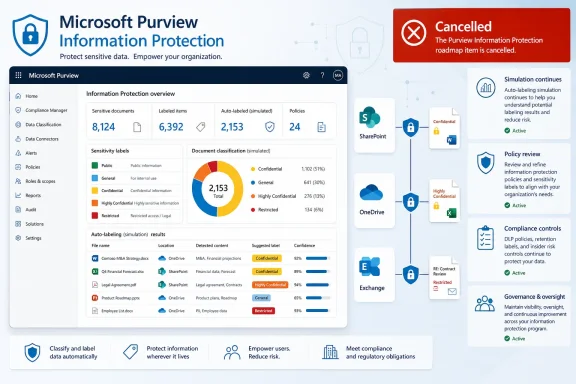
Microsoft has cancelled its planned Microsoft Purview Information Protection – Auto-labeling Simulation Evaluation capability before it reached either Public Preview or General Availability, ending a short-lived roadmap initiative that was originally expected to begin preview availability in May 2026 and general availability in June 2026. The cancellation was recorded on July 22, 2026, under Microsoft 365 Roadmap ID 560707, with Microsoft stating that development resources are moving to other classification and labeling investments.
For Microsoft 365 administrators, security teams, and compliance professionals, the headline is straightforward: do not plan a deployment, pilot, licensing justification, or workflow around Auto-labeling Simulation Evaluation. The feature is no longer on Microsoft’s delivery path.
The more important takeaway is subtler. Microsoft Purview’s existing auto-labeling simulation capabilities remain an essential part of Information Protection operations, but the cancelled feature appears to have been a distinct enhancement intended to improve how organizations evaluate simulated auto-labeling outcomes. That distinction matters because a cancelled roadmap item does not mean that Microsoft Purview auto-labeling itself, sensitivity labels, or simulation mode have been removed.
The cancelled roadmap entry was titled Microsoft Purview: Information Protection – Auto-labeling Simulation Evaluation. It was assigned Roadmap ID 560707 and targeted the worldwide standard multi-tenant Microsoft 365 environment through the web-based Purview experience.
Microsoft’s cancellation notice is concise. The company has decided not to proceed with the feature as previously planned following a product strategy review. It will not enter Public Preview or General Availability, and the work has shifted toward other classification and labeling priorities.
That language contains several practical signals.
First, this is not a delayed release. Microsoft roadmaps commonly use terms such as in development, rolling out, postponed, or launched as a feature changes status. Cancelled is materially different: it indicates that organizations should no longer expect the functionality to arrive in its originally described form.
Second, the feature did not ship broadly. The roadmap identified anticipated release windows, but the cancellation supersedes those target dates. Administrators should therefore avoid assuming that an incomplete portal experience, a preview reference, a training slide, or an internal Microsoft conversation represents a supported product capability.
Third, Microsoft has not described a direct one-for-one replacement. The reference to “other classification and labeling investments” indicates continued development in the wider Purview Information Protection portfolio, but it should not be interpreted as confirmation that every planned Auto-labeling Simulation Evaluation function will reappear under a different name.
In practical terms, an auto-labeling policy can evaluate content against configured conditions without immediately changing labels across the tenant. This gives administrators a controlled opportunity to identify likely matches, inspect sample results, refine policy logic, reduce false positives, and narrow or expand scope before moving into production enforcement.
The cancellation therefore should be understood as the loss of a planned evaluation enhancement, not as the removal of the established simulation workflow that supports Purview Information Protection today.
This is a critical guardrail. Sensitivity labels may do far more than add a visible “Confidential” marker. Depending on configuration, a label can influence encryption, access permissions, content markings, user experience in Office, and downstream data protection behavior. A poorly tuned auto-labeling policy can therefore create operational friction quickly.
That lack of detail creates an important caution for IT departments: organizations should not infer feature parity between a planned roadmap item and the current Purview portal. If a team has been waiting for a particular score, recommendation engine, comparison view, evaluation report, or automated readiness signal, it should validate whether a current supported Purview feature already meets that need.
In other words, simulation remains available; the planned evaluation enhancement does not.
Manual labeling is valuable because it uses human context. A finance director usually understands whether an earnings draft is sensitive, and a legal team knows whether a document is privileged. But a manual-only strategy does not scale reliably across millions of files and emails.
Auto-labeling addresses that gap by applying rules at scale. It can recognize information that meets defined criteria and apply a sensitivity label without requiring a user to take action at the exact moment the content is created or shared.
Yet automation also increases risk.
A sensitive information type may match a number pattern that is not actually a credit card, identity number, or protected record. A keyword list may be too broad. A custom classifier may behave differently across business units. A label that encrypts a document can prevent legitimate access if permissions are not designed carefully.
That is why simulation is more than a convenient test switch. It is a deployment safety mechanism.
For SharePoint and OneDrive, simulation can assess content at rest and report results as scanning proceeds. For Exchange, service-side auto-labeling is associated with mail flow behavior, so results depend on messages that are sent or received during the simulation window rather than a comprehensive retroactive scan of every item already stored in user mailboxes.
This difference is significant. A policy that appears to produce modest email results in simulation may not necessarily be ineffective; it may simply reflect limited qualifying message traffic during the assessment period.
Microsoft Purview also places a maximum on the number of matched files allowed in auto-labeling simulation. When a simulation reaches too many matching files, administrators must refine the policy before it can be activated. This helps prevent an overly broad configuration from being pushed directly into production, but it also means broad, tenant-wide policies need careful scoping.
For many teams, the right operational response is not to weaken the protection objective. It is to segment the rollout:
Label priority is especially important. In many scenarios, a higher-priority label can supersede a lower-priority automatically applied label. Manually applied labels are often treated differently from automatically applied ones, and policy options can affect whether a lower-priority manual label may be overridden.
As a result, a simulation can show that a policy matches content while the eventual production outcome is affected by other active policies, label precedence, or an item’s existing classification state.
That is not a flaw unique to Purview. It is a normal characteristic of policy-based security systems. But it reinforces why simulations should be evaluated as part of a wider policy architecture rather than as an isolated technical test.
That assumption should now be revisited.
Organizations should update:
They are related, but they solve different problems.
A default policy may be suitable for demonstrating sensitivity labeling with common data types such as payment card information. It may be insufficient for the actual information that matters most to an organization: customer records, internal product plans, technical designs, legal communications, acquisition data, employee information, or regulated datasets.
Simulation can reveal a policy’s technical matches. It cannot independently determine whether the organization’s label taxonomy, permissions model, business exceptions, and user communications are appropriate.
Without ownership, auto-labeling can become a source of opaque failures. Users may see an unexpected label, lose access to a file, encounter a sharing restriction, or receive inconsistent results between locations. The technical configuration may be correct, but the operating model may still fail.
Do not replace it with vague language such as “future Purview simulation enhancement.” If there is no announced replacement, the project plan should reflect the current product reality.
A useful internal evaluation record might include:
For high-impact labels, especially those that enforce encryption or materially limit sharing, the review process should include both technical and business perspectives. This approach reduces the likelihood of a policy that is technically accurate but operationally disruptive.
The cancelled feature may reflect prioritization pressures within a rapidly expanding Purview portfolio. Microsoft must balance investment across Microsoft 365 data, endpoints, cloud apps, AI interactions, data maps, collaboration workloads, and increasingly complex regulatory requirements.
That context is important for Windows and Microsoft 365 administrators. The product direction is likely to remain dynamic. Roadmap entries are useful planning signals, but they are not contracts. A feature marked for preview can change scope, move dates, merge into another workstream, or be cancelled entirely before release.
The practical lesson is to build security programs around currently supported capabilities and sound governance practices, not around unshipped roadmap promises.
This does not mean that Microsoft Purview has abandoned sensitivity labels, service-side auto-labeling, or the existing simulation mode used to validate auto-labeling policies. Those capabilities remain important tools for protecting Microsoft 365 content across SharePoint, OneDrive, and Exchange Online.
For organizations using Microsoft Purview Information Protection, the priority now is clear: continue using the existing simulation workflow, apply disciplined policy review, test classifications in limited scopes, monitor label outcomes carefully, and avoid basing compliance strategy on features that have not reached supported release status. The cancelled evaluation feature may be gone, but the underlying need it aimed to address—safe, explainable, well-governed automated classification—remains more important than ever.
For Microsoft 365 administrators, security teams, and compliance professionals, the headline is straightforward: do not plan a deployment, pilot, licensing justification, or workflow around Auto-labeling Simulation Evaluation. The feature is no longer on Microsoft’s delivery path.
The more important takeaway is subtler. Microsoft Purview’s existing auto-labeling simulation capabilities remain an essential part of Information Protection operations, but the cancelled feature appears to have been a distinct enhancement intended to improve how organizations evaluate simulated auto-labeling outcomes. That distinction matters because a cancelled roadmap item does not mean that Microsoft Purview auto-labeling itself, sensitivity labels, or simulation mode have been removed.
 What Microsoft Has Cancelled
The cancelled roadmap entry was titled Microsoft Purview: Information Protection – Auto-labeling Simulation Evaluation. It was assigned Roadmap ID 560707 and targeted the worldwide standard multi-tenant Microsoft 365 environment through the web-based Purview experience.Microsoft’s cancellation notice is concise. The company has decided not to proceed with the feature as previously planned following a product strategy review. It will not enter Public Preview or General Availability, and the work has shifted toward other classification and labeling priorities.
That language contains several practical signals.
First, this is not a delayed release. Microsoft roadmaps commonly use terms such as in development, rolling out, postponed, or launched as a feature changes status. Cancelled is materially different: it indicates that organizations should no longer expect the functionality to arrive in its originally described form.
Second, the feature did not ship broadly. The roadmap identified anticipated release windows, but the cancellation supersedes those target dates. Administrators should therefore avoid assuming that an incomplete portal experience, a preview reference, a training slide, or an internal Microsoft conversation represents a supported product capability.
Third, Microsoft has not described a direct one-for-one replacement. The reference to “other classification and labeling investments” indicates continued development in the wider Purview Information Protection portfolio, but it should not be interpreted as confirmation that every planned Auto-labeling Simulation Evaluation function will reappear under a different name.
The Crucial Distinction: Simulation Is Not Being Cancelled
The roadmap name can easily create confusion because simulation mode is already a core concept in Microsoft Purview auto-labeling. Existing service-side auto-labeling policies can be run in simulation before administrators turn them on to apply labels to real content.In practical terms, an auto-labeling policy can evaluate content against configured conditions without immediately changing labels across the tenant. This gives administrators a controlled opportunity to identify likely matches, inspect sample results, refine policy logic, reduce false positives, and narrow or expand scope before moving into production enforcement.
The cancellation therefore should be understood as the loss of a planned evaluation enhancement, not as the removal of the established simulation workflow that supports Purview Information Protection today.
What Existing Auto-Labeling Simulation Still Does
Microsoft Purview’s established auto-labeling workflow remains focused on applying sensitivity labels based on conditions such as sensitive information types, trainable classifiers where supported, or other available policy criteria. Service-side auto-labeling is designed primarily for:- SharePoint Online documents
- OneDrive for Business documents
- Exchange Online email processing
- Sensitivity labels that classify, mark, and potentially protect content
- Policies that operate at organizational scale rather than requiring each user to label every file or message manually
This is a critical guardrail. Sensitivity labels may do far more than add a visible “Confidential” marker. Depending on configuration, a label can influence encryption, access permissions, content markings, user experience in Office, and downstream data protection behavior. A poorly tuned auto-labeling policy can therefore create operational friction quickly.
Why the Difference Matters
The phrase Auto-labeling Simulation Evaluation suggests that Microsoft had planned to add a more specific evaluation layer, report, decision aid, or analytical workflow around simulation. However, the roadmap cancellation notice does not provide a technical specification detailed enough to establish exactly which controls, dashboards, metrics, or recommendations would have been delivered.That lack of detail creates an important caution for IT departments: organizations should not infer feature parity between a planned roadmap item and the current Purview portal. If a team has been waiting for a particular score, recommendation engine, comparison view, evaluation report, or automated readiness signal, it should validate whether a current supported Purview feature already meets that need.
In other words, simulation remains available; the planned evaluation enhancement does not.
Why Auto-Labeling Simulation Matters in the First Place
Information Protection is difficult because sensitive information is rarely stored in one consistent format, in one application, or under one owner. A single organization may have years of legacy SharePoint content, active OneDrive collaboration, high-volume email, departmental file shares, third-party SaaS repositories, and increasingly, AI-assisted workflows that create or transform content at speed.Manual labeling is valuable because it uses human context. A finance director usually understands whether an earnings draft is sensitive, and a legal team knows whether a document is privileged. But a manual-only strategy does not scale reliably across millions of files and emails.
Auto-labeling addresses that gap by applying rules at scale. It can recognize information that meets defined criteria and apply a sensitivity label without requiring a user to take action at the exact moment the content is created or shared.
Yet automation also increases risk.
A sensitive information type may match a number pattern that is not actually a credit card, identity number, or protected record. A keyword list may be too broad. A custom classifier may behave differently across business units. A label that encrypts a document can prevent legitimate access if permissions are not designed carefully.
That is why simulation is more than a convenient test switch. It is a deployment safety mechanism.
Simulation Supports a Safer Security Lifecycle
A mature auto-labeling lifecycle typically looks like this:- Define the business objective.
Identify the data category that needs protection, such as payment data, personally identifiable information, healthcare records, source code, merger documents, or legal materials. - Design the classification logic.
Select built-in sensitive information types, custom sensitive information types, keywords, exact data match patterns, or other supported conditions. - Choose the sensitivity label deliberately.
Confirm whether the label should simply classify content, add visual markings, restrict sharing, apply encryption, or trigger other protection outcomes. - Limit the initial scope.
Start with a controlled set of sites, users, or workloads instead of applying a broad policy to all Microsoft 365 data immediately. - Run simulation.
Review what the policy would match and determine whether the outcomes align with the organization’s intent. - Investigate exceptions and false positives.
Sample matched items, identify patterns, and find cases where the rule captures harmless content or misses sensitive information. - Refine and rerun.
Adjust thresholds, conditions, exclusions, label priorities, or scoped locations and evaluate the new results. - Deploy progressively.
Enable the policy in a limited production scope, monitor outcomes, then expand coverage in controlled phases.
Current Purview Auto-Labeling Limits Still Shape Deployment
The cancellation is also a reminder that auto-labeling is not a simple “enable it and forget it” technology. Microsoft Purview has operational limits and behavior differences that administrators need to account for before interpreting simulated results.Simulation Represents a Point-in-Time Assessment
Simulation does not provide a permanent, continuously updated prediction of every future labeling event. It evaluates policy conditions against available content and activity according to the policy’s locations and operating model.For SharePoint and OneDrive, simulation can assess content at rest and report results as scanning proceeds. For Exchange, service-side auto-labeling is associated with mail flow behavior, so results depend on messages that are sent or received during the simulation window rather than a comprehensive retroactive scan of every item already stored in user mailboxes.
This difference is significant. A policy that appears to produce modest email results in simulation may not necessarily be ineffective; it may simply reflect limited qualifying message traffic during the assessment period.
Review Capacity Has Practical Boundaries
Auto-labeling simulation is intended to support policy validation, but it does not eliminate the need for human review discipline. Large environments may generate a substantial number of matches, and an organization must establish how it will sample, triage, document, and act on those results.Microsoft Purview also places a maximum on the number of matched files allowed in auto-labeling simulation. When a simulation reaches too many matching files, administrators must refine the policy before it can be activated. This helps prevent an overly broad configuration from being pushed directly into production, but it also means broad, tenant-wide policies need careful scoping.
For many teams, the right operational response is not to weaken the protection objective. It is to segment the rollout:
- Start with one high-value SharePoint site collection.
- Add a focused OneDrive population.
- Validate expected matching behavior.
- Review real business context with content owners.
- Expand to the next business unit or workload.
- Repeat the process before enabling enterprise-wide enforcement.
Label Priority and Existing Labels Can Change Outcomes
Auto-labeling decisions do not occur in a vacuum. An item may already have a manually applied label, an automatically applied label, a default label, or protection applied by another mechanism.Label priority is especially important. In many scenarios, a higher-priority label can supersede a lower-priority automatically applied label. Manually applied labels are often treated differently from automatically applied ones, and policy options can affect whether a lower-priority manual label may be overridden.
As a result, a simulation can show that a policy matches content while the eventual production outcome is affected by other active policies, label precedence, or an item’s existing classification state.
That is not a flaw unique to Purview. It is a normal characteristic of policy-based security systems. But it reinforces why simulations should be evaluated as part of a wider policy architecture rather than as an isolated technical test.
Risks for Organizations That Had Planned Around the Roadmap Item
The most immediate risk is planning drift. Teams that included Auto-labeling Simulation Evaluation in a security roadmap may have deferred process improvements, dashboard development, analyst training, or third-party tooling under the expectation that Microsoft would deliver a native evaluation experience.That assumption should now be revisited.
Risk 1: Waiting for a Feature That Will Not Arrive
A cancelled roadmap entry should be removed from project plans, dependency maps, and executive presentations. Leaving it in a compliance program plan creates a false sense of future capability and can delay decisions that are needed now.Organizations should update:
- Purview rollout roadmaps
- Information Protection program charters
- Security architecture decision records
- Compliance reporting commitments
- Internal training and communications
- Procurement assumptions
- Statements of work involving consulting partners
- Test plans that refer to future portal functionality
Risk 2: Confusing It With DLP Simulation
Microsoft Purview includes simulation concepts across different solutions, including Data Loss Prevention. DLP simulation helps teams understand the impact of a policy without enforcing it, while Information Protection auto-labeling simulation focuses on the conditions under which sensitivity labels would be assigned.They are related, but they solve different problems.
- Sensitivity labels classify and may protect content.
- Auto-labeling policies automatically assign those labels according to criteria.
- DLP policies help prevent inappropriate sharing, transfer, or use of sensitive content.
- DLP simulation evaluates what a DLP policy would detect or act on without enforcing the policy.
Risk 3: Overconfidence in Default Configurations
Microsoft Purview can provide helpful default labels and policy templates, but default configurations are starting points, not a substitute for enterprise data governance.A default policy may be suitable for demonstrating sensitivity labeling with common data types such as payment card information. It may be insufficient for the actual information that matters most to an organization: customer records, internal product plans, technical designs, legal communications, acquisition data, employee information, or regulated datasets.
Simulation can reveal a policy’s technical matches. It cannot independently determine whether the organization’s label taxonomy, permissions model, business exceptions, and user communications are appropriate.
Risk 4: Excessive Automation Without Ownership
The strongest information protection programs combine automation with accountable ownership. A data owner, records manager, privacy office, security team, or business unit representative should be able to explain why a policy exists, what it covers, what the intended label outcome is, and what happens when a user cannot access protected content.Without ownership, auto-labeling can become a source of opaque failures. Users may see an unexpected label, lose access to a file, encounter a sharing restriction, or receive inconsistent results between locations. The technical configuration may be correct, but the operating model may still fail.
A Practical Response for Purview Administrators
The cancellation should prompt a focused review rather than panic. Existing Information Protection and auto-labeling capabilities remain valuable, and the best next step is to make the current deployment model more disciplined.Remove the Cancelled Feature From Dependencies
Begin by identifying every internal artifact that refers to Auto-labeling Simulation Evaluation. Mark the capability as cancelled and remove it from delivery assumptions.Do not replace it with vague language such as “future Purview simulation enhancement.” If there is no announced replacement, the project plan should reflect the current product reality.
Reassess the Existing Simulation Workflow
Review the auto-labeling policies already in simulation or planned for future use. Confirm that the team can answer the following operational questions:- Which sensitivity label will the policy apply?
- What data conditions trigger the label?
- Which SharePoint, OneDrive, and Exchange locations are in scope?
- Which users or business units own the matched data?
- Who has the permissions needed to inspect simulation results?
- How are false positives documented and resolved?
- What measurable threshold must be met before a policy is turned on?
- What is the rollback plan if labels are applied too broadly?
- How will post-deployment results be monitored?
Build an Internal Evaluation Framework
Organizations that were hoping for richer simulation evaluation should consider defining their own lightweight assessment model. This does not require a large custom application. It can begin with a repeatable review template and a decision log.A useful internal evaluation record might include:
- Policy name and business owner
- Target label and protection settings
- Data types or classifiers used
- Policy scope and exclusions
- Simulation start and completion details
- Total matched items
- Sample size reviewed
- Confirmed true positives
- Confirmed false positives
- Known false negatives
- High-risk sites or user groups
- Conflicts with other labels or policies
- Required tuning actions
- Go-live approval and rollback owner
Keep Human Review in the Loop
The best simulation data still requires interpretation. A security administrator may understand the technical reason a match occurred, but a data owner is often better positioned to determine whether the content should receive a particular sensitivity label.For high-impact labels, especially those that enforce encryption or materially limit sharing, the review process should include both technical and business perspectives. This approach reduces the likelihood of a policy that is technically accurate but operationally disruptive.
What the Cancellation Says About Microsoft Purview’s Direction
Microsoft’s wording indicates a strategy shift rather than a retreat from classification and labeling. Purview remains central to Microsoft’s broader data security, compliance, governance, and AI-era protection story. Sensitivity labels, Data Loss Prevention, insider risk controls, data lifecycle management, audit capabilities, and data estate governance continue to depend on accurate classification.The cancelled feature may reflect prioritization pressures within a rapidly expanding Purview portfolio. Microsoft must balance investment across Microsoft 365 data, endpoints, cloud apps, AI interactions, data maps, collaboration workloads, and increasingly complex regulatory requirements.
That context is important for Windows and Microsoft 365 administrators. The product direction is likely to remain dynamic. Roadmap entries are useful planning signals, but they are not contracts. A feature marked for preview can change scope, move dates, merge into another workstream, or be cancelled entirely before release.
The practical lesson is to build security programs around currently supported capabilities and sound governance practices, not around unshipped roadmap promises.
The Bottom Line
The cancellation of Microsoft Purview Information Protection – Auto-labeling Simulation Evaluation means that Roadmap ID 560707 should be treated as closed. It was expected to reach Public Preview in May 2026 and General Availability in June 2026, but it will not ship in either release phase.This does not mean that Microsoft Purview has abandoned sensitivity labels, service-side auto-labeling, or the existing simulation mode used to validate auto-labeling policies. Those capabilities remain important tools for protecting Microsoft 365 content across SharePoint, OneDrive, and Exchange Online.
For organizations using Microsoft Purview Information Protection, the priority now is clear: continue using the existing simulation workflow, apply disciplined policy review, test classifications in limited scopes, monitor label outcomes carefully, and avoid basing compliance strategy on features that have not reached supported release status. The cancelled evaluation feature may be gone, but the underlying need it aimed to address—safe, explainable, well-governed automated classification—remains more important than ever.
References
- Primary source: Microsoft 365 Roadmap
Published: 2026-07-22T22:41:54.4134574Z
Microsoft 365 Roadmap | Microsoft 365
The Microsoft 365 Roadmap lists updates that are currently planned for applicable subscribers. Check here for more information on the status of new features and updates.www.microsoft.com
- Official source: learn.microsoft.com
Get started with data loss prevention simulation mode | Microsoft Learn
This article describes the prerequisites for Microsoft Purview Data Loss Prevention simulation mode and how to use it.learn.microsoft.com - Official source: download.microsoft.com
PDF_MSFT_Cloud_architecture_information protection for GDPR.vsdx
PDF documentdownload.microsoft.com
