

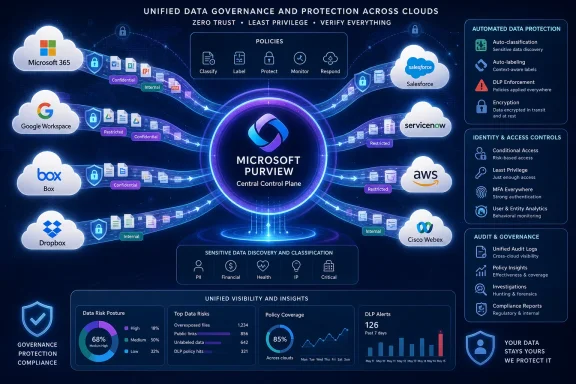
Microsoft is preparing to push Microsoft Purview beyond the boundaries of Microsoft 365, extending Data Loss Prevention and Information Protection auto-labeling policies to connected third-party services including Google Workspace, Box, Dropbox, Salesforce, ServiceNow, Amazon Web Services, and Cisco Webex. Listed under Microsoft 365 Roadmap ID 568075, the capability entered preview in July 2026 and is scheduled for worldwide general availability in September 2026. The strategic significance is larger than the roadmap entry suggests: Microsoft is positioning Purview as a control plane for sensitive information across heterogeneous enterprise clouds, although the warning that supported conditions and actions will vary by application means customers should not expect identical enforcement everywhere.
Microsoft Purview already provides a broad collection of information protection, compliance, governance, investigation, and data loss prevention capabilities. Its strongest integrations have traditionally existed inside the Microsoft ecosystem, where Exchange Online, SharePoint, OneDrive, Teams, Windows endpoints, and Microsoft 365 applications expose rich content and activity signals.
The newly announced expansion targets a persistent enterprise problem: sensitive information rarely stays inside one productivity suite. An organization may use Microsoft 365 for email, Google Workspace for a subsidiary, Salesforce for customer records, ServiceNow for support operations, AWS for application hosting, Box or Dropbox for external collaboration, and Webex for meetings and messaging.
Those dates should be treated as rollout targets rather than guarantees of universal tenant availability on the first day of each month. Microsoft commonly distributes cloud features in stages, and individual connectors, policy actions, licensing checks, or regional dependencies may become available at different points during the deployment window.
That fragmented approach makes consistent classification difficult. It also creates policy gaps in which the same customer list can be blocked from external sharing in OneDrive but remain unrestricted after someone uploads a copy to another sanctioned cloud service.
A unified policy layer can help reduce the operational differences between those platforms. The goal is not necessarily to make every application behave identically, which may be technically impossible, but to let administrators express common intentions such as identifying financial records, detecting credentials, applying sensitivity labels, restricting unsafe sharing, and generating auditable incidents.
Purview’s broader model attempts to attach security meaning to the information itself. If content contains regulated identifiers, source code, contractual language, health information, or confidential business plans, policy should recognize that sensitivity regardless of whether the file resides in Microsoft 365, Box, Google Workspace, or another connected service.
That shift from application-centric control to data-centric control is the most important aspect of Roadmap ID 568075. It acknowledges that location alone is no longer a dependable indicator of risk.
Connected services generally require administrators to authorize an integration, grant specific API permissions, and permit Microsoft’s security services to inspect supported objects or activity metadata. Purview can then evaluate available content against policy conditions and request supported actions through the destination platform’s APIs.
For example, one platform may allow Microsoft to inspect file content and modify sharing permissions, while another may expose only metadata or event records. Some services might support applying a persistent sensitivity label, whereas others may support detection, alerting, or access changes without embedding Microsoft protection into the original object.
Administrators should therefore avoid reading “support for connected apps” as “complete feature parity with SharePoint and OneDrive.” The correct interpretation is that Purview will provide a common policy experience over a connector-specific set of capabilities.
The new connected-app support potentially allows Purview policies to evaluate data already stored in third-party services, rather than concentrating only on the moment when a file leaves a managed Windows device or Microsoft 365 workload.
Connected-app DLP addresses a different part of the lifecycle. It can potentially examine data after it reaches a sanctioned service, identify sensitive content already present there, and take application-specific action.
The two approaches are complementary:
A sanctioned Box tenant can still contain publicly shared contracts. A Salesforce record can still expose personal data to an overly broad group. An AWS storage resource can still be misconfigured, and a ServiceNow ticket can still contain a password pasted by an engineer.
Connected-app DLP gives organizations an opportunity to enforce policies inside approved platforms rather than making the unrealistic assumption that approved applications eliminate data risk.
Labels can communicate that an item is Public, Internal, Confidential, Highly Confidential, regulated, or otherwise restricted. Depending on the file type, application, label configuration, and connector, a label may also be associated with encryption, markings, access restrictions, or downstream policy decisions.
Auto-labeling addresses that weakness by evaluating content against centrally defined criteria. A policy could identify payment card numbers, national identifiers, health information, credentials, proprietary source code, legal records, or documents that resemble a trained category.
Applying those policies across connected apps offers several potential benefits:
Organizations should separate the classification meaning of a label from the technical controls available in each application. Otherwise, a dashboard may suggest that two items have equivalent protection even though one is encrypted and the other remains readable by anyone with a public link.
The principal challenge will be preserving collaboration without creating contradictory controls. Organizations that use both Microsoft 365 and Google Workspace, for example, may need to reconcile Microsoft labels with Google-native classifications, retention rules, sharing permissions, and administrative labels.
Box and Dropbox customers should pay particular attention to external sharing. A connector that can detect a confidential document but cannot reliably remediate all shared links, inherited permissions, or third-party integrations may still leave significant exposure.
DLP policies must account for business context. A customer’s bank account number could be legitimate in a controlled finance workflow but inappropriate in a broadly visible support case. Similarly, credentials copied into a ServiceNow incident may require urgent remediation even when the ticket itself is restricted.
The most useful controls will be those that can distinguish between supported object types and apply actions without breaking critical workflows. Overly broad enforcement could interrupt sales operations, customer support, incident response, or automated integrations.
Administrators should look for precise documentation describing which AWS services are supported. “AWS support” could mean inspection of selected storage repositories, analysis of security findings, integration with specific account connectors, or a wider set of data sources. Those models have dramatically different implications.
AWS environments also raise questions about scale, regional data processing, cross-account authorization, service roles, encryption keys, and consumption costs. Enterprises should test not only detection accuracy but also the performance and operational impact of scanning large cloud datasets.
Communications DLP is especially sensitive to timing. A policy that identifies a secret hours after it appears in a chat is useful for investigation but less effective at preventing immediate misuse. Preview testing should establish whether controls operate before submission, shortly after content is posted, or as periodic scans of stored information.
This convergence matters because Microsoft has also announced the retirement of Defender for Cloud Apps file policies on January 6, 2027. Microsoft is directing customers that depend on file-based protection toward Purview DLP or auto-labeling policies.
A successful transition should include the following sequence:
Consolidation is valuable only if it preserves sufficient depth. Security teams should verify that a simpler administrative experience does not remove application-specific filters, governance actions, or investigative details they currently rely on.
Preview software can change, and security policies can have significant business consequences. A false positive in a reporting tool is inconvenient; a false positive that removes access to an active customer record or operational incident can disrupt revenue and service delivery.
Security teams should measure the volume of matches, common file types, affected departments, frequent false positives, connector failures, scan delays, and business processes that generate legitimate sensitive content. These results can then inform thresholds, exceptions, and escalation procedures.
The capability may also help security operations teams correlate risk across repositories. If the same user downloads sensitive files from SharePoint, uploads related content to Dropbox, and exposes customer records in Salesforce, a cross-cloud view offers a clearer picture than isolated application alerts.
Auditors will want evidence that policies cover the relevant systems, that actions execute successfully, that exceptions receive approval, and that administrators review alerts. They may also need assurance regarding data residency, connector permissions, logs, retention, separation of duties, and the processing of inspected content.
A connected application can contain data beyond Microsoft’s effective scanning scope. Unsupported formats, encrypted objects, custom fields, archives, transient messages, deleted items, and external integrations may create blind spots.
Enterprises should establish a governance model in which:
An employee working entirely in Google Workspace or Salesforce may not understand why a Microsoft Purview policy changed an item. User communications should describe the organization’s data handling standard rather than presenting enforcement as an arbitrary Microsoft product requirement.
Blocking without guidance encourages unsafe workarounds. Employees may take screenshots, rename files, paste content into personal accounts, or move conversations to unmanaged channels if legitimate tasks become impossible.
Licensing, connector complexity, and administrative expertise remain potential barriers. Microsoft has not detailed feature-level licensing in the roadmap entry, and customers should not assume that every capability will be included in an existing subscription. The final service description and licensing documentation will be crucial before general availability.
That places Microsoft in closer competition with enterprise DLP vendors, cloud access security brokers, data security posture management providers, and SaaS security platforms. Many of those products emphasize vendor neutrality, broad discovery, rapid connector development, or deeper controls for specific cloud environments.
If connected-app support is sufficiently deep, Microsoft could correlate identity, endpoint, content, cloud, and collaboration signals under one policy model. That could make Purview particularly attractive to enterprises already committed to Microsoft security licensing.
Competitors will emphasize any differences in scanning depth, remediation options, API coverage, deployment speed, and supported data types. Microsoft must therefore demonstrate not just a long connector list, but meaningful control within each named application.
Particularly important questions include:
Customers should also watch for PowerShell, Microsoft Graph, API, and infrastructure-as-code support. Large deployments cannot depend exclusively on manual portal configuration, especially when policies span many tenants, business units, and cloud accounts.
Automated assessment would be particularly valuable. A tool that analyzes existing file policies and recommends equivalent Purview conditions and actions could reduce errors and shorten the transition period.
Organizations participating in preview should document results carefully and avoid measuring success solely by the number of matches. A useful DLP connector must identify the right content, take the expected action, preserve business operations, produce dependable audit records, and recover gracefully from API failures.
Microsoft Purview’s expansion into non-Microsoft connected apps reflects the way modern organizations actually operate: across multiple productivity suites, SaaS platforms, cloud providers, and collaboration systems. If Microsoft delivers deep connectors, consistent classification, reliable enforcement, and a manageable transition from Defender for Cloud Apps file policies, Purview could become a genuinely cross-cloud data security control plane. The decisive test will come between the July 2026 preview and September 2026 general availability, when customers discover whether one policy framework can provide meaningful protection across very different applications without hiding the limitations that remain.
 Overview
Microsoft Purview already provides a broad collection of information protection, compliance, governance, investigation, and data loss prevention capabilities. Its strongest integrations have traditionally existed inside the Microsoft ecosystem, where Exchange Online, SharePoint, OneDrive, Teams, Windows endpoints, and Microsoft 365 applications expose rich content and activity signals.The newly announced expansion targets a persistent enterprise problem: sensitive information rarely stays inside one productivity suite. An organization may use Microsoft 365 for email, Google Workspace for a subsidiary, Salesforce for customer records, ServiceNow for support operations, AWS for application hosting, Box or Dropbox for external collaboration, and Webex for meetings and messaging.
Roadmap timing and availability
The Microsoft 365 Roadmap lists the feature as in development for the web-based Microsoft Purview experience. Preview availability is scheduled for July 2026, with general availability targeted for September 2026 in Worldwide Standard Multi-Tenant cloud environments.Those dates should be treated as rollout targets rather than guarantees of universal tenant availability on the first day of each month. Microsoft commonly distributes cloud features in stages, and individual connectors, policy actions, licensing checks, or regional dependencies may become available at different points during the deployment window.
The applications named by Microsoft
The initial roadmap description identifies a substantial collection of non-Microsoft platforms:- Google Workspace introduces an alternative productivity and document collaboration environment.
- Box and Dropbox represent widely deployed cloud content repositories.
- Salesforce brings customer, sales, and account information into scope.
- ServiceNow adds service management, incident, workflow, and operational data.
- Amazon Web Services extends the conversation toward public-cloud data and infrastructure.
- Cisco Webex introduces another major communications and collaboration platform.
Why This Expansion Matters
Security teams have spent years assembling separate controls for separate applications. One team may configure Microsoft 365 DLP, another may manage Salesforce security, while cloud engineers monitor AWS and collaboration administrators supervise Box or Google Drive.That fragmented approach makes consistent classification difficult. It also creates policy gaps in which the same customer list can be blocked from external sharing in OneDrive but remain unrestricted after someone uploads a copy to another sanctioned cloud service.
The multi-cloud reality
Many organizations are Microsoft-centric without being Microsoft-exclusive. Acquisitions, departmental purchasing, contractor requirements, customer preferences, and regional operating models frequently result in overlapping SaaS platforms.A unified policy layer can help reduce the operational differences between those platforms. The goal is not necessarily to make every application behave identically, which may be technically impossible, but to let administrators express common intentions such as identifying financial records, detecting credentials, applying sensitivity labels, restricting unsafe sharing, and generating auditable incidents.
From suite protection to data-centric protection
Traditional security policies often attach protection to a location. Administrators secure a mailbox, a SharePoint site, a database, or an endpoint because that is where information is expected to reside.Purview’s broader model attempts to attach security meaning to the information itself. If content contains regulated identifiers, source code, contractual language, health information, or confidential business plans, policy should recognize that sensitivity regardless of whether the file resides in Microsoft 365, Box, Google Workspace, or another connected service.
That shift from application-centric control to data-centric control is the most important aspect of Roadmap ID 568075. It acknowledges that location alone is no longer a dependable indicator of risk.
How Connected-App Protection Is Likely to Work
The roadmap entry does not yet provide a complete connector-by-connector configuration guide. However, Microsoft’s existing Purview and Defender for Cloud Apps architecture offers a useful framework for understanding the likely operating model.Connected services generally require administrators to authorize an integration, grant specific API permissions, and permit Microsoft’s security services to inspect supported objects or activity metadata. Purview can then evaluate available content against policy conditions and request supported actions through the destination platform’s APIs.
Detection, decision, and action
A connected-app DLP workflow can be understood as three sequential stages:- Detection identifies relevant content or activity. Purview may inspect supported files, records, messages, metadata, labels, sharing states, or user actions made available by the connector.
- Policy evaluation determines whether the item matches. Conditions may include sensitive information types, trainable classifiers, labels, user context, sharing status, location, or other signals supported by that application.
- An enforcement or governance action follows. Depending on the connector, this could include generating an alert, applying a label, changing access, restricting sharing, quarantining an item, or recording the event for investigation.
API-based controls have natural limits
Microsoft explicitly notes that conditions and actions vary by application. That caveat is essential because Purview cannot enforce controls that the connected service does not expose through its API or authorization model.For example, one platform may allow Microsoft to inspect file content and modify sharing permissions, while another may expose only metadata or event records. Some services might support applying a persistent sensitivity label, whereas others may support detection, alerting, or access changes without embedding Microsoft protection into the original object.
Administrators should therefore avoid reading “support for connected apps” as “complete feature parity with SharePoint and OneDrive.” The correct interpretation is that Purview will provide a common policy experience over a connector-specific set of capabilities.
Understanding Data Loss Prevention Outside Microsoft 365
DLP is often described as a blocking technology, but prevention includes much more than stopping an upload. Effective programs combine discovery, classification, contextual warnings, restrictions, incident generation, evidence collection, and investigation.The new connected-app support potentially allows Purview policies to evaluate data already stored in third-party services, rather than concentrating only on the moment when a file leaves a managed Windows device or Microsoft 365 workload.
Data at rest versus data in motion
Endpoint DLP can monitor activities such as copying files to removable media, printing, accessing protected files with restricted applications, and uploading content through supported browsers. Those controls are valuable because they operate close to the user and can intervene before data reaches an external destination.Connected-app DLP addresses a different part of the lifecycle. It can potentially examine data after it reaches a sanctioned service, identify sensitive content already present there, and take application-specific action.
The two approaches are complementary:
- Endpoint DLP protects data in use and in motion on managed devices.
- Connected-app DLP protects supported data at rest inside authorized cloud applications.
- Microsoft 365 workload DLP protects collaboration and communication within Exchange, SharePoint, OneDrive, and Teams.
- Investigative tools provide context after an incident by helping analysts determine what data was involved and who handled it.
Sanctioned applications can still create risk
Security teams sometimes treat “sanctioned” and “safe” as equivalent. In practice, approving an application only means that the organization permits its use under defined conditions.A sanctioned Box tenant can still contain publicly shared contracts. A Salesforce record can still expose personal data to an overly broad group. An AWS storage resource can still be misconfigured, and a ServiceNow ticket can still contain a password pasted by an engineer.
Connected-app DLP gives organizations an opportunity to enforce policies inside approved platforms rather than making the unrealistic assumption that approved applications eliminate data risk.
Auto-Labeling as a Cross-Cloud Classification Layer
Information Protection auto-labeling extends the announcement beyond conventional DLP. A DLP rule responds to a risk condition, while a sensitivity label gives data a durable business classification that can influence later handling.Labels can communicate that an item is Public, Internal, Confidential, Highly Confidential, regulated, or otherwise restricted. Depending on the file type, application, label configuration, and connector, a label may also be associated with encryption, markings, access restrictions, or downstream policy decisions.
Classification without user intervention
Manual labeling remains useful because employees understand the business context of documents they create. It is also inconsistent: users forget, misunderstand classification rules, or choose less restrictive labels to avoid workflow friction.Auto-labeling addresses that weakness by evaluating content against centrally defined criteria. A policy could identify payment card numbers, national identifiers, health information, credentials, proprietary source code, legal records, or documents that resemble a trained category.
Applying those policies across connected apps offers several potential benefits:
- Sensitive files can receive classifications even if they were created outside Microsoft Office.
- Legacy content can be discovered and labeled without relying on the original author.
- Policy enforcement can follow consistent organizational definitions across multiple repositories.
- Security teams can use labels as filters during investigations and remediation.
- Administrators can reduce dependence on folder names, site locations, or employee judgment.
Label semantics require careful design
A label called “Confidential” must mean the same thing across the organization, even when enforcement differs by platform. If it encrypts a Word document in OneDrive but merely adds metadata to an object elsewhere, users and auditors need to understand that distinction.Organizations should separate the classification meaning of a label from the technical controls available in each application. Otherwise, a dashboard may suggest that two items have equivalent protection even though one is encrypted and the other remains readable by anyone with a public link.
Application-by-Application Implications
The seven named platforms serve different business functions, and each introduces a distinct set of data protection questions. Microsoft has not yet published a definitive matrix for every condition and action in Roadmap ID 568075, so organizations should validate each connector during preview rather than assuming uniform behavior.Google Workspace, Box, and Dropbox
These services contain conventional documents, spreadsheets, presentations, PDFs, images, archives, and shared folders. They are therefore the most straightforward candidates for content scanning, sensitive information detection, labeling, sharing analysis, and file-level governance.The principal challenge will be preserving collaboration without creating contradictory controls. Organizations that use both Microsoft 365 and Google Workspace, for example, may need to reconcile Microsoft labels with Google-native classifications, retention rules, sharing permissions, and administrative labels.
Box and Dropbox customers should pay particular attention to external sharing. A connector that can detect a confidential document but cannot reliably remediate all shared links, inherited permissions, or third-party integrations may still leave significant exposure.
Salesforce and ServiceNow
Salesforce and ServiceNow are structured business platforms rather than simple file stores. Sensitive information may appear inside record fields, attachments, comments, case notes, knowledge articles, incident descriptions, or workflow histories.DLP policies must account for business context. A customer’s bank account number could be legitimate in a controlled finance workflow but inappropriate in a broadly visible support case. Similarly, credentials copied into a ServiceNow incident may require urgent remediation even when the ticket itself is restricted.
The most useful controls will be those that can distinguish between supported object types and apply actions without breaking critical workflows. Overly broad enforcement could interrupt sales operations, customer support, incident response, or automated integrations.
Amazon Web Services
AWS presents the broadest technical scope and the greatest ambiguity in the roadmap description. It includes object storage, databases, analytics platforms, application logs, secrets, machine learning services, and many other data-bearing resources.Administrators should look for precise documentation describing which AWS services are supported. “AWS support” could mean inspection of selected storage repositories, analysis of security findings, integration with specific account connectors, or a wider set of data sources. Those models have dramatically different implications.
AWS environments also raise questions about scale, regional data processing, cross-account authorization, service roles, encryption keys, and consumption costs. Enterprises should test not only detection accuracy but also the performance and operational impact of scanning large cloud datasets.
Cisco Webex
Webex can contain messages, meeting artifacts, recordings, transcripts, shared files, and metadata. These data types may involve different retention periods and access models.Communications DLP is especially sensitive to timing. A policy that identifies a secret hours after it appears in a chat is useful for investigation but less effective at preventing immediate misuse. Preview testing should establish whether controls operate before submission, shortly after content is posted, or as periodic scans of stored information.
The Defender for Cloud Apps Connection
Microsoft has previously used Defender for Cloud Apps to discover, inspect, label, and govern information stored in connected cloud services. The new roadmap item appears to advance that work by placing DLP and auto-labeling policy management more directly under Microsoft Purview.This convergence matters because Microsoft has also announced the retirement of Defender for Cloud Apps file policies on January 6, 2027. Microsoft is directing customers that depend on file-based protection toward Purview DLP or auto-labeling policies.
A migration, not merely a new feature
For existing Defender for Cloud Apps customers, Roadmap ID 568075 should be viewed as part of a migration program. Organizations may need to translate file policies, governance actions, alerts, filters, and exception logic into Purview’s policy framework.A successful transition should include the following sequence:
- Inventory all active Defender for Cloud Apps file policies and determine their business purpose.
- Identify the connected application, object type, condition, action, owner, and exception associated with each policy.
- Map those requirements to the connected-source capabilities available in Purview preview.
- Run replacement policies in simulation or audit mode where supported.
- Compare detections, false positives, missed objects, action outcomes, and alert volumes.
- Move enforcement gradually rather than disabling the previous control immediately.
- Document any unsupported legacy behavior and assign a compensating control.
Operational consolidation
Moving file-based controls into Purview could reduce the number of policy consoles administrators must maintain. It could also align third-party app protection with the same sensitive information types, classifiers, labels, incidents, and reporting used for Microsoft 365 and endpoints.Consolidation is valuable only if it preserves sufficient depth. Security teams should verify that a simpler administrative experience does not remove application-specific filters, governance actions, or investigative details they currently rely on.
Preparing for the Preview
The July 2026 preview gives organizations an opportunity to discover practical limitations before enforcement reaches production. It should not be treated as an invitation to connect every major repository and immediately block activity.Preview software can change, and security policies can have significant business consequences. A false positive in a reporting tool is inconvenient; a false positive that removes access to an active customer record or operational incident can disrupt revenue and service delivery.
Build an application capability matrix
Administrators should create a matrix for each connected app covering:- The object and file types that Purview can inspect.
- The maximum supported object size.
- The frequency and latency of content evaluation.
- The sensitive information types and classifiers available.
- The labels that can be detected or applied.
- The sharing, quarantine, access, and notification actions supported.
- The behavior of encrypted, password-protected, or compressed content.
- The treatment of existing items versus newly created content.
- The permissions required by the connector.
- The audit records generated when Microsoft or an administrator takes action.
Begin with observation
Organizations should initially deploy policies in simulation, audit-only, or non-blocking modes whenever those options are available. The objective is to establish a baseline before changing user access or content state.Security teams should measure the volume of matches, common file types, affected departments, frequent false positives, connector failures, scan delays, and business processes that generate legitimate sensitive content. These results can then inform thresholds, exceptions, and escalation procedures.
Enterprise Security and Compliance Impact
Large enterprises stand to benefit most because they generally operate the most fragmented application estates. A shared policy framework can reduce duplicated rule creation and make reporting easier across business units.The capability may also help security operations teams correlate risk across repositories. If the same user downloads sensitive files from SharePoint, uploads related content to Dropbox, and exposes customer records in Salesforce, a cross-cloud view offers a clearer picture than isolated application alerts.
Regulatory coverage
Purview policies can help identify data associated with privacy, financial, health, contractual, and industry requirements. However, detecting regulated information does not by itself establish compliance.Auditors will want evidence that policies cover the relevant systems, that actions execute successfully, that exceptions receive approval, and that administrators review alerts. They may also need assurance regarding data residency, connector permissions, logs, retention, separation of duties, and the processing of inspected content.
A connected application can contain data beyond Microsoft’s effective scanning scope. Unsupported formats, encrypted objects, custom fields, archives, transient messages, deleted items, and external integrations may create blind spots.
Organizational ownership
Cross-cloud DLP blurs traditional administrative boundaries. The Purview team may define policy, but the Salesforce owner understands sales workflows, the AWS team controls account permissions, and legal or privacy teams define the underlying data handling requirements.Enterprises should establish a governance model in which:
- Data owners approve classification and handling rules.
- Application owners validate connector access and operational impact.
- Security teams manage detection, incident triage, and enforcement.
- Compliance teams verify control coverage and evidence.
- Help-desk teams receive guidance for handling user blocks and overrides.
- Change-management boards review high-impact policy modifications.
Impact on Employees and Smaller Organizations
End users may experience the expansion through labels, sharing restrictions, warnings, access changes, or notifications in applications that previously appeared independent of Microsoft security policy. That can be beneficial, but it may also be confusing.An employee working entirely in Google Workspace or Salesforce may not understand why a Microsoft Purview policy changed an item. User communications should describe the organization’s data handling standard rather than presenting enforcement as an arbitrary Microsoft product requirement.
Policy tips and remediation guidance
When an action interrupts work, the message should explain what happened and how to proceed. Users need to know whether they can remove sensitive data, move the item to an approved location, request an exception, select a safer sharing method, or contact a data owner.Blocking without guidance encourages unsafe workarounds. Employees may take screenshots, rename files, paste content into personal accounts, or move conversations to unmanaged channels if legitimate tasks become impossible.
Opportunities for smaller IT teams
Smaller organizations may benefit from managing multiple SaaS repositories through one interface rather than purchasing and operating separate DLP products. Shared sensitive information types and auto-labeling policies can also reduce configuration duplication.Licensing, connector complexity, and administrative expertise remain potential barriers. Microsoft has not detailed feature-level licensing in the roadmap entry, and customers should not assume that every capability will be included in an existing subscription. The final service description and licensing documentation will be crucial before general availability.
Competitive and Strategic Implications
The announcement strengthens Microsoft’s argument that Purview is not merely a Microsoft 365 compliance add-on. It is increasingly becoming a data security platform intended to govern information across endpoints, SaaS applications, cloud repositories, collaboration tools, and AI workflows.That places Microsoft in closer competition with enterprise DLP vendors, cloud access security brokers, data security posture management providers, and SaaS security platforms. Many of those products emphasize vendor neutrality, broad discovery, rapid connector development, or deeper controls for specific cloud environments.
Microsoft’s central advantage
Microsoft can combine information from Windows endpoints, Entra identities, Microsoft 365 workloads, Defender security products, and Purview classification systems. Few competitors have equivalent native visibility across such a large installed base.If connected-app support is sufficiently deep, Microsoft could correlate identity, endpoint, content, cloud, and collaboration signals under one policy model. That could make Purview particularly attractive to enterprises already committed to Microsoft security licensing.
The neutrality question
Customers will judge whether third-party connectors receive the same investment as Microsoft workloads. If Google Workspace, Box, or Salesforce support remains materially narrower than SharePoint and OneDrive support, Purview may still function primarily as a Microsoft ecosystem platform with external extensions.Competitors will emphasize any differences in scanning depth, remediation options, API coverage, deployment speed, and supported data types. Microsoft must therefore demonstrate not just a long connector list, but meaningful control within each named application.
Strengths and Opportunities
The roadmap feature presents several clear advantages if Microsoft delivers reliable connectors and transparent capability documentation.- A common policy plane can reduce duplicated administration. Security teams may be able to define sensitive information once and reuse that logic across Microsoft and non-Microsoft services.
- Auto-labeling can improve classification consistency. Existing data in third-party repositories can be evaluated without depending entirely on user decisions.
- Cross-cloud visibility can strengthen investigations. Analysts may gain a clearer view of how sensitive information moves among endpoints, productivity platforms, SaaS applications, and cloud services.
- The feature supports heterogeneous IT strategies. Organizations can adopt Microsoft security controls without requiring every department to replace its preferred application.
- Purview may simplify the Defender for Cloud Apps file-policy transition. A consolidated framework could reduce long-term policy fragmentation.
- Connected-source enforcement can complement Endpoint DLP. Protection can continue after data reaches an approved cloud service.
- Centralized reporting may improve audit readiness. Common labels, detections, alerts, and policy records can make control evidence easier to assemble.
- Broader coverage can reveal previously unmanaged data. Repositories that were sanctioned but weakly monitored may become part of an organization-wide classification program.
Risks and Concerns
The announcement also introduces substantial technical and organizational risks that should not be minimized.- Connector capabilities will differ. A policy name may be consistent while the actual detection and enforcement behavior varies significantly by application.
- API permissions may be extensive. Organizations must understand what Microsoft can read, modify, quarantine, or delete in each connected service.
- False positives could disrupt critical workflows. Automated action against Salesforce, ServiceNow, AWS, or collaboration content may have direct operational consequences.
- Scanning latency could limit prevention. Periodic inspection may detect exposure only after information has already been shared or copied.
- Unsupported content will create blind spots. Encrypted files, archives, custom objects, uncommon formats, and transient content may escape inspection.
- Labeling may imply stronger protection than the connector provides. Classification metadata is not equivalent to encryption or effective access control.
- Licensing may complicate adoption. Feature-level requirements could make broad deployment more expensive than the roadmap entry suggests.
- The migration timeline is tight. Customers replacing Defender for Cloud Apps file policies have limited time between the planned September 2026 general release and the January 6, 2027 retirement.
- Centralization can increase blast radius. A poorly scoped policy or overprivileged connector could affect large amounts of data across multiple business systems.
- Data residency and privacy questions require review. Organizations need clarity about where content is processed, what is retained, and which audit records are generated.
What to Watch Next
Microsoft’s detailed documentation will determine whether Roadmap ID 568075 represents a transformational expansion or a useful but limited connector update. The roadmap description establishes the direction, not the complete technical scope.The condition-and-action matrix
The first item to watch is the promised variation in supported conditions and actions. Customers need a clear table showing what Purview can detect and do in Google Workspace, Box, Dropbox, Salesforce, ServiceNow, AWS, and Webex.Particularly important questions include:
- Can Purview inspect both existing and newly created content?
- Are custom sensitive information types and Exact Data Match supported?
- Can policies use trainable classifiers?
- Which services support native sensitivity labels?
- Can Purview remove public links or external collaborators?
- Are quarantine, restriction, deletion, and notification actions available?
- How quickly are new or modified items evaluated?
- What happens when a governance action fails?
- Are retries automatic, and where are failures reported?
- Which actions support simulation or user override?
Licensing and administration
Microsoft must also clarify which Purview, Defender, Microsoft 365, or add-on licenses are required. Connector authorization roles, least-privilege permissions, administrative units, and audit capabilities will influence whether enterprises can delegate management safely.Customers should also watch for PowerShell, Microsoft Graph, API, and infrastructure-as-code support. Large deployments cannot depend exclusively on manual portal configuration, especially when policies span many tenants, business units, and cloud accounts.
Migration guidance
The approaching retirement of Defender for Cloud Apps file policies makes migration tooling especially important. Microsoft should provide policy mapping guidance, reporting comparisons, coexistence behavior, and methods for identifying unsupported governance actions.Automated assessment would be particularly valuable. A tool that analyzes existing file policies and recommends equivalent Purview conditions and actions could reduce errors and shorten the transition period.
Preview feedback
Real-world preview reports will reveal how the connectors perform at scale. Detection latency, throttling, action reliability, object coverage, false positives, and interaction with native application controls will matter more than the breadth of the initial app list.Organizations participating in preview should document results carefully and avoid measuring success solely by the number of matches. A useful DLP connector must identify the right content, take the expected action, preserve business operations, produce dependable audit records, and recover gracefully from API failures.
Microsoft Purview’s expansion into non-Microsoft connected apps reflects the way modern organizations actually operate: across multiple productivity suites, SaaS platforms, cloud providers, and collaboration systems. If Microsoft delivers deep connectors, consistent classification, reliable enforcement, and a manageable transition from Defender for Cloud Apps file policies, Purview could become a genuinely cross-cloud data security control plane. The decisive test will come between the July 2026 preview and September 2026 general availability, when customers discover whether one policy framework can provide meaningful protection across very different applications without hiding the limitations that remain.
References
- Primary source: Microsoft 365 Roadmap
Published: 2026-07-21T22:37:32.0478671Z
Microsoft 365 Roadmap | Microsoft 365
The Microsoft 365 Roadmap lists updates that are currently planned for applicable subscribers. Check here for more information on the status of new features and updates.www.microsoft.com
- Official source: learn.microsoft.com
Search, review, and refine results in Data Security Investigations | Microsoft Learn
Discover how to search, review, and refine results in Data Security Investigations, including audit search for activity-based content identification.learn.microsoft.com - Official source: techcommunity.microsoft.com