

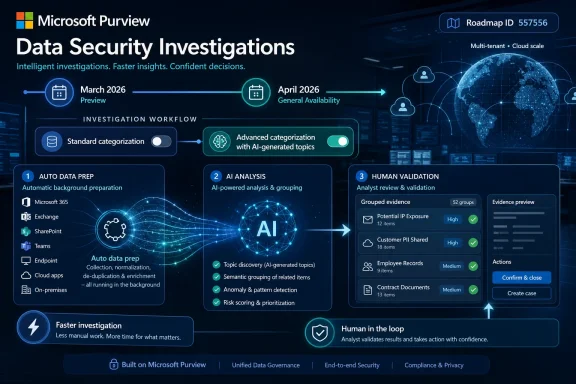
Microsoft Purview Data Security Investigations added AI analysis enhancements for worldwide standard multi-tenant web customers, previewing in March 2026 and reaching general availability in April 2026, with Roadmap ID 557556 last updated by Microsoft on June 26, 2026. The change sounds incremental: a choice between standard and advanced categorization, plus automatic data preparation as material enters an investigation. But in the Purview universe, small workflow changes often reveal where Microsoft believes enterprise security work is actually breaking down. This is not simply about prettier AI labels; it is about making AI-assisted incident response fast enough to be used before the damage is already bureaucratically complete.
The most important word in Microsoft’s roadmap note is not AI. It is faster.
Data Security Investigations, or DSI, sits in the part of Purview where compliance, security operations, insider-risk response, and data governance collide. These are not clean-room workflows. They are messy, high-pressure exercises in figuring out what sensitive files were involved, who touched them, whether the exposure was accidental or malicious, and whether the organization is looking at a policy exception, a regulatory incident, or a board-level crisis.
The new DSI enhancement attacks a familiar choke point: before analysts can reason about a body of data, the platform has to prepare that data for AI analysis. Microsoft says DSI will now automatically prepare data for AI analysis as it is added to an investigation. That phrasing matters because it shifts preparation from a deliberate analyst action into background plumbing.
In a mature security team, that may shave minutes or hours. In a stretched organization where one compliance lead and one security engineer are splitting time across alerts, legal holds, DLP incidents, and executive questions, it may be the difference between beginning analysis the same day and letting an investigation sit half-assembled while everyone waits for the toolchain to catch up.
Microsoft is betting that the future of security tooling is not merely smarter models but fewer moments where humans must stop, configure, wait, and restart. The company has spent the last several years selling Copilot-era security as a force multiplier. DSI’s latest update is a smaller but more concrete version of that pitch: remove a step, expose a judgment, and let the analyst decide how much AI depth the case deserves.
Standard categorization is the pragmatic option. It is designed to help analysts group potentially impacted content quickly, which is what many incidents need in the first pass. If a suspicious download involved a small number of clearly labeled finance documents, or if an insider-risk case is still in early triage, an organization may not need deep topic discovery before deciding what to do next.
Advanced categorization goes further by including AI-generated topics. That moves the tool from sorting content into broad buckets toward surfacing finer-grained patterns inside the investigation scope. For cases involving mixed repositories, ambiguous file names, or large collections of communications and documents, topic generation can help analysts see clusters they might otherwise miss.
The interesting part is not that Microsoft offers both. The interesting part is that Microsoft explicitly frames the standard option as a way to save time and potentially cost. That is an unusually direct admission for an AI feature, where vendors often prefer to imply that the most automated option is always the correct one.
Enterprise buyers know better. AI analysis consumes compute, may introduce licensing or metering considerations, and can produce more output than a human team has time to validate. By making categorization depth a choice, Microsoft is quietly moving from “AI everywhere” to something more operationally believable: AI where the case justifies it.
Traditional classification systems depend on known labels, patterns, and policies. They are good at finding credit card numbers, health identifiers, source code, sensitivity labels, or documents that match existing DLP rules. But real investigations often turn on themes that were not cleanly expressed in advance: merger planning, employee grievances, customer escalations, product roadmap leaks, contract negotiations, or unusual combinations of business context.
That is where AI-generated topics become more than cosmetic metadata. If advanced categorization can group material around emergent themes, DSI may help analysts move from “what files match known patterns?” to “what is this body of content actually about?” That is a more valuable question during insider-risk and data-exposure investigations, especially where the danger is not a single regulated identifier but the business sensitivity of the content itself.
The risk, of course, is that generated topics can sound authoritative even when they are merely plausible. A topic label is not evidence. It is a navigational aid. Microsoft’s challenge is to make these AI groupings useful without letting them become a substitute for review, corroboration, and defensible decision-making.
That distinction will matter most in regulated environments. A security team can use AI-generated topics to prioritize review, but legal, compliance, and HR teams will still need to understand how conclusions were reached. If the tool’s output becomes part of an escalation path, the organization needs process discipline around what the AI suggested, what humans verified, and what actions followed.
In many enterprise workflows, teams do not begin with a neatly scoped incident. They begin with a suspicious alert, a manager’s concern, a DLP hit, a terminated employee, a shared mailbox, or a question from counsel. The investigation scope evolves as new data is added. Every time the analyst expands that scope, friction compounds.
If DSI prepares data for AI analysis as it is added, Microsoft is trying to collapse that lag. The analyst can keep building the case while the platform readies the material in the background. That is a more natural model for real investigations, which are iterative rather than linear.
This also fits Microsoft’s broader push to make Purview less like a set of separate compliance consoles and more like an operational data-security workspace. The company has been threading AI into insider risk, data loss prevention, eDiscovery-adjacent workflows, and data security posture management. The pattern is clear: Microsoft wants the security stack to not only detect risk but help analysts move from signal to scoped evidence to response.
The upside is speed. The downside is that faster workflow can encourage premature confidence. When tools reduce friction, organizations sometimes skip the pauses that previously forced review. A mature program will treat automatic preparation as a way to start analysis earlier, not as permission to close the case faster than the facts allow.
This DSI update is more administrative, and that is why it may matter. Choosing categorization depth and preparing data automatically are not flashy features. They are the kind of workflow improvements that determine whether a tool survives contact with a real incident queue.
Security teams do not need every AI feature to be magical. They need the platform to do less waiting, less handoff, less duplicate setup, and less rework. An AI system that saves an analyst from building the same categorization pipeline for every new batch of evidence may have more practical value than a chatbot that produces a polished paragraph after the fact.
For Microsoft, this is also a defensive move. Purview customers already sit inside the Microsoft 365 data estate, where Teams, Exchange, SharePoint, OneDrive, endpoint signals, labels, and DLP policies generate enormous context. If Microsoft can turn that context into faster investigations without forcing customers to export data into another platform, it strengthens Purview’s role as the default governance and security layer for Microsoft 365-heavy organizations.
That default status is powerful but not guaranteed. Dedicated security analytics, insider-risk, eDiscovery, and data-governance vendors will continue arguing that Microsoft’s breadth comes at the expense of depth. DSI’s AI analysis enhancements are Microsoft’s counterargument: if the investigation begins in Microsoft 365, the analysis should begin there too.
That decision should not be left entirely to individual preference. Organizations will need playbooks. A low-severity DLP incident involving a handful of known sensitive documents may call for standard categorization. A suspected intellectual-property theft case involving a departing employee, source repositories, executive communications, and unlabeled project files may justify advanced categorization.
The distinction is less about the tool and more about investigative proportionality. AI depth should match business risk. If every case gets advanced processing, teams may waste time reviewing unnecessary topic output. If no case gets advanced processing, the organization may miss patterns buried in large or poorly labeled data sets.
Admins should also think about auditability. If an investigation leads to employment action, regulatory notification, litigation strategy, or customer disclosure, the organization will need a record that explains what data was analyzed and how conclusions were validated. AI-generated categories and topics can accelerate the path to insight, but they should not become an undocumented black box in the middle of a sensitive decision.
This is where the governance side of Purview has to meet the operational side. The feature is available in the product, but the policy around using it belongs to the customer. Microsoft can provide controls and documentation; enterprises still have to decide what “reasonable investigation” means in their own risk model.
For much of the generative AI cycle, vendors treated compute cost as an implementation detail and productivity as the universal solvent. Customers were told that AI would save time, reduce manual effort, and justify premium licensing. Less often did product pages concede that different levels of AI analysis might have different cost profiles and that users should be able to choose accordingly.
DSI’s categorization model is a more sober version of the AI promise. It implies that the organization can tune the system for the case at hand. That is how enterprise software should work, particularly in security and compliance, where not all data is equal and not all incidents deserve the same response.
This will be important as AI-assisted security features become more common across Microsoft 365. If every alert, investigation, review set, DLP incident, and compliance workflow begins invoking deeper AI analysis by default, customers will eventually ask where the bill is going and whether the output was worth it. Giving teams a standard option creates a pressure valve.
It also gives Microsoft a better story for skeptical admins. The pitch is no longer only “turn on AI and trust us.” It becomes “use the lighter tool when speed matters, use the deeper tool when complexity demands it.” That is a more credible posture for organizations that have to balance risk reduction against licensing, compute, and analyst capacity.
AI categorization can suggest that a group of documents relates to customer contracts, product strategy, financial planning, or regulated personal data. It can help an analyst decide where to look first. It may reveal unexpected topic clusters or reduce the time needed to understand a large scope of material.
But the consequences of an investigation belong to humans. Someone has to decide whether data was exposed, whether policy was violated, whether the incident must be escalated, and whether the organization’s response is defensible. AI can compress the path to those decisions, but it cannot remove the need for judgment.
That is especially true in insider-risk scenarios. The phrase insider risk covers everything from accidental oversharing to deliberate exfiltration. A tool that groups content by topic may help analysts understand the stakes, but intent remains difficult to infer from data movement alone. A large download before resignation may be suspicious; it may also be a legitimate handoff, an offline work habit, or a poorly designed business process.
Microsoft’s product direction is strongest when it treats AI as investigative scaffolding rather than verdict machinery. The roadmap language stays mostly on that side of the line. It talks about analysis tools, categorization, topics, and faster preparation. It does not claim that DSI can independently determine culpability or replace review.
That restraint should continue. The more sensitive the investigation, the more important it is that AI output be framed as assistance. In security operations, confident automation can be useful. In compliance and personnel matters, overconfident automation can be dangerous.
Exchange messages, Teams chats, SharePoint sites, OneDrive files, sensitivity labels, DLP events, endpoint telemetry, identity signals, and compliance workflows all orbit Microsoft 365. When an incident involves corporate data, the evidence often lives inside that orbit. DSI’s value increases when it can analyze that evidence without forcing teams into export-heavy, connector-heavy, or manual review processes.
That is the strategic layer underneath Roadmap ID 557556. Microsoft is trying to make Purview the place where data risk is not only governed in advance but investigated after the fact. AI analysis enhancements make that pitch more attractive because they promise to reduce the operational penalty of staying inside the Microsoft ecosystem.
For WindowsForum readers, especially admins in Microsoft-centric shops, this should feel familiar. Microsoft often wins not by having the most specialized tool in every category, but by making the integrated path good enough, close enough, and increasingly hard to justify leaving. Purview’s DSI enhancements follow that playbook.
There is a catch. Data gravity can become vendor gravity. The more investigation workflows depend on Microsoft’s categorization, topic generation, permissions model, and portal experience, the more customers need confidence that the system is transparent, exportable, and compatible with their legal and audit needs. Integration is useful; lock-in disguised as convenience is less so.
For IT leaders, that changes the task. The question is no longer whether to watch for the capability. It is whether existing investigation procedures should be updated to account for it. Teams using DSI should review playbooks, analyst training, and escalation templates to decide how standard and advanced categorization fit into real cases.
The most practical first step is to define investigation tiers. Low-risk or narrow-scope reviews can start with standard categorization. High-risk, broad, or ambiguous investigations can move to advanced categorization where AI-generated topics may justify the additional processing. That approach prevents the feature from becoming either ignored shelfware or an indiscriminate default.
Organizations should also revisit permissions. DSI deals with sensitive content by design, and AI analysis can surface relationships and topics that make that content even more revealing. The right users need access, but the audience should not expand just because the interface becomes easier to use.
Finally, teams should test the workflow before a crisis. A launched feature is not the same thing as an operationally understood feature. Security and compliance teams should run controlled exercises with representative data, compare standard and advanced outputs, and document where AI-generated topics helped or misled the review.
 Microsoft Is Turning Investigation Time Into the Product
The most important word in Microsoft’s roadmap note is not AI. It is faster.Data Security Investigations, or DSI, sits in the part of Purview where compliance, security operations, insider-risk response, and data governance collide. These are not clean-room workflows. They are messy, high-pressure exercises in figuring out what sensitive files were involved, who touched them, whether the exposure was accidental or malicious, and whether the organization is looking at a policy exception, a regulatory incident, or a board-level crisis.
The new DSI enhancement attacks a familiar choke point: before analysts can reason about a body of data, the platform has to prepare that data for AI analysis. Microsoft says DSI will now automatically prepare data for AI analysis as it is added to an investigation. That phrasing matters because it shifts preparation from a deliberate analyst action into background plumbing.
In a mature security team, that may shave minutes or hours. In a stretched organization where one compliance lead and one security engineer are splitting time across alerts, legal holds, DLP incidents, and executive questions, it may be the difference between beginning analysis the same day and letting an investigation sit half-assembled while everyone waits for the toolchain to catch up.
Microsoft is betting that the future of security tooling is not merely smarter models but fewer moments where humans must stop, configure, wait, and restart. The company has spent the last several years selling Copilot-era security as a force multiplier. DSI’s latest update is a smaller but more concrete version of that pitch: remove a step, expose a judgment, and let the analyst decide how much AI depth the case deserves.
The Toggle Is Really a Budget Argument
The headline feature is the new ability to choose between standard categorization and advanced categorization. On paper, that sounds like a product settings dialog. In practice, it is Microsoft acknowledging that AI analysis has a cost curve, and not every investigation should ride the expensive end of it.Standard categorization is the pragmatic option. It is designed to help analysts group potentially impacted content quickly, which is what many incidents need in the first pass. If a suspicious download involved a small number of clearly labeled finance documents, or if an insider-risk case is still in early triage, an organization may not need deep topic discovery before deciding what to do next.
Advanced categorization goes further by including AI-generated topics. That moves the tool from sorting content into broad buckets toward surfacing finer-grained patterns inside the investigation scope. For cases involving mixed repositories, ambiguous file names, or large collections of communications and documents, topic generation can help analysts see clusters they might otherwise miss.
The interesting part is not that Microsoft offers both. The interesting part is that Microsoft explicitly frames the standard option as a way to save time and potentially cost. That is an unusually direct admission for an AI feature, where vendors often prefer to imply that the most automated option is always the correct one.
Enterprise buyers know better. AI analysis consumes compute, may introduce licensing or metering considerations, and can produce more output than a human team has time to validate. By making categorization depth a choice, Microsoft is quietly moving from “AI everywhere” to something more operationally believable: AI where the case justifies it.
AI-Generated Topics Move Purview Closer to Analyst Reasoning
Security investigations rarely fail because nobody can search. They fail because the results are too numerous, too noisy, or too context-poor for humans to interpret quickly.Traditional classification systems depend on known labels, patterns, and policies. They are good at finding credit card numbers, health identifiers, source code, sensitivity labels, or documents that match existing DLP rules. But real investigations often turn on themes that were not cleanly expressed in advance: merger planning, employee grievances, customer escalations, product roadmap leaks, contract negotiations, or unusual combinations of business context.
That is where AI-generated topics become more than cosmetic metadata. If advanced categorization can group material around emergent themes, DSI may help analysts move from “what files match known patterns?” to “what is this body of content actually about?” That is a more valuable question during insider-risk and data-exposure investigations, especially where the danger is not a single regulated identifier but the business sensitivity of the content itself.
The risk, of course, is that generated topics can sound authoritative even when they are merely plausible. A topic label is not evidence. It is a navigational aid. Microsoft’s challenge is to make these AI groupings useful without letting them become a substitute for review, corroboration, and defensible decision-making.
That distinction will matter most in regulated environments. A security team can use AI-generated topics to prioritize review, but legal, compliance, and HR teams will still need to understand how conclusions were reached. If the tool’s output becomes part of an escalation path, the organization needs process discipline around what the AI suggested, what humans verified, and what actions followed.
Automation Helps Most When the Case Is Still Foggy
The automatic preparation change may prove more consequential than the categorization toggle because it addresses the dead time that accumulates early in an investigation.In many enterprise workflows, teams do not begin with a neatly scoped incident. They begin with a suspicious alert, a manager’s concern, a DLP hit, a terminated employee, a shared mailbox, or a question from counsel. The investigation scope evolves as new data is added. Every time the analyst expands that scope, friction compounds.
If DSI prepares data for AI analysis as it is added, Microsoft is trying to collapse that lag. The analyst can keep building the case while the platform readies the material in the background. That is a more natural model for real investigations, which are iterative rather than linear.
This also fits Microsoft’s broader push to make Purview less like a set of separate compliance consoles and more like an operational data-security workspace. The company has been threading AI into insider risk, data loss prevention, eDiscovery-adjacent workflows, and data security posture management. The pattern is clear: Microsoft wants the security stack to not only detect risk but help analysts move from signal to scoped evidence to response.
The upside is speed. The downside is that faster workflow can encourage premature confidence. When tools reduce friction, organizations sometimes skip the pauses that previously forced review. A mature program will treat automatic preparation as a way to start analysis earlier, not as permission to close the case faster than the facts allow.
Purview’s AI Push Is Becoming Less Theatrical and More Administrative
The first wave of enterprise AI security marketing was theatrical. It promised natural-language investigation, instant summaries, conversational analysts, and a world where overworked teams could simply ask the system what happened. Some of those capabilities are useful, but they also sit close to demo culture.This DSI update is more administrative, and that is why it may matter. Choosing categorization depth and preparing data automatically are not flashy features. They are the kind of workflow improvements that determine whether a tool survives contact with a real incident queue.
Security teams do not need every AI feature to be magical. They need the platform to do less waiting, less handoff, less duplicate setup, and less rework. An AI system that saves an analyst from building the same categorization pipeline for every new batch of evidence may have more practical value than a chatbot that produces a polished paragraph after the fact.
For Microsoft, this is also a defensive move. Purview customers already sit inside the Microsoft 365 data estate, where Teams, Exchange, SharePoint, OneDrive, endpoint signals, labels, and DLP policies generate enormous context. If Microsoft can turn that context into faster investigations without forcing customers to export data into another platform, it strengthens Purview’s role as the default governance and security layer for Microsoft 365-heavy organizations.
That default status is powerful but not guaranteed. Dedicated security analytics, insider-risk, eDiscovery, and data-governance vendors will continue arguing that Microsoft’s breadth comes at the expense of depth. DSI’s AI analysis enhancements are Microsoft’s counterargument: if the investigation begins in Microsoft 365, the analysis should begin there too.
The Admin’s Real Job Is Deciding When More AI Is Too Much AI
The standard-versus-advanced choice creates a policy question that Microsoft cannot answer for every tenant. When should an analyst use standard categorization, and when should they spend the time and resources on advanced categorization with AI-generated topics?That decision should not be left entirely to individual preference. Organizations will need playbooks. A low-severity DLP incident involving a handful of known sensitive documents may call for standard categorization. A suspected intellectual-property theft case involving a departing employee, source repositories, executive communications, and unlabeled project files may justify advanced categorization.
The distinction is less about the tool and more about investigative proportionality. AI depth should match business risk. If every case gets advanced processing, teams may waste time reviewing unnecessary topic output. If no case gets advanced processing, the organization may miss patterns buried in large or poorly labeled data sets.
Admins should also think about auditability. If an investigation leads to employment action, regulatory notification, litigation strategy, or customer disclosure, the organization will need a record that explains what data was analyzed and how conclusions were validated. AI-generated categories and topics can accelerate the path to insight, but they should not become an undocumented black box in the middle of a sensitive decision.
This is where the governance side of Purview has to meet the operational side. The feature is available in the product, but the policy around using it belongs to the customer. Microsoft can provide controls and documentation; enterprises still have to decide what “reasonable investigation” means in their own risk model.
Cost Awareness Is Finally Entering the AI Feature Conversation
Microsoft’s roadmap language about potential time and cost savings is a small but revealing sign of maturity in enterprise AI.For much of the generative AI cycle, vendors treated compute cost as an implementation detail and productivity as the universal solvent. Customers were told that AI would save time, reduce manual effort, and justify premium licensing. Less often did product pages concede that different levels of AI analysis might have different cost profiles and that users should be able to choose accordingly.
DSI’s categorization model is a more sober version of the AI promise. It implies that the organization can tune the system for the case at hand. That is how enterprise software should work, particularly in security and compliance, where not all data is equal and not all incidents deserve the same response.
This will be important as AI-assisted security features become more common across Microsoft 365. If every alert, investigation, review set, DLP incident, and compliance workflow begins invoking deeper AI analysis by default, customers will eventually ask where the bill is going and whether the output was worth it. Giving teams a standard option creates a pressure valve.
It also gives Microsoft a better story for skeptical admins. The pitch is no longer only “turn on AI and trust us.” It becomes “use the lighter tool when speed matters, use the deeper tool when complexity demands it.” That is a more credible posture for organizations that have to balance risk reduction against licensing, compute, and analyst capacity.
The Security Team Gets Help, But the Evidence Still Needs Humans
The core tension in DSI is the same tension running through every AI-assisted security product: the system can accelerate interpretation, but it cannot own accountability.AI categorization can suggest that a group of documents relates to customer contracts, product strategy, financial planning, or regulated personal data. It can help an analyst decide where to look first. It may reveal unexpected topic clusters or reduce the time needed to understand a large scope of material.
But the consequences of an investigation belong to humans. Someone has to decide whether data was exposed, whether policy was violated, whether the incident must be escalated, and whether the organization’s response is defensible. AI can compress the path to those decisions, but it cannot remove the need for judgment.
That is especially true in insider-risk scenarios. The phrase insider risk covers everything from accidental oversharing to deliberate exfiltration. A tool that groups content by topic may help analysts understand the stakes, but intent remains difficult to infer from data movement alone. A large download before resignation may be suspicious; it may also be a legitimate handoff, an offline work habit, or a poorly designed business process.
Microsoft’s product direction is strongest when it treats AI as investigative scaffolding rather than verdict machinery. The roadmap language stays mostly on that side of the line. It talks about analysis tools, categorization, topics, and faster preparation. It does not claim that DSI can independently determine culpability or replace review.
That restraint should continue. The more sensitive the investigation, the more important it is that AI output be framed as assistance. In security operations, confident automation can be useful. In compliance and personnel matters, overconfident automation can be dangerous.
This Is Also a Microsoft 365 Data Gravity Story
Purview’s advantage is not that Microsoft invented AI-assisted categorization. It is that Microsoft controls the workplace data plane for a huge share of enterprises.Exchange messages, Teams chats, SharePoint sites, OneDrive files, sensitivity labels, DLP events, endpoint telemetry, identity signals, and compliance workflows all orbit Microsoft 365. When an incident involves corporate data, the evidence often lives inside that orbit. DSI’s value increases when it can analyze that evidence without forcing teams into export-heavy, connector-heavy, or manual review processes.
That is the strategic layer underneath Roadmap ID 557556. Microsoft is trying to make Purview the place where data risk is not only governed in advance but investigated after the fact. AI analysis enhancements make that pitch more attractive because they promise to reduce the operational penalty of staying inside the Microsoft ecosystem.
For WindowsForum readers, especially admins in Microsoft-centric shops, this should feel familiar. Microsoft often wins not by having the most specialized tool in every category, but by making the integrated path good enough, close enough, and increasingly hard to justify leaving. Purview’s DSI enhancements follow that playbook.
There is a catch. Data gravity can become vendor gravity. The more investigation workflows depend on Microsoft’s categorization, topic generation, permissions model, and portal experience, the more customers need confidence that the system is transparent, exportable, and compatible with their legal and audit needs. Integration is useful; lock-in disguised as convenience is less so.
The Roadmap Date Matters Because Security Teams Plan in Quarters
Microsoft lists preview availability for March 2026 and general availability for April 2026, with the roadmap item marked launched and updated on June 26, 2026. That timeline puts the feature beyond speculative roadmap theater. It is not merely a future promise; it is part of the current Purview planning conversation.For IT leaders, that changes the task. The question is no longer whether to watch for the capability. It is whether existing investigation procedures should be updated to account for it. Teams using DSI should review playbooks, analyst training, and escalation templates to decide how standard and advanced categorization fit into real cases.
The most practical first step is to define investigation tiers. Low-risk or narrow-scope reviews can start with standard categorization. High-risk, broad, or ambiguous investigations can move to advanced categorization where AI-generated topics may justify the additional processing. That approach prevents the feature from becoming either ignored shelfware or an indiscriminate default.
Organizations should also revisit permissions. DSI deals with sensitive content by design, and AI analysis can surface relationships and topics that make that content even more revealing. The right users need access, but the audience should not expand just because the interface becomes easier to use.
Finally, teams should test the workflow before a crisis. A launched feature is not the same thing as an operationally understood feature. Security and compliance teams should run controlled exercises with representative data, compare standard and advanced outputs, and document where AI-generated topics helped or misled the review.
The April Launch Leaves Admins With a Narrow Set of Sensible Moves
The DSI enhancement is not a revolution, but it is a practical signal about how Microsoft expects Purview investigations to run in the AI era. The organizations that benefit most will be the ones that turn the new options into repeatable policy rather than leaving them as another unlabeled choice in the portal.- DSI now offers a choice between standard AI-powered categorization and advanced categorization that can include AI-generated topics.
- Microsoft says data will be automatically prepared for AI analysis as it is added to an investigation, reducing setup delay during active case work.
- Standard categorization should be treated as the default for narrower or lower-risk reviews where speed and efficiency matter most.
- Advanced categorization is better suited to broad, ambiguous, or high-stakes investigations where topic discovery may reveal patterns that ordinary labels miss.
- AI-generated topics should guide analyst attention, not serve as final evidence or a substitute for human validation.
- Security and compliance teams should update investigation playbooks now that the roadmap item is launched for worldwide standard multi-tenant web customers.
References
- Primary source: Microsoft 365 Roadmap
Published: 2026-06-26T22:01:51.0909953Z
Microsoft 365 Roadmap | Microsoft 365
The Microsoft 365 Roadmap lists updates that are currently planned for applicable subscribers. Check here for more information on the status of new features and updates.www.microsoft.com
- Official source: learn.microsoft.com
Learn about AI analysis in Data Security Investigations | Microsoft Learn
Discover how AI analysis in Data Security Investigations enhances security workflows with tools like vector search, categorization, and examination.learn.microsoft.com - Official source: techcommunity.microsoft.com
Introducing a faster, more intelligent, end-to-end insider risk investigation experience | Microsoft Community Hub
Modern insider risk investigations succeed or fail based on how quickly teams can move from signal to clarity. That’s why the latest Microsoft Purview... techcommunity.microsoft.com
- Official source: cdn-dynmedia-1.microsoft.com
