

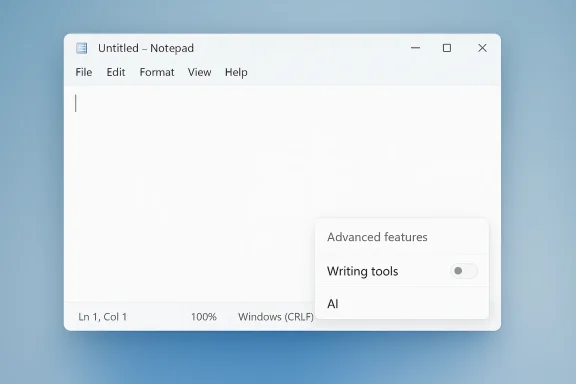
Microsoft is quietly doing something that would have seemed unlikely a year ago: it is removing Copilot branding from parts of Windows 11 rather than adding more of it. In Notepad, the old Copilot menu is being replaced with “writing tools,” the button is changing from a Copilot-marked control to a pen icon, and the AI toggle is being tucked deeper into Settings. The shift does not mean Microsoft is abandoning AI in the app; it means the company is trying to make the AI feel less intrusive, less branded, and, perhaps most importantly, less controversial.
For most of the last two years, Microsoft has been moving in the opposite direction. Windows 11, Microsoft 365, Photos, Paint, Snipping Tool, Widgets, and Notepad have all been used as landing zones for AI features, with Copilot treated as a cross-platform umbrella rather than a single product. The strategy was straightforward: make Copilot visible everywhere, then hope familiarity would translate into adoption. That approach worked in the narrow sense that users saw the brand constantly, but it also created the impression that Microsoft was forcing AI into places where people simply wanted a clean utility experience.
That tension is visible in Microsoft’s own messaging. In March 2026, the Windows Insider Blog said the company was reducing unnecessary Copilot entry points in apps including Snipping Tool, Photos, Widgets, and Notepad, while becoming more intentional about where Copilot integrates across Windows. That is a notable shift in tone from the broad, enthusiastic positioning Microsoft used throughout 2024 and 2025, when it repeatedly emphasized that AI would be woven into everyday Windows workflows. The new wording suggests a product team responding to criticism, not simply iterating on a roadmap.
Notepad is an especially revealing example because it has traditionally been one of Windows’ most basic, almost sacred, tools. Users do not open Notepad to explore feature surfaces; they open it to type, paste, save, and leave. When Microsoft added AI text features such as Write, Rewrite, and Summarize, it could justify them as optional productivity helpers, but the placement of a prominent Copilot-branded entry point still changed the character of the app. By moving the same functions under a more neutral label like writing tools, Microsoft is trying to preserve the utility while reducing the feeling of AI being pushed in the user’s face.
There is also a deeper enterprise lesson here. Corporate IT teams and power users have long been suspicious of consumer-first branding that bleeds into core operating system workflows, especially when it is unclear whether a feature is local, cloud-backed, licensed, or policy-controllable. Microsoft has already documented ways to manage AI features in Notepad through administrative templates, which shows the company understands that these tools need governance, not just marketing. Toning down the visual Copilot presence may be partly about aesthetics, but it is also about making Windows look more manageable in business environments.
Microsoft appears to have concluded that Copilot’s problem is not just usefulness, but placement. If the assistant shows up in the wrong context, it can feel like clutter rather than help. That is especially true in Windows utilities, where users expect speed, clarity, and almost no cognitive overhead. A pen icon suggests editing. A Copilot icon suggests an assistant, a prompt surface, and a brand identity, all of which can feel out of place in a lightweight editor.
The shift also reflects a more mature understanding of user experience. People tolerate AI when it is obviously useful, but they often dislike it when it feels promotional. That is why the word “unnecessary” in Microsoft’s own announcement is so important: it implies the company is now distinguishing between helpful integrations and decorative ones. In other words, it is admitting that not every surface needs a Copilot button.
That is an important point: Microsoft is not removing the AI. It is re-locating and re-framing it. In product terms, that is often the difference between a feature that feels forced and one that feels optional. The move lets Microsoft retain the investment in AI text generation while lowering the emotional temperature around it.
The design choice is subtle but revealing. If Microsoft believed the feature had become broadly beloved, it would have kept the Copilot label and expanded the experience. Instead, it has chosen a quieter presentation that reduces the chance of alienating users who just want a plain text editor. That is not the behavior of a company doubling down on splashy branding.
The pattern also extends to Photos and Widgets, which have been part of Microsoft’s broader AI storytelling. In 2025, Microsoft explicitly highlighted Copilot buttons in Photos and described fresh AI-centered experiences across Windows. The current retrenchment does not invalidate those features, but it does show a more cautious stance about how prominently they should be advertised. Microsoft seems to be learning that presence and prominence are not the same thing.
Microsoft’s decision therefore looks less like a reversal and more like a pruning pass. The company is likely trying to keep AI accessible while removing obvious friction points that trigger complaints. That is an important distinction for both consumers and enterprises, because it suggests Windows is moving toward selective AI integration rather than omnipresent branding.
There is also a consistency problem. Copilot does not behave identically across apps, and that inconsistency can make it feel fragmented even when the underlying technology is impressive. If the UI changes from app to app, the brand starts to stand for ambiguity rather than convenience. Microsoft is probably trying to reduce that confusion by hiding the brand where it adds little value and emphasizing the task instead.
This is why the change feels larger than a cosmetic rebrand. Microsoft is effectively acknowledging that users may accept AI more readily when it is presented as an enhancement to a familiar function rather than as a standalone hero feature. The lesson is obvious, but it took the company a while to apply it: sometimes the best interface is the one that gets out of the way.
At the same time, Microsoft still wants organizations to see Copilot as a productivity platform, not a novelty. The broader Windows messaging around Copilot and AI continues to position these tools as useful for drafting, summarizing, and streamlining work. That means the company is trying to walk a narrow line: reduce consumer backlash without weakening the enterprise story.
That is especially important in regulated environments. Anything that touches text generation, document summarization, or content transformation can trigger internal review, even if the feature is technically optional. By moving away from constant Copilot branding, Microsoft may be easing some of that review pressure, though it certainly is not eliminating it. Visibility is not the same as approval, but it can influence how often a feature gets challenged.
There is also a hardware implication here. Copilot+ PCs were sold in part on the promise of on-device AI experiences and smart integrations. If users start to equate Copilot with annoyance rather than value, the broader PC category suffers. Microsoft therefore has a stake in making the AI feel useful, contextual, and lightweight rather than omnipresent and noisy.
Still, there is a risk of mixed signaling. If Microsoft hides Copilot too aggressively, it may weaken the very brand it spent so long promoting. If it exposes Copilot too much, it invites more backlash. The company is now trying to solve a branding paradox: how do you sell a platform-wide AI story without making every app feel like an ad?
This kind of setting placement sends a message. Microsoft is signaling that AI is now part of the app’s normal feature set, not an experimental bolt-on, even while it makes the opt-out slightly less front-and-center. For users who dislike the feature, that may feel frustrating; for Microsoft, it helps keep the interface cleaner and the default experience more cohesive.
The subtlety here is important. Microsoft is not hiding the controls completely, but it is making them a little less obvious while also making the interface a little less pushy. That tradeoff is likely the result of internal testing and user feedback, and it reflects a broader industry lesson: when a feature becomes controversial, placement matters almost as much as capability.
The platform challenge now is coherence. Microsoft has to make AI feel like a seamless part of Windows without turning the desktop into a cluttered assistant showcase. The company’s latest moves suggest it is trying to shift from hype mode into maintenance mode, where the objective is to make AI feel normal rather than novel. That is often where products mature.
The key will be restraint. If Microsoft keeps pruning unnecessary entry points while improving the actual quality of the remaining Copilot surfaces, it can regain some goodwill without conceding ground in the AI race. If it goes too far in either direction, it risks confusing users or weakening the story it has spent billions to build.
It will also be worth watching how Microsoft handles future Insider builds. If the company keeps shrinking the branding footprint while preserving the same capabilities, that suggests it has accepted that less visible AI may be more effective AI. If the brand returns in a different form later, then this period may have been a temporary response to user backlash rather than a philosophical shift.
Source: Engadget Microsoft starts removing unnecessary Copilot buttons in Windows 11
 Background
For most of the last two years, Microsoft has been moving in the opposite direction. Windows 11, Microsoft 365, Photos, Paint, Snipping Tool, Widgets, and Notepad have all been used as landing zones for AI features, with Copilot treated as a cross-platform umbrella rather than a single product. The strategy was straightforward: make Copilot visible everywhere, then hope familiarity would translate into adoption. That approach worked in the narrow sense that users saw the brand constantly, but it also created the impression that Microsoft was forcing AI into places where people simply wanted a clean utility experience.That tension is visible in Microsoft’s own messaging. In March 2026, the Windows Insider Blog said the company was reducing unnecessary Copilot entry points in apps including Snipping Tool, Photos, Widgets, and Notepad, while becoming more intentional about where Copilot integrates across Windows. That is a notable shift in tone from the broad, enthusiastic positioning Microsoft used throughout 2024 and 2025, when it repeatedly emphasized that AI would be woven into everyday Windows workflows. The new wording suggests a product team responding to criticism, not simply iterating on a roadmap.
Notepad is an especially revealing example because it has traditionally been one of Windows’ most basic, almost sacred, tools. Users do not open Notepad to explore feature surfaces; they open it to type, paste, save, and leave. When Microsoft added AI text features such as Write, Rewrite, and Summarize, it could justify them as optional productivity helpers, but the placement of a prominent Copilot-branded entry point still changed the character of the app. By moving the same functions under a more neutral label like writing tools, Microsoft is trying to preserve the utility while reducing the feeling of AI being pushed in the user’s face.
There is also a deeper enterprise lesson here. Corporate IT teams and power users have long been suspicious of consumer-first branding that bleeds into core operating system workflows, especially when it is unclear whether a feature is local, cloud-backed, licensed, or policy-controllable. Microsoft has already documented ways to manage AI features in Notepad through administrative templates, which shows the company understands that these tools need governance, not just marketing. Toning down the visual Copilot presence may be partly about aesthetics, but it is also about making Windows look more manageable in business environments.
Why Microsoft Is Backing Off the Copilot Badge
The biggest signal is not the pen icon itself. It is the decision to remove Copilot labeling from places where the feature is functionally present but psychologically noisy. That distinction matters, because many users have not objected to AI assistance in principle; they have objected to the sense that Microsoft was turning routine workflows into an AI demo at every turn. Swapping a branded badge for a generic tool label is an attempt to lower resistance without taking the capability away.Microsoft appears to have concluded that Copilot’s problem is not just usefulness, but placement. If the assistant shows up in the wrong context, it can feel like clutter rather than help. That is especially true in Windows utilities, where users expect speed, clarity, and almost no cognitive overhead. A pen icon suggests editing. A Copilot icon suggests an assistant, a prompt surface, and a brand identity, all of which can feel out of place in a lightweight editor.
From brand-first to context-first
This is a classic platform correction. Microsoft spent the first phase of Copilot marketing by making the brand highly visible, then hit the second-phase reality that visibility is not the same as trust. Users still need to decide whether the feature belongs in a given app, and that decision is often contextual rather than strategic. A more muted label lets Microsoft keep the AI pipeline intact while reducing friction at the point of use.The shift also reflects a more mature understanding of user experience. People tolerate AI when it is obviously useful, but they often dislike it when it feels promotional. That is why the word “unnecessary” in Microsoft’s own announcement is so important: it implies the company is now distinguishing between helpful integrations and decorative ones. In other words, it is admitting that not every surface needs a Copilot button.
- Brand fatigue was a real risk.
- Context matters more than blanket AI presence.
- Utility apps need lighter touch design.
- Optional tools are easier to defend than default prompts.
- Reduced labeling can preserve functionality while softening backlash.
What Changed in Notepad
The Notepad change is small on the surface and significant underneath. Microsoft has replaced the old Copilot menu with writing tools, changed the visual control from Copilot branding to a pen icon, and moved the setting that disables AI-powered writing features into Advanced features. The functions themselves remain AI-driven and, by all reported accounts, are still the same tools users already had before the branding shift.That is an important point: Microsoft is not removing the AI. It is re-locating and re-framing it. In product terms, that is often the difference between a feature that feels forced and one that feels optional. The move lets Microsoft retain the investment in AI text generation while lowering the emotional temperature around it.
What users will see
For most people, the practical difference will be visual and navigational rather than functional. The button looks different, the menu name is different, and the disable option is farther from the main settings page. That combination suggests Microsoft wants the default user journey to be gentler on the AI surface while still preserving a path for those who want to turn it off.The design choice is subtle but revealing. If Microsoft believed the feature had become broadly beloved, it would have kept the Copilot label and expanded the experience. Instead, it has chosen a quieter presentation that reduces the chance of alienating users who just want a plain text editor. That is not the behavior of a company doubling down on splashy branding.
- Copilot branding is gone from the primary Notepad surface.
- Writing tools is the new label.
- AI features still exist under the hood.
- Disable controls have been pushed into Advanced features.
- The interface is calmer, even if the backend is not.
The Bigger Copilot Cleanup Across Windows 11
Notepad is only one piece of a broader cleanup. Microsoft has said it is reducing unnecessary Copilot entry points across apps, and Windows Insider reporting indicates that Snipping Tool has already stopped showing the Copilot button when selecting areas to capture. That matters because Snipping Tool is a classic utility where users expect quick capture behavior, not a branching AI prompt. The less the app interrupts the flow, the more natural it feels.The pattern also extends to Photos and Widgets, which have been part of Microsoft’s broader AI storytelling. In 2025, Microsoft explicitly highlighted Copilot buttons in Photos and described fresh AI-centered experiences across Windows. The current retrenchment does not invalidate those features, but it does show a more cautious stance about how prominently they should be advertised. Microsoft seems to be learning that presence and prominence are not the same thing.
Snipping Tool, Photos, and Widgets
If there is a common thread among these apps, it is that none of them are primarily AI destinations. They are workflow tools, and users generally open them with a specific job in mind. A Copilot badge can be helpful when the task truly benefits from AI analysis or generation, but it can also become visual noise when the user just wants to grab a screenshot, edit a photo, or glance at widgets.Microsoft’s decision therefore looks less like a reversal and more like a pruning pass. The company is likely trying to keep AI accessible while removing obvious friction points that trigger complaints. That is an important distinction for both consumers and enterprises, because it suggests Windows is moving toward selective AI integration rather than omnipresent branding.
- Snipping Tool is already seeing visible Copilot reductions.
- Photos and Widgets remain in the cleanup scope.
- AI remains available, but with less visual insistence.
- Workflow apps are being treated differently from assistant surfaces.
- Microsoft is pruning, not abandoning, the Copilot strategy.
Consumer Reaction and UX Fatigue
The user reaction that appears to have driven this change is easy to understand. Many people do not want to relearn ordinary software just because a company wants to surface its newest brand. When every app starts advertising the same AI assistant, users can begin to feel like they are trapped in a marketing campaign rather than using an operating system. That resentment is especially strong when the feature is not clearly better than the existing workflow.There is also a consistency problem. Copilot does not behave identically across apps, and that inconsistency can make it feel fragmented even when the underlying technology is impressive. If the UI changes from app to app, the brand starts to stand for ambiguity rather than convenience. Microsoft is probably trying to reduce that confusion by hiding the brand where it adds little value and emphasizing the task instead.
The psychology of a button
A button is never just a button. In consumer software, the label tells users what the product believes they should care about. A Copilot button tells them Microsoft wants them to think “AI first.” A writing tools button tells them they are still in control of the task. That small shift may be enough to lower annoyance, even if the backend experience is materially the same.This is why the change feels larger than a cosmetic rebrand. Microsoft is effectively acknowledging that users may accept AI more readily when it is presented as an enhancement to a familiar function rather than as a standalone hero feature. The lesson is obvious, but it took the company a while to apply it: sometimes the best interface is the one that gets out of the way.
- Users dislike forced brand repetition.
- Consistency matters across Windows apps.
- Task labels can be less polarizing than AI labels.
- Small interface changes can significantly reduce friction.
- Perceived control is often more important than feature count.
Enterprise Implications and Admin Control
For enterprise customers, the Notepad change is less about aesthetics and more about manageability. Companies need to understand where AI is available, how it behaves, whether it depends on cloud services, and whether users can turn it off. Microsoft’s documentation for managing AI features in Notepad shows that the company already knows this is a policy issue, not just a UX issue. Putting the disable option under Advanced features may not change the underlying controls, but it does reinforce the idea that AI belongs in the governed part of the stack.At the same time, Microsoft still wants organizations to see Copilot as a productivity platform, not a novelty. The broader Windows messaging around Copilot and AI continues to position these tools as useful for drafting, summarizing, and streamlining work. That means the company is trying to walk a narrow line: reduce consumer backlash without weakening the enterprise story.
Policy, compliance, and trust
In business settings, trust often depends on clear boundaries. IT leaders want to know where AI appears, which user accounts it touches, and what telemetry or cloud dependency it introduces. A more subdued UI helps somewhat, but the real value lies in Microsoft’s ability to make Copilot look less like a consumer experiment and more like a configurable platform feature.That is especially important in regulated environments. Anything that touches text generation, document summarization, or content transformation can trigger internal review, even if the feature is technically optional. By moving away from constant Copilot branding, Microsoft may be easing some of that review pressure, though it certainly is not eliminating it. Visibility is not the same as approval, but it can influence how often a feature gets challenged.
- Governance matters more than UI polish in enterprises.
- Administrators need clarity about AI entry points.
- Advanced features placement signals tighter control.
- Branding reduction may ease internal policy review.
- Microsoft is balancing adoption with compliance concerns.
Competitive Positioning in the AI PC Era
Microsoft’s Copilot strategy has always sat at the center of the AI PC narrative. The company wants Windows to be the default environment for everyday AI use, whether that means text assistance, image editing, search, or agent-style workflows. But when the branding gets ahead of the utility, competitors can exploit the gap by offering cleaner, more focused experiences. A less intrusive Copilot may help Microsoft defend that position.There is also a hardware implication here. Copilot+ PCs were sold in part on the promise of on-device AI experiences and smart integrations. If users start to equate Copilot with annoyance rather than value, the broader PC category suffers. Microsoft therefore has a stake in making the AI feel useful, contextual, and lightweight rather than omnipresent and noisy.
Rival platforms and user expectations
Apple, Google, and others are also in the race to normalize AI assistance, but each has leaned differently on visible branding versus embedded features. Microsoft’s retrenchment suggests it has learned that Windows users may prefer AI as a capability rather than as a mascot. That could be a competitive advantage if it leads to a more elegant, less gimmicky experience.Still, there is a risk of mixed signaling. If Microsoft hides Copilot too aggressively, it may weaken the very brand it spent so long promoting. If it exposes Copilot too much, it invites more backlash. The company is now trying to solve a branding paradox: how do you sell a platform-wide AI story without making every app feel like an ad?
- AI PCs need credible software experiences.
- Over-branding can hurt adoption.
- Cleaner UX can beat louder marketing.
- Microsoft must preserve Copilot identity without overexposure.
- Competitive differentiation now depends on restraint as much as ambition.
The Significance of Moving Settings Deeper
One of the more revealing details is that Microsoft has moved the option to disable AI-powered writing tools under Advanced features. That is a classic product-design move: keep the default path simple, but make the more controversial or niche setting less prominent. It reduces accidental discovery while preserving control for the people who actively want it.This kind of setting placement sends a message. Microsoft is signaling that AI is now part of the app’s normal feature set, not an experimental bolt-on, even while it makes the opt-out slightly less front-and-center. For users who dislike the feature, that may feel frustrating; for Microsoft, it helps keep the interface cleaner and the default experience more cohesive.
Defaults shape perception
Defaults are powerful because most users never change them. If AI features are enabled or highly visible by default, many users will assume that is the intended way to use the product. If the disable control is buried deeper, Microsoft can preserve the feature’s presence while reducing the odds that casual users immediately turn it off. That is an old software tactic applied to a new AI debate.The subtlety here is important. Microsoft is not hiding the controls completely, but it is making them a little less obvious while also making the interface a little less pushy. That tradeoff is likely the result of internal testing and user feedback, and it reflects a broader industry lesson: when a feature becomes controversial, placement matters almost as much as capability.
- Advanced features placement reduces clutter.
- Defaults influence adoption more than marketing copy.
- Hidden controls can preserve flexibility.
- Interface hierarchy communicates product priorities.
- User control remains, but less prominently advertised.
What This Means for Windows 11 as a Platform
Windows 11 is increasingly becoming a platform where AI is supposed to be available everywhere but visible only when it feels justified. That is a healthier model than treating every app as a Copilot billboard. It also acknowledges that the core Windows audience is broad: power users, enterprise admins, casual consumers, and new PC buyers do not all want the same level of AI presence.The platform challenge now is coherence. Microsoft has to make AI feel like a seamless part of Windows without turning the desktop into a cluttered assistant showcase. The company’s latest moves suggest it is trying to shift from hype mode into maintenance mode, where the objective is to make AI feel normal rather than novel. That is often where products mature.
A more selective Windows strategy
A selective strategy could benefit Microsoft in the long run. Users are more likely to trust AI features that appear in the right place at the right time than ones that appear everywhere. If Windows can become the OS that offers AI when useful and disappears when not, that will be a stronger proposition than sheer branding volume.The key will be restraint. If Microsoft keeps pruning unnecessary entry points while improving the actual quality of the remaining Copilot surfaces, it can regain some goodwill without conceding ground in the AI race. If it goes too far in either direction, it risks confusing users or weakening the story it has spent billions to build.
- Windows 11 is shifting toward selective AI exposure.
- Trust depends on relevance, not just availability.
- Utility should outrank branding in everyday apps.
- Coherence across apps remains the hard problem.
- Restraint may become a feature in itself.
Strengths and Opportunities
Microsoft’s latest changes show a company that is at least listening to criticism and adjusting its presentation accordingly. That matters because it suggests Copilot can evolve from a noisy brand into a more disciplined platform capability. If Microsoft executes well, it could turn a source of irritation into a more acceptable, even welcome, part of Windows.- Reduces user annoyance without removing core functionality.
- Improves UX clarity in lightweight apps like Notepad.
- Supports enterprise governance by emphasizing configurable features.
- Preserves AI investment while softening backlash.
- Creates room for more thoughtful AI placement across Windows.
- May improve adoption by making AI feel less forced.
- Strengthens Microsoft’s “intentional integration” narrative across the platform.
Risks and Concerns
The danger is that Microsoft may simply be masking the problem rather than solving it. If the AI remains inconsistent across apps, moving the button or renaming the menu will not fix the underlying user frustration. Worse, burying controls or changing labels without improving the experience could make users feel manipulated rather than listened to.- Brand confusion may continue if functionality differs by app.
- User trust could erode if the changes feel cosmetic.
- Opt-out controls moving deeper may frustrate power users.
- Inconsistent feature behavior still weakens Copilot’s identity.
- AI fatigue could grow if Microsoft overcorrects too slowly.
- Enterprise skepticism may persist if governance remains opaque.
- Mixed messaging risks diluting both the AI story and the Windows utility story.
Looking Ahead
The most important question is whether this is the beginning of a broader Copilot redesign or just a selective cleanup of the most visible annoyances. If Microsoft continues removing unnecessary Copilot entry points, the company may settle on a much more restrained Windows AI posture than it initially imagined. That would not be a retreat so much as a recalibration.It will also be worth watching how Microsoft handles future Insider builds. If the company keeps shrinking the branding footprint while preserving the same capabilities, that suggests it has accepted that less visible AI may be more effective AI. If the brand returns in a different form later, then this period may have been a temporary response to user backlash rather than a philosophical shift.
- Future Insider builds will show whether this is a one-off or a pattern.
- Photos and Widgets remain key places to watch.
- Snipping Tool behavior will signal how far the cleanup goes.
- Enterprise policy tools may get more attention if AI keeps spreading.
- Notepad settings placement may preview future Windows design choices.
Source: Engadget Microsoft starts removing unnecessary Copilot buttons in Windows 11
