Microsoft Rejects Windows 8.1 Update 2, Embraces Monthly Servicing Cadence

  • Thread Author
Microsoft has publicly and unequivocally said it will not deliver a packaged “Windows 8.1 Update 2,” choosing instead to continue delivering improvements through its regular monthly servicing cadence.

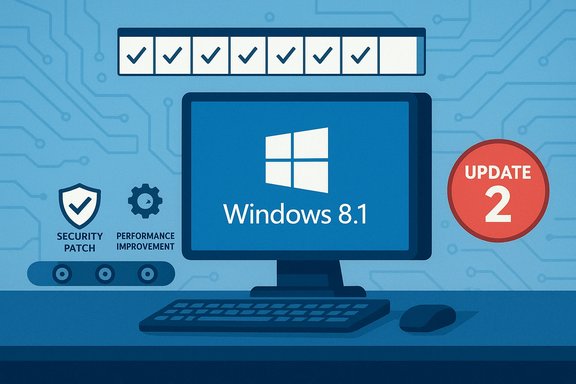
Concept art for Windows 8.1 Update 2, highlighting security patches and performance improvements.Background / Overview​

Windows 8.1 launched as Microsoft’s response to early criticism of Windows 8’s interface and workflow choices. Over the following months Microsoft released a significant cumulative update—commonly referred to as Windows 8.1 Update—and that update reignited discussion around whether Microsoft would continue bundling changes into larger, update‑style packages (a la traditional service packs) or move to a more continuous delivery model.
As Microsoft explained at the time, the company opted not to wait for a monolithic “Update 2.” Instead, it committed to ship security and non‑security fixes, plus a selection of feature refinements, through its existing monthly channels — Windows Update (WU), Microsoft Update (MU), and Windows Server Update Services (WSUS). That official stance explicitly stated: “despite rumors and speculation, we are not planning to deliver a Windows 8.1 ‘Update 2.’”
This decision ended a cycle of rumor, leak and speculation about where Microsoft would place future Windows 8.1 work. Over time those rumors included leaked builds, alleged RTM candidates and third‑party reports of a forthcoming “Update 2.” Many of those claims circulated in enthusiast and leak channels, but Microsoft’s communications clarified the company’s servicing path.

Why the announcement mattered​

The declaration that there would be no Windows 8.1 Update 2 did more than kill a rumor: it signaled an operational and strategic approach to Windows maintenance that affects users, enterprises, OEMs and partners.
  • For consumers and small businesses it meant updates would arrive incrementally and more frequently.
  • For enterprise IT teams it emphasized the need for robust patch management, testing rings and deployment controls rather than waiting for a single consolidated rollup.
  • For OEMs and system builders it changed expectations for preloaded media and upgrade paths.
  • For developers and ISVs it implied a faster cadence of platform-level changes that required faster compatibility testing and release pipelines.
Microsoft explicitly positioned monthly delivery as a more nimble mechanism to respond to feedback and to roll out both visible improvements and behind‑the‑scenes reliability fixes. The company used the monthly patch cycle not only for security patches but also to deliver precision touchpad settings, Miracast receiver APIs and other non‑security improvements as examples of what “regular updates” could include.

The technical mechanics: how Microsoft said updates would be delivered​

Microsoft reinforced that updates for Windows 8.1 would continue to use existing servicing channels:
  • Windows Update (WU) for consumer automatic distribution;
  • Microsoft Update (MU) for products enrolled in broader Microsoft patching,
  • Windows Server Update Services (WSUS) for controlled enterprise deployments.
This approach allows Microsoft to deliver a mix of security updates and non‑security improvements on the same cadence, giving administrators the ability to accept or defer optional fixes while ensuring critical security patches are applied promptly. The company enumerated examples of non‑security improvements already shipped in regular monthly updates—precision touchpad improvements, Miracast Receive APIs, and SharePoint federated sign‑on reductions—demonstrating that meaningful changes could arrive outside of a bundled “Update 2.”

Timeline and context: rumor, leak and official reply​

  • Leaks and third‑party reports began circulating that a Windows 8.1 Update 2 build existed or was near completion. Some community channels claimed RTM‑level builds or discussed feature lists that included a more traditional Start experience or consolidated changes. These were frequently traced to leak sites and code‑tracker sources.
  • Industry outlets and community forums repeated the reports and debated whether Microsoft would package a second update in the same model as the prior Update. That debate played out in web and forum coverage—some users favored consolidated rollups, others preferred a steady flow of monthly improvements.
  • Microsoft publicly clarified its approach: rather than releasing a standalone “Update 2,” the company would continue using monthly updates and existing distribution channels to deliver both security and non‑security improvements. That statement effectively closed the discussion about Update 2 as an official Microsoft deliverable.

What this meant for enterprise patch management​

Microsoft’s decision to avoid a second monolithic update for Windows 8.1 placed operational demands on enterprise IT teams.

Shorter deployment windows, more frequent testing​

Enterprises that had previously relied on a few large rollups to batch change management now had to test and stage a continuous trickle of updates. That raised several operational realities:
  • Increased need for automated testing and staging across pilot rings.
  • More frequent compatibility checks for line‑of‑business applications and drivers.
  • Tighter coordination between imaging teams and update managers to ensure images and deployment media reflect the latest patches.

Benefits and tradeoffs​

There are clear benefits in Microsoft’s approach: critical fixes arrive sooner; small, targeted improvements can be rolled back or mitigated more quickly; and Microsoft can react to telemetry and security threats faster. But the tradeoff is an increased cadence of change that requires better automation and process maturity inside IT shops.
  • Benefit: Faster security remediations and incremental fixes.
  • Tradeoff: More overhead in QA, driver validation and staged rollouts.
  • Requirement: Stronger rollback plans and imaging strategies to cope with occasional regressions.

Consumer and OEM implications​

For consumers the impact was subtler. Home users on the default automatic Windows Update path benefited from timely fixes and small improvements without manual intervention. For power users and those who preferred consolidated installation media, Microsoft’s choice meant more attention to the Windows Update catalog and optional update listings.
OEMs and system builders—who previously timed factory images around large update packages—had to accommodate a more continuous flow of fixes. This affected:
  • The cadence of shipping retention and image validation.
  • How recovery media and factory reinstalls would be maintained.
  • Licensing and upgrade paths: some rumors had suggested changes to keys for clean installs if users attempted to move directly between builds; those granular claims remained in rumor territory and should be treated cautiously.

Technical examples Microsoft used to justify the approach​

Microsoft cited specific updates delivered through the monthly process as examples of non‑security changes that improved functionality:
  • Precision touchpad settings — three new end‑user options surfaced in a monthly update.
  • Miracast Receive APIs — enabling Miracast receiver capabilities through Wi‑Fi Direct interfaces.
  • SharePoint Online prompt reductions — fewer authentication prompts for federated SharePoint Online use.
These concrete examples illustrated that meaningful UI or driver‑related improvements could ship outside of a single large update package and still reach end users through the regular servicing channels.

Critical analysis: strengths and risks of Microsoft’s approach​

Strengths​

  • Speed and responsiveness. Monthly updates let Microsoft react faster to vulnerabilities and customer feedback.
  • Smaller, focused fixes. Smaller updates reduce surface area for unexpected side effects compared with monolithic service packs.
  • Predictable cadence. A regular monthly schedule allows organizations to design repeatable processes and automation for testing and deployment.

Risks and downsides​

  • Operational complexity for IT. Organizations must invest in testing automation, pilot rings and rollback playbooks to manage continuous updates.
  • Update fragmentation perception. Some customers equate frequent small updates with instability; proper communication and telemetry transparency are required to mitigate that perception.
  • Third‑party driver and application churn. Device vendors and ISVs must keep up with faster delivery schedules to ensure compatibility with incremental kernel and driver changes.
  • Rumor and leak management. Because small builds and internal candidate versions can leak, controlling the narrative and managing user expectations becomes more difficult—customers may assume an “Update 2” exists because they’ve seen leaked artifacts, even when Microsoft’s official stance is otherwise.
Where claims from unofficial channels conflict with Microsoft’s public messaging, those claims should be treated as unverified until confirmed by Microsoft or corroborated by high‑quality independent reporting.

Practical guidance for IT administrators and power users​

To operate effectively under Microsoft’s approach, organizations should adopt practices that reduce risk and friction.

Recommended steps for administrators​

  • Establish multiple deployment rings (pilot, pre‑production, production) and enforce rollout gates.
  • Automate functional and regression testing against images and representative workloads.
  • Maintain vendor contact lists for critical drivers and firmware; subscribe to OEM security and driver advisories.
  • Use WSUS or Update for Business to control timing and scope of deployments.
  • Keep robust image maintenance and recovery media creation processes; recreate golden images on a scheduled cadence that aligns with your update policy.

For power users and enthusiasts​

  • Monitor Windows Update catalog entries and the optional updates section to pick and choose non‑security improvements if desired.
  • If you use custom images or frequent clean installs, maintain a local repository of the last known good image and ensure you have drive and firmware installers that match your hardware.
  • Treat leaked builds and rumor reports as exploratory intelligence, not as deployment guidance, until Microsoft confirms details.

Where rumors went wrong: the Update 2 myth​

Historically, the Update 2 chatter originated from a mix of leaked builds, community speculation and third‑party analysis. Some leaks suggested sizable changes or even RTM builds labeled as “Update 2,” but those artifacts did not match Microsoft’s public strategy or final roadmap.
The core error in many rumor cycles was equating leaked internal builds with a committed public product. Microsoft’s public clarification closed that gap: internal candidates and test builds do not necessarily imply a final public “Update 2” release. The company’s statement about continuing monthly updates was explicit in rejecting the idea of a second monolithic 8.1 update.

Implications for Windows lifecycle and user expectations​

Microsoft’s servicing choice for Windows 8.1 should be viewed within a broader product lifecycle strategy. Over recent Windows releases Microsoft has shifted from infrequent, large service packs to a mixed model that combines monthly security servicing, cumulative rollups and feature‑level channels for previewing major changes.
This shift affects expectations for:
  • How quickly fixes arrive after vulnerabilities are discovered.
  • The level of telemetry and telemetry‑driven changes users might see.
  • The importance of staged rollouts, feature flags and Windows Insider/preview channels to preview breaking changes before broad deployment.
For organizations that historically scheduled large‑scale migrations around a single service pack, Microsoft’s cadence means rethinking timelines and investing in continuous test automation.

What to watch for going forward​

  • Delivery reliability. Ensure distribution methods (WSUS, Update for Business) are stable, and monitor for any servicing incidents that ripple across deployments.
  • Driver/firmware coordination. OEMs must be responsive to cumulative servicing changes; administrators should track driver advisories.
  • Communications and transparency. Microsoft’s transparency about what shipped and why reduces uncertainty—look for clear KB articles and changelogs alongside monthly releases.
  • Insider/preview feedback loops. Leverage preview channels to validate significant client or server changes before broad rollout.

Caveats and unverifiable claims​

Some claims around Update 2 — such as alleged free upgrade keys for certain clean installs, promised discounts for preloaded systems or exact RTM dates for leaked build candidates — were propagated in rumor channels without corroborating official statements and should be regarded as unverified. Where leak reports or community posts made concrete claims about pricing or activation behavior, no official confirmation from Microsoft was provided at the time; treat these items as speculative unless explicitly confirmed by Microsoft or authoritative enterprise channels.

Conclusion​

Microsoft’s explicit rejection of a packaged Windows 8.1 Update 2 marked a practical shift toward a continuous, monthly servicing model that blends security patches with targeted functional improvements. That decision simplified the company’s delivery story but increased operational responsibilities for administrators and OEMs, who must now tune testing, deployment automation and rollback plans to a higher‑frequency cadence. The company demonstrated that meaningful, user‑facing improvements can be shipped monthly—precision touchpad features and Miracast APIs being notable examples—while warning that rumors and leaked builds do not substitute for official product commitments.
The long‑term takeaway for Windows users and IT professionals is clear: treat servicing as a continuous discipline. Build automation, maintain pilot rings and prioritize robust rollback strategies. Microsoft will ship fixes and features faster under this model—but the responsibility to manage change safely now rests more squarely with every organization that deploys Windows in production.

Source: BetaNews https://betanews.com/article/microsoft-has-no-plans-at-all-for-a-windows-8-1-update-2/]
 

On July 29, 2016, Microsoft’s year‑long free upgrade to Windows 10 officially closed for the general public — but a little‑known extension for people who use assistive technologies kept the door open a while longer, creating a controversial, convenient and ultimately temporary loophole many late‑deciders used to get Windows 10 without paying.

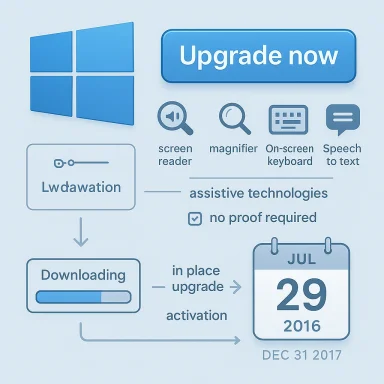
Infographic showing a Windows upgrade with accessibility tools and download/activation steps.Background​

Microsoft launched Windows 10 in 2015 and, in an unprecedented move for the company, offered a free upgrade to customers running Windows 7 and Windows 8.1 for the first year. That public offer carried a firm calendar cutoff of July 29, 2016, a date repeatedly confirmed by mainstream press coverage at the time. Shortly before and after that deadline, Microsoft quietly announced an exception: customers who use assistive technologies could still upgrade to Windows 10 free of charge while Microsoft completed accessibility work for the Anniversary Update and beyond. The company published an accessibility landing page with an “Upgrade now” button and a brief FAQ explaining that eligibility extended to anyone who uses assistive tools, and — crucially — that Microsoft would not require proof of eligibility. That honor‑system approach created a rare policy gap: the free upgrade remained available under the assistive‑technology pathway even after the public deadline, and many publications — and many users — treated it as a practical way to get Windows 10 at no cost.

Overview: what happened, and why it mattered​

Microsoft’s assistive‑technology extension had three practical effects that matter to anyone studying product licensing, accessibility policy and user behaviour.
  • It created an official, documented path to the free upgrade for a subset of users tied to accessibility needs. Microsoft framed the decision as a customer‑first accessibility commitment while also acknowledging the potential for confusion.
  • Because the upgrade page required only a click to confirm use of assistive technologies, the offer effectively worked as an honor system, with no automated verification of assistive‑technology usage. That reality meant many non‑eligible users could upgrade without paying.
  • The extension was explicitly described as temporary by Microsoft; the company warned it would announce an end date before closing the pathway. That promised announcement came months later, when Microsoft removed the offer and confirmed the extension’s expiry.
These facts collided with strong incentives for both Microsoft (to grow Windows 10 adoption) and would‑be upgraders (to avoid paying $119+ for Windows 10 Home). The resulting behaviour — broad use of the assistive route — created controversy and an inevitable policy cleanup.

The assistive‑technologies route: how it worked in practice​

The assistive‑technologies upgrade path was straightforward and technically simple.
  • Visit Microsoft’s accessibility landing page for the Windows 10 upgrade.
  • Click the prominent “Upgrade now” button, which downloaded the Windows 10 Update Assistant executable.
  • When prompted on the page, confirm the statement that “Yes, I use assistive technologies and I am ready for my free upgrade to Windows 10.”
  • Run the downloaded Windows10Upgrade executable and follow the on‑screen steps to begin the upgrade.
Because Microsoft explicitly said it was “not restricting the free upgrade offer to specific assistive technologies,” the FAQ left the definition of qualifying tools broad. Common examples included screen readers, magnifiers, on‑screen keyboards and speech‑to‑text tools, but Microsoft’s statement meant the eligibility criteria were intentionally broad and inclusive. This approach made the upgrade accessible to legitimately eligible users who needed extra time for assistive‑technology vendors to certify compatibility with Windows 10. At the same time, it meant an upgrade could be obtained by anyone willing to click the confirmation box. That duality explains both the policy rationale and the backlash that followed.

Legal, ethical and practical questions​

The accessibility extension raised several interlocking questions: was the honor system legal? Was it ethical to use the assistive page if you didn’t need assistive technology? And what did Microsoft risk by keeping the pathway open?
  • Legal: Microsoft’s public materials presented the assistive path. There was no suggestion that clicking the confirmation would constitute fraud in a legal sense, but intentionally misrepresenting a material fact to obtain a paid product could have legal implications depending on jurisdiction and intent. No public enforcement actions were taken against consumers who used the pathway.
  • Ethical: Many commentators framed the issue as a moral choice. Tech authors noted the awkward optics of clicking a box that asserts reliance on assistive tools when you do not use them. Some advised readers to buy a license rather than exploit the loophole; others argued the practical benefit (a safer, updated OS) justified the choice for many households. The conversation blended accessibility policy with consumer activism and real‑world incentives.
  • Practical/Business: From Microsoft’s perspective, the company had to balance accessibility commitments against the operational reality of product adoption metrics. Letting more people upgrade — even those who stretched the intent — increased Windows 10’s installed base and simplified update telemetry and support planning. That calculus likely influenced how aggressively Microsoft policed the pathway during its active period.
Windows community forums captured this tension in real time: support threads debated whether the move was a “loophole,” whether Microsoft checked for assistive‑tech usage, and whether it was morally acceptable to use the pathway. Those discussions show how quickly accessibility policy can morph into mainstream consumer behaviour once a low‑friction mechanism exists.

Chronology and closure: dates you should know​

Precision matters when reconstructing this episode. The key dates and milestones are:
  • July 29, 2016 — Official end of the general free upgrade offer for Windows 7 and Windows 8.1 users. After this date, consumers were expected to purchase Windows 10 or acquire it with new devices.
  • July 2016 onward — Microsoft described an exception for customers who rely on assistive technologies and published an assistive‑technology upgrade landing page. That page included the “Upgrade now” button and FAQ stating Microsoft would announce any closure in advance.
  • End of 2017 (December 31, 2017) — Multiple outlets and Microsoft’s updated accessibility page announced that the assistive‑technology extension would end; some outlets reported brief administrative extensions into January 2018 download function was removed. Reports and official copy indicate Microsoft set the effective expiry at December 31, 2017, with some public confusion around a short extension window.
Because some outlets recorded last‑minute accessibility downloads as late as January 2018 and community posts noted inconsistencies between the site message and download availability, there is a small, verifiable window of administrative noise after the advertised end date. Readers should treat the December 31, 2017 closure as the official termination while recognizing reporting that the page lingered operationally for a short period afterward.

Technical verification and activation mechanics​

Two technical threads ran alongside the assistive‑upgrade story: how the upgrade executable behaved, and how Windows 10 activation worked for upgrade and clean‑install scenarios.
  • Upgrade tool behaviour: The assistive landing page triggered a download of the Windows 10 Update Assistant executable (for example, Windows10Upgrade24074.exe in that era). Running that executable followed the standard upgrade flow: compatibility checks, data migration options, and an in‑place upgrade. Multiple tests reported the tool worked the same as the year‑long free upgrade flow, and Microsoft provided support guidance for assistive‑technology users to check vendor compatibility before upgrading.
  • Activation rules: Separately, Microsoft introduced activation flexibility in late 2015 and 2016 that allowed certain Windows 7/8/8.1 product keys to activate Windows 10 installations (notably from Version 1511 onward). That activation nuance — digital entitlement/digital license tied to device hardware or to a product key entered during setup — meant some users could perform clean installs and activate using their older keys in qualifying cases. Microsoft’s own documentation and coxplain the digital‑license mechanism and how it related to upgrades performed during the free‑upgrade window.
Taken together, these mechanisms — an accessible upgrade tool and a flexible activation regime — lowered the technical friction for late upgrades, which magnified the practical impact of the assistive‑technology pathway while it existed.

Why Microsoft did this: accessibility, adoption, or both?​

Microsoft justified the assistive‑technologies extension as an accessibility measure: the company wanted users who rely on assistive tools to have adequate time to upgrade while vendors updated their software for compatibility with Windows 10’s architecture and the Anniversary Update. That rationale is credible and consistent with disability‑inclusive product strategy. At the same time, the extension also served adoption goals. Windows 10’s adoption numbers mattered to Microsoft for platform consistency, developer targeting and telemetric learning. Allowing more upgrades — even under a targeted policy — helped increase Windows 10’s footprint. Critics and many observers saw the overlap between accessibility policy and adoption incentives and flagged the potential for deliberate or inadvertent gaming of the system. Both interpretations hah is likely a pragmatic mix: Microsoft needed to maintain accessibility commitments while also benefiting from wider adoption.

Strengths and benefits of the assistive‑tech extension​

  • Inclusivity: The policy recognized a real problem: assistive‑tech vendors and users needed more time to ensure compatible, stable experiences on a new OS. The extension was an accommodation that prioritized accessibility.
  • Low friction for legitimate users: Requiring no proof reduced barriers for people who may have limited technical resources or who rely on third‑party assistive tools that aren’t centrally registered.
  • Faster adoption curve: The pathway helped Microsoft move more systems to Windows 10, reducing fragmentation and enabling a more unified update and support pipeline for the company and third‑party developers.

Risks, downsides and long‑term consequences​

  • Honor‑system abuse: The lack of verification meant anyone could claim eligibility. That ambiguity created moral dilemmas and reputational risk for Microsoft and aggravated privacy and fairness debates.
  • Support and security gaps: Users who delayed upgrading until the assistive‑tech window closed faced end‑of‑support challenges later. Relying on short‑term exceptions can lull consumers into complacency about long‑term patching and lifecycle planning. Multiple community threads later urged users to plan migrations rather than treat extensions as permanent fixes.
  • Precedent and expectation setting: The assistive‑tech extension raised expectations that other targeted exceptions might appear in future product lifecycles. Companies that craft limited exceptions must balance compassion and clarity to avoid creating exploitable precedents.

What happened next: the end of the loophole and the clean‑up​

By the end of 2017, Microsoft updated its accessibility page and confirmed that the assistive‑technologies extension had expired. Reporting from multiple outlets stated Microsoft closed the loophole on December 31, 2017, although community evidence indicated the page and its download link persisted inconsistently in early January 2018 for some users. Microsoft’s public messaging made clear the extension was temporary and that, once closed, users would need to purchase Windows 10 or use legitimate upgrade paths tied to prior licenses. After closure, the primary legal and supported options to obtain Windows 10 were:
  • Buy a Windows or an authorized reseller.
  • Use a valid Windows 7/8 product key in qualifying scenarios supported by Microsoft’s activation rules (subject to changes over time and later tightening).
Community resources, articles and forum threads from the time document the closure and the mixed experiences users had trying to squeeze in last‑minute upgrades. Those community traces are useful evidence of how policy, web infrastructure and real‑world behaviour interact when a vendor attempts to sunset a mass free offer.

Practical lessons for users and IT managers​

  • Treat temporary exceptions as temporary: If you depend on a particular upgrade path, assume it will end and plan accordingly. Extensions and loopholes are operational contingencies, not long‑term guarantees.
  • Verify activation mechanisms before performing a clean install: Microsoft’s activation rules changed during the Windows 10 rollout; linking a Microsoft account to a device’s digital license and understanding the difference between digital entitlement and product‑key activation can save time and prevent inadvertent lockouts. Verify current Microsoft activation guidance before attempting reinstallations.
  • Respect accessibility intent: The assistive‑technology pathway was created to protect a vulnerable user population. Even when a shortcut is technically available, weighing ethical implications matters for individuals and for organizational IT governance.

Looking back: an honest assessment​

The assistive‑technologies extension was a well‑intentioned accommodation that became an unintended upgrade avenue for many. As a policy move it succeeded in making Windows 10 accessible to users who needed extra time; as an operational decision it exposed the tradeoffs of an honor‑system approach in a mass software rollout. Microsoft’s subsequent closure of the pathway reflects a reasonable lifecycle management choice: time‑boxed accommodation followed by a defined end‑state.
From a product‑management perspective, the episode is a case study in balancing accessibility and adoption while maintaining predictable licensing outcomes. From a consumer‑ethics perspective, it’s a reminder that convenience and legality are not always the same as ethical clarity.

Final verdict and actionable summary​

  • The public free upgrade to Windows 10 officially ended on July 29, 2016, but Microsoft provided an assistive‑technologies exception that allowed eligible users to upgrade later without charge.
  • The assistive‑technologies pathway required only a simple confirmation click and a downloaded Update Assistant executable; Microsoft did not require documentation of assistive‑technology use. That lack of verification created a practical loophole.
  • Microsoft ended the assistive‑technologies extension at the close of 2017 (with some administrative noise into January 2018), closing most official free upgrade paths. After that date, legitimate options to get Windows 10 were to purchase a license or rely on qualifying product‑key activation/digital‑license rules.
  • For technical and licensing certainty today, always consult the current Microsoft activation and upgrade documentation before upgrading or reinstalling; activation mechanisms and policies have changed since the initial Windows 10 rollout.
The assistive‑technologies upgrade extension remains a potent reminder that accessibility, adoption incentives and licensing policy can collide in ways that generate real‑world consequences — for users, for vendors and for the public conversation about what “free” software offers actually mean in practice.


Source: BetaNews Forget the deadline, you'll still be able to get Windows 10 for free, and this is how
 

Back
Top