

Microsoft’s new Resume feature for Windows 11 is a technically sensible but still‑raw attempt at the kind of phone‑to‑PC continuity Apple users have enjoyed for more than a decade — and in its current form it simply doesn’t match the breadth, polish, or predictability of Apple’s Handoff. om]
Apple introduced Handoff as part of its Continuity suite in 2014. Handoff relies on local discovery (Bluetooth LE and Wi‑Fi), unified account and cloud storage (iCloud), and deep OS‑level integration across iPhone, iPad, and Mac to move app state back and forth with very little friction. That vertical control — hardware, OS, and cloud — is the foundation of the seamless experience users expect.
Microsoft’s Resume (also called Cross‑Device Resume or XDR in developer documentation) is the company’s pragmatic answer to the same user need: let somebody start an activity on a phone and "pick up where they left off" on a Windows PC with a single click. But Microsoft faces a harder technical problem: Resume must operate across a fragmented Android ecosystem, many OEMs, and a huge third‑party app landscape. Theture and rollout that prioritize security, performance, and developer pragmatism — while accepting some user‑facing limits today.
The Microsoft Learn documentation describes the schema and integration steps in detail and includes code snippets developers can use to initialize the Continuity SDK, publish AppContext, and handle lifecycle events. That documentation is the canonical guidance for deep integrations.
If Microsoft can rapidly broaden OEM participation, accelerate onboarding for major third‑party apps, and add intuitive discovery and enterprise controls, Resume could become a valuable part of Windows’ cross‑device story. Until then, Apple’s decade‑old Handoff remains the smoother, more widely supported standard for seamless mobile↔desktop continuity.
Microsoft’s Resume is a welcome step toward the seamless multi‑device workflows users increasingly expect. Its architectural choices are pragmatic and professionally engineered for a heterogeneous Android + Windows world. But promising architecture alone won’t win users — predictable availability, low‑friction developer adoption, and careful privacy and enterprise tooling will. Until Microsoft closes the app gap and makes the experience invisible in everyday use, Resume will remain a helpful but niche convenience rather than the ubiquitous continuity bridge many expected when the feature was announced.
Source: PCMag Microsoft's Phone to PC 'Resume' Feature in Windows Can't Touch Apple's Handoff
 Background
Apple introduced Handoff as part of its Continuity suite in 2014. Handoff relies on local discovery (Bluetooth LE and Wi‑Fi), unified account and cloud storage (iCloud), and deep OS‑level integration across iPhone, iPad, and Mac to move app state back and forth with very little friction. That vertical control — hardware, OS, and cloud — is the foundation of the seamless experience users expect.Microsoft’s Resume (also called Cross‑Device Resume or XDR in developer documentation) is the company’s pragmatic answer to the same user need: let somebody start an activity on a phone and "pick up where they left off" on a Windows PC with a single click. But Microsoft faces a harder technical problem: Resume must operate across a fragmented Android ecosystem, many OEMs, and a huge third‑party app landscape. Theture and rollout that prioritize security, performance, and developer pragmatism — while accepting some user‑facing limits today.
What Resume actually is (and what it is not)
The user promise
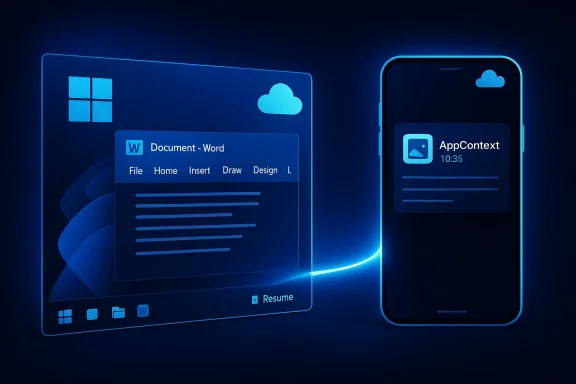
Resume surfaces a small, phone‑badged icon on the Windows taskbar when a linked Android phone has an activity you can continue on the PC. Click that icon and the PC opens the "best available handler" — usually a native desktop app when installed, or a web fallback when it isn’t. That one‑click flow is the visible part of Resume’s UX.Key prerequisites and constraints
- Windows 11 PC and Android 10+ phone paired with Link to Windows (Phone Link).
- Internet connectivity for many scenarios; Resume often requires cloud‑backed state (OneDrive, Copilot, or server metadata). Offline files stored only on the phone are explicitly unsupported.
- Early OEM cooperation: Microsoft lists HONOR, OPPO, Samsung, vivo, and Xiaomi among early partners for specific Microsoft 365 Copilot/OneDrive flows. That OEM dependency matters — only phones with the required LTW integrations wte. (support.microsoft.com)
What Resume supports today (early rollout snapshot)
- OneDrive‑backed Microsoft 365 files opened in the Microsoft 365 Copilot mobile experience (Wo will open on the PC in the desktop apps when available.
- Spotify continuation has been piloted in the preview channel.
- Some OEM browsers (for example, vivo Browser) can hand off browsing sessions to Windows.
What it does not (yet)
- Universal support for major browsers (Edge currently doesn’t act as a Resume handler in many cases).
- Two‑way handoff (desktop → mobile) is not generally available, a feature Apple’s Handoff supports and many users expect.
- Wide third‑party adoption — major apps beyond the narrow early set (Adobe, Google, broader streaming services) have not broadly enabled Resume at scale yet.
How Resume works under the hood
Microsoft chose a model that favors native desktop handling and secure metadata exchange over streaming or mirroring the phone screen. That has important trade‑offs.AppContext and the Continuity SDK
At the heart of Resume is an AppContext metadata payload: a compact description of the activity on the phone (title, intent URI or web link, preview, timestamps, and other small metadata fields). The phone-side Continuity SDK can send AppContext entries to Link to Windows (LTW), which the PC reads and maps to a desktop handler. This avoids heavy UI streaming and preserves Windows’ native performance and security models.The Microsoft Learn documentation describes the schema and integration steps in detail and includes code snippets developers can use to initialize the Continuity SDK, publish AppContext, and handle lifecycle events. That documentation is the canonical guidance for deep integrations.
The WNS (server‑driven) path
Recognizing that embedding a new mobile SDK is a barrier for some developers, Microsoft added a second route: a WNS (Windows Notification Service) raw notification path. In this model, the mobile app calls its backend server, and that server posts a specially formatted raw WNS notification to the resume metadata. This lets apps that already use server push (Azure Notification Hubs, other notification infrastructures) trigger resume prompts without shipping the full SDK on Android. Microsoft’s Learn docs and the recent rhe required headers, JSON schema, and the gating process for server‑driven resume.Gatekeeping: Limited Access Feature (LAF)
Resume/XDR remains a gated capability. Microsoft requires developers to request access (LAF approval) before sending resume payloads to a user’s PC. The LAF gating is deliberate: resume invitations appear in a prominent, low‑friction place (the taskbar), so Microsoft wants to prevent spammy or malicious resume prompts and enforce quality and privacy standards. This approval process reduces abuse risk but slows on‑ramp for developers.Hands‑on UX: what testing shows
Early hands‑on tests and reviews (notably PCMag’s real‑world trial) reveal the user experience is fragillike. The main issues fall into discovery and configuration, timing windows, and inconsistent OEM behavior.Typical failure modes
- System notifications off: Resume prompts can be suppressed by normal Windows notification settings or Phone Link permissions. Testers have seen the prompt only after enabling system notifications.
- Timing/window conditions: The activity recent and the app context live when the PC becomes active. If that window closes or the AppContext expires, no prompt appears. AppContext lifetime defaults are short by design (for security and relevance).
- OEM variance: Phones from partner OEMs that preinstall or tightly integrate Link to Windows provide a much more reliable experience than phones where Link to Windows is a manual install. That creates obvious fragmentation across Android users.
Real‑world example
A reviewer started editing a Word document on a Samsung Galaxy phone, expected to resume on the Windows desktop, and initially failed to see a resume prompt because system notifications were suppressed. After enabling notifications and redoing the workflow, the badge appeared and the document opened in desktop Word — an indication that the UX can be delightful when the preconditions are met, but brittle otherwise.Why Microsoft’s architecture is defensible — and where it costs UX
Strengths (what Microsoft got right)
- Native desktop handlers: Resuming into native desktop apps gives better performance, security, and integration with Windows features (file system, enterprise policies) than streaming a phone UI. This is strategically sound for corporate and power users.
- Two integration paths (SDK + WNS): Offering both a richer SDK path and a server‑driven WNS path balances fidelity vs. developer friction; many developers can reuse existing backends to support Resume.
- Security‑first rollout: LAF gating and short AppContext lifetimes reduce spam, phishing risk, and inadvertent data leaks from over‑eager resume prompts. That conservative approach is good for enterprise adoption.
Costs and tradeoffs
- Fragmentation and gatekeeping slow adoption: The LAF requirement, plus OEM dependencies and the need for cloud‑backed data, creates a high bar for broad, consistent coverage. That’s the key reason Resume feels narrow right now.
- Metadata fidelity limits: AppContext is deliberately compact. It’s efficient and secure, but it can’t convey every UI state nuance; therefore some resume experiences will not feel identical to the phone session and will require developers to design explicit continuation states.
- User discovery and configuration pain: Resume depends on a chain of permissions and correct settings (Phone Link pairing, notifications enabled, cloud sync in place), which makes the feature fragile for non‑technical users. Apple’s Handoff is often invisible by comparison.
Security, privacy, and enterprise considerations
Resume introduces new cross‑device surface area that must be carefully controlled.- Metadata exposure: Taskbar badges and preview snippets can reveal document titles or track l demand controls to suppress sensitive previews or restrict Resume by app/account. Microsoft’s per‑app toggles in Settings → Apps → Resume are a start, but Intune/Endpoint Manager policy controls will be necessary for corporate deployments.
- Approval and trust model: LAF gating helps prevent spam, but enterprises will want mechanisms to whitelist or blacklist particular publishers and tore allowed to send WNS resume payloads. Microsoft’s current approval flow is a good early control, but it needs MDM integration for scale.
- Attack surface: Any server‑driven path requires robust authentication and validation. Microsoft’s WNS model includes headers and payload validation; developers must protect channel URIs and secrets to avoid rogurgeted phishing.
How Resume compares to Apple’s Handoff — a practical comparison
- Platform control vs. fragmentation: Apple controls the full stack, which makes Handoff reliable, fast, and predictable. Microsoft must coordinate with Android OEMs and independent app developers, which adds latency and variability. That’s the structural reason Resume trails Handoff today.
- Directionality: Handoff is symmetric — you can move tasks from phone to Mac and back without special gating. Resume currently emphasizes phone → PC flow; desktop → phone parity is not available broadly. That misserceived utility.
- Discovery and local‑first behavior: Handoff uses local discovery (Bluetooth/Wi‑Fi) and iCloud for state, making the handoff often instantaneous and local. Resume’s WNS/server and LTW pairing models add cloud steps that can introduce latency and more failure modes.
- App ecosystem: Apple’s Handoff gained momentum over a decade; many third‑party apps now support it. Resume must quickly onboard major cross‑platform apps (Chrome, Firefox, Adobe, Google Workspace, streaming services) to be widely useful.
dance for users and admins today
- Ensure you have Windows 11 and a compatible Android phone (Android 10+) paired via Link to Windows.
- Confirm Resume is enabled: Settings → Apps → Resume on the PC and enable per‑app toggles for supported apps. ([suppos://support.microsoft.com/en-us/windows/cross-device-resume-feature-9ada0c0b-f70f-4806-abac-b7126fa6a053)
- Turn on system notifications and Phone Link permissions; Resume prompts are suppressed by notification settings.
- Use cloud‑backed files (OneDrive/ Copilot) or supported apps (Spotify, certain OEM browsers) as the earliest test cases.
- For enterprise admins: watch for Intune policies and ask Microsoft for roadmap notes on per‑account and per‑app controls before broadly enabling Resume in managed fleets.
Recommendations for Microsoft (and the developer community)
To move Resume from a promising preview to a mainstream, “it just works” feature, Microsoft should execute on three fronts:- Make onboarding predictable and visible
- Publish a maintained public compatibility matrix (devicartners) and a clear roadmap with timelines. Consumers and IT teams need to know which phones and apps are reliably supported.
- Lower developer fricng trust
- Expand the WNS path documentation and provide reference server code, simulators, and SDK stubs so developers can test resume payloads in staging without LAF friction. Consider a faster, tieigh‑trust developer accounts.
- Close the app‑gap fast
- Prioritize first‑party support for Edge and Office desktop parity, and pursue partnerships with major cross‑platform apps (Google, Adobe, Spotify, Netflix, Slack). The faster large apps adopt Resume, the quicker it gains habit‑forming value.
- Invest in enterprise and privacy controls
- Add Intune/Endpoint Manager policies to whitelist/blacklist Resume per app or per account, and include privacythat remove titles or previews from taskbar prompts for corporate profiles.
- Work on bidirectionality
- Plan and pilot desktop → phone flows (native app launch or deep link handling) in conjunction with OEMs so Resume becomes truly symmetric and not just a one‑way convenience.
The verdict and what to watch next
Resume is a technically sensible and security‑aware approach to cross‑device continuity. Microsoft picked a defensible architecture — compact AppContext metadata, native desktop handlers, and both SDK and WNS integration routes — that aligns with Windows’ priorities around performance and enterprise readiness. The trade‑off is obvious: the feature is narrow, gated, and fragile for general consumers today.If Microsoft can rapidly broaden OEM participation, accelerate onboarding for major third‑party apps, and add intuitive discovery and enterprise controls, Resume could become a valuable part of Windows’ cross‑device story. Until then, Apple’s decade‑old Handoff remains the smoother, more widely supported standard for seamless mobile↔desktop continuity.
Signals that matter in the coming months
- A public, maintained compatibility list and per‑app roadmap from Microsoft.
- Major app integrations (Edge, Chrome/Firefox, Adobe Creative Cloud, Google Workspace, broader streaming services) announcing Resume or XDR support.
- Expanded enterprise controls in Intune/Endpoint Manager for Resume policies and privacy sanitization.
- Two‑way (desktop → phone) resume pilots or previews with OEM partners.
Microsoft’s Resume is a welcome step toward the seamless multi‑device workflows users increasingly expect. Its architectural choices are pragmatic and professionally engineered for a heterogeneous Android + Windows world. But promising architecture alone won’t win users — predictable availability, low‑friction developer adoption, and careful privacy and enterprise tooling will. Until Microsoft closes the app gap and makes the experience invisible in everyday use, Resume will remain a helpful but niche convenience rather than the ubiquitous continuity bridge many expected when the feature was announced.
Source: PCMag Microsoft's Phone to PC 'Resume' Feature in Windows Can't Touch Apple's Handoff
