

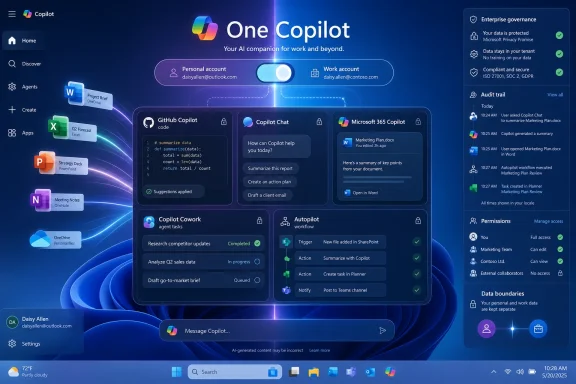
Microsoft is reportedly building a centralized “One Copilot” app that would combine GitHub Copilot, Copilot chat, Copilot Cowork, Microsoft 365 Copilot services, and an agentic workflow feature called Autopilot, with Fortune reporting on May 29, 2026, that Jacob Andreou is leading the effort. The immediate story is product consolidation; the larger one is Microsoft admitting that its AI strategy has become too sprawling for ordinary users and too fragmented for administrators. If the report is accurate, Redmond is not merely polishing Copilot’s front door. It is trying to decide whether Copilot is a product, a platform, a Windows surface, an Office feature, a coding assistant, or all of those things at once.
The problem with Copilot has never been that Microsoft lacked ambition. If anything, the company’s AI push has suffered from the opposite defect: too many entry points, too many overlapping names, and too many moments where a user has to ask which Copilot they are actually using.
There is GitHub Copilot for developers, Microsoft 365 Copilot for work, Copilot Chat for enterprise and consumer scenarios, Copilot in Windows, Copilot in Edge, Copilot Studio for building agents, and now Copilot Cowork for long-running tasks. Each one has a rationale when viewed from inside a Microsoft product group. Viewed from the outside, the map looks less like a platform strategy and more like a brand applied to every surface Microsoft could reach.
That matters because AI assistants are not traditional features. A spreadsheet button can live inside Excel and a coding autocomplete tool can live inside Visual Studio Code without requiring a shared identity. But an assistant is supposed to feel like a continuous relationship. If it forgets where it lives, what it can access, and which account it is allowed to use, the illusion collapses quickly.
The reported “One Copilot” project is therefore less a moonshot than a cleanup operation. Microsoft is trying to turn a federation of AI product bets into a coherent user experience before customers conclude that the fastest way to use AI is to open a rival chat window and paste in the thing they need.
That is sensible, but it is also risky. Microsoft has a long history of bundling products together and calling the result integration. Windows users remember the difference between a useful system component and a persistent piece of software that keeps trying to reassert itself after the user has made a different choice.
For Copilot, the challenge is even sharper. A central hub could reduce confusion if it clearly explains which data it can see, which model is being used, which tenant controls apply, and what an agent is about to do. The same hub could also become a new layer of cognitive overhead if it simply aggregates every Copilot-branded capability into a single dashboard.
The decisive question is not whether Microsoft can put multiple tools behind one icon. Of course it can. The question is whether the resulting app makes the user feel more in control than the scattered Copilot estate does today.
Andreou’s background matters because Copilot’s biggest weakness is not raw model capability. Microsoft has access to powerful models from OpenAI, has increasingly discussed its own model work, and has shown willingness to integrate Anthropic technology where it fits the product. The weakness is packaging: the repeated gap between what Copilot appears to promise and what a user actually experiences on Monday morning.
For developers, GitHub Copilot has an unusually clear value proposition. It helps write, explain, and refactor code inside the tools developers already use. For office workers, Microsoft 365 Copilot is more complicated. It must understand documents, meetings, email, permissions, organizational context, and the user’s intent, all while staying inside enterprise guardrails.
A “One Copilot” app tries to bridge those worlds. But bringing GitHub Copilot into the same conceptual space as Microsoft 365 Copilot also raises expectations. Developers are accustomed to tight feedback loops and visible output. Knowledge workers are being asked to trust a system that may summarize, draft, schedule, delegate, and eventually act. That is a much broader bargain.
That changes the user interface problem. A chat box is forgiving because it is episodic. If the answer is bad, the user can discard it. An agent that sends emails, creates documents, manages files, or schedules meetings needs a different kind of supervision.
Microsoft knows this, which is why its agentic messaging has leaned heavily on checkpoints, governance, sandboxing, and enterprise controls. But those assurances are only useful if users and admins can see them. A fragmented Copilot experience makes it harder to understand where an instruction went, which permissions were invoked, and whether an action was taken under a personal account or a work tenant.
This is where a unified hub could genuinely help. If One Copilot becomes the command center for task status, approvals, audit trails, and identity context, it could make agentic AI feel less magical and more manageable. If it is merely a prettier launcher, it will not solve the underlying trust problem.
Folding GitHub Copilot into a wider app could expose it to more users and create a more continuous Microsoft AI identity. A developer could ask a work question, inspect a Teams thread, generate a script, open a pull request, and coordinate an implementation plan from one place. In theory, that is the kind of cross-domain workflow Microsoft is uniquely positioned to offer.
But GitHub Copilot also has a distinct culture and usage pattern. Developers care about editor integration, repository context, terminal workflows, CI/CD systems, and source control. They may not want their coding assistant buried in an enterprise productivity console designed for meeting summaries and PowerPoint drafts.
This is the classic Microsoft integration dilemma. The company can add value by connecting adjacent workflows, but it can also blunt a sharp product by making it serve too many masters. One Copilot will need to make GitHub Copilot feel more powerful, not more corporate.
A consumer wants a general assistant that remembers preferences, helps with personal projects, and moves fluidly across devices. An enterprise user needs a system governed by tenant policy, data-loss prevention, retention rules, licensing, admin controls, and auditability. Many people are both users at once, often on the same PC.
Windows already struggles with this split. A machine can be personal, work-managed, domain-joined, Entra-joined, cloud-synced, locally signed in, or some messy combination of those states. Adding an AI assistant that can potentially read, write, summarize, and act across work and personal contexts intensifies every ambiguity.
A well-designed toggle could make boundaries explicit. A poorly designed one could produce exactly the kind of accidental data exposure that security teams fear: the wrong file summarized in the wrong context, the wrong prompt stored under the wrong account, or the wrong agent granted access to the wrong workspace.
For IT pros, this is where the super app will either earn its keep or become another policy headache. Centralization is valuable only if the boundary between personal convenience and enterprise control is impossible to miss.
The temptation is obvious. Windows remains Microsoft’s most visible consumer platform and the daily work surface for millions of enterprise users. If Copilot is to become the assistant layer for computing, Windows is the place where Microsoft can make it unavoidable.
But unavoidable is not the same as indispensable. Windows users have become highly sensitive to promotional surfaces, cloud prompts, account nudges, and features that appear before they are mature. An AI hub that launches cleanly when summoned is one thing. An AI hub that keeps inserting itself into search, settings, notifications, and setup flows is another.
Microsoft’s best move would be restraint. Let One Copilot prove itself as a capable app before turning it into another system-level presence that users race to disable. The company’s AI ambitions will not be helped if Copilot becomes the new symbol of Windows clutter.
A centralized Copilot app could simplify onboarding. It could provide one managed experience where users discover chat, agents, coding tools, and workflow automation under a consistent governance model. That would make life easier for help desks and security teams trying to explain which AI tools are approved.
But enterprise IT does not want simplification at the cost of visibility. If GitHub Copilot, Microsoft 365 Copilot, Cowork, and Autopilot sit behind one interface, admins will need clear controls for each capability. A developer assistant and an autonomous workflow agent do not carry the same risk profile.
Licensing is another pressure point. Microsoft’s AI stack already asks organizations to think carefully about which employees need paid Copilot capabilities, which can use limited chat features, and which workloads justify premium agentic tools. A unified app may reduce interface fragmentation while making licensing questions more visible than ever.
That could be healthy. If One Copilot forces Microsoft to explain what each tier actually unlocks, customers benefit. If it hides complexity behind upgrade prompts, administrators will notice immediately.
That shift is where the industry is heading, but it is also where product language becomes dangerous. Users understand that a copilot assists the pilot. Autopilot suggests the plane can fly itself, at least for stretches. In software, that metaphor invites overtrust.
Agentic workflows need humility baked into the interface. They should show plans, ask for confirmation before consequential actions, expose uncertainty, and make reversal possible where practical. They should not encourage users to hand over broad authority because the branding implies the system knows what it is doing.
Microsoft’s advantage is that it already owns many of the enterprise systems where work happens. Its disadvantage is that mistakes inside those systems matter. An agent that drafts a bad paragraph is annoying. An agent that emails a client, changes a file, or schedules a meeting based on a mistaken inference can create real operational cleanup.
If Autopilot becomes part of One Copilot, Microsoft will need to make the automation boundary visually and procedurally unmistakable. The more capable the agent becomes, the less cute the branding can afford to be.
Copilot Cowork’s Anthropic connection is a useful example. Microsoft was willing to incorporate technology associated with Claude Cowork into Microsoft 365 Copilot because the product goal required long-running agentic behavior. That is a pragmatic move, not a theological one.
A unified Copilot app could make this model pluralism less visible to users. The assistant chooses the right model for the task, the enterprise policy governs the data, and the user judges the result. That is probably where the market is going.
Still, abstraction has limits. Developers may want to know which model is writing code. Regulated industries may need to know which systems process sensitive data. Security teams will demand documentation, not vibes. One Copilot can hide complexity from the casual user, but it cannot erase the compliance obligations beneath it.
That is not a comfortable position for a company whose enterprise power has long come from owning the productivity surface. Microsoft does not merely want AI to work with Office documents. It wants Copilot to be the place where work begins.
This explains the urgency around consolidation. Fragmented Copilots create openings for competitors. A user who cannot remember whether a task belongs in Copilot Chat, Microsoft 365 Copilot, GitHub Copilot, or Cowork may simply open a rival assistant with a cleaner mental model.
The irony is that Microsoft already has the assets competitors envy: Office, Teams, Outlook, SharePoint, OneDrive, Windows, GitHub, Azure, Entra, Defender, and Graph. The hard part is not access. The hard part is turning that estate into a humane product rather than an organizational chart rendered as software.
The company should resist the urge to make the hub comprehensive on day one. The first test should be whether a user can understand what Copilot can do, what it cannot do, and what it is currently doing on their behalf. That is more important than exposing every agent, connector, and workflow engine.
The second test should be whether the app respects context. A developer in VS Code should not feel dragged into a generic productivity experience. A salesperson in Outlook should not be asked to think like a prompt engineer. An admin in the Microsoft 365 admin center should see controls, logs, and deployment states, not marketing copy.
The third test is whether One Copilot can make Microsoft’s AI feel less needy. Too many AI products behave as though user attention is the scarce resource they are entitled to consume. The best assistant will be the one that earns invocation because it is useful, not because it has been placed in every corner of the operating system.
That center will matter more as AI moves from generating text to performing work. Chat interfaces can tolerate confusion because the blast radius is small. Agents require clarity because they cross from suggestion into action. Microsoft’s enterprise customers will not accept hand-waving at that boundary.
For WindowsForum readers, the practical question is whether this makes the PC and Microsoft 365 environment easier to manage or merely more aggressively AI-branded. If Microsoft gets the design right, One Copilot could become the control surface that finally makes its AI stack legible. If it gets the design wrong, it will be remembered as the moment Microsoft took a confusing Copilot sprawl and put it behind one bigger button.
Microsoft has the distribution, the enterprise relationships, the developer foothold, and the data graph to make One Copilot consequential. What it still has to prove is taste: the discipline to simplify without flattening, integrate without smothering, and automate without obscuring responsibility. The next phase of the AI race will not be won by the company with the most Copilot icons, but by the one that makes users trust a single assistant enough to let it do real work.
 Microsoft Has Too Many Copilots for Its Own Good
The problem with Copilot has never been that Microsoft lacked ambition. If anything, the company’s AI push has suffered from the opposite defect: too many entry points, too many overlapping names, and too many moments where a user has to ask which Copilot they are actually using.There is GitHub Copilot for developers, Microsoft 365 Copilot for work, Copilot Chat for enterprise and consumer scenarios, Copilot in Windows, Copilot in Edge, Copilot Studio for building agents, and now Copilot Cowork for long-running tasks. Each one has a rationale when viewed from inside a Microsoft product group. Viewed from the outside, the map looks less like a platform strategy and more like a brand applied to every surface Microsoft could reach.
That matters because AI assistants are not traditional features. A spreadsheet button can live inside Excel and a coding autocomplete tool can live inside Visual Studio Code without requiring a shared identity. But an assistant is supposed to feel like a continuous relationship. If it forgets where it lives, what it can access, and which account it is allowed to use, the illusion collapses quickly.
The reported “One Copilot” project is therefore less a moonshot than a cleanup operation. Microsoft is trying to turn a federation of AI product bets into a coherent user experience before customers conclude that the fastest way to use AI is to open a rival chat window and paste in the thing they need.
The Super App Is Really a Trust Repair Job
The phrase super app sounds grand, and in consumer tech it often conjures images of sprawling Asian messaging-and-payments platforms. In Microsoft’s case, the term is more prosaic. The company appears to want one place where chat, coding help, enterprise agents, and background workflows can be found without the user navigating a maze of separate apps and licensing boundaries.That is sensible, but it is also risky. Microsoft has a long history of bundling products together and calling the result integration. Windows users remember the difference between a useful system component and a persistent piece of software that keeps trying to reassert itself after the user has made a different choice.
For Copilot, the challenge is even sharper. A central hub could reduce confusion if it clearly explains which data it can see, which model is being used, which tenant controls apply, and what an agent is about to do. The same hub could also become a new layer of cognitive overhead if it simply aggregates every Copilot-branded capability into a single dashboard.
The decisive question is not whether Microsoft can put multiple tools behind one icon. Of course it can. The question is whether the resulting app makes the user feel more in control than the scattered Copilot estate does today.
Jacob Andreou Inherits Microsoft’s AI User-Experience Debt
Microsoft’s March 2026 leadership changes gave Jacob Andreou responsibility for Copilot across consumer and commercial experiences, with a mandate spanning design, product, growth, and engineering. That structure was itself a signal. Microsoft had reached the point where Copilot could no longer be treated as an add-on to separate divisions.Andreou’s background matters because Copilot’s biggest weakness is not raw model capability. Microsoft has access to powerful models from OpenAI, has increasingly discussed its own model work, and has shown willingness to integrate Anthropic technology where it fits the product. The weakness is packaging: the repeated gap between what Copilot appears to promise and what a user actually experiences on Monday morning.
For developers, GitHub Copilot has an unusually clear value proposition. It helps write, explain, and refactor code inside the tools developers already use. For office workers, Microsoft 365 Copilot is more complicated. It must understand documents, meetings, email, permissions, organizational context, and the user’s intent, all while staying inside enterprise guardrails.
A “One Copilot” app tries to bridge those worlds. But bringing GitHub Copilot into the same conceptual space as Microsoft 365 Copilot also raises expectations. Developers are accustomed to tight feedback loops and visible output. Knowledge workers are being asked to trust a system that may summarize, draft, schedule, delegate, and eventually act. That is a much broader bargain.
Copilot Cowork Shows Why Chat Is No Longer Enough
The reported inclusion of Copilot Cowork is the clearest sign that Microsoft’s target is no longer a better chatbot. Cowork, introduced earlier this year in preview and tied to Microsoft’s broader Frontier push, is meant to handle longer-running, multi-step work across Microsoft 365. Instead of answering a prompt and disappearing, it plans tasks, asks for input, and continues work in the background.That changes the user interface problem. A chat box is forgiving because it is episodic. If the answer is bad, the user can discard it. An agent that sends emails, creates documents, manages files, or schedules meetings needs a different kind of supervision.
Microsoft knows this, which is why its agentic messaging has leaned heavily on checkpoints, governance, sandboxing, and enterprise controls. But those assurances are only useful if users and admins can see them. A fragmented Copilot experience makes it harder to understand where an instruction went, which permissions were invoked, and whether an action was taken under a personal account or a work tenant.
This is where a unified hub could genuinely help. If One Copilot becomes the command center for task status, approvals, audit trails, and identity context, it could make agentic AI feel less magical and more manageable. If it is merely a prettier launcher, it will not solve the underlying trust problem.
GitHub Copilot Is the Prize and the Complication
GitHub Copilot is one of Microsoft’s strongest AI assets because it solved a narrow problem before the rest of the market fully understood the broader one. Developers did not need to be convinced that autocomplete, code explanation, and boilerplate generation could save time. The product lived where the work happened and improved a task that was already highly textual.Folding GitHub Copilot into a wider app could expose it to more users and create a more continuous Microsoft AI identity. A developer could ask a work question, inspect a Teams thread, generate a script, open a pull request, and coordinate an implementation plan from one place. In theory, that is the kind of cross-domain workflow Microsoft is uniquely positioned to offer.
But GitHub Copilot also has a distinct culture and usage pattern. Developers care about editor integration, repository context, terminal workflows, CI/CD systems, and source control. They may not want their coding assistant buried in an enterprise productivity console designed for meeting summaries and PowerPoint drafts.
This is the classic Microsoft integration dilemma. The company can add value by connecting adjacent workflows, but it can also blunt a sharp product by making it serve too many masters. One Copilot will need to make GitHub Copilot feel more powerful, not more corporate.
The Account Toggle Could Become the Whole Story
The report’s mention of a possible toggle between personal and enterprise accounts may sound like a small user-interface detail. It is not. Identity is the fault line running through Microsoft’s entire Copilot strategy.A consumer wants a general assistant that remembers preferences, helps with personal projects, and moves fluidly across devices. An enterprise user needs a system governed by tenant policy, data-loss prevention, retention rules, licensing, admin controls, and auditability. Many people are both users at once, often on the same PC.
Windows already struggles with this split. A machine can be personal, work-managed, domain-joined, Entra-joined, cloud-synced, locally signed in, or some messy combination of those states. Adding an AI assistant that can potentially read, write, summarize, and act across work and personal contexts intensifies every ambiguity.
A well-designed toggle could make boundaries explicit. A poorly designed one could produce exactly the kind of accidental data exposure that security teams fear: the wrong file summarized in the wrong context, the wrong prompt stored under the wrong account, or the wrong agent granted access to the wrong workspace.
For IT pros, this is where the super app will either earn its keep or become another policy headache. Centralization is valuable only if the boundary between personal convenience and enterprise control is impossible to miss.
Windows Is the Stage Microsoft Cannot Resist
Even though the reported One Copilot app is not described as a Windows feature specifically, Windows is inevitably part of the story. Microsoft has spent the last few years trying to make Copilot feel native to the PC, whether through taskbar experiments, keyboard shortcuts, sidebar experiences, or deeper integration with Windows search and settings.The temptation is obvious. Windows remains Microsoft’s most visible consumer platform and the daily work surface for millions of enterprise users. If Copilot is to become the assistant layer for computing, Windows is the place where Microsoft can make it unavoidable.
But unavoidable is not the same as indispensable. Windows users have become highly sensitive to promotional surfaces, cloud prompts, account nudges, and features that appear before they are mature. An AI hub that launches cleanly when summoned is one thing. An AI hub that keeps inserting itself into search, settings, notifications, and setup flows is another.
Microsoft’s best move would be restraint. Let One Copilot prove itself as a capable app before turning it into another system-level presence that users race to disable. The company’s AI ambitions will not be helped if Copilot becomes the new symbol of Windows clutter.
Enterprise Buyers Want Fewer Doors, Not Fewer Controls
For administrators, fragmentation has a different meaning than it does for consumers. A user sees too many Copilot icons. An admin sees too many policy surfaces, licensing SKUs, security assumptions, data paths, and training requirements.A centralized Copilot app could simplify onboarding. It could provide one managed experience where users discover chat, agents, coding tools, and workflow automation under a consistent governance model. That would make life easier for help desks and security teams trying to explain which AI tools are approved.
But enterprise IT does not want simplification at the cost of visibility. If GitHub Copilot, Microsoft 365 Copilot, Cowork, and Autopilot sit behind one interface, admins will need clear controls for each capability. A developer assistant and an autonomous workflow agent do not carry the same risk profile.
Licensing is another pressure point. Microsoft’s AI stack already asks organizations to think carefully about which employees need paid Copilot capabilities, which can use limited chat features, and which workloads justify premium agentic tools. A unified app may reduce interface fragmentation while making licensing questions more visible than ever.
That could be healthy. If One Copilot forces Microsoft to explain what each tier actually unlocks, customers benefit. If it hides complexity behind upgrade prompts, administrators will notice immediately.
Autopilot Is a Dangerous Name for an Agentic Future
The reported internal name “Autopilot” is almost too perfect, and not entirely in a good way. In Microsoft land, Autopilot already has a strong association with Windows device provisioning. In the broader AI market, autopilot implies a shift from assistance to execution, from suggesting work to doing work.That shift is where the industry is heading, but it is also where product language becomes dangerous. Users understand that a copilot assists the pilot. Autopilot suggests the plane can fly itself, at least for stretches. In software, that metaphor invites overtrust.
Agentic workflows need humility baked into the interface. They should show plans, ask for confirmation before consequential actions, expose uncertainty, and make reversal possible where practical. They should not encourage users to hand over broad authority because the branding implies the system knows what it is doing.
Microsoft’s advantage is that it already owns many of the enterprise systems where work happens. Its disadvantage is that mistakes inside those systems matter. An agent that drafts a bad paragraph is annoying. An agent that emails a client, changes a file, or schedules a meeting based on a mistaken inference can create real operational cleanup.
If Autopilot becomes part of One Copilot, Microsoft will need to make the automation boundary visually and procedurally unmistakable. The more capable the agent becomes, the less cute the branding can afford to be.
The Model Story Is Becoming Less Important Than the Product Story
Microsoft’s early AI lead was closely tied to its OpenAI partnership. That relationship still matters, but the market has moved into a more complicated phase. Customers increasingly care less about which frontier model is under the hood and more about whether the product solves a job reliably inside their environment.Copilot Cowork’s Anthropic connection is a useful example. Microsoft was willing to incorporate technology associated with Claude Cowork into Microsoft 365 Copilot because the product goal required long-running agentic behavior. That is a pragmatic move, not a theological one.
A unified Copilot app could make this model pluralism less visible to users. The assistant chooses the right model for the task, the enterprise policy governs the data, and the user judges the result. That is probably where the market is going.
Still, abstraction has limits. Developers may want to know which model is writing code. Regulated industries may need to know which systems process sensitive data. Security teams will demand documentation, not vibes. One Copilot can hide complexity from the casual user, but it cannot erase the compliance obligations beneath it.
Microsoft Is Chasing the Interface Layer Before Someone Else Owns It
The deeper strategic reason for One Copilot is that the AI interface layer is still up for grabs. If users start their workday in ChatGPT, Claude, Gemini, Perplexity, or some specialized vertical agent, Microsoft risks becoming a data and application backend for someone else’s assistant.That is not a comfortable position for a company whose enterprise power has long come from owning the productivity surface. Microsoft does not merely want AI to work with Office documents. It wants Copilot to be the place where work begins.
This explains the urgency around consolidation. Fragmented Copilots create openings for competitors. A user who cannot remember whether a task belongs in Copilot Chat, Microsoft 365 Copilot, GitHub Copilot, or Cowork may simply open a rival assistant with a cleaner mental model.
The irony is that Microsoft already has the assets competitors envy: Office, Teams, Outlook, SharePoint, OneDrive, Windows, GitHub, Azure, Entra, Defender, and Graph. The hard part is not access. The hard part is turning that estate into a humane product rather than an organizational chart rendered as software.
The Super App Could Fail by Being Too Microsoft
Microsoft’s greatest strength is breadth. Its greatest weakness is also breadth. A One Copilot app could become a disciplined front end to a sprawling platform, or it could become another place where every internal constituency gets a tab.The company should resist the urge to make the hub comprehensive on day one. The first test should be whether a user can understand what Copilot can do, what it cannot do, and what it is currently doing on their behalf. That is more important than exposing every agent, connector, and workflow engine.
The second test should be whether the app respects context. A developer in VS Code should not feel dragged into a generic productivity experience. A salesperson in Outlook should not be asked to think like a prompt engineer. An admin in the Microsoft 365 admin center should see controls, logs, and deployment states, not marketing copy.
The third test is whether One Copilot can make Microsoft’s AI feel less needy. Too many AI products behave as though user attention is the scarce resource they are entitled to consume. The best assistant will be the one that earns invocation because it is useful, not because it has been placed in every corner of the operating system.
The Concrete Tests for Microsoft’s One-Copilot Gamble
The reported project is still unreleased, and details may change before Microsoft decides what to ship publicly. But the stakes are already clear: this is a user-experience correction disguised as a strategic expansion.- The app must make identity boundaries obvious, especially when switching between personal and enterprise accounts.
- GitHub Copilot must retain its developer-first workflow instead of being diluted into a generic productivity portal.
- Agentic tools such as Cowork and Autopilot must expose plans, permissions, checkpoints, and audit trails before users are asked to trust them.
- Administrators must receive granular controls for each Copilot capability even if users see one unified front end.
- Microsoft must avoid turning One Copilot into another unavoidable Windows promotional surface before it has proven daily utility.
- Licensing must become easier to understand, not merely easier to upsell.
One Copilot Is Microsoft’s Chance to Make AI Feel Less Like a Product Line
The reported One Copilot strategy is best understood as Microsoft trying to turn AI from a label into a place. For the past few years, Copilot has been everywhere and therefore, at times, nowhere in particular. A unified app could give the brand a center of gravity.That center will matter more as AI moves from generating text to performing work. Chat interfaces can tolerate confusion because the blast radius is small. Agents require clarity because they cross from suggestion into action. Microsoft’s enterprise customers will not accept hand-waving at that boundary.
For WindowsForum readers, the practical question is whether this makes the PC and Microsoft 365 environment easier to manage or merely more aggressively AI-branded. If Microsoft gets the design right, One Copilot could become the control surface that finally makes its AI stack legible. If it gets the design wrong, it will be remembered as the moment Microsoft took a confusing Copilot sprawl and put it behind one bigger button.
Microsoft has the distribution, the enterprise relationships, the developer foothold, and the data graph to make One Copilot consequential. What it still has to prove is taste: the discipline to simplify without flattening, integrate without smothering, and automate without obscuring responsibility. The next phase of the AI race will not be won by the company with the most Copilot icons, but by the one that makes users trust a single assistant enough to let it do real work.
References
- Primary source: Dailyhunt
Published: 2026-06-01T11:12:08.296510

Microsoft Plans 'One Copilot' Super App To Unite GitHub Copilot, AI Chat And Agentic Tools: Report
Microsoft Corp.(NASDAQ:MSFT) is reportedly building a unified Copilotsuper app to consolidate its growing portfolio of AI products into a single destination. m.dailyhunt.in
- Related coverage: benzinga.com

Microsoft Plans 'One Copilot' Super App To Unite GitHub Copilot, AI Chat And Agentic Tools: Report - Micr
Microsoft is reportedly building a unified Copilot super app to combine its AI tools and simplify a fragmented user experience. www.benzinga.com
- Related coverage: fortune.com

Exclusive: Microsoft is building a super app that combines coding, chat, and other Copilot AI tools | Fortune
The project is being spearheaded by new Copilot chief Jacob Andreou, as Microsoft seeks to streamline its lineup of AI tools amid competition from Google, OpenAI, and Anthropic.fortune.com
- Related coverage: siliconreport.com

Microsoft Tests Single Copilot App for GitHub Copilot, Chat, Cowork and Autopilot — Silicon Report
Fortune reported Microsoft is testing a single interface for GitHub Copilot, Copilot chat, Copilot Cowork and a new agentic tool called Autopilot.www.siliconreport.com
- Official source: blogs.microsoft.com

Announcing Copilot leadership update - The Official Microsoft Blog
Satya Nadella, Chairman and CEO, and Mustafa Suleyman, Executive Vice President and CEO of Microsoft AI, shared the below communications with Microsoft employees this morning. SATYA NADELLA MESSAGE I want to share two org changes we’re making to our Copilot org and superintelligence effort. It’s... blogs.microsoft.com
- Related coverage: aiweekly.co

- Related coverage: financialexpress.com
- Related coverage: windowscentral.com
- Related coverage: techradar.com
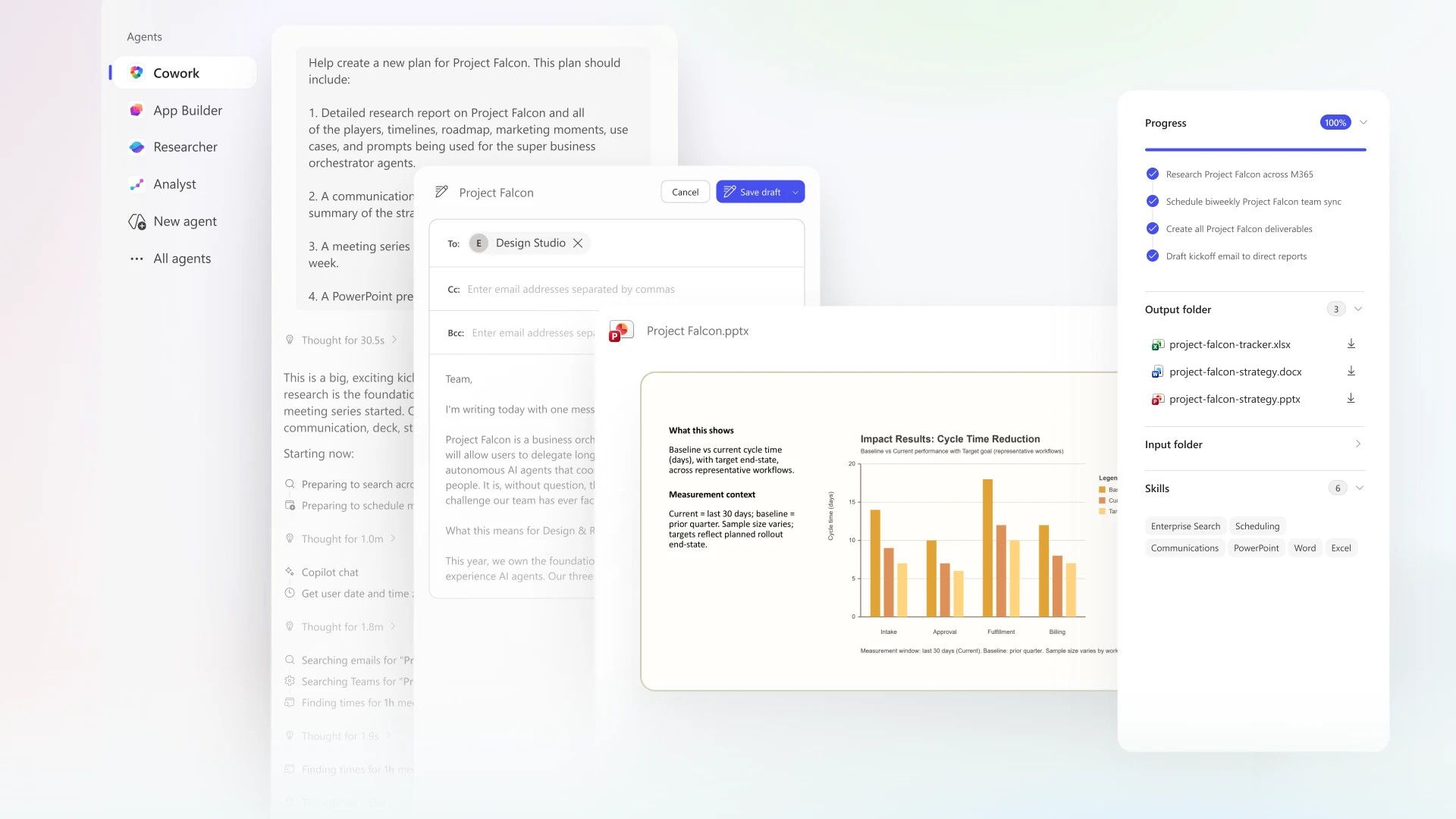
Microsoft's Copilot Cowork uses Anthropic AI to conquer all your biggest work tasks
Microsoft and Anthropic team up to release Copilot Cowork, a more effective way of getting work done.www.techradar.com
- Official source: microsoft.com

Copilot Cowork: A new way of getting work done | Microsoft 365 Blog
Copilot Cowork turns intent into action across Microsoft 365—automating tasks, coordinating workflows, and keeping you in control. See how. www.microsoft.com
- Official source: support.microsoft.com
Get started with Cowork (Frontier) | Microsoft Support
Get started with Cowork (Frontier) support.microsoft.com
- Official source: learn.microsoft.com

Copilot Cowork overview (Frontier)
Learn about Microsoft 365 Copilot Cowork, which takes action on your behalf.learn.microsoft.com - Official source: news.microsoft.com

Copilot Cowork Now Available in the Frontier Program - Source EMEA
 news.microsoft.com
- Related coverage: itpro.com

Anthropic's Claude Cowork tool is coming to Microsoft Copilot
The new Copilot Cowork tool will be made available through a new Microsoft 365 tier at the end of March www.itpro.com
- Related coverage: techriver.com
- Related coverage: assets-c4akfrf5b4d3f4b7.z01.azurefd.net
- Related coverage: davyntt.com
