

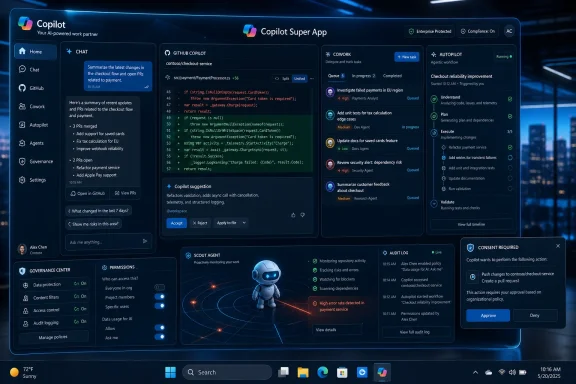
Microsoft is reportedly building an unreleased Copilot “super app” that would combine chat, GitHub Copilot coding help, Copilot Cowork, and a new agentic Autopilot layer, with a leaked Sources screenshot dated May 30, 2026 showing a proactive Scout agent inside the interface. The immediate story is a product leak; the larger story is Microsoft trying to repair a Copilot strategy that has become too fragmented for users and too sprawling for administrators. If the screenshot and accompanying reports are directionally right, Microsoft is no longer merely sprinkling AI over Windows and Microsoft 365. It is trying to make Copilot the place where work itself is routed.
The phrase “super app” usually belongs to consumer platforms, payment ecosystems, and mobile-first markets where one interface becomes the gateway to everything else. Microsoft’s version is more prosaic, and probably more consequential: one Copilot shell for chat, coding, document work, task delegation, and agents that act before being asked. That is less glamorous than a new model launch, but it is exactly the kind of product consolidation Microsoft tends to attempt once an experiment becomes a platform tax.
The leaked screenshot published by Sources adds a visual anchor to what Fortune had already reported: Microsoft is working on a single Copilot app that pulls together tools now scattered across the company’s product estate. The reported ingredients matter. Chat is the familiar entry point, GitHub Copilot is the developer wedge, Cowork is the delegated-task layer, and Autopilot appears to be the umbrella for multi-step agentic workflows.
Scout, the newly reported proactive agent in the screenshot, is the tell. Microsoft has spent the last few years putting Copilot buttons in places where users already work. Scout suggests a more aggressive inversion: instead of waiting in the ribbon, sidebar, or chat box, the assistant starts to watch for work.
That is the product bet hidden inside the branding. Microsoft does not need another chatbot. It needs a coherent runtime for AI labor.
That is the Copilot problem in miniature. For consumers, Copilot has been a web chatbot, a Windows sidebar, a mobile app, a keyboard key, and a changing set of features inside system apps. For business users, it is also Microsoft 365 Copilot, Copilot Chat, Copilot Studio, Copilot agents, Security Copilot, GitHub Copilot, and a growing family of task-specific assistants.
The company’s instinct was understandable. When generative AI broke into the mainstream, Microsoft moved faster than most incumbents and did what Microsoft does: it embedded the new capability across the portfolio. The result was an impressive keynote map and a confusing daily experience.
A single app is therefore not merely a UX cleanup. It is an admission that Copilot’s first phase was expansionary, not architectural. Microsoft built many doors before it settled on the house.
The old Copilot experience could be wrong in a familiar way. It could summarize poorly, hallucinate a fact, suggest bad code, or draft an awkward email. Those are failures of advice. Agentic systems fail differently because they can move information, trigger workflows, modify files, send messages, open tickets, and take actions across systems.
That is why an Autopilot tab matters more than another model selector or chat redesign. It turns Copilot from a response surface into a work queue. The user is no longer simply asking, “What should I do?” The user is asking, “What are you doing for me, what have you already done, and what are you about to do next?”
For WindowsForum readers, that distinction is not academic. The moment AI becomes a task runner, it enters the same governance universe as scripts, macros, scheduled tasks, service accounts, RPA bots, browser extensions, and privileged automation. Enterprises have spent decades learning that convenience at the execution layer becomes technical debt at the control layer.
Modern AI gives Microsoft a better shot, but not a free pass. A proactive agent can scan context, infer intent, suggest next steps, and assemble work from fragments. It can also become a notification engine with a graduate degree.
The difference will come down to precision, restraint, and auditability. Scout cannot merely be “helpful” in the abstract. It has to know when to stay silent, when to propose, when to ask permission, and when to act. In an enterprise setting, it must also explain which data it used, which permissions it exercised, and which systems it touched.
That is where Microsoft has an opportunity its consumer AI rivals may envy. It already controls the identity plane, the productivity graph, endpoint management, compliance tooling, and a large portion of enterprise workflows. A Scout-like agent plugged into that fabric could be genuinely useful. A Scout-like agent without visible boundaries would be another reason for admins to reach for disablement policies before users ever get attached.
Microsoft’s broader Copilot push has struggled because office work is less bounded. A spreadsheet, an email thread, a meeting transcript, and a budget review do not have the same crisp pass-fail loop as a unit test. The assistant can sound right while being useless, or look useful while quietly creating verification work for the human.
A super app that includes coding is therefore a strategic bridge. Microsoft wants the credibility of GitHub Copilot to rub off on the rest of Copilot. It also wants developers and knowledge workers in the same agentic universe, where code changes, documents, tickets, meetings, and business processes can be coordinated through one orchestration layer.
That is powerful, but it changes the audience. GitHub Copilot is mostly a tool used by people who understand tools. A unified Copilot super app would be used by everyone from engineers to finance analysts to executives. The governance model that works for a pull request does not automatically work for a board memo or a customer email.
Delegation is seductive because it maps neatly onto how busy people talk about work. “Prepare the briefing.” “Draft the follow-up.” “Review the budget.” “Find the blocker.” These are not search queries; they are assignments. The system must interpret intent, assemble context, make choices, and return something that looks like progress.
But delegation also creates ambiguity. When a human delegate makes a mistake, organizations have social, managerial, and legal frameworks for responsibility. When an AI agent makes a mistake, the accountability chain is still being invented in real time. Was the prompt bad, the model wrong, the connector over-permissive, the policy too loose, or the user insufficiently attentive?
That is why a single Copilot app could be both clarifying and centralizing. It gives users one place to manage AI work. It also gives Microsoft one place to mediate responsibility, permissions, logs, approvals, and escalation. If the company gets that layer right, Copilot becomes infrastructure. If it gets it wrong, it becomes an enterprise risk dashboard with a friendly icon.
Microsoft has already learned that forcing AI too visibly into Windows can provoke backlash. Users do not want every utility app turned into a demonstration booth. Admins do not want unpredictable features arriving in places they have spent years standardizing. Privacy-minded users do not want ambient capture and inference presented as a default posture.
A unified Copilot app lets Microsoft route around some of that resistance. Instead of embedding a half-dozen AI affordances directly into every corner of Windows, it can concentrate the experience in a dedicated app while leaving hooks into files, settings, browser sessions, Microsoft 365 content, and cloud services. That is cleaner politically and cleaner administratively.
It also fits the modern Windows reality. The operating system is still the local substrate, but Microsoft’s highest-value experiences increasingly live in identity, cloud policy, Microsoft 365 data, and cross-device continuity. Copilot does not need to be “in Windows” in the old shell-extension sense to reshape Windows usage. It needs access to the work users do on Windows.
The technical issues are obvious. Which data sources can Scout inspect? Can Autopilot run unattended? Can actions be limited by sensitivity labels, device compliance, tenant boundaries, user role, or app category? Are prompts and outputs retained, discoverable, exportable, or excluded from certain logs? Can an organization disable proactive suggestions while allowing chat? Can GitHub-related context be isolated from Microsoft 365 business context?
Microsoft has the building blocks to answer many of these questions. Entra ID, Purview, Intune, Defender, Microsoft 365 admin controls, and the company’s agent-governance work all give it a better starting point than a startup stapling browser automation onto OAuth tokens. But building blocks are not the same as a calm deployment experience.
The nightmare scenario for IT is not that Copilot becomes powerful. It is that Copilot becomes powerful in ways that are hard to inventory. Shadow AI is already a problem; official AI that behaves like shadow AI would be worse. If Microsoft wants Autopilot to become acceptable in regulated environments, the admin story has to be first-class from day one.
Users have been asked to absorb a lot of AI branding in a short time. Some features are useful, some are half-baked, some are duplicative, and some appear before organizations have decided whether they want them. The result is a trust deficit. When Microsoft says “Copilot,” many users no longer hear one product; they hear a corporate weather system.
A super app could fix that by making the promise legible. Open one place, see your chats, code help, delegated tasks, agents, approvals, and history. Understand what is running, what is paused, what needs your input, and what has changed. That would be a meaningful improvement over the current sprawl.
But consolidation can also intensify skepticism. If users perceive the app as an unavoidable AI command center that watches everything and upsells constantly, they will resist it. If admins perceive it as a fast-moving bundle of defaults, they will lock it down. Microsoft’s challenge is to make Copilot feel less like an invasion and more like a controlled workspace.
Microsoft’s instinct to build a more controlled version of that idea is rational. Enterprise customers do not want random local agents clicking through apps with unclear provenance and weak policy controls. They want automation that knows the difference between a draft and a sent message, between a test tenant and production, between public content and confidential material.
Autopilot, if it becomes the orchestrator implied by the leak, could be Microsoft’s answer to that moment. It can wrap agentic execution in identity, policy, and telemetry. It can give business users the magic without asking security teams to accept a black box.
The trade-off is that Microsoft’s version may be less wild, less flexible, and less exciting than open-ended agent frameworks. That is not necessarily a flaw. In enterprise software, boring is often the price of adoption.
A unified app gives Microsoft a cleaner sales motion. Copilot becomes not a collection of features but a work hub. GitHub Copilot can pull developers in, Microsoft 365 Copilot can pull office workers in, Cowork can appeal to managers, and Autopilot can represent the next tier of automation. The app becomes the storefront and the control room.
That bundling logic will worry competitors and some customers. Microsoft has a long history of turning adjacency into advantage. When the company controls the productivity suite, identity layer, endpoint, developer platform, and cloud backend, a unified AI app can feel less like a neutral assistant and more like the latest gravitational center in the Microsoft ecosystem.
For customers, the practical question is leverage. A deeply integrated Copilot may be easier to deploy than a patchwork of AI tools. It may also make it harder to choose best-of-breed alternatives later. The more work history, agent configuration, approval flows, and organizational memory live inside Copilot, the stickier it becomes.
A Scout-like agent does not merely need documents and messages. To be useful, it may need to infer priorities, routines, deadlines, relationships, and exceptions. It may notice that a manager always delays a certain report, that a salesperson is avoiding a customer follow-up, or that an engineer is repeatedly touching a fragile subsystem. Some of that can be helpful. Some of it can feel surveillance-adjacent very quickly.
The answer cannot be a privacy policy alone. Users need visible controls. Admins need clear defaults. Organizations need to decide whether proactive suggestions are allowed for all employees, only certain roles, or only in specific data domains. Most importantly, Microsoft needs to avoid the trap of treating consent as a one-time setup wizard.
The more proactive the agent, the more ongoing the consent model must be. A quiet agent is not automatically a respectful one. Sometimes it is just harder to notice.
Autopilot will not be judged by whether it can produce an impressive demo workflow. It will be judged by whether users keep trusting it after the tenth mundane task. Did it attach the right file? Did it schedule the meeting with the right attendees? Did it respect the retention label? Did it avoid emailing the external partner before approval? Did it leave a trail that makes sense two weeks later?
The hard part is that AI reliability is contextual. A model can be good enough for brainstorming and not good enough for procurement. It can be useful for summarizing a meeting and dangerous for summarizing legal obligations. It can help a developer scaffold code while still requiring review from someone who understands the codebase.
Microsoft’s super app will therefore need strong task boundaries. Not every action should be equally easy. Not every workflow should be one prompt away. The most mature AI products will not be the ones that say yes to everything. They will be the ones that know when to slow the user down.
If Copilot feels slower, more confusing, more restricted, or less capable than the tools people use outside work, distribution alone will not create affection. It may create usage, especially where employers mandate it, but not loyalty. The super app must therefore do more than gather icons under one roof.
Its advantage has to be context. Microsoft knows the calendar, files, chats, code repositories, org chart, permissions, meetings, and business processes. A rival chatbot may be more charming, but it should not be able to understand a Microsoft 365 tenant better than Microsoft does. If Copilot cannot turn that privileged position into clearly superior work outcomes, the criticism will be brutal and deserved.
This is where the leaked app becomes a referendum on Microsoft AI as a product discipline. The company has the data, the distribution, the cloud, the models through partners and internal work, and the enterprise relationships. The missing ingredient has been a coherent user experience. A super app is the obvious fix. It is also the obvious place to fail in public.
 Microsoft’s AI Strategy Is Collapsing Into One App
The phrase “super app” usually belongs to consumer platforms, payment ecosystems, and mobile-first markets where one interface becomes the gateway to everything else. Microsoft’s version is more prosaic, and probably more consequential: one Copilot shell for chat, coding, document work, task delegation, and agents that act before being asked. That is less glamorous than a new model launch, but it is exactly the kind of product consolidation Microsoft tends to attempt once an experiment becomes a platform tax.The leaked screenshot published by Sources adds a visual anchor to what Fortune had already reported: Microsoft is working on a single Copilot app that pulls together tools now scattered across the company’s product estate. The reported ingredients matter. Chat is the familiar entry point, GitHub Copilot is the developer wedge, Cowork is the delegated-task layer, and Autopilot appears to be the umbrella for multi-step agentic workflows.
Scout, the newly reported proactive agent in the screenshot, is the tell. Microsoft has spent the last few years putting Copilot buttons in places where users already work. Scout suggests a more aggressive inversion: instead of waiting in the ribbon, sidebar, or chat box, the assistant starts to watch for work.
That is the product bet hidden inside the branding. Microsoft does not need another chatbot. It needs a coherent runtime for AI labor.
Copilot Became Ubiquitous Before It Became Coherent
Microsoft’s biggest AI advantage has always been distribution. Windows, Office, Teams, Outlook, GitHub, Azure, Edge, and enterprise identity give Redmond more surfaces for AI deployment than almost any rival. But distribution can become a liability when every surface gets its own Copilot before users understand why any of them exists.That is the Copilot problem in miniature. For consumers, Copilot has been a web chatbot, a Windows sidebar, a mobile app, a keyboard key, and a changing set of features inside system apps. For business users, it is also Microsoft 365 Copilot, Copilot Chat, Copilot Studio, Copilot agents, Security Copilot, GitHub Copilot, and a growing family of task-specific assistants.
The company’s instinct was understandable. When generative AI broke into the mainstream, Microsoft moved faster than most incumbents and did what Microsoft does: it embedded the new capability across the portfolio. The result was an impressive keynote map and a confusing daily experience.
A single app is therefore not merely a UX cleanup. It is an admission that Copilot’s first phase was expansionary, not architectural. Microsoft built many doors before it settled on the house.
Autopilot Is a Dangerous Name for a Necessary Shift
If Microsoft is indeed using Autopilot as the name for a new agentic layer, the symbolism is unsubtle. Copilot implies assistance: the human flies, the software helps. Autopilot implies sustained execution: the software keeps the plane level while the human supervises. That shift is exactly where enterprise AI is heading, and exactly where the risks compound.The old Copilot experience could be wrong in a familiar way. It could summarize poorly, hallucinate a fact, suggest bad code, or draft an awkward email. Those are failures of advice. Agentic systems fail differently because they can move information, trigger workflows, modify files, send messages, open tickets, and take actions across systems.
That is why an Autopilot tab matters more than another model selector or chat redesign. It turns Copilot from a response surface into a work queue. The user is no longer simply asking, “What should I do?” The user is asking, “What are you doing for me, what have you already done, and what are you about to do next?”
For WindowsForum readers, that distinction is not academic. The moment AI becomes a task runner, it enters the same governance universe as scripts, macros, scheduled tasks, service accounts, RPA bots, browser extensions, and privileged automation. Enterprises have spent decades learning that convenience at the execution layer becomes technical debt at the control layer.
Scout Points Toward Proactive Computing, Not Just Better Chat
The reported Scout agent is the most interesting piece because it suggests Microsoft is chasing the oldest dream in personal computing: a system that notices what matters before the user asks. That dream has many graves. Clippy was mocked not because assistance was a bad idea, but because poorly timed assistance is indistinguishable from interruption.Modern AI gives Microsoft a better shot, but not a free pass. A proactive agent can scan context, infer intent, suggest next steps, and assemble work from fragments. It can also become a notification engine with a graduate degree.
The difference will come down to precision, restraint, and auditability. Scout cannot merely be “helpful” in the abstract. It has to know when to stay silent, when to propose, when to ask permission, and when to act. In an enterprise setting, it must also explain which data it used, which permissions it exercised, and which systems it touched.
That is where Microsoft has an opportunity its consumer AI rivals may envy. It already controls the identity plane, the productivity graph, endpoint management, compliance tooling, and a large portion of enterprise workflows. A Scout-like agent plugged into that fabric could be genuinely useful. A Scout-like agent without visible boundaries would be another reason for admins to reach for disablement policies before users ever get attached.
GitHub Copilot Is the Proof Point Microsoft Wants to Generalize
GitHub Copilot remains Microsoft’s cleanest AI success because its value proposition is narrow, measurable, and embedded in a workflow where users already expect imperfect suggestions. Developers understand autocomplete. They understand reviewing diffs. They understand that code must compile, tests must pass, and production systems punish wishful thinking.Microsoft’s broader Copilot push has struggled because office work is less bounded. A spreadsheet, an email thread, a meeting transcript, and a budget review do not have the same crisp pass-fail loop as a unit test. The assistant can sound right while being useless, or look useful while quietly creating verification work for the human.
A super app that includes coding is therefore a strategic bridge. Microsoft wants the credibility of GitHub Copilot to rub off on the rest of Copilot. It also wants developers and knowledge workers in the same agentic universe, where code changes, documents, tickets, meetings, and business processes can be coordinated through one orchestration layer.
That is powerful, but it changes the audience. GitHub Copilot is mostly a tool used by people who understand tools. A unified Copilot super app would be used by everyone from engineers to finance analysts to executives. The governance model that works for a pull request does not automatically work for a board memo or a customer email.
Cowork Shows Microsoft Is Borrowing the Language of Delegation
Copilot Cowork is important because its framing is different from chat. Microsoft has described it as a way to delegate work, manage tasks, and run workflows across productivity tools. That language is closer to management than software usage.Delegation is seductive because it maps neatly onto how busy people talk about work. “Prepare the briefing.” “Draft the follow-up.” “Review the budget.” “Find the blocker.” These are not search queries; they are assignments. The system must interpret intent, assemble context, make choices, and return something that looks like progress.
But delegation also creates ambiguity. When a human delegate makes a mistake, organizations have social, managerial, and legal frameworks for responsibility. When an AI agent makes a mistake, the accountability chain is still being invented in real time. Was the prompt bad, the model wrong, the connector over-permissive, the policy too loose, or the user insufficiently attentive?
That is why a single Copilot app could be both clarifying and centralizing. It gives users one place to manage AI work. It also gives Microsoft one place to mediate responsibility, permissions, logs, approvals, and escalation. If the company gets that layer right, Copilot becomes infrastructure. If it gets it wrong, it becomes an enterprise risk dashboard with a friendly icon.
The Windows Angle Is Less About the Start Menu Than the Work Graph
Windows enthusiasts naturally ask whether this super app belongs in Windows. That is the wrong first question. The more important question is whether Windows becomes just another endpoint for a Copilot work graph that lives above the operating system.Microsoft has already learned that forcing AI too visibly into Windows can provoke backlash. Users do not want every utility app turned into a demonstration booth. Admins do not want unpredictable features arriving in places they have spent years standardizing. Privacy-minded users do not want ambient capture and inference presented as a default posture.
A unified Copilot app lets Microsoft route around some of that resistance. Instead of embedding a half-dozen AI affordances directly into every corner of Windows, it can concentrate the experience in a dedicated app while leaving hooks into files, settings, browser sessions, Microsoft 365 content, and cloud services. That is cleaner politically and cleaner administratively.
It also fits the modern Windows reality. The operating system is still the local substrate, but Microsoft’s highest-value experiences increasingly live in identity, cloud policy, Microsoft 365 data, and cross-device continuity. Copilot does not need to be “in Windows” in the old shell-extension sense to reshape Windows usage. It needs access to the work users do on Windows.
The Admin Console Will Decide Whether This Ships as Help or Headache
For enterprise IT, the leak raises a familiar question: who controls the agent? A proactive Copilot that can inspect work, suggest tasks, and act across applications will be judged less by its demo than by its administrative surface. The first wave of users may see convenience. The first wave of admins will see permissions.The technical issues are obvious. Which data sources can Scout inspect? Can Autopilot run unattended? Can actions be limited by sensitivity labels, device compliance, tenant boundaries, user role, or app category? Are prompts and outputs retained, discoverable, exportable, or excluded from certain logs? Can an organization disable proactive suggestions while allowing chat? Can GitHub-related context be isolated from Microsoft 365 business context?
Microsoft has the building blocks to answer many of these questions. Entra ID, Purview, Intune, Defender, Microsoft 365 admin controls, and the company’s agent-governance work all give it a better starting point than a startup stapling browser automation onto OAuth tokens. But building blocks are not the same as a calm deployment experience.
The nightmare scenario for IT is not that Copilot becomes powerful. It is that Copilot becomes powerful in ways that are hard to inventory. Shadow AI is already a problem; official AI that behaves like shadow AI would be worse. If Microsoft wants Autopilot to become acceptable in regulated environments, the admin story has to be first-class from day one.
Microsoft’s Real Rival Is User Skepticism
It is tempting to frame this as Microsoft versus OpenAI, Google, Anthropic, Apple, or whatever AI workspace startup is trending this week. Those comparisons matter, but they are secondary. Microsoft’s hardest opponent is the fatigue created by its own Copilot rollout.Users have been asked to absorb a lot of AI branding in a short time. Some features are useful, some are half-baked, some are duplicative, and some appear before organizations have decided whether they want them. The result is a trust deficit. When Microsoft says “Copilot,” many users no longer hear one product; they hear a corporate weather system.
A super app could fix that by making the promise legible. Open one place, see your chats, code help, delegated tasks, agents, approvals, and history. Understand what is running, what is paused, what needs your input, and what has changed. That would be a meaningful improvement over the current sprawl.
But consolidation can also intensify skepticism. If users perceive the app as an unavoidable AI command center that watches everything and upsells constantly, they will resist it. If admins perceive it as a fast-moving bundle of defaults, they will lock it down. Microsoft’s challenge is to make Copilot feel less like an invasion and more like a controlled workspace.
The OpenClaw Echo Explains Why Microsoft Wants Its Own Agent Layer
The reports around Microsoft’s agent work have repeatedly circled a broader industry fascination with computer-using agents and OpenClaw-like systems. The appeal is obvious: an agent that can operate software the way a human does can potentially automate anything. The danger is equally obvious: an agent that can operate software the way a human does can also make mistakes at human scale and machine speed.Microsoft’s instinct to build a more controlled version of that idea is rational. Enterprise customers do not want random local agents clicking through apps with unclear provenance and weak policy controls. They want automation that knows the difference between a draft and a sent message, between a test tenant and production, between public content and confidential material.
Autopilot, if it becomes the orchestrator implied by the leak, could be Microsoft’s answer to that moment. It can wrap agentic execution in identity, policy, and telemetry. It can give business users the magic without asking security teams to accept a black box.
The trade-off is that Microsoft’s version may be less wild, less flexible, and less exciting than open-ended agent frameworks. That is not necessarily a flaw. In enterprise software, boring is often the price of adoption.
The Super App Is Also a Bundle Strategy
A single Copilot app is a product strategy, but it is also a packaging strategy. Microsoft’s AI business depends not just on users trying Copilot, but on organizations paying for it at scale and accepting it as part of the Microsoft 365 value proposition. Fragmented tools make that harder to explain.A unified app gives Microsoft a cleaner sales motion. Copilot becomes not a collection of features but a work hub. GitHub Copilot can pull developers in, Microsoft 365 Copilot can pull office workers in, Cowork can appeal to managers, and Autopilot can represent the next tier of automation. The app becomes the storefront and the control room.
That bundling logic will worry competitors and some customers. Microsoft has a long history of turning adjacency into advantage. When the company controls the productivity suite, identity layer, endpoint, developer platform, and cloud backend, a unified AI app can feel less like a neutral assistant and more like the latest gravitational center in the Microsoft ecosystem.
For customers, the practical question is leverage. A deeply integrated Copilot may be easier to deploy than a patchwork of AI tools. It may also make it harder to choose best-of-breed alternatives later. The more work history, agent configuration, approval flows, and organizational memory live inside Copilot, the stickier it becomes.
The Privacy Problem Moves From Data Access to Behavioral Inference
Microsoft’s AI controversies have often centered on data access: what the system can see, how it stores information, and whether sensitive content is exposed. Those concerns remain. But proactive agents add another layer: behavioral inference.A Scout-like agent does not merely need documents and messages. To be useful, it may need to infer priorities, routines, deadlines, relationships, and exceptions. It may notice that a manager always delays a certain report, that a salesperson is avoiding a customer follow-up, or that an engineer is repeatedly touching a fragile subsystem. Some of that can be helpful. Some of it can feel surveillance-adjacent very quickly.
The answer cannot be a privacy policy alone. Users need visible controls. Admins need clear defaults. Organizations need to decide whether proactive suggestions are allowed for all employees, only certain roles, or only in specific data domains. Most importantly, Microsoft needs to avoid the trap of treating consent as a one-time setup wizard.
The more proactive the agent, the more ongoing the consent model must be. A quiet agent is not automatically a respectful one. Sometimes it is just harder to notice.
Reliability Will Matter More Than Intelligence
The AI industry loves to talk about model intelligence, but enterprise users tend to reward reliability. A slightly less brilliant agent that consistently follows policy, asks before risky actions, and produces auditable work will beat a dazzling one that occasionally goes feral. This is where Microsoft’s conservative instincts may be an advantage.Autopilot will not be judged by whether it can produce an impressive demo workflow. It will be judged by whether users keep trusting it after the tenth mundane task. Did it attach the right file? Did it schedule the meeting with the right attendees? Did it respect the retention label? Did it avoid emailing the external partner before approval? Did it leave a trail that makes sense two weeks later?
The hard part is that AI reliability is contextual. A model can be good enough for brainstorming and not good enough for procurement. It can be useful for summarizing a meeting and dangerous for summarizing legal obligations. It can help a developer scaffold code while still requiring review from someone who understands the codebase.
Microsoft’s super app will therefore need strong task boundaries. Not every action should be equally easy. Not every workflow should be one prompt away. The most mature AI products will not be the ones that say yes to everything. They will be the ones that know when to slow the user down.
The Old Microsoft Playbook Still Works, But Only If the Product Earns It
Microsoft has won many markets by integrating, bundling, and waiting out the chaos. The strategy is not subtle, but it is effective. In AI, however, the old playbook has a new constraint: users can compare Microsoft’s work against fast-moving consumer tools every day.If Copilot feels slower, more confusing, more restricted, or less capable than the tools people use outside work, distribution alone will not create affection. It may create usage, especially where employers mandate it, but not loyalty. The super app must therefore do more than gather icons under one roof.
Its advantage has to be context. Microsoft knows the calendar, files, chats, code repositories, org chart, permissions, meetings, and business processes. A rival chatbot may be more charming, but it should not be able to understand a Microsoft 365 tenant better than Microsoft does. If Copilot cannot turn that privileged position into clearly superior work outcomes, the criticism will be brutal and deserved.
This is where the leaked app becomes a referendum on Microsoft AI as a product discipline. The company has the data, the distribution, the cloud, the models through partners and internal work, and the enterprise relationships. The missing ingredient has been a coherent user experience. A super app is the obvious fix. It is also the obvious place to fail in public.
The Screenshot Makes Microsoft’s Copilot Bet Easier to Judge
The leak does not prove what Microsoft will ship, when it will ship, or which features will survive internal testing. It does, however, make the direction concrete enough for users and admins to start asking better questions. The next Copilot phase is not about whether Microsoft can add AI to apps. It is about whether Microsoft can make AI operate across apps without creating chaos.- Microsoft is reportedly consolidating chat, coding, Cowork, and agentic workflows into a single Copilot app rather than continuing to scatter AI surfaces across products.
- The reported Autopilot layer signals a shift from assistant-style responses toward longer-running workflows that can execute tasks under user supervision.
- The newly reported Scout agent matters because proactive AI raises harder questions about timing, consent, data access, and administrative control.
- Windows users should watch the app less as a shell feature and more as a cloud-connected work hub that may reshape how Windows endpoints participate in Microsoft 365 workflows.
- Enterprise adoption will depend on governance, logging, permission boundaries, and policy controls as much as model quality or interface design.
- Microsoft’s main challenge is no longer proving that it can deploy Copilot everywhere, but proving that a unified Copilot is useful enough to deserve being everywhere.
References
- Primary source: Sources | Alex Heath
Published: 2026-05-30T00:50:30.118530
This is Microsoft's unreleased AI super app - by Alex Heath
A leaked screenshot shows a new Microsoft Copilot Autopilot tab and OpenClaw-like agent called Scout.sources.news
