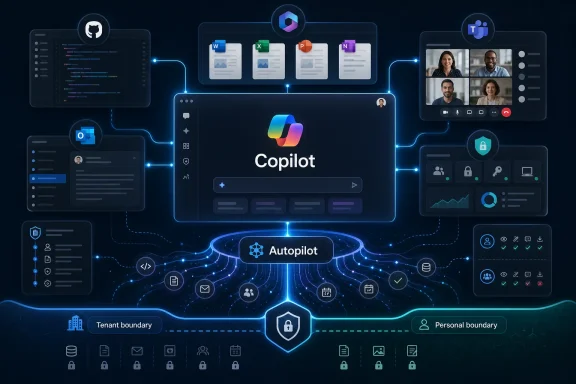
Microsoft is reportedly building a single Copilot “super app” for release by the end of summer 2026 that would combine GitHub Copilot, Copilot chat, Copilot Cowork, and an internal agentic workflow system called Autopilot into one central interface. The move is less a moonshot than a cleanup operation. Microsoft’s AI portfolio has sprawled faster than its product design, and the company now appears to be admitting that enterprise AI cannot scale if every assistant feels like a different product, contract, and identity boundary.
The pitch is simple: one Copilot, many contexts. The risk is just as simple: Microsoft may be trying to solve a trust problem with a navigation bar. For Windows users, developers, and IT administrators, the coming Copilot hub could either become the missing front door for Microsoft’s AI strategy or the place where every unresolved licensing, governance, and automation question arrives at once.
Microsoft did not arrive late to enterprise AI. If anything, it arrived early enough to create the first generation of confusion. Copilot became a brand, a button, a subscription tier, a Windows feature, a GitHub coding assistant, a Microsoft 365 upsell, and a general-purpose chatbot before it became a coherent product family.
That fragmentation was tolerable when Copilot was mostly a set of demonstrations: summarize this meeting, draft that email, complete this function, search these files. But the industry has moved quickly from chat boxes to agents, and agents need continuity. A system that can plan, act, audit, and hand work from one domain to another cannot feel like five assistants wearing the same badge.
The reported super app is Microsoft’s answer to that contradiction. It would bring together the general Copilot chat experience, GitHub Copilot, Copilot Cowork, and Autopilot, a workflow-oriented agentic capability reportedly under internal development. Leaked interface references also point to Scout, described in reports as a proactive agent surfaced inside the emerging experience.
That list matters because it crosses the old Microsoft boundary lines. GitHub belongs to developers. Microsoft 365 belongs to office workers and enterprise administrators. Windows Copilot belongs to the operating system. Consumer Copilot belongs to Microsoft’s broader AI ambitions against ChatGPT and Gemini. A single app suggests Microsoft no longer believes these markets can be handled as separate AI islands.
That is where Microsoft has both an advantage and a burden. Its strongest argument in AI has always been that Copilot can live inside the Microsoft Graph, Entra ID, Purview, Defender, SharePoint, Teams, Outlook, Office, and Windows estate that many organizations already operate. But that argument weakens if the user experience looks scattered and the administrative model feels inconsistent.
A unified Copilot front door could make Microsoft’s governance story easier to believe. If a developer moves from a GitHub issue to a Teams discussion to a Word specification to an agentic workflow, Microsoft wants that journey to happen inside a recognizable identity and policy envelope. The super app is not merely about fewer icons; it is about making AI activity legible to the organizations expected to pay for it.
The hard part is that users and administrators want different kinds of simplicity. Users want one place to ask for help. Administrators want precise boundaries around what the assistant can read, infer, generate, execute, and remember. Microsoft’s challenge is to make the former possible without disguising the latter.
Copilot has appeared across Windows, Edge, Teams, Word, Excel, PowerPoint, Outlook, GitHub, Azure, and standalone apps. Some versions are consumer-facing. Some are commercial. Some are included with existing subscriptions. Some require expensive add-ons. Some use work data. Some do not. Some feel like search assistants, while others behave more like collaborative agents.
That sprawl is not accidental. Microsoft’s business units moved quickly to attach AI to their own products, and the company had every incentive to show Copilot momentum across the entire stack. But speed left scars. The Copilot name became ubiquitous before the Copilot experience became unified.
The super app appears to be the moment Microsoft tries to reverse the order. Instead of every product shipping its own Copilot and hoping users understand the family resemblance, Microsoft wants a central place where the family becomes visible. The question is whether that central place can be more than a launcher.
GitHub Copilot also has its own identity, culture, and buying motion. Developers adopted it before many office workers touched Microsoft 365 Copilot. It competes in a fast-moving market against Cursor, Anthropic’s Claude Code, OpenAI’s Codex-related efforts, and a long tail of IDE-native and terminal-native assistants. Folding GitHub Copilot into a broader Microsoft Copilot hub could give Microsoft a distribution advantage, but it could also make developers nervous.
Developers tend to resist tools that feel like enterprise platforms first and engineering tools second. If the super app improves authentication, context sharing, and workflow continuity without slowing down the coding experience, it could be useful. If it turns GitHub Copilot into another pane of corporate AI middleware, Microsoft risks diluting one of its most successful AI products.
There is also a deeper product question. A coding assistant needs very different affordances from a meeting summarizer. It needs repository context, diff awareness, test execution, branch discipline, dependency insight, and guardrails around code ownership. Microsoft can unify access without flattening the use cases, but only if the super app respects the difference between asking a chatbot to draft an email and asking an agent to alter production code.
Chatbots can be wrong and still remain useful if the user is in the loop. Workflow agents can be wrong in ways that create tickets, change files, notify customers, update records, move data, or trigger downstream automation. Once an AI system can initiate or complete work, the traditional Copilot metaphor becomes strained. A copilot assists; an autopilot acts.
That naming tension will not be lost on IT pros. Microsoft already uses “Autopilot” for Windows device provisioning, so any new agentic Autopilot branding would need careful handling to avoid yet another collision in the company’s terminology. Even if the internal codename changes, the concept matters: Microsoft is building toward assistants that can run workflows across the productivity and developer estate.
That makes auditability non-negotiable. Organizations will need to know what an agent did, why it did it, which identity it acted under, what data it accessed, which model or tool chain it used, and how to reverse or suspend the action. A unified app can help expose those controls. It can also hide complexity behind a friendly prompt box, which would be a mistake.
That can be powerful. A proactive assistant could notice that a pull request depends on a design document, that a meeting decision has no assigned owner, that a security advisory affects a repository, or that a customer escalation is missing context from a Teams thread. In theory, Scout-like behavior could make Copilot feel less like a tool and more like a colleague watching the flow of work.
But proactive AI is where helpfulness becomes interruption. Windows users already know the cost of features that Microsoft believes are assistive but users experience as intrusive. Enterprise users are even more sensitive, because a proactive agent operating across work data can create both productivity gains and surveillance anxiety.
For Microsoft, the design challenge is not just making Scout smart. It is making Scout permissioned. Users need to understand why an agent surfaced something, where it found the signal, what it can do next, and how to silence or narrow it. Administrators need policy controls that are more granular than “on” or “off.”
But account switching is not just a login problem. It is a data boundary problem. The distinction between personal and work AI contexts must be obvious, enforceable, and resistant to accidental leakage. A user asking Copilot to summarize a personal document should not accidentally bring in work data; a user asking about a confidential work project should not route that context through a consumer experience.
Microsoft has spent years telling enterprises that commercial Copilot is grounded in tenant permissions and compliance controls. A unified app cannot blur that message. The toggle needs to be more than a cosmetic switch; it needs to communicate which identity, data estate, retention policy, plugin set, and administrative rules are active at any moment.
This is one of the places where Microsoft’s history cuts both ways. The company understands identity and enterprise policy as well as anyone in the industry. It also has a long record of confusing users with overlapping account types, duplicated sign-in prompts, and consumer-commercial seams that show up at the worst possible moment. A Copilot super app will inherit that legacy on day one.
That would be a sensible approach. A full super app reveal before the product is ready could create expectations Microsoft cannot meet. A developer-focused preview of the underlying agent and identity direction would let the company frame the architecture before the UI becomes the story.
Build also gives Microsoft a chance to connect this effort to its broader AI platform ambitions. The company does not merely want users chatting with Copilot; it wants developers building agents that run on Microsoft infrastructure, respect Microsoft governance, and connect back into Microsoft 365 and GitHub. The super app could become the consumer-visible surface of a much larger platform move.
The risk is that Microsoft overstates coherence before customers can experience it. Developers have seen enough AI demos that work beautifully on stage and less beautifully inside messy organizations. If Microsoft wants credibility, it should show boring things: permissions, logs, failure states, admin policies, tenant boundaries, repository scopes, and rollback mechanisms.
In that market, fragmentation is not just annoying; it is strategically dangerous. If users build habits around a rival assistant that feels like one continuous workspace, Microsoft’s advantage in Office and Windows becomes less decisive. The company can own the files and still lose the user’s daily AI habit.
This is why the super app matters even if it ships as a modest first version. Microsoft is trying to defend the center of work. The center is no longer the document, the inbox, or even the operating system. Increasingly, it is the assistant that knows where the work lives and can move between tasks without forcing the user to start over.
Microsoft has the raw material for that assistant. It has the productivity suite, the developer platform, the cloud, the identity layer, the security tooling, and the desktop operating system. What it has not had is a single AI experience that makes those assets feel like one product. That is the gap the super app is designed to close.
A super app could clarify that. Windows does not need to be the only home for Copilot; it needs to be a reliable launch point into the correct Copilot context. If the user is working locally, the assistant should understand device state and system settings. If the user is working in a corporate tenant, it should respect enterprise policy. If the user is writing code, it should move naturally into GitHub and the IDE.
The danger is that Windows becomes merely another surface for a cloud-first AI product whose behavior changes depending on licensing and region. Windows users have already become wary of features that arrive as defaults, prompts, recommendations, or promotional surfaces. A unified Copilot app will need to earn its place on the desktop by being useful rather than unavoidable.
For admins managing Windows fleets, the practical concerns are predictable. Can the app be deployed, removed, pinned, blocked, configured, and updated through existing management channels? Can consumer Copilot be disabled while work Copilot remains available? Can logs flow into existing security and compliance tooling? Can agentic features be rolled out gradually by group, role, or device class? Those answers will matter more than the branding.
That matters because the user does not think in SKUs. The user thinks, “Can Copilot help me with this?” If the answer changes depending on whether the task touches GitHub, Outlook, SharePoint, Teams, Windows, or a third-party connector, the super app may become a permissions maze.
Microsoft has strong financial incentives to bundle Copilot more deeply into its enterprise stack. It also has to avoid making customers feel trapped in an escalating series of AI toll booths. The more central the super app becomes, the more visible those boundaries will be. A disabled button in a scattered product is an annoyance; a disabled capability in the one app meant to unify work is a statement about what the customer has not paid for.
This is where Microsoft’s enterprise discipline will be tested. The company can use the super app to clarify entitlements and guide customers toward sensible upgrades. Or it can use it as a cross-sell machine. The former builds trust; the latter reinforces the suspicion that “one Copilot” really means one more way to package the same confusion.
But developers will not accept magic as an interface. They need to know which files were read, which commands were run, which dependencies were changed, which tests passed, which secrets were excluded, and which assumptions were made. They also need control over model choice and agent behavior, especially in regulated or security-sensitive environments.
The reported unification of GitHub Copilot with broader Copilot surfaces raises a critical question: will Microsoft expose enough of the plumbing? A single app can make routing decisions behind the scenes, but developer trust depends on inspectability. If an agent changes code, the developer should be able to reconstruct the chain of reasoning and tool use at a practical level, even if the model’s internal weights remain opaque.
This is not only about individual preference. Organizations adopting AI coding tools need policy. They need to define which repositories can use agents, whether generated code requires special review, how prompts and outputs are retained, and how third-party model access is controlled. A unified Copilot should make those policies easier to enforce, not easier to bypass.
Trying to serve both in one app can produce a product that is neither delightful enough for consumers nor controlled enough for enterprises. Microsoft has been here before. The company often wants one brand to stretch from home users to global corporations, but the needs diverge quickly.
The personal-work toggle is the symbolic solution. The deeper solution requires different defaults. A consumer assistant may prioritize continuity, personalization, and broad web utility. A work assistant may prioritize tenant boundaries, citation to internal sources, administrative control, and predictable retention. The app can share a shell, but the modes need genuinely different operating rules.
If Microsoft gets this right, it could make Copilot feel like a single companion that changes posture depending on context. If it gets it wrong, users will see yet another Microsoft account puzzle with higher stakes.
A unified Copilot is valuable only if it can carry context across those questions. But context is also where privacy, security, and compliance become difficult. Remember too little and the assistant feels dumb. Remember too much and it feels invasive. Remember the wrong thing across personal and work boundaries and it becomes a liability.
Microsoft’s advantage is that much of the relevant work context already lives inside systems it controls or integrates with. The Microsoft Graph can connect people, documents, meetings, messages, and permissions. GitHub can connect code, issues, pull requests, and reviews. Windows can connect local device state and user activity. The super app is the place where those signals could converge.
But convergence requires restraint. The best enterprise AI systems will not be the ones that ingest everything by default. They will be the ones that make context explicit, scoped, revocable, and auditable. Microsoft should resist the temptation to make Copilot feel omniscient. In the workplace, a helpful assistant that can explain its boundaries will beat a mysterious one that seems to know too much.
That is probably healthy. Product fragmentation has allowed Microsoft to distribute responsibility across teams and surfaces. A single Copilot experience creates pressure for consistency. It also gives users a clearer mental model for where to go when they want AI help.
But it raises the bar. Performance differences, model differences, data access differences, and licensing differences will become more obvious. If Copilot can summarize a meeting but cannot understand the project repository linked from that meeting, users will notice. If it can draft a document but cannot act on the workflow it proposes, users will notice. If it can see work content in one mode and not another without clear explanation, users will notice.
That visibility may be exactly what Microsoft needs. The company has often improved products after forcing itself to integrate them. The Office ribbon, Teams, Microsoft 365 admin center, Defender portal, and Azure portal all reflect the same tension: unification can be messy, but it can also expose what must be made coherent.
Microsoft wants Copilot to be that starting point. Not just the thing you click inside Word, or the thing that suggests code in an IDE, or the thing that summarizes Teams meetings, but the place where work begins and continues. That is a much bigger ambition than a chatbot.
The irony is that Microsoft has been building toward this for decades. Office integrated documents, spreadsheets, presentations, and email. Windows integrated local computing with enterprise management. Microsoft 365 integrated identity, collaboration, and cloud productivity. GitHub integrated code collaboration at global scale. Copilot is supposed to be the connective tissue across all of it.
The reported super app is therefore not a side project. It is a referendum on whether Microsoft can turn its sprawl into an advantage. If it can, Copilot becomes the interface layer for the Microsoft ecosystem. If it cannot, the app becomes another symbol of the very fragmentation it was built to fix.
The pitch is simple: one Copilot, many contexts. The risk is just as simple: Microsoft may be trying to solve a trust problem with a navigation bar. For Windows users, developers, and IT administrators, the coming Copilot hub could either become the missing front door for Microsoft’s AI strategy or the place where every unresolved licensing, governance, and automation question arrives at once.
 Microsoft’s AI Ambition Has Outgrown Its Product Map
Microsoft did not arrive late to enterprise AI. If anything, it arrived early enough to create the first generation of confusion. Copilot became a brand, a button, a subscription tier, a Windows feature, a GitHub coding assistant, a Microsoft 365 upsell, and a general-purpose chatbot before it became a coherent product family.That fragmentation was tolerable when Copilot was mostly a set of demonstrations: summarize this meeting, draft that email, complete this function, search these files. But the industry has moved quickly from chat boxes to agents, and agents need continuity. A system that can plan, act, audit, and hand work from one domain to another cannot feel like five assistants wearing the same badge.
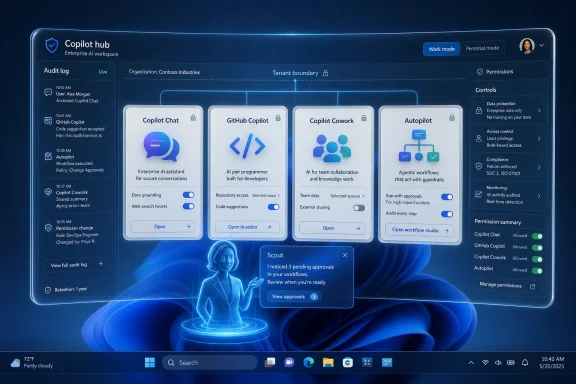
The reported super app is Microsoft’s answer to that contradiction. It would bring together the general Copilot chat experience, GitHub Copilot, Copilot Cowork, and Autopilot, a workflow-oriented agentic capability reportedly under internal development. Leaked interface references also point to Scout, described in reports as a proactive agent surfaced inside the emerging experience.
That list matters because it crosses the old Microsoft boundary lines. GitHub belongs to developers. Microsoft 365 belongs to office workers and enterprise administrators. Windows Copilot belongs to the operating system. Consumer Copilot belongs to Microsoft’s broader AI ambitions against ChatGPT and Gemini. A single app suggests Microsoft no longer believes these markets can be handled as separate AI islands.
The Super App Is Really a Governance Story
Calling this a “super app” makes it sound like a consumer convenience play, but the more important audience is enterprise IT. A user may dislike switching between Copilot surfaces; an administrator has a harder problem. Every additional AI entry point raises questions about identity, data access, retention, eDiscovery, logging, permissions, model routing, and licensing.That is where Microsoft has both an advantage and a burden. Its strongest argument in AI has always been that Copilot can live inside the Microsoft Graph, Entra ID, Purview, Defender, SharePoint, Teams, Outlook, Office, and Windows estate that many organizations already operate. But that argument weakens if the user experience looks scattered and the administrative model feels inconsistent.
A unified Copilot front door could make Microsoft’s governance story easier to believe. If a developer moves from a GitHub issue to a Teams discussion to a Word specification to an agentic workflow, Microsoft wants that journey to happen inside a recognizable identity and policy envelope. The super app is not merely about fewer icons; it is about making AI activity legible to the organizations expected to pay for it.
The hard part is that users and administrators want different kinds of simplicity. Users want one place to ask for help. Administrators want precise boundaries around what the assistant can read, infer, generate, execute, and remember. Microsoft’s challenge is to make the former possible without disguising the latter.
“One Copilot” Is a Fix for a Problem Microsoft Created
The reported internal slogan, “Delivering one Copilot,” is revealing because it frames the project as integration rather than invention. Microsoft does not lack AI surfaces. It lacks a convincing way to make them feel like one system.Copilot has appeared across Windows, Edge, Teams, Word, Excel, PowerPoint, Outlook, GitHub, Azure, and standalone apps. Some versions are consumer-facing. Some are commercial. Some are included with existing subscriptions. Some require expensive add-ons. Some use work data. Some do not. Some feel like search assistants, while others behave more like collaborative agents.
That sprawl is not accidental. Microsoft’s business units moved quickly to attach AI to their own products, and the company had every incentive to show Copilot momentum across the entire stack. But speed left scars. The Copilot name became ubiquitous before the Copilot experience became unified.
The super app appears to be the moment Microsoft tries to reverse the order. Instead of every product shipping its own Copilot and hoping users understand the family resemblance, Microsoft wants a central place where the family becomes visible. The question is whether that central place can be more than a launcher.
GitHub Copilot Changes the Stakes
The inclusion of GitHub Copilot is the most consequential part of the reported plan. Coding assistants are no longer side utilities. They are becoming orchestration layers for software work: reading issues, generating pull requests, modifying files, explaining code, writing tests, and increasingly acting across repositories.GitHub Copilot also has its own identity, culture, and buying motion. Developers adopted it before many office workers touched Microsoft 365 Copilot. It competes in a fast-moving market against Cursor, Anthropic’s Claude Code, OpenAI’s Codex-related efforts, and a long tail of IDE-native and terminal-native assistants. Folding GitHub Copilot into a broader Microsoft Copilot hub could give Microsoft a distribution advantage, but it could also make developers nervous.
Developers tend to resist tools that feel like enterprise platforms first and engineering tools second. If the super app improves authentication, context sharing, and workflow continuity without slowing down the coding experience, it could be useful. If it turns GitHub Copilot into another pane of corporate AI middleware, Microsoft risks diluting one of its most successful AI products.
There is also a deeper product question. A coding assistant needs very different affordances from a meeting summarizer. It needs repository context, diff awareness, test execution, branch discipline, dependency insight, and guardrails around code ownership. Microsoft can unify access without flattening the use cases, but only if the super app respects the difference between asking a chatbot to draft an email and asking an agent to alter production code.
Autopilot Is the Name That Should Make Admins Sit Up
The reported Autopilot component is where the story shifts from convenience to control. An “agentic workflow capability” sounds like the layer that turns Copilot from an answering system into an acting system. That is the future every AI vendor is chasing, and it is also the point at which enterprise buyers become much less forgiving.Chatbots can be wrong and still remain useful if the user is in the loop. Workflow agents can be wrong in ways that create tickets, change files, notify customers, update records, move data, or trigger downstream automation. Once an AI system can initiate or complete work, the traditional Copilot metaphor becomes strained. A copilot assists; an autopilot acts.
That naming tension will not be lost on IT pros. Microsoft already uses “Autopilot” for Windows device provisioning, so any new agentic Autopilot branding would need careful handling to avoid yet another collision in the company’s terminology. Even if the internal codename changes, the concept matters: Microsoft is building toward assistants that can run workflows across the productivity and developer estate.
That makes auditability non-negotiable. Organizations will need to know what an agent did, why it did it, which identity it acted under, what data it accessed, which model or tool chain it used, and how to reverse or suspend the action. A unified app can help expose those controls. It can also hide complexity behind a friendly prompt box, which would be a mistake.
Scout Points Toward Proactive AI, and Proactive AI Points Toward Friction
Scout, the proactive agent referenced in leaked screenshots and follow-on reporting, represents another step beyond today’s Copilot model. Most Copilot experiences still begin with user intent: ask, summarize, draft, rewrite, explain. A proactive agent suggests, monitors, nudges, and initiates.That can be powerful. A proactive assistant could notice that a pull request depends on a design document, that a meeting decision has no assigned owner, that a security advisory affects a repository, or that a customer escalation is missing context from a Teams thread. In theory, Scout-like behavior could make Copilot feel less like a tool and more like a colleague watching the flow of work.
But proactive AI is where helpfulness becomes interruption. Windows users already know the cost of features that Microsoft believes are assistive but users experience as intrusive. Enterprise users are even more sensitive, because a proactive agent operating across work data can create both productivity gains and surveillance anxiety.
For Microsoft, the design challenge is not just making Scout smart. It is making Scout permissioned. Users need to understand why an agent surfaced something, where it found the signal, what it can do next, and how to silence or narrow it. Administrators need policy controls that are more granular than “on” or “off.”
Personal and Work Toggles Are Small UI With Large Consequences
One reported feature of the super app is a toggle between personal Copilot and Microsoft 365 enterprise Copilot accounts. On the surface, that sounds like overdue convenience. Anyone who has bounced between consumer Microsoft accounts, work tenants, browser profiles, GitHub identities, and Microsoft 365 sessions knows the pain this is meant to address.But account switching is not just a login problem. It is a data boundary problem. The distinction between personal and work AI contexts must be obvious, enforceable, and resistant to accidental leakage. A user asking Copilot to summarize a personal document should not accidentally bring in work data; a user asking about a confidential work project should not route that context through a consumer experience.
Microsoft has spent years telling enterprises that commercial Copilot is grounded in tenant permissions and compliance controls. A unified app cannot blur that message. The toggle needs to be more than a cosmetic switch; it needs to communicate which identity, data estate, retention policy, plugin set, and administrative rules are active at any moment.
This is one of the places where Microsoft’s history cuts both ways. The company understands identity and enterprise policy as well as anyone in the industry. It also has a long record of confusing users with overlapping account types, duplicated sign-in prompts, and consumer-commercial seams that show up at the worst possible moment. A Copilot super app will inherit that legacy on day one.
Build 2026 Is the Right Stage for a Partial Reveal
The timing around Microsoft Build makes strategic sense. Build is where Microsoft explains itself to developers, and developers are the group most likely to care about how GitHub Copilot, agent frameworks, APIs, model routing, and enterprise identity fit together. Reports suggest Microsoft may reference pieces of the project around Build without fully unveiling the app itself.That would be a sensible approach. A full super app reveal before the product is ready could create expectations Microsoft cannot meet. A developer-focused preview of the underlying agent and identity direction would let the company frame the architecture before the UI becomes the story.
Build also gives Microsoft a chance to connect this effort to its broader AI platform ambitions. The company does not merely want users chatting with Copilot; it wants developers building agents that run on Microsoft infrastructure, respect Microsoft governance, and connect back into Microsoft 365 and GitHub. The super app could become the consumer-visible surface of a much larger platform move.
The risk is that Microsoft overstates coherence before customers can experience it. Developers have seen enough AI demos that work beautifully on stage and less beautifully inside messy organizations. If Microsoft wants credibility, it should show boring things: permissions, logs, failure states, admin policies, tenant boundaries, repository scopes, and rollback mechanisms.
OpenAI and Google Are Forcing Microsoft to Simplify
Microsoft’s integration push is not happening in a vacuum. OpenAI has been moving ChatGPT beyond a chat window toward a broader work environment that includes browsing, coding, files, memory, and desktop-style workflows. Google is embedding Gemini across Workspace, Android, Search, and developer tools. Anthropic has made strong inroads with Claude in coding and workplace collaboration.In that market, fragmentation is not just annoying; it is strategically dangerous. If users build habits around a rival assistant that feels like one continuous workspace, Microsoft’s advantage in Office and Windows becomes less decisive. The company can own the files and still lose the user’s daily AI habit.
This is why the super app matters even if it ships as a modest first version. Microsoft is trying to defend the center of work. The center is no longer the document, the inbox, or even the operating system. Increasingly, it is the assistant that knows where the work lives and can move between tasks without forcing the user to start over.
Microsoft has the raw material for that assistant. It has the productivity suite, the developer platform, the cloud, the identity layer, the security tooling, and the desktop operating system. What it has not had is a single AI experience that makes those assets feel like one product. That is the gap the super app is designed to close.
The Windows Angle Is Bigger Than Another Copilot Button
For Windows enthusiasts, this story may sound like yet another Copilot reshuffle. Microsoft has already experimented with Copilot as a taskbar button, a sidebar, a web app, a native-ish app, and a feature woven into system settings. The desktop experience has sometimes felt like Microsoft was still deciding whether Copilot is part of Windows, part of Edge, part of Microsoft 365, or part of the cloud.A super app could clarify that. Windows does not need to be the only home for Copilot; it needs to be a reliable launch point into the correct Copilot context. If the user is working locally, the assistant should understand device state and system settings. If the user is working in a corporate tenant, it should respect enterprise policy. If the user is writing code, it should move naturally into GitHub and the IDE.
The danger is that Windows becomes merely another surface for a cloud-first AI product whose behavior changes depending on licensing and region. Windows users have already become wary of features that arrive as defaults, prompts, recommendations, or promotional surfaces. A unified Copilot app will need to earn its place on the desktop by being useful rather than unavoidable.
For admins managing Windows fleets, the practical concerns are predictable. Can the app be deployed, removed, pinned, blocked, configured, and updated through existing management channels? Can consumer Copilot be disabled while work Copilot remains available? Can logs flow into existing security and compliance tooling? Can agentic features be rolled out gradually by group, role, or device class? Those answers will matter more than the branding.
Microsoft’s Licensing Puzzle Will Not Disappear Inside One App
The most optimistic version of the super app is that it simplifies Copilot purchasing. The more realistic version is that it exposes how complicated Copilot purchasing already is. Microsoft 365 Copilot, GitHub Copilot, Copilot Pro, consumer Copilot, enterprise Copilot Chat, and role-specific agents do not all map neatly to the same buyer or budget.That matters because the user does not think in SKUs. The user thinks, “Can Copilot help me with this?” If the answer changes depending on whether the task touches GitHub, Outlook, SharePoint, Teams, Windows, or a third-party connector, the super app may become a permissions maze.
Microsoft has strong financial incentives to bundle Copilot more deeply into its enterprise stack. It also has to avoid making customers feel trapped in an escalating series of AI toll booths. The more central the super app becomes, the more visible those boundaries will be. A disabled button in a scattered product is an annoyance; a disabled capability in the one app meant to unify work is a statement about what the customer has not paid for.
This is where Microsoft’s enterprise discipline will be tested. The company can use the super app to clarify entitlements and guide customers toward sensible upgrades. Or it can use it as a cross-sell machine. The former builds trust; the latter reinforces the suspicion that “one Copilot” really means one more way to package the same confusion.
Developers Need Transparency, Not Just Context
For developers, the best version of this strategy is compelling. Imagine a Copilot that can read a product spec in Word, connect it to a GitHub issue, generate an implementation plan, open a branch, make a first pass at code, summarize the diff in Teams, and prepare release notes. That is the kind of cross-domain workflow Microsoft is uniquely positioned to attempt.But developers will not accept magic as an interface. They need to know which files were read, which commands were run, which dependencies were changed, which tests passed, which secrets were excluded, and which assumptions were made. They also need control over model choice and agent behavior, especially in regulated or security-sensitive environments.
The reported unification of GitHub Copilot with broader Copilot surfaces raises a critical question: will Microsoft expose enough of the plumbing? A single app can make routing decisions behind the scenes, but developer trust depends on inspectability. If an agent changes code, the developer should be able to reconstruct the chain of reasoning and tool use at a practical level, even if the model’s internal weights remain opaque.
This is not only about individual preference. Organizations adopting AI coding tools need policy. They need to define which repositories can use agents, whether generated code requires special review, how prompts and outputs are retained, and how third-party model access is controlled. A unified Copilot should make those policies easier to enforce, not easier to bypass.
The Consumer Copilot Problem Still Lurks Beneath the Enterprise Story
Microsoft’s strongest Copilot story is commercial, but the super app reportedly also aims to bridge consumer and enterprise sides. That is a harder problem than it looks. Consumer AI products win through personality, speed, memory, multimodal ease, and daily habit. Enterprise AI products win through trust, compliance, access control, and integration.Trying to serve both in one app can produce a product that is neither delightful enough for consumers nor controlled enough for enterprises. Microsoft has been here before. The company often wants one brand to stretch from home users to global corporations, but the needs diverge quickly.
The personal-work toggle is the symbolic solution. The deeper solution requires different defaults. A consumer assistant may prioritize continuity, personalization, and broad web utility. A work assistant may prioritize tenant boundaries, citation to internal sources, administrative control, and predictable retention. The app can share a shell, but the modes need genuinely different operating rules.
If Microsoft gets this right, it could make Copilot feel like a single companion that changes posture depending on context. If it gets it wrong, users will see yet another Microsoft account puzzle with higher stakes.
The Real Test Is Whether Copilot Can Remember Without Overreaching
State is the hidden issue behind the whole project. The user complaint is switching between apps, but the deeper frustration is having to reestablish context. What project is this? Which files matter? What did we decide yesterday? Which repo implements that feature? Who owns the deployment? What constraints did legal impose? Which customer is affected?A unified Copilot is valuable only if it can carry context across those questions. But context is also where privacy, security, and compliance become difficult. Remember too little and the assistant feels dumb. Remember too much and it feels invasive. Remember the wrong thing across personal and work boundaries and it becomes a liability.
Microsoft’s advantage is that much of the relevant work context already lives inside systems it controls or integrates with. The Microsoft Graph can connect people, documents, meetings, messages, and permissions. GitHub can connect code, issues, pull requests, and reviews. Windows can connect local device state and user activity. The super app is the place where those signals could converge.
But convergence requires restraint. The best enterprise AI systems will not be the ones that ingest everything by default. They will be the ones that make context explicit, scoped, revocable, and auditable. Microsoft should resist the temptation to make Copilot feel omniscient. In the workplace, a helpful assistant that can explain its boundaries will beat a mysterious one that seems to know too much.
A Single Front Door Will Make Failures More Visible
There is a downside to unification that Microsoft cannot avoid: when everything sits behind one door, users blame that door for everything. Today, a bad GitHub Copilot response is a GitHub Copilot problem. A weak Teams summary is a Teams Copilot problem. A confusing Windows Copilot experience is a Windows problem. In a unified app, they all become Copilot problems.That is probably healthy. Product fragmentation has allowed Microsoft to distribute responsibility across teams and surfaces. A single Copilot experience creates pressure for consistency. It also gives users a clearer mental model for where to go when they want AI help.
But it raises the bar. Performance differences, model differences, data access differences, and licensing differences will become more obvious. If Copilot can summarize a meeting but cannot understand the project repository linked from that meeting, users will notice. If it can draft a document but cannot act on the workflow it proposes, users will notice. If it can see work content in one mode and not another without clear explanation, users will notice.
That visibility may be exactly what Microsoft needs. The company has often improved products after forcing itself to integrate them. The Office ribbon, Teams, Microsoft 365 admin center, Defender portal, and Azure portal all reflect the same tension: unification can be messy, but it can also expose what must be made coherent.
The Summer Bet Is About Habit, Not Hype
A target launch by the end of summer 2026 gives Microsoft only a narrow runway to turn the reported project into something customers can understand. Even if the first release is limited, the timing matters. The AI assistant market is consolidating around daily workflows. Once users decide where they start their work, switching costs become behavioral rather than technical.Microsoft wants Copilot to be that starting point. Not just the thing you click inside Word, or the thing that suggests code in an IDE, or the thing that summarizes Teams meetings, but the place where work begins and continues. That is a much bigger ambition than a chatbot.
The irony is that Microsoft has been building toward this for decades. Office integrated documents, spreadsheets, presentations, and email. Windows integrated local computing with enterprise management. Microsoft 365 integrated identity, collaboration, and cloud productivity. GitHub integrated code collaboration at global scale. Copilot is supposed to be the connective tissue across all of it.
The reported super app is therefore not a side project. It is a referendum on whether Microsoft can turn its sprawl into an advantage. If it can, Copilot becomes the interface layer for the Microsoft ecosystem. If it cannot, the app becomes another symbol of the very fragmentation it was built to fix.
The Copilot Hub Will Succeed Only If Microsoft Makes the Boring Parts Brilliant
The headline feature is consolidation, but the decisive features will be mundane: identity clarity, policy control, logging, licensing transparency, and predictable user experience. The super app does not need to impress every user on first launch. It needs to convince organizations that Microsoft has finally made Copilot governable as one system.- Microsoft is reportedly targeting the end of summer 2026 for a unified Copilot app that combines chat, GitHub Copilot, Copilot Cowork, and an agentic workflow layer called Autopilot.
- The most important feature may be the planned personal and Microsoft 365 account toggle, because it forces Microsoft to make consumer and enterprise data boundaries unmistakable.
- GitHub Copilot’s inclusion raises the stakes for developers, who will expect repository-aware workflows without losing transparency, review discipline, or control over agent behavior.
- Autopilot and Scout point toward proactive and workflow-executing agents, which will require strong audit logs, kill switches, scoped permissions, and administrative policy controls.
- The super app can reduce Copilot confusion only if Microsoft resists turning it into another licensing maze or promotional surface inside the Windows and Microsoft 365 ecosystem.
- Build 2026 is likely to matter less for a polished app reveal than for the architecture Microsoft shows developers around agents, identity, model routing, and governance.
References
- Primary source: abhs.in
Published: 2026-06-01T19:50:07.255848
Microsoft Copilot Super App: GitHub Chat, Cowork, Autopilot at Build | Abhishek Gautam
One shell for coding agents across VS Code, Teams, and Windows. Enterprise lock-in angle for developers choosing stacks.www.abhs.in
- Related coverage: fortune.com
Exclusive: Microsoft is building a super app that combines coding, chat, and other Copilot AI tools | Fortune
The project is being spearheaded by new Copilot chief Jacob Andreou, as Microsoft seeks to streamline its lineup of AI tools amid competition from Google, OpenAI, and Anthropic.fortune.com
- Related coverage: startupfortune.com
Microsoft is building a super app to end its own AI fragmentation before rivals do it for them - Startup Fortune
Microsoft is building a super app to end its own AI fragmentation before rivals do it for themstartupfortune.com - Related coverage: siliconreport.com
Microsoft Tests Single Copilot App for GitHub Copilot, Chat, Cowork and Autopilot — Silicon Report
Fortune reported Microsoft is testing a single interface for GitHub Copilot, Copilot chat, Copilot Cowork and a new agentic tool called Autopilot.www.siliconreport.com - Related coverage: windowsforum.com
Microsoft Copilot Super App Leak: Chat, Coding, Cowork, and Agentic Autopilot | Windows Forum
Microsoft is reportedly building an unreleased Copilot “super app” that would combine chat, GitHub Copilot coding help, Copilot Cowork, and a new agentic...windowsforum.com - Related coverage: techcrunch.com
Microsoft says it has over 20M paid Copilot users, and they really are using it | TechCrunch
Despite the lingering perception that no one really uses Copilot, Microsoft said on Wednesday that the number of users and engagement is growing.techcrunch.com
- Related coverage: pasqualepillitteri.it
Microsoft Copilot Super App: Autopilot and the Scout Agent
Leaked screenshot reveals Microsoft Copilot super app: Autopilot orchestrates multi-step flows and a new proactive agent, Scout, acts on its own.pasqualepillitteri.it
- Related coverage: hipertextual.com
Microsoft prepara una super app para unificar Copilot
Microsoft planea lanzar una super app para unificar todas las herramientas de Copilot y competir con Claude Code y Gemini.hipertextual.com - Related coverage: letsdatascience.com
Microsoft Builds Copilot Super App Combining Tools | Let's Data Science
Fortune reports Microsoft is developing a single **Copilot** "super app" that would combine **GitHub Copilot**, Copilot chat, **Copilot Cowork**, and a new agentic workflow capability internally named **Autopilot**. Fortune says the project is being spearheaded by Jacob Andreou... letsdatascience.com
- Related coverage: aiweekly.co
- Related coverage: newsbytesapp.com
Microsoft is building a 'super app' to unify Copilot assistants
Microsoft is developing a super app to unify its Copilot AI tools, addressing customer frustration with scattered assistants across its product ecosystem.www.newsbytesapp.com - Official source: info.microsoft.com
- Related coverage: cloudcontraptions.com
GitHub Copilot in 2026: Chat, Edits, Agents, Spaces, and CLI
For more information on this course contact Cloud Contraptions LLC - https://cloudcontraptions.comwww.cloudcontraptions.com
- Official source: fpc.microsoft.com
- Official source: microsoft.github.io
- Official source: download.microsoft.com
- Official source: microsoft.com
</rdf:Alt> </dc:title> <dc:description> <rdf:Alt> <rdf:li xml:lang="x-default"/> </rdf:Alt> </dc:description> <dc:creator> <rdf:Seq> <rdf:li>Lukas V
</rdf:Alt> </dc:description> <dc:creator> <rdf:Seq> <rdf:li>Lukas Velushwww.microsoft.com