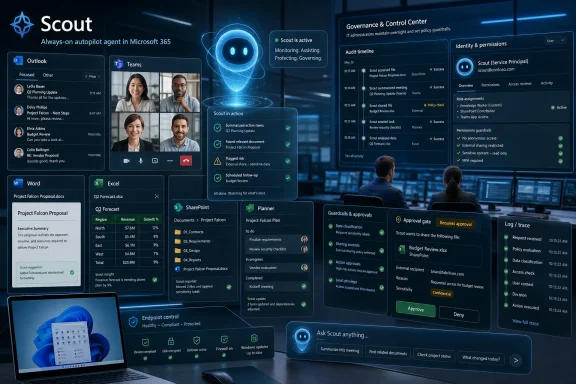
Microsoft introduced Microsoft Scout on June 2, 2026, at Build in San Francisco and online as its first “Autopilot” agent for Microsoft 365, an always-on OpenClaw-based assistant that works through Teams, Outlook, OneDrive, SharePoint, the desktop, the browser, and governed Entra identity. The announcement matters because Microsoft is no longer merely selling Copilot as a chat box with enterprise data access. It is trying to normalize a new class of software that waits in the background, observes work as it unfolds, and acts before the user asks. That is both the pitch and the problem: Scout is Microsoft’s clearest attempt yet to turn autonomous agents from a viral experiment into managed corporate infrastructure.
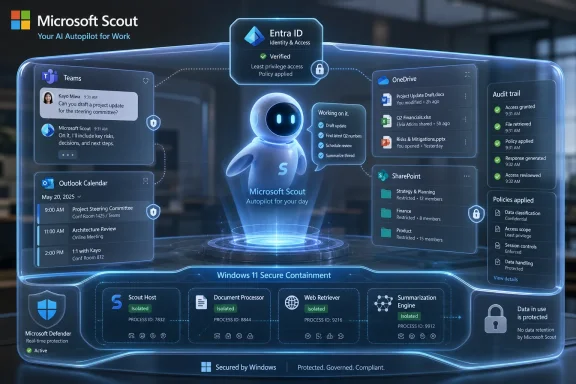
The most important word in Microsoft’s Scout announcement is not “AI,” “Copilot,” or even “OpenClaw.” It is identity. Scout is being positioned as an agent with its own governed Entra identity, which means Microsoft wants organizations to treat it less like a feature and more like a worker-shaped software principal.
That is a subtle but enormous shift. Traditional productivity software is something a user opens, commands, and closes. Copilot changed the interaction model by letting users ask for summaries, drafts, and analysis inside Microsoft 365. Scout changes the accountability model by giving an assistant enough persistence to act when the human is elsewhere.
Microsoft calls this new category “Autopilots,” a term that suggests delegation without abandonment. The agent remains under policy, but it does not wait for every individual prompt. It can coordinate meetings, monitor work commitments, block calendar time, surface stalled decisions, and prepare materials based on signals from chats, email, calendars, files, contacts, browser activity, local resources, and model context protocol servers.
That is not just a better assistant. It is Microsoft making a claim about where office work is going: away from the user manually orchestrating apps and toward a managed layer of agents moving between them.
That matters for WindowsForum readers because Microsoft is not treating agents as a cloud-only Microsoft 365 feature. It is pushing agent execution into Windows, WSL, Cloud PCs, browsers, and managed desktops. The desktop is becoming an agent host, not merely a place where humans run applications.
The company’s Windows developer messaging is unusually direct on this point. Microsoft Execution Containers are described as a policy-driven execution layer for agents, with developers declaring what an agent can access and Windows enforcing those boundaries at runtime. The company is also talking about OS-enforced agent identity, containment, Intune policy, Defender protections, Purview data controls, and Entra-backed attribution.
In other words, Scout is not just a product announcement. It is a proof point for Microsoft’s preferred answer to the agent problem: do not ban autonomous agents, do not let them roam free, and do not pretend chat permissions are enough. Give them identities, put them in containers, wire them into enterprise policy, and make Windows part of the control plane.
Microsoft’s move is notable because it does not reject OpenClaw. It embraces it, wraps it, and tries to enterprise it. Scout is explicitly powered by OpenClaw open-source technology, and Microsoft says it is contributing policy conformance upstream so organizations running OpenClaw can validate whether an environment meets security and compliance requirements.
That is a classic Microsoft play when a developer movement gets too large to ignore. The company does not need to own the original spark if it can own the enterprise-safe distribution path. It did this with Linux, containers, Kubernetes, VS Code extensions, GitHub workflows, and open-source developer tooling. Now it is attempting the same maneuver with autonomous agents.
The gamble is that enterprises will accept OpenClaw-style autonomy if Microsoft can make it legible to compliance teams. The risk is that “OpenClaw, but governed” may still inherit enough of OpenClaw’s threat model to make cautious organizations slow-walk adoption. Scout’s success will depend less on whether it can schedule meetings and more on whether auditors, CISOs, and tenant admins believe its actions are traceable, reversible, and meaningfully constrained.
That machinery is Microsoft 365. Teams tells Scout where conversations are happening. Outlook tells it what commitments are accumulating. OneDrive and SharePoint expose the documents that define projects. Calendar data exposes time pressure. Contacts reveal the human graph. Browser and desktop hooks extend the agent beyond cloud APIs into the messier world where modern work actually happens.
This is why the announcement is more consequential than a feature list. An assistant that summarizes a meeting is useful. An assistant that notices a decision has stalled, finds the relevant people, proposes a meeting time, prepares background material, and blocks focus time for deliverables is edging into workflow ownership. That is a different relationship between user and software.
Microsoft is trying to keep that relationship from sounding scary by emphasizing that Scout keeps the user “in the loop.” But “in the loop” is not a static concept. The more capable the agent becomes, the more pressure there will be to move approvals from every action to only sensitive actions, from active confirmation to policy exceptions, and from direct supervision to audit review.
The company is trying to solve a structural problem in agentic software: the more useful an agent is, the more dangerous it becomes. A calendar-only bot is safe but limited. A desktop-and-browser agent that can interact with files, apps, websites, local resources, and external MCP servers can become genuinely useful, but it also becomes a new attack surface with a memory, a tool belt, and delegated authority.
That is why Entra identity matters. If every agent acts through a known identity, its work can be attributed, logged, governed, and revoked. If credentials are scoped, redacted from diagnostics, and managed like first-party service credentials, the agent is less likely to become a leaky automation script with a friendly name. If Purview policies apply at the moment data is sent or written, the agent is at least forced to operate inside the same compliance envelope as a human user.
The hard part is that policy enforcement has to survive real-world complexity. Agents do not merely call clean APIs. They browse, paste, read, infer, click, summarize, transform, and compose. The difference between “preparing material for a meeting” and “exfiltrating sensitive context into the wrong place” can be a thin line when the agent is operating across chat, mail, files, and browser sessions.
Microsoft says MXC lets developers declare what an agent can access, such as files and network resources, while the runtime enforces boundaries. It also describes fast process isolation and session isolation that separate the agent’s execution from the user’s desktop, clipboard, UI, and input devices. That is important because the agent threat model is not just malware in the old sense; it is also UI spoofing, input injection, cross-session data leakage, and agents being tricked by malicious content.
This framing suggests Microsoft sees agents as a new class of workload, not merely a new class of application. A normal Windows app asks for permissions, runs under the user, and leaves the operating system to police broad resource boundaries. An agent may need finer-grained, intent-aware containment because it can reason, chain tasks, and act across interfaces designed for humans.
The connection to Windows 365 for Agents is equally revealing. If local execution is too risky or too hard to isolate, Microsoft can offer Cloud PCs as controlled workspaces where agents can open apps, navigate interfaces, enter data, and process workflows away from the user’s physical machine. That gives enterprises a familiar administrative model: isolate the workload, manage it with Intune, observe it, and wipe or revoke it when needed.
A personal agent that blocks time based on upcoming commitments is making a judgment about priority. An agent that flags stalled decisions is making a judgment about accountability. An agent that prepares meeting material is deciding what context matters. An agent that coordinates across time zones is mediating between people’s calendars, availability, and status.
Microsoft will argue that the user remains in control, and in the early versions that may be largely true. But organizations do not buy enterprise productivity tools merely to make individuals happier. They buy them to standardize workflows, compress cycle time, measure output, and make work more legible to management. Scout’s “Work IQ” layer, which learns how work gets done and what needs to happen next, could become a powerful personal assistant or a quiet instrument of managerial visibility.
That tension will define the reception. Workers may welcome an agent that reduces drudgery while resisting one that quietly encodes a corporate theory of productivity. Admins may love auditability while employees worry about surveillance. The same context that makes Scout useful also makes it sensitive.
This is where the distinction between an agent and a macro matters. A macro does what it is scripted to do. An agent interprets intent, plans steps, invokes tools, and adapts. That flexibility is the value proposition, but it also makes behavior harder to fully predict and harder to test with traditional software assurance methods.
Microsoft’s strongest defense is that enterprises already live in its identity, compliance, endpoint management, and productivity stack. If Scout’s actions are visible in Entra, constrained by Intune, scanned by Defender, and checked against Purview, Microsoft can offer a governance story that point solutions will struggle to match. That does not make Scout safe by default, but it makes it administratively plausible.
The bigger challenge is cultural. Security teams are accustomed to approving applications and monitoring accounts. They are less accustomed to approving non-human actors that can read context, make decisions, and take multi-step actions across software. Scout will force organizations to define not only what an agent may access, but what kinds of intent it may execute.
That could be good news for developers who have been forced to choose between cloud agent frameworks and brittle desktop automation. If Windows offers a supported containment model, local models, speech APIs, GPU and CPU acceleration, WSL container support, and managed Cloud PCs for agent execution, developers get a more coherent target. They can build agents that do real work without reinventing every permission and isolation boundary.
But the constraint is also clear. The more Microsoft defines the enterprise-safe path, the more agent developers will be nudged into Microsoft’s policy model. That means Entra identities, Intune policies, Purview constraints, Windows containment, and Microsoft 365 integration will shape what “acceptable” autonomy looks like in corporate environments.
This is not necessarily bad. The alternative is a sprawl of agents with opaque credentials and inconsistent audit trails. But it does mean that Microsoft is positioning itself as the referee for an emerging software category. Developers who want enterprise reach may find that building for Microsoft’s governance stack becomes less optional over time.
A Copilot prompt is episodic. A user asks, the model responds, and the interaction ends. Scout is persistent. It can notice, remember, infer, and act across time. That makes it closer to a lightweight operations layer than a chat feature.
This is why Microsoft’s use of Teams as the primary interaction surface is strategic. Teams is already where many organizations experience Microsoft 365 as a living workstream rather than a set of separate apps. Putting Scout there makes the agent feel like another participant in the work graph, even if its authority is backed by policies elsewhere.
The danger is that Microsoft may blur boundaries too successfully. If agents become ambient participants in work, users will need clear signals about when Scout is observing, when it is acting, whose authority it is using, what data it considered, and how to stop or correct it. Autonomy without comprehensibility will not survive contact with enterprise risk committees.
That gated rollout is not just caution; it is product research. Microsoft needs to learn how always-on agents behave in the untidy reality of enterprise tenants, where policies differ, data hygiene varies, calendars are chaotic, and users routinely create edge cases no demo anticipates. The preview is where Microsoft will discover which tasks users actually trust Scout to perform and which ones demand human approval.
The GitHub Copilot license requirement is also interesting. It ties the early Scout experience to an audience already accustomed to AI-assisted work, especially developers and technical users. That group is more likely to tolerate rough edges, understand agent concepts, and provide meaningful feedback. It is also more likely to test boundaries.
For admins, the preview should be treated as a governance pilot, not a productivity toy. The relevant questions are not simply whether Scout saves time. They are how permissions are assigned, how actions are logged, how sensitive operations are approved, how data boundaries are enforced, and how quickly the organization can disable the agent if something goes wrong.
That integration is the product’s strongest selling point. It is also why competitors will frame Scout as another expansion of Microsoft’s control over the enterprise work layer. If the agent that understands your work, schedules your time, prepares your materials, reads your documents, and navigates your desktop is also from the vendor that owns the identity system, endpoint manager, collaboration hub, productivity suite, browser hooks, and cloud PC, the convenience is obvious. So is the lock-in.
WindowsForum readers have seen this movie before. Microsoft often wins by making the integrated path the administratively sane path. The company does not need every organization to love the idea of always-on agents. It needs them to conclude that if agents are coming anyway, Microsoft’s version is the one least likely to get them fired.
That is the sober way to understand Scout. It is not Microsoft discovering personal agents for the first time. It is Microsoft domesticating the agentic enthusiasm that OpenClaw unleashed and routing it through the enterprise machinery Microsoft already controls.
 Microsoft Moves the Agent From the Prompt Box to the Org Chart
The most important word in Microsoft’s Scout announcement is not “AI,” “Copilot,” or even “OpenClaw.” It is identity. Scout is being positioned as an agent with its own governed Entra identity, which means Microsoft wants organizations to treat it less like a feature and more like a worker-shaped software principal.That is a subtle but enormous shift. Traditional productivity software is something a user opens, commands, and closes. Copilot changed the interaction model by letting users ask for summaries, drafts, and analysis inside Microsoft 365. Scout changes the accountability model by giving an assistant enough persistence to act when the human is elsewhere.
Microsoft calls this new category “Autopilots,” a term that suggests delegation without abandonment. The agent remains under policy, but it does not wait for every individual prompt. It can coordinate meetings, monitor work commitments, block calendar time, surface stalled decisions, and prepare materials based on signals from chats, email, calendars, files, contacts, browser activity, local resources, and model context protocol servers.
That is not just a better assistant. It is Microsoft making a claim about where office work is going: away from the user manually orchestrating apps and toward a managed layer of agents moving between them.
Scout Is the Friendly Face of a Much Bigger Platform Bet
Scout arrives wrapped in the language of personal productivity, but Build 2026 made clear that Microsoft is building a broader agent stack underneath it. The same event featured OpenClaw on Windows in preview, Microsoft Execution Containers, Windows 365 for Agents, Agent 365 integration, new Windows AI APIs, local small language models, and developer hardware aimed at running agent workloads. Scout is the consumer-visible tip of an enterprise architecture iceberg.That matters for WindowsForum readers because Microsoft is not treating agents as a cloud-only Microsoft 365 feature. It is pushing agent execution into Windows, WSL, Cloud PCs, browsers, and managed desktops. The desktop is becoming an agent host, not merely a place where humans run applications.
The company’s Windows developer messaging is unusually direct on this point. Microsoft Execution Containers are described as a policy-driven execution layer for agents, with developers declaring what an agent can access and Windows enforcing those boundaries at runtime. The company is also talking about OS-enforced agent identity, containment, Intune policy, Defender protections, Purview data controls, and Entra-backed attribution.
In other words, Scout is not just a product announcement. It is a proof point for Microsoft’s preferred answer to the agent problem: do not ban autonomous agents, do not let them roam free, and do not pretend chat permissions are enough. Give them identities, put them in containers, wire them into enterprise policy, and make Windows part of the control plane.
OpenClaw Forced Microsoft to Pick a Side
OpenClaw is the ghost in the room. The open-source agent framework became a symbol of what enthusiasts want from autonomous software: persistence, extensibility, local control, tool use, and the ability to wire an agent into real workflows without waiting for a vendor roadmap. It also became a symbol of what security teams fear: broad permissions, unpredictable actions, credential exposure, prompt injection, and weak boundaries between suggestion and execution.Microsoft’s move is notable because it does not reject OpenClaw. It embraces it, wraps it, and tries to enterprise it. Scout is explicitly powered by OpenClaw open-source technology, and Microsoft says it is contributing policy conformance upstream so organizations running OpenClaw can validate whether an environment meets security and compliance requirements.
That is a classic Microsoft play when a developer movement gets too large to ignore. The company does not need to own the original spark if it can own the enterprise-safe distribution path. It did this with Linux, containers, Kubernetes, VS Code extensions, GitHub workflows, and open-source developer tooling. Now it is attempting the same maneuver with autonomous agents.
The gamble is that enterprises will accept OpenClaw-style autonomy if Microsoft can make it legible to compliance teams. The risk is that “OpenClaw, but governed” may still inherit enough of OpenClaw’s threat model to make cautious organizations slow-walk adoption. Scout’s success will depend less on whether it can schedule meetings and more on whether auditors, CISOs, and tenant admins believe its actions are traceable, reversible, and meaningfully constrained.
The Office Assistant Finally Got Permissions
The history of digital assistants is littered with products that could talk convincingly but do very little. Siri, Alexa, Google Assistant, Cortana, and the first wave of Copilot-style chat tools all ran into the same wall: helpful language without dependable authority is still mostly advice. Scout is Microsoft’s attempt to cross that wall by giving the assistant sanctioned access to the machinery of work.That machinery is Microsoft 365. Teams tells Scout where conversations are happening. Outlook tells it what commitments are accumulating. OneDrive and SharePoint expose the documents that define projects. Calendar data exposes time pressure. Contacts reveal the human graph. Browser and desktop hooks extend the agent beyond cloud APIs into the messier world where modern work actually happens.
This is why the announcement is more consequential than a feature list. An assistant that summarizes a meeting is useful. An assistant that notices a decision has stalled, finds the relevant people, proposes a meeting time, prepares background material, and blocks focus time for deliverables is edging into workflow ownership. That is a different relationship between user and software.
Microsoft is trying to keep that relationship from sounding scary by emphasizing that Scout keeps the user “in the loop.” But “in the loop” is not a static concept. The more capable the agent becomes, the more pressure there will be to move approvals from every action to only sensitive actions, from active confirmation to policy exceptions, and from direct supervision to audit review.
Governance Is the Product, Not the Wrapper
Microsoft’s Scout pitch repeatedly returns to identity, credentials, access control, sensitivity labels, data loss prevention, and sign-off for sensitive actions. That may sound like enterprise throat-clearing, but it is actually the core product. Without those controls, Scout would be another impressive demo that most regulated organizations would refuse to deploy.The company is trying to solve a structural problem in agentic software: the more useful an agent is, the more dangerous it becomes. A calendar-only bot is safe but limited. A desktop-and-browser agent that can interact with files, apps, websites, local resources, and external MCP servers can become genuinely useful, but it also becomes a new attack surface with a memory, a tool belt, and delegated authority.
That is why Entra identity matters. If every agent acts through a known identity, its work can be attributed, logged, governed, and revoked. If credentials are scoped, redacted from diagnostics, and managed like first-party service credentials, the agent is less likely to become a leaky automation script with a friendly name. If Purview policies apply at the moment data is sent or written, the agent is at least forced to operate inside the same compliance envelope as a human user.
The hard part is that policy enforcement has to survive real-world complexity. Agents do not merely call clean APIs. They browse, paste, read, infer, click, summarize, transform, and compose. The difference between “preparing material for a meeting” and “exfiltrating sensitive context into the wrong place” can be a thin line when the agent is operating across chat, mail, files, and browser sessions.
Windows Becomes an Agent Containment System
For Windows users and administrators, the most interesting Scout-adjacent announcement may be Microsoft Execution Containers. MXC is Microsoft’s answer to a problem that Windows has historically not had to solve at this scale: how to let semi-autonomous software use the PC without giving it the PC.Microsoft says MXC lets developers declare what an agent can access, such as files and network resources, while the runtime enforces boundaries. It also describes fast process isolation and session isolation that separate the agent’s execution from the user’s desktop, clipboard, UI, and input devices. That is important because the agent threat model is not just malware in the old sense; it is also UI spoofing, input injection, cross-session data leakage, and agents being tricked by malicious content.
This framing suggests Microsoft sees agents as a new class of workload, not merely a new class of application. A normal Windows app asks for permissions, runs under the user, and leaves the operating system to police broad resource boundaries. An agent may need finer-grained, intent-aware containment because it can reason, chain tasks, and act across interfaces designed for humans.
The connection to Windows 365 for Agents is equally revealing. If local execution is too risky or too hard to isolate, Microsoft can offer Cloud PCs as controlled workspaces where agents can open apps, navigate interfaces, enter data, and process workflows away from the user’s physical machine. That gives enterprises a familiar administrative model: isolate the workload, manage it with Intune, observe it, and wipe or revoke it when needed.
The Productivity Demo Hides the Labor Politics
Scout’s advertised examples are deliberately mundane: scheduling, coordination, preparation, calendar blocking, and risk spotting. That is smart product marketing because almost nobody loves administrative overhead. But the mundane is also where office politics live.A personal agent that blocks time based on upcoming commitments is making a judgment about priority. An agent that flags stalled decisions is making a judgment about accountability. An agent that prepares meeting material is deciding what context matters. An agent that coordinates across time zones is mediating between people’s calendars, availability, and status.
Microsoft will argue that the user remains in control, and in the early versions that may be largely true. But organizations do not buy enterprise productivity tools merely to make individuals happier. They buy them to standardize workflows, compress cycle time, measure output, and make work more legible to management. Scout’s “Work IQ” layer, which learns how work gets done and what needs to happen next, could become a powerful personal assistant or a quiet instrument of managerial visibility.
That tension will define the reception. Workers may welcome an agent that reduces drudgery while resisting one that quietly encodes a corporate theory of productivity. Admins may love auditability while employees worry about surveillance. The same context that makes Scout useful also makes it sensitive.
The Security Model Will Be Judged by the Failures
Microsoft’s announcement uses all the right enterprise words, but the market will not judge Scout by the announcement. It will judge Scout by the first incidents. The first time an agent schedules the wrong meeting is a nuisance. The first time it sends sensitive material to the wrong destination, accepts a malicious instruction from a document, or acts under misunderstood authority, it becomes a case study.This is where the distinction between an agent and a macro matters. A macro does what it is scripted to do. An agent interprets intent, plans steps, invokes tools, and adapts. That flexibility is the value proposition, but it also makes behavior harder to fully predict and harder to test with traditional software assurance methods.
Microsoft’s strongest defense is that enterprises already live in its identity, compliance, endpoint management, and productivity stack. If Scout’s actions are visible in Entra, constrained by Intune, scanned by Defender, and checked against Purview, Microsoft can offer a governance story that point solutions will struggle to match. That does not make Scout safe by default, but it makes it administratively plausible.
The bigger challenge is cultural. Security teams are accustomed to approving applications and monitoring accounts. They are less accustomed to approving non-human actors that can read context, make decisions, and take multi-step actions across software. Scout will force organizations to define not only what an agent may access, but what kinds of intent it may execute.
Developers Get a New Target, and a New Constraint
For developers, Scout and the broader Build agent stack create a new platform opportunity. Microsoft is clearly inviting software makers to build around agents that can use Windows, Microsoft 365, MCP servers, local resources, and cloud services. The company wants Windows to be a place where agents are developed, tested, contained, and deployed.That could be good news for developers who have been forced to choose between cloud agent frameworks and brittle desktop automation. If Windows offers a supported containment model, local models, speech APIs, GPU and CPU acceleration, WSL container support, and managed Cloud PCs for agent execution, developers get a more coherent target. They can build agents that do real work without reinventing every permission and isolation boundary.
But the constraint is also clear. The more Microsoft defines the enterprise-safe path, the more agent developers will be nudged into Microsoft’s policy model. That means Entra identities, Intune policies, Purview constraints, Windows containment, and Microsoft 365 integration will shape what “acceptable” autonomy looks like in corporate environments.
This is not necessarily bad. The alternative is a sprawl of agents with opaque credentials and inconsistent audit trails. But it does mean that Microsoft is positioning itself as the referee for an emerging software category. Developers who want enterprise reach may find that building for Microsoft’s governance stack becomes less optional over time.
Copilot Was the Interface; Scout Is the Operating Model
Copilot taught users to expect AI inside the flow of work. Scout asks them to accept AI as part of the flow of work. That distinction is easy to miss but hard to overstate.A Copilot prompt is episodic. A user asks, the model responds, and the interaction ends. Scout is persistent. It can notice, remember, infer, and act across time. That makes it closer to a lightweight operations layer than a chat feature.
This is why Microsoft’s use of Teams as the primary interaction surface is strategic. Teams is already where many organizations experience Microsoft 365 as a living workstream rather than a set of separate apps. Putting Scout there makes the agent feel like another participant in the work graph, even if its authority is backed by policies elsewhere.
The danger is that Microsoft may blur boundaries too successfully. If agents become ambient participants in work, users will need clear signals about when Scout is observing, when it is acting, whose authority it is using, what data it considered, and how to stop or correct it. Autonomy without comprehensibility will not survive contact with enterprise risk committees.
The Preview Label Is Doing Real Work
Scout is not being thrown wide open. Microsoft says employees have been using an early desktop experience, and the company is extending access to select customers in private preview and Frontier organizations. Access requires Frontier enrollment, Intune policy configuration, opt-in attestation, and a GitHub Copilot license for users who download and install the experience.That gated rollout is not just caution; it is product research. Microsoft needs to learn how always-on agents behave in the untidy reality of enterprise tenants, where policies differ, data hygiene varies, calendars are chaotic, and users routinely create edge cases no demo anticipates. The preview is where Microsoft will discover which tasks users actually trust Scout to perform and which ones demand human approval.
The GitHub Copilot license requirement is also interesting. It ties the early Scout experience to an audience already accustomed to AI-assisted work, especially developers and technical users. That group is more likely to tolerate rough edges, understand agent concepts, and provide meaningful feedback. It is also more likely to test boundaries.
For admins, the preview should be treated as a governance pilot, not a productivity toy. The relevant questions are not simply whether Scout saves time. They are how permissions are assigned, how actions are logged, how sensitive operations are approved, how data boundaries are enforced, and how quickly the organization can disable the agent if something goes wrong.
Microsoft’s Best Argument Is Also Its Biggest Liability
Microsoft has one overwhelming advantage in this race: it already owns the workplace substrate. Scout can be grounded in Microsoft 365 data because that is where the data already lives. It can be governed by Entra because organizations already use Entra. It can be managed through Intune because endpoints already report there. It can enforce Purview policies because compliance teams have already invested in that model.That integration is the product’s strongest selling point. It is also why competitors will frame Scout as another expansion of Microsoft’s control over the enterprise work layer. If the agent that understands your work, schedules your time, prepares your materials, reads your documents, and navigates your desktop is also from the vendor that owns the identity system, endpoint manager, collaboration hub, productivity suite, browser hooks, and cloud PC, the convenience is obvious. So is the lock-in.
WindowsForum readers have seen this movie before. Microsoft often wins by making the integrated path the administratively sane path. The company does not need every organization to love the idea of always-on agents. It needs them to conclude that if agents are coming anyway, Microsoft’s version is the one least likely to get them fired.
That is the sober way to understand Scout. It is not Microsoft discovering personal agents for the first time. It is Microsoft domesticating the agentic enthusiasm that OpenClaw unleashed and routing it through the enterprise machinery Microsoft already controls.
The Scout Announcement Gives Admins Their First Real Checklist
Scout is early, but it is concrete enough that IT teams can start preparing. The organizations that get value from this wave will not be the ones that simply enable the newest assistant. They will be the ones that treat agents as identities, workloads, and policy subjects from day one.- Microsoft Scout is best understood as an autonomous Microsoft 365 work agent, not as a conventional Copilot chat feature.
- Scout’s enterprise case depends on governed Entra identity, scoped credentials, Purview enforcement, Intune configuration, and human approval for sensitive actions.
- OpenClaw is no longer merely an enthusiast phenomenon; Microsoft is using it as a foundation while trying to add policy conformance and enterprise controls.
- Windows is becoming a runtime and containment layer for agents through Microsoft Execution Containers, Agent 365 integration, and Windows 365 for Agents.
- Early adopters should pilot Scout with auditability, revocation, data boundaries, and incident response plans defined before productivity metrics are celebrated.
- The most important unresolved question is not whether Scout can save time, but whether organizations can understand and trust the chain of authority behind every action it takes.
References
- Primary source: Microsoft Source
Published: Tue, 02 Jun 2026 19:16:19 GMT
Microsoft Build Live
The home for real-time coverage of the news as it is announced from Microsoft Build, June 2-3, 2026.news.microsoft.com - Independent coverage: Computerworld
Published: 2026-06-02T18:50:13.648375
Microsoft unveils Scout, an autonomous AI agent built on OpenClaw – Computerworld
Scout is the first of a new breed of ‘autopilot’ agents in Microsoft 365 that can carry out tasks independently. www.computerworld.com
- Independent coverage: Microsoft
Published: Tue, 02 Jun 2026 18:00:00 GMT
Introducing Microsoft Scout: Your always-on personal agent | Microsoft 365 Blog
Microsoft introduces a new, always-on personal agent, Microsoft Scout, integrated across the Microsoft 365 apps you use every day.www.microsoft.com - Related coverage: techradar.com
50 Microsoft tools you can use for free just in time for Build 2026 | TechRadar
Free tools from across the Microsoft ecosystemwww.techradar.com - Related coverage: windowscentral.com
How to watch Microsoft Build 2026: Windows 11, NVIDIA RTX Spark, AI agents, and more | Windows Central
Build isn't just some boring developer conference. It showcases the future of Windows and computing.www.windowscentral.com - Related coverage: tomsguide.com
Microsoft Build 2026 preview — all the big announcements to expect | Tom's Guide
Microsoft Build 2026 should be a showcase for the company's latest and upcoming AI efforts. Here are some of the big announcements we expect to see.www.tomsguide.com
- Official source: blogs.windows.com
Build 2026: Furthering Windows as the trusted platform for development
Build is one of our favorite moments each year - a chance to connect with the global developer community and share what we’ve been building. Over the past year, we have connected with many developers pushing the boundaries of what’s possible onblogs.windows.com - Official source: devblogs.microsoft.com
Microsoft Agent Framework at BUILD 2026 | Microsoft Agent Framework
Watch Microsoft Agent Framework sessions at Build 2026 (June 2–3). Explore multi-agent systems, agent harness patterns, observability, evals, and open-source governance.devblogs.microsoft.com - Official source: build.microsoft.com
Your home for Microsoft Build
Go deep on real code and real systems with the teams building and scaling AI at Microsoft Build, June 2–3, 2026, in San Francisco and online.build.microsoft.com - Related coverage: techcrunch.com
Microsoft is working on yet another OpenClaw-like agent | TechCrunch
The new features would be geared toward enterprise customers, with better security controls than the famously risky open source OpenClaw agent.techcrunch.com - Related coverage: nvidia.com
Join NVIDIA at Microsoft Build 2026
Learn how NVIDIA and Microsoft are partnering to accelerate the development and deployment of Generative AI across Microsoft Azure, Azure AI services, and more.www.nvidia.com - Related coverage: itpro.com
Dell unveils Deskside Agentic AI at Dell Technologies World 2026 | IT Pro
Deskside Agentic AI is the latest in the Dell AI Factory with Nvidia stable, with the company saying it further demonstrates its end-to-end enterprise AI capabilitywww.itpro.com - Related coverage: axios.com
OpenClaw agents inspire Nvidia, Anthropic, Perplexity, Snowflake
Big tech races to create the most secure agents for work.www.axios.com
- Related coverage: techxplore.com
- Related coverage: labs.cloudsecurityalliance.org
CSA research note entra agent id admin takeover 20260428 csa styled
PDF documentlabs.cloudsecurityalliance.org