

Microsoft announced the 12th-generation Surface Pro on June 16, 2026, bringing Qualcomm’s Snapdragon X2 Plus and X2 Elite processors to its flagship Windows tablet in the United States and other launch markets. The hardware looks almost deliberately familiar, but the price does not. What Microsoft is really launching is not a redesigned Surface so much as a more expensive second act for Windows on Arm, one that asks buyers to believe the platform’s compatibility story is finally settled and that local AI performance is now worth real money.
The bet is cleaner than it was in 2024. Back then, the first Copilot+ PCs arrived with Snapdragon X chips, a new NPU threshold, and a lot of unfinished promises around Windows AI features. Two years later, the new Surface Pro lands in a more mature ecosystem, but also in a harsher market: users have now had time to learn which apps work well on Arm, which still feel compromised, and how much “AI PC” branding actually changes a workday.
The 12th-generation Surface Pro keeps the basic formula Microsoft has been refining for more than a decade: a thin 13-inch Windows tablet, a kickstand, a detachable keyboard sold as an accessory or promotion, pen support, Windows Hello, and enough ports to be useful but not generous. The colors are familiar too — Dune, Black, and Platinum — which makes the launch feel less like a design reset than a platform refresh.
That is not necessarily a weakness. Surface Pro buyers generally know what they are buying: the most polished version of Microsoft’s detachable PC idea, with all the compromises that come with it. The device is still a brilliant travel computer for people who live in OneNote, Outlook, Teams, Edge, Office, remote desktops, and browser-based line-of-business apps. It is still less ideal for people who want a laptop first and a tablet occasionally.
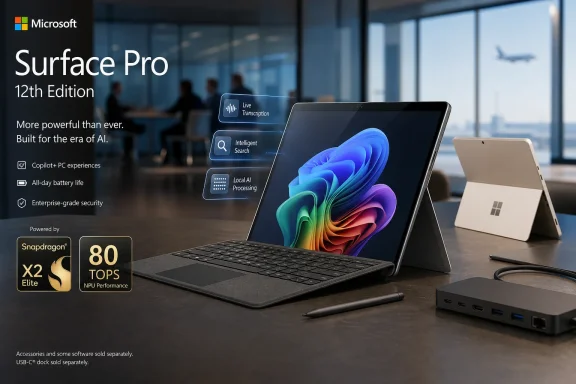
The most consequential change is inside. Microsoft is moving the consumer Surface Pro from Snapdragon X1-class processors to Snapdragon X2, with a choice between a 10-core Snapdragon X2 Plus and a 12-core Snapdragon X2 Elite. Qualcomm’s new platform raises the AI accelerator to as much as 80 TOPS, while Microsoft is claiming substantially better graphics performance than the previous generation.
That is the right place for Microsoft to focus. The original Snapdragon X Surface Pro was not slow in ordinary productivity work, but it carried two burdens: uneven graphics expectations and the lingering memory of earlier Arm-based Surface devices that felt like experiments. The new model is Microsoft saying that the experiment phase is over. The question is whether the rest of the PC market agrees.
That $500 jump changes the conversation. At $999, a Surface Pro could be defended as a premium Windows tablet with a plausible mainstream entry point. At $1,499 before accessories, it moves squarely into high-end laptop territory, where buyers compare it not only against Windows ultrabooks but also against MacBook Pros, business ThinkPads, Dell XPS machines, HP Spectre systems, and even Microsoft’s own Surface Laptop line.
Microsoft is softening the blow with a limited-time promotion that includes a Surface Pro 13-inch Keyboard for buyers between June 16 and June 30. That matters because the Surface Pro without a keyboard is technically complete but practically unfinished for most PC users. Still, a two-week bundle does not erase the long-term price repositioning. It merely acknowledges the obvious: the keyboard is essential enough that treating it as optional has always been a little too convenient.
The price also sharpens the Arm compatibility question. When a device is cheaper, buyers are more willing to forgive edge cases. At $1,499, the machine has to behave like a primary PC for professionals, students, and creators who do not want to become amateur platform testers. Microsoft is no longer asking customers to try Windows on Arm. It is asking them to pay premium money for it.
But the “AI PC” pitch has always had a translation problem. TOPS is a vendor-friendly metric, not a user experience. Buyers do not wake up wanting 80 trillion operations per second; they want search that finds the right document, video calls that look better without draining the battery, transcription that works offline, creative tools that accelerate real work, and system features that feel less like demos.
Microsoft’s challenge is that hardware has been moving faster than the visible software payoff. Copilot+ PCs promised a new class of Windows experiences, but the most controversial and memorable feature from the original launch window was Recall, which became a privacy and security flashpoint before being reworked. That episode taught users to be skeptical of sweeping AI claims, particularly when the features touch personal data.
The new Surface Pro gives Microsoft room to rebuild that case. Better silicon means more local inference capacity, and more local inference capacity gives Microsoft and developers more options. Yet the platform will be judged by workflows, not by neural processing benchmarks. If the best AI experiences remain scattered, gated, delayed, or cloud-dependent, the NPU becomes another impressive line item that does not justify the purchase on its own.
OLED matters on a tablet-shaped PC. It improves perceived contrast, makes media look richer, and gives creative and reading-heavy users a more modern premium feel. But it also risks making the base model feel like a compromise at a price where compromises are harder to excuse.
The same pattern appears in storage and memory. Microsoft now offers configurations up to 64GB of RAM, which is a welcome expansion from the prior 32GB ceiling. Storage remains at 256GB, 512GB, or 1TB, using user-replaceable PCIe Gen4 SSDs. The replaceable SSD continues to be one of Surface Pro’s most practical strengths, particularly for businesses and technically confident users who dislike sealed storage.
Still, the base 256GB SSD is going to annoy some buyers. In 2026, 256GB is workable for cloud-first users, but it is lean for a premium Windows machine. Windows itself, recovery partitions, development tools, offline media, Teams caches, OneDrive sync folders, and modern creative apps can chew through that space quickly. Microsoft’s storage tiers preserve upsell room, but they also make the entry price feel less generous.
USB4 helps. One cable can handle power, external display, fast storage, and docked peripherals. For a clean-desk setup, the Surface Pro can be elegant: carry the tablet, snap on the keyboard, and plug into a single cable at a desk.
The weakness appears in messier real-world environments. Conference rooms still have HDMI. Photographers still juggle SD cards. Some offices still have USB-A security keys, label printers, imaging tools, and legacy accessories. Surface Pro users have long accepted dongles as the cost of thinness, but the higher the price rises, the more visible those missing ports become.
Wireless connectivity is stronger. Wi-Fi 7 and Bluetooth 5.4 put the device where a 2026 premium PC should be. Those upgrades matter more than they sound, especially in dense enterprise environments and home offices filled with competing devices. But wireless improvements do not fully replace physical flexibility, and detachable PCs live or die by how gracefully they move between contexts.
The original Copilot+ Surface generation helped normalize Snapdragon Windows PCs in a way earlier Surface Pro X devices never did. Performance improved, battery life became more competitive, and app compatibility was less frightening than in previous Arm eras. But the ecosystem still depends on developers doing the work. Native Arm64 apps are the difference between a platform that feels modern and one that occasionally reminds users they bought the unusual version.
For mainstream users, the story is better than it used to be. Browsers, Office, Teams, many communication tools, and a growing number of productivity apps run well. Emulation has improved enough that many older applications are fine. But “many” is not “all,” and professionals tend to discover compatibility problems at the worst possible time: a VPN client before a trip, a printer utility before a deadline, a plug-in before a presentation, a driver-dependent app before a client meeting.
That is why Surface Pro matters disproportionately. If Microsoft cannot make its own flagship Arm PC feel boringly reliable, the rest of the ecosystem has a problem. Conversely, if the 12th-generation Surface Pro performs well, lasts long, and avoids compatibility drama, it gives OEMs permission to push Snapdragon X2 machines more aggressively.
But IT departments are conservative for a reason. Platform transitions create helpdesk tickets, and Arm adds a layer of validation work that x86 fleets do not require. Even if most apps work, the burden of proving that they work falls on IT. That means testing VPN clients, endpoint detection agents, device management policies, printer drivers, browser extensions, accessibility tools, and industry-specific software.
Microsoft has tried to split the difference by maintaining Intel-based Surface for Business options while bringing Snapdragon X2 into the broader Surface lineup. That is a pragmatic move. It lets organizations choose battery life and Arm efficiency where the software stack is ready, while keeping Intel for users whose workflows are still tied to x86 assumptions.
The risk is fragmentation. A mixed fleet of Intel and Arm Windows PCs is manageable, but it adds another axis to procurement and support. IT teams will need clearer policies about who gets which architecture. Without that discipline, the helpdesk may find itself troubleshooting not just Windows, but Windows-on-this-chip-versus-Windows-on-that-chip.
Surface Pro is not a gaming handheld, and it is not marketed as a workstation. But graphics performance touches more than games. It affects external display smoothness, browser rendering, creative apps, light video editing, GPU-accelerated interfaces, and the general feeling that a machine is keeping up with modern software. A weak GPU makes a premium PC feel older than its CPU benchmarks suggest.
The problem is that Windows graphics expectations are complicated. Some games rely on anti-cheat systems that may not behave well on Arm. Some creative tools are tuned for specific GPU architectures. Some professional applications expect driver maturity that takes time to build. A faster Adreno GPU helps, but driver support and software optimization will matter just as much as raw performance.
That is why this generation needs real-world testing more than launch claims. If the Surface Pro can handle the boring things smoothly — multiple displays, heavy browser sessions, video calls, Office, media playback, casual creative work, and long standby — most buyers will be satisfied. If it stumbles in edge cases that premium buyers consider normal, the price will make those stumbles louder.
Even so, battery life is where Snapdragon Surface devices have their strongest emotional appeal. A Surface Pro that can last through travel, meetings, note-taking, browsing, and light creative work without constant charger anxiety is a different class of PC from one that makes users scan every room for an outlet. The detachable form factor amplifies this because the device is often used away from desks.
Battery life also affects whether the Surface Pro feels like a tablet. A tablet should be ready when picked up, should sleep efficiently, and should not punish casual use with laptop-like power management rituals. Windows has historically struggled to feel as appliance-like as iPadOS in this respect, but Arm gives Microsoft a better chance.
The catch is that Windows is still Windows. Background processes, legacy apps, peripheral drivers, and enterprise agents can all erode the clean battery story. Microsoft can design the hardware, but the lived experience depends on the software environment buyers bring to it.
This contradiction has followed Surface Pro for years. Microsoft wants the device to be seen as modular and flexible, but most buyers configure it like a laptop. They need the keyboard. Many also want the pen. By the time the accessories are included, the Surface Pro often competes less like a tablet and more like an unusually expensive ultraportable with a removable base.
The 2026 pricing makes that tension harder to ignore. A $1,499 starting point with a temporary keyboard bundle will feel acceptable to some early buyers, especially those already committed to the form factor. After June 30, the math becomes less friendly unless Microsoft extends the promotion or adjusts bundles.
There is a strategic reason Microsoft keeps doing this. Accessories are margin, and Surface keyboards are part of the product identity. But as Windows laptops become lighter, brighter, and more efficient, the detachable premium needs to be justified by real use cases, not just by the elegance of the hinge.
That split is healthy for Microsoft but dangerous for indecisive buyers. The Surface Laptop represents the mainstream expression of Windows on Arm. The Surface Pro represents the aspirational one. If the prices are close, users will ask whether they are paying more for a form factor they use less.
The Pro still has unique strengths. It is excellent for handwritten notes, markup, cramped airplane trays, standing presentations, and desk setups where the tablet can sit beside a main monitor as a secondary screen. It also remains one of the few Windows devices that makes tablet mode feel like more than an afterthought.
But the Surface Laptop’s existence forces clarity. If a buyer wants the best Windows laptop experience, they should probably buy a laptop. If they want the most flexible Windows device and accept the ergonomic trade-offs, the Surface Pro still has a reason to exist. Microsoft’s challenge is that flexibility alone becomes a tougher sell as the price climbs.
The 12th-generation Surface Pro is different. It arrives after two years of market education. Reviewers, IT departments, developers, and users now know what to test. They know to ask about native apps, emulation, thermals, standby drain, external displays, security tools, and the difference between impressive AI demos and daily productivity.
That maturity is good for the platform but unforgiving for Microsoft. The company cannot lean forever on the idea that Arm Windows is about to become great. At $1,499, it has to be great enough now.
The irony is that Microsoft may be right on the direction and vulnerable on the timing. Local AI workloads will matter more over time. Efficient Arm PCs will matter more as users expect battery life without performance collapse. Thin, quiet, always-ready Windows machines are exactly where the market is going. But being early to the future does not exempt a product from present-day value judgments.
For enthusiasts, that makes the device fascinating. For everyday buyers, it makes patience reasonable. The first reviews will matter, especially around sustained performance, battery life under real workloads, app compatibility, and whether the OLED upgrade is worth the added cost.
For IT pros, the buying advice is more conservative. Test before standardizing. The Surface Pro may be excellent for some users and wrong for others in the same organization. Arm is no longer exotic, but it is still a deployment variable.
The bet is cleaner than it was in 2024. Back then, the first Copilot+ PCs arrived with Snapdragon X chips, a new NPU threshold, and a lot of unfinished promises around Windows AI features. Two years later, the new Surface Pro lands in a more mature ecosystem, but also in a harsher market: users have now had time to learn which apps work well on Arm, which still feel compromised, and how much “AI PC” branding actually changes a workday.
 Microsoft Changes the Silicon, Not the Surface Story
The 12th-generation Surface Pro keeps the basic formula Microsoft has been refining for more than a decade: a thin 13-inch Windows tablet, a kickstand, a detachable keyboard sold as an accessory or promotion, pen support, Windows Hello, and enough ports to be useful but not generous. The colors are familiar too — Dune, Black, and Platinum — which makes the launch feel less like a design reset than a platform refresh.That is not necessarily a weakness. Surface Pro buyers generally know what they are buying: the most polished version of Microsoft’s detachable PC idea, with all the compromises that come with it. The device is still a brilliant travel computer for people who live in OneNote, Outlook, Teams, Edge, Office, remote desktops, and browser-based line-of-business apps. It is still less ideal for people who want a laptop first and a tablet occasionally.
The most consequential change is inside. Microsoft is moving the consumer Surface Pro from Snapdragon X1-class processors to Snapdragon X2, with a choice between a 10-core Snapdragon X2 Plus and a 12-core Snapdragon X2 Elite. Qualcomm’s new platform raises the AI accelerator to as much as 80 TOPS, while Microsoft is claiming substantially better graphics performance than the previous generation.
That is the right place for Microsoft to focus. The original Snapdragon X Surface Pro was not slow in ordinary productivity work, but it carried two burdens: uneven graphics expectations and the lingering memory of earlier Arm-based Surface devices that felt like experiments. The new model is Microsoft saying that the experiment phase is over. The question is whether the rest of the PC market agrees.
The $1,499 Starting Price Turns a Refresh Into a Statement
The most jarring specification is not the NPU, the GPU, or the 64GB RAM ceiling. It is the starting price. The prior Snapdragon Surface Pro generation launched at $999, while the new Surface Pro starts at $1,499 with 16GB of memory and 256GB of storage.That $500 jump changes the conversation. At $999, a Surface Pro could be defended as a premium Windows tablet with a plausible mainstream entry point. At $1,499 before accessories, it moves squarely into high-end laptop territory, where buyers compare it not only against Windows ultrabooks but also against MacBook Pros, business ThinkPads, Dell XPS machines, HP Spectre systems, and even Microsoft’s own Surface Laptop line.
Microsoft is softening the blow with a limited-time promotion that includes a Surface Pro 13-inch Keyboard for buyers between June 16 and June 30. That matters because the Surface Pro without a keyboard is technically complete but practically unfinished for most PC users. Still, a two-week bundle does not erase the long-term price repositioning. It merely acknowledges the obvious: the keyboard is essential enough that treating it as optional has always been a little too convenient.
The price also sharpens the Arm compatibility question. When a device is cheaper, buyers are more willing to forgive edge cases. At $1,499, the machine has to behave like a primary PC for professionals, students, and creators who do not want to become amateur platform testers. Microsoft is no longer asking customers to try Windows on Arm. It is asking them to pay premium money for it.
Snapdragon X2 Makes the AI PC Pitch More Plausible, Not Automatically Useful
The Snapdragon X2 upgrade gives Microsoft a stronger technical foundation for its Copilot+ PC message. An 80 TOPS NPU is a large increase over the first wave of Copilot+ hardware, and it gives Windows more room to run local AI workloads without leaning on the CPU, GPU, or cloud. In principle, that means better responsiveness, lower power use, and more privacy-friendly processing for features that can stay on-device.But the “AI PC” pitch has always had a translation problem. TOPS is a vendor-friendly metric, not a user experience. Buyers do not wake up wanting 80 trillion operations per second; they want search that finds the right document, video calls that look better without draining the battery, transcription that works offline, creative tools that accelerate real work, and system features that feel less like demos.
Microsoft’s challenge is that hardware has been moving faster than the visible software payoff. Copilot+ PCs promised a new class of Windows experiences, but the most controversial and memorable feature from the original launch window was Recall, which became a privacy and security flashpoint before being reworked. That episode taught users to be skeptical of sweeping AI claims, particularly when the features touch personal data.
The new Surface Pro gives Microsoft room to rebuild that case. Better silicon means more local inference capacity, and more local inference capacity gives Microsoft and developers more options. Yet the platform will be judged by workflows, not by neural processing benchmarks. If the best AI experiences remain scattered, gated, delayed, or cloud-dependent, the NPU becomes another impressive line item that does not justify the purchase on its own.
The Display Strategy Keeps Premium Buyers on the Hook
Microsoft is keeping the 13-inch IPS display as the standard configuration while reserving OLED for more expensive models. That split is not surprising, but it is revealing. Surface Pro has become a device where the best version is meaningfully better than the entry version, and Microsoft knows many buyers looking at a $1,499 detachable will be tempted upward.OLED matters on a tablet-shaped PC. It improves perceived contrast, makes media look richer, and gives creative and reading-heavy users a more modern premium feel. But it also risks making the base model feel like a compromise at a price where compromises are harder to excuse.
The same pattern appears in storage and memory. Microsoft now offers configurations up to 64GB of RAM, which is a welcome expansion from the prior 32GB ceiling. Storage remains at 256GB, 512GB, or 1TB, using user-replaceable PCIe Gen4 SSDs. The replaceable SSD continues to be one of Surface Pro’s most practical strengths, particularly for businesses and technically confident users who dislike sealed storage.
Still, the base 256GB SSD is going to annoy some buyers. In 2026, 256GB is workable for cloud-first users, but it is lean for a premium Windows machine. Windows itself, recovery partitions, development tools, offline media, Teams caches, OneDrive sync folders, and modern creative apps can chew through that space quickly. Microsoft’s storage tiers preserve upsell room, but they also make the entry price feel less generous.
The Ports Say “Modern,” While the Form Factor Still Says “Adapter”
The new Surface Pro keeps two USB4 ports for charging, data, and display output. That is enough for many modern setups, especially for users with a USB-C monitor or dock, but it remains a minimalist port selection for a device Microsoft wants professionals to treat as a full PC.USB4 helps. One cable can handle power, external display, fast storage, and docked peripherals. For a clean-desk setup, the Surface Pro can be elegant: carry the tablet, snap on the keyboard, and plug into a single cable at a desk.
The weakness appears in messier real-world environments. Conference rooms still have HDMI. Photographers still juggle SD cards. Some offices still have USB-A security keys, label printers, imaging tools, and legacy accessories. Surface Pro users have long accepted dongles as the cost of thinness, but the higher the price rises, the more visible those missing ports become.
Wireless connectivity is stronger. Wi-Fi 7 and Bluetooth 5.4 put the device where a 2026 premium PC should be. Those upgrades matter more than they sound, especially in dense enterprise environments and home offices filled with competing devices. But wireless improvements do not fully replace physical flexibility, and detachable PCs live or die by how gracefully they move between contexts.
Windows on Arm Is Now a Platform Test for Everyone Else
The Surface Pro has always been more than a device. It is Microsoft’s argument about what Windows hardware should look like. With this generation, that argument is less about detachable design and more about Arm becoming a first-class Windows architecture.The original Copilot+ Surface generation helped normalize Snapdragon Windows PCs in a way earlier Surface Pro X devices never did. Performance improved, battery life became more competitive, and app compatibility was less frightening than in previous Arm eras. But the ecosystem still depends on developers doing the work. Native Arm64 apps are the difference between a platform that feels modern and one that occasionally reminds users they bought the unusual version.
For mainstream users, the story is better than it used to be. Browsers, Office, Teams, many communication tools, and a growing number of productivity apps run well. Emulation has improved enough that many older applications are fine. But “many” is not “all,” and professionals tend to discover compatibility problems at the worst possible time: a VPN client before a trip, a printer utility before a deadline, a plug-in before a presentation, a driver-dependent app before a client meeting.
That is why Surface Pro matters disproportionately. If Microsoft cannot make its own flagship Arm PC feel boringly reliable, the rest of the ecosystem has a problem. Conversely, if the 12th-generation Surface Pro performs well, lasts long, and avoids compatibility drama, it gives OEMs permission to push Snapdragon X2 machines more aggressively.
Business Buyers Will Notice What Microsoft Did Not Change
For enterprise IT, the new Surface Pro is both attractive and awkward. The performance and battery claims are appealing, especially for mobile workers who spend their day in managed cloud apps. The replaceable SSD helps with serviceability and data handling. The familiar chassis reduces training and accessory disruption.But IT departments are conservative for a reason. Platform transitions create helpdesk tickets, and Arm adds a layer of validation work that x86 fleets do not require. Even if most apps work, the burden of proving that they work falls on IT. That means testing VPN clients, endpoint detection agents, device management policies, printer drivers, browser extensions, accessibility tools, and industry-specific software.
Microsoft has tried to split the difference by maintaining Intel-based Surface for Business options while bringing Snapdragon X2 into the broader Surface lineup. That is a pragmatic move. It lets organizations choose battery life and Arm efficiency where the software stack is ready, while keeping Intel for users whose workflows are still tied to x86 assumptions.
The risk is fragmentation. A mixed fleet of Intel and Arm Windows PCs is manageable, but it adds another axis to procurement and support. IT teams will need clearer policies about who gets which architecture. Without that discipline, the helpdesk may find itself troubleshooting not just Windows, but Windows-on-this-chip-versus-Windows-on-that-chip.
The Graphics Claim Hints at Microsoft’s Real Weak Spot
Microsoft’s claim of up to 53 percent faster graphics performance over the previous generation is not just a gaming talking point. It speaks to one of the more important perception gaps around Snapdragon Windows PCs. CPU performance and battery life were the first barriers to overcome; graphics confidence is the next.Surface Pro is not a gaming handheld, and it is not marketed as a workstation. But graphics performance touches more than games. It affects external display smoothness, browser rendering, creative apps, light video editing, GPU-accelerated interfaces, and the general feeling that a machine is keeping up with modern software. A weak GPU makes a premium PC feel older than its CPU benchmarks suggest.
The problem is that Windows graphics expectations are complicated. Some games rely on anti-cheat systems that may not behave well on Arm. Some creative tools are tuned for specific GPU architectures. Some professional applications expect driver maturity that takes time to build. A faster Adreno GPU helps, but driver support and software optimization will matter just as much as raw performance.
That is why this generation needs real-world testing more than launch claims. If the Surface Pro can handle the boring things smoothly — multiple displays, heavy browser sessions, video calls, Office, media playback, casual creative work, and long standby — most buyers will be satisfied. If it stumbles in edge cases that premium buyers consider normal, the price will make those stumbles louder.
The Battery Claim Is Useful Because the Device Still Lives in the Bag
Microsoft says the new Surface Pro can reach up to 15.5 hours of battery life. As always, vendor battery numbers should be treated as best-case guidance, not a promise. Real workloads with Teams calls, high brightness, browser tabs, background sync, external displays, and mixed native/emulated apps will be lower.Even so, battery life is where Snapdragon Surface devices have their strongest emotional appeal. A Surface Pro that can last through travel, meetings, note-taking, browsing, and light creative work without constant charger anxiety is a different class of PC from one that makes users scan every room for an outlet. The detachable form factor amplifies this because the device is often used away from desks.
Battery life also affects whether the Surface Pro feels like a tablet. A tablet should be ready when picked up, should sleep efficiently, and should not punish casual use with laptop-like power management rituals. Windows has historically struggled to feel as appliance-like as iPadOS in this respect, but Arm gives Microsoft a better chance.
The catch is that Windows is still Windows. Background processes, legacy apps, peripheral drivers, and enterprise agents can all erode the clean battery story. Microsoft can design the hardware, but the lived experience depends on the software environment buyers bring to it.
The Keyboard Promotion Reveals the Old Surface Contradiction
The free keyboard promotion is a small launch detail with a big symbolic payload. Surface Pro has always been marketed as a tablet that can replace your laptop, yet the keyboard is the accessory that makes that claim true. Bundling it temporarily is nice. Not bundling it permanently keeps the advertised entry price cleaner than the practical entry price.This contradiction has followed Surface Pro for years. Microsoft wants the device to be seen as modular and flexible, but most buyers configure it like a laptop. They need the keyboard. Many also want the pen. By the time the accessories are included, the Surface Pro often competes less like a tablet and more like an unusually expensive ultraportable with a removable base.
The 2026 pricing makes that tension harder to ignore. A $1,499 starting point with a temporary keyboard bundle will feel acceptable to some early buyers, especially those already committed to the form factor. After June 30, the math becomes less friendly unless Microsoft extends the promotion or adjusts bundles.
There is a strategic reason Microsoft keeps doing this. Accessories are margin, and Surface keyboards are part of the product identity. But as Windows laptops become lighter, brighter, and more efficient, the detachable premium needs to be justified by real use cases, not just by the elegance of the hinge.
The Surface Laptop Makes the Pro’s Job Harder
Microsoft’s simultaneous refresh of the Surface Laptop with Snapdragon X2 chips complicates the Surface Pro pitch. For users who do not need tablet mode, the laptop is often the saner purchase: built-in keyboard, better lap stability, a more conventional thermal envelope, and fewer accessory decisions. The Surface Pro must win on flexibility, pen use, portability, and presentation-friendly design.That split is healthy for Microsoft but dangerous for indecisive buyers. The Surface Laptop represents the mainstream expression of Windows on Arm. The Surface Pro represents the aspirational one. If the prices are close, users will ask whether they are paying more for a form factor they use less.
The Pro still has unique strengths. It is excellent for handwritten notes, markup, cramped airplane trays, standing presentations, and desk setups where the tablet can sit beside a main monitor as a secondary screen. It also remains one of the few Windows devices that makes tablet mode feel like more than an afterthought.
But the Surface Laptop’s existence forces clarity. If a buyer wants the best Windows laptop experience, they should probably buy a laptop. If they want the most flexible Windows device and accept the ergonomic trade-offs, the Surface Pro still has a reason to exist. Microsoft’s challenge is that flexibility alone becomes a tougher sell as the price climbs.
The Launch Marks the End of the Cheap Copilot+ Honeymoon
The first Copilot+ PC wave had a launch-window optimism that made the platform feel new and unfinished in equal measure. Microsoft and Qualcomm could argue that early devices were the beginning of something. Buyers could justify taking a chance because battery life was promising and the hardware was relatively accessible.The 12th-generation Surface Pro is different. It arrives after two years of market education. Reviewers, IT departments, developers, and users now know what to test. They know to ask about native apps, emulation, thermals, standby drain, external displays, security tools, and the difference between impressive AI demos and daily productivity.
That maturity is good for the platform but unforgiving for Microsoft. The company cannot lean forever on the idea that Arm Windows is about to become great. At $1,499, it has to be great enough now.
The irony is that Microsoft may be right on the direction and vulnerable on the timing. Local AI workloads will matter more over time. Efficient Arm PCs will matter more as users expect battery life without performance collapse. Thin, quiet, always-ready Windows machines are exactly where the market is going. But being early to the future does not exempt a product from present-day value judgments.
The Price Tag Forces the Real Buying Advice
The clearest reading of the new Surface Pro is that Microsoft has stopped pricing Windows on Arm like a proving ground. This is now a premium Surface, priced for buyers who already believe in the form factor or organizations willing to validate the platform carefully.For enthusiasts, that makes the device fascinating. For everyday buyers, it makes patience reasonable. The first reviews will matter, especially around sustained performance, battery life under real workloads, app compatibility, and whether the OLED upgrade is worth the added cost.
For IT pros, the buying advice is more conservative. Test before standardizing. The Surface Pro may be excellent for some users and wrong for others in the same organization. Arm is no longer exotic, but it is still a deployment variable.
Microsoft’s New Surface Pro Leaves Buyers With Fewer Excuses and Fewer Discounts
The 12th-generation Surface Pro is not a mystery product, and that is the point. It is a familiar machine with a faster Arm platform, a larger memory ceiling, stronger AI hardware, modern wireless, and a much higher floor price. The buying decision is less about whether the concept works and more about whether the premium is justified.- Microsoft’s new Surface Pro starts at $1,499, a major increase from the $999 starting price of the previous Snapdragon generation.
- The Snapdragon X2 Plus and X2 Elite options give the device a stronger foundation for graphics, battery life, and local AI workloads.
- The 80 TOPS NPU improves Microsoft’s Copilot+ hardware story, but the everyday value still depends on software that users actually rely on.
- The base IPS display and 256GB SSD keep the entry model from feeling fully premium despite the higher price.
- The limited-time keyboard promotion helps early buyers, but it also highlights how essential the keyboard is to the Surface Pro experience.
- Business deployments should treat Arm compatibility as a validation project, not as an assumption.
References
- Primary source: Neowin
Published: Tue, 16 Jun 2026 13:00:00 GMT
Microsoft announces 12th-gen Surface Pro with Snapdragon X2 processors - Neowin
The new Surface Pro is officially here. Powered by the Snapdragon X2 processor family, the tablet offers better performance and optional OLED displays, albeit at a notably higher price. www.neowin.net
- Related coverage: techradar.com
Microsoft reveals new Surface Pro and Surface Laptop with big graphics upgrades from Snapdragon X2 CPUs — but they're seriously pricey | TechRadar
Around an up to 50% boost in graphics performancewww.techradar.com - Related coverage: windowscentral.com
Surface will have Snapdragon X2 in business and consumer models — so what are the differences? | Windows Central
Surface for Business PCs will be available with Snapdragon X2 chips starting next month. Here's what separates those systems from their consumer-focused counterparts.www.windowscentral.com - Related coverage: tomsguide.com
Latest Microsoft Surface devices are more expensive — but there’s some good news | Tom's Guide
The consumer versions of the Microsoft Surface Laptop 8 and Surface Pro 12 are now available for $600 and $500 more than 2024's models.www.tomsguide.com - Related coverage: notebookcheck.net
New Microsoft Surface Pro 12 detailed with Snapdragon X2, 32 GB RAM and over 10% longer battery life than older model - Notebookcheck News
The launch of new consumer Surface PCs is on the horizon. According to a reliable leaker, the Surface Pro 12 is arriving globally in June 2026. Not only that, but the leak has described multiple upgrades from the existing Surface Pro 11. www.notebookcheck.net
- Official source: 9to5google.com
Microsoft launches new Surface Laptop, Pro with Snapdragon X2
Roughly two years after the last generation debuted, Microsoft is today unveiling its new Surface Laptop and Surface Pro models,...9to5google.com
- Related coverage: petri.com
Microsoft's Surface Pro, Surface Laptop Debut with Snapdragon X2 Chips
Microsoft launches new Surface Pro and Surface Laptop models powered by Snapdragon X2 processors with improved performance. petri.com
- Related coverage: ebisuda.net
Microsoft、Snapdragon X2搭載Surface Pro/Laptopの2026年発売を正式確認——Intel搭載ビジネスモデルが先行、コンシューマー向けは時期未定 | ebisuda.net
MicrosoftがSnapdragon X2搭載Surface Pro/Laptopの2026年内発売を確認。Intel搭載ビジネスモデルが先行し、コンシューマー向けは具体的な発売時期が不明のまま。www.ebisuda.net
- Related coverage: tomshardware.com
Microsoft debuts Surface Pro and Surface Laptop with new jade green color and Qualcomm Snapdragon X2 chips — refreshed devices start at $1,499 with 16GB of RAM | Tom's Hardware
The Laptop features Microsoft's new haptic touchpad.www.tomshardware.com - Official source: microsoft.com
- Related coverage: qualcomm.com
- Related coverage: download.intel.com
Microsoft Announces New 8th Gen Intel Core-Powered Surface Pro 6 and Surface Laptop 2 | Intel Newsroom
PDF documentdownload.intel.com
